
VOYEE PC Controller
4.3Editor score
Windows 11 and 10 support
Rumble and sensitive controls
Seven-point-two-foot wired connection
Discover the best joysticks for Windows 11, compared for flight simulation, combat controls, compatibility, programmable features, ergonomics, and overall
Joysticks for Windows 11 range from simple gamepads for arcade and console-style titles to detailed flight controls built for combat simulators, commercial aviation, farming machinery, and other specialist games. A useful joystick should feel comfortable, map cleanly in software, and provide enough control inputs for the type of game you actually play.
This guide compares ten joysticks and controllers based on their stated compatibility, control layouts, programmability, ergonomics, feedback features, and intended gaming applications. It covers budget gamepad options, standalone flight sticks, HOTAS systems, premium precision hardware, and a purpose-designed farming simulator controller without claiming any product was personally tested.
Each pick highlights a different way to approach Windows 11 gaming: the VOYEE controller serves budget-oriented players, the Thrustmaster T-Flight Hotas One offers a balanced flight setup, and the Logitech G X56 targets experienced pilots who want extensive control. Ratings and availability can change, so shoppers should verify current product details and prices before buying.
4.3Editor score

4.4Editor score

4.0Editor score
The table below compares all ten products by controller type, platform support, principal features, and ideal gaming use, making it easier to identify the right option for flight, combat, farming, or general Windows gaming.






The PXN 2113PRO is a dedicated PC flight stick with a 3.6 rating, four-axis control, an eight-way hat switch, a rapid-fire trigger, and 12 programmable buttons. Its stated Windows 7, 8, 10, and 11 compatibility makes it relevant to current Windows 11 users, particularly those interested in flight simulators, tank games, and combat aircraft software.
We may earn a commission when you buy through this link, at no additional cost to you.
Its main appeal is the amount of control packed into an entry-oriented design. The 12 programmable buttons can be adjusted through the supplied software, and keyboard mapping support gives players a way to tailor commands to their preferred scheme. A vibration switch provides additional feedback, while the four suction cups help stabilize the controller on a smooth desktop.
There are important limitations. The listed rating is the lowest in this group, and the product explicitly does not support force feedback. Some buyers may also need to download the optional driver or follow the manual when a game does not immediately identify the controller, which is less convenient than an entirely driver-free experience.
This joystick is best for Windows 11 players who want dedicated flight controls and numerous programmable inputs without moving into a premium HOTAS system. Those who prioritize refined force feedback, a highly rated control stick, or broad console support should consider one of the Thrustmaster or Logitech alternatives instead.
Four axes, a hat switch, a trigger, and 12 programmable buttons provide a substantial control vocabulary for aircraft, tanks, and other vehicles. The software's custom adjustment and keyboard-mapping options can help turn those inputs into a layout that matches individual games.
The grip is described as solid and smooth, while four power-grip suction cups secure the unit to a smooth surface. The vibration switch is easy to reach at the bottom, although the manufacturer notes that the effect may be difficult to perceive below 20 percent strength.
We may earn a commission when you buy through this link, at no additional cost to you.
The Thrustmaster T-Flight Hotas One combines a flight stick with a detachable throttle and carries a 4.4 rating. Its USB connection supports Windows PC and Xbox Series X|S, making it a flexible choice for flight simulation enthusiasts who want a conventional stick and throttle without committing to a much larger premium setup.
We may earn a commission when you buy through this link, at no additional cost to you.
The adjustable resistance, responsive trigger, hat switch, and programmable buttons provide a well-rounded set of controls. Because the throttle can be used separately, pilots can arrange the two components across a desk or place the throttle closer on their lap, which is helpful for long sessions involving takeoff, landing, and combat maneuvering.
The controller is not a complete flight rig. Thrustmaster TFRP rudder pedals are compatible but sold separately, and the level of resistance adjustment is not as elaborate as the four-spring system offered by the Logitech G X56. Xbox support is another benefit, but software and game support still determine what configurations can be used.
The T-Flight Hotas One is a strong recommendation for new and experienced Windows 11 flight-sim players who value an approachable HOTAS-style package. It offers a better-balanced feature set than a basic three-axis stick while remaining more compact and less specialized than a full advanced cockpit.
The detachable throttle gives new pilots familiar, separate controls for power and aircraft movement. It can sit on the desk beside the stick or be repositioned onto the lap, making the setup easier to adapt to different desk sizes and preferred control positions.
Adjustable stick resistance and ergonomically placed buttons support commercial aviation, combat jets, and helicopters. The feature set is broad enough for various simulation styles, although rudder pedals remain a separate purchase for pilots seeking a complete three-axis setup.
We may earn a commission when you buy through this link, at no additional cost to you.
The V-one Wired USB Gaming Controller is a conventional gamepad with a 4.2 rating and support for PC, Steam, Android, and PS3. Its compatibility with Windows XP through Windows 11 makes it useful for older and newer systems, while the lack of modern driver requirements simplifies setup.
We may earn a commission when you buy through this link, at no additional cost to you.
Its multi-mode design covers Xinput, Dinput, Android, and PS3 operation. Vibration feedback and a dedicated turbo function add game-specific flexibility, and the wired connection avoids battery management. Android users need an OTG adapter or cable when their device has a Type-C or Micro-USB connection.
The exclusions are significant for some shoppers. It does not support the Xbox 360, Xbox One, Mac OS, or PS4. It is also a gamepad rather than a flight stick, so players seeking precise pitch, roll, yaw, throttle, or rudder inputs should choose a dedicated flight controller.
This is a practical choice for Windows 11 players who also use Steam, older PS3 games, or Android games and want one controller to cover several systems. It is less appropriate for combat flight simulation, aviation enthusiasts, or anyone who expects current Xbox console support.
Xinput, Dinput, Android, and PS3 modes give the controller unusual reach for a basic wired gamepad. That makes it useful for users who want a familiar layout across more than one platform rather than a device restricted to a single Windows setup.
Modern Windows systems can use the controller without installing drivers, apart from the stated exception for Windows XP. The physical connection is simple, although a fixed cable can limit reach compared with wireless alternatives.
We may earn a commission when you buy through this link, at no additional cost to you.
The Thrustmaster USB Joystick is an entry-level flight stick with a 3.9 rating, three axes, four buttons, and one trigger. Its point-of-view button is the distinguishing feature, providing an easy way to change camera views while playing supported Windows flight games.
We may earn a commission when you buy through this link, at no additional cost to you.
The ergonomic handle includes an enlarged rest intended to improve comfort during longer sessions. Its relatively small control set keeps the layout approachable, which can be useful for a player moving away from a keyboard and mouse without having to learn a complicated HOTAS arrangement.
Compared with the other flight sticks here, the limitations are clear. It lacks a throttle, twist-rudder axis, larger button array, and advanced resistance system. It may therefore feel limited in modern combat simulations or for pilots who want granular command placement without spending time remapping sparse inputs.
The joystick remains a sensible choice for basic flight games, older titles, and users seeking a simple first flight controller. More serious simulators are better served by the T.16000M FCS, T-Flight Hotas One, or Logitech G X56, depending on the level of control and realism required.
The dedicated point-of-view button is positioned as a simple way to manage camera perspectives. This is particularly useful in games where rapid viewpoint changes are common and removes the need to reach for a keyboard command.
An enlarged hand rest supports a relaxed grip, while the three-axis, five-input layout keeps the device approachable. The result is a straightforward stick for basic simulations rather than a heavily loaded advanced control system.
We may earn a commission when you buy through this link, at no additional cost to you.
The Microsoft Sidewinder Precision 2 combines 16 programmable functions with a rotating handle and an integrated throttle. Its 4.0 rating reflects a well-equipped classic joystick design, with eight buttons, an eight-direction hat, and the ability to store game-specific controller profiles.
We may earn a commission when you buy through this link, at no additional cost to you.
The rotating handle is a notable alternative to a separate twist-rudder axis. It allows rudder movement to be integrated into the grip, while the 146-degree action throttle provides a broad range of power control. Sixteen programmable functions give players more command options than most entry-level sticks in this roundup.
The main concern is platform relevance. Although the product uses USB and was designed for plug-and-play operation, its Windows 11 compatibility is not explicitly confirmed in the supplied details. A buyer should therefore verify current driver and game support rather than assuming that an older Windows peripheral will be recognized without issue.
The Precision 2 may appeal to players who enjoy older flight and simulation titles or want a large programmable control surface. For guaranteed Windows 11 relevance and clearer modern compatibility information, the Logitech G X56 or Thrustmaster T.16000M FCS are more straightforward choices.
A rotating handle translates wrist movement into rudder control, reducing the need for a separate pedal system in some games. It offers a different handling style from a fixed grip with a twist axis, which can appeal to pilots accustomed to the format.
Players can save and download programmed commands into game-specific controller profiles. This is useful for switching among aircraft, vehicle, and other control schemes without rebuilding every assignment from scratch.
We may earn a commission when you buy through this link, at no additional cost to you.
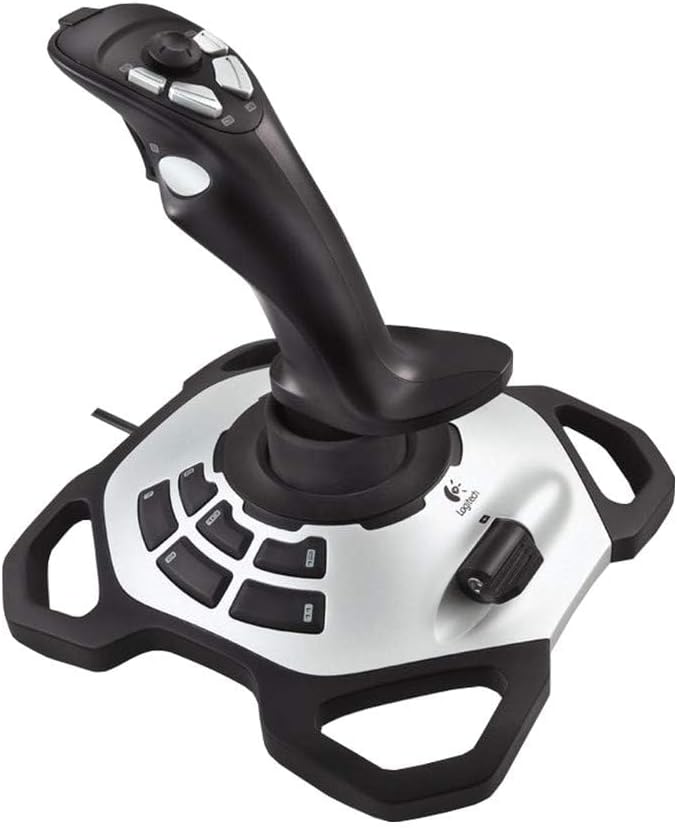
The Logitech Extreme 3D Pro is a widely recognized precision fightstick with a 4.2 rating. Its compact form and familiar grip make it a natural choice for Windows flight games, arcade-style combat titles, and players who prefer a joystick without a large HOTAS console or separate throttle.
We may earn a commission when you buy through this link, at no additional cost to you.
The supplied listing information is intentionally brief, identifying the product as the Extreme 3D Pro Joystick. Its established form factor is the main appeal: the centered stick, pistol-grip shape, and compact base suit players who want physical flight input while keeping their desk relatively uncluttered.
Compared with newer options, it offers less documented flexibility. The provided details do not list the number of axes, programmable buttons, force-feedback behavior, explicit Windows 11 support, or software capabilities. Those details should be checked in the current product listing and game-specific control menus before purchase.
The Extreme 3D Pro suits Windows 11 users who recognize the format, value a simple fightstick, and do not need a detachable throttle or extensive programmable inputs. It is less compelling for advanced flight simulation, where the T.16000M FCS and Logitech G X56 provide clearer feature documentation and more explicit modern platform support.
The fightstick format places the hand naturally around a vertically moving control and occupies less desk space than a full HOTAS unit. This makes it convenient for players who fly on a standard computer desk or share a workspace with other equipment.
Compared with a throttle-equipped setup, the Extreme 3D Pro keeps the control concept straightforward. It is well suited to arcade and combat experiences where quick physical movement matters more than a large set of separate switches and axes.
We may earn a commission when you buy through this link, at no additional cost to you.
The VOYEE PC Controller is a wired, Xbox 360-style gamepad with a 4.3 rating and explicit compatibility with Windows 7, 8, 8.1, 10, and 11. It offers a familiar layout, upgraded trigger buttons, sensitive sticks, and rumble feedback for a straightforward general-purpose Windows controller.
We may earn a commission when you buy through this link, at no additional cost to you.
The seven-point-two-foot cable gives the player more freedom to sit back than a very short fixed lead, while the contoured grips are designed for extended holding. The product's plug-and-play approach is useful for casual gaming, and its compatibility with Slim Xbox 360 hardware broadens its appeal to users with multiple supported systems.
It is not a flight joystick, and the manufacturer specifically advises that it is not for FPS games. Its fixed controls also cannot reproduce the analog axis variety of a dedicated flight stick. Shoppers should therefore view the word controller literally: this is a gamepad rather than a precision flight-control device.
The VOYEE controller is the budget choice for Windows 11 players who want a recognizable console-style layout and rumble feedback. It is especially useful for action, adventure, racing, and other supported games, while aviation and serious combat-sim pilots should select one of the dedicated sticks instead.
The familiar arrangement makes the controller approachable for anyone who has used an Xbox-style gamepad. It can function as a general Windows controller without asking the player to learn the axis and button arrangement of a flight-focused product.
Rumble control provides in-game vibration according to the game, while the 7.2-foot cable allows a more relaxed seating position. A fixed wired connection also avoids the charging and battery-life concerns associated with wireless controllers.
We may earn a commission when you buy through this link, at no additional cost to you.
The Thrustmaster SimTask FarmStick is a specialized joystick designed for Farming Simulator 25, with a 4.3 rating and support for Windows 11 PC as well as Xbox Series X|S. It controls tractors, loaders, construction equipment, and other machinery in a purpose-built configuration rather than a generic flight layout.
We may earn a commission when you buy through this link, at no additional cost to you.
Its most impressive feature is the set of up to 33 programmable inputs, spread across buttons, a thumbwheel, mini-stick, triggers, and rocker switches. Hall effect magnetic sensors support accurate, durable control, while the ambidextrous design allows use with a racing wheel, a dual-joystick arrangement, or another preferred cockpit configuration.
The major requirement is a racing wheel, which must be used alongside the FarmStick and is sold separately. The controller is also tightly focused on Farming Simulator 25, with Xbox compatibility limited to that game. Buyers looking for a general-purpose joystick across aviation, combat, and other genres will find that focus too narrow.
The FarmStick is an excellent choice for Windows 11 players who primarily simulate farming and heavy machinery and want dedicated, assignable controls. It should be purchased as part of a planned cockpit, with the steering hardware and display arrangement considered before committing to this specialized setup.
Rocker switches, a thumbwheel, mini-stick, triggers, and numerous buttons are intended for the distinct functions required by tractors and construction machines. This tailored arrangement can reduce reliance on the keyboard compared with a standard flight-style controller.
Hall effect magnetic sensors are designed to provide accurate control without the drift and wear associated with some older sensing technologies. That precision is particularly valuable when operating machinery that demands smooth, incremental inputs.
We may earn a commission when you buy through this link, at no additional cost to you.
The Logitech G X56 H.O.T.A.S is a feature-heavy flight control system with a 4.0 rating. It combines a full HOTAS layout, twin throttles, a mini analog stick, numerous programmable controls, RGB lighting, and a four-spring stick system. Windows 11 compatibility is explicitly listed, along with a requirement for two USB 2.0 ports.
We may earn a commission when you buy through this link, at no additional cost to you.
The flight controls use 16-bit aileron and elevator axes with hall effect sensors, while the adjustable stick force offers four spring options. Twin throttles include a friction adjuster and throttle lock, giving pilots direct control over power delivery and resistance. The software supports more than 189 programmable controls, allowing highly detailed game-specific setups.
The complexity is the trade-off. A full HOTAS system takes up more desk space than a simple joystick, has a steeper learning curve, and demands careful software configuration. The two USB connections add another setup requirement, while RGB lighting is useful for matching a gaming setup but does not improve control precision.
The X56 is the premium choice for committed Windows 11 flight-sim pilots who want extensive customization and direct access to realistic control functions. It is less suitable for casual play, compact desks, or anyone who wants a simple gamepad. Even experienced users should allocate time for mapping and calibration before diving into a complex simulation.
More than 189 programmable controls create room for complex commands, alternate aircraft functions, and game-specific profiles. Combined with the mini analog stick and separate control surfaces, this level of programmability is aimed at pilots who want their entire command layout under one hand.
The Advanced 4-Spring System lets users choose among four resistance configurations, while the throttle friction adjuster and lock refine power-control movement. These physical adjustments can make axis behavior more consistent with different aircraft and handling styles.
We may earn a commission when you buy through this link, at no additional cost to you.
The Thrustmaster T.16000M FCS is a precision PC joystick with a 4.4 rating, four independent axes, 16 action buttons, and an eight-way point-of-view hat. It is one of the most balanced dedicated flight sticks in this guide, combining a substantial control layout with a modular physical design.
We may earn a commission when you buy through this link, at no additional cost to you.
Three removable components allow the stick, throttle, and grip to be arranged for either left- or right-handed use. The handle includes a twist-rudder axis, while H.E.A.R.T sensor technology is intended to maintain a high precision level over time. Braille-style physical markings make the action buttons easier to identify by touch.
The supplied compatibility statement names Windows 10, 8, and 7 in both 32-bit and 64-bit versions rather than explicitly naming Windows 11. Since the device uses USB and modern systems often provide backward compatibility, it may still work, but a buyer should confirm present-day game recognition and any required software before purchase.
This is the best overall recommendation for a Windows 11 pilot who wants a dedicated joystick with meaningful programmability but does not need the G X56's full HOTAS complexity. It is particularly attractive for its ambidextrous construction, strong rating, tactile button identification, and ability to build game-specific profiles in T.A.R.G.E.T software.
Removable stick, grip, and throttle components let users configure the layout for left- or right-handed operation. That flexibility is unusually valuable in a precision joystick and allows the controller to fit a preferred seating position more closely.
Sixteen action buttons cover a wide range of commands, while braille-style physical identifiers help pilots locate important inputs without looking down. The twist rudder and independent axes add useful handling options for supported flight simulations.
We may earn a commission when you buy through this link, at no additional cost to you.
The most useful Windows 11 joystick depends on whether you want a traditional gamepad, a dedicated flight stick, a combined HOTAS system, or controls designed for heavy machinery. Compatibility, control count, programmability, ergonomics, and the games in your library should guide the decision.
A conventional gamepad uses two thumbsticks, buttons, triggers, and shoulder controls, making it suitable for action, adventure, racing, and other games that expect console-style input. A flight joystick instead centers the hand around a stick that moves in multiple directions, often adding a throttle, hat switch, and more programmable buttons for aircraft, tanks, and machinery.
Choose a gamepad for general Windows gaming and a flight stick for aviation or vehicle simulation. A product marketed simply as a controller should not be expected to provide the analog precision of a dedicated stick.
Compatibility should be checked at two levels: whether Windows 11 recognizes the device and whether the game supports the controller's mode. Some entries explicitly list Windows 11, while others were originally described for Windows 10, 8, and 7. Products using Xinput are often readily recognized by modern PC games, but an older DirectInput device may require additional configuration.
Verify the current listing, manufacturer support page, and game requirements before buying. Do not assume that a USB connection alone guarantees full Windows 11 support.
A three-axis stick generally covers pitch, roll, and yaw, but many flight simulators also benefit from twist-rudder control and a separate throttle. Four-axis models add a rotational control, while full HOTAS products can include miniature sticks, throttles, rocker switches, and a broad selection of buttons. Specialized machinery controllers may organize their inputs around levers, triggers, and thumb-operated controls.
Match the layout to your games. More axes are useful only when the software supports them and when the controls fit the way you intend to play.
Programmable buttons let players place frequently used commands under their fingers, but the practical value depends on the quality and accessibility of the mapping software. The T.16000M FCS supports game-specific profiles in T.A.R.G.E.T, while the X56 provides a very large programmable control set. Other products support custom adjustment or keyboard mapping, and simpler controllers may rely on the game itself.
Look for downloadable profiles, per-game presets, and clear calibration tools. A good mapping interface is especially important for HOTAS systems with many inputs.
A comfortable grip can make a major difference during long flights, vehicle operations, or ordinary gaming sessions. Look for contoured handles, enlarged rests, neutral wrist angles, and a grip shape that suits your hand size. The T.16000M FCS can be configured for either hand, while the VOYEE and V-one controllers use familiar gamepad shapes.
Avoid choosing solely by appearance. If possible, compare grip styles and control spacing, and consider whether your desk can accommodate the full width of a throttle-equipped HOTAS unit.
A stick can control an aircraft's attitude, but realistic flight often also requires a separate throttle and rudder pedals. The T-Flight Hotas One includes a detachable throttle, while the T.16000M FCS offers a removable throttle component but does not include the TFRP pedal system. The G X56 integrates twin throttles into its larger HOTAS frame. Rudder pedals are sold separately in these arrangements.
Decide whether realism is worth the additional equipment and desk space. A complete setup is more engaging for aviation enthusiasts, while simpler games may work adequately with fewer controls.
Feedback can range from basic vibration to adjustable stick spring tension and throttle friction. The PXN 2113PRO includes a vibration switch, the VOYEE and V-one controllers provide rumble, and the Logitech G X56 offers a four-spring resistance system with adjustable throttle friction. The supplied information does not establish force-feedback support for every model, so users should not assume that conventional force feedback is present.
Prioritize resistance controls for flight simulation, where consistent axis movement can matter more than cosmetic vibration. For action games, rumble may be the more relevant feedback feature.
General-purpose products are easier to move between genres, but a specialized controller can be more satisfying when your library centers on one activity. The SimTask FarmStick is designed around Farming Simulator 25 and heavy machinery, with 33 programmable inputs and a requirement for a separate racing wheel. Flight sticks, by contrast, are optimized for aircraft-style movement and command layouts.
Choose a specialized model when you play its target genre consistently. Choose a general-purpose gamepad or adaptable flight stick if you switch frequently among unrelated game types.
Before connecting the controller, read its installation instructions and confirm the operating-system requirements. For models with optional drivers, such as the PXN 2113PRO, follow the manufacturer's download process. Other products are designed for plug-and-play operation, but Windows 11 may still need a moment to recognize the USB device or assign it a generic game controller profile.
Open the game after connecting the controller, enter its options or controller menu, and select the appropriate generic USB joystick, Xinput device, or named hardware profile. Map one control at a time, testing axes and buttons in the game's calibration screen. Axis inversion, dead zones, throttle range, and button assignments should be adjusted before beginning a long session.
For a stable stick, place it on a clean, level surface and use suction cups or a suitable mount when supplied. Keep the grip and throttle free of dust, avoid yanking the cable, and do not force a control past its normal range of motion. Allow ventilation around the base, especially for a large HOTAS unit, and recheck mappings after installing game updates or changing between substantially different simulation genres.
A dedicated flight joystick with at least three axes, a hat switch, programmable buttons, and optionally a separate throttle is usually the most suitable choice. Helicopters, combat jets, and commercial aircraft may also benefit from twist-rudder control or separate rudder pedals. Confirm that the game supports the controller and that the required drivers or mapping software are available for the installed Windows version.
Not all are equally appropriate. The PXN 2113PRO specifically discusses a Microsoft Flight Simulator setup, while the Thrustmaster and Logitech flight products are designed around common flight-control layouts. Conventional gamepads such as the VOYEE and V-one can work for certain functions but do not offer a comparable dedicated flight experience.
A gamepad places controls in a familiar console-style arrangement with two thumbsticks, a D-pad, face buttons, shoulder buttons, and triggers. A joystick centers one hand around a vertical stick that moves along multiple axes and may include a throttle, hat switch, and many additional buttons. Gamepads suit general action and adventure games, while joysticks provide more natural aircraft and vehicle input.
It depends on the genre and desired realism. The T-Flight Hotas One includes a detachable throttle, and the T.16000M FCS includes a separate throttle component, while the Logitech G X56 integrates twin throttles into the HOTAS layout. Rudder pedals can complete a realistic flight setup but are generally a separate purchase, so beginners can begin with a stick and add them later.
It may, but compatibility should be verified before purchase. Products in this roundup explicitly listing Windows 11 include the PXN 2113PRO, V-one controller, VOYEE controller, and Logitech G X56. The Thrustmaster T.16000M FCS is listed for Windows 10, 8, and 7, while the Microsoft Sidewinder Precision 2 has an older product history. Check the current driver and game-support information.
A wired controller removes battery charging and wireless interference, while a wireless model offers a cleaner desk and freedom to move. Every controller in this guide that is described as a gamepad uses a wired connection, which can also simplify installation. The main practical consideration is cable reach and whether it interferes with the player's preferred seating position.
A general flight joystick may work in both if the game accepts its axes and buttons, but dedicated machinery controls often fit farming games better. The Thrustmaster SimTask FarmStick is purpose-designed for Farming Simulator 25, with up to 33 programmable inputs and a detachable throttle. It also requires a separate racing wheel, so a complete setup should be planned before purchase.
The amount depends on the product. Basic gamepads often rely on the game's built-in Xinput mapping, while flight sticks and HOTAS systems benefit from custom profiles, axis calibration, and button assignments. The T.16000M FCS supports game-specific profiles, and the Logitech G X56 supports extensive programmable controls. Start with the most frequently used commands and add advanced functions only as needed.
The best general choice in this roundup is the Thrustmaster T.16000M FCS because it combines a strong 4.4 rating, four independent axes, 16 action buttons, a twist-rudder control, game-specific profiles, and a removable ambidextrous design. The VOYEE PC Controller is the budget pick for conventional games, while the Logitech G X56 H.O.T.A.S is the premium option for pilots who want extensive programmability and adjustable physical resistance.
Players should prioritize the controller that matches their games rather than simply choosing the largest control surface. General gaming calls for a familiar wired gamepad, aviation benefits from a stick with useful axes and a throttle, advanced flight simulation may justify a full HOTAS system, and Farming Simulator 25 is best served by dedicated machinery controls with a compatible racing wheel.
Check the current product listing, software requirements, and game compatibility before making a final decision. Customer ratings, driver support, and prices can change over time, and a controller that is ideal for one genre may be a poor fit for another. Use the comparison to match platform support, controls, ergonomics, and programmable features to your own Windows 11 gaming setup.