
HP DeskJet 2923
3.7Editor score
Compact wireless all-in-one
Color print copy scan
60-sheet input tray
Dual-band Wi-Fi
Smartphone app support
Finding a printer for a small space means balancing output quality, useful features, and a footprint that will not overwhelm a desk, shelf, or compact work area. The ideal model should handle everyday documents without sacrificing wireless convenience, scanning, or color printing when those functions are genuinely useful.
We compared ten printers based on their stated capabilities, physical design, connectivity, media support, ease of use, and suitability for homes, dorms, hybrid offices, and travel. The list covers compact inkjet all-in-ones, portable thermal devices, a wireless portable inkjet, and a cartridge-free EcoTank model for buyers with different space and ink-management priorities.
Each review explains where the printer fits best, highlights practical advantages, and identifies important limitations. The Canon PIXMA TS6520 stands out for its compact feature set, the Canon PIXMA TR160 offers genuine portability, and the Epson EcoTank ET-2803 targets frequent users who want to reduce cartridge handling. Product availability and prices can change, so confirm current details before purchasing.
3.7Editor score

4.2Editor score

4.2Editor score
As an Amazon Associate we earn from qualifying purchases.
This side-by-side overview compares the ten shortlisted printers by printer type, core functions, connectivity, media support, and space-saving features. It also highlights whether each model is designed primarily for a fixed compact workspace, mobile printing, or high-volume cartridge-free operation.






The HP DeskJet 2923 is a compact wireless inkjet all-in-one with a 3.7 rating and a clear focus on essential home printing. It combines printing, copying, scanning, and mobile support in a design described as suitable for fitting into a home, making it a practical option for desks, dorm rooms, and modest offices.
We may earn a commission when you buy through this link, at no additional cost to you.
Its strongest qualities are practical rather than specialized. A 60-sheet input tray is adequate for routine documents, while the stated speed of up to 7.5 pages per minute in black and 5.5 pages per minute in color suits occasional work. Dual-band Wi-Fi helps reduce connection problems, and the HP App can be used to print, scan, copy, or fax from a smartphone. HP AI is also included to help prepare web pages and emails for cleaner output.
The main trade-off is the absence of automatic duplex printing, so double-sided documents require manual paper handling. The 60-sheet tray also means more frequent refills than larger-capacity models. These limitations make the printer less compelling for office-heavy workloads, but they are easier to accept in a compact setup where low-cost essentials matter more than maximum productivity.
This is a strong recommendation for buyers who want four basic functions, wireless printing, and a small footprint without paying for premium paper handling. It is especially useful for students, apartment residents, and light home users. Buyers who regularly produce double-sided documents should favor a model with automatic duplex printing instead.
The DeskJet 2923 brings printing, copying, scanning, and wireless support together without requiring a separate scanner or a large office-style chassis. Its icon LCD provides basic status control while keeping the front panel uncomplicated.
Dual-band Wi-Fi and smartphone app support make it convenient to place the printer on a small shelf and send jobs from a laptop, tablet, or phone. Automatic network issue detection is designed to keep everyday wireless use more consistent.
We may earn a commission when you buy through this link, at no additional cost to you.
The Canon PIXMA TS6520 is the strongest all-around option in this guide, earning a 4.2 rating while keeping its design explicitly compact. It offers wireless color printing, copying, scanning, automatic duplex printing, and a 1.42-inch monochrome OLED display in a home-office-oriented format.
We may earn a commission when you buy through this link, at no additional cost to you.
Automatic duplex printing is the feature that most directly improves daily productivity. Rather than flipping every multipage document, users can produce double-sided output automatically, reducing paper consumption and interruptions. The hybrid two-cartridge ink system is described as producing sharp text and vivid color for both documents and photos, while media support extends to bordered and borderless letter-size output.
Its compact footprint is balanced by thoughtful controls. The OLED display shows ink levels, printer status, and settings at a glance, which is useful in a shared or confined workspace. Dual-band Wi-Fi supports both 2.4GHz and 5GHz networks, while Canon PRINT, Apple AirPrint, and Mopria broaden the available mobile-printing options. The trade-off is reliance on a conventional cartridge-based ink system rather than refillable tanks.
Overall, the TS6520 is ideal for hybrid workers, students, and households that need scanning and copying but also want automatic duplex printing. It occupies less space than a conventional office printer while avoiding the most basic feature set. For most compact workspaces, it offers the most balanced combination of capability, convenience, and physical economy.
Automatic two-sided output saves time and paper without requiring a large desktop footprint. This makes the TS6520 particularly useful for reports, notes, worksheets, and other routinely multipage documents.
The 1.42-inch monochrome OLED lets users monitor ink and printer status without navigating a larger display. That contributes to the clean, uncluttered feel of a compact workstation.
We may earn a commission when you buy through this link, at no additional cost to you.
The HP DeskJet 2955 has a 3.7 rating and is positioned as a wireless color inkjet all-in-one for home use. Its basic proposition is uncomplicated: provide a familiar printing solution in a home setting where a larger office machine would be unnecessary.
We may earn a commission when you buy through this link, at no additional cost to you.
The supplied product information identifies it as a wireless color inkjet with all-in-one functionality. Its listed weight of 10.45 pounds provides a useful indication that it is not designed as a large-format or commercial machine. That makes it a reasonable candidate for a home office, dorm, apartment, or secondary workspace where moderate capacity is sufficient.
One limitation of this recommendation is the limited technical detail supplied for the model. The listing does not provide a detailed tray capacity, speed specification, duplex capability, display type, or supported mobile platforms. Those omissions do not make the printer unusable, but they make it harder to compare it confidently with the more thoroughly documented models in the list.
For shoppers who prioritize the familiar HP DeskJet format, straightforward wireless color printing, and an all-in-one design, the 2955 remains worth considering. It is best suited to routine home documents rather than intensive office workflows. A buyer needing duplex printing, detailed media handling, or advanced mobile features should examine one of the more fully specified alternatives.
The wireless all-in-one format suits users who want documents and color output without a large office device. Its listed weight is consistent with a home desktop printer intended for occasional use.
The model belongs to HP's widely recognized DeskJet family, which can appeal to buyers who already understand the brand's basic inkjet ecosystem. Check the final package details for included ink, connectivity, and scanning functionality.
We may earn a commission when you buy through this link, at no additional cost to you.
The Canon PIXMA TS4320 carries a 3.9 rating and combines printing, copying, and scanning in a compact wireless package. It is particularly interesting for space-conscious buyers who also want automatic duplex printing and recognized environmental certifications.
We may earn a commission when you buy through this link, at no additional cost to you.
Its two-cartridge hybrid ink system is designed to provide sharp text and vivid colors for documents and photos. Automatic two-sided printing improves efficiency, while the printer supports media up to 8.5 by 11 inches, with or without borders. Setup can be completed from a smartphone or computer, and dual-band Wi-Fi supports both 2.4GHz and 5GHz networks.
The TS4320 also emphasizes environmental considerations. It is EPEAT Silver and ENERGY STAR certified, which may be especially relevant to buyers seeking a compact home device with lower-impact credentials. The trade-off is the absence of a specified control display, so status and settings may be less visible than on the TS6520, and the cartridge-based system still requires routine ink management.
This model is a good fit for environmentally conscious students, home offices, and hybrid workers who want duplex output and broad media support in a small package. It may appeal to anyone comparing Canon PIXMA models and prioritizing certifications over display sophistication. Those who frequently need a clear screen should consider the nearby TS6520 instead.
EPEAT Silver and ENERGY STAR certification make the TS4320 easier to recommend to buyers who consider energy use and environmental standards alongside size. Its compact styling also suits modern home workspaces.
Automatic duplex printing reduces paper use and makes the model more efficient for multi-page assignments, bills, reports, and office notes than printers limited to single-sided output.
We may earn a commission when you buy through this link, at no additional cost to you.
The Canon PIXMA TR160 earns a 4.2 rating and stands apart from desk-bound models because it is explicitly designed for portability. Its lightweight chassis can fit into a bag or backpack with room to spare, making it a compelling choice for users who need color output away from a permanent desk.
We may earn a commission when you buy through this link, at no additional cost to you.
Despite its portable form, the printer supports documents and photos up to 8.5 by 11 inches with sharp black text and rich color. A five-color hybrid ink system, including square and borderless printing, offers more flexibility than a basic two-color thermal device. The 1.44-inch monochrome OLED provides access to ink levels, status, and settings without requiring a computer.
Connectivity is designed for flexible environments. The Canon PRINT app, Apple AirPrint, and Mopria cover common mobile workflows, while Wireless Direct Mode can connect a compatible device without relying on a wireless router. The main trade-off is that this is a printer rather than a full scanner and copier, and its portable inkjet format still depends on conventional cartridges.
The TR160 is ideal for travelers, students working across different locations, and users who need occasional full-size color prints without carrying a full-size office printer. It is also a strong choice for anyone who prioritizes portability over scanning. For a fixed, ultra-compact all-in-one, the TS6520 or TS4320 may be more practical.
Unlike a thermal receipt printer, the TR160 uses a five-color hybrid ink system and can produce letter-size documents and bordered or borderless photos. It therefore serves a broader range of mobile printing needs.
Wireless Direct Mode gives compatible devices a path to the printer without a conventional wireless network. This is helpful in hotel rooms, shared spaces, and other locations where relying on one fixed router is inconvenient.
We may earn a commission when you buy through this link, at no additional cost to you.
The N80 Bluetooth Thermal Printer has a 4.1 rating and offers a very different approach to small-space printing. It uses direct thermal technology, so it requires no ink, toner, or ribbon, and its compact 1.5-pound body includes a rechargeable 1500mAh battery for mobile use.
We may earn a commission when you buy through this link, at no additional cost to you.
Print resolution is listed at 203 DPI, which supports clear text and basic graphics. The printer can handle PDFs, Word documents, pictures, and web pages from a compatible phone through the Nada Print app. It is also compatible with iPhone, Android, iPad, and tablet computers over Bluetooth. A roll of US Letter thermal paper is included in the package.
The important limitation is that this is not a conventional printer for ordinary paper. It supports only US Letter and A4 thermal paper, and ordinary paper cannot be substituted. Laptops and computers connect through USB-C and require a driver; Bluetooth is not supported for those devices. The charging adapter is also not included, although a Type-C cable and adapter are listed.
The N80 is best suited to travelers, field workers, teachers, students, and home users who need compact ink-free documents, contracts, invoices, boarding passes, or tattoo-transfer designs. It is less appropriate for conventional color documents and photos. Buyers who need full-size color output should instead consider the Canon PIXMA TR160.
Direct thermal printing eliminates ink, toner, and ribbon handling. For occasional mobile documents, this can make the N80 simpler to carry and use than a conventional portable inkjet.
The rechargeable battery, compact weight, and included thermal-paper roll make the printer suitable for cars, hotel rooms, construction sites, classrooms, and small offices. Its output depends on having compatible thermal media available.
We may earn a commission when you buy through this link, at no additional cost to you.
The Canon PIXMA TS3720 has a 4.0 rating and is a straightforward wireless all-in-one for basic home printing. It provides print, copy, and scan functions, a 1.5-inch segment LCD, and setup designed to be completed in a few minutes without a computer.
We may earn a commission when you buy through this link, at no additional cost to you.
Its most useful feature set is centered on accessibility. Canon PRINT, Apple AirPrint, and Mopria support mobile printing, while Chromebook compatibility supports students printing schoolwork. The printer can handle envelopes, photos, high-resolution paper, banners, 5-by-5-inch square photos, and borderless photos up to 5 by 7 inches, broadening its use beyond plain documents.
The decisive limitation is single-sided printing only. There is no automatic duplex feature, so users must manually reverse pages for two-sided documents. The printer uses two easy-to-replace ink cartridges, and its stated speed is approximately 7.7 black images per minute and 4 color images per minute. These specifications position it as a home-focused model rather than a high-volume office solution.
The TS3720 is a good recommendation for students, first-time printer buyers, and households wanting an uncomplicated scanner and copier with broad creative media support. Its easy setup, mobile connectivity, display, and one-year warranty make it approachable. If you frequently print multipage documents on both sides, choose a model with automatic duplex printing.
The streamlined installation process and ability to connect to Wi-Fi without a computer lower the barrier for first-time owners. Its segment LCD provides a simple way to check settings and status.
Support for envelopes, banners, square photos, borderless photos, and high-resolution paper gives the model creative flexibility. POSTERARTIST Online is included for designing banners and signage.
We may earn a commission when you buy through this link, at no additional cost to you.
The Canon PIXMA TS6420a is a wireless inkjet all-in-one with printing, copying, scanning, and Alexa compatibility. It has a 3.8 rating and is described as suitable for home or work, making it a potential fit for compact offices that want voice-activated printing alongside conventional output.
We may earn a commission when you buy through this link, at no additional cost to you.
Its distinguishing practical details include both front and rear paper feeding, allowing paper to be loaded from two positions. That flexibility can be useful in an awkward shelf arrangement or on a crowded desk where one loading direction is easier to access. A 1.44-inch OLED window provides compact access to printer information and settings.
The main uncertainty is the limited supplied specification list. The product information does not state paper capacity, print speed, duplex support, supported media sizes, or exact wireless standards. Alexa compatibility adds hands-free convenience, but buyers should confirm the required setup and account details. It is also important not to assume that an OLED window provides the same level of control as a full touchscreen.
The TS6420a is most compelling for users who want flexible paper loading and voice printing in a compact area. Its front and rear feeding options distinguish it from more basic compact models. For buyers who require documented automatic duplexing or high media versatility, the Canon PIXMA TS6520 offers a more clearly specified feature set.
Front and rear paper feeding lets users choose the more accessible direction for a particular shelf or desk arrangement. This is a practical space-saving feature when the printer cannot be positioned with all sides freely accessible.
Alexa support lets compatible users send print jobs by voice, which is useful when hands are occupied or the printer is out of reach. It adds a convenient option without replacing the need for standard setup.
We may earn a commission when you buy through this link, at no additional cost to you.
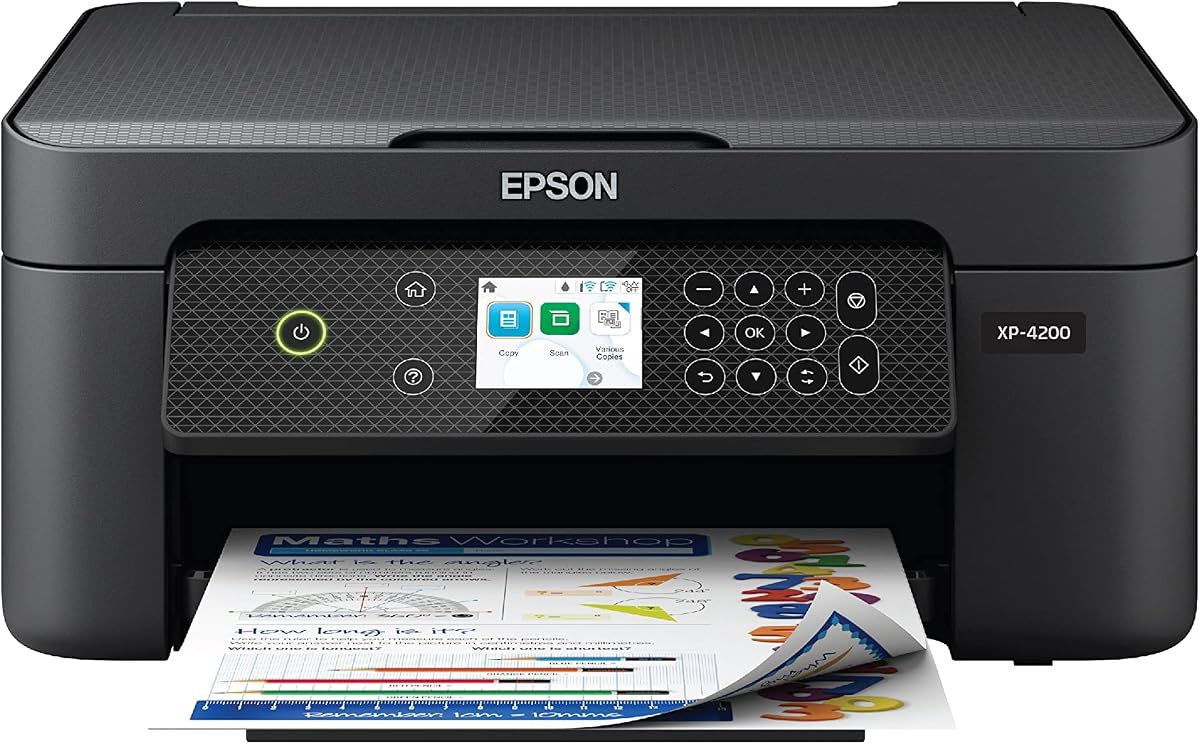
The Epson Expression Home XP-4200 is a wireless color all-in-one with a 3.8 rating and a strong emphasis on image quality, navigation, and home convenience. It can print, copy, and scan, with automatic duplex printing and a comparatively large 2.4-inch color display for its class.
We may earn a commission when you buy through this link, at no additional cost to you.
Epson's imaging technology is designed to produce crisp documents, vibrant borderless photos, and rich color. The Micro Piezo Heat Free system and permanent printhead are intended to support consistent output. Setup and operation can be managed through the Epson Smart Panel app, while Mopria Print Service, Mopria Scan, Android, and iOS support cover common mobile workflows.
Automatic two-sided printing helps control paper waste, and separate ink cartridges let users replace only the color they need. The trade-offs are the continued use of conventional cartridges and the stated limitation that the Epson printing system is designed for Epson Genuine cartridges. Non-genuine ink could cause damage not covered by the printer's limited warranty. The 2.4-inch display also requires more front-panel space than a minimal display.
The XP-4200 suits students, photo-oriented home users, and hybrid workers who want automatic duplexing, mobile tools, and a more informative display. It is a particularly good fit for a compact home office where document quality and borderless photos both matter. Shoppers who print frequently and want fewer cartridge interruptions should compare it with the EcoTank ET-2803.
The 2.4-inch color display makes menus, status information, and navigation easier to understand than on minimal-panel models. It adds a small amount of visual complexity but improves everyday usability.
Borderless photo support, rich color, crisp text, and automatic duplexing cover both creative and practical needs. Scanning and searchable-PDF software further extend the all-in-one format.
We may earn a commission when you buy through this link, at no additional cost to you.
The Epson EcoTank ET-2803 earns a 4.2 rating and is the choice for compact-space users who print frequently enough to prefer refillable ink tanks over small cartridges. It combines wireless color printing, copying, scanning, a color display, and high-capacity EcoFit ink bottles.
We may earn a commission when you buy through this link, at no additional cost to you.
The central advantage is ink capacity and reduced replacement frequency. Epson states that each ink-bottle set is equivalent to about 80 individual cartridges, with a stated yield of up to 4,500 black pages or 7,500 color pages. Its refillable tanks are intended to reduce cartridge waste and make routine ink management less frequent than on cartridge-based printers.
Print quality is supported by Micro Piezo Heat Free technology, which produces sharp text and color photos and graphics on various paper types. A high-resolution flatbed scanner handles copying and document workflows, while AirPrint, the Epson Smart Panel app, and voice-activated printing provide flexible connectivity. The trade-off is that the EcoTank format may require more physical room than a minimal compact printer, and Epson recommends Genuine ink because non-genuine ink may cause damage outside warranty coverage.
The ET-2803 is ideal for students, remote workers, families, and home businesses producing a steady stream of documents who want a small office footprint without cartridge interruptions. It is less compelling for occasional printing, where a basic inkjet may be simpler. For those who print often and can accommodate the refillable-tank body, its capacity makes it a standout long-term option.
EcoFit bottles feed high-capacity internal tanks, so users do not need to replace tiny cartridges after ordinary jobs. That makes the printer well suited to regular document and photo output in a compact home office.
The built-in high-resolution flatbed scanner and color display turn the model into a practical all-in-one. Wireless and smart-device printing keep routine output convenient while the tank system handles volume.
We may earn a commission when you buy through this link, at no additional cost to you.
The best compact printer is not simply the smallest model on the market. Consider your print volume, paper types, need for scanning, available surfaces, connectivity, and willingness to manage different ink systems before choosing a device.
Begin by measuring the intended shelf, desk, cabinet, or counter rather than focusing only on the printer's advertised compactness. Allow room for the paper input, output area, cables, ink tank access, and the movement needed to remove pages and scan documents. A portable inkjet may occupy less permanent room, while a refillable EcoTank model can provide useful capacity while still requiring a stable base.
Choose a model that fits without forcing awkward angles or blocking ventilation. In a cramped room, a printer with flexible paper loading, such as the Canon PIXMA TS6420a, may be easier to use than a smaller unit that can only be loaded from one side.
Portable printers are for people who need to print in more than one location. The Canon PIXMA TR160 supports letter-size color documents and photos through mobile services and Wireless Direct Mode, while the N80 uses compact thermal paper and a rechargeable battery for ink-free mobile documents. These devices suit travel, classrooms, vehicles, and temporary workspaces.
A fixed desktop all-in-one generally makes more sense if the printer will stay in one location. It may offer scanning, copying, larger media support, and automatic duplexing, but it requires a permanent home on a shelf or desk.
Printing, copying, and scanning are useful if you manage physical paperwork, receipts, forms, or school materials. Automatic duplex printing is especially valuable for multipage reports because it reduces manual paper flipping and paper consumption. Displays also matter: the TS6520 and TR160 use compact OLED panels, the TS3720 uses a segment LCD, and the Epson XP-4200 offers a larger color screen.
If your needs are almost entirely plain text and occasional web pages, a simpler all-in-one may be enough. If you regularly produce borderless photos, look for a model that explicitly supports them and offers richer color ink configurations.
Cartridge-based models are familiar and straightforward, but small cartridges may need frequent replacement. The Epson ET-2803 uses refillable tanks and high-capacity bottles, reducing replacement frequency and cartridge waste while requiring care when filling the tanks. The N80 takes a different approach by using direct thermal printing, which needs no ink or toner but only accepts special thermal paper.
Consider both output volume and maintenance tolerance. Occasional users may prefer the simplicity of cartridges, regular users may benefit from EcoTank capacity, and mobile users may value an ink-free thermal design.
Dual-band Wi-Fi is valuable in apartment buildings and modern homes because the printer can operate on either a 2.4GHz or 5GHz network. Canon PRINT, HP App, Epson Smart Panel, Apple AirPrint, and Mopria provide common mobile routes for sending jobs. Some models also support direct connections or voice-assisted printing.
Confirm that the printer and your preferred devices use compatible services. A wireless printer is not automatically convenient if its app, account requirements, or network setup do not fit your devices and technical comfort level.
Input capacity determines how often you will need to refill paper. The HP DeskJet 2923 includes a 60-sheet input tray, which is modest but adequate for a home office with intermittent jobs. A printer with automatic duplex printing can also reduce refill frequency by completing more content with fewer sheets. Front and rear feeding improves access in awkward positions.
Paper support matters if you print envelopes, banners, square photos, high-resolution stock, or borderless images. Check maximum sheet dimensions and supported media before buying for a specific creative project.
A display makes status checks and configuration more convenient, but it is not automatically better in every space. A compact OLED can provide essential information without a large panel, while a color display may help users navigate photos and settings more easily. Minimal controls reduce visual and physical bulk.
Choose based on your comfort with technology and how often you will change paper or ink. For advanced users, a larger screen can be helpful; for a simple printer in a shared room, a minimal interface may feel less intrusive.
The Canon PIXMA TS4320 is EPEAT Silver and ENERGY STAR certified, while the HP DeskJet 2923 includes ENERGY STAR and EPEAT certification and is described as using at least 70% recycled plastics. The EcoTank ET-2803 is designed to reduce cartridge waste through refillable bottles. These distinctions can matter to environmentally conscious buyers.
Certification is only one part of the sustainability picture. Actual impact also depends on how often you print, which cartridges or ink bottles you use, paper consumption, and whether duplex printing reduces the number of sheets required.
Begin by choosing a stable, level surface with enough clearance for the input and output areas. Connect the printer to the appropriate Wi-Fi network, install the manufacturer's app, and confirm that ink or toner levels are adequate before beginning a large job. For portable models, charge the battery fully and keep compatible paper or thermal media nearby.
Select the correct paper type and size in the print settings rather than relying on automatic detection for every job. Use automatic duplex printing when available for multipage documents, and check pages for alignment after the first print. For photo output, confirm the borderless setting and let ink dry before handling or storing finished images.
Keep the printer and paper away from direct heat, moisture, and dust. Clean the exterior with a soft, dry cloth, follow the manual for scan glass and feed-roller cleaning, and avoid pushing ink or thermal residue into openings. For EcoTank models, store bottles properly and clean any tank spill promptly. Periodically run the manufacturer's cleaning or alignment cycle when print quality declines.
The Canon PIXMA TR160 is designed specifically for portability and can fit inside a bag or backpack. The Canon PIXMA TS6520 and TS4320 are also described as compact, but they are intended for a fixed workspace. Your definition of compact should determine whether portability or a small desktop footprint matters more.
Most models in this guide support mobile printing through a manufacturer app, Apple AirPrint, or Mopria. The HP DeskJet 2923 supports the HP App, while Canon models use Canon PRINT and the TR160 also supports wireless direct connections. The Epson models provide AirPrint and their respective smart-device apps.
The Canon PIXMA TS6520, TS4320, and Epson Expression Home XP-4200 offer automatic duplex printing. The Canon PIXMA TS3720 is single-sided only, and the supplied information does not confirm duplex capability for every other model. Automatic duplexing saves paper and reduces the need to manually reverse sheets.
You need those functions if you routinely digitize documents, make copies, or sign and send paper records. A portable color model such as the Canon PIXMA TR160 focuses on printing, while most desktop inkjet picks include a scanner and copier. Choosing only what you use can keep the printer simpler and the footprint smaller.
A thermal printer can be simpler for mobile text documents because it requires no ink, toner, or ribbon. The N80 is compact and rechargeable, but it only accepts US Letter or A4 thermal paper and cannot print on ordinary paper. The Canon PIXMA TR160 is more flexible for conventional full-size color documents and photos.
The Epson EcoTank ET-2803 uses refillable high-capacity ink tanks rather than small replacement cartridges. Epson states that each bottle set is equivalent to about 80 individual cartridges. This can reduce interruptions for high-volume users, although it requires more space and care than a basic cartridge model.
The Canon PIXMA TS6520, TS4320, and TR160 support borderless printing according to their supplied feature information. The TS6520 and TS4320 support letter-size output, while the TR160 includes square and borderless options. The Epson XP-4200 also supports vibrant borderless photos.
Choose a portable printer if you regularly work in different locations or need color documents on the go. Choose a compact all-in-one for a fixed desk or shelf where scanning, copying, duplex printing, and larger media support are important. Neither type automatically provides every feature available in larger office printers.
The Canon PIXMA TS6520 is the most balanced overall choice because it combines a compact footprint with automatic duplex printing, wireless connectivity, scanning, copying, and a useful OLED display. The HP DeskJet 2923 offers an approachable budget option for essential wireless printing, while the Canon PIXMA TR160 is the standout for users who need portable letter-size color output.
For fixed workspaces, prioritize automatic duplexing, paper capacity, and the functions you will genuinely use. For frequent printing, the Epson EcoTank ET-2803 reduces cartridge interruptions. For true mobility, the TR160 handles full-size color output, whereas the N80 is more specialized for ink-free thermal documents and requires compatible paper.
Before ordering, verify the printer's current specifications, included accessories, ink arrangement, warranty, and compatibility with your devices and operating habits. Product offerings, features, availability, and prices can change over time, so check the current listing before making a final purchase decision.