
UGREEN SD Card Reader USB C
4.6Editor score
USB 3.0 up to 5Gbps
USB-C and USB-A
Dual card reading
Discover the best SD Card Reader for Travel, with ten options compared for speed, portability, card support, device compatibility, and organization needs.
An SD card reader for travel should be small, dependable, and ready to connect to the devices you carry. The best models quickly move photos and videos from cameras, drones, or action cameras while supporting the card formats and connection standards your equipment requires.
We compared ten readers by examining their stated transfer speeds, supported memory cards, interface options, portability, organization features, operating-system compatibility, and travel-oriented protection. The list includes basic dual-interface readers as well as combined readers and card-storage cases for more demanding trips.
Each review explains the product's strongest use case, notable limitations, and ideal traveler. Ratings and specifications reflect the supplied product information, while prices and availability can change, so check the current listing before deciding which option fits your equipment and itinerary.
4.6Editor score
4.6Editor score

4.6Editor score
The comparison below highlights the most important differences among all ten options, including connector style, supported cards, transfer claims, and the extent to which each reader also organizes or protects memory cards.


The UGREEN SD Card Reader USB C, USB 3.0 Micro SD Card Reader earns a 4.6 rating and stands out as a practical all-purpose travel reader. It combines USB-C and USB-A connections in one compact body, allowing travelers to use newer laptops and phones alongside older USB-A equipment without carrying a separate adapter. Its stated USB 3.0 speed of up to 5Gbps is useful for moving batches of travel photos and video.
We may earn a commission when you buy through this link, at no additional cost to you.
The strongest feature is flexibility. UGREEN says the reader supports SD and microSD cards simultaneously, reducing the need to remove and reinstall one card while the other is still being transferred. It handles SDXC, SDHC, SD, MMC, RS-MMC, Micro SDXC, Micro SD, and Micro SDHC formats, covering the common card types used by cameras, GoPro devices, dash cams, and surveillance cameras.
Operation is straightforward because the reader is driver-free and does not require external power. Its compatibility with Windows, macOS, and most Android devices broadens the situations in which it can be used, while the low-profile design is easy to place in a camera bag or laptop sleeve. The main limitation is that it organizes no cards and does not provide the stated physical protection offered by readers built into cases.
This is a strong recommendation for most travelers who want a simple reader without spending attention on specialized storage features. Choose it when one compact device must work with both USB-C and USB-A hosts, especially if you regularly switch between a camera, phone, tablet, and laptop. It is less suitable for someone who wants one object to both transfer and securely store several full-size cards.
The built-in USB-C and USB-A interfaces are particularly useful on trips because hotel rooms, rental cars, airports, and personal devices rarely expose the same port combination. You can move files without searching for a dedicated cable or adapter.
Reading SD and microSD media at the same time helps when a camera uses one format and a phone or action camera uses another. It also makes card rotation less disruptive when both types contain files that need to be transferred.
We may earn a commission when you buy through this link, at no additional cost to you.
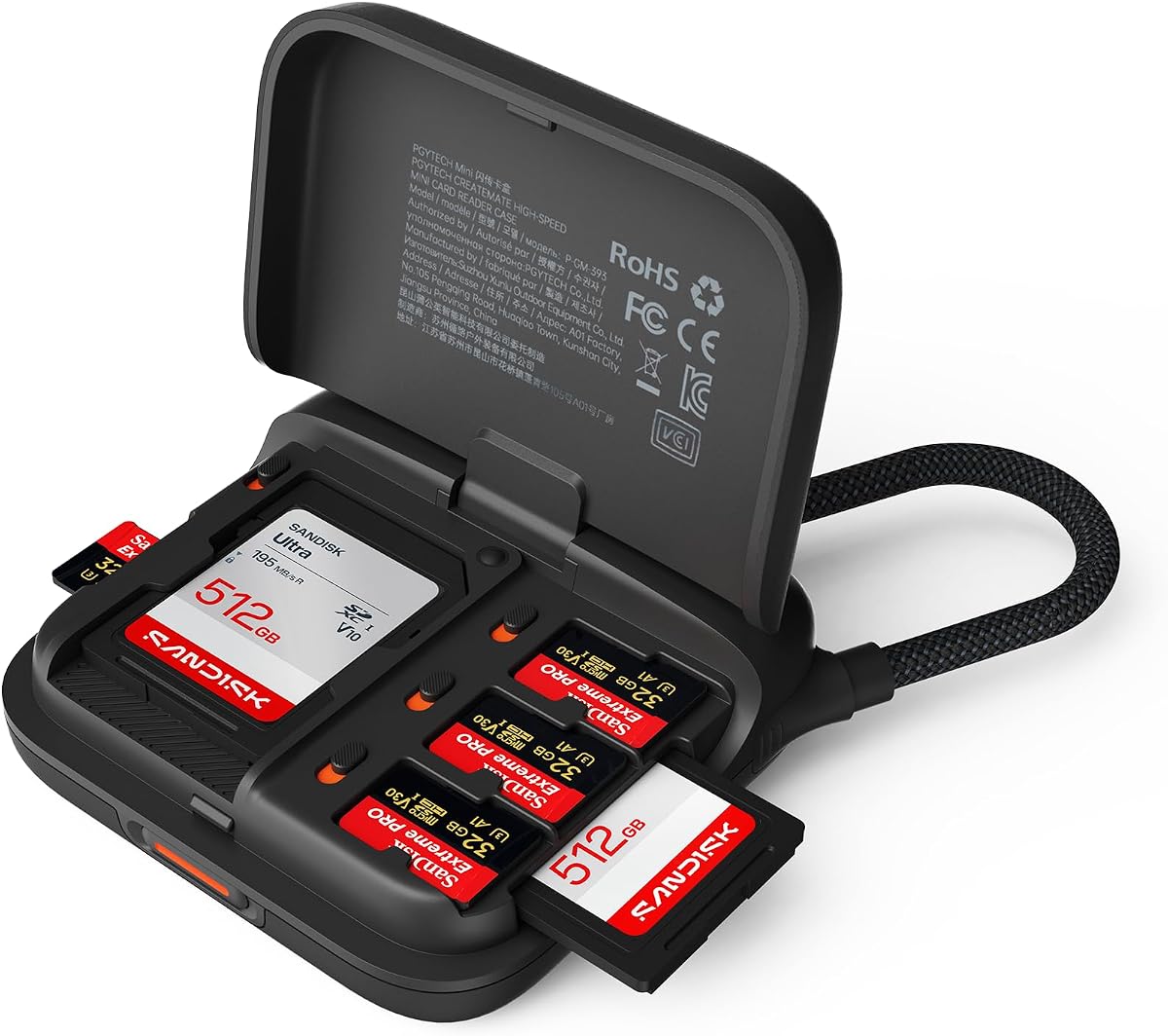
The PGYTECH Mini SD Card Reader Case, 2-in-1 UHS-II SD 4.0/Micro SD Card Reader has a 4.6 rating and offers one of the most travel-focused combinations in this guide. It functions as both a card reader and a compact holder for two SD cards and four microSD cards, reducing the number of loose memory cards travelers need to track.
We may earn a commission when you buy through this link, at no additional cost to you.
Its listed maximum transfer speed is 312MB/s, and it supports UHS-I and UHS-II cards. The SD and microSD slots can be used simultaneously, while the broad compatibility list includes cameras, drones, action cams, Windows, macOS, Linux, Android, and iPadOS. A standard Type-C interface and OTG readiness allow direct connection to compatible phones and tablets for immediate file sharing.
Portability is handled particularly well. The device weighs 50 grams, fits in a pocket or bag, and uses a braided cable that doubles as a carry strap. The push-to-unlock mechanism detaches the cable, and the snap-lock design is intended to prevent accidental loss. Card status markers help travelers see which cards are in use and which remain available.
The trade-off is that its connection is centered on Type-C rather than offering both USB-C and USB-A interfaces. Travelers who rely on a USB-A-only computer may need to carry an adapter. Even so, the combination of storage, high-speed reading, and compactness makes this a particularly persuasive choice for photographers, drone operators, and anyone carrying several cards.
Keeping cards in a dedicated case makes them easier to inventory and reduces the likelihood of leaving one behind. The storage and reading functions share a compact body rather than requiring a separate container and reader.
Plug-and-play operation, hot-swap support, and direct OTG use suit fast-moving travel workflows. The device can be connected to compatible mobile equipment without relying on a separate storage adapter.
We may earn a commission when you buy through this link, at no additional cost to you.
The SmartQ C368 USB 3.0 Card Reader is a 4.6-rated choice for travelers who may encounter older or less common memory cards. Its four-in-one design supports SD, microSD, MS, and CF cards and can read data independently, making it more versatile for a mixed collection of camera equipment than readers limited to two formats.
We may earn a commission when you buy through this link, at no additional cost to you.
The reader uses USB 3.0 and is listed as supporting transfer speeds up to 5Gbps. It is also compatible with USB 2.0, while its stated operating-system support includes Windows, macOS, and Linux. A blue LED makes its powered status visible, which is useful when connecting in a dim hotel room, tent, or other travel environment where a small status light can otherwise be overlooked.
The product is designed around uncomplicated plug-and-play use. No drivers are required, and the box includes the reader, a cable organizer, and a user manual. Memory cards are not included. It does not double as a card case, and its mobile-oriented four-format design may feel less aligned with a modern kit made primarily around USB-C phones and tablets.
Travelers carrying a CF card, an older MS card, or a mixed bag of media will find this reader especially useful. If your equipment uses only SD and microSD, a more modern dual-interface USB-C reader may be easier to carry. Even then, the C368 remains a sensible backup for a trip involving borrowed or legacy cameras.
CF and MS support broadens the reader's usefulness when a trip includes older cameras, borrowed equipment, or a memory card that would otherwise be unreadable through a modern phone or laptop.
The blue power light provides immediate feedback that a connection is active, while broad desktop compatibility and no required drivers minimize setup delays.
We may earn a commission when you buy through this link, at no additional cost to you.
The PGYTECH UHS-II SD4.0/Micro SD Card Reader Holder TF Memory Card Reader Case earns a 4.6 rating and combines high-speed reading with a substantial travel organization system. Its built-in USB 3.1 chip is listed as supporting transfer speeds up to 312MB/s, positioning it for photographers using UHS-II, SD 4.0, and high-capacity cards.
We may earn a commission when you buy through this link, at no additional cost to you.
As a holder, it accommodates four SD cards, four TF cards, and two Nano SIM cards, along with an eject pin. As a reader, its SD and TF slots support simultaneous transfers. The aluminum-alloy shell, rubber case, and IP54 waterproof level are designed to protect cards from dust and water splashes, making the package more suitable for outdoor and variable-weather itineraries.
The product supports UHS-II and UHS-I SDXC, SDHC, SD, and microSD variants. It works with Windows 7 and later, Mac OS 10 and later, Linux, Android, and iPadOS. Mobile transfers require an OTG-capable Type-C device, and a desktop Type-C-to-USB-A adapter is included according to the supplied information.
This is the most complete premium travel option in the list for users who need both transfer speed and physical organization. The additional protection, card capacity, SIM storage, carabiner, and adapter create a more travel-ready kit than a bare reader. It is best for camera-focused trips, variable weather, and travelers who appreciate carrying one organized object rather than a reader plus separate card case.
The metal shell, removable rubber protection, and IP54 rating add useful safeguards against dust and splashes. They are relevant for hiking, beach travel, and itineraries where memory cards may be carried in a less controlled environment.
Slots for eight cards, two Nano SIM cards, and an eject pin turn the device into a compact field organizer. That makes it easier to manage the small, easily misplaced items that accumulate during a photography-focused trip.
We may earn a commission when you buy through this link, at no additional cost to you.
The SmartQ Micro SD Card Reader USB C, USB 3.0 Memory Card Adapter for iPhone has a 4.5 rating and focuses on direct transfers to modern mobile devices. USB-A and USB-C connectors are built into the design, and the product description identifies compatibility with Windows PCs, Macs, Android devices, iPads, and USB-C hardware.
We may earn a commission when you buy through this link, at no additional cost to you.
Its stated USB 3.0 interface can transfer at up to 5Gbps, making it suitable for moving photos, videos, and other larger files from high-capacity memory cards. The reader supports SD and microSD formats and requires no additional drivers, allowing a phone or tablet to recognize it through a direct connection.
Its lightweight form is easy to carry, and the description emphasizes durable materials and interference resistance for frequent use. The reader is particularly relevant for travelers who want to review images on a tablet immediately after a shoot, move video to a phone, or use mobile devices as a temporary editing and sharing hub.
Unlike several alternatives in this guide, it does not provide slots for storing loose cards, and it does not claim water or dust protection. Those omissions matter if you expect to carry it in wet or dusty conditions. It remains a clean, straightforward choice for a traveler whose priority is connection versatility and direct mobile access.
The combination of card support and modern connectors allows compatible phones and tablets to act as immediate viewing and sharing devices. That can reduce dependence on a laptop while on the move.
Because the reader includes both major connector styles in one compact device, it reduces the number of small adapters you need to keep in a carry-on or day bag.
We may earn a commission when you buy through this link, at no additional cost to you.
The Dockteck USB A/C to Micro SD Memory Card Adapter USB 3.0 has a 4.6 rating and combines broad connectivity with a three-slot design. The reader supports SD, TF, and microSD cards, with the description indicating that the SD and TF slots can operate at the same time. It also supports OTG, allowing direct use with compatible external devices.
We may earn a commission when you buy through this link, at no additional cost to you.
USB 3.0 is listed at up to 5Gbps, and the adapter remains backwards compatible with USB 2.0 and USB 1.1. This makes it useful across a broad range of computers, tablets, and phones. The stated compatibility list includes numerous USB-C and USB-A laptops and mobile devices, giving travelers confidence that an unfamiliar host may still work.
Travel protection comes through covers at both ends, which help keep out liquid and dust. The slim body is designed to fit in a camera bag or backpack. Its three slots provide convenient access to both full-size and microSD media, and the claimed slot speed of up to 104MB/s can be helpful for routine photo transfers.
The reader does not include a place to store loose cards, so it must be paired with a separate case if that is a concern. Maximum transfer performance will also depend on the cards and host device. Nevertheless, its end covers, broad compatibility, and three-slot approach make it a good general-purpose option for camera-bag travel.
The removable or protected ends help limit exposure to dust and splashes while the reader sits among camera accessories. This is a modest but useful safeguard for outdoor itineraries.
Having dedicated access to SD, TF, and microSD media is convenient when a trip involves several cameras or card sizes. Simultaneous SD and TF operation further improves workflow flexibility.
We may earn a commission when you buy through this link, at no additional cost to you.
The ULANZI CR2 High-Speed 2-in-1 SD TF Card Reader & Case Holder has a 4.3 rating and is designed primarily as a comprehensive travel organizer. It stores up to 12 cards in recessed slots, including seven SD positions and five TF positions, and also accommodates two Nano SIM cards and an eject pin.
We may earn a commission when you buy through this link, at no additional cost to you.
The sealed pull-out design and impact-proof silicone cover provide IP54 protection against dust and water splashes. The product is not intended for submersion, but its listed safeguards are relevant for trips involving rain, dust, beaches, or crowded camera bags where small cards need more protection than a loose pouch can offer.
UGREEN-style high-speed claims are replaced here by a listed USB 3.1 maximum of 312MB/s, with support for UHS-II SD and TF 4.0 cards. A built-in cable includes USB and Type-C connectors, and a C-to-A adapter is included for wider compatibility. Dual SD and TF slots support simultaneous reading across Windows, Linux, macOS, iOS, and Android.
Its 4.3 rating is the lowest among the ten products, so it should be evaluated primarily on its organization and protection rather than customer-rating strength. For a traveler carrying many cards, however, the storage capacity is unmatched in this guide. It is best for serious photographers, videographers, and drone operators who prefer one protected organization system.
Recessed spaces for 12 cards make the CR2 practical for trips with multiple cameras, action cameras, drones, or backup devices. Separating every card also makes inventory and card rotation easier.
Its sealed structure, silicone cover, and IP54 rating help shield the card collection from dust and splashes. It is a more robust travel organizer than a conventional soft card wallet.
We may earn a commission when you buy through this link, at no additional cost to you.
The UGREEN USB C SD 4.0 Card Reader UHS-II Micro SD Card Reader earns a 4.6 rating and is a strong option for photographers who regularly work with modern, high-speed memory cards. It supports SD 4.0 UHS-II media and has a stated maximum transfer rate of 312MB/s, which is particularly relevant for 4K video and large photo libraries.
We may earn a commission when you buy through this link, at no additional cost to you.
Both the full-size SD slot and the TF slot support UHS-II media, and the device can read, write, synchronize, transfer, and copy files between two cards at the same time. That flexibility lets travelers offload from one card while working with another, rather than repeatedly disconnecting the reader.
Durability is another strength. The housing uses aluminum alloy rather than a basic plastic shell, and the design includes a braided cable. The reader is driver-free for most laptops, tablets, and compatible phones. Android devices must support OTG, and the supplied information also lists compatibility with the iPhone 18, 17 Pro, and Pro Max models.
Its primary limitation is that it uses a USB-C-style connection without an integrated USB-A alternative. Travelers with older computers should verify that they have the right adapter. Even so, this is a compelling high-speed reader for a camera-focused trip where card format and transfer efficiency matter more than built-in storage.
The 312MB/s figure is a maximum tied to suitable SD 4.0 UHS-II cards and compatible hardware. Smaller cards, older host interfaces, and device processing limits can produce lower results.
Reading, writing, synchronizing, and copying across two cards is useful when a photographer needs to balance media or maintain a working set. It is more versatile than a basic single-slot reader.
We may earn a commission when you buy through this link, at no additional cost to you.
The llano Micro SD Card Reader Case, TF 4.0 Memory Card Reader Holder has a 4.5 rating and offers a balanced combination of card storage and transfer speed. Its pocket-sized case holds two SD cards and four microSD cards, giving travelers a more systematic way to carry media than a collection of loose cards.
We may earn a commission when you buy through this link, at no additional cost to you.
The reader supports USB-C-connected UHS-II SD and TF 4.0 cards, with a listed maximum transfer speed of 312MB/s. Independent SD and TF interfaces allow simultaneous reading and writing. Compatibility includes Mac, Windows, Android, and Linux, so the same device can be used across the mix of personal and travel devices encountered during a trip.
Its nylon-braided USB-C cable is described as resistant to corrosion and able to withstand more than 10,000 bends and twists. The ABS composite shell is intended to aid heat dissipation. These construction details are relevant for a reader expected to be connected and disconnected repeatedly while cards are offloaded throughout a day.
Unlike several competing reader cases, the llano does not claim an IP dust-and-water rating. It also lists a USB-C connection without mentioning a USB-A adapter. As a result, it is best for travelers with modern Type-C equipment who want organized card storage and high-speed capability in a compact form.
Six dedicated card positions keep full-size and microSD media together and make it easier to see which cards are already in use. That can simplify packing and prevent accidental duplication.
The braided cable and composite housing are designed for regular travel use. A durable connection is especially important when the reader is handled in airports, vehicles, and outdoor shooting locations.
We may earn a commission when you buy through this link, at no additional cost to you.
The PGYTECH SD Card Reader USB 3.1 Micro SD 4.0 Card Case has a 4.6 rating and presents a practical all-in-one solution for photographers. Its reader and card-holder functions share a Type-C body, while the holder stores four SD cards, four TF cards, two Nano SIM cards, and an eject pin.
We may earn a commission when you buy through this link, at no additional cost to you.
The built-in USB 3.1 chip is listed as supporting up to 312MB/s when paired with suitable SD 4.0 media. SD and TF slots can transfer data simultaneously, and the card support list includes UHS-II and UHS-I SDXC, SDHC, SD, and microSD formats. Compatibility includes Windows 7 and later, Mac OS 10 and later, Linux, Android, and iPadOS.
The aluminum-alloy shell is paired with a rubber case rated at IP54 for protection against dust and water splashes. The package also includes a carabiner, eject pin, and user guide. These accessories make the reader easier to attach to a bag and keep the collection of small travel essentials together.
Its Type-C emphasis is the key limitation. Mobile transfers require an OTG-capable phone or tablet, while a Type-C-to-USB-A adapter is needed for some desktop computers. Still, for travelers who carry multiple card formats and want physical protection, the combination of high-speed reading and organized storage remains compelling.
Rather than asking you to choose between a reader and a card case, this design combines both functions. That reduces the number of loose items in a camera bag and keeps transfer hardware near the media.
The metal shell, rubber outer case, and IP54 rating help protect the card collection from splashes and dust. They are useful safeguards, though the product should not be treated as waterproof for submersion.
We may earn a commission when you buy through this link, at no additional cost to you.
The right travel card reader depends on the devices you use, the memory cards you carry, and how you move between locations. Speed, connector design, organization, and physical protection should be balanced rather than considered separately.
Begin by listing every device you expect to connect to during the trip. Newer laptops and many modern phones rely on USB-C, while older computers, cameras, and accessories may still expose USB-A. Some readers in this guide integrate both connector types, which offers the greatest flexibility and eliminates the need to keep a small adapter readily accessible. Type-C-only models may be cleaner and more compact, but you should confirm that every important host device has the correct port or that you will carry an adapter.
For mobile transfers, look for OTG support rather than assuming every phone or tablet can read a memory card. Compatibility with Windows, macOS, Linux, Android, and iPadOS is useful, but the host device must still support the physical connection and required protocol. Checking compatibility before departure avoids the common travel problem of arriving with a fast reader that cannot connect to the device holding your media.
Your camera determines the formats you actually need. Most modern cameras use SD or microSD, but action cameras, older professional cameras, and legacy devices may use CF or MS cards. A two-slot reader covering SD and microSD is enough for most trips, while a four-format reader offers useful insurance when you will borrow older equipment or carry cards from multiple camera systems. Also look for capacity support such as SDXC, SDHC, and their microSD equivalents so the reader can handle modern high-capacity media.
UHS-II and SD 4.0 support matter when you use the newest, fastest cards. A compatible reader cannot create speed that the card or host device does not provide, but an outdated interface can prevent a fast card from reaching its potential. For casual sightseeing, broad format support matters more than headline speed; for professional photo and video work, the card standard and transfer rate deserve equal attention.
Readers in this guide advertise either USB 3.0 performance of up to 5Gbps or USB 3.1 performance of up to 312MB/s. These are different ways of describing high-speed interfaces, and real transfer results depend on the card, host device, file sizes, and the number of files being copied. A fast reader cannot compensate for a slow memory card, while a slower reader can prevent newer cards from being offloaded efficiently.
For still photos and routine daily backups, USB 3.0 is generally more than adequate. High-resolution video, large RAW libraries, and professional UHS-II workflows benefit from a reader built around SD 4.0 or UHS-II. Treat maximum speed as a capability rather than a guaranteed result, and leave time for copying, verifying, and safely removing files after a long travel day.
A travel reader should be small enough to live permanently in a camera bag, day pack, or laptop sleeve without creating clutter. Slim dual-interface readers take up very little room, while reader cases are bulkier because they include protected storage for multiple cards. PGYTECH's Mini model weighs 50 grams, which illustrates that a combined reader and organizer can remain lightweight. Consider the entire travel kit rather than judging the reader alone: a larger case may be justified when it replaces several separate card wallets.
Cable management also matters. Built-in retractable or detachable cables, push-to-unlock mechanisms, and braided cords can prevent tangles and reduce the need for a separate adapter. Choose a design that can be attached to a bag or stored in a predictable orientation. A compact reader that is easy to find at the bottom of a bag is often more useful than a marginally smaller model that is difficult to retrieve.
Loose memory cards are small, easy to lose, and vulnerable to scratches. A reader with integrated storage gives cards dedicated slots and lets you keep the transfer device and media together. Capacity is worth comparing: the ULANZI CR2 stores up to 12 cards, while the PGYTECH and llano cases in this guide hold six, with some models also providing Nano SIM and eject-pin storage. A plain reader is smaller and simpler but requires a separate card case.
Integrated status markers can help distinguish used from unused media, while recessed slots reduce movement inside the case. A physical lock can also help prevent accidental opening. None of these organizational features increases transfer speed, but they may make a long trip easier to manage. If you regularly carry several cards or alternate between devices, a combined reader and case may be worth the extra size.
Travel equipment is exposed to bags being compressed, dust, rain, and repeated handling. Aluminum housings, braided cables, and impact-resistant covers can improve longevity. Several reader cases in this guide also carry an IP54 rating, which indicates protection against dust and water splashes but not submersion. That distinction matters: an IP54 product should not be washed under a faucet or submerged in water.
Readers without a formal rating may still be suitable for normal travel if they are kept in a clean, padded camera compartment. A protective case, end covers, and dust-resistant ports add useful defense but should not be treated as permission to expose the device to severe weather. For hiking, coastal trips, and dusty destinations, prioritize sealed or protected designs and keep memory cards in their own storage slots during transit.
A dual-card reader can save time when you use SD and microSD media or need to copy from one card to another. Several options in this guide also support simultaneous reading and writing, and some can synchronize or copy files between slots. That flexibility is valuable for cameras that use different formats and for travel workflows that require both a card with new footage and a card with backup media.
A single-slot device can be smaller and may have less opportunity for confusion if you only use one card type. Dual-card operation also does not guarantee twice the speed of a single transfer because the host interface and individual cards remain limiting factors. Choose based on your real card rotation and file-management process, not on slot count alone.
A standalone reader is easiest to carry and usually the most straightforward choice for a traveler who already owns a protective card wallet. It keeps the task focused: connect, transfer, verify, and remove the media. A combined reader and case offers a more integrated solution, but it is larger, stores only a limited number of cards, and may include features such as SIM storage that are irrelevant to your trip.
The best choice depends on your packing system. If your camera bag already has a proper card case, a slim standalone reader may prevent redundancy. If cards routinely sit loose in pockets or small compartments, a protected reader case may be the safer primary tool. Compare the complete package with the number of separate accessories you would otherwise need to carry.
Before leaving, confirm that the reader supports the cards and host devices you plan to use. Test a transfer with a smaller file, install any required host updates, and make sure you understand where the card's files will appear. When inserting a memory card, align its contacts with the correct slot and push it in only until it feels seated. Do not force a card into a slot of the wrong size.
Connect the reader directly to the device before opening its card slot. Copy rather than move files when possible, and avoid removing the card while a transfer is active. After copying, verify that the expected folders and file sizes appear on the destination device. Once the backup is confirmed, format the card in the camera or computer according to your workflow rather than treating every card operation as safe interruption.
Keep the reader dry and free of dust, particularly around exposed connectors and card contacts. Store cards in the reader's dedicated slots or another protective case, and do not leave media in a hot vehicle. When using a rubber case or splash-resistant cover, ensure it is fully seated before packing the device. For longer trips, periodically check that both the reader and card collection remain dry, clean, and complete before the next departure.
It depends on the iPhone model and the reader's connection method. The listed products support devices such as the iPhone 15 and later in several descriptions, but the phone must have a compatible USB-C port and support OTG-style card access. Some readers also work through a compatible USB-C device connection, while others may require a suitable adapter. Check both the phone model's port and the reader's stated mobile compatibility before purchasing.
A UHS-II reader is designed to use the faster second row of contacts found on compatible SD and microSD cards. It can be substantially better suited to high-resolution video, large photo batches, and professional workflows. A basic reader still works for ordinary SD and microSD cards, but it may not exploit the full capabilities of newer media. The memory card and host device must also support the relevant speed standard.
Advertised speed is usually the reader's maximum under favorable conditions. Your card's standard, capacity, host USB interface, file sizes, device processing, and background activity can all reduce the result. Cards that are nearly full also often perform more slowly because of wear leveling. To approach the stated maximum, use compatible UHS-II or SD 4.0 media with a host device that supports the corresponding high-speed interface.
A combined reader and case is useful if you routinely carry several cards or struggle to keep them organized. It can reduce the chance of losing a small card and gives each card a protected slot. If you already own a dependable card wallet, a slim standalone reader may be lighter and simpler. Consider how many cards you carry and whether the case's extra features justify its size.
Yes, if the laptop has a USB-A port and the card format is supported by the reader. Dual-interface models that combine USB-C and USB-A are especially useful for mixed travel kits because you can move between modern and older hosts without finding an adapter. The connection must also provide a compatible operating system and, for mobile devices, OTG support.
An IP54 rating indicates resistance to dust and water splashes, not full waterproofing or protection against submersion. A reader with that rating can be appropriate for drizzle, dusty trails, and accidental splashes when its protective parts are correctly fitted. It should not be immersed, washed, or left in wet conditions, and its ports and card slot should be dry before storage or use.
Most readers in this guide are described as plug-and-play and driver-free for compatible modern devices. A computer may still need to recognize a new storage format or update its system, but a separate driver installation is generally unnecessary. If a phone or tablet does not display the card, confirm that the device supports OTG and that the reader's interface matches the port.
Copying is generally safer because the original remains on the card until you verify the backup and format it. Moving files can leave you without a second copy if the connection fails, the card has a problem, or the transfer is interrupted. After copying, confirm that the files open correctly, make a separate backup when practical, and format the card only after the new files are secure.
The UGREEN USB-C SD Reader is the strongest general recommendation because it combines a 4.6 rating, USB-C and USB-A connectivity, USB 3.0 performance, and simultaneous SD and microSD reading in a slim package. The PGYTECH Mini Reader Case is the leading organization-focused option, while the PGYTECH UHS-II Reader Holder stands out as the most comprehensive premium travel kit with high-speed reading, protected storage, and IP54 protection.
Your priority should be practical: choose connector types that match every device you carry, confirm the card formats and capacity classes you use, and decide whether transfer speed or integrated card storage matters more. Travelers with older equipment may need the SmartQ C368's CF and MS support, while high-volume photographers may prioritize the UGREEN UHS-II reader's dual-card operations and the protection offered by reader-case designs.
Finally, check the current listing, price, availability, and included accessories before purchasing, since these details can change. Ratings and specifications are useful for narrowing the field, but the best travel reader is the one that connects to your equipment, holds the cards you carry, and fits the way you organize and protect your gear on the road.