
JSAUX 2-Pack Ultra HD Screen Protector
4.6Editor score
Two tempered glass protectors
LCD and OLED compatible
Installation guide frame included
Steam Deck Accessories can transform a capable handheld into a more comfortable, protected, and versatile gaming system. The right additions should fit your device, suit where you play, and solve a specific problem without creating unnecessary clutter or awkward bulk.
This guide compares ten popular accessories based on their stated compatibility, protective features, included components, portability, cooling performance, display support, and ergonomic design. It covers screen protection, cases, docks, cooling fans, travel cases, and pillow-style stands for LCD and OLED models.
Each pick highlights a different use case, from basic screen care to desktop connections and hands-free comfort. Product ratings reflect the supplied customer feedback, while features and limitations are based on the available product information. Prices and availability can change, so confirm current details before buying.
4.6Editor score

4.3Editor score

4.8Editor score
As an Amazon Associate we earn from qualifying purchases.
The comparison below places all ten accessories by their primary purpose, compatibility, standout functions, and best-fit user, making it easier to identify the right upgrade for your Steam Deck setup.





The JSAUX 2-Pack Ultra HD Screen Protector is a straightforward way to protect the seven-inch display on either an original Steam Deck LCD or a Steam Deck OLED. With a 4.6 rating, it stands out for combining a two-sheet pack with edge-to-edge tempered glass, 99.99% claimed transparency, and a guiding installation frame. The focus is visual clarity rather than a matte finish.
We may earn a commission when you buy through this link, at no additional cost to you.
Its main advantage is installation. The included frame helps users avoid repeatedly aligning each edge, which is especially useful because a small shift can leave exposed screen borders. The protector is described as extra-reinforced at 500 degrees Celsius for several hours and five times sturdier than regularly reinforced alternatives. An oleophobic coating is also included to help resist fingerprints and keep the surface looking clean.
The tradeoff is that this version is optimized for clarity rather than reflection control. If you often play in bright rooms or under strong overhead lighting, the anti-glare model may be more suitable. It also provides no case-like impact protection, so it should complement rather than replace a protective shell or travel case. Despite those limits, it remains a focused and economical maintenance accessory.
This is the best pick for owners who want a simple way to guard against scratches and everyday smudges without adding bulk. The two-pack provides a spare for replacement or use on a second compatible device, while the guide frame improves the setup process. Choose it if display clarity and dependable tempered-glass protection matter more than glare reduction.
The stated 99.99% transparency and full-screen coverage make this protector most suitable for players who value an unmodified-looking display. It also adds an oleophobic surface that can make fingerprints and routine cleaning more manageable.
The guiding frame is a meaningful convenience for a seven-inch display, where edge alignment can be frustrating. It helps the protector sit more consistently and reduces the need for repeated positioning during setup.
We may earn a commission when you buy through this link, at no additional cost to you.
The JSAUX PC0104 ModCase is a modular protective solution for both original LCD Steam Decks and newer OLED models. Its 4.7 rating reflects a well-rounded accessory package that includes a detachable front shell, a body protective shell, a metal bracket, and an accessory strap. Rather than serving only as a back cover, it is designed to protect several exposed areas of the handheld.
We may earn a commission when you buy through this link, at no additional cost to you.
The removable hard front cover protects the screen, thumbsticks, and controls from scratches and pressure when the console is not being used. A detachable zinc-alloy kickstand provides support for tabletop gaming, while the silicone strap can hold compatible accessories such as a power bank, USB-C hub, or JSAUX cooling fan. The combination of PC-ABS and shock-absorbent TPU also provides structure and grip.
Protection inevitably adds some weight and thickness, and a full front shell may not be as convenient for users who prefer to play immediately without removing a cover. The kickstand is removable, so it can be detached when portability is the priority. Buyers should also consider how densely they use the strap, since carrying a power bank or hub creates a larger overall setup.
This case is best for players who alternate between handheld gaming, tabletop play, and travel while wanting more protection than a simple shell. It suits users who appreciate modular parts and want the option to attach supported accessories. If your priority is minimal bulk, choose a lighter back-only case; otherwise, the PC0104 offers one of the most versatile protection systems in this guide.
The detachable front cover distinguishes this model from a conventional rear shell. It helps guard the display and controls during storage, while the textured rear and side materials improve handling during extended handheld sessions.
The included kickstand and strap let the case adapt to different uses. You can remove the stand for handheld play or attach a compatible hub, power bank, or cooling fan when your session requires additional support.
We may earn a commission when you buy through this link, at no additional cost to you.
The JSAUX ModCase Cooler Set is the most feature-rich option in this roundup, combining a modular case, front cover, metal stand, strap, and GP0200 cooling fan. It carries a 4.8 rating, the highest among the supplied products. The concept is straightforward: protect the Steam Deck, improve airflow during demanding games, and retain the flexibility to add or remove accessories.
We may earn a commission when you buy through this link, at no additional cost to you.
The case uses eco-friendly PC-ABS and silicone materials to help prevent scratches and cracks. Its cutouts are aligned with the handheld's input and output ports, and the back cover's modular slider accepts compatible accessories, including the included fan. This creates a more integrated alternative to buying separate cooling, stand, and protection components one at a time.
The main disadvantage is complexity. A larger bundle has more parts, and the attached fan can increase weight, occupy desk space, and contribute noise during use. The product information also specifically describes optimization for the Valve Steam Deck 2022, so buyers with later hardware revisions should confirm fit and port access before ordering. The broader category of Steam Deck accessories includes simpler options with less to configure.
This set is the strongest recommendation for a player who wants one coordinated system rather than a collection of unrelated add-ons. It is particularly appealing for long sessions, tabletop use, and owners who like modifying their setup. Choose the basic ModCase if cooling is not a priority, but select the Cooler Set when integrated airflow and modular expansion justify the additional components.
The case provides a structured shell and front cover while the fan directs additional airflow toward the handheld. Combining these functions can reduce desk clutter and make the cooling component easier to position.
The modular slider is more than a branding detail. It gives compatible accessories a defined mounting path, allowing the system to grow around the user's gaming habits rather than forcing every upgrade into a separate arrangement.
We may earn a commission when you buy through this link, at no additional cost to you.
The JSAUX 6-in-1 Docking Station turns the Steam Deck into a more practical desktop console by adding display output, wired networking, charging, and USB connectivity. Its 4.3 rating makes it the editor's choice because it focuses on a well-defined set of high-value functions, led by HDMI 2.1 output at up to 4K and 120Hz.
We may earn a commission when you buy through this link, at no additional cost to you.
The dock includes three USB-A 3.0 ports, Gigabit Ethernet, and up to 100W Power Delivery. The latter can support Turbo Mode when paired with a suitable charger, helping keep a long desktop session powered. Its compatibility list covers Steam Deck LCD and OLED, ROG Ally and Ally X, Legion Go and Go S, and MSI Claw, giving it value across more than one handheld platform.
There are important compatibility limitations. The listing explicitly says the dock is not for ROG Xbox Ally or ROG Xbox Ally X, so buyers with those systems should not assume broad compatibility. A 100W charger is recommended even though the ROG Ally's 30W Turbo Mode is supported. The six-in-one format is also intentionally more focused than larger docks with additional USB-C and legacy connections.
This dock is best for players who regularly connect their Steam Deck to an external display and want one cable-centric hub for peripherals, Ethernet, and power. It is a strong fit for a compact desk setup where high-refresh output and charging matter more than legacy ports. Those needing a broader port inventory should compare it with the 12-in-1 YCE model included in this guide.
Moving from the handheld screen to a larger monitor changes the visual experience, and HDMI 2.1 support at 4K and 120Hz offers room for high-refresh play. The listed output capability is the main reason this dock stands out in a relatively focused six-port design.
Charging, Ethernet, and three USB-A ports cover many common desktop needs without requiring separate adapters. That makes the station especially practical for a monitor-based setup where desk space and cable management matter.
We may earn a commission when you buy through this link, at no additional cost to you.
The Mechanism Gaming Pillow is designed for players who want the Steam Deck supported in front of them rather than held continuously. It is compatible with LCD and OLED models and includes a Deckmate grip intended to secure the console. Its 4.1 rating reflects a highly specialized design centered on comfort, flexibility, and unconventional mounting.
We may earn a commission when you buy through this link, at no additional cost to you.
A 360-degree ball socket allows the device to be repositioned for different postures, while the tightening control can provide a more stable connection. The pillow uses lightweight beaded filling and high-performance Lycra fabric to conform around the player. It is machine washable, which is especially useful for a soft accessory likely to encounter sweat and ordinary wear.
The extra Mechanism mounting point can support compatible items such as a battery or phone mount, enabling multi-screen arrangements. The tradeoff is that adding accessories may reduce the free movement of the main arm. This is also not a rigid stand: its soft structure is intended for lounging or bed gaming, and users who require precise typing support may find a conventional rigid dock more appropriate.
Choose this pillow if your priority is hands-free comfort during relaxed gaming, streaming, or long sessions in bed. It is especially useful for players who dislike holding a handheld for extended periods or who want the screen at a more personal viewing angle. For a fixed office desk, a docking station with a rigid stand would serve a different and more specialized purpose.
The soft, conforming pillow distributes support around the player rather than forcing the Steam Deck onto a hard surface. That makes it well suited to reclined positions and sessions in which holding the console would otherwise become tiring.
The ball joint supports a broad range of angles, and its locking mechanism lets the user balance stability with movement. A looser setting can preserve gyroscope responsiveness, while a tighter lock is better for reducing unwanted movement.
We may earn a commission when you buy through this link, at no additional cost to you.
The JSAUX 2-Pack Anti Glare Screen Protector is the sensible choice for players who frequently encounter reflections. Compatible with both Steam Deck LCD and OLED models, it has a 4.5 rating and uses a matte texture intended to reduce harsh glare in brightly lit environments. It covers the full seven-inch screen edge to edge.
We may earn a commission when you buy through this link, at no additional cost to you.
The protector is only 0.33 millimeters thick, according to the product information, which is intended to preserve touch sensitivity. A guiding frame helps with alignment during installation, while the matte coating resists fingerprints and keeps the display looking tidy. As with the clear protector in this list, the package includes two sheets for replacement or a second device.
Matte protection involves a visual compromise. Depending on your preferences, the anti-glare texture can make colors or blacks appear slightly less crisp than they do beneath a highly transparent protector. It also does not provide the same strong scratch-resistance narrative as the 5X-reinforced clear model, although it is still described as tempered glass.
This pick is best for travel, commuting, and shared spaces where overhead lights or windows can create distracting reflections. It is less compelling if image clarity is the priority and your play area has controlled lighting. For those users, the Ultra HD clear version offers the more natural-looking option, while anti-glare users gain a steadier view in difficult lighting conditions.
The matte texture diffuses reflections that would otherwise compete with darker game scenes. It is particularly helpful for portable use, where a Steam Deck may be played near windows, overhead lights, or other unpredictable light sources.
At a stated 0.33 millimeters, the protector is designed to preserve input responsiveness. The edge-to-edge coverage and guiding frame also help it function as a practical daily upgrade rather than a partial screen covering.
We may earn a commission when you buy through this link, at no additional cost to you.
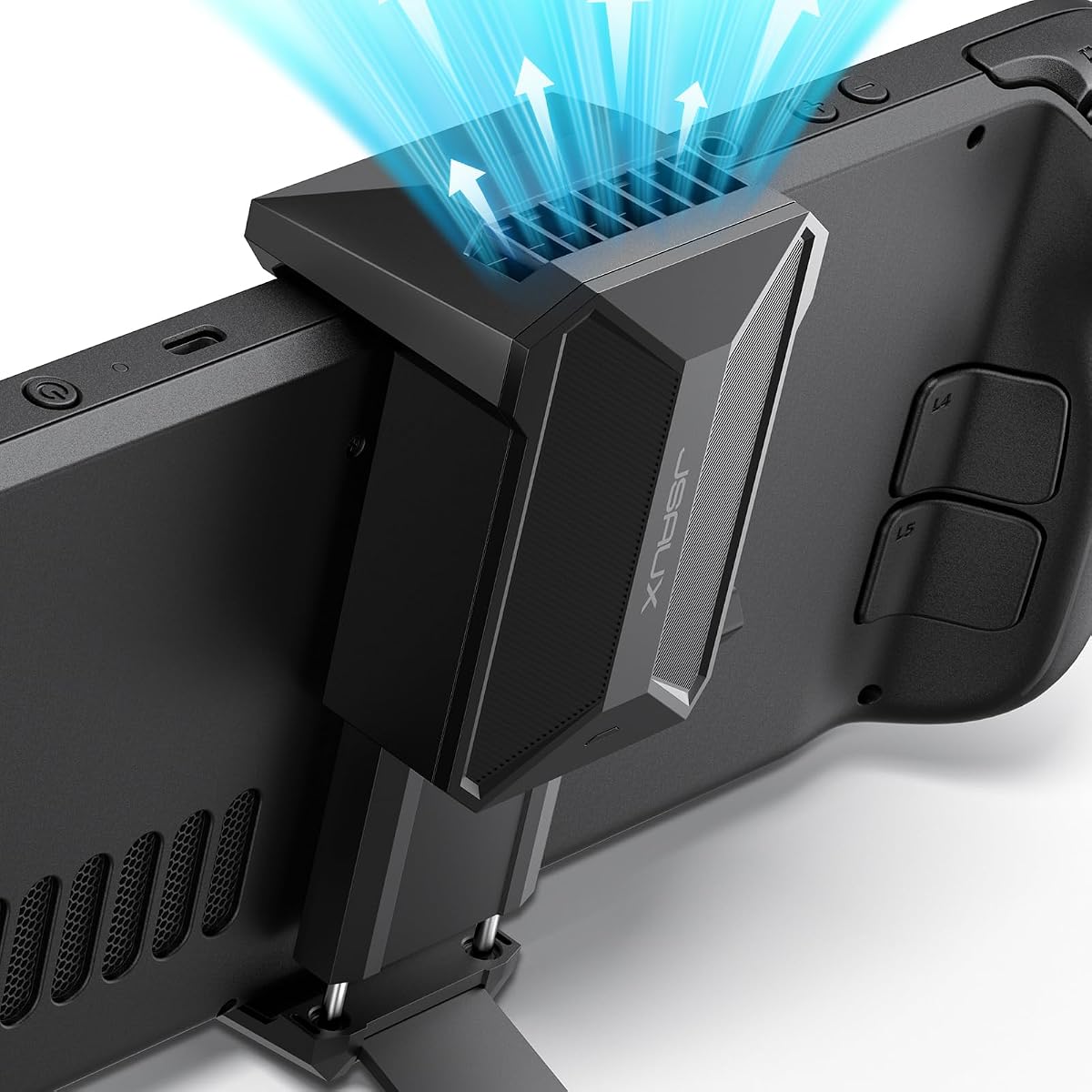
The JSAUX Cooling Fan is a practical accessory for players who want additional airflow while using the Steam Deck on a desk. It has a 4.7 rating and combines a vent-directed fan with an integrated stand. Rather than requiring a separate support, it holds the console while pulling air across the device's ventilation openings.
We may earn a commission when you buy through this link, at no additional cost to you.
According to the product information, the fan can reduce device temperature by 8-15 degrees Celsius after 4-8 minutes of operation. Speed is adjustable from zero to 100% with a physical knob. Runtime is listed as more than three hours at full speed and up to five hours at the minimum setting, allowing users to balance cooling, sound, and session length.
Noise is the main tradeoff. The listing notes that higher wind speeds result in louder sound, which is normal for this type of active cooler. The integrated stand may also encourage a fixed viewing position rather than the freedom of handheld play. Because it is an active accessory, it requires an appropriate power connection, and compatibility with the intended power source should be confirmed before use.
This is a strong choice for longer desktop sessions, especially for games that place sustained demand on the handheld. It also appeals to users who want a simpler alternative to a complete docking station. Choose the ModCase Cooler Set if you want the fan integrated into a protective modular case, or select this standalone cooler when a flexible, adjustable stand is the priority.
The 0-100% control allows the user to increase airflow during demanding games and reduce it for lighter titles or conversations. That flexibility makes the fan more adaptable than a fixed-speed cooling accessory.
The built-in support eliminates the need for a separate basic stand while leaving both hands available. It can create a more consistent tabletop viewing position, although it is less relevant during fully handheld play.
We may earn a commission when you buy through this link, at no additional cost to you.
The YCE 12-in-1 Steam Deck Dock is built for users who want a broad collection of connections, active cooling, and a sturdy desktop hub in one package. Its 4.2 rating reflects a feature-heavy design that supports Steam Deck LCD and OLED, Switch 1 and 2, ROG Ally models, Legion Go variants, and MSI Claw. It also works with laptops, iPads, and Android devices through the included Type-C cable.
We may earn a commission when you buy through this link, at no additional cost to you.
Its connectivity includes HDMI 2.0 at up to 4K and 60Hz, Gigabit Ethernet, three USB 3.0 ports, three USB 2.0 ports, and Type-C PD 3.0 with 100W charging and up to 40Gbps data. Two five-centimeter cooling fans provide more airflow than small two-centimeter alternatives, while a rear switch disables the fans and RGB lighting. The aviation aluminum body is intended to provide durability and passive heat dissipation.
The most significant limitation is display refresh rate. Its HDMI 2.0 output tops out at 4K and 60Hz, whereas the JSAUX 6-in-1 dock supports up to 4K and 120Hz through HDMI 2.1. Nintendo platforms also restrict certain USB data functions regardless of dock, and the dedicated slot is specified for devices up to 27 millimeters thick. These constraints make careful compatibility checks important.
Choose the YCE dock if port variety, integrated fans, and broad device support matter most. It is ideal for a multi-device desk where a laptop or tablet may also connect. If your priority is the highest listed external-display refresh rate and a more compact six-port design, the JSAUX dock is the better fit.
The combination of fast and standard USB ports, Ethernet, display output, and charging covers many desk peripherals. It is particularly useful for users who connect mice, keyboards, storage, networking, and a display through a single station.
The dual larger fans are intended to move more air than compact alternatives, and the rear switch allows users to turn them off when they are unnecessary. This is useful for reducing active cooling during quieter activities or cooler conditions.
We may earn a commission when you buy through this link, at no additional cost to you.
The JSAUX Carrying Case is designed for players who regularly commute or travel with their Steam Deck and a collection of cables. It has a 4.6 rating and accommodates both LCD and OLED models. Rather than protecting only the console, its hard shell and dual-layer organization provide room for the device, microSD cards, charger, power bank, cables, dock, earbuds, and other small essentials.
We may earn a commission when you buy through this link, at no additional cost to you.
A removable hook-and-loop divider lets users customize the interior, while a recessed top groove helps reduce pressure on the joystick controls. The center panel folds into a stand for desk-mode play, adding convenience when the case reaches a destination. A built-in cable port allows a power bank connection while the case is open, and the included right-angle USB-C to USB-C cable is designed to reduce connector bending.
The main limitation is size. A hard shell with two storage layers occupies more room than a padded sleeve or simple zip pouch. The listed accessories are not included, so buyers must supply their own charger, power bank, cables, or dock as needed. It also cannot provide the same everyday flexibility as an open carrying case, making it most suitable for organized travel kits.
This is the best recommendation for commuters, travelers, and owners who want a single place for the Steam Deck and its support gear. The combination of shell protection, padded lining, and customizable storage is particularly useful for car rides, flights, and shared workspaces. Choose a minimal sleeve instead if low bulk matters more than a structured travel system.
The lower compartment holds daily accessories while the upper area protects the handheld and microSD cards. A removable divider allows users to divide the space according to the gear they actually carry rather than leaving empty gaps.
The folding panel and accessible cable port make the case more than passive storage. It can support desk-mode use and permit charging from a power bank during a break without requiring the entire console to be transferred to another setup.
We may earn a commission when you buy through this link, at no additional cost to you.
The LULULOOK Gaming Pillow Stand combines a soft memory-foam base, an adjustable support arm, and a multi-purpose storage area. It is compatible with the Steam Deck LCD and OLED models and has a 4.4 rating. Its strongest selling point is convenience: the base can hold snacks and small accessories, while the arm positions a primary screen and a secondary device.
We may earn a commission when you buy through this link, at no additional cost to you.
High-density memory foam is wrapped in soft, breathable fabric and is designed to mold to the user's shape without collapsing. The arm uses adjustable damping resistance, allowing joints to be tightened for stability or left looser for movement. Two specialized clamps support the Steam Deck and a universal clamp for many phones, tablets, and Kindle devices, which can be useful for guides or video alongside the game.
Compatibility is the key concern. The listing explicitly says the stand is not compatible with a Steam Deck fitted with a protective case, silicone sleeve, or other third-party accessory. Users should therefore check their existing setup before buying. It is also a soft lounging support rather than a rigid desk stand, so it is better suited to beds, sofas, and relaxed viewing than precision office work.
Choose this stand if you want a single accessory that combines screen positioning, a secondary-device mount, and nearby storage. The removable machine-washable cover makes it practical for regular use and helps with sweat or spills. If you prefer a rigid desktop dock, a conventional tabletop stand, or travel protection, one of the more specialized accessories in this guide will be a better match.
The memory foam core is intended to retain its shape while conforming to the user's posture. Combined with the fabric cover, it offers a more comfortable alternative to balancing a handheld on a hard surface during relaxed play.
The integrated compartment keeps snacks, earbuds, chargers, or small controllers close at hand, while the universal clamp creates space for a guide or second screen. These added functions reduce the need for several separate items around the player.
We may earn a commission when you buy through this link, at no additional cost to you.
The right Steam Deck accessory depends on where you play, how you use the console, and which weak points in your current setup need attention. Match the accessory's main function, fit, and included parts to your routine rather than treating it as a general upgrade.
Steam Deck accessories are often sold for both LCD and OLED models, but not every product supports every revision. The JSAUX screen protectors explicitly cover both seven-inch variants, and the PC0104 ModCase is precision-engineered for the original LCD and Steam Deck OLED. By contrast, some case and stand listings include model-specific restrictions. Check the product description for screen size, port locations, button cutouts, case clearance, and any excluded hardware revisions before ordering.
Choose an accessory only when its stated compatibility matches your exact Steam Deck. Pay particular attention to protective cases, clamps, docks, and cooling attachments because a physical fit is harder to change later than a preference-based feature.
Begin by identifying the inconvenience you want to solve. A screen protector addresses scratches and glare, a cooling fan improves airflow, a dock adds desktop connectivity, a travel case organizes a mobile kit, and a pillow stand supports relaxed, hands-free play. The JSAUX ModCase Cooler Set is different from a screen protector because it combines physical protection with active cooling rather than trying to do everything individually.
Prioritize the function you will use most. A single well-matched accessory is usually more useful than several overlapping upgrades that duplicate features or add avoidable bulk.
A useful protection accessory should match the risks your Steam Deck faces. Tempered-glass screen protectors help guard against scratches and smudges, while a hard carrying case cushions travel bumps. The JSAUX carrying case adds a durable exterior, soft padded lining, secure straps, and a recessed groove intended to reduce joystick pressure. For tabletop use, a modular shell can protect the body, screen, and controls when the console is stored.
Look for specific protection claims rather than broad labels. A well-described accessory should explain which surfaces it covers, how it secures the console, and how it protects against scratches, pressure, or impact.
A dock is more than an output adapter. The JSAUX 6-in-1 model provides HDMI 2.1 at up to 4K and 120Hz, 100W Power Delivery, Gigabit Ethernet, and three USB-A 3.0 ports. The YCE model broadens the port inventory and includes active fans, but its HDMI 2.0 output is listed at up to 4K and 60Hz. Evaluate video refresh rate, wired networking, charging speed, peripheral port types, and cooling together.
Choose the smallest dock that covers your desk setup. A focused six-port station can create a cleaner setup than a larger model, while a 12-in-1 design benefits users with several peripherals and mixed devices.
Active cooling is most useful during extended or demanding play, but it can introduce noise and require power. The JSAUX cooling fan claims an 8-15 degree Celsius reduction after 4-8 minutes, with an adjustable speed control and an integrated stand. The YCE dock uses two five-centimeter fans and includes a rear switch for turning them off. The product information for the JSAUX unit notes that higher speeds are louder.
Consider how and where you play. A fan is valuable for a long desktop session but less relevant during short handheld bursts. Check power requirements, sound tolerance, and whether the cooling accessory works alone or as part of a case system.
Every added accessory affects the size and weight of your mobile setup. A hard-shell travel case, front cover, cooling fan, power bank, and dock can all be useful, but combining them may create a bulky kit. The ModCase strap can hold a power bank, USB-C hub, or cooling fan, while the carrying case provides a compartment for a charger, cables, dock, and earbuds. Decide which pieces you will realistically carry before committing to a full system.
For travel, prioritize a case with adjustable organization and a protected device section. For stationary use, prioritize dock ports, cooling, and comfortable positioning over minimum weight.
The environment around your screen affects which accessory provides the greatest benefit. The clear Ultra HD protector prioritizes transparency, while the anti-glare protector uses a matte texture to reduce harsh reflections. The LULULOOK and Mechanism pillow products are designed for relaxed, hands-free positioning rather than rigid desktop use. The LULULOOK includes two clamps and a storage compartment, while the Mechanism model uses a 360-degree ball socket and a Deck-specific grip.
Choose glare control for bright or variable lighting, and choose a soft support for lounging. Confirm that cases, sleeves, and other mounted accessories will not prevent a clamp from closing or reduce the intended range of movement.
A single product title may conceal a substantial bundle, so compare the included components before buying. The PC0104 ModCase includes a front shell, body shell, metal bracket, and strap, while the Cooler Set adds a GP0200 fan. The YCE dock includes joystick caps and a Type-C extender, and the JSAUX carrying case includes a right-angle USB-C cable but no power bank. Some accessories mentioned in the storage descriptions are explicitly not included.
Read the package notes carefully and make a checklist of what you already own. The best-value choice is the product that fills missing functions without simply duplicating equipment already in your bag.
Before adding any accessory, check the included instructions and confirm that the device is powered off before installing a screen protector, case, clamp, or dock. Clean the Steam Deck and the attachment surfaces with a soft, lint-free cloth, and remove dust from ports and cooling openings. For screen protectors, use the supplied frame when available and work in a clean, well-lit area so bubbles and misaligned edges are easier to identify.
For cases, cooling fans, and stands, attach the components gradually and verify that buttons, triggers, vents, speakers, and ports remain unobstructed. Connect a dock to the display and other accessories first, then attach the Steam Deck and begin charging. With an active fan, start at a low setting and increase it as needed. With a pillow stand, adjust the arm's damping and tighten the clamp only after finding a comfortable viewing angle.
Care for the accessories according to their materials. Wipe tempered glass with a microfiber cloth, avoid abrasive cleaners, and replace a protector if it develops persistent bubbles or deep scratches. Brush loose debris from cooling fans without pulling on the blades, and unplug powered accessories before cleaning them. Removable pillow covers can be machine washed, but electronic mounts and attached grips should be detached first and kept dry.
Some accessories are designed for both, while others are limited to a particular model or revision. The two JSAUX screen protector packs explicitly cover Steam Deck LCD and OLED screens, and the PC0104 ModCase is described as compatible with both. Always check the product's stated compatibility, especially for docks, clamps, cases, and cooling attachments, because button positions, port locations, and physical clearances can vary.
A dock is not necessary for portable gaming and can actually add unnecessary weight to a travel kit. It becomes most useful when you want to connect an external display, Ethernet, multiple peripherals, and continuous charging at a desk. If your sessions are primarily handheld, prioritize a screen protector, a protective case, or a travel case instead.
A clear protector is preferable when image clarity and maximum transparency are your main concerns. An anti-glare protector is better for bright rooms, travel, and setups where overhead lighting or reflections can make the display difficult to see. Both JSAUX options use tempered glass, include two sheets, and provide a guiding frame, so the deciding factor is the matte finish versus the clear finish.
An external cooling fan can improve airflow and help maintain performance during demanding sessions, but it should not be treated as a guarantee against every heat-related issue. The JSAUX fan is designed to direct air toward the vents and offers adjustable speed. Ventilation, ambient temperature, game demand, and battery behavior still matter, and higher fan speeds produce more sound.
That depends on the stand's clamp design. The LULULOOK explicitly states that it is not compatible with a Steam Deck fitted with a protective case, silicone sleeve, or other third-party accessory. The Mechanism product includes a dedicated grip, which may offer a different fit, but users should still check dimensions and mounting clearance. Always follow the stated exclusions and compare your installed case with the supported configuration.
Look for a fitted device area, soft padding, a durable outer shell, secure closure, and enough room for the accessories you actually carry. The JSAUX carrying case provides two storage layers, a removable divider, a folding stand, and access for charging while open. Remember that chargers, power banks, cables, and earbuds shown as storage options are generally not included unless the listing specifically says otherwise.
Not automatically. A larger dock is useful when you need more port types, wider device compatibility, integrated fans, or additional accessories. A 6-in-1 dock may produce a simpler setup and can offer a higher listed display refresh rate. Compare the exact video output, charging capability, networking, USB ports, physical size, and cooling design against your actual desktop needs.
Use a soft, lint-free or microfiber cloth for screen protectors and avoid abrasive or harsh chemical cleaners. For the LULULOOK pillow, remove the entire machine-washable cover before washing and keep the electronic clamp assembly dry. The Mechanism pillow is also described as machine washable, so separate any electronic mount or attached grip according to the product instructions before cleaning.
The strongest overall setup depends on your priorities. The JSAUX Ultra HD Screen Protector is the straightforward budget choice for display protection, the JSAUX 6-in-1 Docking Station is the editor's choice for external displays, charging, networking, and peripherals, and the JSAUX ModCase Cooler Set is the premium option for modular protection, expansion, and integrated cooling.
Prioritize fit and function before adding more gear. Match every accessory to your exact Steam Deck model, consider how you game, and decide whether you need portability, display clarity, active cooling, desktop connectivity, travel organization, or relaxed hands-free support. A smaller set of purpose-built accessories will usually create a better experience than a collection of overlapping products.
Finally, recheck current product details, compatibility notes, and prices before purchasing. Steam Deck hardware revisions and accessory designs can evolve, while availability and pricing may change. Confirm that the included parts and restrictions match your setup, and review the latest listing information to make an informed final choice.