
PERLESMITH 26-65 Inch Corner TV Mount
4.7Editor score
Supports 26-65 inch screens
Pre-assembled installation design
Fits 100×100-400x400mm VESA
A corner TV mount can turn an awkward wall junction into a useful viewing area while freeing furniture space and reducing glare. The best models combine generous arm extension, smooth swivel and tilt, secure wall anchoring, and compatibility with your television’s size, weight, and VESA pattern.
This guide compares ten corner wall TV mounts using their stated screen-size ranges, load limits, VESA support, reach, motion, installation requirements, and intended room applications. It covers compact models for smaller televisions, extended-arm brackets for broad seating areas, and heavy-duty options for large displays.
Each review explains the standouts, limitations, and best-fit scenarios for a particular mount. Ratings and specifications reflect the supplied product information, while product availability and current prices can change, so readers should confirm fit and technical details before ordering.
4.7Editor score

4.8Editor score

4.8Editor score
As an Amazon Associate we earn from qualifying purchases.
The comparison below places all ten mounts side by side, focusing on television compatibility, reach, weight capacity, articulation, and practical installation considerations.




The Perlegear Corner TV Wall Mount is a balanced all-around selection for readers who want meaningful reach without moving into an oversized heavy-duty bracket. It carries a 4.8 rating and accommodates televisions from 37 to 75 inches, with a stated capacity of 100 pounds. Its most useful feature is the 32.37-inch extension, which can pull the screen toward seating areas positioned away from the corner.
We may earn a commission when you buy through this link, at no additional cost to you.
Motion is well distributed across several adjustments. The arm swivels plus or minus 90 degrees, tilts from 15 degrees downward to 5 degrees upward, and provides plus or minus 4 degrees of post-installation leveling. The tool-free tilt mechanism is convenient for routine glare adjustment, while the long reach makes it easier to direct the television toward different parts of an open-plan room.
Compatibility is broad for a mid-to-large mounting solution. The stated VESA range runs from 200 by 100 millimeters to 600 by 400 millimeters, allowing the mount to work with many popular television sizes. Its UL listing and solid hinge pin reinforce confidence in the arm design, although actual stability still depends on attaching it to concrete, brick, or a properly located wood stud.
This is a strong recommendation for a living room, bedroom, kitchen entertainment area, or conference space where the corner is the logical place for the screen. It may be more substantial than a compact bracket, and it cannot be installed in unsupported drywall alone. Even so, its combination of reach, motion, load capacity, and screen-size coverage makes it the strongest general-purpose choice in this group.
The extended arm changes how the room can be used, allowing the screen to face a sofa, adjacent seating, or another viewing zone. When glare becomes an issue, the tool-free tilt adjustment offers a quick physical correction without removing the television.
A 100-pound limit and support for VESA patterns as large as 600 by 400 millimeters make this model suitable for many larger televisions. Buyers should still verify both measurements and confirm that the wall can safely carry the complete assembly.
We may earn a commission when you buy through this link, at no additional cost to you.
The VIVO MOUNT-CR70C combines broad television compatibility with one of the most generous swivel specifications in the group. It has a 4.7 rating and is titled for 37- to 70-inch screens, while its detailed specifications also state support for flat-panel and curved televisions from 32 to 70 inches. Its maximum stated weight capacity is 99 pounds.
We may earn a commission when you buy through this link, at no additional cost to you.
The defining advantage is 180-degree swivel, allowing the screen to turn through a much wider range than many competing corner mounts. Tilt adjustment spans 15 degrees downward to 5 degrees upward. Separating wall plates are designed to accommodate a variety of angled corner walls, which may be useful in rooms where the two wall planes do not meet at a perfect right angle.
The steel frame is listed as tested at three times the stated load capacity, although that should be understood as a manufacturer test rather than a guarantee that every installation will perform identically. Compatibility covers a long list of VESA patterns, including 100 by 100, 200 by 200, 300 by 300, 400 by 400, and 600 by 400 millimeters.
Buyers seeking unusual swivel freedom or support for curved displays will find this model attractive. It includes detachable VESA plates, hardware, instructions, a three-year manufacturer warranty, and technical support. Those considering it should confirm their television’s actual dimensions and wall condition, because compatibility claims vary between the concise product title and the fuller specification list.
The 180-degree movement is particularly useful when one corner serves several seating areas. It can reduce the need to reposition furniture simply to obtain a comfortable viewing angle.
Separating wall plates give this mount more flexibility than a conventional single-plane bracket. That design focus makes it relevant to rooms where the corner geometry is imperfect.
We may earn a commission when you buy through this link, at no additional cost to you.
The USX MOUNT Corner TV Wall Mount is a capable middle-sized option for screens from 26 to 65 inches. Its 4.7 rating, UL listing, and 80-pound capacity make it especially relevant to readers with mainstream televisions who still want enough extension to move the display out from a corner.
We may earn a commission when you buy through this link, at no additional cost to you.
Its arm reaches 31.22 inches from the wall and retracts to just 2.52 inches, giving it a useful balance of extended viewing and compact storage. The mount swivels plus or minus 90 degrees, tilts from 12 degrees downward to 5 degrees upward, and offers plus or minus 4 degrees of leveling for final alignment.
The main limitation is its maximum VESA size of 400 by 400 millimeters. While many popular 26- to 65-inch televisions fall within that range, some larger patterns do not. Its 80-pound capacity also leaves less margin than heavy-duty options rated above 100 pounds, making exact television verification especially important.
This bracket works well for apartments, bedrooms, living rooms, and open areas where a long arm is desired without the size or weight of a large-screen mounting system. The supplied manual, pre-labeled hardware, and stated availability of concrete anchors or M8 by 50 millimeter screws for qualifying installations make setup planning straightforward.
The 31.22-inch extension can redirect the screen toward alternative seating positions, while the 2.52-inch retracted profile helps it blend into the corner when extended viewing is unnecessary.
Clearly labeled components and a user-friendly manual simplify the process of identifying the correct parts. Buyers should still use the appropriate anchors for concrete or brick and ensure every fastener enters sound structure.
We may earn a commission when you buy through this link, at no additional cost to you.
The PERLESMITH Corner TV Wall Mount is an economical way to add corner placement and adjustable viewing without committing to a very long articulated arm. It has a 4.7 rating and supports most 26- to 65-inch televisions weighing up to 70 pounds, provided their VESA pattern falls between 100 by 100 and 400 by 400 millimeters.
We may earn a commission when you buy through this link, at no additional cost to you.
The mount extends 19.17 inches and retracts to 3.2 inches. Its plus or minus 90-degree swivel lets the television face different parts of the room, while the tilt range from 5 degrees upward to 15 degrees downward helps control glare. Post-installation leveling of plus or minus 3 degrees allows fine correction after the television is hung.
Installation is the model’s strongest practical feature. Its pre-assembled design is stated to reduce installation steps by 30 percent, and the package includes a detailed manual and standard mounting hardware for a single wood stud, solid concrete, or brick. Drywall alone is expressly unsupported. Its shorter reach and lower load limit are the main compromises compared with the longer brackets in the list.
This is a sensible recommendation for a bedroom, children’s room, modest living area, or secondary television where a 19-inch extension is enough. Buyers should verify the television’s weight and mounting pattern, and they should avoid assuming that a nearby stud is present. For anyone seeking dramatic movement across a large room, a longer-arm model would be more appropriate.
A pre-assembled structure can reduce the number of separate pieces that must be joined before the wall plate is secured. The included manual and labeled hardware remain important for identifying the correct installation components.
The combination of swivel, tilt, and post-installation leveling covers the adjustments most viewers need. It is broad enough for common glare and seating changes without requiring constant reinstallation.
We may earn a commission when you buy through this link, at no additional cost to you.
The PERLESMITH 37- to 70-inch Corner TV Wall Mount offers a strong blend of compatibility and simple articulation. Its 4.8 rating reflects a well-received product, while the stated load capacity of 99 pounds gives it enough capability for many popular LED, LCD, OLED, and 4K televisions.
We may earn a commission when you buy through this link, at no additional cost to you.
Its defining advantage is compatibility rather than extreme motion. Supported VESA patterns include 200 by 100, 200 by 200, 300 by 200, 300 by 300, 400 by 200, 400 by 400, 600 by 200, 600 by 300, and 600 by 400 millimeters. This broad range increases the likelihood that a qualifying large television will fit without changing the mount.
The bracket swivels up to 45 degrees, with the maximum angle dependent on screen size, and tilts 10 degrees downward or 5 degrees upward. A plus or minus 3-degree level adjustment helps correct the final position. The high-strength steel frame has a powder-coated finish intended to support durability.
This mount is a good choice for readers who prioritize broad television fit and structural capacity over the very wide swivel offered by certain competitors. It can free tabletop space and create a more deliberate corner arrangement in living rooms, bedrooms, or dedicated viewing rooms. Buyers should compare the available wall space against the swing of the television, especially with larger screens.
Support for LED, LCD, OLED, and 4K displays makes the mount versatile across common television categories. Always confirm the actual weight and VESA measurements printed on the television rather than relying only on screen size.
Moving the screen to the wall frees the surface beneath it for décor or media components. The articulated design still allows the television to be turned toward a preferred seating area when needed.
We may earn a commission when you buy through this link, at no additional cost to you.
The Perlegear PGMF25B stands out for pairing a relatively compact television range with substantial reach and load capacity. It carries a 4.7 rating, supports most 32- to 65-inch screens, and has a stated capacity of 110 pounds. Its 37.4-inch extension is among the longer options included in this roundup.
We may earn a commission when you buy through this link, at no additional cost to you.
The reinforced wall plate, thicker heavy-duty steel, and solid central pivot are designed to limit wobble and sagging, particularly when the arm is extended. The screen can swivel plus or minus 90 degrees, tilt 15 degrees downward or 5 degrees upward, and be leveled by plus or minus 3 degrees after installation.
A single-stud design gives it more placement flexibility than a two-stud bracket. It can be installed on a wood stud or solid concrete, but the instructions explicitly prohibit installation on drywall alone. Its VESA range of 100 by 100 through 400 by 400 millimeters is narrower than several competitors, so larger-pattern televisions require careful confirmation.
The long reach is useful in rooms where furniture, cabinetry, or wall geometry might obstruct a conventional bracket. It also allows the display to be moved toward multiple seating areas or around an obstruction. However, the product is intended for indoor use and should not be treated as an outdoor-rated mounting system, even though the brand describes placement ideas near patios and pool areas.
The 37.4-inch arm can move the television beyond a nearby cabinet, wall return, or seating obstacle. This flexibility makes it useful in rooms where the display must remain on the wall but still serve more than one viewing position.
Thicker steel, a reinforced wall plate, and a solid pivot are intended to preserve stability when the arm is extended. Actual performance depends on correct anchoring, sound wall construction, and staying within the stated weight limit.
We may earn a commission when you buy through this link, at no additional cost to you.
The Perlegear PGXLF02 is the premium selection for unusually large displays and demanding installations. It has a 4.8 rating, supports flat or curved televisions from 42 to 97 inches, and carries up to 150 pounds. The 800 by 400 millimeter maximum VESA pattern gives it exceptional coverage among the ten products.
We may earn a commission when you buy through this link, at no additional cost to you.
Its arm extends 40.1 inches and retracts to 3.7 inches, allowing a large television to move around nearby walls or furniture. Swivel ranges plus or minus 90 degrees, tilt spans 15 degrees downward to 5 degrees upward, and plus or minus 4-degree leveling permits careful final alignment. The design is particularly useful where a large screen would otherwise dominate a compact corner.
Cold-rolled steel, a wide wall plate, and a 150-pound capacity position this as a heavy-duty option. The stated testing includes a four-times load test and a 6,000-cycle test. Installation is possible on 8-, 12-, 16-, or 24-inch wood stud spacing, concrete, or brick, but not on drywall alone.
This mount is most appropriate for a large home-theater display, a large television in an open-plan room, or a corner installation where reach must clear an obstruction. A pre-assembled design, drilling template, bubble level, hardware, and instructions make the package organized. Buyers should not choose it merely for its size; unless the television and wall are substantial, a lighter bracket will be more appropriate.
The 150-pound limit and 800 by 400 millimeter maximum VESA pattern provide room for demanding displays and unusual mounting arrangements. It is one of the few selections here expressly designed for displays approaching 100 inches.
Pre-assembly reduces the amount of bracket construction required, while the drilling template, bubble level, labeled hardware, and instructions support accurate placement. Two people are prudent for handling a very large television.
We may earn a commission when you buy through this link, at no additional cost to you.
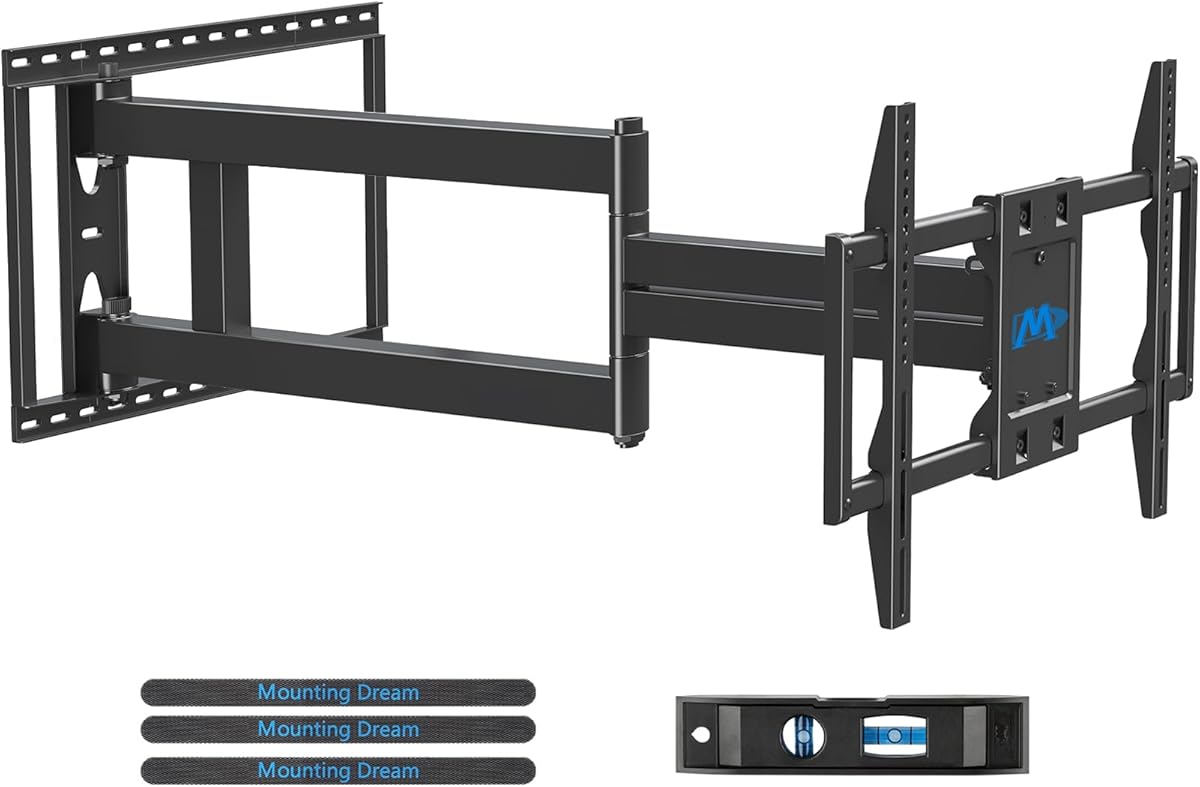
The Mounting Dream Long Arm TV Wall Mount is another strong option for very large televisions. It has a 4.8 rating and supports most 42- to 94-inch displays up to 150 pounds, with VESA patterns ranging from 200 by 100 to 800 by 400 millimeters.
We may earn a commission when you buy through this link, at no additional cost to you.
Its arm can extend 40 inches from the wall and retract to 3 inches. This gives the display considerable freedom to move around a corner or an obstruction and cover multiple viewing areas. The bracket swivels plus or minus 90 degrees, tilts 12 degrees forward or 5 degrees backward, and offers plus or minus 3 degrees of post-installation leveling.
Installation is supported by clear instructions, necessary standard hardware, a mounting template, and a bubble level. Concrete anchors measuring 10 by 50 millimeters are sent by request, a detail worth noting before installation day. Like most long-arm products in this group, the mount cannot be attached to drywall by itself.
This bracket is well suited to large home-theater screens and rooms where furniture placement makes a fixed shallow mount impractical. Its limitations are mostly practical rather than functional: the assembly is substantial, extra help is sensible for a large television, and installers must source the appropriate anchors if the wall is concrete or brick.
The unusually long arm can shift the screen well beyond the wall plane. That helps the television clear furniture, cabinetry, or a perpendicular wall while preserving the ability to turn toward different seats.
A 150-pound load limit and broad VESA range make this suitable for many large and heavy televisions. The mounting hardware and wall structure must both be appropriate for the display's size and weight.
We may earn a commission when you buy through this link, at no additional cost to you.
The HCMOUNTING Corner TV Wall Mount offers an unusually wide swivel range alongside a high load capacity. It has a 4.7 rating and supports televisions from 26 to 70 inches, including common 32-, 40-, 50-, 55-, 60-, 65-, and 70-inch sizes.
We may earn a commission when you buy through this link, at no additional cost to you.
Its plus or minus 180-degree swivel exceeds the motion offered by most corner brackets, while the tilt range extends 15 degrees downward and 5 degrees upward. Post-installation leveling of plus or minus 3 degrees helps keep the display aligned. The arm reaches 30.2 inches and retracts to 2.68 inches.
A distinctive feature is the claimed center-aligned retraction, intended to leave the VESA plate aligned with the wall plate when the arm is pushed back. The steel construction has a stated capacity of 132 pounds, and the package includes cable clamps, an Allen key, a template, anchors, and a bubble level.
The maximum VESA pattern of 400 by 400 millimeters is the principal compatibility constraint. The mount is therefore less flexible for unusual large-pattern televisions than the 600- or 800-millimeter alternatives. For standard 65- or 70-inch screens that meet the specifications, however, the combination of swivel, reach, capacity, and centered storage is highly functional.
The 180-degree movement can serve seating areas located to either side of the installation. It also gives the user an easy way to conceal the display against the wall when it is not being watched.
The center-aligned retraction is designed to leave the television centered rather than visibly offset. Cable clamps and the included management components add another way to maintain a tidy installation.
We may earn a commission when you buy through this link, at no additional cost to you.
The USX STAR Corner TV Wall Mount covers a notably broad range of screen sizes while retaining a 100-pound capacity. Its 4.7 rating and stated compatibility with most 37- to 84-inch televisions make it a versatile option for living rooms, bedrooms, studios, and larger shared spaces.
We may earn a commission when you buy through this link, at no additional cost to you.
Its 32-inch extension and 2.52-inch retracted profile provide enough movement for corner placement and multiple viewing positions. Swivel adjustment reaches plus or minus 90 degrees, with the maximum angle depending on screen size. Tilt ranges 15 degrees downward to 5 degrees upward, and leveling adjustment spans plus or minus 4 degrees.
The supported VESA range extends from 200 by 100 through 600 by 400 millimeters, offering good coverage for many large displays. A built-in Velcro cable-management feature is intended to conceal and organize cords. The package also includes a cable manager, bubble level, detailed instructions, and hardware organized in labeled bags.
This is a useful recommendation for buyers who want broad size compatibility and tidy cable handling without moving into a 150-pound heavy-duty system. Its 100-pound limit and 600-by-400-millimeter ceiling are the main constraints. Concrete anchors are available by request and should be obtained before installation if the wall material requires them.
Built-in hook-and-loop cable management and the included organizer help keep cords gathered behind the television. This is especially useful with an extended arm because the cable path changes as the display moves.
The combination of 37- to 84-inch screen support and VESA patterns up to 600 by 400 millimeters gives the bracket wide applicability. Exact television weight, dimensions, and mounting pattern remain essential checks.
We may earn a commission when you buy through this link, at no additional cost to you.
The right corner mount depends on television compatibility, wall structure, required reach, viewing angles, and installation constraints. Checking these factors before ordering prevents the most common problems with articulated wall brackets.
Begin with the television's actual diagonal screen size and weight rather than relying on the size printed in a product listing. A mount can support the correct dimensions yet still be unsuitable if the display exceeds its load rating. Some brackets are designed for compact bedroom televisions, while others accommodate displays approaching 100 inches. Leave a reasonable margin below the stated maximum whenever possible, especially when a soundbar or other attached equipment may add to the load. The dimensions on the television's specification label are the best source for both measurements.
VESA describes the distance between the television's mounting holes. Compatibility ranges may look complicated because each listing lists many individual dimensions, so the simplest approach is to locate the TV's manual or rear label and confirm that its exact horizontal-by-vertical pattern appears within the mount's supported range. Pay particular attention to maximum horizontal and vertical dimensions rather than assuming that a similar screen size will fit. An incorrect pattern can prevent the bracket from attaching at all.
Extension determines how far the screen can move away from the wall and around nearby furniture or a corner return. Compact brackets near 19 inches suit smaller rooms and modest positioning changes, while models extending 30 inches or more can reach across an open-plan seating area. Longer arms are not automatically better: they require more clearance, can place additional leverage on the anchors, and may be unnecessary when the television only needs to face a single seating zone.
Swivel controls horizontal movement, while tilt addresses vertical viewing comfort and glare. A plus or minus 90-degree swivel is common and generally sufficient for most corner arrangements. Models offering 180 degrees provide more freedom but may require more space around the television. Tilt is especially useful when a window or lamp reflects toward the screen. Post-installation leveling is a smaller but valuable adjustment because it lets the display remain straight after all mounting and positioning decisions are complete.
Most of these mounts require a single wood stud, solid concrete, or brick. Installation into drywall alone is specifically excluded for multiple products and is unsafe as a general practice for a heavy television. Identify the wall material, locate a stud if one exists, and verify that the selected bracket supports the required stud spacing. Concrete and brick installations need suitable anchors, which should be confirmed before purchasing or installation. Sound structure is more important than convenience.
Even a fully retracted mount needs room for the wall plate, arm joints, and television depth. A bracket that extends 40 inches may require substantial clearance from adjacent walls and ceilings, particularly in a tight corner. Before ordering, measure the available wall plane, the distance to perpendicular surfaces, and the path the television will travel when swiveling. Large displays also benefit from two-person handling during mounting.
An articulating arm changes position, so cables must have enough slack to move without pulling against connectors. Some products include hook-and-loop straps, clips, or a cable-management bar, while others expect the installer to route cords separately. Buyers should consider how the television will be connected to power, audio, and source devices and whether those cables can remain behind the wall. Good cable management also makes the retracted position look cleaner.
The box contents matter because missing or mismatched parts can delay installation. Several mounts include complete hardware, labeled bags, a drilling template, and a bubble level. Others state that concrete anchors are available only on request or advise contacting support for particular screws. Check the listed contents before buying, especially when the wall is concrete or brick. Pre-assembled designs may reduce setup steps, but the instructions still need to be followed carefully.
Before installation, identify the wall material, locate a wood stud or determine whether concrete or brick anchors are required, and compare the mount's VESA range with the television's mounting holes. Assemble the wall plate according to the manual, use the supplied template or bubble level, and tighten the fasteners evenly. Do not rely on drywall alone to support the television.
Attach the television with a helper, particularly for screens above 55 inches. Keep the mount within its stated weight and extension limits, allow adequate slack in connected cables, and use the swivel and tilt adjustments deliberately rather than forcing the arm beyond its designed range. When moving the screen, support it with two people and avoid pulling on attached cables.
Periodically inspect the fasteners, wall plate, joints, and television for looseness, sagging, or unusual movement. Clean the metal surfaces with a soft, dry cloth and keep moisture away from electrical connections. If the television becomes difficult to adjust, develops wobble, or requires more force, stop using the articulation and check for an alignment or hardware issue.
Most of the mounts reviewed should not be installed on drywall alone. Their instructions identify wood studs, solid concrete, or brick as suitable structural surfaces, and several explicitly warn against unsupported drywall. A heavy articulated television can place substantial leverage on the fasteners, so use the correct anchors and secure the plate into sound structure. If studs are not conveniently located, consult a qualified installer before proceeding.
Check three specifications: screen size, weight, and VESA pattern. The television must fall within the mount's stated size range and remain below its load limit. Its VESA measurements must appear within the bracket's supported list, including both horizontal and vertical hole spacing. The rear of the television or its manual usually provides these details. Do not use screen size alone as the deciding factor.
A short-arm mount is best when the screen only needs modest movement away from the corner. A long-arm bracket can pull the display toward another seating area, around furniture, or past an obstruction. Longer reach requires more clearance and is most useful in open rooms or unusual layouts. It should not be selected solely for a larger number because unnecessary extension adds complexity without improving the installation.
It can be useful when one television needs to serve a wide range of seating positions. The arm can turn farther toward opposite sides of the room than a conventional 90-degree model. That freedom still depends on available wall space, the television's depth, and the size of the surrounding furniture. Always test or carefully plan the swing path before final positioning.
Concrete anchors are necessary when mounting into concrete or brick, unless compatible anchors are already supplied. Several products include anchors, while others state that concrete anchors are sent upon request. Wood studs generally use suitable screws rather than masonry anchors. Check the package contents and wall material first so the correct hardware is available on installation day.
The mount should support at least the television's stated weight, with additional margin being prudent for larger or heavier sets. The products reviewed range from stated capacities of 70 pounds to 150 pounds. Do not confuse the maximum rating with the screen-size range, because a television can fall within the advertised size range while exceeding a bracket's load limit. Verify both values before purchase.
Yes. Every product listed offers a tilt range, generally covering downward movement with a smaller upward range. Exact specifications differ: some reach 15 degrees downward and 5 upward, while others offer 12 degrees downward and 5 upward. Tilt is most helpful when a window or lamp reflects toward the screen. Post-installation leveling is also valuable for making the television look properly aligned.
Two people are strongly advisable for large televisions, especially those above 55 inches. One person can support and position the screen while the other secures the mounting hardware, reducing the chance of dropping the television or losing alignment. The wall bracket itself may also be heavy. Installation safety depends on using the proper tools, anchors, and sound wall structure.
The Perlegear 37- to 75-inch model is the strongest overall option because it combines a 4.8 rating, 100-pound capacity, long reach, and broad motion in a manageable package. The PERLESMITH 26- to 65-inch mount is the budget-oriented choice for smaller screens and more modest reach, while the Perlegear 42- to 97-inch PGXLF02 stands out as the premium solution for very large displays.
Prioritize exact VESA compatibility, weight capacity, and wall construction before considering reach or swivel. A longer arm is useful only when the room layout demands it, and a high load rating cannot compensate for weak or inappropriate mounting surfaces. Once those fundamentals are confirmed, compare extension distance, tilt range, leveling adjustment, cable handling, and the hardware included with the bracket.
Product specifications and prices can change over time, so check the current listing and manufacturer instructions before purchase. Confirm the television's measurements, verify the wall type, obtain any necessary anchors, and review warranty or support details. Taking those steps helps ensure that the selected corner wall TV mount provides the intended viewing flexibility and a safe, secure installation.