
Hamile Wireless Keyboard Case
4.5Editor score
Seven-color illuminated keys
Detachable Bluetooth keyboard
Three adjustable viewing grooves
A keyboard case can turn an 8th Generation iPad into a more practical typing and browsing device while adding protection and a convenient way to position the screen. The right model balances accurate fit, responsive keys, stable viewing angles, useful controls, dependable battery life, and a design that suits work, study, travel, or creative tasks.
This guide compares ten keyboard cases compatible with the 8th Generation iPad, along with several cases that also support closely related 10.2-inch and 10.5-inch models. We evaluated the supplied specifications and feature descriptions, focusing on model compatibility, keyboard design, backlighting, trackpads, viewing modes, charging, accessory storage, and physical protection.
Each pick highlights a different reason to consider it, from budget-friendly typing to premium floating construction and precise touchpad control. Customer ratings and product details can change over time, and prices fluctuate frequently, so readers should confirm the current listing, package contents, and iPad model number before making a purchase.
4.5Editor score

4.4Editor score

4.3Editor score
As an Amazon Associate we earn from qualifying purchases.
The comparison covers keyboard layout, backlighting, navigation, viewing support, charging, and model fit across ten cases designed around the iPad 8th Generation and several compatible 10.2-inch or 10.5-inch models.



The typecase Touch Keyboard Case is a feature-rich option for anyone using an iPad 8th Generation who wants more than a basic keyboard protector. Its 4.4 customer rating reflects a favorable balance of navigation, display positioning, protection, and typing convenience. A built-in precision trackpad supports multi-finger gestures, while a full row of iPadOS shortcuts gives the keyboard a distinctly laptop-like role.
We may earn a commission when you buy through this link, at no additional cost to you.
The most impressive feature is the patented 360-degree hinge, which is described as having been stress tested for 20,000 cycles. It allows the iPad to move through seven use modes, covering typing, viewing, reading, and native tablet operation. The keyboard also uses laser-etched keys with an adjustable ten-color RGB LED backlight, making it easier to locate familiar characters and type in subdued surroundings.
This is not a conventional fixed-position folio. The rotating construction gives it more flexibility than many folio cases, although that same design means the keyboard is detachable rather than permanently integrated. The premium hard-shell design is intended to protect all sides of the tablet, while automatic sleep and wake occur when the case is opened and closed. These are meaningful conveniences for users who alternate frequently between typing, sketching, and media viewing.
This is our Editor's Choice because it combines the broadest selection of interaction modes in the group with a useful trackpad and adaptable backlit keyboard. It suits students, office workers, and creative users who switch among writing, browsing, editing, and presentation tasks throughout the day. Confirm the specific model number before ordering, and note that the compatibility list also includes several 10.2-inch and 10.5-inch iPads.
The integrated precision trackpad supports multi-finger navigation for tapping, scrolling, pinching, and swiping. That makes the case more useful for document editing and web browsing than a keyboard-only folio, particularly when carrying a separate mouse would be inconvenient.
Seven use modes and the 360-degree hinge allow the iPad to shift between laptop-style typing, hands-free viewing, reading, and detached tablet use. This flexibility is the defining advantage for buyers who do not want one fixed posture for every task.
We may earn a commission when you buy through this link, at no additional cost to you.
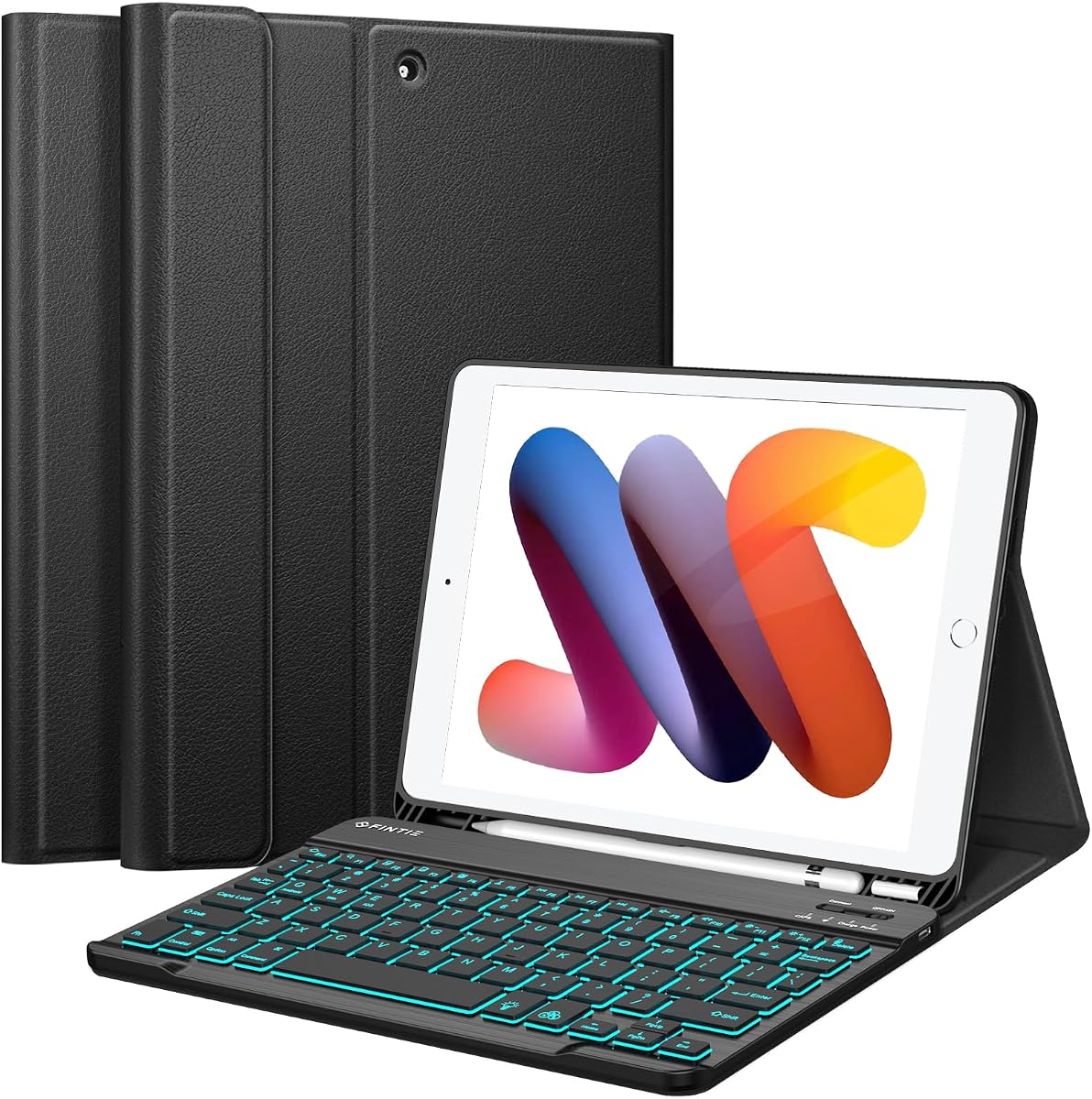
The FINTIE Backlit Keyboard Case is an appealing choice for buyers who prioritize endurance, familiar physical keys, and straightforward folio protection. It carries a 4.5 customer rating and is specifically designed for the 9th, 8th, and 7th Generation 10.2-inch iPads. Its 420mAh rechargeable battery is stated to provide as much as 230 hours of continuous use, which sets it apart from many competing designs.
We may earn a commission when you buy through this link, at no additional cost to you.
The magnetic Bluetooth keyboard is only seven millimeters thick and uses ergonomic mechanical scissor keys with a rebound design intended to reduce noise during extended typing. Seven backlight colors make the keys easier to locate in dim conditions, while a stated 10-meter wireless range offers useful freedom for positioning. The keyboard also supports iOS, Android, and Windows systems, making it more versatile outside the Apple ecosystem than the compatibility label alone suggests.
There are some compromises. Unlike several higher-ranked alternatives, it does not include a trackpad, so cursor control still requires touching the display or using a separate mouse. Automatic energy saving after ten minutes of inactivity helps preserve standby time, but the keyboard must be recharged through USB-C. Its three anti-slip grooves support landscape viewing for typing, watching video, or following a lecture.
Overall, the FINTIE case is a strong pick for students and commuters who want long intervals between charges. The slim keyboard makes it convenient to carry, while the PU leather cover, TPU back shell, and rubber-lined interior provide protection against scuffs, bumps, and impacts. It is best for 10.2-inch iPad users who want a long-lasting physical keyboard without paying for premium rotating hardware.
The stated 230-hour continuous-use figure and automatic energy-saving mode make this case well suited to classrooms, flights, and long workdays. Its keyboard reaches a full charge in approximately two to three hours using the integrated USB-C charging connection.
The seven-millimeter magnetic keyboard separates from the case and pairs wirelessly, giving buyers a compact way to keep typing while presenting. Its narrow profile also makes it easier to fit into a briefcase or backpack than a full folio with an integrated trackpad.
We may earn a commission when you buy through this link, at no additional cost to you.
The TUNKARMOR Keyboard Case offers one of the more complete accessory packages in this guide. It combines a protective folio, a magnetic detachable Bluetooth keyboard, a rechargeable Bluetooth mouse, a USB-C charging cable, and a manual. Its 4.4 rating reflects a generally positive feature set, with particular appeal for buyers who do not want to purchase a separate pointing device.
We may earn a commission when you buy through this link, at no additional cost to you.
The keyboard supports seven selectable backlight colors, which is useful for typing in dim rooms or during nighttime travel. Its magnetic construction allows the keyboard to attach securely while the iPad stands upright, then detach and move as needed. Three viewing positions, anti-slip slots, and a built-in pencil holder expand the case's usefulness for writing, reading, drawing, and video viewing.
Protection is handled through full edge coverage, a durable outer shell, and an inner honeycomb grid intended to cushion the device and assist heat dissipation. Automatic sleep and wake happen when the lid is opened or closed, reducing the need to manage the tablet manually. The supplied mouse is a significant convenience, although users seeking touchpad-based navigation will not find one in this design.
This case is best for someone who wants a ready-to-use typing and navigation package with broad compatibility across supported 10.2-inch and 10.5-inch models. Before purchasing, check the model number beginning with A on the back of the iPad carefully, as the case is explicitly not universal. The included mouse and detachable keyboard make it particularly practical for commuters, travelers, and casual home-office users.
The rechargeable Bluetooth mouse is the distinguishing element of this bundle. It allows immediate cursor control without requiring an additional accessory, which can be particularly helpful for users who are less comfortable navigating an iPad entirely through touch gestures.
The stated fit list covers the 9th, 8th, and 7th Generation 10.2-inch iPads, the 3rd Generation Air 10.5-inch, and the 2017 10.5-inch iPad Pro. The range is useful for shared households, although buyers should still verify their exact A-number before ordering.
We may earn a commission when you buy through this link, at no additional cost to you.
The Hamile Wireless Keyboard Case combines a 4.5 customer rating with a broad set of practical features for compatible 10.2-inch and 10.5-inch iPads. Its magnetic Bluetooth keyboard can be removed and repositioned, while the case provides three grooves for adjusting the screen angle. This makes it suitable for typing, studying, writing, reading, and watching video.
We may earn a commission when you buy through this link, at no additional cost to you.
A built-in 400mAh battery is stated to deliver at least 180 hours of use and recharge fully in two hours through USB-C. The laser-etched keys support seven backlight colors, and the mechanical scissor design is intended to provide quick rebound and quieter typing. Shortcut keys make common system actions easier to access, while compatibility with iOS, Windows, and Android extends its usefulness across devices.
The physical construction combines a soft PU exterior with flexible TPU inside. A honeycomb pattern is designed to assist heat dissipation, and precise openings preserve access to ports, sensors, speakers, microphones, and the camera. A pencil holder and a separate pen slot provide convenient storage, although neither a tablet nor a stylus is included in the package.
This is a strong general-purpose folio for users who want a backlit, detachable keyboard and multiple viewing angles without a trackpad. Its stated battery life and broad model support make it particularly useful for students and professionals moving between locations. It is less suitable for buyers whose main goal is mouse-free cursor control, but for touch-based navigation and conventional typing it offers a balanced feature set.
The detachable keyboard reduces bulk when the iPad is used as a reading or drawing device, while the fitted TPU shell protects the tablet when the folio is closed. Three support grooves also help prevent the screen from sliding during common landscape tasks.
Support for iOS, Windows, and Android means the keyboard can be used with more than an iPad. This broadens its value for shared workspaces, although buyers should still check the tablet case for the correct dimensions and openings.
We may earn a commission when you buy through this link, at no additional cost to you.
The Divufus Keyboard Case is a compact wireless option designed specifically for the 9th, 8th, and 7th Generation 10.2-inch iPads. Its 4.4 rating reflects a solid balance of detachable typing, shortcut access, device protection, and adjustable support. It does not include a mouse or stylus, but its slim magnetic keyboard and long battery figures make it easy to pair with other accessories.
We may earn a commission when you buy through this link, at no additional cost to you.
The keyboard supports iOS, Android, and Windows, with the Fn key plus a corresponding Q, W, or E key used to change the active system. A full row of iPad-oriented shortcut keys can reduce navigation time. The battery is stated to work for more than 80 hours and remain on standby for 130 days, then automatically enter sleep after 15 minutes of inactivity.
Mechanical scissor keys are described as responding quickly and pressing smoothly. On the case side, the magnetic safety buckle secures the tablet, a non-slip rubber lining adds grip, and the honeycomb grid is intended to help with heat dissipation. Multiple angle support makes the case useful for typing, reading, writing, and viewing, while the pencil holder helps keep an accessory from being misplaced.
This case is a good fit for buyers who need a straightforward wireless keyboard, cross-platform support, and a long standby period without moving to a premium trackpad design. Its limitations are straightforward: the package omits a mouse and pencil, and the fit does not extend to larger or more recent iPads. Confirm the model number and think about whether touch-based navigation is sufficient before buying.
A stated standby period of 130 days and automatic sleep after inactivity reduce the need for frequent charging. For a student who occasionally uses the iPad in class or a traveler who carries it between short sessions, those figures are especially relevant.
The magnetic keyboard can be removed for lighter reading, browsing, or drawing. This separation makes the case more versatile than a permanently attached keyboard cover and helps users switch between production and consumption quickly.
We may earn a commission when you buy through this link, at no additional cost to you.
The Logitech Slim Folio is a polished physical-keyboard option for compatible 7th, 8th, and 9th Generation iPads. Its 4.4 rating aligns with a well-regarded design that emphasizes comfortable typing, familiar iOS shortcuts, and all-around coverage. The keyboard's large, well-spaced keys extend across the width of the case, reducing the cramped feeling often associated with tablet accessories.
We may earn a commission when you buy through this link, at no additional cost to you.
Its most unusual battery feature is the use of two replaceable coin-cell batteries and a smart power-management system. The stated estimate is up to four years when the case is used for two hours per day. That removes the need for regular USB-C charging, though actual longevity depends on use patterns and battery conditions.
The folio offers three named positions: Type at a 58-degree angle, Sketch for a flatter writing surface, and Read at 10 degrees. A holder stores a Logitech Crayon or first-generation Apple Pencil, while the surrounding structure protects against bumps, scratches, and spills. Bluetooth Low Energy supports a reliable, energy-conscious connection without requiring a cable during normal use.
This case is best for buyers who want a dedicated, familiar keyboard and stable Apple ecosystem accessories. It is less suitable for people who require a trackpad or want to detach the keyboard independently, and it does not include an iPad, stylus, or other accessories. Its strongest selling points are key comfort, low-maintenance battery operation, and a simple three-position design.
Large, edge-to-edge, well-spaced keys offer a more familiar typing experience than many compact tablet keyboards. A full row of iOS shortcuts also provides direct access to functions such as media and volume controls.
Separate Type, Sketch, and Read angles make it easier to choose a posture suited to the current task. The 58-degree typing position supports a laptop-like view, while the 10-degree read position places the screen at a shallower angle.
We may earn a commission when you buy through this link, at no additional cost to you.
The KBCASE Keyboard Case in light blue is a straightforward 4.5-rated option for compatible 9th, 8th, and 7th Generation iPads. The supplied information also lists compatibility with the 3rd Generation Air 10.5-inch and the 10.5-inch iPad Pro from 2017, making it one of the broader traditional folio options in the guide.
We may earn a commission when you buy through this link, at no additional cost to you.
Its detachable Bluetooth keyboard is designed with more spacious scissor-structure keys for a relaxed, tactile feel. Seven backlight colors support typing in dim conditions, and the ultra-thin keyboard is easy to place in a briefcase, handbag, or backpack. An opening at the bottom of the built-in pencil holder allows a stylus to be removed without first removing it from the tablet.
The case uses slot-based angle adjustment for work, writing, notes, editing, and video. A honeycomb grid pattern is intended to support heat release and anti-slip performance, while the solid shell and wave shock absorption provide protection from scratches and minor damage. It does not include a trackpad, so mouse-free cursor navigation is not one of its strengths.
This model suits buyers who want a light-colored, conventional keyboard folio with a detachable keyboard and broad device compatibility. It is especially useful for users who alternate between typing and holding the iPad for reading or drawing. Verify the A-number on the device and note that the pencil is not included before making the final decision.
Removing the slim keyboard allows the case to become a lighter reading or drawing setup. It also lets owners carry only the keyboard when using the iPad at a desk, provided they have another suitable way to hold the tablet.
The pencil holder includes a bottom opening that keeps the stylus accessible while it is stored. This is a small but useful detail for users who alternate between typing and handwritten note-taking.
We may earn a commission when you buy through this link, at no additional cost to you.
The Dexnor Floating Keyboard Case is the most premium-styled option here, using a magnetic floating stand and an aluminum-alloy hinge to create a laptop-like presentation. Its 4.3 rating is still favorable, though it is lower than the ratings attached to several more conventional folios. The distinguishing attraction is the combination of floating construction, a built-in trackpad, and adjustable illumination.
We may earn a commission when you buy through this link, at no additional cost to you.
The magnetic connection is designed to remain sturdy while allowing the iPad to float at customizable angles for typing, reading, and viewing. The tablet can also be used in portrait orientation, and the detachable rear case includes a built-in pencil holder. A precision touchpad supports tap, pinch, scroll, swipe, and other multi-finger actions for document editing, browsing, and presentation work.
The 650mAh battery is stated to provide up to 200 working hours and 1,200 standby hours on one charge. Recharging takes approximately three and a half hours through the included USB-C cable. Seven solid backlight colors and three brightness levels help adapt the keyboard to different environments, while automatic wake and sleep are designed to conserve power.
The scissor-switch keys activate halfway through the press and are designed to provide quiet operation without dropped characters. A full shortcut row adds quick access to media and volume functions. This is our Best Premium pick for buyers who value a refined floating design, a trackpad, and flexible angles more than maximizing the customer rating. It is suited to frequent travelers and professionals who want their iPad to closely imitate a compact workstation.
The cantilevered magnetic stand separates the iPad from the surface below, creating a laptop-like silhouette while leaving the display free to move through different angles. The aluminum-alloy hinge is intended to provide a stable base despite that floating position.
A multi-touch trackpad adds direct cursor control without a separate mouse, while seven colors and three brightness levels make the keyboard easier to use in changing light. This combination is unusual among the more traditional folio designs in the guide.
We may earn a commission when you buy through this link, at no additional cost to you.
The INFILAND Keyboard Case combines a traditional black folio appearance with modern conveniences that are often absent from basic keyboard covers. Its 4.5 customer rating reflects a favorable balance of typing response, backlighting, trackpad navigation, and flexible viewing. It is made specifically for the 9th, 8th, and 7th Generation 10.2-inch iPads.
We may earn a commission when you buy through this link, at no additional cost to you.
The magnetic Bluetooth keyboard is described as offering zero-lag key response with no missed inputs. Strong magnets keep it locked in place during use and neatly stored when closed. Seven backlight colors and three brightness levels provide a broad lighting range, while pairing instructions and shortcut labels printed on the back make setup more accessible.
A built-in precision trackpad supports navigation without touching the screen, allowing users to scroll, select, and browse in a more laptop-like way. The cover folds into a stand for hands-free video, and the keyboard can detach for reading or drawing. A built-in pencil holder keeps a stylus secure, although the Apple Pencil itself is not included.
The form-fitting shell shields against scratches, scuffs, and minor bumps, and precise cutouts preserve access to buttons, ports, and cameras. This case is best for users who want a trackpad but do not need a rotating or floating premium mechanism. Its narrower fit means it is not an option for 10.5-inch models or other iPad generations, so checking the model number is essential.
The trackpad is the key distinction here, adding tap, scroll, and selection capabilities to a conventional folding folio. It provides many of the benefits of a premium keyboard case while retaining a simpler overall structure.
The keyboard attaches securely through magnets and separates cleanly when the iPad needs to become a lighter tablet. This design makes it easy to transition from typing to media viewing, reading, or note-taking.
We may earn a commission when you buy through this link, at no additional cost to you.
The KBCASE Touchpad Keyboard Case in light purple is a flexible rotating case designed for the 9th, 8th, and 7th Generation 10.2-inch iPads. Its 4.4 rating reflects a positive balance of touchpad control, multiple viewing positions, hardshell protection, and accessory storage. It is a practical alternative for users who value rotation more than illuminated keys.
We may earn a commission when you buy through this link, at no additional cost to you.
The case supports both a 360-degree swivel and a 180-degree flip, allowing the iPad to move among typing, viewing, and reading orientations. The trackpad permits laptop-style cursor control, including tap, scroll, and swipe actions. A shortcut combination involving Fn and A is used for the touchpad, giving keyboard users a way to access essential navigation features without leaving the keyboard area.
A hardshell design protects the sides of the tablet from scratches, dust, wear, and minor impacts. Precise openings preserve access to the device's ports and features, and a built-in pencil holder helps prevent a stylus from being misplaced. The pencil itself is not included. Unlike several other illuminated options in this guide, no backlight capability is specified.
This case is best for readers and students who want to alternate between typing and holding the iPad in different orientations. Its trackpad adds useful navigation, while the rotating structure provides more flexibility than a fixed three-groove folio. Confirm the tablet's model number, and consider whether a backlit keyboard is important for your usual low-light environments.
The 360-degree swivel and 180-degree flip provide more ways to position the display than a standard landscape-only case. That makes the model useful for reading, studying, and hands-free viewing as well as keyboard work.
The touchpad supports tap, scroll, and swipe gestures, making common browsing and editing tasks less dependent on repeated screen taps. A dedicated shortcut makes the touchpad easier to access while the keyboard remains in use.
We may earn a commission when you buy through this link, at no additional cost to you.
The best keyboard case depends on fit, typing habits, navigation needs, viewing flexibility, battery expectations, and protection. Comparing those factors before shopping is more reliable than choosing solely by appearance or the number of listed features.
The iPad 8th Generation must match both the physical dimensions and the case's listed model numbers. The 8th Generation 10.2-inch iPad uses model numbers A2270, A2428, A2429, and A2430, but shoppers should confirm the code beginning with A on the back of their own device. A case can look visually similar while leaving camera, button, or port openings in the wrong locations.
Some options in this guide also fit the 7th and 9th Generation 10.2-inch models, the 3rd Generation Air 10.5-inch, or the 2017 10.5-inch iPad Pro. Those wider claims are convenient, but they do not make every case suitable for every listed tablet. Always compare the complete model list with the identifier on the device before ordering.
Scissor-switch keyboards are slim, portable, and familiar to many tablet users. Their keys generally travel a short distance and return quickly, which can make them practical for emails, notes, and ordinary document work. The typecase, FINTIE, Hamile, Divufus, Dexnor, and KBCASE options described in this guide use scissor-style or similarly thin key mechanisms.
The Logitech Slim Folio instead emphasizes large, well-spaced physical keys and dedicated iOS shortcuts. That design may feel more like a conventional computer keyboard. Buyers who write long documents or already prefer laptop typing may value spacing and key travel more than an ultra-thin profile.
A trackpad can make an iPad feel more like a laptop by providing cursor control, scrolling, selection, and multi-finger navigation. The typecase, Dexnor, INFILAND, and purple KBCASE models include one. The FINTIE and Hamile cases do not, while the TUNKARMOR package includes a separate rechargeable mouse instead.
A trackpad is especially useful for editing, browsing, working with presentations, and navigating documents without repeatedly touching the screen. It is less critical for casual typing or viewing. Consider the gestures you use most and whether a separate pointing device would be easier or more comfortable to carry.
Backlit keys help in dim rooms, nighttime travel, and poorly lit classrooms. Seven colors appear across several options, while the typecase offers an adjustable ten-color RGB option. The Logitech Slim Folio does not emphasize illumination, and the purple KBCASE does not list a backlight, so those choices may be less suitable for frequent low-light typing.
Rechargeable models state different battery expectations. The FINTIE keyboard claims up to 230 hours of use, Hamile at least 180 hours, Dexnor up to 200 working hours, and Divufus more than 80 hours. The Logitech design instead uses replaceable coin-cell batteries with a stated four-year estimate under typical daily use. Consider charging access, usage duration, and standby behavior together.
Basic folios commonly use three grooves to provide landscape viewing positions. This is sufficient for typing, watching video, and reading at a desk. Rotating designs add more postures: the typecase supports seven modes, the Dexnor uses a floating magnetic stand, and the purple KBCASE supports a 360-degree swivel and 180-degree flip.
Greater articulation is useful when switching among typing, drawing, reading, and hands-free viewing. It may also add complexity and bulk. Users who mostly type at a desk can remain within a simpler folio, while travelers and creative professionals may appreciate the flexibility of a rotating or floating platform.
A suitable case should cover the tablet's edges, secure it in the keyboard position, and maintain access to buttons, ports, speakers, microphones, and cameras. TPU or hardshell materials offer different levels of flexibility and rigidity, while a non-slip interior helps the iPad remain stable when typing.
Several cases also use a honeycomb grid on the back to assist with heat dissipation. The TUNKARMOR and Divufus descriptions specifically state that the pattern is intended to reduce overheating and help extend device life. Look for both impact protection and a stable surface rather than choosing a thin cover that offers little protection during travel.
Package contents vary significantly. The TUNKARMOR set includes a magnetic keyboard, rechargeable Bluetooth mouse, USB-C cable, case, and manual. The FINTIE case includes its keyboard, while the Divufus and Hamile products list a wireless keyboard, charging cable, and manual. Accessories such as the iPad and Apple Pencil are generally not included.
The Logitech case includes a holder for a Logitech Crayon or first-generation Apple Pencil, but the stylus itself must be supplied separately. A built-in holder is useful, yet it does not guarantee compatibility with every newer pencil. Compare the included mouse, trackpad, cables, stylus storage, and manual before deciding which bundle offers the best value.
Folio cases offer protection and a stable typing platform but occupy more space than a detachable tablet cover. Several keyboards are only a few millimeters thick and can be removed before placing the iPad in a bag. The FINTIE keyboard is specifically described as seven millimeters thick, while the KBCASE model is marketed as ultra-thin.
Premium floating and rotating structures can be more substantial but offer better trackpad integration and viewing flexibility. A clear case for work, school, and travel is best. If the iPad spends much of its time on a desk, a larger folio may be worthwhile; if it is carried constantly, a slim detachable keyboard and compact cover should take priority.
Begin by checking the model number on the back of the iPad and comparing it with the case's compatibility list. Fully charge the keyboard with its specified USB-C connection, then place the iPad in the case with the screen facing the keyboard. Attach the magnetic keyboard in the intended typing position and pair it using the printed Bluetooth instructions or the shortcut indicated by the manufacturer.
For trackpad models, learn the basic tap, scroll, swipe, and pinch gestures before beginning a long task. For models that support several operating systems, verify that the keyboard is set to iOS and use the required Fn shortcut if needed. Adjust the viewing angle before typing, and use the keyboard's sleep or wake behavior rather than manually locking the iPad whenever possible.
Clean the case with a soft, slightly damp cloth and avoid liquids near the keys, ports, and charging connection. Do not press sharply on the trackpad or pull a stylus out by the tip. Keep the keyboard away from excessive heat, check the battery periodically, and transport the iPad with the folio closed or the keyboard detached if the case allows it.
Some cases in this guide fit both the 8th and 9th Generation 10.2-inch iPads, but others are limited to a smaller list of models. Check the case description for the exact A-numbers and confirm the year of the device. Similar dimensions do not guarantee that every button, camera, and port opening will align correctly.
Both use the 10.2-inch form factor, which allows some manufacturers to support both generations in one case. Compatibility still depends on the cutouts and internal fit, not screen size alone. Buyers should verify the model number beginning with A on the back of their iPad before ordering.
It depends on the design. The TUNKARMOR option includes a rechargeable mouse, while the typecase, Dexnor, INFILAND, and purple KBCASE include trackpads. Several lighter folios provide physical keys only. Check the package list to determine whether additional pointing hardware is included.
Many models include a built-in holder designed to keep a stylus accessible, and the Logitech Slim Folio specifically accommodates a Logitech Crayon or first-generation Apple Pencil. The pencil is generally not included, and newer stylus versions may have different dimensions. Confirm holder compatibility before relying on it for a specific accessory.
The stated figures vary by model. FINTIE lists up to 230 hours of continuous use, Hamile lists at least 180 hours, Dexnor lists up to 200 working hours, and Divufus lists more than 80 hours. Actual results depend on backlight level, activity, standby settings, and battery condition.
They can be especially useful in dim lecture halls, during evening study sessions, or while traveling at night. Several models offer seven backlight colors, and some also provide brightness levels. Backlighting is not essential for every student, but it adds visibility when ambient lighting is inconsistent.
A detachable keyboard can be removed from the case while retaining a traditional folio design, making the iPad lighter for reading or drawing. A rotating case moves the screen through multiple angles, sometimes including portrait or tablet positions. Rotating cases generally offer more posture flexibility but may be bulkier.
A trackpad is useful if you regularly edit documents, browse websites, work with presentations, or want laptop-style cursor movement. It is less important if your main activity is short-form typing or watching video. A separate mouse can also work well, and some bundles include one.
The typecase Touch Keyboard Case stands out as the most versatile overall choice because it combines a multi-gesture trackpad, ten-color backlighting, and a highly flexible 360-degree hinge. The Hamile Wireless Keyboard Case offers an excellent balance of illumination, detachable typing, multiple angles, and cross-platform support, while the Dexnor Floating Keyboard Case provides the most premium visual design and trackpad-equipped workstation experience.
Before choosing, prioritize exact model compatibility, the way you actually use the iPad, and the navigation method you prefer. Trackpads benefit document editing and browsing, dedicated mice suit precise pointing, and backlighting is valuable in low light. Battery claims, viewing flexibility, stylus storage, and the included accessories should be compared only after the basic fit has been confirmed.
Ratings, product details, package contents, and prices can change over time, so check the current Amazon listing before ordering. Most importantly, verify the A-number on the back of the 8th Generation iPad and ensure that the chosen case is explicitly listed as compatible.
