
SVBONY SVHub Omni2
5.0Editor score
Four-microphone 360-degree pickup
AI noise and echo cancellation
USB and Bluetooth connectivity
Eight-to-ten-hour battery life
This guide compares the best speaker for conference calls, covering microphones, connectivity, noise cancellation, portability, battery life, and compatibility.
A speaker for conference calls must make every participant easy to hear while keeping distracting room noise from entering the conversation. Useful options range from compact Bluetooth models for travel to certified, feature-rich devices designed for hybrid offices and larger business meetings.
The products in this guide were compared using the supplied specifications, focusing on microphone coverage, voice processing, full-duplex operation, connection options, platform compatibility, portability, battery life, and room capacity. The list also highlights different workflows, from solo calls to multi-person meetings.
Each review explains the strongest reasons to consider a particular model, along with practical limitations to keep in mind. Ratings and specifications can change over time, while prices and availability fluctuate, so readers should confirm the current product details before purchasing.
5.0Editor score

4.7Editor score

4.4Editor score
The comparison below organizes all ten models by their most important design traits, including microphone pickup, audio processing, connectivity, portability, and intended meeting environment.
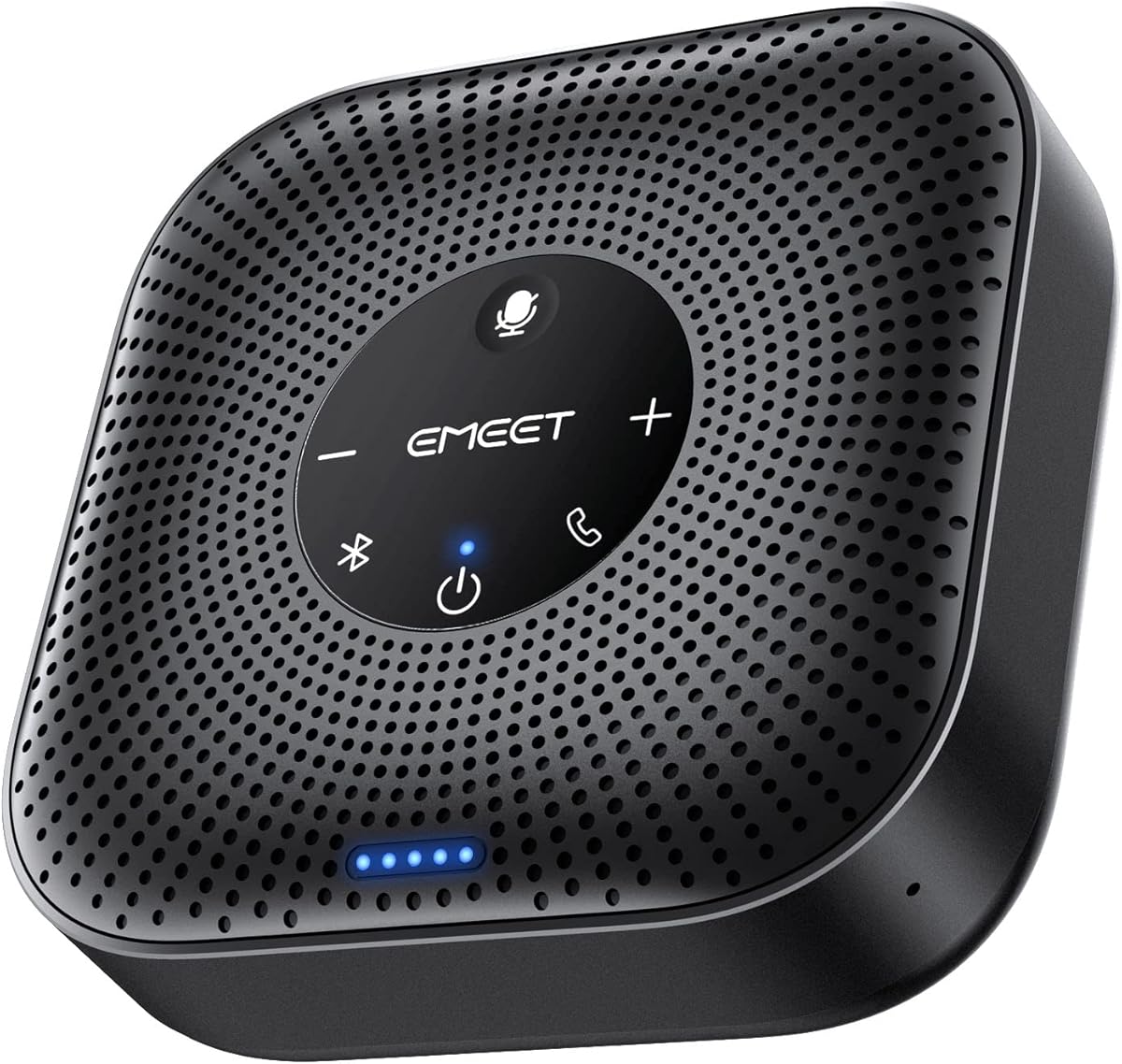


The EMEET M0 Plus is a 4.2-rated conference speaker and microphone built around a four-microphone array with 360-degree voice pickup. Its most appealing combination is a relatively compact footprint, flexible wired and wireless connections, and a battery rated for more than ten hours of talk time. That makes it a practical option for home offices, travel, and meeting rooms that may need to expand.
We may earn a commission when you buy through this link, at no additional cost to you.
Voice pickup is the central strength. EMEET's upgraded VoiceIA algorithm is designed to filter background noise and suppress echoes, while the four microphones allow it to capture speech from different positions around the device. The 3W speaker distributes sound evenly through the room, and full-duplex operation is intended to create a more natural exchange in which participants can listen and speak without the clipped, turn-taking effect associated with some basic conference devices.
The M0 Plus also stands apart because it is not restricted to a single meeting size. Its Daisy Chain feature allows two compatible EMEET speakerphones to work together, effectively supporting up to 16 attendees when combined with compatible products such as the Meeting Capsule, M3, or another M0 Plus. The trade-off is that this expansion depends on compatible hardware, and buyers who need a much larger room should confirm the complete setup before purchasing.
Connection options are straightforward: USB-C with a USB-C-to-A adapter or Bluetooth 5.0, including single-device and dual-device pairing. It works with Zoom, Microsoft Teams, Slack, Webex, and other major services without installed drivers. This is an excellent recommendation for buyers who prioritize balanced pickup, long battery life, and scalable meetings more than a premium exterior or enterprise-focused physical controls.
The 3W speaker and full-duplex design are intended to let a small group converse naturally around one device. It is particularly useful when every participant should be able to hear one another without passing a phone or headset around the table.
Daisy-chaining two compatible EMEET speakerphones extends the meeting space and provides a practical path for larger groups. This makes the M0 Plus more versatile than a fixed single-room solution.
We may earn a commission when you buy through this link, at no additional cost to you.
The Jabra Speak 510 2025 Edition is a 4.7-rated portable conference speaker designed to bring clear meeting audio to offices, home workspaces, and travel locations. It emphasizes simple setup and flexible use rather than an advanced specification list. A buyer choosing a speaker for conference calls can expect a compact device that connects by Bluetooth or USB and works with a wide range of meeting equipment.
We may earn a commission when you buy through this link, at no additional cost to you.
The strongest feature is its flexibility. The speaker can be paired with a laptop or smartphone, plugged into a compatible computer through USB, or connected to a desk phone, mobile phone, or softphone. This makes it a useful companion for employees who move between private calls, shared workspaces, and customer meetings. The supplied information also states that it works with online meeting platforms and can handle streaming music.
Its main limitation is that the description does not specify the microphone count, pickup radius, noise-cancellation implementation, or battery duration. Buyers prioritizing detailed room acoustics may find that models such as the EMEET M0 Plus, SVBONY SVHub Omni2, or Jabra Speak2 55 provide more explicit information. A travel-focused buyer may not need those specifications as much and will value the straightforward portable format instead.
Overall, the Jabra Speak 510 2025 Edition is a compelling general-purpose choice for people who value a strong customer rating, quick setup, and broad device compatibility. It suits small and medium meetings where portability matters and works particularly well for users accustomed to connecting a headset or speaker to different computers throughout the day.
Bluetooth and USB connections make it easy to move between a smartphone, laptop, desk phone, or softphone. That flexibility is useful for people whose meeting platform changes from one session to the next.
The compact, wireless design suits business travel and shared workspaces. It is especially convenient for users who want a more capable alternative to relying entirely on a laptop's built-in microphone.
We may earn a commission when you buy through this link, at no additional cost to you.
The Jabra Speak 510 Teams edition is a 4.6-rated portable speakerphone aimed at users who regularly communicate through Microsoft Teams while also need support for other meeting services. It combines Bluetooth and USB connectivity with a straightforward setup process, allowing it to serve as a central audio device for a laptop, smartphone, desk phone, or softphone.
We may earn a commission when you buy through this link, at no additional cost to you.
Its principal advantage is the combination of portability and broad compatibility. The product information explicitly mentions Microsoft Teams alongside other online meeting platforms, while the connection options make it useful in offices, home offices, and while traveling. It also supports streaming music, although that is a secondary benefit rather than the reason to choose it for conferencing.
Compared with the more technical entries in this list, its specifications are less granular. The supplied description does not identify the number of microphones, voice-pickup range, noise-cancellation method, or battery runtime. A buyer with a small meeting room and a straightforward Teams workflow may have little need for those details, but larger teams should investigate models that publish clear microphone pickup and room-expansion information.
This Jabra model is a strong recommendation for anyone seeking a portable speaker for conference calls without committing to a specialized enterprise device. Its 4.6 rating, clear Teams positioning, and flexible wired or wireless connections make it particularly suitable for hybrid employees and small businesses that want simple audio across several types of devices.
Explicit Teams compatibility simplifies the selection process for organizations centered on Microsoft's collaboration platform. It can also serve other online meeting services, preserving flexibility when different participants use different software.
USB offers a familiar computer connection, while Bluetooth supports phones and mobile workflows. Buyers can choose the most appropriate route for each meeting or device.
We may earn a commission when you buy through this link, at no additional cost to you.
The SVBONY SVHub Omni2 is a 5.0-rated conference speaker with an unusually complete list of features for the budget-focused category. Its four built-in microphones, AI-based noise cancellation, 5W full-range speaker, full-duplex operation, and stated pickup range of up to 18 feet make it a serious candidate for home offices and small meeting rooms.
We may earn a commission when you buy through this link, at no additional cost to you.
The device is designed to separate human speech from distractions, suppress echoes, and let participants talk naturally without taking turns. Its 360-degree microphone arrangement captures voices from around the unit, while the full-range speaker recreates a more balanced in-person atmosphere. These qualities are especially important in rooms with background noise, although real-world results will vary with acoustics, placement, and distance.
Connectivity is flexible through USB and Bluetooth 5.1, and the product supports Windows, macOS, Zoom, Microsoft Teams, Skype, Webex, Google Meet, and other major services. A one-click mute control and NFC touch-pairing add convenience for supported devices. The built-in 2,000mAh battery is stated to support eight to ten hours of calls or music, with a two-hour recharge time.
The most distinctive addition is support for third-party applications that can provide real-time transcription, captions, and translation. Those capabilities depend on compatible external software rather than being entirely self-contained. Even so, the combination of pickup range, full-duplex audio, broad platform support, and a 5.0 rating makes this an excellent choice for buyers who want a capable conference speaker without moving to a premium enterprise model.
Four microphones positioned for 360-degree pickup and a stated range of up to 18 feet help the Omni2 cover a meaningful portion of a home office or small meeting room. Placement remains important, so the device should be positioned near the center of the group.
Beyond ordinary voice calls, compatible third-party applications can add captions, transcription, and translation. These extensions may be valuable for interviews, international meetings, and organizations that rely on searchable conversation records.
We may earn a commission when you buy through this link, at no additional cost to you.
The EMEET Luna is a 4.4-rated conference speaker designed for groups of up to eight people, with a wired expansion path for larger meetings. Its three-microphone array provides 360-degree pickup, while VoiceIA technology is designed to suppress common distractions such as air-conditioning noise, keyboard clicks, and general room activity.
We may earn a commission when you buy through this link, at no additional cost to you.
One particularly useful feature is automatic vocal increase. The speaker identifies the distance of a sound source and adjusts volume to create a more consistent listening experience. Combined with a maximum output of 85dB, this helps the Luna serve small home offices as well as larger conference rooms. Full-duplex operation further supports natural conversation, with participants able to speak and listen simultaneously.
The Luna also offers an unusually broad connection selection: USB, Bluetooth, AUX, and a dedicated dongle. No driver is required, and the supplied information notes compatibility with Zoom, Skype for Business, and Webex. Its full-metal, matte-colored casing and portable design also distinguish it from lightweight plastic conference devices.
For larger groups, two Luna units can be linked with EMEET's separate daisy-chain cable, creating a wired system intended to support up to 16 or more attendees. That cable is an additional purchase, and the automatic one-hour shutdown when idle may interrupt an extended meeting if the device is not being used. Even with those caveats, the Luna offers a compelling mix of voice processing, moderate capacity, and stable expansion.
The automatic vocal-increase function adjusts output according to the distance of a sound source. This is useful when participants are spread across a room and not everyone sits the same distance from the speaker.
A wired daisy-chain connection can be more resistant to environmental interference than a wireless link. Buyers should plan for the separately sold cable and confirm that the room layout and attendee count justify a two-speaker system.
We may earn a commission when you buy through this link, at no additional cost to you.
The Dell SP3022 is a 4.2-rated desk speakerphone created for business conferences, home offices, and users who want direct call controls. It is certified for Microsoft Teams and Zoom, uses full-duplex audio, and includes AI noise cancellation so multiple people can speak while remaining clear to remote participants.
We may earn a commission when you buy through this link, at no additional cost to you.
Its most distinctive feature is physical operation. LED indicators clearly show Microsoft Teams status, call and hang-up state, volume, and microphone mute status. A dedicated Teams button provides quick access to meetings and notifications. This makes the SP3022 particularly suitable for a desk where the user wants clear feedback without navigating only through software controls.
The compact soundbar form factor fits neatly beside a laptop or desktop, or on a monitor base. USB-A and USB-C connectivity allows it to connect to modern and legacy computer ports, and the supplied information describes an intuitive setup process without highlighting a complicated driver requirement. It is a practical wired choice for a fixed office, though the absence of stated battery support makes it less obviously suited to travel.
Compared with portable Bluetooth models, the Dell prioritizes workplace control, platform certification, and a professional desk footprint. Compared with more advanced enterprise speakerphones, it offers less detail about microphone count, pickup range, and wireless features. Overall, it is a focused recommendation for a Microsoft Teams or Zoom user who values dedicated buttons, status lights, and a compact wired design.
LED indicators communicate meeting status, volume, call state, and microphone mute. This reduces the need to guess whether a meeting is live or whether the microphone is active.
The small soundbar shape and USB connectivity suit an office desk shared with a monitor or laptop. It also works for home offices that want a dedicated, consistently connected call device.
We may earn a commission when you buy through this link, at no additional cost to you.
The Lenovo Speakerphone 6000 is a 4.4-rated conference device designed for enterprise collaboration, hybrid work, and meetings that need extended microphone reach. Its eight beamforming microphones, AI noise cancellation, and stated five-meter pickup range distinguish it from compact models intended mainly for small groups and personal offices.
We may earn a commission when you buy through this link, at no additional cost to you.
The 50mm speaker and full-duplex audio are designed to deliver clear, natural conversation while several people speak. Beamforming helps the system prioritize voices in particular directions, while AI noise cancellation reduces background distractions. These are meaningful capabilities for medium rooms, though the pickup specification should be treated as a maximum condition rather than a guarantee for every environment.
Connectivity is a major strength. Bluetooth 5.3 can maintain connections to two devices simultaneously, with the ability to pair with up to eight devices in total. USB-C or USB-A wired connections support plug-and-play operation and charging, while the dedicated Teams button provides quick call access. The supplied information specifically notes that Microsoft Teams certification applies to the USB connection.
For travel and hybrid schedules, the device offers up to 12 hours of talk time, IP54 dust and splash resistance, a compact form, and an included carrying case. This is a strong choice for organizations that need broad wireless flexibility and large-room pickup, although buyers may not need every feature for a simple home call.
Eight beamforming microphones and the stated five-meter pickup range are intended to support conference tables that are too large for a basic desktop speaker. Central placement remains essential for consistent coverage.
Dual Bluetooth connectivity can keep the device linked with two sources at once, which is useful when a meeting moves between a computer and phone. Additional pairings expand the range of devices it can remember.
We may earn a commission when you buy through this link, at no additional cost to you.
The Jabra Speak2 55 is a 4.4-rated premium speakerphone with four beamforming microphones, voice-level normalization, and a stated battery life of up to 12 hours. It is designed for business users who want a polished, portable device with broad wireless freedom and a clear set of included accessories.
We may earn a commission when you buy through this link, at no additional cost to you.
The four microphones pick up sound from multiple directions, while normalization is intended to even out differences in volume among participants. The result is a more balanced group conversation, particularly in offices where people sit at different distances from the device. Its full-size portability is reinforced by Bluetooth range of up to 30 meters, allowing the speaker to remain connected while the active computer or phone is elsewhere in the room.
The 2025 edition includes a USB-C charging adapter, a USB-C cable with a USB-A adapter, a carrying pouch, safety literature, and the main unit. Buyers can connect through Bluetooth 5.1 or the supplied USB-C and USB-A options. The device is described as fully compatible with Microsoft Teams and as a complement to Jabra PanaCast video solutions.
A two-year warranty is included with registration required. That limited warranty and the broad accessory package reinforce its premium positioning. It is an excellent recommendation for business professionals who travel regularly, use Microsoft Teams, and want more refined microphone behavior than a basic portable speaker offers.
Voice-level normalization equalizes surrounding voices so that participants at different distances are more consistently heard. This is especially helpful in meetings where everyone does not sit directly beside the device.
The included charging adapter, cable, carrying pouch, and long battery life create a complete travel package. Bluetooth range also gives users more freedom to place the speaker where the group needs it.
We may earn a commission when you buy through this link, at no additional cost to you.
The Jabra Speak 510 Portable is a 4.6-rated 2025-edition conference speaker with Bluetooth, USB-A, and Link 370 USB adapter options. It retains the portable, easy-to-use character of the Speak 510 family while offering a particularly flexible range of wired connections for different computers and phones.
We may earn a commission when you buy through this link, at no additional cost to you.
The supplied information highlights quick setup and broad device support. It can be used with a laptop, smartphone, desk phone, mobile phone, or softphone, as well as with major online meeting platforms. Its ability to also stream music gives it more general utility than a strictly business-focused conference device.
The Link 370 adapter option is the main point of difference from the other listed Speak 510 versions. It may appeal to users who want a dedicated USB connection method, although buyers should confirm compatibility with their exact computer and workflow. The product description does not provide microphone count, pickup distance, noise-cancellation details, or battery runtime, so it offers less information for detailed room planning.
This model is a good middle ground for people who prioritize portability, established device compatibility, and a strong customer rating. It is best suited to small-to-medium meetings, travel, and hybrid users who want simple setup without committing to a large enterprise installation.
Bluetooth, USB-A, and the Link 370 USB adapter provide multiple ways to reach a host device. This reduces the chance that an older port or changing meeting setup will create a connection obstacle.
Compatibility with desk phones, softphones, mobile devices, and laptops makes the speaker adaptable beyond video-conferencing software. It can also move easily between home, office, and travel environments.
We may earn a commission when you buy through this link, at no additional cost to you.
The Jabra Speak 510 UC is a 4.7-rated portable speakerphone with a 360-degree microphone, Bluetooth and USB connectivity, and certifications for Zoom and Google Meet. It is also listed as compatible with unified communications platforms and certified for services such as Avaya, Cisco, and Skype for Business.
We may earn a commission when you buy through this link, at no additional cost to you.
The 360-degree microphone is designed to capture voices at different angles, while the speaker's portable form allows it to turn a home, office, or travel space into a small conference room. Setup is presented as straightforward and not dependent on IT support, which is valuable for temporary offices, shared rooms, and employees who move frequently.
Integrated cable management and a carrying case are thoughtful additions for frequent travelers. The device can also connect to a desk phone, mobile phone, softphone, or computer, providing flexibility across both traditional and online calls. Its principal limitation is that the supplied information does not list a battery duration, microphone count, or detailed noise-cancellation performance.
Even with that limited specification detail, the 4.7 rating and broad unified communications certification make this a compelling choice for business users who want a portable speaker known for straightforward setup. It is particularly attractive for Zoom, Google Meet, Avaya, Cisco, and Skype for Business environments where platform reliability matters.
The 360-degree microphone allows participants around the device to be captured without relying on a single directional position. Proper placement near the center of the conversation will improve consistency.
Zoom, Google Meet, Avaya, Cisco, and Skype for Business certifications are useful for organizations that want a speaker aligned with their communication environment. Platform certification can simplify purchasing and deployment decisions.
We may earn a commission when you buy through this link, at no additional cost to you.
The right conference speaker depends on room size, participant behavior, platform requirements, and how often the device will move. The following factors help narrow the field without overlooking essential audio and connectivity details.
Microphone pickup determines whether people at the edge of a table can be heard clearly. Models with 360-degree arrays, beamforming microphones, or explicit range claims are generally more appropriate for groups that sit around a shared surface. The SVBONY SVHub Omni2 states coverage across rooms up to 18 feet, while the Lenovo Speakerphone 6000 states a five-meter pickup range. Smaller units may still work well when everyone is close, but the room should be considered before purchase.
Choose a model whose pickup design matches the intended meeting space, and always place the speaker near the center of the participants.
A conference speaker must separate voices from keyboard noise, ventilation, moving chairs, and household activity. AI noise cancellation appears across several options, while EMEET models use VoiceIA filtering to reduce background sound and echo. These technologies cannot create a perfect acoustic environment, but they can make a meaningful difference in active offices and homes. A full-duplex design is also valuable because it allows natural overlapping conversation.
Prioritize devices with documented noise reduction, echo suppression, and full-duplex operation for busy or larger rooms.
USB usually offers the simplest and most consistent connection to a laptop, while Bluetooth supports phones, tablets, and computers without a cable. Some products add AUX, a dongle, dual-device pairing, or a proprietary USB adapter. The EMEET Luna supports USB, Bluetooth, AUX, and a dongle, while the Lenovo Speakerphone 6000 can maintain two Bluetooth connections. Wired and wireless options are useful together because a device may need to work with an office computer during the week and a personal phone while traveling.
Match the available ports and meeting software, then confirm whether your workflow needs one active source or simultaneous device connections.
A device that connects to a computer does not always behave identically across every conferencing application. The featured products support combinations of Zoom, Microsoft Teams, Google Meet, Slack, Skype, Webex, and unified communications platforms, with several carrying explicit certifications. Jabra's UC model is listed for Zoom, Google Meet, Avaya, Cisco, and Skype for Business, while the Dell model is certified for Teams and Zoom. Platform certification provides greater confidence for business deployments.
Check the current meeting application, account type, operating system, and any device-specific requirements before purchasing.
A battery-powered speaker provides freedom away from a desk, but battery life determines whether it can support a full schedule. Published figures range from eight to ten hours for the SVBONY SVHub Omni2 to more than ten hours for the EMEET M0 Plus and up to 12 hours for the Lenovo Speakerphone 6000 and Jabra Speak2 55. Portability also depends on size, included case, charging method, and resistance to travel conditions. The Lenovo includes a carrying case and IP54 protection, while the Jabra Speak2 55 includes a pouch and charging adapter.
For frequent travel, compare real talk-time claims, included charging accessories, and physical protection before deciding.
Small personal speakerphones are best when everyone is close to the device. Larger groups need a broader microphone array, higher output, or the ability to chain multiple units. The EMEET M0 Plus can combine two compatible speakerphones for up to 16 attendees, while the EMEET Luna supports a wired daisy-chain arrangement for 16 or more and requires a separately purchased cable. The Lenovo's eight-microphone design and stated five-meter range also suit more demanding conference environments.
Estimate the number of attendees, table dimensions, and likely microphone distance before choosing a single-room model.
A dedicated mute button and clear status lights can prevent accidental interruptions and uncertainty during meetings. The Dell SP3022 uses LED indicators for Teams status, call state, volume, and microphone mute, and it includes a dedicated Teams button. The SVBONY offers one-click mute, while the Lenovo includes a Teams control for call management. These physical interactions are particularly helpful when software menus are difficult to navigate during a live conversation.
Look for easily reachable mute and call controls if you frequently lead meetings or move between software platforms.
A conference speaker should fit the environment in which it will be used. Travel devices benefit from carrying cases, cable management, and charging adapters, while fixed office units can prioritize status lights and wired connections. The Jabra Speak2 55 includes a two-year warranty subject to registration, while several portable models provide cases or pouches. Buyers should also consider warranty coverage, replacement parts, and whether proprietary adapters or cables are required.
Check the complete box contents and support terms so the device remains convenient after the initial meeting rather than becoming another cable-dependent accessory.
Begin by placing the speaker at the center of the table and as close as practical to the group. This lets 360-degree or beamforming microphones capture participants more evenly. Connect through USB when the host computer allows it, or use Bluetooth when a phone, tablet, or untethered laptop is the meeting source. For devices with multiple inputs, make sure the intended microphone and speaker are selected in the conferencing application's audio settings.
Before a large meeting, run a short sound check to confirm that each participant is audible and that the device is not competing with the computer's built-in microphone. Keep the unit away from drinks, paper rustling, and other noise sources, and use the physical mute control when a conversation should remain private. If the room is large, consider a second compatible speaker or an extended setup rather than placing one unit too far from the participants.
After use, disconnect the wired cable and switch off the speaker to preserve battery capacity. Keep charging accessories in the supplied pouch or case, and clean the exterior with a soft, dry cloth. Avoid moisture, direct heat, and aggressive cleaners. Recheck firmware, application settings, and room placement when the computer, phone, conferencing platform, or meeting layout changes, since those changes can affect which device is selected or how effectively voices are captured.
A separate conference speaker is useful when several people need to participate from one room. Laptop microphones are generally optimized for one user and may not capture voices evenly around a table. A dedicated speakerphone adds microphone coverage, room-filling output, and convenient call controls, making it more suitable for group meetings.
A conference speaker is designed with microphones, echo control, and full-duplex operation for two-way conversations. A conventional Bluetooth speaker often emphasizes music playback and may not include the microphone array, meeting controls, or platform compatibility needed for calls. Always verify that a wireless speaker includes a microphone and supports the required conferencing applications.
USB is often more consistent because it provides a direct wired connection and may avoid wireless interference or pairing issues. Bluetooth offers greater freedom because the speaker can be positioned away from the computer and can support phones or tablets. The best choice depends on the available ports, room layout, and whether mobility is important.
It depends on the microphone count, pickup range, speaker output, and room size. Devices such as the Lenovo Speakerphone 6000 and SVBONY SVHub Omni2 publish more extensive room-related specifications, while the EMEET M0 Plus and Luna can be expanded with a second compatible unit. For a very large room, a professionally designed installation may be more appropriate.
Place the speaker near the center of the group, use only one primary conference microphone, and keep it away from walls or other reflective surfaces. Choose a model with echo suppression and full-duplex audio. If feedback persists, lower the speaker and microphone levels, move the device slightly, and disconnect the computer's built-in microphone.
Most of the featured products support major platforms including Microsoft Teams and Zoom, but certification varies by model. The Dell SP3022 and Lenovo Speakerphone 6000 are specifically described as Microsoft Teams certified, while the Jabra Speak 510 UC is listed for Zoom, Google Meet, Avaya, Cisco, and Skype for Business. Confirm current certification and application requirements before purchase.
The need depends on the model's battery life and how often it is used. A device used for several full days of short meetings may not need daily charging, while a travel speaker that handles long calls should be topped up whenever possible. Keeping a charged unit available avoids interruptions at the start of a call.
That depends on the model. Some support Bluetooth multipoint or dual-device connections, while others require the user to reconnect or select one source at a time. The Lenovo Speakerphone 6000 supports two simultaneous Bluetooth connections, and the EMEET M0 Plus supports Bluetooth single-device or dual-device connection. Check the specific model's connection behavior before assuming both devices can remain active.
The SVBONY SVHub Omni2 stands out for buyers seeking a feature-rich and budget-conscious conference speaker, with four microphones, AI noise cancellation, full-duplex operation, and useful transcription-app support. The Jabra Speak 510 2025 Edition is a strong all-around portable choice, while the Jabra Speak2 55 represents the premium selection with beamforming microphones, voice normalization, generous battery life, and a complete accessory package.
Prioritize room coverage and noise handling first, because those factors determine whether remote participants can hear everyone. Next, confirm the connection method, platform compatibility, and call controls. Portability and battery life matter most for mobile workers, whereas fixed offices may prioritize USB, status lights, and dedicated Teams buttons.
Ratings, platform certifications, bundle contents, and technical specifications can evolve, and prices and availability change frequently. Check the current listing and compatibility details before making a final purchase, especially when deploying multiple units or relying on daisy-chain accessories.
