
EXTRIC 7-Sheet Strip-Cut Shredder
3.4Editor score
Shreds up to 7 sheets
Mounts over a waste bin
Includes credit card slot
Portable Paper Shredder without Basket guide comparing ten models for capacity, security, portability, jam handling, fit, and everyday home office use.
A portable paper shredder without a basket can be a practical solution for home offices, apartment dwellers, and compact workspaces where a bulky wastebasket is inconvenient. These machines shred documents directly into a separate bin, reducing floor space while helping protect bills, receipts, mail, and other sensitive paperwork from casual viewing.
The products in this guide were compared using their stated paper capacities, cutting styles, bin-mounting mechanisms, paper-jam controls, safety systems, media slots, and continuous run times. The list includes basketless strip-cut models intended for everyday use as well as several conventional cross-cut shredders included for comparison, making it possible to distinguish true basketless designs from larger machines with pull-out bins.
Each review explains where the product is strongest, where its specifications may limit it, and which type of user it may suit best. The top recommendations balance useful capacity, portability, and straightforward operation. Product availability and pricing can change, so readers should verify the current listing, measurements, included accessories, and operating details before making a purchase.
3.4Editor score
4.3Editor score

4.5Editor score
The comparison below covers capacity, cutting style, mounting or bin design, paper handling, and media support. It also highlights three conventional pull-out-bin shredders so buyers can see how they differ from the basketless models that are the focus of this guide.


The EXTRIC 7-Sheet Strip-Cut Mini Document Shredder is a compact, bin-mounted model for home users who want a straightforward way to destroy everyday paperwork without giving up floor space. Its basketless design sends shredded material directly into a waste bin supplied by the user, while a separate slot accommodates credit cards and other thin items that should not be placed in the main paper feed.
We may earn a commission when you buy through this link, at no additional cost to you.
The main strengths are portability, a clearly defined seven-sheet capacity, and an extendable arm that adds 4.5 inches of reach. Forward and reverse functions help with paper-feed problems, and built-in overheat protection pauses the unit after two minutes of use. Those features make the machine practical for occasional shredding at a home desk, in an apartment, or in a small office that does not need to process large document stacks at once.
There are meaningful trade-offs. The two-minute operating window is shorter than that of several competing basketless models, so users may need to wait before continuing a larger job. Strip-cut security is also less demanding than cross-cut or micro-cut protection, and the product's lower customer rating suggests that prospective buyers should examine current customer feedback carefully for recurring concerns.
This is a sensible value-oriented choice for someone whose shredding needs are modest and who already owns a suitable waste bin. It is less attractive for a shared office, routine bulk shredding, or highly sensitive material. Buyers should confirm that their bin will support the mounted unit and that its width is compatible with the extended arm before ordering.
The defining advantage is the absence of a bulky internal wastebasket. The shredder can be positioned over a compatible bin, used, and then stored away, making it particularly useful where workspace area is limited.
Forward and reverse modes give the user some control when a sheet catches, while the dedicated card slot keeps thin items separated from ordinary paper. This makes routine document processing more convenient.
We may earn a commission when you buy through this link, at no additional cost to you.
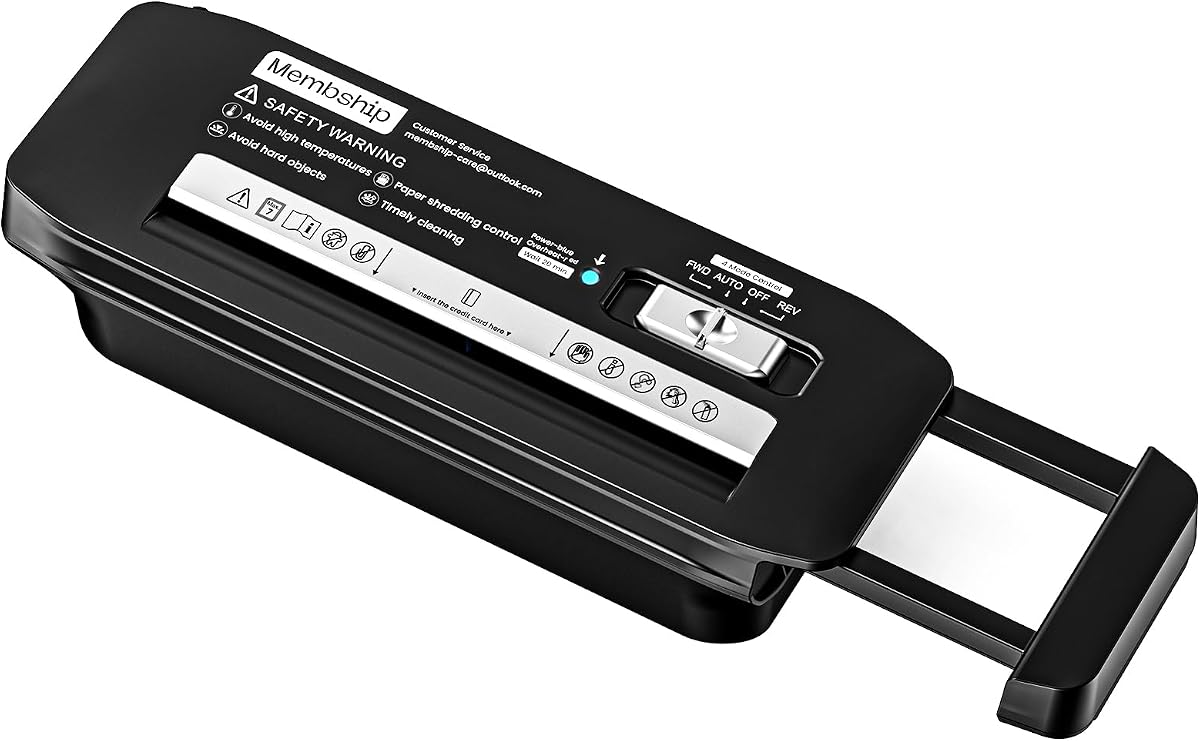
The 7-Sheet Strip-Cut Paper Shredder Without Basket for Home Office is a well-rounded compact option for users who want more operating flexibility than a basic mini shredder. It handles up to seven sheets at a time, produces narrow strips, and provides a dedicated way to process a credit card one at a time. Its basketless construction also keeps the footprint relatively small.
We may earn a commission when you buy through this link, at no additional cost to you.
This model stands out because of its five-minute continuous run time and adjustable mounting arm, which extends across basket widths from 11.22 to 17.22 inches. Auto, off, reverse, and forward modes cover common operating needs, while the overheating warning system stops operation and calls for a 20-minute cool-down. The listed jam-reduction technology adds further appeal for anyone who regularly handles mail or multi-page documents.
The strip-cut format should be considered when deciding whether the security level is appropriate. Although narrow strips make reconstructed documents more difficult, they do not provide the same concealment as cross-cut or micro-cut particles. Users handling highly sensitive records may prefer a more secure cutting system even if the machine is larger and includes a wastebasket.
Overall, this is the most balanced basketless model in the guide. It suits home offices, students, apartment residents, and small businesses that shred regularly but do not need industrial volume. Its adjustable mounting system, useful controls, and five-minute run time make it easier to live with than a very small or short-cycle model.
The extendable arm accommodates a broader range of bin dimensions than a fixed bracket. That flexibility is especially helpful for renters or shared workspaces where the available wastebasket may change.
A five-minute operating cycle offers more room for multi-page documents than shorter-cycle alternatives. It also makes the machine more practical for a home office that handles bills, receipts, and mail throughout the week.
We may earn a commission when you buy through this link, at no additional cost to you.
The Amazon Basics 8-Sheet Strip Cut Portable Paper, CD, and Credit Card Shredder combines a useful eight-sheet capacity with a genuinely basketless design. It is suited to users who regularly handle standard mail and paper but also want dedicated support for CDs, DVDs, and credit cards. The mounting arm extends as far as 16.7 inches, allowing the machine to fit over most waste baskets.
We may earn a commission when you buy through this link, at no additional cost to you.
Its feature set is more versatile than that of many compact competitors. Paper can be fed without removing staples or small paper clips, and the dedicated disc slot cuts each CD or DVD into three pieces. Auto, off, forward, and reverse controls cover operation and jam recovery, while auto start and stop reduce the need for constant supervision.
The product's stated run time is 2.5 minutes followed by a 15-minute off period. This is adequate for routine document destruction but less generous than the five-minute cycle offered by the second-ranked model. Its P-2 strip-cut security level is appropriate for many household and office records, though users with highly confidential documents may want a finer cutting style.
This shredder is an excellent choice for a home or small office seeking a no-basket format without giving up media support. It combines the highest paper capacity among the featured basketless machines with flexible bin placement and thoughtful controls. It is less suitable for high-volume document processing or extremely sensitive information.
A dedicated slot for CDs, DVDs, and credit cards expands the machine beyond paper. Users can process several material types without feeding unsuitable items into the main paper path.
The 16.7-inch extendable arm provides a long reach across many wastebasket shapes. It can make the shredder easier to position while preserving a small, basketless footprint.
We may earn a commission when you buy through this link, at no additional cost to you.
The Aurora AU800SD is a professional-style, basketless strip-cut shredder built for paper, CDs, DVDs, and credit cards. It handles up to eight sheets of 20-pound bond paper per pass and mounts over most waste baskets with an extendable arm reaching 15 inches. Its strong customer rating makes it one of the most well-regarded products in this comparison.
We may earn a commission when you buy through this link, at no additional cost to you.
Operational controls include automatic start and stop, forward jam removal, manual reverse, and thermal overheat protection. These features make it a practical choice for a home office, reception area, or small professional workspace where operators want straightforward operation without a large integrated wastebasket.
The main limitation is its strip-cut output. Narrow strips protect ordinary paperwork but provide less visual concealment than the cross-cut particles offered by the Fellowes models later in the guide. The listed product information also does not mention a dedicated card slot, so buyers wanting very specific media handling should review the current listing and manual.
Choose the AU800SD when you value a professional appearance, eight-sheet capacity, disc support, and a compact bin-mounted design. It is particularly attractive for users who want the Aurora product family without moving to a larger wastebasket-equipped model.
Automatic operation, thermal protection, and forward and reverse controls provide the type of feature set often sought in an office machine, while the basketless layout preserves valuable floor space.
Eight-sheet paper capacity and disc destruction cover the most common materials encountered in a home or small business. It is a versatile middle ground between basic paper-only models and larger cross-cut machines.
We may earn a commission when you buy through this link, at no additional cost to you.
The Suntiko 6-Sheet Strip Cut Portable Home Paper Shredder is a straightforward basketless model for basic document destruction. It can process up to six sheets at once, producing strips measuring 9/32 by 11-22/32 inches. A compact body and extendable arm allow it to sit over many common waste baskets without requiring a dedicated internal collector.
We may earn a commission when you buy through this link, at no additional cost to you.
Its four-mode control switch includes auto, off, reverse, and forward settings. Those choices help with normal operation and recovering a jam, while a red overheat indicator signals when the machine has entered its cooling state. The stated three-minute continuous run time is sufficient for intermittent household use.
Compared with the seven- and eight-sheet alternatives, this model offers less throughput and a shorter operating cycle. Its listed media capabilities are also less extensive, so it is better viewed as a dedicated paper shredder than an all-purpose document and disc destroyer. The strip-cut format remains appropriate for routine bills and mail but not for the highest security needs.
This shredder makes sense for a small apartment, dorm-style workspace, or occasional home office where low-volume use and a compact footprint matter more than handling large stacks. It offers the essential benefits of a basketless design without an extensive list of dedicated media features.
The compact body and basketless layout reduce the amount of permanent equipment occupying the desk or nearby floor. It can also be removed from the bin when it is not needed.
Forward and reverse modes give users a way to address paper-feed issues without immediately stopping the task. This is a useful convenience in a compact home-office model.
We may earn a commission when you buy through this link, at no additional cost to you.
The Aurora AU660S is a compact basketless shredder intended for general documents, credit cards, and staples. It processes up to six sheets into quarter-inch strips and uses an extendable arm to fit over most wastebaskets. Its stated dimensions of 12.99 by 5 by 2.8 inches make it relatively easy to place in a small workspace.
We may earn a commission when you buy through this link, at no additional cost to you.
A three-mode power switch, power and overheat indicators, and an extendable mounting arm cover the basic needs of a compact office shredder. Because it lacks a built-in wastebasket, the user can route shredded paper into a nearby bin and empty that container according to its own needs.
The two-minute run time is the most important limitation. Larger document sets may require several pauses, making the machine less attractive for heavy or continuous shredding. Its customer rating also trails most of the field, which may justify comparing recent feedback before choosing it over better-reviewed models with similar capacity.
The AU660S is most appropriate for someone who prioritizes compact dimensions, simple controls, and a no-basket layout over throughput or advanced media support. It can be a functional choice for occasional documents, receipts, and mail in a compact home office.
The shallow, compact form is easy to position near a suitable wastebasket. It suits users who want document destruction available without dedicating substantial floor space to a larger shredder.
Separate power and overheat indicators help show what the machine is doing. The included three-mode switch keeps operation limited and understandable.
We may earn a commission when you buy through this link, at no additional cost to you.
The Aurora Professional Strip Cut Paper Shredder is a capable eight-sheet basketless model for users who want to destroy paper, CDs, DVDs, and credit cards without adding a bulky integrated wastebasket. It mounts over most waste baskets using an extendable arm that reaches 15 inches and offers automatic start and stop operation.
We may earn a commission when you buy through this link, at no additional cost to you.
Its control set includes a forward jam-remover, manual reverse, and thermal overheat protection. These features make it a natural fit for small professional environments, home offices, or reception spaces where the machine may be used by several people. The eight-sheet feed capacity is among the strongest in the basketless group featured here.
As with other strip-cut machines, confidentiality is based on narrow strips rather than small cross-cut particles. Users should consider whether that level of destruction suits their documents. The machine also depends on the dimensions and stability of the user's wastebasket, making compatibility an important pre-purchase check.
This model is well suited to buyers who want more capacity and media flexibility than compact six- or seven-sheet alternatives. Its automatic controls, strong rating, and professional feature set make it a credible choice for regular home-office or small-business use.
Eight-sheet capacity makes this model useful for routine stacks of mail and office documents. The absence of a built-in basket preserves the space advantage sought by compact users.
Support for credit cards and optical discs broadens the range of material the machine can destroy. Dedicated handling can be more appropriate than forcing unusual items into a standard paper slot.
We may earn a commission when you buy through this link, at no additional cost to you.
The Fellowes 14C10 is not a basketless shredder; it includes a five-gallon pull-out bin designed to hold more than 250 shredded sheets. It is included in the comparison to show what a conventional home-office model offers when stronger security and greater capacity matter more than a minimal footprint. It shreds up to 14 sheets into small cross-cut particles at a P-4 security level.
We may earn a commission when you buy through this link, at no additional cost to you.
Its strengths are substantial. The machine handles paper clips, staples, credit cards, and unopened junk mail, while a safety lock helps protect children and pets. Quiet operation suits shared rooms and home offices, and a ten-minute continuous run time allows it to handle larger document projects than most basketless models in the guide.
The trade-off is obvious: the pull-out bin makes this a bulkier product that does not meet the core basketless requirement. It also shreds into cross-cut pieces rather than the narrow strips produced by the leading basketless choices. Buyers seeking a small, bin-mounted shredder may consider it too large, while those prioritizing security may find the added bulk worthwhile.
The 14C10 is best for home offices that want higher security, quiet operation, and a large internal container. It should not be considered a direct substitute for a true no-basket model, but it provides a useful benchmark for determining which feature matters more in the user's workspace.
P-4 cross-cut output produces smaller, less readily reconstructed particles than strip-cut shredding. This makes the model more appropriate for confidential home-office documents.
The five-gallon pull-out bin contains a substantial amount of shredded material. Users do not need to position a separate wastebasket beneath the machine, although the overall footprint becomes larger.
We may earn a commission when you buy through this link, at no additional cost to you.
The Fellowes Powershred 79Ci is a heavy-duty cross-cut shredder for offices and home offices that process more paper than a compact bin-mounted model can handle. It accepts up to 16 sheets at once, creates P-4 cross-cut particles, and runs for up to 20 minutes before requiring a cool-down period. A six-gallon pull-out bin includes an LED indicator to show when it is nearly full.
We may earn a commission when you buy through this link, at no additional cost to you.
The machine is built around demanding use. It handles staples, paper clips, credit cards, CDs, DVDs, and junk mail, automatically detects difficult jobs, and uses a system intended to prevent jams. SafeSense technology disables the shredder when hands or paws touch the paper opening, adding an important safety layer in busy or family-accessible spaces.
It does not satisfy the basketless aspect of the search, and its size, internal bin, and high throughput make it less portable than the top basketless models. It is better regarded as a step up in security and volume for a fixed office position. The P-4 cross-cut output is also much more secure than the strips created by most machines in this guide.
Users who shred confidential records continuously in a dedicated office should give the 79Ci serious consideration. It is less appropriate for a small apartment, temporary workspace, or anyone whose main priority is a compact device that mounts over an existing bin.
A 20-minute run time and 16-sheet capacity support larger projects. The machine is better suited to regular office workloads than short household tasks.
P-4 cross-cut particles improve document protection, while SafeSense technology addresses a common concern around moving paper-feed openings. Together they make the model suitable for shared professional environments.
We may earn a commission when you buy through this link, at no additional cost to you.
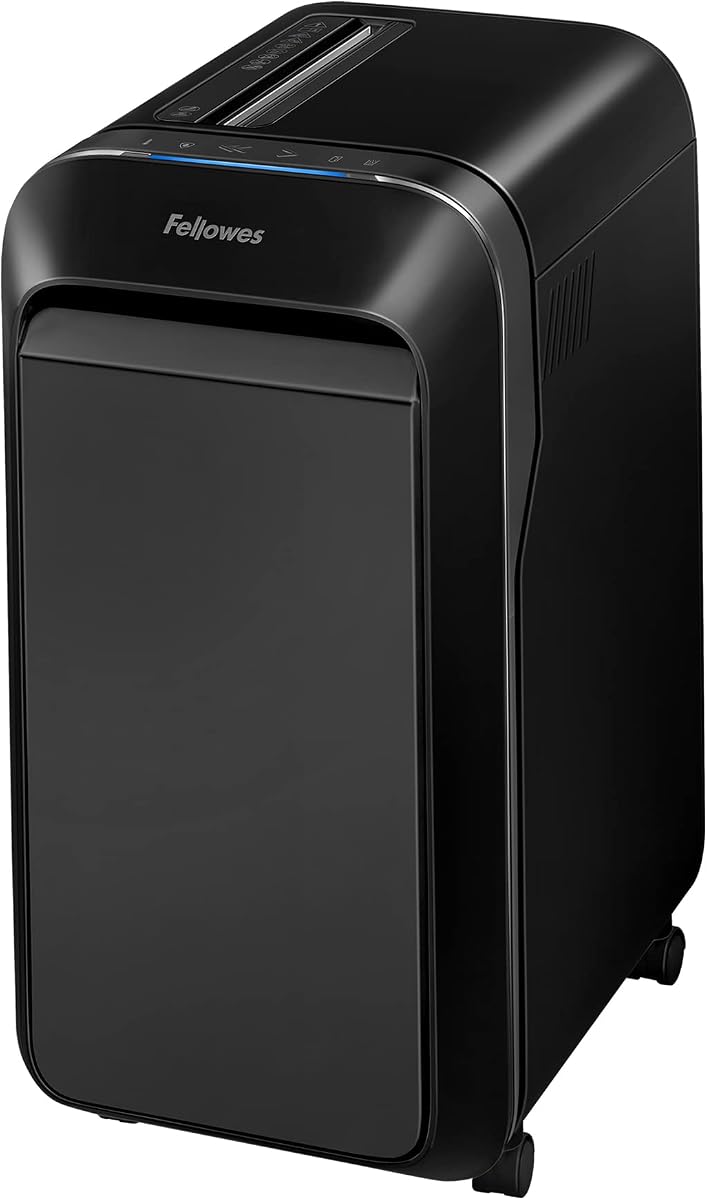
The Fellowes Powershred LX220 is the highest-capacity machine in this guide, designed to shred up to 20 sheets and run for 30 continuous minutes before a 15-minute cool-down. It uses a P-4 micro-cut system that produces approximately 1,257 particles from each sheet, offering a high level of document protection for a dedicated home or office installation.
We may earn a commission when you buy through this link, at no additional cost to you.
Operational features are unusually helpful. An efficiency meter indicates the ideal number of sheets for a load, a full indicator signals when the pull-out wastebin needs attention, and the bin can hold 750 shredded sheets. Wheels make the larger unit easier to move, while a jam-proof system is designed to detect and power through difficult work. SafeSense protection stops the machine when hands or paws approach the entry.
The decisive limitation is that the LX220 has a sizable pull-out wastebin rather than a basketless mounting system. It therefore trades away the portability and space savings sought by most readers of this guide. It is also a dedicated high-volume machine, not a lightweight model for moving between rooms or storing in a cabinet.
This shredder is ideal for organizations or individuals that handle large amounts of sensitive paperwork and have room for a permanent shredding station. If the defining priority is a compact portable unit that feeds directly into a standard wastebasket, the basketless selections near the top of the guide are more appropriate.
The micro-cut system creates a very large number of small pieces per sheet. That makes reconstruction substantially more difficult than it is with conventional strip output.
Twenty-sheet manual capacity, a 30-minute run time, and a large internal wastebin are intended for serious document-processing sessions rather than occasional household use.
We may earn a commission when you buy through this link, at no additional cost to you.
The most important choice is whether a true basketless design fits your space and waste-bin setup. Beyond that, consider cutting security, sheet capacity, runtime, jam controls, media compatibility, safety, and the overall convenience of operating the machine.
A basketless shredder sends material directly into a separate waste bin positioned beneath its mounting arm. This configuration reduces the number of large containers in the workspace, makes storage easier, and allows the user to choose a bin that matches the room. It also means checking the width, shape, and stability of the available bin before buying. A machine with an extendable arm offers more placement flexibility than a fixed mount.
In contrast, a built-in pull-out bin creates a more self-contained setup but requires additional floor space and regular emptying. Several products in this guide are conventional bin-equipped models, included to show how capacity and security change when portability is no longer the priority. A true basketless model is the better fit for the stated search.
Summary: Choose a basketless design for compact spaces, and confirm bin compatibility before purchase.
Strip-cut shredders slice paper into narrow strips. They are effective for ordinary household and office paperwork and tend to pair well with compact, basketless designs. Cross-cut and micro-cut systems create smaller pieces and provide stronger protection against reconstruction. These higher-security formats are commonly found in larger machines with built-in wastebins, although they increase the machine's size and price.
Consider the sensitivity of the documents being destroyed. Routine bills, receipts, and promotional mail may be suitable for a strip-cut model, while financial records, customer information, medical documents, or proprietary business papers warrant closer attention to the security level. A dedicated P-4 cross-cut or micro-cut system is generally the more protective choice.
Summary: Match the cutting style to document sensitivity, not merely to the machine's size.
Sheet capacity indicates how many sheets the manufacturer states can be handled at once. Basketless models in this guide commonly handle six to eight sheets, which is suitable for typical bills, mail, and small document stacks. Larger pull-out-bin machines accommodate 14 to 20 sheets per pass, making them better suited to sustained office processing.
Capacity is only one part of feed convenience. Staples and paper clips should not be assumed to pass through every shredder, and some models require dedicated slots for cards or discs. Check the feed opening, accepted materials, and whether the stated capacity refers to ordinary 20-pound bond paper. Users should avoid overloading the machine beyond its listed specifications.
Summary: Choose enough capacity for routine use without expecting to feed mixed materials through the paper slot.
Continuous runtime indicates how long the shredder can run before it stops for cooling. Basketless models listed here range from approximately two to five minutes per operating cycle, while the larger Fellowes machines offer substantially longer sessions. A longer cycle is more convenient for a large batch of documents, but it can also make a machine more appropriate for a fixed office location.
Overheat protection is essential because it prevents the motor from being damaged by excessive operation. Some models use an indicator light and a prescribed cool-down period, while others switch off automatically. Users should plan to pause when the machine reaches its limit rather than repeatedly restarting it immediately. A five-minute cycle is a good balance for many basketless home-office shoppers.
Summary: Pick a runtime that matches your batch size and always follow the cooling instructions.
Paper jams are one of the most frustrating shredder problems, particularly when thin strips or cross-cut particles are involved. Look for forward and reverse controls so a partially fed sheet can be released or repositioned. Auto start and stop features can improve convenience, while a manufacturer claiming jam-proof or jam-reduction technology may provide additional reassurance for regular users.
The controls do not eliminate the need for sensible feeding. Avoid feeding damp, warped, laminated, or excessively thick material unless the manual specifically allows it. Do not force a jam, and give the machine time to stop before trying another recovery step. A model with clear forward and reverse modes is more practical for routine use than one without them.
Summary: Look for forward and reverse functions, then follow the manual when a jam occurs.
A paper-only shredder is adequate for many homes, but credit cards, CDs, DVDs, staples, paper clips, and junk mail may require separate capabilities. Several featured basketless machines include dedicated card or disc slots. Disc slots often divide a disc into several pieces rather than reducing it to tiny particles, so those shredders should be evaluated according to the level of media destruction required.
Always use the intended slot for each material. Do not spray aerosols near a shredder, and do not place metallic cards or other unsuitable objects into a nonmetallic card slot. If the machine cannot safely process an item, the responsible alternative is to cut or otherwise destroy the item separately and dispose of it securely.
Summary: Confirm every material you plan to shred has a supported, dedicated path.
A shredder creates a moving cutting mechanism directly below its feed opening. Automatic shutoff, thermal protection, reverse controls, and physical safety locks can reduce risk. The Fellowes models include safety-oriented features such as SafeSense or a locking mechanism, while basketless models generally emphasize overheat protection and automatic stopping. Families should keep children and pets away from the feed area.
Place the unit on a stable, level surface and ensure the waste bin can support the shredder without tipping. Leave enough room above the opening for paper to be inserted safely, and keep the control switch accessible. Because a basketless shredder may be moved easily, it is important to reinstall and secure it properly whenever its position changes.
Summary: Prioritize protective controls and a stable placement over convenience alone.
Compact basketless machines are easier to carry between a desk, cabinet, and drawer than large models built around a pull-out bin. Their weight and dimensions also matter: a product can save floor space while still being awkward to carry. Check the physical dimensions, arm reach, and storage location before ordering, particularly if the shredder will be mounted only while in use.
The largest models in the comparison include wheels, but they remain designed as fixed shredding stations. For an apartment, dorm, or shared home office, a lightweight six- or seven-sheet unit is generally easier to manage. For a business with a dedicated secure room, a higher-capacity cross-cut machine may be the more practical long-term choice.
Summary: Favor a compact unit that can be carried and mounted easily, or a dedicated machine for a fixed office.
Begin by selecting a stable waste bin and checking the mounting arm's stated width range. Extend the arm only as far as the manufacturer permits, then position the shredder securely over the bin. Review the control labels, locate the power and overheat indicators, and make sure the feed slot is clear before switching the machine on. A simple test with a single sheet can confirm that the paper travels into the bin correctly.
Feed only the number of sheets listed for the machine, keeping documents flat and aligned with the entry slot. Allow each sheet to finish before adding another unless the stated capacity covers the full load. Use dedicated slots for cards, discs, staples, or paper clips whenever the manufacturer provides one. If paper catches, stop the shredder and use the reverse or forward function according to its manual rather than pulling the sheet out by hand.
Empty the separate waste bin regularly, especially if shredded material begins to approach the cutting area. Follow the prescribed cool-down after an overheat shutdown, and never bypass thermal protection. Clean the exterior with a dry or lightly damp cloth only after unplugging the unit, while avoiding sprays and keeping liquids away from the feed opening. If noise, pulling, or repeated jams appear, stop using the machine and consult the manual or customer service.
It is a shredder that does not include a built-in wastebasket. Instead, it mounts over a separate bin and drops shredded material directly into that container. This can reduce the amount of space occupied by a full-size shredder and gives the user control over the type and size of the receiving bin.
Compare the bin's width and shape with the shredder's stated mounting range, which is often measured from the minimum arm length to the maximum extension. Also check that the bin is stable and tall enough to keep shredded paper inside. A wider adjustment range generally makes the shredder easier to position across different bin designs.
Strip cutting is generally more protective than leaving documents intact, but it is less secure than cross-cut or micro-cut shredding. For ordinary household and office records, it may be sufficient when strips are short. For highly sensitive information, a P-4 cross-cut or micro-cut machine offers stronger protection against reconstruction.
A basketless shredder sends paper into a bin you provide, while a pull-out-bin model stores strips inside its own removable container. The basketless format is usually more compact and flexible, whereas pull-out-bin models often provide greater capacity, finer cutting, and longer run times. Three products in this comparison use pull-out bins and should not be mistaken for basketless designs.
Some models can, but not all of them. Several featured shredders include a dedicated credit card slot, and a few also accept CDs and DVDs. Always follow the manual, use the designated slot, and avoid feeding metallic cards into a slot intended for nonmetallic cards. Discs may be cut into several pieces rather than micro-cut.
Turn off the machine and use its reverse or forward control as directed in the manual. Do not pull a partially shredded sheet out by hand, and do not keep restarting a machine that has entered its cooling period. If the jam persists, unplug the unit and follow the troubleshooting instructions or contact the manufacturer.
Empty it before shredded paper reaches the cutting area or begins to block the output path. Checking it after each substantial shredding session is a good habit, while lighter users may need to check less frequently. Because the bin belongs to the user, its capacity and emptying routine are under your control.
They are included in the comparison as conventional pull-out-bin shredders rather than true basketless products. The Fellowes 14C10, Powershred 79Ci, and Powershred LX220 may suit buyers who prioritize higher security, larger paper capacity, or longer run times over a compact footprint. Buyers focused on portability should prioritize the true basketless models.
The 7-Sheet Strip-Cut Paper Shredder Without Basket for Home Office stands out as the most balanced overall choice because it combines a five-minute run time, four operating modes, an adjustable arm, and a compact basketless design. The Amazon Basics 8-Sheet model is the feature-rich alternative for people who also need CD and DVD support, while the EXTRIC model offers a budget-oriented approach to the same space-saving format.
Prioritize bin compatibility, sheet capacity, runtime, and paper-jam controls when choosing a basketless shredder. Most buyers will also need to decide whether strip-cut output is appropriate or whether the stronger security of a cross-cut machine justifies its larger body and built-in wastebin. The right choice depends more on the user's documents and available space than on any single specification.
Before ordering, confirm the current listing details, dimensions, accepted materials, and operating instructions because features and availability can change. Comparing the current product page with the guide's specifications will help ensure that the chosen model still fits the intended bin, document-security needs, and routine workload.