
MAYFLASH F500 Arcade FightStick
4.0Editor score
Broad multi-platform compatibility
Includes PS5 Magic Boots
Wired connection for PS5
Turbo functions with speed settings
Our Arcade Stick for PS5 guide compares ten wired, wireless, budget, and premium fight sticks, helping you choose the right controls for PS5 fighting games.
An arcade stick for PS5 can transform fighting-game sessions by replacing a compact gamepad with full-size buttons, a stable joystick, and a broad control panel. The best model depends on your preferred inputs, available desk space, portability needs, and interest in customizing the setup.
This guide compares ten sticks using the supplied compatibility details, control hardware, connection methods, customization features, and user ratings. It covers licensed tournament models, wireless and wired options, leverless designs, and packages designed to make PlayStation 5 fighting games more accessible.
Each review explains what the stick offers and whom it suits, while the comparison table highlights the main differences. Ratings and availability can change, and prices fluctuate, so confirm the current listing and platform requirements before making a final purchase.
4.0Editor score

4.6Editor score

4.2Editor score
The table below compares all ten sticks by connection style, control hardware, customization, and platform support. It highlights the quickest way to identify the right option for a traditional joystick setup, a wireless fighting setup, or a fully leverless design.




The HORI PlayStation 5 Fighting Stick Alpha is a strong all-around recommendation for players who want a full-size joystick setup with official Sony licensing. Its 4.6 rating is among the strongest in this roundup, and the combination of Hayabusa controls, a tournament-oriented layout, and PS5, PS4, and PC compatibility makes it especially appealing to dedicated fighting-game fans.
We may earn a commission when you buy through this link, at no additional cost to you.
Its main strength is the balance between control hardware and serviceability. Hayabusa buttons and joystick deliver the kind of hardware associated with competitive-oriented sticks, while the openable case supports easy customization and maintenance. A replaceable top panel adds visual flexibility, allowing the stick to reflect a favorite character or simply look cleaner as the player's setup evolves.
The primary compromise is its focus on a fixed, wired configuration. That is entirely normal for a traditional fight stick and can be a benefit for consistent connections, but it does not provide the convenience of wireless play. Buyers who need to move between locations regularly or share one system among players may want to consider a wireless model instead.
Overall, this is a compelling pick for someone who wants a dependable PS5 arcade stick without a leverless learning curve. It offers the essential qualities most players notice—solid controls, broad platform support, and easy access to the internals—making it a strong first stop for anyone building a serious fighting setup.
The dedicated Hayabusa button and joystick package gives players large, consistent inputs intended for fast execution. That makes the Alpha well suited to directional shortcuts, repeated strikes, and games where precise timing matters more than portability.
The case opens for straightforward access, while the replaceable top-panel artwork makes visual updates easy. Players who plan to change parts, alter the appearance, or perform maintenance have a more convenient foundation than a sealed design.
We may earn a commission when you buy through this link, at no additional cost to you.
The Nacon Daija Arcade Fight Stick stands out as the most feature-oriented premium option here. Its 4.2 rating is respectable, and the product was developed with professional gamers in mind for major fighting titles. Official PlayStation licensing, a full control panel, and support for PS5, PS4, and PC make it a strong fit for a polished home setup.
We may earn a commission when you buy through this link, at no additional cost to you.
Configurability is the defining feature. The supplied software allows buttons to be configured and game profiles to be created on PC or Mac. Players can also switch between two joystick heads, customize the front plate with one of three options or a supplied template, and use the lock function to prevent accidental button presses from interrupting a match.
Comfort and practical extras are handled well. A textured palm rest supports longer sessions, while the 3.5 mm audio jack allows a competition-grade headset to connect directly. The package includes a detachable USB-A-to-USB-C cable, both joystick heads, and two tools for customization, reducing the need to source setup accessories separately.
This Daija is most appropriate for a player who values extensive configuration and a premium presentation rather than the lowest possible cost. It may feel like more than a beginner needs, but for someone building a versatile fight-stick station or frequently changing games, its controls, software, and accessory bundle justify the premium positioning.
Dedicated software lets players assign inputs and create profiles for different fighting games. This is particularly useful when switching between games with different control requirements or when a player wants to preserve a preferred layout for each title.
The textured palm rest is designed to stabilize the hands during extended sessions, while the lock function guards against accidental inputs. Together, they show attention to comfort and competitive reliability rather than basic functionality alone.
We may earn a commission when you buy through this link, at no additional cost to you.
The MAYFLASH F700 is an attractive choice for PS5 players who want more connection freedom than a conventional wired stick provides. It has a 4.5 rating and supports Bluetooth, a 2.4 GHz receiver, and wired USB, allowing it to adapt to different setups while remaining centered on fighting games.
We may earn a commission when you buy through this link, at no additional cost to you.
The platform list is extensive for a stick in this category. It supports PS5 and PS4 fighting games, along with Switch, Windows, Apple devices, Android, Steam Deck, and several mini consoles. On PS5, PS4, and PC with XInput, wired headset support can handle background music and online chat. Turbo functions also provide several speed settings.
The most important limitation is explicit rather than hidden. The F700 is intended for fighting games and does not support other game genres, and it is not compatible with Xbox Series or Xbox One systems. Players who need one controller for every console and game type should choose the F500 or a licensed stick with broader use.
For a player who plays fighting games on PS5 and appreciates wireless placement options, the F700 offers a compelling combination of flexibility, platform reach, and customization potential. Its support for standard Sanwa Denshi buttons and joysticks also makes it more attractive to players who may eventually want to upgrade individual components.
Bluetooth is useful for a cable-free PS5 setup, the included 2.4 GHz receiver offers another wireless route, and wired USB provides a direct alternative. A hidden compartment stores the receiver when it is not in use.
The F700 works across PC, Apple, Android, Nintendo platforms, and the PS5, with additional support for several mini consoles. Its broad reach is valuable for players who rotate between fighting games on more than one system.
We may earn a commission when you buy through this link, at no additional cost to you.
The Qanba N3 Drone 2 combines official Sony licensing with a traditional joystick layout and recognizable fighting-game components. Its 4.5 rating indicates strong user reception, while compatibility with PS5, PS4, and PC covers the core platforms for most console fighting-game players.
We may earn a commission when you buy through this link, at no additional cost to you.
The supplied control hardware is a major part of its appeal. It includes Qanba 30 mm B30 buttons and a Qanba OV7 joystick with an OMRON switch, giving players large face buttons and a conventional directional input. A full control panel and touchpad support functions that a basic six-button stick would not replicate as faithfully.
Audio convenience is another point in its favor. The 3.5 mm microphone input includes a mute control, useful for online sessions where players want a quick way to manage voice communication. It is a more complete control surface than a barebones stick focused solely on fighting inputs.
This is a sensible recommendation for someone who prefers a joystick and wants a licensed, full-featured PS5 control panel. The lack of wireless support and narrower platform list mean it is less flexible than the MAYFLASH models, but its directness and full-size layout make it compelling for a dedicated PlayStation fighting setup.
The full control panel, touchpad, 30 mm B30 buttons, and OV7 OMRON switch joystick cover the controls players expect from a conventional arcade stick. This makes it easier to use a single stick for fighting and supported PlayStation navigation.
As an officially licensed Sony peripheral, the N3 Drone 2 is aimed directly at PlayStation owners. The specified Qanba components also give players clear expectations about the physical controls they will be using.
We may earn a commission when you buy through this link, at no additional cost to you.
The MAYFLASH F700 Elite is a particularly complete wireless fight stick, earning a 4.6 rating that matches the strongest score in this guide. It retains the F700's connection flexibility and broad platform support but adds a full set of premium Sanwa components and a large anti-slip mat.
We may earn a commission when you buy through this link, at no additional cost to you.
The control package includes eight responsive Sanwa buttons and a precision four-way joystick. That gives the stick a more refined starting point than a bare-bones unit and reduces the need for immediate upgrades. The included mat also helps the chassis remain stable on a desk, which is valuable during fast directional inputs and repeated button presses.
Like the standard F700, the Elite supports Bluetooth, 2.4 GHz wireless, and wired USB. It works with PS5 and PS4 fighting games, PC, Apple systems, Android, Switch platforms, Steam Deck, and other supported devices. PS5, PS4, and XInput PC modes can route wired headset audio for music and chat, and adjustable turbo functions are included.
The Elite is an excellent choice for a player who wants wireless freedom without settling for basic controls. Its limitations are the same as the F700's: it is designed for fighting games and does not support Xbox consoles. Subject to those constraints, the stronger Sanwa package and anti-slip foundation make it a particularly well-rounded recommendation.
Eight Sanwa buttons and a four-way joystick provide a substantial, familiar control layout. Players can begin with the supplied hardware and decide later whether their preferred parts or setup demands upgrades.
The full-size anti-slip mat helps keep the stick from shifting during intense matches. Combined with three connection methods, it creates a flexible setup that can move between cable-free and direct wired use.
We may earn a commission when you buy through this link, at no additional cost to you.
The MAYFLASH F500 Arcade FightStick is the budget-focused recommendation here, offering a practical path from gamepad controls to full-size fighting inputs. Its 4.0 rating is the lowest in the group, but the broad platform support and included Magic Boots make it a useful option for new or cost-conscious players.
We may earn a commission when you buy through this link, at no additional cost to you.
The bundle is designed to simplify PS5 and PS4 use. Magic Boots allow the stick to be connected without keeping an original PS4 or PS5 controller plugged in. The system also supports a large collection of consoles, PC environments, Steam Deck, Raspberry Pi, and Android, with XInput and DInput support for PC.
There are platform-specific requirements to consider. A wired Microsoft Xbox 360 or Xbox One controller is required when using the F500 with Xbox 360 or Xbox One consoles, while Xbox Series X/S support is also listed. Headset support for music and online chat is available for PS4 and Xbox One or Xbox One S, and adjustable turbo functions are included.
This is the best pick for someone who wants to try an arcade stick without committing to a high-end licensed model. It does not lead on user rating, premium materials, or wireless convenience, but it covers the essential PS5 experience while extending to many other systems. For a first full-size fight stick, that combination is difficult to overlook.
The included Magic Boots remove the need to route PS5 or PS4 input through an original controller. That keeps the setup more direct and makes the package easier for newcomers to understand.
Support extends across current and older consoles, PC, Steam Deck, Raspberry Pi, and Android. A few Xbox configurations require an additional wired controller, but the overall reach is extensive for an entry-level package.
We may earn a commission when you buy through this link, at no additional cost to you.
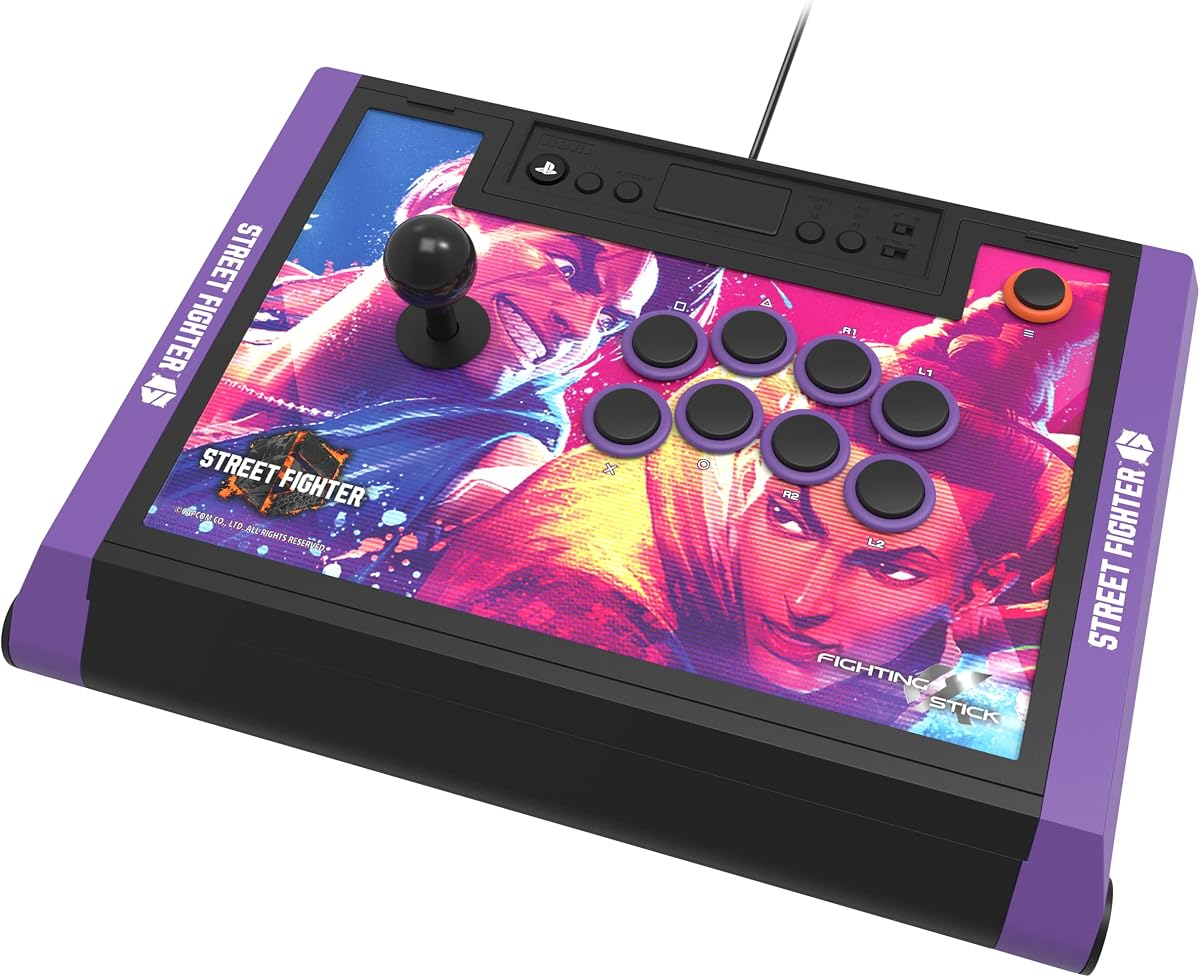
The HORI PlayStation 5 Fighting Stick Alpha Street Fighter 6 Edition is ideal for a player who wants official PlayStation hardware and a strong Street Fighter theme. Its 4.5 rating reflects solid user reception, while the licensed Sony and Capcom design gives the package a clear identity beyond a generic control box.
We may earn a commission when you buy through this link, at no additional cost to you.
The included customization is a defining feature. Owners receive a link to 18 downloadable, high-resolution images featuring Street Fighter 6 characters, allowing the top panel to be refreshed with preferred artwork. The chassis opens for customization and maintenance, so the visual options fit into a platform that is also designed to be worked on.
Input performance comes from HORI's proprietary HAYABUSA buttons and HAYABUSA joystick. The stick is compatible with PS5, PS4, and PC, and its designation as a tournament-ready fight stick makes it a logical fit for the same audience that values larger buttons and a traditional lever.
This edition is a particularly good fit for Street Fighter 6 players who want their arcade setup to reflect the game. Players who do not care about the theme can still benefit from the licensed hardware and openable design, although other Alpha editions may be more visually aligned with their favorite fighter.
The supplied collection of downloadable high-resolution Street Fighter 6 images makes changing the top panel easy. Players can select a favorite character or refresh the look whenever the mood or setup changes.
Official licensing from Sony and Capcom pairs the themed presentation with recognized controller components. HAYABUSA buttons and joystick supply the traditional inputs expected by fighting-game players.
We may earn a commission when you buy through this link, at no additional cost to you.
The Qanba Q7 Obsidian 2 is a polished, officially licensed fight stick designed for PS5, PS4, and PC. Its 4.3 rating sits in the middle of the group, and the platform switch, full control panel, and interchangeable joystick tops make it easy to recommend for players who want a straightforward traditional design.
We may earn a commission when you buy through this link, at no additional cost to you.
Its controls include Qanba 30 mm OBSF buttons and swappable Sanwa JLF joystick tops. Having different top shapes available gives players a way to tune the directional feel to their preferences, while the large action buttons suit standard fighting-game layouts. A touchpad and dedicated platform switch make it feel more like a complete PlayStation controller than a stripped-down stick.
Voice-chat convenience comes from the 3.5 mm microphone input and mute control. This is a useful feature for online matches because it allows quick control of the microphone without navigating through console menus. The wired connection and explicit three-platform focus keep the design uncomplicated.
The Q7 Obsidian 2 suits someone who prefers a joystick, appreciates official PlayStation hardware, and wants more control-surface options than a minimal stick. Its rating is not the highest here, and the lack of wireless connectivity limits flexibility, but the physical controls and platform controls are well matched to the needs of many PS5 fighting-game players.
Swappable Sanwa JLF tops let players choose a directional feel that matches their preferences. That flexibility is useful for anyone uncertain whether a rounded, shorter, or more pronounced top suits their play style.
The full panel, touchpad, and selectable PS5, PS4, and PC modes cover both fighting inputs and common PlayStation functions. A microphone input with mute control adds straightforward online-chat management.
We may earn a commission when you buy through this link, at no additional cost to you.
The HORI PlayStation 5 Fighting Stick Alpha TEKKEN 8 Edition is a top-rated traditional stick, carrying a 4.6 user rating. It is officially licensed by Sony and Bandai Namco Entertainment, supports PS5, PS4, and PC, and combines the TEKKEN 8 visual theme with HORI's HAYABUSA buttons and joystick.
We may earn a commission when you buy through this link, at no additional cost to you.
The strongest non-control feature is its artwork system. The stick ships with TEKKEN 8 top-panel artwork and offers downloadable alternate artwork to print. That gives buyers a way to personalize the stick while retaining a coherent official design, especially attractive for someone whose main fighting game is TEKKEN.
The underlying hardware follows the familiar Alpha formula. The case opens for customization and maintenance, allowing players to access the internal components when needed. A tournament-grade layout and the HAYABUSA control package target players who prefer substantial buttons and a conventional lever over a leverless arrangement.
The wired design and thematic focus are the main limitations, but neither is a flaw for the right buyer. This edition is a compelling recommendation for a TEKKEN enthusiast who wants licensed PS5 hardware, polished presentation, and competitive-style controls without changing to a wireless or leverless layout.
TEKKEN 8 top-panel artwork gives the stick a distinctive licensed appearance. Downloadable alternate artwork expands the options and makes it simple to refresh the panel with a preferred design.
HAYABUSA buttons and joystick deliver the physical feel expected from a tournament-oriented arcade stick. The openable chassis allows maintenance and customization while retaining a familiar lever-based format.
We may earn a commission when you buy through this link, at no additional cost to you.
The GuileKeys GK-18 is the only leverless design in this roundup, and it offers a very different proposition from the traditional sticks. Its 4.3 rating reflects steady user interest, while the 18-key layout, hot-swappable switches, RGB lighting, and OLED screen make it the most feature-dense customization option here.
We may earn a commission when you buy through this link, at no additional cost to you.
The all-button approach replaces joystick movements with four-direction keys, reducing the need for circular stick motion. Kailh Choc low-profile switches provide short pre-travel and fast response, while the RP2040 chip and GP2040-CE firmware support sub-1-millisecond input latency according to the supplied product information. The layout accommodates complex button combinations without crowding the fighting controls.
Customization extends across five input modes, adjustable turbo, M1 and M2 macro keys, tournament lock, web configuration, RGB effects, the startup screen, and swappable keycaps. The OLED display shows the active input mode and layout, which makes it easier to verify the current configuration before entering a match.
The critical caveat is PS5 compatibility. The listed native systems include Windows 10 or later, Steam Deck, PS3, PS4, Switch, and Android, but PS4 and PS5 use require an additional arcade stick converter. Players whose main goal is direct PS5 plug-and-play use should choose a conventional stick; everyone else can benefit from the GK-18's flexible, highly programmable leverless layout.
The expanded all-button layout gives players more directional keys than a traditional six-button fight-stick layout. This creates room for complex combinations and gives the controller a distinctly different feel.
Hot-swappable switches and keycaps make changes much easier than soldering-based modifications. The web configurator, OLED display, macro keys, multiple input modes, and extensive lighting options support a highly individualized setup.
We may earn a commission when you buy through this link, at no additional cost to you.
Choosing an arcade stick for PS5 involves balancing input style, platform support, connection method, physical controls, and customization. The most important step is deciding how you want to play, then checking that the chosen model supports your games, setup, and future plans.
A joystick fight stick uses a lever for directional movement, which many traditional fighting-game players find intuitive and dependable. It also closely resembles an arcade cabinet, making it a natural choice for games built around circular motions, quarter-circle commands, and precise directional transitions. A leverless controller replaces the lever with direction keys, which can make some motions easier to perform while requiring players to adapt to a keyboard-like layout. The GuileKeys GK-18 is the only leverless model here, and it also requires an additional converter for PS5 use.
Choose a joystick if you want the familiar arcade format or plan to use many standard fight sticks. Choose leverless if you prefer direct directional keys or want extensive layout, lighting, and macro customization.
Every stick in this guide can serve PS5 fighting-game players, but the connection method is not identical. The HORI, Qanba, Nacon, and standard F700 models are presented as straightforward fight sticks for PS5, while the F500 includes Magic Boots designed to let players connect without an original PS4 or PS5 controller. The GK-18 is compatible with PS5 only after adding the appropriate arcade stick converter. Always verify that the exact product version includes the required adapter, cable, or accessory.
Direct plug-and-play behavior is usually more convenient. Confirm the platform mode, included cable, and current PS5 fighting-game support before ordering.
Wired sticks provide a stable, consistent route and are common in dedicated fighting setups. Wireless options can make a shared living-room arrangement easier because the controller does not need a cable running to the console. The MAYFLASH F700 and F700 Elite support Bluetooth, 2.4 GHz, and wired USB, giving them the greatest placement flexibility in the group. Wireless operation still needs careful setup, and the products may require firmware updates for particular platforms or modes.
Choose wired for a stationary setup and fewer connection variables. Choose wireless if moving the stick between couches, desks, or systems is a priority.
Traditional fighting sticks commonly use six or eight action buttons, with larger sizes allowing different finger positions. The N3 Drone 2 and Q7 Obsidian 2 include full control panels and touchpads, while the HORI Alpha models focus on a dedicated fighting layout. The MAYFLASH F700 Elite includes eight Sanwa buttons and a four-way joystick, making its supplied control package particularly substantial. Check whether you need PlayStation navigation functions as well as standard fighting inputs.
Prioritize the layout that matches your preferred fighting games. A full panel is useful for system access; a focused fight-stick layout is simpler at the table.
The supplied switch and joystick quality can influence how a fight stick feels and how much maintenance it may need. Recognized components mentioned in the supplied data include Hayabusa controls on the HORI Alpha, Sanwa controls on the Nacon Daija and MAYFLASH F700 Elite, Qanba B30 buttons and an OV7 OMRON switch joystick on the N3 Drone 2, and Qanba OBSF buttons with swappable Sanwa JLF tops on the Q7 Obsidian 2. The standard F700 is compatible with Sanwa Denshi buttons and joysticks for future customization.
Included quality matters if you want a ready-to-play setup. Upgradability matters more if you already know which parts and directional feel you prefer.
Customization can mean changing artwork, remapping buttons, creating game profiles, changing macros, or replacing physical components. The Daija offers software remapping and game profiles along with interchangeable joystick heads and a customizable plate. The HORI Alpha models open for maintenance and support downloadable or replaceable artwork. The GK-18 goes furthest in digital customization, with five modes, macros, a web configurator, RGB controls, an OLED display, and hot-swappable switches and keycaps.
Choose based on the type of customization you will actually use. Maintenance access and artwork options are practical; software and hardware modifications suit enthusiasts who enjoy tuning their equipment.
A fight stick needs to remain stable during fast inputs, and long sessions are more comfortable when the hands have support. The F700 Elite includes a full-size anti-slip mat, while the Nacon Daija has a textured palm rest. Other considerations include cable length, whether the cable detaches, and whether tools for changing parts are included. The Daija includes a three-meter detachable USB-A-to-USB-C cable, two joystick heads, and two tools. Headset ports and microphone mute controls are valuable for online play.
Check desk space and comfort before finalizing. Stable feet, a palm rest, and manageable cabling can matter as much as the headline control specifications.
Some sticks are general-purpose controllers, while others are expressly limited to fighting games. The F700 and F700 Elite warn against using their full capabilities for other game types and are not compatible with Xbox consoles. The GK-18 supports several platforms but requires a converter for PS4 and PS5. If you want one device for role-playing games, shooters, and fighting games, the F500's broad support may be more practical. If your library is focused on Street Fighter, TEKKEN, Mortal Kombat, or similar titles, a dedicated stick offers a more specialized layout.
List your most-played games before choosing. Ensure the stick supports both the titles and the functions you expect to use on PS5.
Begin by placing the stick on a stable, level surface with enough room for your forearms. Connect it using the supplied cable or required adapter, select the appropriate PS5 mode if the hardware offers one, and turn the console on before launching a fighting game. For wireless models, complete the requested Bluetooth or receiver pairing and update any specified firmware before expecting every platform mode to work.
When a game launches, verify the control mapping through the game's input settings. Assign actions to the face buttons, directional stick, and any auxiliary controls you want to use. If a stick supports software remapping or game profiles, create a separate profile for each title so layouts remain consistent without manual changes. Use the lock or tournament-lock function during matches when accidental menu presses would be disruptive.
For maintenance, unplug the stick before opening the case or changing components. Keep the panel and button surfaces free of dust and sticky residue, tighten loose hardware gently, and inspect cables for bending or damage. If you use the GK-18, take advantage of hot-swappable switches and keycaps rather than forcing parts into place. Store wireless sticks in a dry environment and avoid leaving the 2.4 GHz receiver loose in a bag.
It depends on the model. The MAYFLASH F500 bundle includes Magic Boots and is described as allowing PS5 and PS4 use without an original controller plugged in. Other sticks generally connect through their own cable or approved adapter, while the GuileKeys GK-18 requires an additional arcade stick converter for PS5. Check the compatibility instructions for the exact listing before buying.
Wireless sticks offer more flexibility in where you place the controller and can reduce cable clutter. Wired sticks avoid wireless pairing variables and can be simpler for a permanent station. The MAYFLASH F700 and F700 Elite support Bluetooth, 2.4 GHz, and wired modes, allowing you to choose based on the situation.
A leverless controller can work well for fighting games, but the GK-18 requires an additional converter for PS5 compatibility. Players also need to adjust to its 18-key direction layout. Traditional joystick sticks may be easier for beginners because their controls more closely resemble familiar arcade cabinets.
Both support Bluetooth, 2.4 GHz, and wired connections, and both focus on fighting games rather than general-purpose console play. The Elite includes eight Sanwa buttons, a precision four-way joystick, and a full-size anti-slip mat, giving it a more substantial supplied control and stability package.
The HORI Fighting Stick Alpha Street Fighter 6 Edition is a thematic choice with official Sony and Capcom licensing, HAYABUSA controls, and 18 downloadable character images. Players who prioritize the licensed design will likely appreciate it, although other sticks in the guide also support PS5 fighting games and offer strong customization.
Some traditional sticks with full PlayStation control panels can handle more than fighting games, while the F700 and F700 Elite are explicitly designed only for fighting games. The F500 supports a much broader range of console and PC uses. Always review the model's stated restrictions and confirm the required navigation controls are present.
Start with your preferred input style, then verify PS5 compatibility, connection method, included buttons, and joystick type. Stability, palm support, customization options, and headset features can also affect long-term comfort. The best choice is the model that matches your games and habits rather than simply the one with the most features.
It is wise to check the manufacturer's instructions and update to the specified firmware when connecting to a new platform or mode. In particular, the MAYFLASH listing states that a firmware update is needed for Switch 2 Bluetooth support. Keeping firmware current can also help with platform or control compatibility changes.
The best overall traditional option is the HORI PlayStation 5 Fighting Stick Alpha, thanks to its 4.6 rating, official Sony licensing, Hayabusa controls, and openable, customizable design. The MAYFLASH F500 is the practical budget choice for newcomers or multi-platform players, while the Nacon Daija is the premium pick for users who prioritize remapping, game profiles, interchangeable joystick heads, and a refined accessory bundle.
Players should prioritize the experience they want rather than a feature checklist. A wired joystick stick may be ideal for a dedicated station, a wireless model may suit a shared space, and the GuileKeys GK-18 may appeal to leverless fans who value deep customization and are comfortable obtaining the required PS5 converter. Confirm platform support and control layout before ordering.
Ratings, product availability, and prices change over time. Check the current Amazon listing, included accessories, and platform requirements at the point of purchase so that the model you choose still offers the features and compatibility you need.