
Zodzi Manual Embossing Label Maker
4.2Editor score
No batteries or ink required
Includes three embossed tape rolls
Compact 3D embossing output
This guide compares the best plastic label maker machines, covering print styles, tape options, portability, display features, ease of use, and organization
A plastic label maker machine turns everyday containers, folders, cables, and stored belongings into a neatly organized system that is easier to identify and maintain. The best models balance clear printing, convenient controls, suitable tape compatibility, and simple upkeep, whether you need a compact household tool or a more expressive desktop unit.
The products in this guide were compared using the supplied specifications, customer ratings, included accessories, and stated capabilities. The list covers manual embossing machines, keyboard-based handheld models, display-equipped organizers, app-connected devices, and compact desktop label makers designed for home, office, school, craft, or workshop use.
Each review explains the product's strongest benefits, practical limitations, ideal use cases, and most suitable buyer. Ratings reflect the supplied customer feedback and may change over time. Product prices and deal conditions also fluctuate, so readers should confirm current availability, tape costs, and compatibility before purchasing.
4.2Editor score

4.6Editor score
4.3Editor score
This side-by-side comparison highlights each machine's operating method, creative controls, tape system, portability, and most practical strengths, helping buyers identify the label maker that best matches their organization style.


The Zodzi Manual Embossing Label Maker is an uncomplicated, ink-free machine designed for short, decorative labels. It holds a 4.2 customer rating and stands out for its straightforward turn-and-press operation, portable size, and included black, red, and blue embossed tape. It is especially appealing to buyers who want a useful labeling tool without a screen, batteries, charging, or app setup.
We may earn a commission when you buy through this link, at no additional cost to you.
Its character wheel contains 48 choices, covering the English alphabet, numerals, common punctuation, and a space. A four-line calibration system is intended to support accurate alignment, while the built-in cutter and pre-cut dividers simplify removing each label. The supplied tape is described as wear resistant, water resistant, oil resistant, fade resistant, and suitable for indoor or outdoor use.
The main compromise is the limited interface. Each character must be selected on a rotary dial, and the product information recommends applying firm, sustained pressure for clearer results. Spaces around words can improve the appearance of short labels, but repeated manual selection becomes less efficient than typing on a keyboard. It is therefore better suited to occasional, brief labels than long descriptive text.
Choose this Zodzi model for small homes, classrooms, craft tables, storage drawers, toolboxes, and quick organization projects. It is a strong budget option for short labels, especially for users who value the vintage appearance and zero-power operation. People who routinely create long names, detailed inventory records, or frequent batches should consider a keyboard-based electronic model instead.
The complete rotate, press, and cut workflow means the machine can be used wherever a clear surface is available. It avoids batteries, ink cartridges, charging, device pairing, and downloaded software, making setup unusually simple.
Embossed tape produces a raised, retro appearance that works well for jars, bins, craft materials, school items, photo albums, and decorative storage labels. Multiple tape colors add visual separation without requiring electronic formatting controls.
We may earn a commission when you buy through this link, at no additional cost to you.
The EazeID Vintage Embossing Label Maker combines nostalgic styling with a practical manual mechanism. Its 4.0 customer rating reflects an uncomplicated approach: turn the dial to choose a character, press the handle, and remove the finished label. The kit includes embossed tape and is positioned for scrapbooking, school supplies, photo albums, and general household organization.
We may earn a commission when you buy through this link, at no additional cost to you.
The machine offers 48 embossing characters, including the full English alphabet, numbers, and a useful selection of punctuation. Its ergonomic handle is designed for comfortable pressing, while a built-in cutter and dotted dividers help separate labels cleanly. The included 9mm tape is described as waterproof, oilproof, wear resistant, and fade resistant, with strong adhesion and residue-free removal.
Like other rotary embossers, it is less efficient for extensive text. The product guidance emphasizes pressing firmly and making sure the selected character is centered in the indicator. This requirement gives the operator more control than a basic stamp, but it can produce inconsistent results for inexperienced users who do not develop a consistent technique.
This model is most appropriate for short decorative labels, classroom identification, scrapbook embellishments, and compact organization systems. It also suits anyone who prefers tactile, ink-free tools over screens and electronic menus. Buyers who need multilingual characters, extensive symbols, barcode support, or rapid high-volume labeling should look toward a more advanced electronic machine.
The raised lettering and vintage character dial suit scrapbooks, journals, photo albums, and personalized craft storage. Its appeal comes from the physical production process rather than digital templates or color printing.
At 149g and without a power source, the machine is easy to pass around a classroom or carry to another room. The straightforward controls also make it approachable for children and older adults.
We may earn a commission when you buy through this link, at no additional cost to you.
The Brother P-Touch PTD210 is the most versatile general-purpose model in this guide. It carries a 4.6 customer rating and combines easy-to-access one-touch keys with a display that previews labels before printing. That balance makes it a strong choice for household organization, office filing, school materials, clothing storage, and many other everyday labeling tasks.
We may earn a commission when you buy through this link, at no additional cost to you.
Creative controls include 10 styles, 14 fonts, 98 frames, more than 600 symbols, and 27 templates. The machine supports 12mm, 9mm, 6mm, and 3.5mm tapes, allowing users to match label width to the available space. Its bundle includes one sample and three full-length black-on-white tapes, while Brother TZe laminated options are described as water resistant, fade resistant, and suitable for demanding kitchen environments.
The PTD210 uses six AAA batteries, which are sold separately. A desk-based setup can instead use the optional AD-24 power adapter, and the optional protective case can hold the machine, batteries, and extra tapes. These optional accessories are worthwhile for frequent users but are not essential for occasional portable labeling. The lack of included batteries is the clearest drawback for a first-time buyer.
This is the best general choice for someone who wants more than plain text without moving into app-based design. The preview display helps avoid wasted labels, while the broad style and symbol library supports both practical and decorative work. It is particularly well suited to people who already use Brother TZe supplies or want one machine capable of producing several tape widths.
Fonts, frames, symbols, and templates are accessible through the physical controls, so basic creative labeling does not require a phone or computer. This keeps the machine versatile while avoiding a learning curve based entirely on software.
Support for four tape widths lets users label small files, cords, containers, drawers, and larger storage items with one device. This flexibility is particularly useful in mixed home and office environments.
We may earn a commission when you buy through this link, at no additional cost to you.
The DYMO LetraTag 100H Bundle is a compact electronic label maker with a 4.6 customer rating. It is designed for quick, straightforward organization and includes a graphical display that lets users review font effects before printing. Its compact, lightweight construction makes it convenient for labeling in different rooms or taking on the move.
We may earn a commission when you buy through this link, at no additional cost to you.
The customization options include five font sizes, seven print styles, and eight box styles. While more limited than the PTD210's library, they cover the essentials for names, categories, and clearly defined labels. Automatic shutoff helps conserve power when the unit is not in use, reducing the likelihood that batteries will drain during a busy labeling session.
The supplied pack is notable because it contains three different types of 1/2-inch LT tape: black on white paper, black on white plastic, and black on clear plastic. Paper can suit temporary or less demanding labels, while plastic options are useful where a more durable surface is needed. The tradeoff is ecosystem limitation: the machine is intended to work with authentic DYMO LetraTag LT labels.
This bundle is a good fit for first-time buyers who want the machine and several useful tape choices together. It works well for household storage, office filing, and classroom organization, particularly when users value a preview screen without needing a large keyboard. Those who need barcode labels, more symbols, multilingual support, or several tape widths may prefer a more advanced model.
The graphical display gives immediate visual feedback on selected styles, helping users catch spacing or formatting issues before consuming a label. That preview is one of the most useful features for everyday organization.
Including paper, white plastic, and clear plastic tape lets buyers compare different surfaces and visibility needs. The assortment is practical for testing which material works best in each part of the home or office.
We may earn a commission when you buy through this link, at no additional cost to you.
The DYMO LetraTag 100H Plus is a portable label maker built around a simple handheld format. It has a 4.6 customer rating and offers five font sizes, seven print styles, and eight box styles, giving users enough variation for most basic organizational labels without the complexity of a full keyboard.
We may earn a commission when you buy through this link, at no additional cost to you.
A graphical display previews text effects before printing, which is helpful for short labels where alignment and box framing matter. Automatic shutoff is included to conserve battery power, and the body is described as compact and lightweight. The plus package includes black-on-white paper tape, black-on-clear plastic tape, and a magnetic holder for convenient storage.
As with other LetraTag machines, compatibility is centered on 1/2-inch authentic DYMO LT labels. That provides a straightforward system, but buyers should consider future supply availability and whether the half-inch format fits every intended use. The model also does not offer the expansive fonts, frames, or symbols found in more feature-heavy desktop devices.
The 100H Plus is a sensible pick for people who label a moderate number of items and want a compact device with clear previews. It suits small businesses, home offices, schoolrooms, and households that need tidy, consistent labels for bins, files, and supplies. For extensive text entry, professional inventory work, or highly personalized color output, a keyboard-based alternative may be more efficient.
The included magnetic holder provides a convenient way to keep the machine visible and accessible. Its portable size also makes it easier to carry between a desk, craft area, or storage room.
Five font sizes, seven print styles, and eight box styles cover common categories, names, and reminders. The result is enough variation for functional labels without requiring advanced design tools.
We may earn a commission when you buy through this link, at no additional cost to you.
The SUPVAN E12 is a feature-rich label maker suited to users who want both rapid keyboard entry and app-assisted design. It has a 4.4 customer rating, a compact keyboard layout, a backlit LCD, and Bluetooth connectivity. Direct keyboard printing makes it convenient for frequent labels, while the app expands creative options for more elaborate projects.
We may earn a commission when you buy through this link, at no additional cost to you.
The app includes more than 30 fonts, over 50 frames, and more than 660 icons, along with templates that can be saved locally. The built-in system supports 17 languages, including Spanish and French. These features make the E12 relevant for multilingual households, international offices, classroom materials, and personalized storage systems where visual variety matters.
Its built-in 1200mAh rechargeable battery is rated for up to one month of use per charge, though actual runtime depends on frequency and settings. A minimal margin of 0.2 inches is designed to reduce unused material and improve output efficiency. The main dependency is the companion app for its more advanced editing features; users who dislike mobile software may get less value from those tools.
Choose the SUPVAN E12 when you want creative freedom and quick text entry without moving to a full desktop unit. It is a strong option for frequent organizers, students, small-business users, and crafters who value icons, frames, multilingual support, and saved templates. Those wanting a simpler, fully offline label maker should prioritize a model with physical-only controls.
The keyboard handles routine names and categories quickly, while the app provides advanced fonts, frames, icons, templates, and language options. This dual approach makes the machine adaptable to both simple and decorative work.
A backlit display remains readable in bright or dim conditions, while the 0.2-inch margin reduces wasted tape. Both details support efficient labeling in active work environments.
We may earn a commission when you buy through this link, at no additional cost to you.
The Vintage Blue Embossing Label Maker is a compact, ink-free tool designed for tactile organization and creative labeling. Its 4.2 customer rating reflects a straightforward manual experience with a 48-character rotary dial and a press-and-cut workflow. It is particularly relevant to journalers, scrapbookers, teachers, and families who appreciate a hands-on labeling process.
We may earn a commission when you buy through this link, at no additional cost to you.
The machine provides A-to-Z letters, zero through nine, common punctuation, and a space. Calibration lines help align characters, and the product guidance recommends adding spaces around text for cleaner results. It weighs 149.6g and includes black, red, and blue embossed tape, so it can be used immediately for basic projects without additional power equipment.
Its durability claims are relatively broad: the tape is described as wear resistant, strongly adhesive, water resistant, oil resistant, and fade resistant. It also adheres to most clean surfaces and is said to remove without breaking or leaving residue. These characteristics make it useful for indoor organization and outdoor applications where paper labels would be less dependable.
This embossing maker is best for short, decorative labels and craft-oriented organization rather than rapid professional production. It is a good match for journals, scrapbooks, photo albums, school items, condiment containers, and tool storage. Buyers who need long labels, international text, or a large symbol catalog should choose an electronic model with keyboard input.
The raised 3D lettering gives journal and scrapbook projects a distinctive finish. Because the machine needs no charging or pairing, it remains ready for spontaneous creative sessions.
The included embossed tape is designed to resist water, oil, wear, and fading. Its adhesive characteristics suit clean containers, tools, craft materials, and storage locations.
We may earn a commission when you buy through this link, at no additional cost to you.
The Phomemo E975 Embossing Kit differentiates itself with a generous assortment of six embossed tape rolls. It has a 4.2 customer rating and follows a familiar manual format: choose characters on a rotary dial, emboss them with a press, and peel away the finished label. The package also includes a user manual, making it suitable for first-time embossing users.
We may earn a commission when you buy through this link, at no additional cost to you.
The character set covers 48 choices, including letters, digits, and punctuation such as !, ?, #, $, %, and @. A single-button operation keeps the physical process uncomplicated, and no Bluetooth pairing or app is needed. The nano-coated 9mm tape is described as waterproof, smudgeproof, firmly adhesive, and resistant to fading, with no residue left after removal.
Compared with smaller manual bundles, the larger tape assortment gives users more colors and more material for a variety of projects. It includes three black rolls plus pink, blue, and green tape. The tradeoff is that the single-button approach may be less intuitive than a clearly separated print control, and the 48-character set remains limited compared with electronic machines.
The E975 is a good choice for scrapbookers, teachers, daycare households, and crafters who want multiple colors immediately. It can label children's belongings, study materials, medication containers, garden items, and general storage. Buyers should choose it for short text and decorative appeal, not for multilingual labeling, dense inventory records, or professional barcode workflows.
Six rolls provide more color variety than most comparable starter kits. The assortment makes it easy to create visually distinct systems for different rooms, projects, or categories.
Waterproof, smudgeproof, and fade-resistant tape is well suited to garden containers and other exposed locations. The stated clean removal also helps limit adhesive residue when labels need changing.
We may earn a commission when you buy through this link, at no additional cost to you.
The DYMO LabelManager 160 is built for users who want faster text entry than a character wheel can provide. It carries a 4.4 customer rating and uses a full QWERTY keyboard, one-touch smart keys, and a large display. The result is a more efficient option for naming several items in succession or producing longer labels without complex wheel selection.
We may earn a commission when you buy through this link, at no additional cost to you.
Customization includes more than 20 text formats and over 200 symbols. Automatic power-off helps conserve battery life, and the device remains compact enough to function as a portable handheld unit. The bundle includes three 1/2-inch, 23-foot D1 cassettes in black print on white, while authentic DYMO D1 tapes are also offered in 1/4-inch, 3/8-inch, and 1/2-inch widths and multiple colors.
The primary consideration is the D1 cassette system. These self-contained cartridges are convenient to replace and roll into a portable organizer, but they are specific to this broader DYMO format rather than interchangeable with every label maker on the market. The product information focuses on black-on-white output in the bundle, so buyers seeking bold color printing should investigate the available tape options carefully.
This model suits home organizers, administrators, teachers, and small-business users who type regularly and appreciate a large screen. It is particularly useful for labeling supply drawers, archived files, equipment, cables, and frequently relocated objects. For decorative multi-line layouts, multilingual projects, or narrow spaces where a 1/2-inch cassette is too large, a more specialized machine may fit better.
A QWERTY keyboard makes names, categories, and longer descriptions faster to enter than dial-based systems. One-touch smart keys further streamline routine formatting.
The large display makes text and format selection easier to inspect. That visibility is valuable during busy labeling sessions when users need to confirm information quickly.
We may earn a commission when you buy through this link, at no additional cost to you.
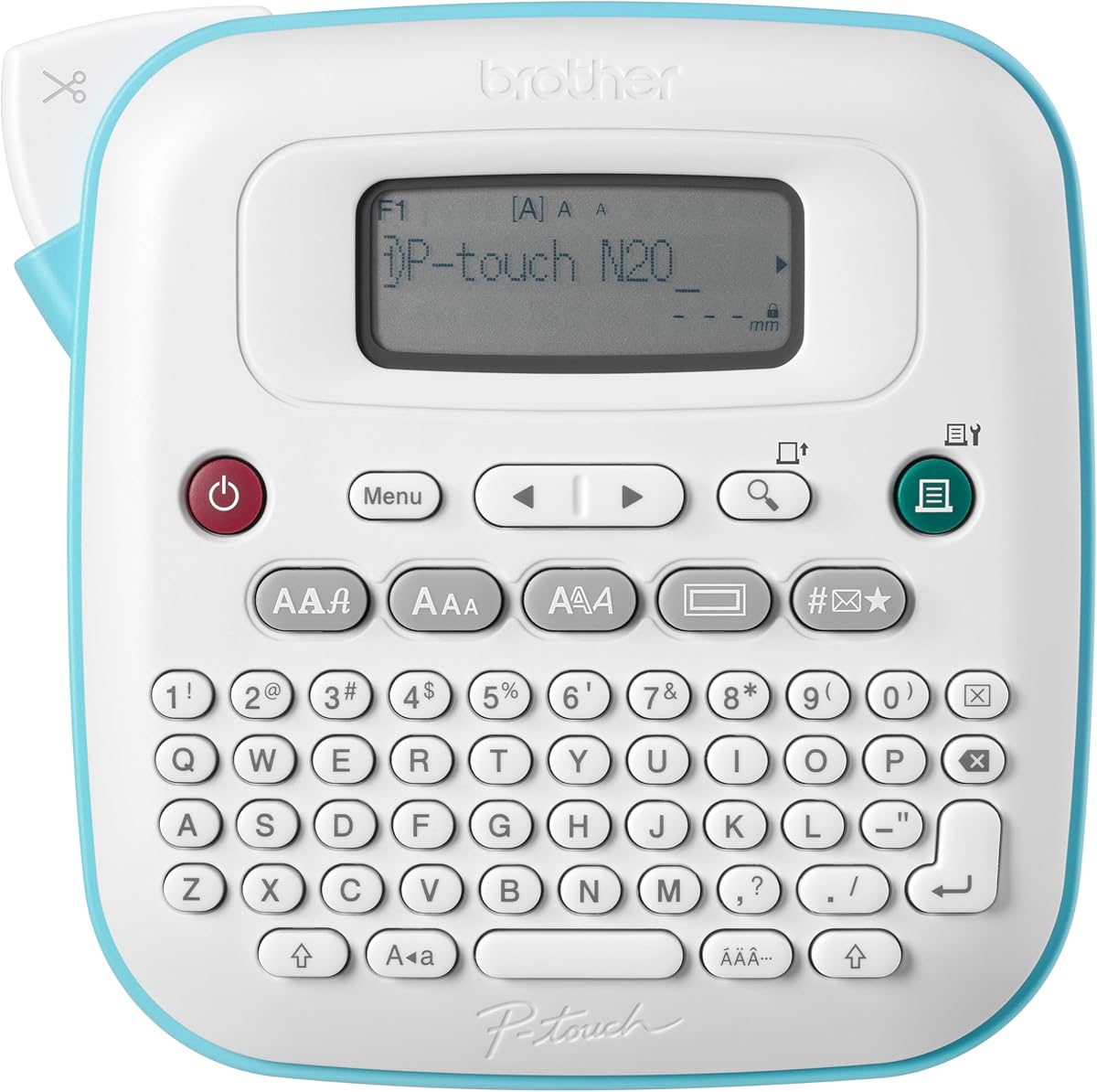
The Brother P-Touch PT-N20 is the most distinctive desktop-oriented model in this guide. Its 4.3 customer rating reflects a device that combines a portable footprint with colorful personalized output, a full QWERTY keyboard, a preview display, and an integrated cutter. It is designed for home, dorm rooms, studios, workshops, and creative organization projects.
We may earn a commission when you buy through this link, at no additional cost to you.
The machine uses Brother P-Touch Btag tapes measuring 12mm wide and 4m long, available in 17 colorful options. Split, easy-peel backings are described as damage-free when removed. Preloaded choices include three fonts, seven font styles, 15 frames, and 250 symbols, while labels can contain up to two lines with a combined text height of 9mm.
A 16-character display previews label content before printing, helping reduce mistakes and material waste. The device can also save 10 frequently used labels for quick reprinting. The main limitation is its specialized Btag system: buyers must use compatible tapes, and the preset length may feel limited for lengthy names or descriptions.
Choose the PT-N20 when color and personality matter as much as straightforward organization. It works well for personalized belongings, storage containers, craft projects, dorm rooms, and workshop materials. Users who require long labels, multiple tape widths, barcode generation, or a larger creative library should verify the Btag format limits before committing or choose a more versatile alternative.
Seventeen tape colors make it easy to distinguish rooms, categories, owners, or project stages. The 3D-looking creative result is more expressive than standard black-on-white labeling.
The preview screen helps catch errors before printing, the built-in cutter creates clean edges, and ten saved labels streamline repeated tasks. These details improve workflow for regular users.
We may earn a commission when you buy through this link, at no additional cost to you.
The right plastic label maker depends on how much you label, how much text you need, whether you prefer physical or digital controls, and the surfaces or materials involved. Reviewing these factors before buying can prevent an expensive mismatch.
Choose manual embossing for short decorative labels, crafts, classrooms, and occasional organization. Choose an electronic keyboard for frequent labeling, longer text, or a larger format library.
Prioritize a clear preview if you often make mistakes, print long names, or use decorative frames. A simple display is sufficient for short, consistently formatted labels.
Choose a machine whose tape system fits your surfaces, label length, and future supply needs. Avoid selecting a printer solely by advertised width if its cartridge format is incompatible with other equipment you own.
Choose a manual dial for occasional short labels and a keyboard for frequent or detailed work. Add app-based design only when templates, icons, or multilingual editing justify the extra setup.
Use durable laminated or plastic tape for exposed or frequently handled items. Choose standard paper for inexpensive, temporary labels that can be changed frequently.
Choose a handheld model if labeling happens in several locations. Use a desktop-style unit when you will sit in one place and produce larger batches or more decorative labels.
Check included tapes, batteries, power adapters, cases, and holders before checkout. A complete starter bundle usually offers a better first-use experience.
Begin by reading the specific instructions for your model and confirming that the installed tape or cassette is compatible. Electronic users should install the required batteries or charge the built-in battery, while manual embossers can be used directly. Clean the surface where the label will sit, and consider testing a short word before producing an entire batch.
For electronic machines, turn on the display, select a font or text style, and enter the desired wording. Check the preview carefully, especially for capitalization, punctuation, spacing, and line length. Manual embossers require the selected character to be centered in the indicated area; add spaces around words when recommended. Press firmly enough to create a complete impression, then use the built-in cutter or pre-cut dividers to separate the finished label.
Store the machine in a dry place with its tape protected from dust and direct sunlight. Replace cartridges or rolls according to the manufacturer's guidance, and avoid pulling labels sideways when removing adhesive. For battery-powered units, remove batteries during long storage if the manual recommends it. Clean the exterior with a soft, dry cloth, and do not use moisture around electrical controls, displays, or cutter mechanisms unless the manufacturer specifically permits it.
An embossing label maker presses raised characters into specialized tape without ink or electricity. A printed label maker uses electronic mechanisms to produce text, symbols, frames, and sometimes color on compatible label media. Embossing is tactile and convenient for short labels, while electronic printing is generally faster and more flexible for detailed work.
Compatibility depends on the exact tape system, not merely the visible width. Some embossing machines accept several 9mm rolls, while Brother and DYMO products often use specific tape structures, cartridge designs, or proprietary formats. Check the manufacturer's compatibility notes before purchasing additional rolls or cassettes.
Many models are designed for all ages, particularly simple manual embossers with no batteries, ink, or charging requirements. Adult supervision is still sensible for very young children because the press handle and cutter contain moving or sharp components. Electronic models can also be educational when used for classroom organization and matching names.
The DYMO LetraTag models are particularly approachable because they are compact, use a graphical preview, and automate some formatting choices. The Brother PTD210 adds more styles and tape-width flexibility for users who want greater creative control. A manual embosser is also easy to start, but it is best for short labels rather than large batches.
Water-resistant or laminated tape is generally more dependable around moisture, heat, and frequent handling than basic paper. The Brother PTD210 can use laminated TZe tape, and the DYMO LetraTag bundle includes plastic options. Always clean the container before application and verify that the adhesive is suitable for the surface.
Models such as the SUPVAN E12 can print directly through their keyboard for standard labels, but their most advanced fonts, frames, icons, and templates use the companion app. If offline operation is important, choose a model with complete physical controls or a manual embossing machine.
The embossing products listed use tapes described as waterproof, oil resistant, wear resistant, and fade resistant. The Brother PTD210's laminated TZe tapes are also described as water resistant and fade resistant. Actual performance still depends on the surface, application method, exposure, and tape specification.
Clean and dry the surface before applying the label, and follow the tape manufacturer's recommended temperature and pressure. Remove labels slowly at an angle rather than pulling sharply upward. Some included embossing tapes are specifically described as leaving no residue, but testing a discreet area first is still sensible.
The Brother P-Touch PTD210 is the strongest all-around option because it combines a preview display, one-touch controls, an extensive style library, and support for four tape widths. The Zodzi manual embosser is the best budget choice for short, decorative labels without power, while the Brother PT-N20 leads the premium picks for colorful personalization and a full keyboard.
Prioritize the operating method that matches your habits. Choose a rotary embosser for tactile, occasional labels; a compact electronic model for straightforward home organization; an app-connected unit for icons, templates, and multilingual editing; or a color-focused desktop model for expressive projects. Tape format, width, included accessories, and long-term cartridge availability are just as important as the headline feature list.
Before purchasing, confirm that the machine supports the label dimensions and materials you intend to use, read the included-accessory list, and evaluate battery requirements. Customer ratings and prices can change, and promotions may shift over time, so checking current product details and availability will help ensure that the selected machine remains the right fit.