
BENTSAI BT-HH6205BL
4.3Editor score
One-inch maximum print height
Adjustable multi-line output
Five-roller handling system
Our guide compares 10 Handheld Inkjet Printer options across print height, ink performance, portability, battery life, screen controls, and ease of use.
A handheld inkjet printer brings variable coding and marking directly to cartons, packages, pallets, metal parts, and other surfaces where standard label printers may not reach. The strongest models combine fast-drying ink, useful template controls, dependable battery life, and enough print height for production codes, dates, logos, barcodes, and QR codes.
This guide compares ten handheld inkjet printers using the specifications and feature details supplied for each product. The evaluation considers print height, resolution, supported content, compatible surfaces, ink cartridge design, runtime, screen size, file importing, portability, and practical extras such as positioning guides and wrist straps.
Each pick highlights a different balance of capabilities, from compact standalone units to models with larger touchscreens and wider printing areas. Ratings and specifications can change over time, and current product details, availability, warranty terms, and prices should always be confirmed on the retailer listing before purchase.
4.3Editor score

4.7Editor score

4.7Editor score
The comparison below highlights the main differences in print area, content support, portability, and operation time, helping buyers identify the printer that best fits their coding workflow.

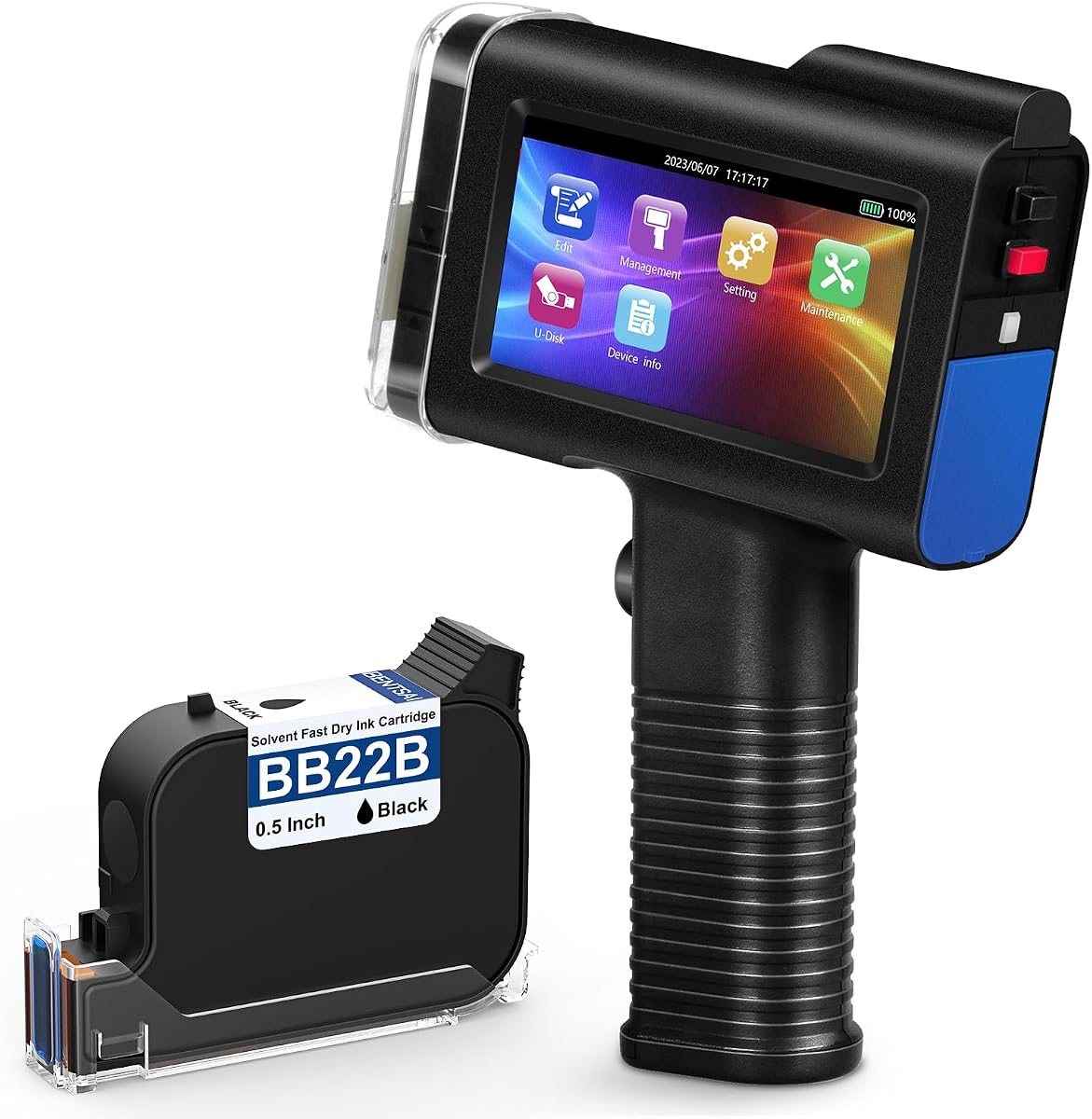


The first-ranked model is a balanced all-rounder, earning a 4.7 rating for its combination of accessible controls, broad marking capabilities, and advertised 16-hour operating time. It can produce text, dates, batch numbers, QR codes, barcodes, and graphics, making it appropriate for businesses that need more than a simple date coder.
We may earn a commission when you buy through this link, at no additional cost to you.
Its 4.3-inch HD capacitive touchscreen is one of the clearest control interfaces in this group. Users can create or edit templates directly on the display, while the USB port accepts JPG, PNG, and BMP files for logos and other artwork. The self-locking 42ml cartridge, 28 interface languages, and quick-drying ink make the package attractive for multi-site or international teams.
The main limitation is the 0.5-inch, or 12.7mm, print height. That is ample for compact codes and individual identification lines but cannot match the broader vertical area offered by the BENTSAI BT-HH6205BL. Buyers needing a large logo, several stacked fields, or more than five lines should account for that restriction before choosing.
This is a strong recommendation for warehouses, packaging operations, manufacturers, and general product-identification users that value an intuitive interface and broad feature set without moving to a one-inch model. It combines the most useful capabilities in the list and serves as an adaptable choice for mixed coding environments.
Direct touchscreen editing reduces the need for a connected computer when codes change frequently. USB image importing adds flexibility for approved logos, barcodes, and custom graphics when a more elaborate layout is required.
The advertised 16-hour runtime, leak-proof self-locking cartridge, and positioning accessory make the unit practical for extended work away from a fixed station. Its 0.5-inch print area remains the deciding factor when compared with larger-head models.
We may earn a commission when you buy through this link, at no additional cost to you.
The JC01 has a 4.2 rating and stands out for its low 390g weight, drop-oriented design, and complete kit. It targets production staff and warehouse workers who need a lightweight printer that can be carried throughout a shift without the bulk of a larger industrial unit.
We may earn a commission when you buy through this link, at no additional cost to you.
A four-direction positioning structure, 4.3-inch touchscreen, and included wrist strap help place the device consistently. Its 300-nozzle system, 42ml solvent-based cartridge, and quick-drying ink support clear marks on plastic, cartons, metal, wood, glass, aluminum, foam, and curved surfaces. USB importing covers TTF, PNG, JPG, and BMP files.
Compared with the top-ranked option, the JC01 offers a very similar 0.5-inch print height and similar stated runtime, but its overall feature description is less focused on template-based customization. The listing also identifies the bundle as black, which may be an important limitation for teams that need another ink color.
It is a sensible pick for users prioritizing lightness, drop protection, and a ready-to-use package. Manufacturing, warehouse, food-packaging, and product-content teams should confirm color requirements and verify their exact printing workflow before making it their standard device.
At 390g, the JC01 is among the lightest models listed. Its wrist strap and positioning structure add practical control for mobile coding, while the compact grip should suit repeated one-handed use.
The 300-nozzle system and fast-drying black ink are designed for varied packaging and production surfaces. Curved-surface support and imported graphics add flexibility for identification, packaging, and general labeling tasks.
We may earn a commission when you buy through this link, at no additional cost to you.
The BT-HH6105B2 carries a 4.4 rating and emphasizes detailed output, material flexibility, and production-line integration. Its 600 DPI specification and support for six barcode types make it appealing to users who need more precision than a basic date-and-batch-number printer can provide.
We may earn a commission when you buy through this link, at no additional cost to you.
The device can print small text, dates, batch numbers, QR codes, Data Matrix codes, logos, and pictures on porous, semi-porous, and non-porous materials. A 42ml waterproof cartridge is said to deliver up to two million characters at 2.5mm font size, while the 4.3-inch touchscreen supports template editing and JPEG, PNG, and BMP file loading.
Its stated endurance of more than eight hours is lower than the roughly 16-hour figures given for several competitors, and the cartridge must be capped promptly when unused to reduce the chance of nozzle drying or blockage. Those are meaningful considerations for long shifts or frequent color changes.
This model is best suited to quality-focused operations that value 600 DPI detail, multiple barcode formats, and the ability to mount on a conveyor line. It may appeal to experienced users more than beginners, particularly those already comfortable managing templates and printer placement.
The 600 DPI output and support for six barcode types provide useful detail for compact markings. Buyers should still verify actual legibility on their chosen material and ink with a representative test.
Conveyor mounting capability can improve repeatability in automated workflows. Combined with editable templates and file imports, it supports both manual and semi-automated code placement.
We may earn a commission when you buy through this link, at no additional cost to you.
The BT-HH6205BL earns a 4.3 rating and is the strongest choice in this list for users who need a broad printing area. Its head adjusts from 0.03 inches to one inch and can output as many as ten lines, distinguishing it from compact coders limited to 0.5 inches.
We may earn a commission when you buy through this link, at no additional cost to you.
Variable content includes batch numbers, QR codes, dates, text, logos, pictures, and other data. The 42ml quick-drying ink works across wood, cardboard, plastic, polyethylene, metal, glass, ceramic, aluminum foil, and concrete. A 4.3-inch HD touchscreen, ergonomic handle, and five-roller system support more controlled movement than standard three-roller designs.
The listing specifies the handheld unit only, so buyers may need to confirm which cartridge, charger, cable, and positioning accessories are included for their region. Its premium feature is the adjustable print height rather than portability: at 410g, it remains reasonably light, but the larger print head is more substantial than a mini printer.
This recommendation is ideal for manufacturers, logistics teams, and packagers that regularly print multi-line information, larger logos, or dense identification blocks. It is the premium pick because the additional print area can reduce the need for multiple passes and consolidate more information into each mark.
The unusually broad adjustment range supports both tiny serial characters and larger multiline layouts. This makes the model more versatile for companies working across several product formats.
Five rollers are intended to stabilize the print head as it moves over a surface. The additional 16-hour runtime claim also makes it suitable for extended production sessions.
We may earn a commission when you buy through this link, at no additional cost to you.
The Phezer P15 has a 4.1 rating and focuses on independent operation, direct touchscreen entry, and broad content support. It can print text, digital information, QR codes, barcodes, production dates, times, and logos without requiring an app, computer, or mobile phone.
We may earn a commission when you buy through this link, at no additional cost to you.
Its 4.3-inch LCD touchscreen accepts direct input and editing, while 25 language options suit internationally distributed teams. The print height adjusts from 2mm to 12.7mm, and 360-degree printing is supported with positioning plates. A black 42ml quick-drying cartridge is included, with other colors listed as available options.
Although the product is described as lightweight, the supplied total weight is 1.54 pounds, which is heavier than several compact rivals. The claim of unlimited print length is also difficult to assess independently, so buyers should define their expected message dimensions and test the longest intended content.
It is a useful choice for field service, inventory, and small production teams that want a self-contained system. The lack of required connected devices is particularly valuable where Wi-Fi, cables, or phone pairing would complicate routine work.
A built-in system and direct touchscreen entry let users begin printing without a phone, app, or computer. That simplicity may appeal to occasional operators as well as traveling technicians.
The included cartridge is black, but the product family is described as supporting white, yellow, red, blue, green, invisible, and UV inks. Users should confirm the exact cartridge included with their selected listing.
We may earn a commission when you buy through this link, at no additional cost to you.
The MS-Z10 receives a 3.9 rating, the lowest in the group, but it remains a capable coder for buyers seeking several resolution choices. Its stated 300, 400, and 600 DPI settings offer flexibility for different levels of detail and print speed.
We may earn a commission when you buy through this link, at no additional cost to you.
Print height adjusts from 0.078 inches to 0.5 inches, with support for one to five lines of text. Users can enter content directly on the 4.3-inch touchscreen or import BMP, JPG, and PNG files. The auxiliary positioning plate helps with placement on cartons, metal, wood, glass, and curved surfaces.
The most important caveat is the explicit note that the black quick-drying ink is not permanently waterproof, even though it produces water-resistant results. Its lower aggregate rating may also reflect buyer expectations, while the supplied data does not identify the source of that feedback.
This printer suits workshops, logistics operations, retail environments, and warehouse teams that value compactness and resolution flexibility. It is less suitable where a mark must withstand prolonged water exposure without further testing or protection.
Offering 300, 400, and 600 DPI lets users balance detail against workflow requirements. A representative test on the target material remains important for determining which setting produces the clearest result.
The touchscreen, USB importing, and positioning plate create a straightforward mobile setup. The included case helps protect the device during transport between job sites.
We may earn a commission when you buy through this link, at no additional cost to you.
This one-inch model has a 4.0 rating and combines a broad print area with one of the fastest stated drying times in the group. It is designed for variable coding tasks involving QR codes, expiry dates, logos, batch numbers, barcodes, and other product information.
We may earn a commission when you buy through this link, at no additional cost to you.
Its 4.3-inch HD capacitive touchscreen supports template creation, editing, and saving. JPG, PNG, and BMP files can be imported through USB, and an infrared aiming assist helps users position marks more accurately. The self-locking 42ml cartridge is described as waterproof and fade-resistant, with a claimed yield of up to 1,140,000 characters.
The main limitation is the fixed maximum print height of one inch, which is less adjustable than the BENTSAI BT-HH6205BL's 0.03-to-one-inch range. The listing also centers on black ink, and there is no stated support for other cartridge colors.
This is a strong option for warehouses, packaging lines, and product-identification teams that want a large print area and very rapid ink drying. It is particularly appealing when moves between products occur quickly and marks need to be handled soon after printing.
The cartridge is advertised to dry in less than two seconds, reducing waiting before cartons or components move onward. This is useful in workflows where rapid changeover matters.
Infrared aiming assistance adds a practical way to line up codes on varied products. The touchscreen and imported artwork support repeatable layouts without requiring a connected computer.
We may earn a commission when you buy through this link, at no additional cost to you.
The XMINI carries a 4.5 rating and is one of the most compact models here, with a listed weight of 0.54 pounds. It offers standalone printing, a built-in 2000mAh rechargeable battery, and direct data entry without an app, computer, or phone.
We may earn a commission when you buy through this link, at no additional cost to you.
Its 2.4-inch resistive touchscreen is smaller than the displays on most competitors, but it supports text, barcodes, lot and batch numbers, dates, expiration dates, PNG, JPEG, and BMP images, logos, and counters. Print height ranges from 2mm to 12.7mm, one to five lines are supported, and 28 languages are listed.
The product instructions recommend calibrating the screen after delivery to maintain sensitivity and accuracy. Its stated operating range is 0–45°C with optimum conditions at 20–30°C and humidity of 40%–60% relative humidity, which should be considered for outdoor or industrial use.
It is a good fit for field technicians, warehouse staff, and travelers who prioritize minimum weight and independent operation. The included touch pen helps prevent accidental screen input, while the positioning board improves placement consistency.
The low weight, built-in battery, and direct input system make the XMINI easy to carry between locations. No connection to a separate device is required for routine data entry.
A positioning board and touch pen are included, helping users control placement and avoid accidental inputs. The original ER520 black cartridge is supplied with the unit.
We may earn a commission when you buy through this link, at no additional cost to you.
The E12 Mini shares the highest listed rating at 4.7 and stands out for its unusually compact, dual-use design. A detachable handle allows it to switch between full handheld and compact mini configurations, while its 4-by-4.7-by-2-inch body is intended to fit into restricted workspaces.
We may earn a commission when you buy through this link, at no additional cost to you.
It can print dates, serial numbers, barcodes, QR codes, and custom BMP or JPG logos, with adjustable fonts and sizes, a 0.5-inch maximum height, and unlimited claimed length. The unit supports 360-degree output and is designed for corrugated cardboard, metal, plastic, wood, fabric, and curved containers.
Its included 42ml cartridge is stated to deliver approximately 80,000 characters at a standard 10mm height, a lower figure than the 1.14-million-character claim associated with the top-ranked model. Imported images must be under 300 KB, and buyers should not interpret the unlimited-length claim as unlimited battery life or unrestricted message complexity.
It is an excellent recommendation for mobile warehouse work, ladders, production-line movement, outdoor coding, and users who need a compact unit for confined spaces. The detachable handle and high rating make it a particularly well-rounded portable option.
The detachable handle quickly changes the unit between a full handheld configuration and a pocket-sized mini mode. This flexibility suits both active production work and storage in smaller tool bags.
The quick-dry system is advertised to achieve waterproof adhesion in under three seconds, while 360-degree printing supports bottles, tubes, and other curved containers. Anti-clog nozzles and a leak-resistant design add consistency.
We may earn a commission when you buy through this link, at no additional cost to you.
The 0.5-inch quick-dry model has a 4.5 rating and provides a straightforward combination of portability, long operation, and flexible file handling. It prints text, dates, QR codes, barcodes, serial numbers, and logos on cardboard, wood, plastic, metal, glass, and curved surfaces.
We may earn a commission when you buy through this link, at no additional cost to you.
Its print height adjusts from 0.03 to 0.5 inches, and one to five lines can be produced. Users can enter content directly on the 4.3-inch touchscreen or import TXT, JPG, JPEG, BMP, and variable database files from USB. The 390g body, wrist strap, and ergonomic grip support mobile use, while the ink cartridge holds 42ml.
The five-line maximum is the clearest restriction for buyers planning large logos or dense data blocks. More importantly, the listing does not describe a multi-line print-height adjustment beyond 0.5 inches, so teams needing a large code area should look toward the one-inch models.
This printer is well suited to warehouses, delivery operations, and small manufacturers that need fast, on-demand identification. It is particularly attractive for users who prefer bringing a USB drive with variable data instead of connecting the printer to a computer.
Direct support for TXT, image formats, and variable databases gives the device flexibility beyond manually entered text. Batch operators can update information without a full software workflow.
The 390g body is easy to carry, while the advertised 16-hour runtime supports extended work away from an outlet. A wrist strap provides an additional safeguard against accidental drops.
We may earn a commission when you buy through this link, at no additional cost to you.
The right handheld inkjet printer depends on the size of your codes, the materials you mark, the length of your shift, and how much configuration your team needs. These factors determine whether a compact standalone coder is sufficient or whether a larger print head is worth considering.
Print height is one of the most consequential specifications. Most models in this guide support up to 0.5 inches, or 12.7mm, which suits batch numbers, dates, short text lines, compact QR codes, and small logos. The BENTSAI BT-HH6205BL and the one-inch fast-dry model offer a larger area for denser information, larger artwork, or more vertical flexibility. The BT-HH6205BL can also reduce its height to 0.03 inches for small markings, while supporting up to ten lines.
Fast-drying ink helps products move through a workflow without smudging, but performance depends on the material. All ten models are described as suitable for multiple surfaces, including cardboard, plastic, metal, glass, wood, and fabric, although porous and non-porous materials can absorb or repel ink differently. Some listings specify waterproof or fade-resistant results, while the MS-Z10 explicitly notes that its ink is not permanently waterproof. Test a representative sample before committing to a high-volume workflow.
Advertised runtimes range from more than eight hours for the BENTSAI BT-HH6105B2 to more than 16 hours for several other models. Longer stated endurance is useful for warehouse, production, and field technicians who work far from a charger. Actual runtime can vary with print density, screen use, battery condition, wireless activity, and the number of cartridges used, so the maximum figure should be treated as a best-case guideline rather than a guarantee.
A touchscreen can substantially simplify template entry, code editing, and language changes. Most products use a 4.3-inch display, while the XMINI has a more compact 2.4-inch resistive screen. Larger capacitive displays may be easier to operate with gloves or during detailed work, although screen technology, responsiveness, and calibration requirements also matter. Beginners should prioritize straightforward menus, visible touch targets, and an included stylus or pen.
Several printers can enter information directly without an app, computer, or phone, making them convenient for mobile work. Others support USB file importing for logos, barcodes, QR codes, TTF fonts, JPG, PNG, BMP, and variable database files. Standalone entry is easier for occasional use, while USB importing is more valuable when a team manages approved artwork or repeated batches. The most important check is whether the format you use is supported by the exact model.
Weights range from approximately 0.54 pounds for the XMINI and 390g for the JC01 and 0.5-inch quick-dry model to 1.1 pounds for the E12 Mini and 1.54 pounds for the total Phezer P15 package. A detachable handle, wrist strap, positioning plate, or compact body can make a substantial difference in confined or active environments. The five-roller BENTSAI design is intended to stabilize printing movement across surfaces.
Resolution determines how much detail can be represented in a small area. The BENTSAI BT-HH6105B2 lists 600 DPI, while the MS-Z10 offers selectable 300, 400, and 600 DPI settings. Other products emphasize high-resolution graphics or crisp output without giving a comparable resolution in the supplied data. QR codes, dense Data Matrix codes, small serial numbers, and detailed logos should be checked on a sample before high-volume use.
A complete package can reduce setup time. Included items vary among ink cartridges, cables, power adapters, positioners, touch pens, protective cases, USB drives, manuals, and even suitcases. Several listings also mention technical support, tutorials, a one-year manufacturer warranty, or return support, but terms can differ by seller and region. Confirm the exact bundle, warranty provider, replacement ink availability, and support responsiveness before purchasing for business use.
Begin by fully charging the printer, installing the supplied ink cartridge, and reading the model-specific manual. Power on the unit, select the language, and set the desired print height, line count, text size, and date or variable-data format. Use the touchscreen to create a simple test template, and use the included positioning guide when accurate placement on a box, tube, or other surface matters.
Before marking production goods, print a test on the exact material and color combination you will use. Check character clarity, barcode scanning, QR code readability, drying time, edge spacing, and adhesion. Import logos or variable data in a supported format, then confirm the output on the device before beginning a long batch. Keep the nozzle away from dust, and do not touch or scrape the printhead.
After a session, cap the cartridge promptly as specified by the manufacturer, especially when switching colors or storing the unit temporarily. Keep the device and cartridge away from extreme heat, cold, humidity, and direct sunlight, and use a lint-free cloth to clean the exterior. Store a partially used cartridge in an upright, sealed position, allow the nozzle to seal, and avoid leaving the printer on a non-porous surface while ink is still wet.
A handheld inkjet printer applies variable text and graphics directly to products, packages, pallets, and parts. Typical jobs include batch numbers, production or expiration dates, serial numbers, barcodes, QR codes, logos, and text. It is especially useful when labels cannot be applied easily because the target is curved, textured, porous, or otherwise inconvenient for conventional label printing.
A 0.5-inch, or 12.7mm, print height is sufficient for most compact identification codes and short text fields. It is less suitable for large logos, dense multi-line product information, or blocks of text. Choose a model with a one-inch print area if your markings need a larger vertical footprint, while noting that a broader head may be less convenient for very small jobs.
Many models in this guide are specifically described as supporting curved surfaces, including containers, tubes, cables, and other uneven products. The included positioning plate or auxiliary guide can help maintain consistent distance and movement. Actual results depend on surface curvature, ink type, speed, and technique, so curved items should be included in a material-specific test.
Several models, including the JC01, Phezer P15, XMINI, and 0.5-inch quick-dry printer, support direct standalone operation. Other products emphasize USB importing for logos, templates, fonts, and variable data. The exact workflow varies by model, so check whether the printer supports the file format and data source used by your operation.
Use the cartridge as intended, avoid touching the nozzle, and replace or reseal the cartridge promptly after use. Several product descriptions specifically recommend covering the protective cap to prevent ink from drying and blocking the nozzle. The E12 also lists anti-clog nozzles and a leak-resistant cartridge design, but preventive handling remains important with every inkjet model.
Water resistance varies by model and ink. Several listings describe their ink as waterproof, while the MS-Z10 explicitly states that its ink is not permanent when exposed to water. Even for a model claiming waterproof ink, repeated handling, washing, chemicals, and abrasion may affect the mark. Test durability under the conditions the printed product will actually encounter.
A larger touchscreen is usually easier for editing templates, changing fonts, and entering variable information. The XMINI's 2.4-inch resistive screen is more compact but requires calibration, and its supplied touch pen helps avoid accidental input. Consider glove use, available workspace, operator familiarity, and whether most jobs use saved templates or direct entry.
Test the exact material, ink color, message size, and longest expected code. Evaluate legibility, barcode or QR scanning, drying time, adhesion, alignment, and consistency across a full batch. For mobile use, also assess weight, battery life, grip comfort, and how well the positioning guide works on the intended surfaces.
The top-ranked 42ml fast-dry ink printer offers the strongest all-around balance, combining a 4.7 rating, a clear 4.3-inch touchscreen, template editing, USB file importing, and advertised 16-hour operation. The E12 Mini is equally highly rated and may appeal more to users who prioritize compact dimensions, a detachable handle, and rapid 360-degree marking on curved products.
Buyers focused on print area should give special attention to the BENTSAI BT-HH6205BL, whose head adjusts from 0.03 inches to one inch and supports up to ten lines. For the lightest standalone option, the XMINI weighs only 0.54 pounds, while the JC01 combines a 390g body with a protective wrist strap and fast-drying black ink.
Ultimately, prioritize print dimensions, tested performance on your materials, cartridge availability, battery needs, and the simplest workflow for the people who will use the printer. Product specifications and prices can change, so review the current listing, package contents, warranty, and customer feedback before making a final purchase.