
Magic Style Case Keyboard
4.8Editor score
Detachable magnetic keyboard
Large gesture-supporting touchpad
Seven backlight colors
Floating adjustable stand
A Galaxy Tab S10 Lite keyboard case transforms a lightweight tablet into a more practical productivity tool for writing, email, browsing, video calls, and document work. The best options combine a secure tablet fit, stable viewing angles, responsive keys, useful navigation features, and enough protection for travel or daily use.
The ten cases in this guide were compared using their stated tablet compatibility, keyboard design, touchpad or mouse support, backlighting, charging method, viewing-angle adjustment, stylus storage, and protective construction. The list covers basic folio models, detachable magnetic designs, premium laptop-style cases, and feature-rich options for compatible Galaxy tablets.
Each review identifies the strongest reason to consider a particular model while also noting practical trade-offs such as included accessories, weight, or narrower device support. Ratings and specifications reflect the supplied product information, while current prices and availability can change. Always verify your tablet model before ordering.
4.8Editor score

4.7Editor score
4.5Editor score
As an Amazon Associate we earn from qualifying purchases.
The comparison below highlights the major differences among all ten cases, including their supported Galaxy models, navigation features, lighting, viewing mechanisms, and included accessories.


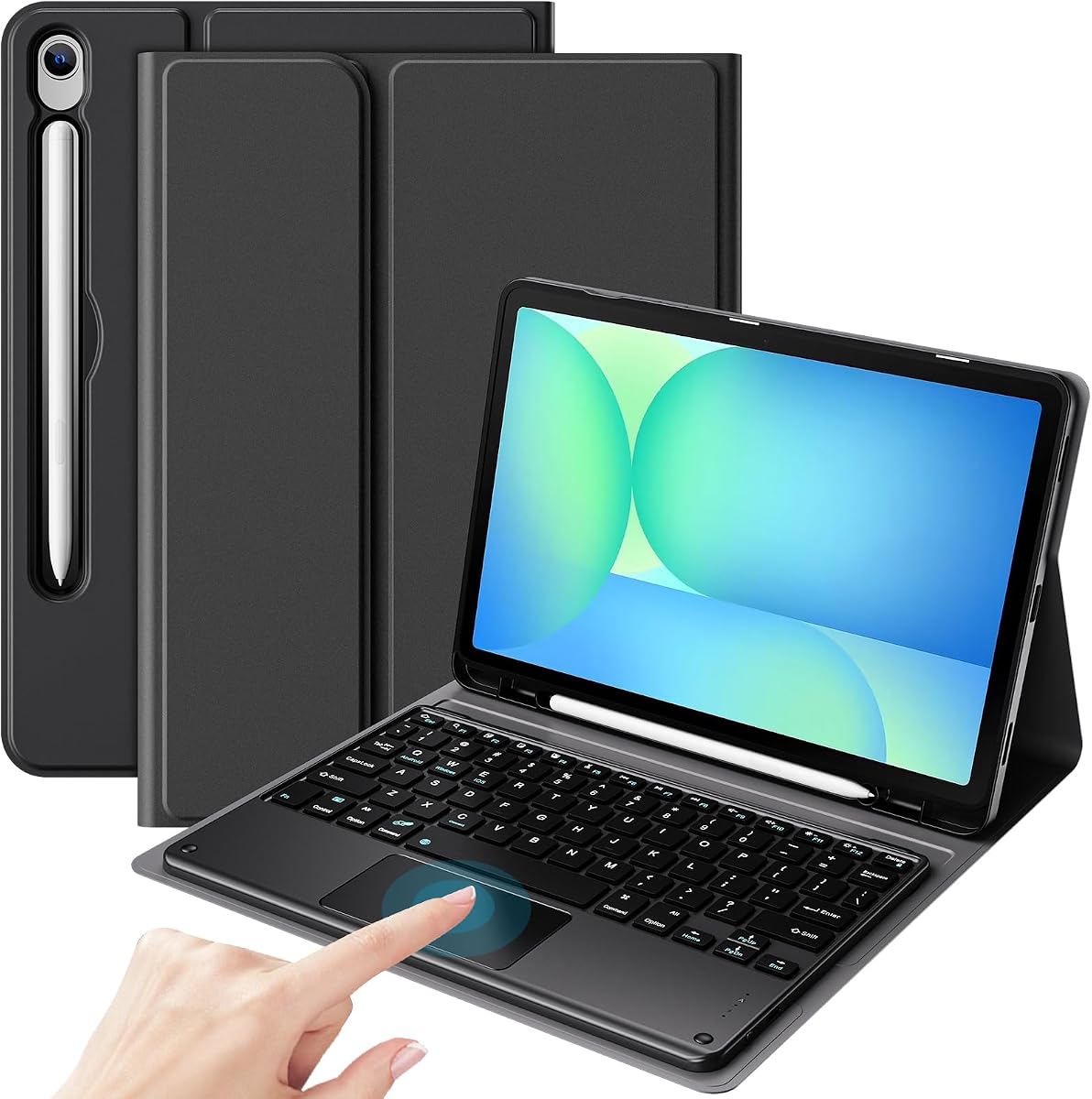
The FINTIE Keyboard Case is a well-rounded folio option for people who want the Galaxy Tab S10 Lite to feel more like a compact laptop without adding a separate mouse. Its supplied rating is 4.4, and its strongest qualities include broad stated compatibility, a detachable keyboard, adjustable viewing positions, rechargeable power, and an integrated holder for the S Pen.
We may earn a commission when you buy through this link, at no additional cost to you.
The magnetic keyboard measures 7 millimeters in the supplied description and uses mechanical scissor keys intended to provide a responsive rebound while reducing noise. Its Bluetooth connection has a stated 10-meter range, and it works with both iOS and Android operating systems. Moving the keyboard forward or backward changes the tablet angle, giving the cover three positions for typing, reading, or viewing without a separate folding easel.
Protection comes from a PU leather exterior, a rubber-lined interior, and a polycarbonate shell that secures the tablet. The case also supports automatic sleep and wake when used in case-only mode. A major limitation is the absence of a touchpad or mouse, so users who spend substantial time editing documents, moving cursors, or navigating small interface elements may prefer one of the touchpad-equipped alternatives.
This is an appealing choice for students, travelers, and casual users who mainly type in shorter sessions, watch videos, or take handwritten notes. It supports the S10 Lite, S10 FE, S9 FE, and 11-inch S9 according to the listed model numbers. Buyers should confirm the exact device code before ordering, particularly if they own a differently sized Galaxy tablet.
Detaching the keyboard lets the cover function as a lightweight tablet protector, while reattaching it creates a stable typing arrangement. The keyboard also doubles as the support for the display, reducing the number of separate parts required for travel.
The rechargeable keyboard avoids disposable batteries and reaches a full charge in about two hours according to the product information. A built-in S Pen holder helps keep the stylus close without requiring a separate sleeve.
We may earn a commission when you buy through this link, at no additional cost to you.
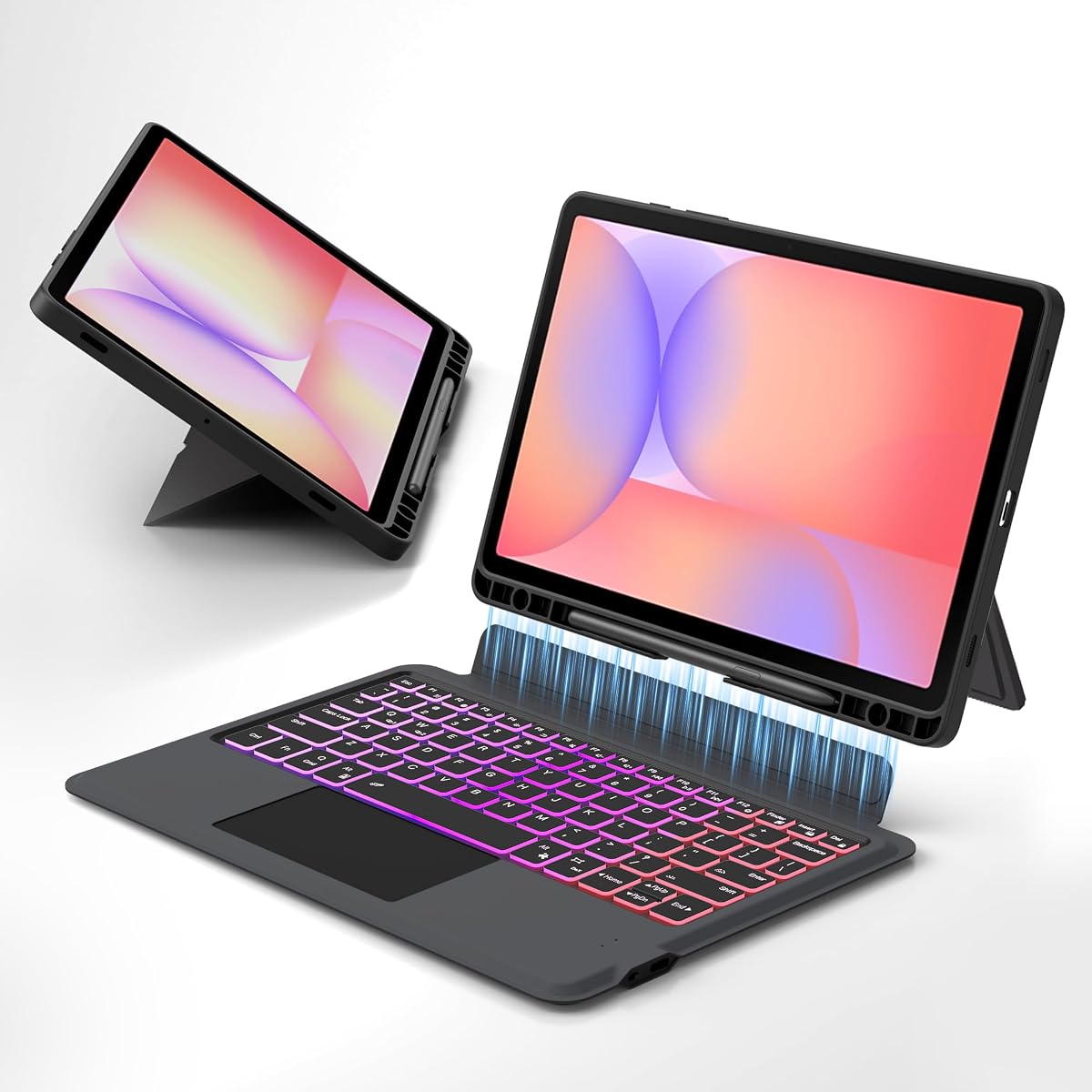
The Dexnor Keyboard Case ranks as one of the strongest all-around choices in this roundup, combining a premium aluminum hinge, a multi-touch trackpad, adjustable magnetic stand, and a full backlit keyboard. It carries a supplied rating of 4.5 and is designed for the S10 Lite, S10 FE, S9, and S9 FE within the stated size and model range.
We may earn a commission when you buy through this link, at no additional cost to you.
Its high-precision trackpad supports multi-finger gestures, which is particularly useful for moving a cursor, browsing pages, editing documents, and building presentations. The hinge uses embedded magnets to hold the tablet in a laptop-like position. Seven solid backlight colors and three brightness levels make the keyboard easier to use in dim environments, while a 650mAh battery is rated for up to 200 working hours and 1,200 standby hours.
The included USB-C cable replenishes the battery in about 3.5 hours, and an automatic wake/sleep function helps conserve tablet power. Stylus storage is unusually well thought out because the keyboard contains a magnetic holder and the rear cover includes a separate slot for storage or charging. The package also includes a quick-start guide, detailed manual, and keyboard cable, although neither the tablet nor S Pen is included.
This case is best suited to users who want fewer compromises than a basic keyboard folio provides. It is particularly attractive for intensive typing, document work, and travel because the hinge and trackpad create a more conventional laptop experience. Confirm the model number and note that larger Plus models are explicitly excluded before purchasing.
The multi-touch trackpad is the defining feature in this design. Gesture support reduces reliance on repeated screen taps and makes the tablet more practical for editing, browsing, and presentation tasks.
The aluminum alloy hinge provides a refined alternative to a folding cover, while the rechargeable battery and adjustable backlighting make the keyboard suitable for extended sessions away from an outlet.
We may earn a commission when you buy through this link, at no additional cost to you.
This RGB Keyboard and Mouse Case stands out because it supplies both a backlit magnetic keyboard and a mouse in the same package. With a supplied rating of 4.7, it offers one of the most complete accessory sets in the guide and is intended for users who prefer a separate pointing device over a compact touchpad.
We may earn a commission when you buy through this link, at no additional cost to you.
The keyboard offers seven adjustable backlight colors, a breathing or cycling light mode, and multiple function shortcuts intended to speed up common tasks. A magnetic connection secures it to the folio, and moving the tablet along the front-to-back axis produces three viewing settings for writing, reading, viewing, and creative work. The cover includes a built-in stylus slot, although the stylus itself is not supplied.
Its PU leather exterior is described as helping protect against splashes, dust, and stains, while opening or closing the lid automatically wakes or sleeps the tablet. The package contains the protective folio, RGB keyboard, mouse, USB-C data cable, and user manual. The extra mouse is the clearest trade-off because it provides familiar cursor control but adds bulk to a travel bag.
This recommendation is a strong fit for buyers who want immediate keyboard-and-mouse functionality without sourcing a pointer separately. It also suits users who enjoy more noticeable lighting effects. As with the other folio cases, model verification matters: the stated fit covers the Galaxy Tab S10 Lite, S10 FE, and 11-inch S9 rather than every Galaxy tablet.
Including a mouse distinguishes this package from most keyboard folios. It offers an immediate way to navigate the tablet and can be left at home when only the keyboard and protective cover are needed.
Seven selectable colors and a breathing mode make the keyboard easy to locate in low light. Dedicated shortcuts can reduce steps during document editing, although the exact command layout may not match every user’s preferred Android workflow.
We may earn a commission when you buy through this link, at no additional cost to you.
The ProCase Keyboard Case is a streamlined option for someone who wants a touchpad, a detachable keyboard, and a stable folio without the extra lighting or mouse features found in some bundles. Its supplied rating is 4.5, and the stated compatibility includes the Galaxy Tab S10 Lite, S10 FE, S9 FE, and 11-inch S9.
We may earn a commission when you buy through this link, at no additional cost to you.
The responsive touchpad supports gestures for browsing, switching applications, and managing files, making it a meaningful improvement over a keyboard-only design. The keyboard attaches magnetically, allowing users to switch quickly between laptop mode and a lighter handheld case. Three viewing angles support typing, streaming, and video calls, and the stand is described as stable on desks, laps, and sofas.
The exterior is intended to shield the tablet from drops and scuffs, while an ultra-slim construction improves portability. A built-in stylus slot keeps an S Pen accessible, although the stylus is not included. Unlike many competing cases, this product information does not advertise adjustable backlighting, and it also does not specify whether the keyboard has a rechargeable battery or how it is charged.
This is a sensible recommendation for people who regularly type and navigate but do not require a mouse, illuminated keys, or a large battery specification. The stable stand and detachable arrangement are especially useful for commuting and everyday use. Buyers should check the SM-X model code in tablet settings, as precise compatibility is essential with Galaxy accessories.
The gesture touchpad provides a middle ground between touch-only use and carrying a separate mouse. It can handle common desktop-style movements while keeping the accessory set compact.
Detaching the keyboard changes the case from a workstation into a portable cover. Three stable angles then provide practical viewing choices for calls, media, and typing.
We may earn a commission when you buy through this link, at no additional cost to you.
The Rainbow Backlit Pink Case combines a colorful folio exterior with a detachable magnetic keyboard, seven lighting colors, and a mouse. Its supplied rating is 4.3, and its stated model support includes the Galaxy Tab S10 Lite, S10 FE, S8, S9, and S9 FE in the listed 10.9- to 11-inch group.
We may earn a commission when you buy through this link, at no additional cost to you.
The keyboard can be removed for lighter reading or media use and reattached to create a mini-laptop arrangement. Users can select among seven iridescent backlight colors for low-light typing. The cover also supports three viewing angles through anti-slip channels, allowing the display position to move forward or backward for writing, viewing, reading, or drawing. A built-in holder keeps the S Pen close, though it is not supplied.
Opening or closing the cover triggers automatic sleep and wake according to the product description. Protection includes full edge coverage, cushioning, and a honeycomb interior pattern intended to improve airflow and reduce overheating. The mouse is a notable inclusion, but there is no touchpad, making this a better fit for users who prefer a separate pointer than for those who want a trackpad-equipped folio.
The pink finish makes this an expressive option for students and users who want their tablet setup to look less utilitarian. It suits casual productivity, travel, and evening entertainment as well as regular typing. The tablet is not included, and buyers should confirm the precise model code because the case does not fit models outside the specified list.
The pink exterior and selectable rainbow lighting distinguish the case from conventional black office accessories. Users who enjoy personalizing their setup may find that visual character particularly appealing.
A bundled mouse and a dedicated pen holder cover two common accessory needs. This makes the package more versatile, although it is less compact than a keyboard-only folio.
We may earn a commission when you buy through this link, at no additional cost to you.
The Rainbow Touchpad Keyboard Case fills a useful middle ground by combining an illuminated keyboard with a gesture-sensitive touchpad. It has a supplied rating of 4.4 and supports the Galaxy Tab S10 Lite, S10 FE, S9 FE, S9, and S8 according to the listed model codes.
We may earn a commission when you buy through this link, at no additional cost to you.
The keyboard provides seven vibrant backlight modes, including a pulse-lighting effect, and the backlight can be turned off without affecting normal typing. Its high-sensitivity touchpad responds to clicks, swipes, application switching, and other gestures, offering more precise navigation than a cover with no pointing surface. The three-point stand and anti-slip texture allow the tablet to move forward and backward for angle adjustment.
A pen slot helps prevent the stylus from being misplaced, while precision cutouts are designed to preserve access to the camera, speakers, ports, and buttons. The scratch-resistant outer layer and honeycomb mesh interior provide daily protection and airflow. One drawback is that the product information does not specify a rechargeable battery, charging connector, or included mouse, making the long-term lighting experience less predictable than for explicitly rechargeable models.
This is a good fit for users who want colorful keys and a trackpad without carrying a separate mouse. It is appropriate for writing, browsing, schoolwork, and ordinary office use. Exact model verification remains necessary because the case is limited to the specified Galaxy tablets and their corresponding dimensions.
The combination of rainbow illumination and a gesture touchpad improves visibility and cursor control. It offers a more complete workstation setup than a simple keyboard folio while remaining one integrated accessory.
The honeycomb mesh interior is intended to cushion the tablet while supporting airflow. Combined with the scratch-resistant exterior, it gives the case a practical role beyond keyboard support.
We may earn a commission when you buy through this link, at no additional cost to you.
The Samsung Book Cover Keyboard Slim is built for users invested in Samsung’s broader device ecosystem rather than simply seeking a generic tablet keyboard. It carries a supplied rating of 4.6 and is listed for the Galaxy Tab S9, S9 FE, and S10 FE, but Galaxy Tab S10 Lite support is not explicitly stated in the supplied title or details.
We may earn a commission when you buy through this link, at no additional cost to you.
Its dedicated AI key offers quick access to Bixby or Gemini prompts. Combined with Samsung DeX, the keyboard creates a convenient PC-like workspace for typing and navigation. Wireless Keyboard Sharing allows the keyboard to type on or navigate compatible Galaxy devices, making it easier to move between a tablet and another supported device without carrying a separate accessory.
The slim, lightweight cover attaches using magnets and protects the tablet while maintaining a modern appearance. This refined, device-specific approach is the principal advantage over third-party cases. However, the supplied information does not detail a touchpad, backlighting levels, battery capacity, charging method, or included stylus, so buyers who require those specifications should examine the final package details carefully.
This recommendation is primarily for Galaxy Tab S10 FE, S9 FE, or S9 owners who value direct integration with Samsung features. It may be an especially strong match for users already using other compatible Galaxy phones or tablets. Those seeking a Galaxy Tab S10 Lite-specific case should choose one of the models in this guide that explicitly lists the S10 Lite model codes.
The dedicated AI key reduces the steps needed to open Bixby or Gemini and issue a prompt. This is a meaningful advantage for owners who regularly use Samsung’s voice and AI tools.
Wireless Keyboard Sharing extends the keyboard beyond the attached tablet. It can provide a more consistent typing experience across compatible Galaxy hardware and reduce desk clutter.
We may earn a commission when you buy through this link, at no additional cost to you.
The GreenLaw Keyboard Case is distinguished by its ability to maintain connections to two devices at once. It has a supplied rating of 4.4 and is designed for the Galaxy Tab S10 Lite 5G, S10 FE 5G, and 11-inch Galaxy Tab S9 according to the supplied compatibility information.
We may earn a commission when you buy through this link, at no additional cost to you.
Dual Bluetooth channels let users connect the tablet and a smartphone, with the FN+Q and FN+W shortcuts used to switch between them. The touchpad records small movements and supports multi-gesture operations such as moving left or right and returning to the desktop. This makes the case convenient for people who alternate between messages on a phone and documents on a tablet.
The backlight offers seven colors and three brightness levels, and the magnetic keyboard can be detached so the cover can be used independently. Three card slots create viewing angles of 110, 120, and 130 degrees, offering defined positions rather than a continuously movable front-to-back adjustment. The case also includes stylus storage, and the outer construction is designed to protect against daily wear.
This is a strong recommendation for users who want to type across two Bluetooth devices or appreciate a touchpad with a backlit keyboard. It is less suited to those who need a mouse, a very wide range of angles, or explicit support for additional Galaxy models. Checking the model code before purchase remains important because the supported list is not universal.
Two Bluetooth channels allow the keyboard to remain paired with a tablet and phone. Dedicated FN shortcuts make moving between them quick, which is useful for professionals handling messages on both devices.
Three defined viewing positions support different working postures, while seven colors and three brightness levels adapt the keyboard to different environments and personal preferences.
We may earn a commission when you buy through this link, at no additional cost to you.
The One-Click DeX Keyboard Case is built for users who want the S10 Lite to function as a compact workstation and value flexible hinge positioning. It has a supplied rating of 4.3 and supports the Galaxy Tab S10 Lite, S10 FE, S9 FE, and 11-inch Galaxy Tab S9.
We may earn a commission when you buy through this link, at no additional cost to you.
Its alloy hinge provides 270-degree stepless adjustment with self-locking damping, allowing the tablet to move among work, gaming, reading, and drawing positions. One-Click DeX activation is intended to streamline the transition into a PC-like interface. A smart touchpad supports multi-finger gestures for document editing, web browsing, and presentation work.
The keyboard includes a full row of Android shortcut keys for functions such as brightness, media, and volume. Its split design allows the keyboard and case to separate, and four usage modes cover typing, sketching, viewing, and reading. A dedicated slot stores the S Pen, and automatic wake and sleep occurs as the lid opens and closes.
This case is most appropriate for buyers who prioritize the stand and DeX workflow over compactness or premium materials. The supplied information does not specify keyboard battery capacity, charging method, or detailed backlight controls, so users should verify those points before ordering. A model-number check is also necessary for exact fit.
A 270-degree stepless hinge offers much more latitude than a three-position folio. Self-locking damping helps the display remain stable while the angle is changed.
The split detachable design lets the tablet move between typing, sketching, viewing, and reading. One-Click DeX support is a useful addition for workflows that benefit from a desktop-style layout.
We may earn a commission when you buy through this link, at no additional cost to you.
The Magic Style Case Keyboard is the most premium-focused recommendation, combining a 4.8 supplied rating with a large touchpad, scissor-switch keyboard, refined materials, and a floating cantilever stand. Its stated compatibility includes the Galaxy Tab S10 Lite, S10 FE, S9 FE, S9, S8, and even the listed S7 models.
We may earn a commission when you buy through this link, at no additional cost to you.
The keyboard and case connect magnetically but can separate easily, allowing the case to function as a light protective cover for reading or viewing. A floating cantilever structure supports vertical screen attachment and an ergonomic 125-degree viewing position. The large touchpad handles swipes, pinches, and three-finger application switching, while dedicated top-row hotkeys improve common work and study tasks.
A 420mAh rechargeable battery is rated for up to 80 hours of continuous typing with the backlight off, and a USB-C port recharges it in a few hours. The keyboard offers seven solid colors and three brightness levels. Its stain-resistant surface is intended to withstand fingerprints and regular handling, and the larger, well-spaced scissor keys are designed for controlled rebound and accurate typing.
This is the leading choice for a buyer who wants a premium, laptop-like experience and accepts a heavier build. The stated total weight is 2.04 pounds, which is the main portability compromise. It is particularly suitable for extended work sessions, home-office use, and owners who value the touchpad, hinge, and scissor keys over having a mouse in the box.
The cantilever structure gives the tablet a laptop-like profile without the bulk of a conventional rigid laptop shell. The 125-degree angle is designed to provide a comfortable shared view for work and entertainment.
Well-spaced scissor keys offer a deliberate rebound, while the large touchpad provides room for multi-finger gestures. Together they create one of the most complete productivity-oriented designs in the roundup.
We may earn a commission when you buy through this link, at no additional cost to you.
The right Galaxy Tab S10 Lite keyboard case depends on model fit, typing style, navigation method, portability, lighting, and stylus support. Reviewing these factors before purchasing helps avoid an expensive mismatch.
Galaxy tablet accessories are frequently similar in appearance while differing in cutouts, dimensions, magnetic attachment points, and keyboard proportions. For the Galaxy Tab S10 Lite, the supplied product information repeatedly identifies models such as SM-X400 and SM-X406B. Depending on the case, the S10 FE, S9 FE, S9, S8, or other listed models may also fit, but support is never automatic. Check the exact model code in the tablet settings before ordering, especially when a listing covers several generations.
Choosing from a list of explicitly supported model numbers is more reliable than relying on screen size alone. Some cases exclude Plus editions and other larger variants even when their display measurements appear similar.
Keyboard-only cases are the lightest and simplest, but they leave cursor movement dependent on the touchscreen. A touchpad adds swipe, click, pinch, and application-switching capabilities without requiring a separate mouse. A bundled mouse offers familiar pointer control but takes up additional space. Multi-device users may also want dual Bluetooth channels so one keyboard can switch between a tablet and phone.
Choose a keyboard-only design for short writing sessions, a touchpad for frequent navigation, or a mouse bundle when precision and familiar controls matter more than compactness.
Useful keyboard features include well-spaced keys, a complete row of Android shortcuts, a responsive scissor mechanism, and a stable magnetic connection. Backlighting improves visibility in dim rooms, and selectable colors or brightness levels can make the keyboard easier to use in changing environments. Check whether the light can be disabled, since illumination can consume additional battery.
Rechargeable USB-C power is generally more convenient than disposable batteries. If battery life, charging speed, or the ability to type while charging matter to you, look for those details in the product listing rather than assuming all detachable keyboards behave alike.
A stable stand is essential for typing, video calls, media viewing, and handwritten notes. Some folios offer three fixed or manually adjusted positions, while floating hinges and stepless hinges allow much broader movement. Anti-slip grooves keep the tablet from sliding as its position changes. Strong hinges and self-locking damping add stability but may also increase the case’s bulk.
For desk-based work, prioritize a stable laptop-like angle. For travel or sketching, look for a stand that can shift between upright viewing and a flatter, more natural writing position.
A magnetic detachable keyboard lets you remove the typing component when reading or watching video, reducing weight and bulk. Some premium-style cases retain a full-size folio and a heavier hinge, while lightweight covers prioritize portability. Look at the total weight and the size of any hinge, trackpad, mouse, or cable that must travel with the tablet.
The most portable option is usually a thin, keyboard-only folio. The most versatile option may be a detachable design with a touchpad, since it supports both handheld and workstation use.
A built-in S Pen holder is valuable because the stylus is easier to lose when stored separately. Some cases provide one holder, while the Dexnor design includes both a magnetic keyboard holder and a rear charging slot. Mouse inclusion is less common, and only certain packages provide one. Neither the tablet nor the stylus is normally included, even when the case has a dedicated holder.
Verify the package contents before ordering. A mouse is helpful for document editing, while a stylus holder is useful for drawing, note-taking, and precise navigation.
A keyboard case also serves as a tablet protector, so examine the shell material, edge coverage, inner lining, and tablet-retaining structure. Honeycomb cushioning may improve airflow, while a rigid polycarbonate shell is useful for impact protection. Automatic sleep and wake can conserve battery when the cover closes, although some products activate this function only in case-only mode.
Choose a case that keeps the tablet firmly retained without making ports, speakers, buttons, cameras, or sensors difficult to access. Good protection should not interfere with everyday charging or use.
Before installation, confirm that the tablet model matches the case and inspect the magnetic attachment area, hinge, and keyboard for damage. Attach the tablet to the case first, connect the keyboard by Bluetooth where required, and pair it using the procedure in the included guide. Allow the keyboard to charge fully before a long session, especially if it has adjustable backlighting.
For regular use, open the case fully and choose a stable viewing angle before beginning to type. Use the touchpad gestures or mouse appropriate to the model, and take advantage of shortcut keys for brightness, media, and volume where available. If the case includes sleep and wake functionality, close the cover completely to activate it. Keep the S Pen in its holder and avoid pulling it from the tablet while attached.
To maintain the case, use a soft, dry cloth to remove fingerprints and dust from the exterior, keyboard keys, and touchpad. Avoid harsh liquids and aggressive scrubbing, particularly on a backlit or touch-sensitive surface. Keep the magnetic surfaces free of grit, check the hinge periodically, and store the tablet in a cool, dry place when it is not being used. Long-term storage with the keyboard detached and partially unfolded can reduce unnecessary stress on the hinge.
It depends on the case and its stated compatibility list. Several options in this guide support the S10 Lite alongside the S10 FE, S9 FE, S9, or S8, but others are limited to specific models. Check the exact SM-X code in the tablet settings and compare it with the manufacturer’s supported list. Screen size alone is not enough because dimensions, cutouts, and magnetic connectors can differ.
A touchpad is usually more convenient for travel because it adds little bulk and supports multi-finger gestures. A mouse can be preferable for detailed document editing or users accustomed to a separate pointer. Some bundles include a mouse but omit a touchpad, while other cases provide only a touchpad. Consider your workspace, handling preferences, and need for compactness before deciding.
Many modern cases use a rechargeable Bluetooth keyboard with USB-C charging, but not every listing provides battery or charging specifications. The FINTIE, Dexnor, and Magic Style models specifically describe rechargeable power and USB-C charging. For other products, review the package information carefully or contact the manufacturer if continuous use and charging while connected are priorities.
No. The tablet and S Pen are not included with the reviewed keyboard cases, even when a stylus holder or charging slot is built into the cover. The Dexnor and GreenLaw listings are especially explicit about this point. A mouse and USB-C cable may be included with certain bundles, so shoppers should verify the complete package contents before ordering.
A detachable keyboard lets you use the cover as a lightweight protective shell for reading, drawing, or watching video. Reattaching it creates a more stable typing setup without carrying a separate full-size keyboard. Magnetic attachments are generally quick to engage, but users should align the connector carefully and avoid pulling the tablet away while the keyboard is still attached.
Backlighting makes keys easier to identify in dim rooms, at night, or in a dim workspace. Several cases offer seven colors and multiple brightness levels, while some use a rainbow or breathing effect. The illumination can also consume additional power, so turning it off is sensible during long daytime sessions or when battery life is more important than visibility.
The One-Click DeX Keyboard Case is explicitly designed around one-click DeX mode, while the Samsung Book Cover Keyboard Slim supports a DeX-based PC-like experience. Other cases may also work with DeX when the hardware and settings allow it, but that is not stated in every listing. Confirm the current DeX behavior and required settings on the tablet before relying on a desktop-style workflow.
Three positions are common and generally sufficient for upright typing, media viewing, and a lower writing angle. Floating or stepless hinges provide a wider range, which can be helpful for drawing, calls, and varied seating positions. The most important factor is stability: each selected angle should hold the tablet securely without wobbling.
The Magic Style Case Keyboard leads the premium-focused recommendations with its supplied 4.8 rating, refined scissor keys, large gesture touchpad, floating stand, and rechargeable battery. The RGB Keyboard and Mouse Case is the Editor’s Choice because it supplies a complete mouse-and-keyboard bundle with vivid lighting, while the ProCase offers a streamlined touchpad design without extra accessories.
For most buyers, model compatibility should come before every other feature. Once the exact tablet code is confirmed, choose based on how you will navigate: a touchpad for portability, a mouse for familiar pointer control, and a detachable keyboard for switching between typing and handheld use. Backlighting, charging method, viewing stability, stylus storage, and case protection then determine which model fits your routine best.
Ratings, product details, and current availability can change over time, and prices fluctuate as well. Revisit the listing before purchasing to confirm the included accessories, battery behavior, supported models, warranty information, and latest customer feedback. Those final checks can prevent a mismatch and help ensure the chosen case supports the way you actually intend to use your Galaxy tablet.