
Smart Drawing Robot with 219+ Cards
4.8Editor score
No app or network required
Thirteen themed card categories
Reusable drawing board included
Smart AI drawing robots combine voice recognition, image generation, projection, or guided drawing to turn children’s ideas into visible artwork. A satisfying robot does more than automate lines: it encourages imagination, supports hand-eye coordination, and makes independent creative play feel approachable for young children.
The products in this guide were compared using the information supplied about their creative features, age positioning, included accessories, connectivity requirements, privacy controls, and learning support. The list covers voice-activated robots, touchscreen companions, card-guided systems, and AI projectors for children and older hobbyists.
Each review explains what makes a particular model stand out while noting practical limitations based on its supplied specifications. Ratings reflect the listed customer feedback, and availability, features, and prices can change, so readers should confirm current listing details before making a purchase.
4.8Editor score

5.0Editor score

4.7Editor score
As an Amazon Associate we earn from qualifying purchases.
This side-by-side comparison highlights the different ways each product creates artwork, from offline card-guided robots to AI projectors and touchscreen companions. It also considers the intended age group, creative freedom, included supplies, connectivity, and practical control features.

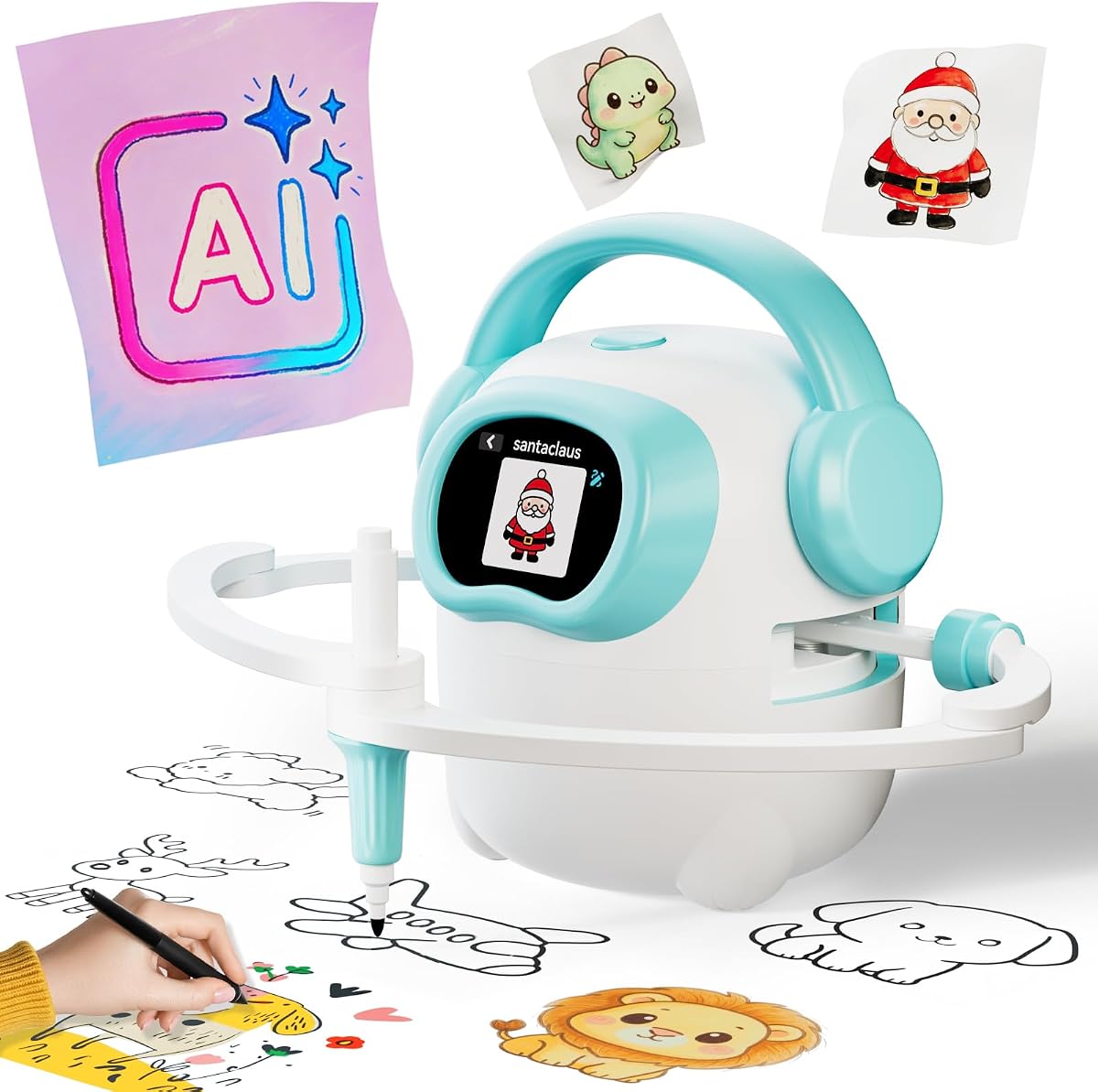



The IBEED AI Drawing Robot with APP combines a 5.0 customer rating with several unusually broad creative features for the 3-to-8 age range. Children can ask for an image by voice, browse a high-definition touchscreen, and create art from a library of more than 10,000 AI-generated pictures. It is designed to feel like a creative companion rather than a conventional drawing tool with a fixed library.
We may earn a commission when you buy through this link, at no additional cost to you.
Its strongest attraction is the connection between language and image creation. Speaking a request gives children a way to practice describing what they imagine, while the touchscreen provides an immediate alternative for younger users who are not ready to formulate elaborate prompts. The app can also transform a photograph of a toy or family moment into a cartoon-style sketch that the robot draws on paper, creating a direct link between a child’s real-world interests and the finished artwork.
Parental Mode adds an important layer of control for connected play. A one-click setting can disable network access for offline use, and the microphone can be turned off to reduce recording concerns. These controls do not make the toy suitable for every household without supervision, and WiFi and app dependence may be inconvenient for families who prefer a completely offline experience, but they are valuable additions for privacy-conscious parents.
The package includes the drawing robot, 16 pens, a reusable drawing board, and a Type-C charging cable, reducing the chance that a child will be excited about the robot before the necessary drawing supplies are available. This model is an especially strong recommendation for families that want a mixture of voice interaction, touchscreen browsing, AI generation, and physical drawing in one child-focused system.
Instead of limiting children to preloaded cards, the robot can generate images based on spoken ideas. That open-ended approach is especially useful for imaginative children who want to combine familiar objects, fantasy characters, animals, or other concepts in unexpected ways.
The built-in touchscreen gives children an easy way to select local images without repeatedly changing cards. The app-based photo conversion feature then adds another route into creativity by turning a familiar toy, pet, or family scene into a sketch the robot can draw.
We may earn a commission when you buy through this link, at no additional cost to you.
The IBEED AI Drawing Robot Cyan offers the same broad voice-driven concept as the first-ranked model, but it places particular emphasis on an official cloud image library that is regularly expanded with new patterns and themes. Its 4.1 rating still places it within the competitive field, and the continuing updates could help sustain a child’s interest beyond the first few weeks of use.
We may earn a commission when you buy through this link, at no additional cost to you.
The toy supports both voice requests and touchscreen selection, giving children multiple ways to begin a project. A child can ask for an animal, plant, or fantasy character, or browse local pictures without inserting and removing cards. The included card functionality provides an additional familiar method of interaction, while the cloud library supplies a wider and continually changing selection of subjects.
Its main constraint is dependence on the network for the connected features described in the listing. Parents who want children to use the toy without a router, app, or cloud service may find that less appealing. The lower customer rating also means buyers should review recent feedback carefully, although the supplied specifications show a broad and capable feature set for its intended ages.
The included robot, 16 drawing pens, reusable drawing board, and Type-C cable make this a well-rounded option for birthdays and holidays. It is a sensible choice for families attracted to ongoing content updates, while the first-ranked IBEED model may appeal more to shoppers focused on the combined photo-conversion feature.
A large library can eventually become repetitive for children. The regularly expanded official cloud collection is this model’s key differentiator, introducing new patterns and themes without requiring a separate card purchase.
Voice interaction encourages children to put ideas into words, while the touchscreen gives younger or less verbal users a visual starting point. Supporting both approaches makes the robot more adaptable across a wide range of ages and communication preferences.
We may earn a commission when you buy through this link, at no additional cost to you.
The Mewaii Drawing Robot for Kids has a 4.8 rating and centers on a clean idea: children should be able to turn their own spoken concepts into physical drawings. Rather than focusing on a stated quantity of ready-made images, it lets kids request animals, characters, funny combinations, or subjects that have not been anticipated in advance.
We may earn a commission when you buy through this link, at no additional cost to you.
The activity has a natural learning sequence. A child describes an idea, watches the robot assemble lines and shapes, and then has something concrete to color, copy, or personalize. That process can support observation, hand-eye coordination, concentration, creative confidence, and verbal expression without requiring the child to begin with advanced drawing skills.
The supplied information does not describe specific parental privacy settings, a touchscreen, or a large image library, so buyers should not assume that it offers the same feature set as the IBEED models. Its apparent strength is instead a focused creative experience with straightforward voice interaction. The package contains the AI robot, drawing board, and markers, allowing a family to begin a complete activity with relatively little setup.
This is a strong recommendation for a child who readily invents characters, enjoys repetitive storytelling, or wants a drawing activity that begins with language rather than selecting a card. It may be especially useful for quiet creative sessions, parent-child art time, and independent play, provided buyers are comfortable with the product’s more compact feature set.
Open-ended prompting puts the child in charge of the subject and gives the AI something to interpret. This can produce more surprising results than a fixed menu and encourages children to keep imagining new combinations.
The robot’s line work provides a visual model that children can follow, color, or modify. Adding personal details turns passive observation into active art practice and helps the finished result feel like the child’s own work.
We may earn a commission when you buy through this link, at no additional cost to you.
This second Mewaii listing shares the voice-activated format and complete robot, board, and marker package described for the first Mewaii model. It is particularly relevant for children who treat drawing as part of a larger story. A request can become the beginning of a character, a humorous animal mash-up, or a new imaginary world that the child later colors and expands by hand.
We may earn a commission when you buy through this link, at no additional cost to you.
The learning value comes from a balanced process of thinking, asking, observing, and creating. Children can work independently, during quiet creative time, or with parents and friends, which makes the toy flexible for different routines. Watching the physical drawing process may also encourage patience because the result unfolds step by step rather than appearing instantly on a screen.
No customer rating is provided for this listing, which makes direct feedback comparison more difficult. The product data also does not specify the size of the image library or describe detailed privacy controls. Shoppers should therefore review the current listing and customer feedback carefully, especially if microphone behavior or connected use is important to their household.
Even with those uncertainties, the product’s stated creative focus is attractive. It is best suited to families seeking a straightforward voice-to-drawing experience, a child-ready physical activity, and a way to encourage children to explain their ideas before committing them to paper.
Because the robot accepts open-ended ideas, children can test characters and situations that fit their current interests. The resulting sketch becomes a physical prop for coloring, storytelling, and further invention rather than the end of the play session.
The product description highlights independent play as well as drawing with parents and friends. That versatility lets the robot serve as a quiet activity option while still providing a cooperative way for adults to model descriptive language and creative persistence.
We may earn a commission when you buy through this link, at no additional cost to you.
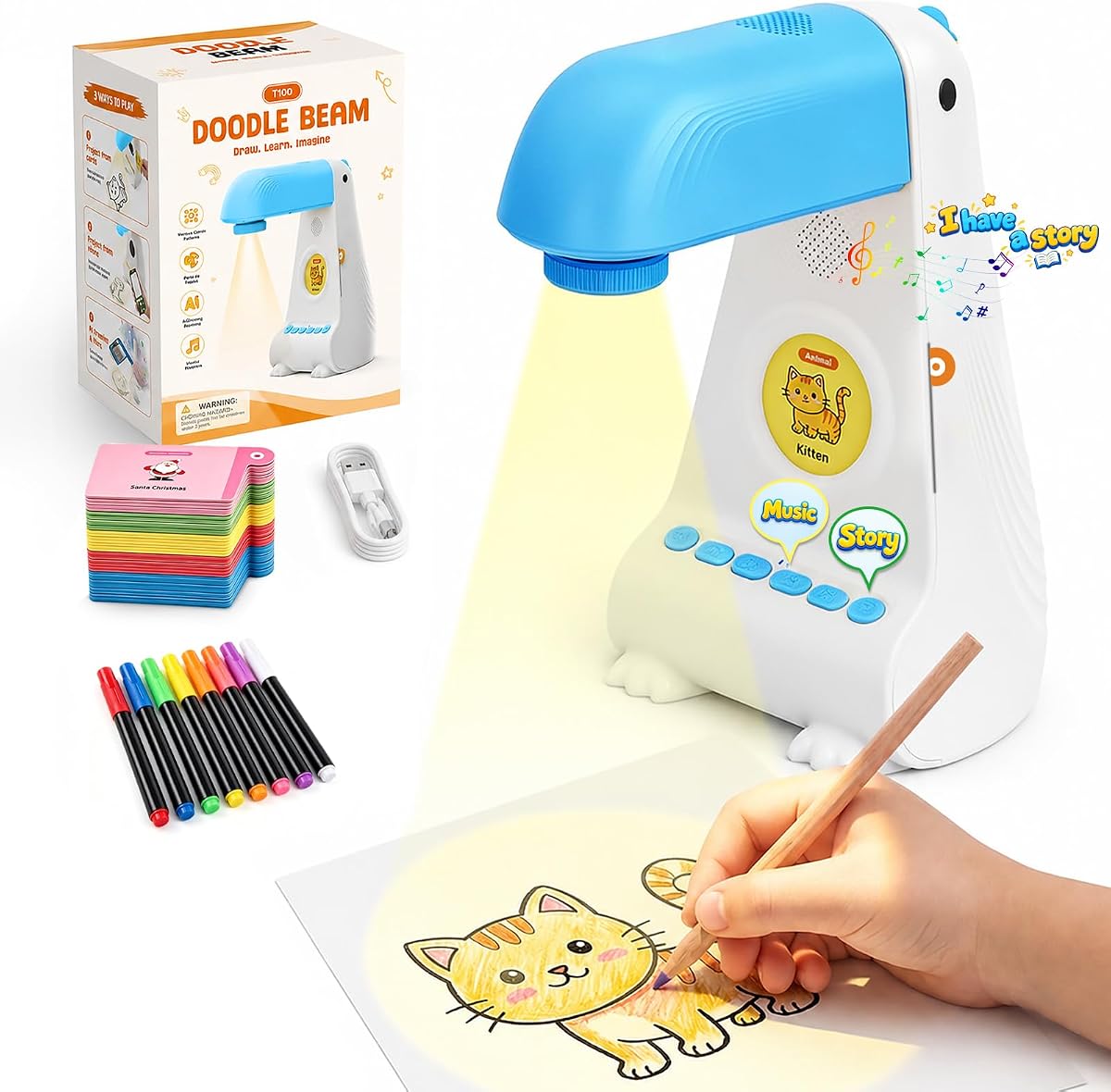
The AI Art Projector 3.0 combines a 5.0 rating with a 3.0-focused user experience designed around clearer images, more sensitive operation, and buttons positioned at the bottom so the device does not move when pressed. It provides a projected alternative to placing a tablet or phone directly in front of a child during drawing activities.
We may earn a commission when you buy through this link, at no additional cost to you.
Its 200 cards cover objects and include outlines that guide children through a painting process. Cards also carry object names, helping children connect the visible subject with vocabulary. Fourteen stories, eight music options, and downloadable drawing applications that can scan objects broaden the entertainment and learning value beyond simply tracing a fixed outline.
The projector is not quite the same kind of product as a robot that physically draws with pens. Instead, light projects an image or step-by-step pattern that a child follows on paper. This format can support recognition, vocabulary, observation, and creative additions, while soft light offers a screen-free alternative to prolonged use of mobile devices.
The package includes the projector, 200 cards, eight color pens, a charging cable, and manuals in six countries. After a full charge, it can operate for up to four hours and can be used at home, outdoors, or in classrooms. It is a strong pick for families that want guided drawing and an app-assisted projector rather than an autonomous drawing robot.
The cards divide artwork into manageable steps and name the pictured objects. That structure lowers the barrier to beginning a drawing while still giving children room to select colors and add their own details.
The projected outline lets the child work directly on paper with art supplies. That can reduce passive screen time while preserving a digital element in the planning and image-selection process.
We may earn a commission when you buy through this link, at no additional cost to you.
The Smart Drawing Robot with 219+ Cards has a 4.8 rating and stands out for straightforward, screen-free operation. The robot requires no companion app or internet connection, allowing children to begin drawing by inserting a card and following its automatic guidance. This makes it one of the most convenient choices for families who want a drawing robot without network setup.
We may earn a commission when you buy through this link, at no additional cost to you.
The card collection is extensive, covering 13 categories such as English letters, animals, fruits, vegetables, and vehicles. Cards are described as thick and water-resistant, which helps reduce the chance of tearing during repeated use. The robot can announce the printed word while the child draws, adding vocabulary practice to the visual activity.
Built-in early-education songs and several interactive drawing modes create a more lively session than a purely mechanical tool. The package includes the robot, 219+ cards, 14 colorful markers, five black markers, an erasable drawing board, and a charging cable. Including two marker sets reduces interruptions caused by depleted pens, while the water-cleanable board supports repeat use.
The main limitation is that its creativity is organized around a large but finite card collection rather than unrestricted AI prompting. Nevertheless, it offers a balanced combination of learning, physical drawing, music, and reliable offline operation. It is a compelling pick for younger children, early learners, and households that prefer a toy without app or router dependencies.
No app download or internet connection is required, which removes several common setup barriers. A child can select a card, start drawing, and use the robot’s educational features without relying on a connected device.
Each card pairs a drawing task with a labeled object. The combination gives children visual recognition practice, vocabulary exposure, and a clear art objective within the same activity.
We may earn a commission when you buy through this link, at no additional cost to you.
The Flycatcher smART Sketcher AI is designed for ages 10 and older, distinguishing it from most robotic drawing toys marketed to small children. Its 4.7 rating reflects a feature set aimed at tweens, teenagers, and adult hobbyists: children can describe or type an idea, receive a clean traceable outline, and project it onto paper in high resolution.
We may earn a commission when you buy through this link, at no additional cost to you.
The free smART Sketcher AI app supports both voice and typed prompts, giving users more ways to create an image. It can also transform a photograph sent from a phone into a step-by-step outline. That feature allows a child to draw a family member, pet, holiday scene, or other familiar subject while still producing the work by hand.
Its tracing workflow teaches practical art fundamentals such as hand-eye coordination, proportion, and confidence. The projected image serves as a reference, but the final work happens with a pencil on paper or another compatible surface. The product description also mentions canvas, fabric, and cookies, giving the device broader creative applications beyond a standard sheet of drawing paper.
The box includes the projector, a 30-image inspiration cartridge, and USB-C power. It is a new generation product and does not use smART Sketcher 2.0 cartridges, an important compatibility point for anyone comparing it with older accessories. It is the premium option here for older users who prioritize detailed AI imagery and more sophisticated drawing practice.
Unlike toddler-oriented projectors with simple outlines, this model is described as capable of handling detailed and realistic images. That makes it more appropriate for complex portraits, animals, imaginative structures, and hobby-level tracing.
The photo conversion workflow turns familiar images into traceable outlines. Children can create artwork around their own interests rather than relying entirely on generic examples or preloaded patterns.
We may earn a commission when you buy through this link, at no additional cost to you.
The Voltix AI Robot with a 7-inch touchscreen has a 5.0 rating but offers much more than paper drawing. It combines creative activities with letter practice, stories, songs, AI chat, educational videos, games, and downloadable applications. That makes it better suited to families seeking a broad learning companion than those wanting only a specialized drawing machine.
We may earn a commission when you buy through this link, at no additional cost to you.
The 7-inch high-definition display has a stated resolution of 1024 by 600 and supports touchscreen tracing, step-by-step drawing instruction, coloring, letter recognition, and other educational activities. These features can develop creativity, hand-eye coordination, and early cognitive skills, although the actual drawing happens on the display rather than being produced by a physical drawing arm.
The built-in Google Play Store, 1GB of RAM, 16GB of internal storage, expandable TF card support, 2.4GHz Wi-Fi, Bluetooth, and online updates give it the feel of a compact smart device. AI voice interaction can answer questions, tell stories, and sing, while smooth wheels let it move, dance, and interact with a child in the room.
A 4,000mAh rechargeable battery provides approximately four to six hours of continuous use, and the robot can serve in bedrooms, playrooms, during travel, or at family activities. It is a strong all-in-one option, but buyers seeking an autonomous robot that draws on paper should look elsewhere. Privacy deserves particular attention because of the microphone, Android apps, and connected features.
Drawing, stories, music, letters, games, videos, and conversations share one platform. The broad feature set can keep a child engaged across different interests without requiring a separate device for every category of play.
The wheels allow the robot to move, dance, and interact naturally rather than remaining a static screen. That physical presence can make voice conversations and learning prompts feel more like engaging play with a character.
We may earn a commission when you buy through this link, at no additional cost to you.
The Smart Projector Drawing Apps is another detailed AI art projector with a 5.0 rating, offering clear projected images, responsive buttons, 200 cards, 14 stories, eight music options, and downloadable drawing applications. It shares a similar overall design with the AI Art Projector 3.0, but appears in a separate listing and should be compared on its current availability and customer feedback.
We may earn a commission when you buy through this link, at no additional cost to you.
Children can use cards as guided painting templates, select patterns by pressing buttons, listen to stories, and scan objects to find a sketch through the drawing apps. Object names on the cards encourage recognition and vocabulary development, while step-by-step outlines help young artists work through more complicated images with less frustration.
The projected format keeps the actual coloring activity away from a conventional screen. Soft light is used instead of direct screen viewing, and the supplied description positions the toy as a useful educational supplement that can be used at home, outdoors, in classrooms, and elsewhere. After a full charge, its battery supports up to four hours of continuous use.
The box contains the projector, 200 cards, eight color pens, a charging cable, and manuals in six countries. A one-year warranty is also described. The main practical concern is ensuring that the relevant drawing applications work with the child’s own phone or device before purchase, since the core guided-card experience does not require an app.
Families can begin with the included cards and use apps when they want object scanning or additional sketch selection. This layered approach keeps a guided activity available even when connected features are not being used.
A four-hour battery after charging makes the projector useful beyond a fixed playroom station. Families can take it to a classroom, outdoor session, or creative lesson and continue using the included physical art materials.
We may earn a commission when you buy through this link, at no additional cost to you.
The WITALENT Step-by-Step Drawing Robot has a 4.6 rating and uses Montessori-inspired guidance to break artwork into manageable stages. The approach helps children learn complex patterns progressively rather than confronting a finished outline immediately. Once the robot completes the pattern, children can color it and add their own details to develop a personal artistic result.
We may earn a commission when you buy through this link, at no additional cost to you.
Its card collection contains up to 150 patterns across 12 themes, including animals, insects, food, flowers, vehicles, and other everyday subjects. A built-in music mode provides cheerful background sound, while silent mode is available when a quieter environment is preferable. The robot also reads the name of the card’s subject aloud, giving children a simple connection between the written word, the spoken term, and the visual drawing.
This model is particularly flexible for location because its 2,000mAh battery provides up to 120 minutes of cordless use. It can be used in a study room, classroom, at a party, or during quiet family time without requiring a cable during the session. Rechargeable operation is a meaningful convenience for travel and shared family spaces.
The toy does not offer the same unrestricted AI generation or photo conversion found in several higher-ranked models. Its strengths are instead reliability, themed learning content, music options, and portability. It is a good fit for families seeking a structured drawing activity that teaches through repetition and step-by-step guidance.
Breaking an image into stages helps a child understand how a complete picture can be assembled. That structure can make early drawing practice feel achievable while still leaving room for personal color choices and additions.
The rechargeable battery removes the need for a cable during active use. Children can therefore use the robot in different rooms, at a party, or during a family art session without staying near an outlet.
We may earn a commission when you buy through this link, at no additional cost to you.
The most suitable smart drawing robot depends on age, creativity, connectivity tolerance, and the type of art experience desired. These factors help distinguish unrestricted AI creation from guided card systems, projected outlines, and broader touchscreen companions.
Age is a useful starting point, but the child’s comfort with technology matters just as much. Products explicitly positioned for ages 3 to 8 often rely on simple picture selection, guided steps, voice commands, and cheerful feedback. Models for ages 10 and up may offer more detailed outlines, photo conversion, and advanced tracing suitable for older children and hobbyists. Younger children generally benefit from a narrow choice of subjects, clear physical results, and a straightforward way to begin.
Choose a model that matches the child’s current attention span and communication skills. A child who enjoys describing stories may appreciate open-ended voice prompts, while one who still struggles with complex instructions may do better with cards and step-by-step guidance.
Voice-activated robots offer one of the most compelling forms of open-ended play. Instead of choosing from a fixed menu, a child can describe an animal, character, combination, or imaginary scene and see the interpretation rendered physically. This can strengthen descriptive language, reasoning, and confidence because the child must decide what to request and how to communicate it.
Prioritize models with a broad image library, reliable voice recognition, and a smooth transition from a spoken idea to a drawing. Families should also understand whether images are generated locally, accessed through a cloud service, or selected from a maintained official library.
Card-guided systems trade some open-endedness for reliability and ease of use. A child inserts a card, and the robot follows a known drawing sequence, which reduces uncertainty and makes the toy effective for practicing outlines, vocabulary, and stepwise art. These products can also work without an app or internet connection, a major advantage in homes with limited connectivity.
Open AI systems provide greater novelty because the possible subjects are not limited to a physical collection. The best choice depends on whether the goal is immediate creative experimentation or structured art instruction. Both approaches can be valuable, but they serve different learning styles.
A drawing robot physically marks the paper, which provides a satisfying cause-and-effect result and allows a child to watch the image form. A projector displays a reference image or outline that the child traces by hand, offering more control over line weight, color, and the final medium. Projectors can also be used with canvas, fabric, or other surfaces when the setup is appropriate.
Families should decide whether the child values seeing a robot draw automatically or learning to reproduce an image manually. Physical drawing robots are more theatrical and end-to-end, while projectors can feel like a traditional art lesson enhanced by AI selection.
Connected products can provide larger libraries, regular updates, object scanning, and photo conversion, but they also require a compatible app, network access, and a parent’s comfort with the associated data environment. Offline products reduce setup and reliability concerns, making them useful for travel, classrooms, and younger children who need a predictable experience.
Check whether WiFi, a smartphone, an account, or an app is required for the features that matter most. A model that offers useful offline functions is generally more flexible than one that becomes inactive without a connection.
Voice interaction and connected image generation deserve careful attention. Useful controls include an easily accessible parental mode, the ability to disable the microphone, and the option to disable network access. These features allow adults to limit connected activity or use a toy in a more traditional offline manner.
Families should also review the current privacy policy, microphone behavior, account requirements, and information needed to use the app. A parental control is helpful only if adults know how to find and activate it, so setup should begin with a quick tour of the security options.
A complete package should include enough markers or pens, a drawing surface, and charging accessories to start immediately. A reusable board that can be cleaned is particularly useful for repeated sessions, while multiple marker colors reduce the chance that a child loses interest because a pen has run out.
Look for clear instructions and a straightforward first-use experience. The ideal robot should not require advanced technical knowledge, and the package should not depend on optional accessories to produce a satisfying drawing. Review the listed contents carefully, especially for replacement pens, cards, boards, and charging cables.
A good educational drawing toy should do more than repeat the same motion. Look for vocabulary announcements, object recognition, step-by-step guidance, letter themes, storytelling, and opportunities for children to add their own colors and details. These elements can support language development, hand-eye coordination, focus, and confidence.
Replayability comes from a large or updated content library, varied prompts, and multiple ways to interact. A product that supports voice, touchscreen, cards, music, and personal photos may remain engaging longer than a model with only one activity mode, although the added complexity should remain understandable for the intended child.
Begin with the age-appropriate setup instructions and the supplied drawing materials. Charge the robot or projector fully, connect the required app if the chosen features need it, and check that pens fit correctly before allowing independent use. For connected toys, parents should explore a few example prompts, adjust privacy settings, and confirm that the microphone and network controls are easy to reach.
Give the child a simple creative starting point rather than an overly complicated command. Voice products work well with a clear subject and one or two details, while card systems require an age-appropriate card and projectors need the correct image centered on the paper. Keep the device stable, provide adequate lighting, and ensure that the child’s hands and the robot’s movement area are clear.
After the session, switch off connected functions if desired, disconnect the charging cable, and return cards or cartridges to their storage area. Wipe the drawing board with water as directed, store pens securely, and check the robot for ink residue or debris. Periodically review app permissions, parental settings, library updates, and battery performance, and remove any damaged cards or art supplies.
For a child around ages 3 to 8, a guided model with simple controls, cheerful feedback, and an easy-to-follow drawing result is usually most appropriate. Voice robots can encourage expression, card systems provide consistency, and offline operation may be valuable for younger or less technically confident users. The best choice ultimately depends on the child’s communication style and interest in physical drawing versus tracing.
Some models need WiFi and an app for AI generation, cloud libraries, photo conversion, or updates. Others provide complete card-guided drawing without a network or app. If a household values reliable use in different locations, an offline model may be more convenient, while a connected model can provide a larger and more frequently changing range of subjects.
They are generally designed as children’s creative tools, but parents should review the current product instructions, privacy policy, and app permissions before use. Models with microphone and network controls offer useful ways to limit connected activity. Adult supervision remains sensible, especially when a child is creating identifiable images or the toy stores information through a required account.
A drawing robot generally moves a pen and creates a physical drawing with little direct input after the child selects a subject or prompt. A projector displays an outline or guide that the child traces manually with a pencil or pen. The robot provides more visible automation, while the projector gives the child greater control over line weight, color, and medium.
Yes, because they break artwork into visible steps and provide repeated, guided practice. Cards can introduce subjects and vocabulary, projectors can display clear outlines, and voice prompts can encourage children to describe what they want. The strongest learning occurs when the child follows the system, then colors, traces, or alters the result to add personal choices.
The Smart Drawing Robot with 219+ Cards is explicitly designed to operate without an app or network connection. It uses physical cards to guide the child and includes music, marker pens, and a reusable drawing board. It is particularly practical for families who want a complete drawing activity that can begin without configuring a smartphone, account, or network.
It can be, provided the model offers visual alternatives. Touchscreen selection, cards, and projected patterns allow a child to begin without speaking, while a voice system may become useful later as confidence develops. Adults can also demonstrate simple prompts and let the child point, choose, or repeat phrases rather than requiring a complex spoken request.
Yes, especially models designed for ages 10 and older. The Flycatcher smART Sketcher AI can handle detailed and realistic images, convert photographs into outlines, and project onto paper, canvas, fabric, and other compatible surfaces. Older users generally benefit more from precise tracing and photo-based projects than from simple early-childhood character outlines.
The IBEED AI Drawing Robot with APP is the most complete overall choice because it combines voice generation, a large touchscreen library, photo conversion, and practical parental controls. The Smart Drawing Robot with 219+ Cards is the strongest budget and offline option, while the Flycatcher smART Sketcher AI stands out as the premium choice for older children, teenagers, and adults who want detailed AI-assisted tracing.
For younger children, prioritize simple setup, physical results, clear guidance, and a mode that does not overwhelm them with too many choices. For a child who loves verbal storytelling, a voice-activated robot can turn language practice into a genuinely creative activity. Older creators may benefit more from high-resolution projection, detailed outlines, and the ability to work from personal photographs.
Before buying, confirm the current listing details, app compatibility, included accessories, age recommendations, and privacy controls. Customer ratings and product availability can change, as can prices and promotional offers, so shoppers should compare the latest information and choose the model that best matches the child’s age, interests, and household setup.