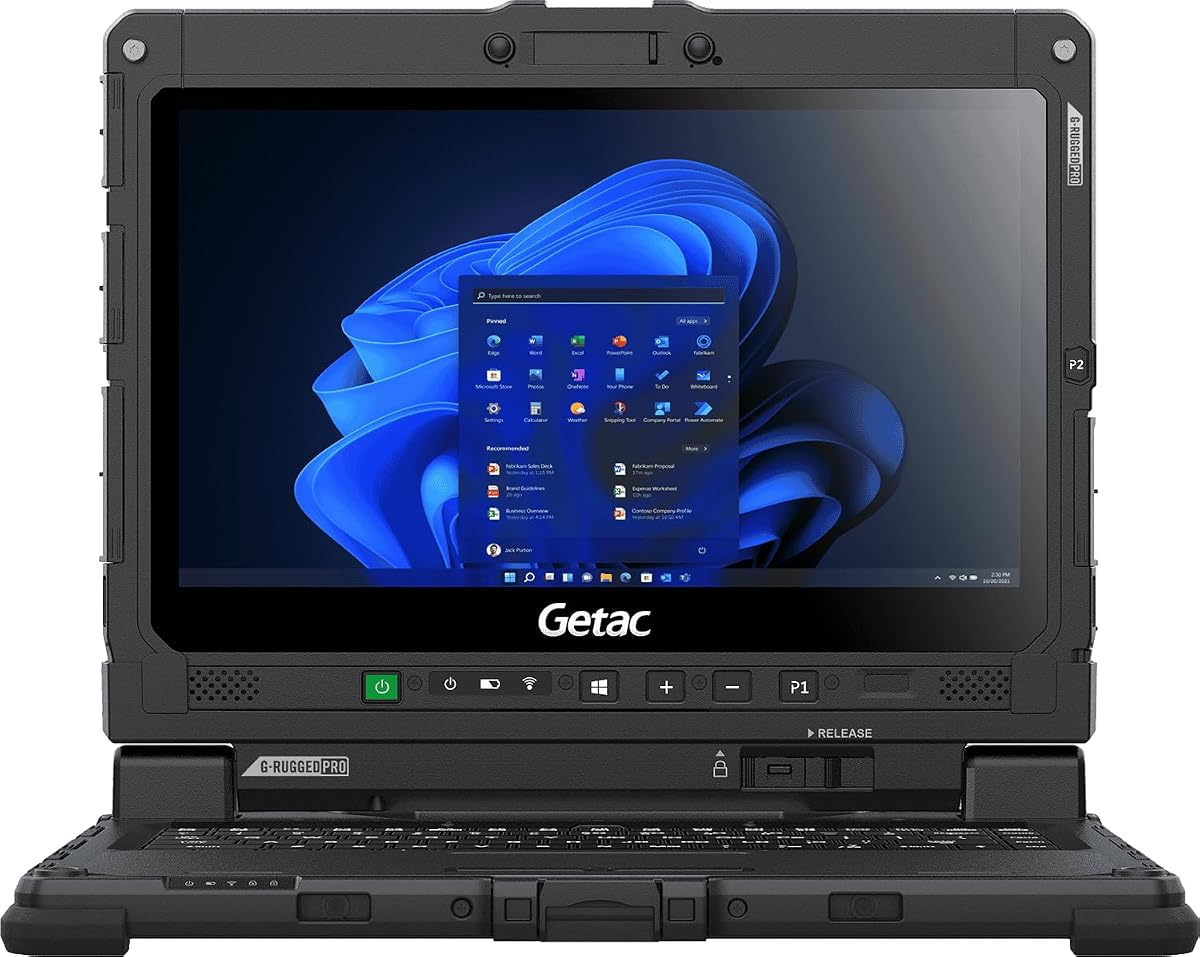
Getac Renewed K120
5.0Editor score
1,200-nit sunlight-readable touchscreen
Military-grade temperature tolerance
Glove-compatible multi-touch display
256GB NVMe solid-state drive
A laptop for bright sunlight must remain readable in direct sun, harsh glare, and reflective outdoor conditions. Screen brightness alone is only part of the equation: anti-glare coatings, contrast, display finish, viewing angles, and the quality of the panel all affect what you can actually see. The strongest models pair high-nit displays with rugged construction and dependable battery systems.
This guide compares 10 rugged and conventional laptops for outdoor visibility, display characteristics, processing power, memory, storage, connectivity, portability, and practical protection. It covers high-luminance industrial models alongside renewed professional equipment and mainstream laptops with anti-glare or touchscreen panels, helping buyers identify the features that matter for field work.
The rankings show which products stand out for extreme sunlight, which suit mobile productivity, and which provide more affordable everyday performance. Brightness figures and product configurations can vary, so confirm the exact display specification before purchasing. Prices and availability also change frequently, making it sensible to compare the current listing with your specific needs.
5.0Editor score

4.1Editor score

As an Amazon Associate we earn from qualifying purchases.
The comparison below places display brightness, outdoor-oriented features, core performance, and everyday usability side by side, making it easier to see which laptop best matches your outdoor workload.


The MUNBYN IRX17 is our leading recommendation for buyers who need a capable Windows machine in genuinely harsh outdoor environments. Its defining feature is a 15.6-inch 1920×1080 display rated at 1,000 nits and specifically described as sunlight readable. That output provides a substantial margin over a conventional 300-nit laptop, improving the visibility of forms, maps, schematics, and reference material when the screen catches direct light.
We may earn a commission when you buy through this link, at no additional cost to you.
Performance is equally suited to demanding professional work. The Intel Core i7-1255U processor is paired with 32GB of DDR5 memory and a replaceable 512GB solid-state drive. According to the product information, the system is intended to handle AutoCAD, SolidWorks, Creo, ANSYS, MATLAB, and other intensive applications. Wi-Fi 6, full-size working space, and dual removable batteries further support a full day of connected field use.
Durability is another major advantage. IP65 protection addresses dust and water exposure, while MIL-STD-810H certification indicates testing against demanding environmental conditions. The built-in physical camera switch is also more transparent and dependable than relying on software alone when confidential work requires a clear visual confirmation that the camera is covered. These rugged features add bulk, but they are meaningful advantages in construction, surveying, utilities, maintenance, and research.
The IRX17 is best for organizations that need both sunlight visibility and workstation-class capability. It is less convincing as a travel laptop or a machine for someone who simply wants a bright screen in occasional sun. Even so, its combination of a high-nit panel, replaceable storage, dual batteries, rugged protection, and generous memory makes it the most complete choice in this guide for sustained outdoor work.
The 1,000-nit FHD panel is the IRX17's defining advantage. Higher luminance helps the display compete with reflected sunlight, while the 1920×1080 resolution provides enough detail for forms, CAD interfaces, and mapping applications. For field teams, that combination can be more valuable than a higher-resolution panel that is difficult to read outdoors.
The i7-1255U, 32GB of DDR5 memory, and replaceable 512GB SSD make the IRX17 suitable for technical work rather than light field tasks. The removable SSD and dual-battery arrangement also give owners more flexibility when storage or power needs change over time.
We may earn a commission when you buy through this link, at no additional cost to you.
The Getac Renewed K120 combines the highest stated panel brightness in this group with the practicality of a compact 12.5-inch chassis. Its 1,200-nit LumiBond FHD touchscreen is designed specifically for direct sunlight, making it an especially attractive option for surveyors, emergency personnel, field technicians, and mobile inspectors. The current 5.0 rating also reflects a strong user response, although ratings alone should not replace checking the condition of a renewed device.
We may earn a commission when you buy through this link, at no additional cost to you.
The K120 is built for demanding environments. Getac specifies operation from approximately -20°F to 145°F, resistance to drops, shocks, vibration, and high humidity, and a screen that remains responsive with gloves. The 16GB of high-speed memory and 256GB PCIe NVMe SSD support field applications, data analysis, schematics, maps, and multitasking, while Intel Iris Xe graphics provide suitable visuals for those tasks.
There are clear compromises. The Intel Core i5-8250U belongs to an older eighth-generation platform, so it is not the strongest option for intensive engineering software. The renewed designation also means buyers should review the condition, included accessories, and 90-day warranty carefully. Nevertheless, obtaining a 1,200-nit sunlight-readable panel and military-oriented construction in a more affordable package is exceptional value.
Choose the K120 when outdoor readability and ruggedness matter more than having the newest processor. It is a particularly strong match for organizations replacing several basic laptops, because the compact screen, glove-compatible touch, and wide environmental tolerance can improve field workflows. Review the refurbished listing closely, but as a bright-sunlight specialist, it is the most compelling value choice here.
At 1,200 nits, the K120 offers the highest stated brightness among the listed models. The touchscreen format also lets users interact with maps and forms directly, and its glove compatibility is more useful outdoors than a screen limited to precise fingertip input.
The 12.5-inch display keeps the K120 relatively compact compared with larger 15.6-inch and 17.3-inch alternatives. Its extreme-temperature rating, rugged testing, protective screen film, and 90-day renewed warranty make it a practical option for mobile teams that need dependable equipment.
We may earn a commission when you buy through this link, at no additional cost to you.
The Getac S510 is the premium option for buyers who want a modern, generously equipped rugged laptop with a bright outdoor display. Its 15.6-inch FHD TFT LCD touchscreen reaches 1,000 nits and includes a protective film. The result is a workspace large enough for technical applications while remaining substantially more visible in direct sun than a standard laptop panel.
We may earn a commission when you buy through this link, at no additional cost to you.
Internally, the S510 is well positioned for demanding use. The Intel Core Ultra 5 125U offers up to a stated 4.3GHz with a 12MB smart cache, supported by 32GB of DDR5 memory and a 1TB PCIe NVMe SSD. Windows 11 Pro is preinstalled, and the included 65W adapter and single battery provide a conventional professional configuration. No rating is currently supplied for the listing, so the specifications are more informative than customer sentiment.
Ruggedness is certified rather than merely implied. The S510 carries MIL-STD-810H and IP53 certifications, is listed as resistant to vibration and drops from approximately three feet, and weighs about 5.18 pounds. It also includes two USB 3.2 ports, Thunderbolt 4, HDMI, LAN, audio connections, a docking connector, and a 5MP Windows Hello camera, making it well suited to fixed-site technicians who still require mobile capability.
The S510 is the best choice for organizations that value a complete professional platform and can accommodate its size and weight. It costs more than conventional alternatives, but the premium buys a bright touchscreen, modern performance, abundant memory and storage, and verified rugged credentials in one machine. For procurement managers seeking long-term flexibility, it is a particularly well-balanced recommendation.
The Core Ultra 5 125U, 32GB of memory, and 1TB NVMe drive provide a more current foundation than many renewed or industrial alternatives. Windows 11 Pro adds useful management and business capabilities for organizations that need to deploy a consistent configuration.
Thunderbolt 4, dual USB 3.2, HDMI, Ethernet, audio, and a dedicated docking connector cover a broad range of workshop and office accessories. The 15.6-inch touchscreen, 5MP camera, and Windows Hello support also make the S510 useful for presentations, inspections, and remote collaboration.
We may earn a commission when you buy through this link, at no additional cost to you.
The MUNBYN IRX16 is a well-balanced rugged alternative to the IRX17. It also has a 15.6-inch 1920×1080 display rated at 1,000 nits and sunlight readable, so it addresses the same central problem of viewing detailed work in direct sun. Its current 4.0 rating indicates generally positive user sentiment, though the shorter track record of a newer listing warrants the usual attention to warranty and support terms.
We may earn a commission when you buy through this link, at no additional cost to you.
The Core i5-1235U and 16GB of DDR5 memory provide enough capability for AutoCAD, SolidWorks, Siemens NX, ZBrush, ArcGIS, data analysis, and communication tasks. A 512GB replaceable SSD can be expanded to as much as 4TB according to the product information. Wi-Fi 6 supports fast transfers, low-latency communication, video conferencing, and remote monitoring, making the IRX16 suitable for connected field operations.
The physical design is built for harsh locations. IP65 protection helps resist dust and water, MIL-STD-810H certification adds confidence in demanding conditions, and the camera cover provides a simple privacy control. One practical complication is SIM installation: the instructions require opening the bottom cover, removing the SSD mounting screws, and accessing the SIM beneath the drive. It is therefore less convenient than a side-access design.
The IRX16 is best for buyers who want the IRX17-class 1,000-nit visibility without needing 32GB of memory. It is a compelling choice for field designers, GIS users, and industrial teams that value storage flexibility and rugged protection. Those who can benefit from extra memory and the IRX17's dual-battery setup should step up, but this model remains a strong all-around sunlight-focused machine.
The included 512GB SSD is replaceable and supports expansion up to 4TB. That is useful for survey files, 3D assets, maps, video, and project archives that can grow quickly. The physical access also allows storage to be upgraded or exchanged as requirements change.
A 1,000-nit FHD screen gives the IRX16 ample brightness for direct sun while preserving a familiar resolution for industrial software. Combined with IP65 protection, it is a better outdoor tool than a conventional laptop whose display and enclosure are optimized for indoor use.
We may earn a commission when you buy through this link, at no additional cost to you.
The HP OmniBook 3 14 is the most mobile-focused selection in this guide. It pairs a 14-inch 2K OLED display with a Snapdragon X X1-26-100 processor, 16GB of LPDDR5x memory, and a 256GB PCIe Gen4 NVMe drive. The result is a lightweight, efficient laptop for travelers who encounter variable lighting but do not require a high-luminance industrial panel.
We may earn a commission when you buy through this link, at no additional cost to you.
The display's 1920×1200 resolution is excellent for documents, web work, maps, and media, while the OLED format provides rich colors and deep contrast. Its listed brightness reaches 300 nits, however, which is significantly lower than the 1,000- and 1,200-nit options in the roundup. It should be viewed outdoors with the same caution as any conventional laptop, particularly under direct overhead sunlight.
Efficiency is a major strength. HP advertises up to 41 hours and 45 minutes of battery life, and fast charging can restore the battery from zero to 50 percent in approximately 45 minutes. Qualcomm Wi-Fi 6E, an FHD camera with HDR auto-switch, dual microphones, and Otter.ai features add useful tools for mobile meetings and documentation. Windows 11 Home and a dedicated Copilot key support everyday AI-assisted workflows.
This OmniBook is best for students, commuters, and mobile professionals who value sharp resolution, endurance, and portability. It is not the right choice when the defining requirement is reading a screen under intense direct sun. For occasional outdoor work in shade or moderate brightness, though, its 2K OLED panel and strong battery proposition make it a polished general-purpose alternative.
The Snapdragon platform and stated battery life make the OmniBook 3 14 convenient for travel and all-day use. Fast charging is particularly helpful between meetings, while Wi-Fi 6E supports modern networks and efficient connectivity on the move.
The 2K OLED panel excels at detail and color, but its stated 300-nit output is not equivalent to a sunlight-readable panel. Users needing dependable visibility under direct sun should favor one of the rugged 1,000-nit models instead.
We may earn a commission when you buy through this link, at no additional cost to you.
The HP OmniBook 3 16 offers a large touchscreen and 2K IPS panel at a mainstream level, with a current 4.5 rating. Its 1920×1200 resolution, wide viewing angles, and touch functionality make it practical for browsing maps, reviewing documents, and working with visual applications. Unlike the true rugged choices, no specific sunlight-readable brightness or anti-glare rating is supplied.
We may earn a commission when you buy through this link, at no additional cost to you.
An AMD Ryzen 3 30 processor, Radeon 610M graphics, 8GB of LPDDR5 memory, and a 256GB PCIe NVMe drive provide a capable everyday configuration. The product information supports multitasking, streaming, casual gaming, and photo editing. HP also lists up to 14 hours and 15 minutes of battery life, with fast charging reaching 50 percent in about 45 minutes.
Its large display can be beneficial in outdoor work because a bigger interface makes forms and controls easier to interact with. The camera's HDR auto-switch can also help when backlighting changes during calls, while Advanced Personal Mode filters competing noise. These are useful quality-of-life features, but they do not change the fundamental fact that a 2K IPS panel without a stated high-nit or sunlight-readable rating may struggle under harsh direct light.
The OmniBook 3 16 is best for buyers who want touch input, a large workspace, and solid everyday specifications without moving into rugged-laptop pricing. It is less appropriate for engineers, surveyors, or inspectors who require guaranteed outdoor readability. If occasional outdoor use is the goal and shade is available, it remains a capable, well-reviewed general-purpose laptop.
The 16-inch 2K IPS touchscreen offers ample space and wide viewing angles for everyday work. Touch controls can speed up tasks that would otherwise depend on a trackpad, particularly when reviewing images, maps, or reference material.
The Ryzen 3 30 and Radeon 610M cover common productivity and entertainment tasks, while 8GB of memory may become limiting under heavy multitasking. Buyers working with large project files should consider a higher-memory configuration.
We may earn a commission when you buy through this link, at no additional cost to you.
The Dell 15.6 DC15250 is a conventional business laptop for buyers who want reliable everyday performance in a relatively portable format. Its 15.6-inch Full HD display is comfortable for standard office tasks, and the Intel Core i5-1334U is well suited to multitasking and routine productivity. The current 4.3 rating gives it a solid customer-satisfaction profile, although the listing does not claim that the display is sunlight readable.
We may earn a commission when you buy through this link, at no additional cost to you.
Dell emphasizes energy-efficient batteries, Express Charge, and ComfortView software for reducing potentially harmful blue-light emissions. The keyboard includes a separate numeric keypad and calculator hotkey, while lifted hinges create a more comfortable typing angle. These features make the laptop sensible for office work, home use, and intermittent travel where durability certification and extreme-temperature operation are not required.
Its main limitation is the lack of a stated high-nit panel or anti-glare coating. In direct sunlight, a standard FHD display may become washed out, especially when the screen angle reflects nearby objects. Users who mostly work indoors or outdoors in shade may find the DC15250 entirely adequate. Those who regularly need to read detailed information under open sky should invest in a specifically sunlight-readable model.
The Dell is best for students, administrators, and business users seeking a familiar 15.6-inch laptop with current processing power and onsite service. It offers a sensible balance of portability and screen space, but it does not solve extreme outdoor visibility. Its value lies in general productivity rather than rugged performance, making it a good companion to consider against the brighter industrial models in this list.
The full-size keyboard, numeric keypad, calculator hotkey, and lifted hinges prioritize frequent typing and number entry. ComfortView software and energy-efficient batteries complement those practical touches for long workdays.
Dell lists one year of onsite service for covered hardware issues that cannot be resolved remotely. This can be valuable for business users because it may reduce the need to transport a malfunctioning laptop to a repair facility.
We may earn a commission when you buy through this link, at no additional cost to you.
The HP 17.3 FHD IPS stands out among mainstream laptops because its anti-glare display is explicitly designed to reduce reflections. That treatment is particularly relevant outdoors, where glossy screens can mirror the sky, buildings, vehicles, or other bright surfaces. Its 300-nit brightness is not comparable to the 1,000-nit industrial panels, but the anti-glare finish can still make the screen more practical in bright environments.
We may earn a commission when you buy through this link, at no additional cost to you.
The large 17.3-inch Full HD IPS panel provides ample space for documents, spreadsheets, media, and side-by-side work. AMD FreeSync synchronization is listed for fluid visual performance, while a 45% NTSC color specification should be considered by users who need highly accurate color. The physical webcam shutter is a welcome privacy feature, and dual microphones and speakers support collaboration.
Internally, the Ryzen 5 7430U is a six-core, 12-thread processor with a stated boost clock up to 4.3GHz and 16MB of L3 cache. The laptop includes 16GB of RAM and 1TB of storage, providing a comfortable amount of memory and disk capacity for multitaskers. Wi-Fi 6, Bluetooth 5.4, Windows 11 Home, and a dedicated Copilot key round out the feature set.
The HP 17.3 is best for users who want a large, glare-resistant display and roomy specifications but do not need a fully rugged enclosure. It is a sensible choice for field sales, mobile work in variable light, and students who prefer a large screen. It is less suited to very bright direct sun or heavy drops, but it offers a more thoughtful glare treatment than many conventional alternatives.
An anti-glare surface diffuses reflected light and can make a 300-nit display easier to view than a glossy panel with the same brightness. It does not replace a high-nit sunlight-readable display, but it reduces one common source of outdoor screen confusion.
The six-core Ryzen 5 7430U, 16GB of memory, and 1TB drive provide strong capacity for browsing, office applications, communication, and media. A 17.3-inch screen also makes detailed documents and spreadsheets easier to work with.
We may earn a commission when you buy through this link, at no additional cost to you.
The Panasonic Toughbook FZ-55 MK1 is a highly rated, compact rugged option with a 14-inch Full HD touchscreen capable of reaching 1,000 nits. That brightness makes it one of the strongest candidates here for direct sunlight, while the smaller display preserves more portability than a 15.6-inch industrial notebook. Its current 4.7 rating suggests strong satisfaction among buyers.
We may earn a commission when you buy through this link, at no additional cost to you.
Despite its compact proportions, the FZ-55 is thoroughly designed for field work. It is MIL-STD-810H certified, sealed to IP53 standards, and includes 4G LTE with multi-carrier support for connectivity beyond conventional Wi-Fi networks. The Intel Core i7-8665U vPro processor, 16GB of RAM, and 512GB M.2 SSD handle multitasking, data processing, maps, and multimedia with room to spare.
Its interface and security features are thoughtful. A 1080p webcam has a physical privacy cover, an infrared camera supports Windows Hello, and a tetra-array microphone assists with calls. Connectivity includes USB-A 3.1, USB-C 3.1, microSDXC, HDMI, gigabit Ethernet, audio connections, a docking connector, and a Nano SIM. A stylus, AC adapter, and preinstalled Windows 11 Pro complete the package.
The FZ-55 is best for mobile professionals who need cellular connectivity and a high-brightness display but prefer a smaller footprint. The renewed designation deserves careful review, and the eighth-generation processor is no longer current. Even so, the combination of 1,000-nit visibility, LTE, rugged certification, and excellent user feedback makes it a compelling field machine for the right buyer.
The 14-inch 1,000-nit touchscreen offers an unusual balance of outdoor visibility and mobility. Integrated 4G LTE broadens the laptop's usefulness in locations where Wi-Fi is unavailable, which is especially relevant for field service and mobile inspection.
The physical webcam cover, infrared Windows Hello camera, and Windows 11 Pro create a useful security toolkit. Docking and peripheral connections also make it easier to transition between mobile fieldwork and a desk-based workstation.
We may earn a commission when you buy through this link, at no additional cost to you.
The Dell 16 DC16251 is a large-screen productivity laptop that may appeal to users who want more workspace without moving to a specialized rugged machine. Its 16-inch FHD+ display uses a 16:10 aspect ratio, providing a wider and taller viewing area than a conventional 16:9 panel. The current 4.4 rating reflects generally favorable user sentiment.
We may earn a commission when you buy through this link, at no additional cost to you.
The Intel Core 7-150U processor and 16GB of RAM are well matched to business productivity, communication, document work, and entertainment. Dell ComfortView Plus reduces potentially harmful blue-light emissions while preserving color, and the camera supports wide dynamic range and temporal noise reduction for clearer calls in changing lighting. Adaptive thermals adjust power and heat management according to the surface and operating conditions.
As a general-purpose laptop, it does not specify a high-nit display, anti-glare coating, or rugged certification. It should therefore be considered a bright-room productivity option rather than a dependable direct-sun computer. The 16-inch scale may help show more content, but a larger panel can also be harder to position away from reflections. Buyers who routinely work outside may be better served by a 1,000-nit rugged option.
The DC16251 is best for home and office users, hybrid workers, and students who value a large display and modern processing. Dell also includes one year of onsite service for covered hardware issues that cannot be resolved remotely. It is a capable laptop for ordinary workflows, but it belongs in this roundup as a large-screen alternative rather than a true sunlight specialist.
The 16:10 FHD+ panel offers a broader canvas for documents, browser pages, and media than a standard widescreen laptop. At the same time, its larger dimensions mean the machine is less convenient to carry than a compact 12.5- or 14-inch device.
ComfortView Plus helps reduce blue-light exposure during extended work, while the FHD camera's dynamic range and noise reduction support clearer video calls. These features improve everyday comfort but do not increase the screen's outdoor brightness.
We may earn a commission when you buy through this link, at no additional cost to you.
The most important choice is the display, but brightness alone does not determine outdoor usability. Screen finish, application demands, connectivity, battery life, and environmental protection should all be considered before selecting a laptop for work under direct sun.
A sunlight-readable display is specifically engineered to remain legible in direct or reflected sunlight. The rugged models in this guide provide stated outputs of 1,000 or 1,200 nits, far above the 300-nit panels used by many conventional laptops. High luminance helps the display overpower reflected light, while a 1920×1080 or higher resolution preserves the detail needed for maps, forms, engineering software, and photographs. Buyers should avoid treating ordinary brightness claims as equivalent to a sunlight-readable certification.
A matte or anti-glare finish can be nearly as important as raw brightness because glossy screens reflect bright objects and the sky. The HP 17.3 FHD IPS is the clearest anti-glare alternative in this list, although its 300-nit rating remains below the dedicated high-luminance models. Touchscreens add another consideration: they are convenient outdoors but may show more reflections or fingerprints than matte non-touch displays. Viewing angle and contrast should also be checked, particularly for work away from a desk.
Screen size affects both visibility and portability. A 15.6-inch panel offers a generous workspace for technical applications, while 12.5- and 14-inch models are easier to carry and can be positioned more effectively in bright conditions. Touch input is useful for maps, forms, inspections, and gloves, but it may add reflections and consume additional power. A native 1920×1080 resolution remains a practical baseline for most field software, particularly when fine text must be readable.
A modern Core i5, Core i7, Core Ultra 5, or Ryzen 5 can handle standard productivity and communication, but technical software raises the requirement. CAD, simulation, GIS, and 3D modeling benefit from at least 16GB of memory, with 32GB providing more comfortable headroom for demanding projects. The MUNBYN IRX17 and Getac S510 stand apart with 32GB, while the IRX16 and Toughbook FZ-55 offer 16GB configurations suitable for many field workloads.
Field laptops may accumulate maps, photographs, video, sensor data, and project files quickly. A 256GB drive can feel restrictive, so 512GB or 1TB is preferable for sustained work. Replaceable storage is another useful feature: both MUNBYN models support expandability up to 4TB, while the Toughbook FZ-55 uses a 512GB M.2 SSD and the Getac S510 includes 1TB of PCIe NVMe capacity. Consider backup and transfer needs as well as internal storage.
Outdoor laptops face rain, dust, vibration, drops, and extreme temperatures. IP65 on the MUNBYN models indicates strong protection against dust and water, while the Getac K120 and S510 and Panasonic Toughbook use MIL-STD-810H-related rugged credentials. The K120 also lists a broad operating-temperature range. Rugged construction usually adds weight and thickness, but it can be worthwhile when downtime, repair expense, or device failure would disrupt important work.
A high-nit display and rugged enclosure can increase power demands, making battery strategy important. The MUNBYN IRX17 includes dual batteries, and the HP OmniBook 3 14 lists exceptional endurance with its efficient Snapdragon platform. The Toughbook FZ-55 supports LTE and includes a battery, while the Getac S510 ships with one battery and a 65W adapter. Buyers should consider available power outlets, vehicle charging, battery interchangeability, and how long they will work away from a desk.
Field work often depends on more than a Wi-Fi connection. Wi-Fi 6 appears on both MUNBYN models, while the Toughbook FZ-55 adds multi-carrier 4G LTE. The Getac S510 includes Thunderbolt 4, dual USB 3.2, HDMI, Ethernet, and a docking connector. Privacy features are also important: the MUNBYN laptops have physical camera covers, the Toughbook includes a webcam privacy cover and infrared Windows Hello camera, and the HP 17.3 provides a webcam shutter. Choose the ports and security controls that match your working environment.
Begin by configuring the display before heading outdoors. Set the brightness as high as practical without creating excessive heat or power drain, enable any available sunlight or outdoor viewing mode, and use the full-screen brightness control supplied by the operating system. If the display remains difficult to read, change your position to avoid reflections rather than relying only on maximum luminance. A simple folding sunshade can also reduce glare without adding weight to the computer.
For rugged models, inspect seals, covers, ports, and the screen before each demanding shift. Keep the camera cover closed when privacy matters, use the supplied stylus for precise touchscreen work, and protect ports from dust when they are not in use. Replaceable SSDs and batteries should only be changed with the machine powered down and in accordance with the manufacturer's instructions. For a SIM installed beneath an SSD, follow the specific removal procedure supplied with the device.
Ordinary laptops require a different approach. Use a padded case, avoid leaving the computer in a hot vehicle or direct sun for long periods, and clean the display with a soft, lint-free cloth. Do not use harsh solvents on anti-glare coatings. Update the operating system, preserve recovery options, and keep an external backup for important field data. Periodic battery conditioning and close inspection of charging cables can prevent avoidable interruptions when the machine is already needed away from easy access to power.
For occasional outdoor use, a bright 300- or 400-nit panel with an anti-glare finish may be adequate, especially if you can work in shade or adjust the screen angle. Frequent use in direct sun calls for a purpose-built sunlight-readable panel around 1,000 nits or more. The K120, IRX17, IRX16, S510, and Toughbook FZ-55 are the clearest choices in this guide for that higher-visibility requirement.
No. Brightness is only one part of outdoor usability. A matte anti-glare finish, good contrast, suitable viewing angles, and careful screen positioning can matter just as much. Very bright panels may also draw more power, and rugged housings can add weight. Buyers should evaluate the complete package instead of treating one specification as decisive.
Not necessarily. If outdoor use is brief and the computer stays in a protective bag away from dust, rain, and impact, a conventional laptop may be sufficient. Regular construction, utility, emergency, survey, or field-service work makes IP protection, drop resistance, temperature tolerance, and replaceable components considerably more valuable. The Getac and Panasonic models are appropriate when equipment reliability affects the job.
Touchscreens can be very useful for maps, forms, inspections, and other visual tasks, particularly when gloves are permitted or supported. The Getac K120 specifically describes glove-compatible capacitive touch. However, some touch surfaces show more reflections, consume more energy, and require careful screen protection, so buyers should weigh convenience against glare and durability.
Sixteen gigabytes is generally sufficient for web use, office applications, mapping, and moderate multitasking. CAD, simulation, large GIS projects, and 3D modeling benefit from 32GB, particularly when several demanding applications are open. The IRX17 and S510 provide 32GB, while the IRX16 and Toughbook FZ-55 are listed with 16GB and may be configured differently depending on availability.
The first number in an IP rating concerns protection against solid particles, while the second concerns water ingress. IP65 indicates strong dust protection and resistance to water jets, while IP53 offers protection against limited dust and spraying water. Neither rating guarantees protection against every form of liquid damage, and correct port closure, care, and manufacturer guidance remain important.
No, although it substantially improves visibility. Direct overhead sunlight, reflections from pale surfaces, screen angle, display contrast, and the software interface all affect what the user sees. A 1,000- or 1,200-nit panel is much better suited to open-air work than a standard 300-nit screen, but changing position and using a sunshade can improve results further.
A renewed model can offer strong value because professional rugged laptops are expensive, but the buyer should review the refurbishment details, cosmetic condition, battery condition, included accessories, warranty, and return terms. The K120 and Toughbook FZ-55 are renewed options in this guide. A new rugged model may be preferable where uptime is critical or device appearance matters.
The MUNBYN IRX17 is the strongest overall recommendation because it combines a 1,000-nit sunlight-readable display, modern Core i7 performance, 32GB of DDR5 memory, replaceable storage, dual batteries, and IP65 protection. The Getac Renewed K120 is the value leader, offering the highest stated brightness and rugged construction in a more affordable package. For buyers wanting the most complete premium platform, the Getac S510 pairs a 1,000-nit touchscreen with modern processing, abundant memory and storage, extensive ports, and verified rugged credentials.
Prioritize the actual conditions of use. A dedicated high-luminance panel is essential for repeated work in direct sun, while anti-glare treatment may be enough for occasional use in variable light. Also consider whether the computer needs cellular connectivity, replaceable components, glove-compatible touch, physical privacy controls, or wide temperature tolerance. A large screen is useful for detail, but a smaller rugged model is often easier to position and carry outside.
Before purchasing, verify the exact display brightness, coating, warranty, configuration, and included accessories on the current listing. Product configurations and customer ratings can change, and prices fluctuate over time. Comparing the latest information ensures that the selected laptop genuinely matches your screen visibility, durability, and productivity needs rather than relying on specifications alone.