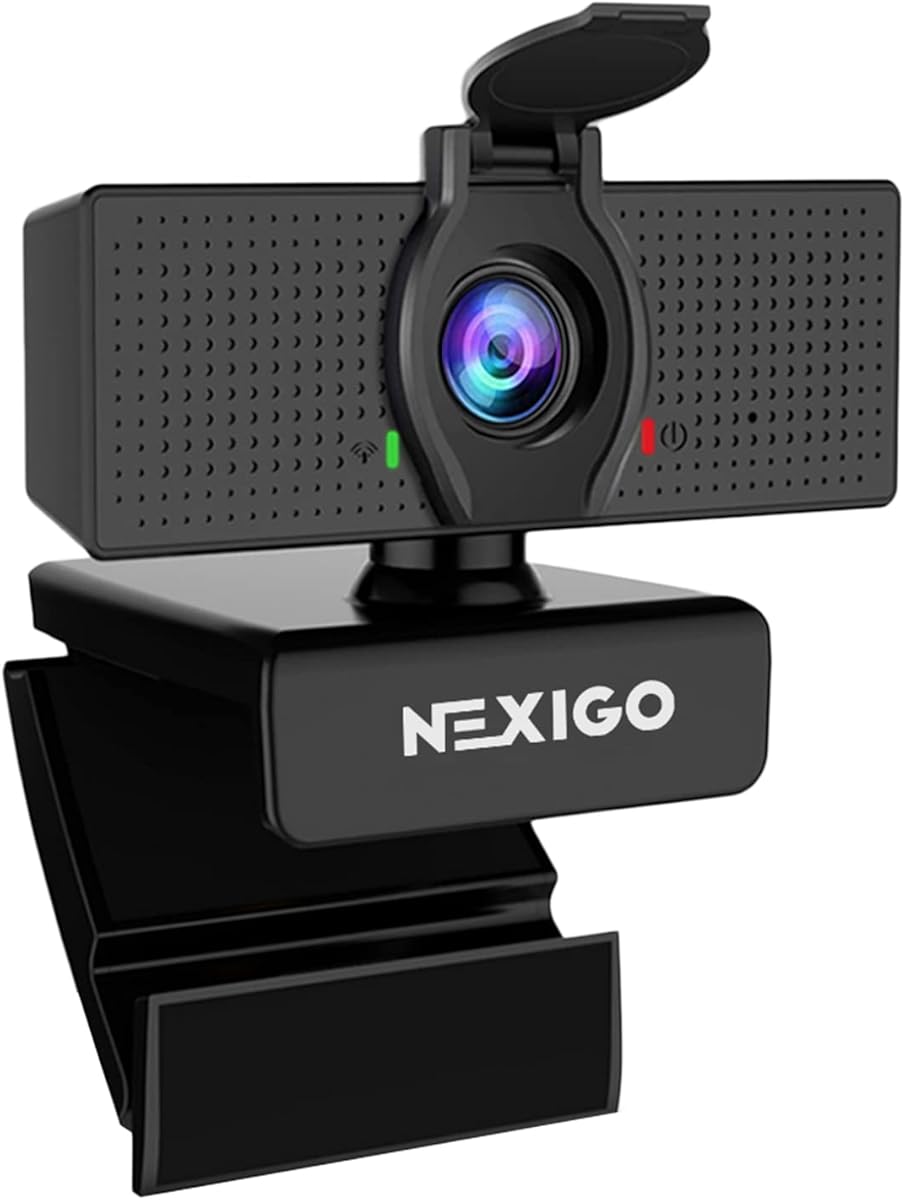
NexiGo N60
4.3Editor score
Full HD 1080p capture
Built-in noise cancellation
Simple USB plug-and-play setup
An external webcam can make a Mac-based workspace feel more professional, especially when the built-in camera cannot keep you evenly lit, focused, or visible. The right model should combine sharp image quality, natural audio, reliable Mac compatibility, and a privacy control that restores your peace of mind between calls.
This guide compares ten external webcams for Mac using the specifications and product information supplied for each model. The list covers 4K and 1080p cameras with features such as phase detection autofocus, automatic light correction, dual microphones, adjustable viewing angles, and physical lens covers.
Each review explains who the camera suits, what stands out, and where its compromises may matter. The top selections range from a budget-friendly 1080p option to premium 4K models, while the buying guide explains the factors that should guide your decision. Prices and availability can change, so verify current listings before purchasing.
4.3Editor score

4.6Editor score

4.6Editor score
As an Amazon Associate we earn from qualifying purchases.
The comparison below places every camera's headline resolution, focusing system, audio hardware, and privacy approach side by side, making it easier to match a webcam to your Mac setup, lighting, and preferred calling or streaming platform.




The Acer 4K Webcam is the strongest all-around choice in this guide, combining genuine UHD 4K output with a large Sony 1/2-inch CMOS sensor, phase detection autofocus, and two noise-reducing digital microphones. Its 4.6 rating reflects a feature set that goes well beyond basic 1080p conference hardware without turning the camera into a bulky studio device.
We may earn a commission when you buy through this link, at no additional cost to you.
The most appealing part is the combination of image quality and responsive focusing. The 1/2-inch sensor is designed to capture more light and preserve useful detail in dim rooms, while PDAF is intended to keep your face stable and sharp when you move toward or away from the camera. A magnetic privacy cover blocks the lens physically, which is a more reassuring design than relying only on a software setting.
Its all-metal unibody is unusually compact for a 4K webcam, weighing only 57 grams according to the supplied information. The aluminum construction also promotes heat dissipation for extended use, which is relevant to streamers and professionals who keep a camera running throughout the day. Audio is designed to pick up voices from as far as 2.5 meters, with filtering aimed at wind, keyboard noise, and other distractions.
This is the best option for a Mac user who wants 4K flexibility, dependable autofocus, and excellent everyday convenience. It connects through USB-C to USB-A with an adapter included, supports major conferencing and streaming services, and requires no separate wireless connection. The main consideration is that 4K recording can be demanding on a Mac and its connection, so 1080p remains a sensible choice for routine calls.
The larger Sony sensor and 4K resolution provide useful latitude for detailed calls, demonstrations, and recorded content. Automatic brightness and color behavior are especially valuable when your room lighting changes, although a separate light will still produce a more polished result.
The magnetic cover provides a quick, visible way to prevent unwanted capture. At 57 grams, the camera is easy to carry between a home office, shared workspace, or travel setup without feeling like specialized streaming equipment.
We may earn a commission when you buy through this link, at no additional cost to you.
The Anker PowerConf C200 is a practical middle ground for Mac users who want more detail than 1080p without moving to a true 4K model. Its 2K resolution, automatic low-light correction, and dual microphones make it particularly suitable for meetings, online classes, and everyday streaming. The supplied 4.4 rating reflects a balanced package with useful everyday features.
We may earn a commission when you buy through this link, at no additional cost to you.
One of its distinguishing advantages is the choice of 65-degree, 78-degree, and 95-degree viewing angles through software. That flexibility allows a tight frame for a close-up call, a conventional meeting view, or a wider composition that includes a whiteboard or part of your desk. The sliding lens cover is integrated into the body, so privacy does not depend on remembering to find a separate cap.
Audio is another strength. Two microphones work with AI noise cancellation to reduce distractions and make speech easier to hear in a shared office or family environment. Low-light correction similarly aims to maintain a clear image without requiring extra lighting, although a desk lamp or ring light can still improve facial detail, color, and contrast.
The C200 is best for professionals who spend significant time on video calls and want a clean balance of resolution, framing control, and privacy. Mac OS 10.11 or later is supported, and the camera works with the broad category of conferencing platforms. It does not match the Acer's native 4K detail, but for most calls the resolution difference will matter less than lighting and network stability.
Three software-selectable fields of view make the camera adaptable to interviews, screen sharing, tutorials, and group calls. Choosing a narrower angle can also reduce distracting background clutter without relying on digital cropping.
The dual microphone array and AI noise cancellation are valuable for home offices where keyboards, household movement, or open-plan noise can compete with your voice. Using a quiet room still improves results, but the processing gives you a helpful starting point.
We may earn a commission when you buy through this link, at no additional cost to you.
The EMEET C960 4K is a strong choice for creators and remote professionals who want genuine 4K capture without moving to a larger studio camera. It combines a true 4K CMOS sensor, PDAF autofocus, automatic light adjustment, dual omnidirectional microphones, and a 73-degree field of view. Its 4.5 rating reflects a capable package with thoughtful software and mounting options.
We may earn a commission when you buy through this link, at no additional cost to you.
An important detail is that the camera defaults to 1080p. To record in 4K, you need to change the setting through the built-in camera software or compatible applications such as PotPlayer and OBS. This is not necessarily a disadvantage, as a lower default can keep routine calls efficient, but users expecting immediate 4K should be aware of it before connecting the device.
The 73-degree view is designed to emphasize the user while leaving enough room for natural movement and a little surrounding context. Automatic light adjustment can help in over-exposed or dim conditions, while PDAF focuses quickly as you shift position. The camera also supports 360 degrees of horizontal adjustment, 15 degrees of vertical movement, and a standard quarter-inch tripod thread for more deliberate placement.
This model is well suited to a Mac user producing remote lessons, business presentations, tutorials, or regular calls in changing light. It works with macOS 10.14 and later, along with major platforms including Zoom, Teams, and Skype. EMEETLINK provides additional control, while the included privacy cover offers a physical barrier whenever the camera is not in use.
Keeping 1080p as the default can simplify bandwidth and processing for everyday meetings. Creators who need 4K can enable it in compatible software and gain finer detail for demonstrations, presentations, and recorded content.
The wide horizontal and limited vertical adjustment, combined with a quarter-inch thread, lets you fine-tune the camera instead of settling for a fixed monitor-clip position. A small tripod or stand can often produce a more natural eye-level composition.
We may earn a commission when you buy through this link, at no additional cost to you.
The NexiGo N60 is the budget-focused selection for Mac users who need a clear upgrade over a built-in camera without paying for 2K or 4K specifications. It records at 1920 by 1080 up to 30 frames per second through a two-megapixel CMOS sensor and a 3.6mm glass lens. Its 4.3 rating makes it a solid, straightforward conference and online-learning camera.
We may earn a commission when you buy through this link, at no additional cost to you.
The lens is optimized for indoor use at distances from 19.6 inches to 13 feet, which covers a typical desk setup and many small meeting spaces. Because the focus is fixed, the camera works best when you remain within that range. That limitation is not troublesome for standard calls, but it may be noticeable if you frequently move very close to the lens or stand farther away.
Its compatibility list is broad for a basic webcam. The N60 supports Mac OS X 10.7 and later, Windows 7 through 11, Android, Linux, Chrome OS, and Ubuntu, and it works through USB 2.0 or 3.0. Setup is designed to take approximately a minute or less without additional drivers, making it convenient for offices that issue equipment quickly.
The built-in noise-canceling microphone improves clarity for Zoom, FaceTime, OBS, Twitch, YouTube, online classes, and general calls. A physical privacy cover blocks the lens when the webcam is inactive. This is the best budget choice for students, remote workers, and occasional streamers who prioritize simplicity, 1080p clarity, and broad platform support.
The 1080p sensor at 30fps is a proven format for video conferencing, where stable delivery and clear facial detail are more important than extremely high resolution. The glass lens helps preserve sharpness across the camera's stated indoor focusing range.
Driver-free USB operation and extensive operating system compatibility make this model useful for mixed-device environments. The physical cover also adds privacy without requiring users to navigate camera settings every time they finish a meeting.
We may earn a commission when you buy through this link, at no additional cost to you.
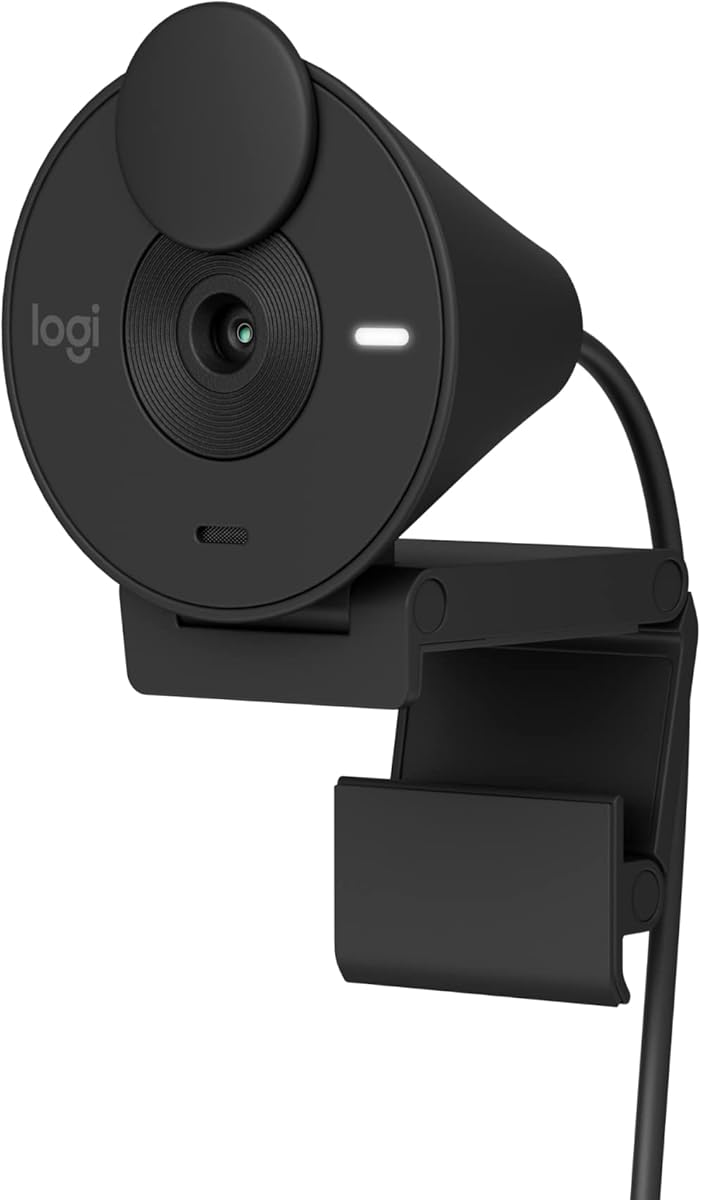
The Logitech Brio 100 is a colorful, approachable 1080p camera for Mac users who want a clear image and a privacy shutter without a complicated feature set. It supports Full HD calls, automatic brightness enhancement, and a built-in microphone. The supplied 4.4 rating reflects a well-rounded general-purpose model suited to meetings, streaming, and casual content creation.
We may earn a commission when you buy through this link, at no additional cost to you.
RightLight can raise brightness by up to 50% compared with earlier Logitech webcams, according to the supplied product information. This helps when a Mac user is backlit or sitting in a dim room, reducing the shadowy appearance that often undermines otherwise sharp 1080p footage. It does not replace a properly placed light, but it can make a modest workspace look more presentable.
The integrated cover slides over the lens, giving you an immediate physical indication of whether the camera can see you. A built-in microphone handles voice pickup for standard calls, while plug-and-play operation works with major platforms including Microsoft Teams, Zoom, and Google Meet. Compatibility with Nintendo Switch 2's GameChat mode broadens its appeal further.
This webcam is best for a home office, study area, or shared family computer where appearance and ease of use matter. Its choice of fun or sophisticated colors can help it fit into a more personal workspace. The main limitations are a single microphone and fewer manual framing options, so it is better suited to smaller rooms and solo calls than demanding studio production.
RightLight automatically compensates for weak or uneven lighting, which is one of the most visible improvements over many basic webcams. A forward-facing lamp still helps create more natural skin tone and sharper detail.
The privacy cover and straightforward setup keep daily use uncomplicated. Meanwhile, the range of colors lets the webcam blend into a personal setup or become a small piece of desk personality.
We may earn a commission when you buy through this link, at no additional cost to you.
The Logitech Brio 301 is designed around dependable everyday meetings. It offers natural-looking 1080p video, RightLight 2 automatic correction, a noise-reducing mono microphone, and a rotating privacy shutter. Its 4.4 rating makes it a strong option for Mac professionals who value a polished image and effortless privacy over higher-resolution specifications.
We may earn a commission when you buy through this link, at no additional cost to you.
RightLight 2 automatically compensates for poor lighting conditions, helping your face remain visible when the screen is bright or the room is dim. Logi Tune adds another layer of control, allowing you to adjust color and image quality rather than relying entirely on automatic behavior. The camera is certified for Zoom, Microsoft Teams, and Google Meet and also supports Nintendo Switch 2 GameChat.
The rotating shutter is effective because it can be moved as part of the routine closing action after a call. You can see whether the lens is exposed, which is useful in shared offices and home spaces where accidental video capture is a concern. The microphone's noise reduction suppresses background sounds, although a mono microphone cannot create the same spatial separation as a dual-microphone array.
The Brio 301 is a good match for employees, consultants, and students who spend most of their time in standard video meetings. It is particularly attractive if Logi Tune and broad platform certification matter more than 4K detail or advanced field-of-view adjustment. Pair it with good room lighting and an external microphone if broadcast-quality narration is your main goal.
Automatic light correction and Logi Tune adjustments help maintain a consistent face and color across changing meeting conditions. This makes the camera useful for recurring calls where a stable, professional presentation is important.
The rotating shutter can be closed immediately at the end of a conversation. Its visible position also makes it easier to confirm that the camera is no longer recording in a shared environment.
We may earn a commission when you buy through this link, at no additional cost to you.
The Logitech C920e is the premium business-oriented selection in this guide, combining 1080p HD video, HD autofocus, two omnidirectional microphones, and a balanced 78-degree field of view. Its 4.6 rating reflects a mature, professional package with certifications for Zoom and Microsoft Teams, making it especially suitable for workplace deployments.
We may earn a commission when you buy through this link, at no additional cost to you.
The 78-degree view is a useful middle ground. It frames an individual clearly while retaining enough room to show nearby objects, a second person, or a small portion of a presentation. Unlike cameras with multiple selectable viewing angles, this field of view is fixed, but the well-chosen framing reduces the need for extensive digital correction in a typical office.
Audio is designed for natural conversation. The integrated omnidirectional microphones can capture a voice clearly from up to one meter away, making them practical for desk-based calls and small meetings. HD autofocus and automatic light correction work together to keep the image stable and visible, while the attachable privacy screen gives a physical indication of whether the lens is exposed.
The sturdy adjustable clip fits laptops and external monitors, and quarter-inch threads add tripod flexibility. Certification for Zoom, TAA compliance, and support for Teams make the C920e a logical choice for managed business environments. A buyer who values workplace certification, robust mounting, balanced framing, and dual-microphone audio will find this model especially compelling.
Zoom and Microsoft Teams certification, automatic correction, and a professional field of view reduce the need for manual tuning. These qualities make the camera well suited to employees who use the same setup throughout the workday.
The adjustable clip and tripod threads make it easy to position the lens at a useful height. Its attachable privacy screen can be lowered over the lens, providing a clear visual signal when the camera is not active.
We may earn a commission when you buy through this link, at no additional cost to you.
The Logitech C922x stands out for offering both Full HD 1080p at 30fps and 720p at 60fps. That flexibility makes it a compelling choice for Mac users who record fast-moving content, game streams, or presentations and want a higher frame rate when motion matters more than pixel detail. Its 4.6 rating reflects strong image quality and established streaming support.
We may earn a commission when you buy through this link, at no additional cost to you.
HD light correction automatically fine-tunes brightness, while HD autofocus helps keep your face sharp as you move. Dual microphones provide natural stereo audio for calls and recordings. These automatic features reduce setup time, making the camera convenient for users who do not want to continually adjust exposure, color, and focus during a live session.
Advanced capture software supports content creation, and the camera works with Microsoft Teams, Google Meet, Zoom, and Nintendo Switch 2's GameChat mode. A three-month XSplit VCam license is also included, allowing background removal, replacement, or blur without a green screen. That software benefit expands its value for streamers and remote presenters.
The major hardware compromise is the absence of a privacy shutter. Users who need a physical lens cover may prefer the C920S or C920e. The C922x is still the strongest choice in this list for a Mac creator who values smooth 60fps capture, dual microphones, automatic correction, and flexible background tools over having a built-in privacy cover.
Use 1080p at 30fps for detailed screen demonstrations and everyday calls, or select 720p at 60fps when rapid movement, gaming, or live action needs smoother rendering. The option makes the camera more versatile than a fixed 30fps model.
The included XSplit VCam period can replace, remove, or blur your background without a physical green screen. It is a useful creative tool, although the absence of a physical shutter should be considered if physical privacy is a priority.
We may earn a commission when you buy through this link, at no additional cost to you.
The Logitech C920S is a proven 1080p option for Mac users who want dependable video, clear stereo audio, and a physical privacy shutter. It records Full HD at 30fps and uses a glass lens, HD autofocus, and automatic light correction. Its 4.6 rating reflects a well-established general-purpose webcam with a strong feature-to-function balance.
We may earn a commission when you buy through this link, at no additional cost to you.
Full HD remains the standard format for most professional calls, online classes, and recordings. The C920S produces crisp, colorful video at 1920 by 1080, while autofocus helps maintain clarity when you shift position. The dual microphones capture natural sound for conversations and recorded material, giving the camera more flexibility than models with only one built-in microphone.
Its most distinctive feature is the snugly fitting privacy shutter, which lets you control when the lens is exposed without relying on a menu command. That is useful for confidential meetings, shared workspaces, and anyone who wants a visible indicator that the camera is off. The design also avoids the extra software associated with some competing models.
This webcam is ideal for users who do not need 4K, 60fps, or advanced virtual-background features. It handles standard meetings and recordings well and is less likely to overwhelm a new user. If you want smoother motion for gaming or want background replacement tools included, the C922x may be a better fit, but for traditional Full HD communication, the C920S remains a strong, understandable choice.
The glass lens and Full HD sensor provide a sharp, familiar image format that works well for both calls and recordings. Automatic focus and light correction help maintain consistency without demanding constant manual adjustment.
The integrated shutter makes it easy to block the lens immediately after a call. It is a simple but meaningful privacy advantage, especially compared with webcams that offer only software-based camera toggles.
We may earn a commission when you buy through this link, at no additional cost to you.
The second Acer 4K Webcam in this guide offers a compact sensor-rich alternative for Mac users who want 4K detail and phase detection autofocus. It uses a Sony 1/2-inch CMOS sensor, a CNC-machined aluminum unibody, dual noise-reducing digital microphones, and a magnetic privacy cover. Its 4.4 rating reflects a capable camera with broad universal compatibility.
We may earn a commission when you buy through this link, at no additional cost to you.
The large sensor is designed to balance true-to-life color, low-light performance, and light capture. PDAF provides quicker and more stable focusing than a basic fixed-focus design, which is particularly useful when you move during a meeting or presentation. The dual microphones can pick up a voice from as far as 2.5 meters while filtering wind, keyboard clicks, and other ambient noise.
At only 57 grams, the camera is easy to move between calls and temporary workspaces. Its all-aluminum body supports fast heat dissipation for reliable extended operation, while the 12-magnet privacy cover snaps securely over the lens. Plug-and-play operation requires no drivers, applications, Wi-Fi, or Bluetooth, keeping local connectivity simple and secure.
This Acer model is a good fit for streamers, gamers, commerce creators, and mobile professionals who need 4K without a large housing. It works with Windows, Mac, and ChromeOS across major conferencing and streaming platforms. Its direct USB-A connection may require an adapter on a Mac with USB-C-only ports, but it offers the same core 4K, focus, audio, and privacy benefits as the top-ranked Acer model.
Combining a 4K sensor, autofocus, and dual microphones in a 57-gram housing makes this camera convenient for mobile work. Its compact size does not require a dedicated mounting arm or fixed desk position.
The wired USB-A connection avoids dependence on wireless networks and eliminates the need for software installation. On newer Macs, check whether your available ports require a suitable USB-A adapter before setup.
We may earn a commission when you buy through this link, at no additional cost to you.
The most useful webcam is not necessarily the one with the highest resolution. Mac compatibility, autofocus behavior, field of view, microphone quality, lighting correction, and physical privacy should be balanced against how and where you will use the camera.
Resolution determines how much fine detail a camera can capture, while frame rate controls how smoothly movement appears. The Acer models and EMEET C960 provide native 4K output, the Anker PowerConf C200 uses 2K, and most of the Logitech choices record 1080p. For ordinary Zoom or FaceTime conversations, 1080p at 30fps is usually more than sufficient. Native 4K becomes more valuable for detailed demonstrations, recorded tutorials, close-up product content, and displays with high pixel density. It also requires a capable Mac, a reliable connection, adequate lighting, and a conferencing service that supports the selected resolution.
The Logitech C922x is the notable option for smoother motion because it can record 720p at 60fps as well as 1080p at 30fps. That makes it useful for gaming and active presentations. Higher resolution does not automatically produce a better image if the room is dim, the webcam is poorly positioned, or the Mac cannot process the selected settings smoothly.
Autofocus is essential when your distance from the camera changes during a call. The Acer 4K Webcams and EMEET C960 use phase detection autofocus, which is designed to respond quickly and maintain stable focus. The Logitech C920e, C922x, and C920S also include HD autofocus, while the NexiGo N60 uses a fixed-focus lens optimized for a stated range of indoor distances. Fixed focus can produce excellent results if you remain in one position, but it may be less forgiving when you lean toward the screen or move around a larger workspace.
When evaluating autofocus, consider stability rather than the mere presence of the word autofocus. Phase detection is generally positioned as a more responsive approach, while established Logitech autofocus systems can also support natural movement. Whichever system you choose, place the camera at eye level and test it with the lighting and distance you expect to use during calls.
Field of view determines how much of you and your surroundings appear in the frame. The EMEET C960 uses a 73-degree view intended to emphasize the user, while the Logitech C920e offers a balanced 78-degree perspective that leaves room for nearby objects or a second participant. The Anker PowerConf C200 stands out with software-selectable 65-degree, 78-degree, and 95-degree options. A tighter angle can reduce background clutter, while a wider angle works better for collaborative demonstrations.
Remember that digital cropping and background blur cannot fully replace physical placement. A webcam close to eye level looks more natural than one perched above a monitor. The EMEET model's horizontal and vertical adjustments, the Acer's compact size, and the Logitech models' adjustable clips or tripod threads help you find a more useful angle. Check desk space before choosing a wide view or a separate stand.
A webcam microphone can be more convenient than relying on a MacBook's distant built-in microphone, though it rarely replaces a dedicated desktop microphone for professional narration. Dual-microphone models generally provide stronger voice pickup and can support stereo recording. The Acer 4K cameras and EMEET C960 use dual or omnidirectional arrangements, while the Logitech C920e, C922x, and C920S feature dual microphones. The Brio 301 uses a mono noise-reducing microphone, and the Brio 100 includes a built-in microphone.
The Anker PowerConf C200 adds AI noise cancellation, while the NexiGo N60 includes a noise-canceling microphone. These features can reduce keyboard clicks, fan noise, and room movement, but no processing can fully eliminate echo or a noisy shared environment. Speak at a natural distance, position the camera close to your monitor, and use headphones when background sound becomes disruptive.
Webcams can improve exposure automatically, but they cannot manufacture good lighting. RightLight in the Logitech Brio 100, RightLight 2 in the Brio 301, and similar automatic correction features can brighten a face and reduce harsh shadows. The Acer 4K models, EMEET C960, and Anker PowerConf C200 also emphasize low-light capture or automatic light adjustment. These systems are helpful, but their results remain limited when the only light source is behind the screen.
For professional-looking video, place a soft light in front of you and slightly above eye level. Avoid relying on the computer display as the primary light source, as it tends to silhouette your face. A larger sensor, as offered by the Acer models, can gather more light in difficult rooms, while lower-resolution cameras may still look excellent once the scene is properly illuminated.
A physical privacy mechanism provides a visible, reliable way to prevent unwanted capture. The Acer models use magnetic covers with 12 built-in magnets, the Anker PowerConf C200 has a sliding cover, the EMEET C960 includes a privacy cover, and the NexiGo N60 and Logitech models provide physical covers or shutters. The Logitech C922x does not include a privacy shutter, so it is less suitable for users who require immediate physical control of the lens.
All of the cameras described here rely on a wired USB connection, avoiding dependence on Wi-Fi or Bluetooth and reducing the need for cloud-based setup. Review your Mac's camera permissions, disable unused applications from accessing the camera, and use the physical cover during sensitive conversations. Privacy hardware is most useful when paired with sensible operating-system controls.
Mac compatibility should be verified beyond the presence of a USB connector. The Anker PowerConf C200 supports macOS 10.11 and later, the EMEET C960 supports macOS 10.14 and later, and the NexiGo N60 supports Mac OS X 10.7 and later. The Acer models and Logitech webcams are presented as broadly compatible with common calling and streaming services, including Zoom, Microsoft Teams, Google Meet, FaceTime, and other major platforms.
Also consider the application in which you work. The EMEET camera can be configured through EMEETLINK, the Logitech Brio 301 through Logi Tune, and the C922x through its advanced capture software. Some camera settings, particularly native 4K selection, may need to be changed in the app rather than automatically negotiated by the conferencing platform. Check the current operating-system requirements and the controls offered by your preferred app before finalizing a choice.
A webcam that looks good but sits at the wrong height can undermine an otherwise strong image. Clip-mounted models are convenient for laptops and monitors, while tripod threads provide a more stable foundation for an external stand. The Logitech C920e has a sturdy adjustable clip and quarter-inch threads, and the EMEET C960 offers broad adjustment plus a quarter-inch mount. The Acer cameras are exceptionally light, making them convenient to reposition between temporary workspaces.
For extended streaming or office use, consider heat management, cable strain, and whether the camera will remain stable. The Acer models use an aluminum unibody for fast heat dissipation. For everyone else, allow ventilation around the camera and avoid pushing it tightly against a monitor. A separate light and a stable riser can also improve ergonomics more than a marginal increase in camera resolution.
Begin by connecting the webcam with its supplied USB cable. On a Mac, open System Settings, choose Privacy & Security, and confirm that the application you intend to use has camera and microphone access. Select the external webcam in the system, Zoom, Teams, FaceTime, OBS, or another relevant app rather than relying on automatic device switching.
Next, place the camera at eye level or only slightly above it. Keep it close enough to your face that your expression remains visible, then add a soft light in front of you if possible. After making a test recording, adjust exposure, brightness, focus, and field of view within the camera's software. For native 4K models, verify that the application supports the requested resolution, and select a lower mode if your connection or Mac struggles to maintain a stable frame.
For care, unplug the camera before moving it and avoid pulling on the cable. Dust the lens with a soft, dry cloth rather than household cleaner, and keep the magnetic or sliding privacy cover closed while transporting it. Do not block the microphones or ventilation openings. Periodically check macOS software updates, camera permissions, and the device's default microphone selection so the camera continues to work smoothly across calls.
For routine video calls, 1080p is generally sufficient and places fewer demands on your Mac and network connection. Native 4K becomes more useful for recorded demonstrations, detailed tutorials, close-up content, and high-resolution displays. You will get the best results from 4K when your lighting is good and the selected application supports the full resolution.
A built-in camera can be perfectly adequate for short, informal calls, especially on a recent Mac. An external webcam generally offers a larger sensor, more reliable autofocus, better microphones, wider framing control, and physical privacy. It can also make you appear more evenly lit if you position a separate light in front of the screen.
Consider the application, your Mac's processing capability, and your connection speed. 4K provides more detail but requires a compatible application and a stable connection, while 2K can be a practical middle ground for sharper everyday calls. The EMEET C960 defaults to 1080p and requires a deliberate setting change for its native 4K mode.
The listed products support the major conferencing platforms described in their product information, including Zoom, Microsoft Teams, and Google Meet. Once connected, you may need to select the external camera and microphone manually in the application's device settings. Check the current compatibility requirements of your operating system and app if you use an older macOS release.
For normal calls, the built-in dual microphones on several premium models can provide clear voice pickup from a desk. For narration, podcasting, gaming commentary, or a noisy room, a dedicated microphone positioned close to your mouth will usually produce cleaner and more controllable audio. A headset can also reduce echo and room noise.
A physical cover or shutter is the clearest option because you can immediately see that the lens is blocked. Several models in this guide include one, while the Logitech C922x does not. Physical privacy should be combined with macOS camera permissions, application controls, and secure handling of your USB connection.
A higher frame rate makes fast movement look smoother, but most conventional calls do not require it. The Logitech C922x's 720p at 60fps mode is useful for gaming, active demonstrations, and recorded content where motion is frequent. For static talking-head calls, 1080p at 30fps is often the more efficient choice.
Yes, the products list support for major streaming platforms such as Twitch and YouTube, and the C922x includes advanced capture software and an XSplit VCam period. Your choice should account for resolution, frame rate, autofocus, microphone quality, and whether you want virtual background tools or a physical privacy cover.
The Acer 4K Webcam is the strongest overall choice because it combines native 4K recording, a Sony 1/2-inch sensor, phase detection autofocus, dual noise-reducing microphones, a magnetic privacy cover, and an exceptionally compact aluminum body. The EMEET C960 4K is another strong option for users who prioritize software control, mounting flexibility, and cross-platform support.
For a more affordable daily setup, the NexiGo N60 delivers the core features most Mac users need: Full HD video, a built-in noise-canceling microphone, broad operating-system compatibility, and a physical cover. The Logitech C920S is an alternative for those who prefer a proven 1080p format and integrated shutter, while the C920e is the premium workplace choice with dual microphones and business-platform certification.
Prioritize the combination that matches your environment rather than resolution alone. Good front lighting, stable placement, clear audio, appropriate framing, and physical privacy often improve a call more than an incremental specification gain. Before ordering, confirm the webcam's current macOS and app compatibility, check the connector on your Mac, and review the latest listing because prices and availability can change.