
VSDISPLAY 15.6-Inch 40-Pin LVDS Controller
4.4Editor score
VGA and DVI inputs
40-pin LVDS interface
1366×768 panel support
Built-in audio output
An LCD controller board for a laptop screen can turn a compatible panel into a useful standalone display, but the wrong board can leave you with a blank, unstable, or incorrectly scaled image. A good match must align with the panel’s resolution, connector type, voltage requirements, backlight system, and intended video source.
We compared these ten boards by examining their stated panel compatibility, supported resolution, signal inputs, connector configuration, power requirements, installation guidance, and troubleshooting support. The list covers 30-pin eDP, 40-pin LVDS, 5V LVDS, and universal controller options for common laptop panels.
Each review explains the most suitable use, highlights relevant specifications, and identifies practical limitations. Ratings reflect the supplied customer feedback, while compatibility remains the deciding factor because a well-rated board cannot operate a panel whose interface or electrical requirements differ. Current prices and availability may change.
4.4Editor score

4.4Editor score

4.6Editor score
As an Amazon Associate we earn from qualifying purchases.
The table below places each controller beside the factors that most affect a successful installation: target resolution, panel interface, supported dimensions, and common input options. Use it as a screening tool, then confirm the exact panel model and electrical specifications before buying.




This board is designed specifically for 1366×768 laptop panels using a 30-pin eDP connection. Its supplied rating is 4.4, and its strongest quality is the clarity of its compatibility guidance: the product explicitly warns against use with a 1920×1080 panel and lists several common panel model numbers.
We may earn a commission when you buy through this link, at no additional cost to you.
The board supports laptop screen sizes from 11.6 to 15.6 inches and uses a pre-connected signal cable. Pin 1 is marked with a red circle, reducing the risk of attaching the cable in the wrong orientation. Its 12V DC requirement calls for an adapter rated at 2A or higher through a 5.5 by 2.1mm connector, which helps prevent flickering, no-signal conditions, or repeated restarts.
Its limitations are fundamental rather than hidden. It is not a full-resolution choice, so a 1920×1080 panel should not be connected on the assumption that the image will be scaled. The user must also source a suitable power adapter and identify the panel model correctly before beginning installation.
This is a strong choice for a repairer working with a known 1366×768, 30-pin eDP laptop panel. It combines a clear target specification, practical alignment features, and troubleshooting guidance, making it easier to diagnose than a generic board. Confirm the panel number and connector before ordering.
The board states its supported resolution, interface, size range, and many example panel numbers. That specificity is valuable because controller boards with superficially similar connectors may still require different signal timing or voltage arrangements.
A pre-connected signal cable and marked Pin 1 location simplify the physical setup. The described green status light and factory-mode reset procedure also provide useful checkpoints when diagnosing a successful image.
We may earn a commission when you buy through this link, at no additional cost to you.
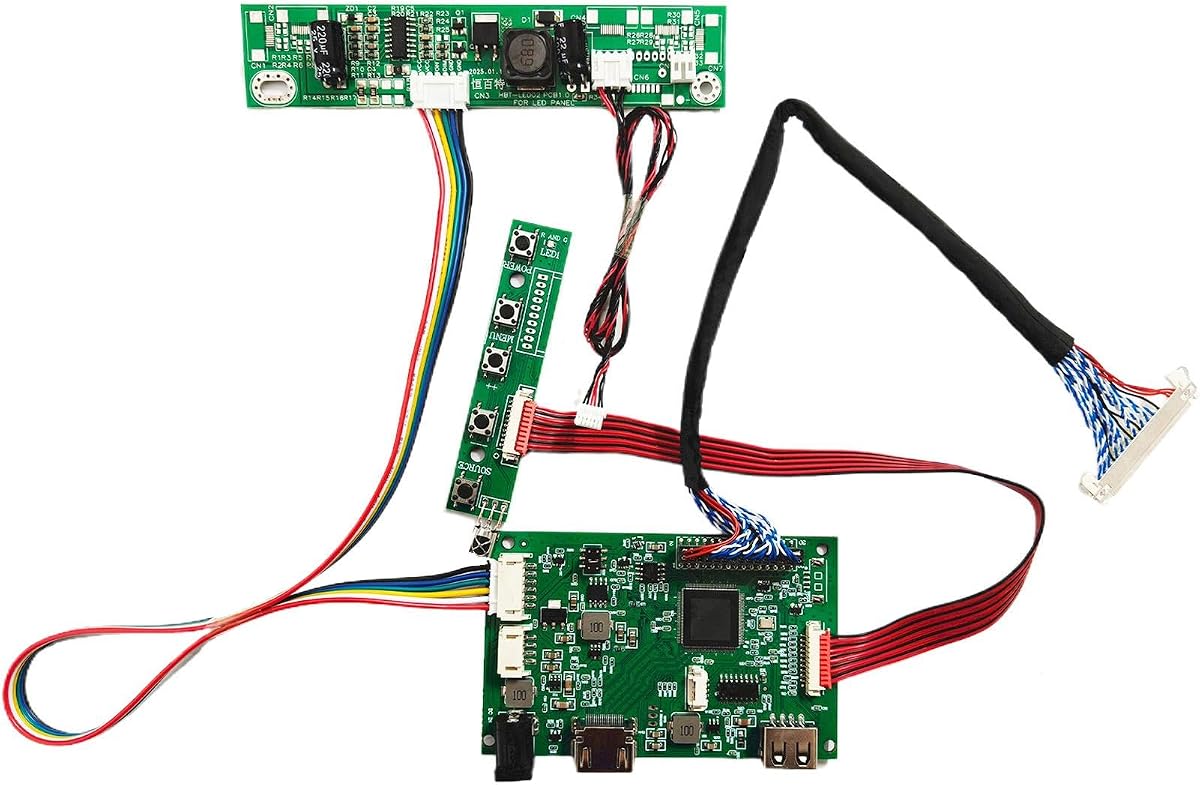
This VSDISPLAY board converts compatible 15.6-inch 1366×768 WLED LVDS panels and carries a supplied rating of 4.4. It supports VGA and DVI video inputs plus a speaker connection, making it a practical option for turning a suitable laptop panel into a secondary display.
We may earn a commission when you buy through this link, at no additional cost to you.
Its compatibility list includes well-known LP156WH2, LP156WH3, LP156WH4, B156XW02, and related variants. The 40-pin LVDS connection is an important detail: it is not interchangeable with the 30-pin eDP boards in this guide, even where the screen size and resolution are similar.
The board needs a separately supplied 12V DC adapter delivering more than 2A through a 5.5 by 2.1mm port. Its troubleshooting notes distinguish a board-level indication from signal and connection faults, which helps narrow down black, white, or no-signal displays. Users should still expect to match the panel and cable arrangement carefully.
Among the more specialized options, this is a sensible value-oriented choice for a compatible 15.6-inch 1366×768 panel. It offers more input flexibility than a VGA-only board and does not require the 1920×1080 timing of the Full HD alternatives. Verify the panel model and 40-pin configuration first.
VGA and DVI support allows the controller to work with a wider range of source devices. The speaker connector adds a convenient audio path for a compact DIY workstation or test display.
The described status-light test separates basic board operation from panel or signal issues. Troubleshooting guidance also points users toward cable, resolution, and jumper checks when the image is white, black, or absent.
We may earn a commission when you buy through this link, at no additional cost to you.
This controller supports 1920×1080 laptop panels with a 30-pin eDP interface across sizes from 11.6 to 17.3 inches. Its supplied rating is 4.0, and the board’s principal appeal is its broad compatibility list, which includes B156HAN01.1, LP156WF4, NV156FHM, N173HCE, and B173HAN01.0 variants.
We may earn a commission when you buy through this link, at no additional cost to you.
The board accepts VGA input and does not require driver installation when the cables and ports are connected according to the supplied instructions. A 12V DC power source delivering more than 2A is required through a 5.5 by 2.1mm port, so a suitable adapter must be prepared separately.
The 4.0 rating reflects a serviceable but less universally flexible option than boards with digital video inputs. Its troubleshooting explanation is direct: a black screen may indicate a connection or missing signal, a white screen may indicate reversed cabling or incorrect resolution, and repeated restarts may point to inadequate current.
Choose this controller when the target panel appears in the compatibility list and VGA is an acceptable source. It is particularly useful for Full HD laptop-panel conversions where a simple, driver-free setup is desired, provided the installer accepts the single input format and prepares adequate power.
The listed models cover several common 11.6, 13.3, 14, 15.6, and 17.3-inch panels. Matching the complete model suffix is important because panels within one size can use different interfaces or timing specifications.
VGA input and a no-driver workflow can make this board approachable for a first conversion. Users should still set the source to the panel’s native resolution and verify the cable orientation and power capacity.
We may earn a commission when you buy through this link, at no additional cost to you.
This board targets 1280×1024 laptop panels with a 30-pin 5V LVDS interface. Its supplied rating of 4.6 is the highest among the rated products in the list, and its input flexibility helps it stand out for compatible 17-inch and 19-inch panels.
We may earn a commission when you buy through this link, at no additional cost to you.
Supported examples include LTM170EU, LTM170EH, M170EG01, M170EN01, M170EN06, LM190E02, and several G190 and M190 series panels. VGA and DVI video inputs are supported, while an 8-ohm, 2-watt, four-pin PH2.0 speaker connector provides an audio output.
The board calls for 12V DC power above 3A through a 5.5 by 2.1mm connector. The power arrangement is more demanding than several 2A alternatives, and the interface is specifically 5V LVDS. The stated troubleshooting process also draws attention to the 5V jumper pin, which is an installation detail users should not overlook.
This is a compelling specialist option when the exact panel appears in the compatibility list. The strong rating, multiple video inputs, and audio support make it well suited to a polished DIY display, but the panel must use the correct 30-pin 5V LVDS arrangement and accept 1280×1024 timing.
The 30-pin 5V LVDS configuration differentiates this board from both standard 40-pin LVDS and 30-pin eDP products. Its listed panel coverage gives older 17- and 19-inch laptop screens a defined path to reuse.
VGA, DVI, and speaker connections cover common external-display needs. A recommended power supply above 3A also provides more headroom for the larger panel class described in the product information.
We may earn a commission when you buy through this link, at no additional cost to you.
This VSDISPLAY controller targets 1920×1080, 30-pin LVDS panels in the 21.5- and 23.8-inch categories. Its supplied rating is 4.2, and the package is notably more complete than many alternatives because it includes an inverter board, a 30-pin signal cable, a keyboard, and a USB cable for one supported touch-screen model.
We may earn a commission when you buy through this link, at no additional cost to you.
Compatible examples include T215HVN01.0, M215HW03 versions 1 and 2, M215HGE-L23, M215HTN01.1, LM238WF1-SLE3, and LM238WF5-SSA1. VGA and DVI inputs and a speaker output cover common external sources, while the stated power requirement is 12V DC above 3A.
The most important exclusion is LM215WF3-SLA1, which the product information explicitly says will not work. The accessory bundle also has limitations: the USB cable is specified for LM238WF5-SSA1, and no power adapter is included. The keyboard and inverter should therefore be checked against the target panel before purchase.
This board is well suited to a large-screen DIY project using one of the specifically listed panels. Its assembled accessory set may simplify construction, but compatibility is model-specific. Confirm both the screen suffix and included-cable purpose rather than relying only on the nominal 21.5- or 23.8-inch size.
The package includes several components normally assembled separately, including a signal cable, inverter, and wired keyboard. This can reduce the number of missing parts during a first large-panel build.
The listed 21.5- and 23.8-inch sizes are not universally interchangeable. The stated LM215WF3-SLA1 exclusion demonstrates why the complete panel model and version should be confirmed before ordering.
We may earn a commission when you buy through this link, at no additional cost to you.
This H/D board is made for 1920×1080 panels connected through a 30-pin eDP interface. With a supplied rating of 4.1, it distinguishes itself through installation-oriented details, including a pre-connected signal cable, a marked Pin 1 position, and support for checking compatibility before purchase.
We may earn a commission when you buy through this link, at no additional cost to you.
Its listed compatibility covers popular B156HAN01.1, B156HAN01.2, LP156WF4-SP, NV156FHM, B140HAN01, N133HSE, N173HCE, and N173HGE panels across sizes from 11.6 to 17.3 inches. The board recommends a 12V, 2A-or-higher adapter with a 5.5 by 2.1mm plug.
The product is explicitly not intended for 1366×768 displays. It also asks users to use the provided signal cable rather than the original laptop cable, which is significant because eDP cable pinouts can vary. Its troubleshooting notes focus on connection direction, source resolution, signal availability, and power capacity.
For a builder with a listed Full HD eDP panel, this is a practical and approachable option. The model list and installation aids are more useful than a generic compatibility claim. Exact panel verification remains essential, and the correct 12V power source must be supplied independently.
The controller is optimized for 1920×1080 output rather than HD 1366×768. This makes it a better match for modern Full HD laptop panels when the listed model and connector are confirmed.
Using the pre-connected supplied cable and aligning its marked Pin 1 reduces uncertainty during assembly. The installation notes also warn against substituting an original laptop cable whose pin arrangement may differ.
We may earn a commission when you buy through this link, at no additional cost to you.
The Taidacent board is positioned as a universal LVDS controller for displays ranging from 10 to 65 inches. Its supplied rating is 4.0, and its scale is the distinguishing feature: this is the only product in the list explicitly presented as accommodating such a wide range of display sizes.
We may earn a commission when you buy through this link, at no additional cost to you.
The board uses an NT68676 UFG chipset and accepts HDMI, DVI, and VGA sources. Its onscreen menu supports Simplified Chinese, Traditional Chinese, English, French, German, Italian, Spanish, Portuguese, Japanese, and Korean. Physical controls provide power, menu, volume, and adjustment or exit functions.
The supplied information is less detailed about exact panel timing, connector pinouts, backlight requirements, and power consumption than several model-specific alternatives. The advertised 10-to-65-inch range therefore should not be interpreted as automatic compatibility with every panel in that size range. The installer must still match the LVDS parameters and backlight system.
This option appeals to builders who want a broad, adjustable platform rather than a board dedicated to one laptop model family. It may be particularly useful for a larger DIY notebook display project with configurable LVDS timing, but users should demand panel-level details and confirm the required settings before committing to an installation.
The unusually broad size range and universal description make this board suitable for experimentation beyond one specific laptop panel family. Its value lies in adaptability, provided the panel timing and backlight arrangement can be configured correctly.
HDMI, DVI, and VGA inputs reduce source-device restrictions. A multilingual onscreen menu and dedicated control keys also make everyday adjustment more convenient than relying entirely on software.
We may earn a commission when you buy through this link, at no additional cost to you.
This VSDISPLAY controller supports 1920×1080 panels in 21.5- and 23.8-inch sizes and carries a supplied rating of 5.0. It accepts conventional high-definition video through its H/D connections and adds USB support for video, picture, and text playback.
We may earn a commission when you buy through this link, at no additional cost to you.
Compatibility is stated for T215HVN01.0, M215HW03 versions 1 and 2, M215HGE-L23, M215HTN01.1, LM238WF1-SLE3, and LM238WF5-SSA1. As with other large-panel boards, the listing warns that it will not work with LM215WF3-SLA1. The board also supports 180-degree image rotation.
Its stated input requirement is 12V DC above 2A, and the package includes the controller, inverter board, 30-pin signal cable, and keyboard with cable. A power adapter is not included. Audio can drive an 8-ohm, 2-watt or 4-ohm, 2-watt speaker, depending on the connected speaker specification.
The 5.0 rating makes this one of the strongest-rated options in the guide, although a single new or limited rating history does not establish long-term reliability. It is a good match for a compatible large Full HD panel when rotation, USB playback, and a wired keyboard are useful features for the intended display.
USB support extends the board beyond conventional PC display sources by allowing video, picture, and text playback. That can be useful for a dedicated information screen or self-contained media display.
The stated 180-degree image rotation allows the same panel to be mounted in different physical orientations. It is a practical feature for kiosks, counters, and custom installations where the screen may be inverted.
We may earn a commission when you buy through this link, at no additional cost to you.
This controller targets 15.6-inch, 1366×768, 40-pin LVDS panels and names LP156WH4, LP156WH2, LTN156AT17, and B156XW02 among its compatible models. It supports both HDMI and VGA, giving it more source flexibility than a single-input controller.
We may earn a commission when you buy through this link, at no additional cost to you.
The stated features include adjustable brightness, contrast, and color, along with rapid response to remote-control commands. Compatibility with external devices such as set-top boxes and gaming consoles is also highlighted. These functions make the board relevant to a converted display that may receive signals from several types of equipment.
The listing does not supply a customer rating, so there is no numerical feedback basis for comparison with the rated products. It also provides less explicit information about the required power adapter, connector layout, panel timing configuration, and included components. Those omissions make careful seller-page and panel documentation checks especially important.
The product is a promising choice for a compatible 15.6-inch HD panel when HDMI and VGA flexibility matter. Its lack of a supplied rating and incomplete installation data prevent a stronger recommendation, but the named panel families and adjustable controls can still make it a useful specialist board.
HDMI and VGA inputs accommodate modern computers as well as legacy or specialized sources. This is helpful when the converted laptop panel may serve more than one device over time.
Brightness, contrast, and color controls are presented as useful features for optimizing the display. They can compensate for panel differences and help the converted screen look more natural in its new environment.
We may earn a commission when you buy through this link, at no additional cost to you.
This controller is narrowly targeted at the B173HW01 V0/V5 and B173HW02 V0/V1 17.3-inch laptop matrix, including the B173HW02 V.1 version. Its supplied rating is 5.0, making it one of the highest-rated options, though it is intended for a much more specific panel family than the broad boards in this list.
We may earn a commission when you buy through this link, at no additional cost to you.
The board supports 1920×1080 output through a 40-pin LVDS connection and accepts VGA or HDMI host signals. Its signal-processing role includes converting the host output into a format the screen recognizes, driving the display, and processing brightness and color commands.
Compatibility depends on matching the panel model, resolution, panel technology, host output, and screen interface. The product information emphasizes that even when both sides use LVDS, mismatched parameters can prevent communication. It also describes a smaller form factor and integration with notebook power and signal systems.
This is a strong specialist option for a repair involving a confirmed B173HW-series matrix. Its exact model focus makes verification easier, and the 5.0 rating is encouraging. It is not a general-purpose choice for arbitrary 17.3-inch panels, so the complete panel designation should be checked before installation.
The board is designed around named B173HW01 and B173HW02 hardware versions. This precision makes it potentially more dependable for the intended repair than a generic controller marketed for many unrelated panels.
The listed design converts host video signals, manages display voltage, and processes adjustment commands. Its low-power mode and closer relationship to notebook power and signal systems are particularly relevant for integrated laptop repairs.
We may earn a commission when you buy through this link, at no additional cost to you.
Choosing a controller for a laptop screen begins with the panel rather than the controller. Confirm the screen’s complete model number, native resolution, connector, signal voltage, backlight system, and dimensions before comparing boards, then select the option that matches every stated requirement.
A laptop screen’s diagonal size is not enough to identify a compatible controller. The complete manufacturer part number and version suffix determine the connector, signal timing, voltage, and backlight arrangement. Some products in this guide explicitly list compatible families such as LP156WH2, B156XW02, N173HGE, M170EN01, and B173HW02, while others warn that a similarly named panel will not work.
The controller and panel should agree on the native resolution for the cleanest result. Two of the reviewed boards are expressly limited to 1366×768, several target 1920×1080, and the 17- and 19-inch option supports 1280×1024. Connecting a Full HD panel to an HD-only board can prevent a proper image, while using a source that does not match the expected mode can cause scaling, cropping, or unstable output.
Connector terminology can be confusing because 30-pin and 40-pin may refer to physically different interfaces and voltage arrangements. The selections cover 30-pin eDP, 40-pin LVDS, 30-pin 5V LVDS, 30-pin standard LVDS, and a universal LVDS platform. A cable that appears to fit is not sufficient evidence of compatibility; the board and panel must use the same interface and pin configuration.
A controller processes the panel’s image signal, but the backlight system still needs appropriate power. Some packages include an inverter board, which is especially relevant for older CCFL or compatible WLED panels, while eDP-based designs may integrate the backlight differently. The complete hardware revision and supplied component list should be reviewed so the panel is not left without a compatible illumination source.
Available sources range from VGA-only to combinations of VGA and DVI, HDMI, and USB video. The source should already exist on the computer or device that will drive the panel. A board with more inputs can be useful for a shared workshop display, while a simpler interface may reduce connection complexity if only one source is planned.
Several boards recommend 12V DC through a 5.5 by 2.1mm connector, with minimum current recommendations of 2A or 3A. The power supply is generally separate from the board, and a higher-current adapter can be appropriate when recommended. Insufficient current may contribute to flickering, repeated restarts, unstable illumination, or a no-signal condition, so the power specification should be treated as part of the compatibility check.
Useful boards include pin-alignment markings, pre-connected cables, self-check instructions, and explanations of common black, white, or no-signal symptoms. A pre-connected eDP cable can reduce assembly errors, while a detailed fault guide helps distinguish cable, resolution, signal, and power problems. These features are especially valuable when the user is performing the first conversion on that particular panel.
Some controller boards arrive with a signal cable, inverter, keyboard, and other accessories, while others require the user to prepare those parts separately. The 21.5- and 23.8-inch options include relatively complete accessory sets, but their cables are tied to specified panel models. A long accessory list does not replace exact compatibility, so each included part should be checked against the intended display.
Begin by identifying the panel and documenting its connector, resolution, and power requirements. Compare those details with the controller’s compatibility list, then inspect the board, cable, and screen for damage. Connect the controller while the system is powered off, align the signal cable with Pin 1, and avoid forcing any connector.
Prepare the specified 12V power supply, connect the appropriate video source at the panel’s native resolution, and allow the system to detect the display. A green board light can indicate that the controller is operating, but it does not prove that the panel connection, timing, backlight, and source are all correct. Troubleshoot one variable at a time when the display remains black or white.
For routine care, keep the controller away from moisture, conductive debris, and excessive heat. Do not repeatedly unplug the screen cable while the display is active, and do not substitute a cable or power supply with different pinout or insufficient current. If the display flickers, restarts, shows a factory-color cycle, or loses synchronization, inspect power capacity, connector orientation, source resolution, and signal compatibility before increasing the workload.
No. The board must match the panel’s resolution, connector type, signal voltage, timing, and often its backlight requirements. A screen size alone is not sufficient because several 15.6-inch panels use different 30-pin eDP or 40-pin LVDS arrangements. Use the complete panel model number to confirm compatibility.
The main difference is the physical and electrical interface used to connect the controller to the panel. In this guide, 30-pin options include eDP, standard LVDS, and 5V LVDS designs, while 40-pin boards use LVDS. These connector labels are not interchangeable, even when the supported screen size and resolution appear similar.
A black screen commonly indicates a missing source signal or an incorrect connection, while a white screen may result from reversed cabling or an incorrect source resolution. Other causes include an inadequate power supply, a wrong jumper setting, incompatible panel timing, or a backlight problem. Check power current, cable orientation, native resolution, and the source one step at a time.
Most of the reviewed products require a separate 12V DC adapter and do not include one. Recommendations vary between 2A or higher and more than 3A, with a 5.5 by 2.1mm connector described for many boards. Follow the current requirement for the selected product because insufficient current can cause flickering or repeated restarts.
You should not assume it will work. Several products specifically warn that their 1366×768 board will not display correctly with a 1920×1080 panel, and the opposite is equally important: a Full HD-only controller is not intended for an HD panel. Matching the controller to the panel’s native timing is the safest approach.
Common options include VGA, DVI, HDMI, and USB video, sometimes combined with an audio speaker output. The VSDISPLAY USB board additionally supports video, picture, and text playback through USB, while a universal Taidacent board accepts HDMI, DVI, and VGA. Choose based on the output available from the computer or media source.
No. The requirement depends on the panel and controller system. Some reviewed packages include an inverter board, while eDP-oriented boards may work with the panel’s integrated backlight arrangement. Confirm the panel technology and the controller package before ordering, and follow the seller’s specified component list.
Disconnect power, handle the panel by its edges, and never force a connector. Confirm Pin 1 alignment, use the specified cable and voltage, and avoid changing cables or jumpers while the system is energized. Work on a protected, dry surface and keep conductive objects away from exposed circuitry.
The strongest general recommendation is the H/D 30-Pin eDP HD board for a confirmed 1366×768 eDP panel because it provides explicit resolution guidance, a marked cable orientation, and useful troubleshooting information. The VSDISPLAY 40-pin LVDS option stands out for compatible 15.6-inch HD panels and multiple inputs, while the 17-inch 5V LVDS board earns its premium position through its 4.6 rating, broad supported model list, and audio support.
For Full HD projects, prioritize the panel’s native resolution and interface before considering input options or included accessories. Model-specific boards can be the safest choice for a repair, whereas universal LVDS products may offer more flexibility but demand more configuration confidence. Match power requirements and backlight requirements as carefully as the connector itself.
Customer ratings are useful for gauging the feedback attached to each listing, but they cannot compensate for an electrical mismatch. Confirm the complete screen model, revision, resolution, connector, and power specification before ordering, and check the current product page for availability and price changes.