
Nettbe Reusable Cable Ties
4.8Editor score
Sixty reusable hook-and-loop ties
Suitable for home and outdoor use
Removable and adjustable
Cable management solutions range from simple reusable straps to substantial under-desk trays, each designed to reduce clutter in a different environment. A useful organizer should match the cable volume, available mounting surface, and need for portability or permanent concealment. The right choice can improve both the appearance and safety of a workspace.
The products in this guide were compared by examining their supplied materials, dimensions, mounting methods, capacity, environmental suitability, and intended applications. The list covers adhesive clips, hook-and-loop ties, split sleeves, raceways, concealment boxes, and under-desk trays for home offices, entertainment areas, vehicles, and outdoor installations.
Each pick highlights the most useful qualities and realistic trade-offs based on the supplied product information. Rankings reflect how well each option addresses common cable organization needs rather than a universal claim that one style fits every space. Product availability, ratings, and prices can change, so check current listings before purchasing.
4.8Editor score

4.7Editor score

4.6Editor score
As an Amazon Associate we earn from qualifying purchases.
This side-by-side comparison covers ten distinct approaches to cable control, from lightweight reusable ties to spacious under-desk trays. The table clarifies each product's format, mounting approach, capacity, and strongest application so readers can narrow the list by their particular setup.



This XHF kit combines 100 small cable tie mounting squares with 100 eight-inch zip ties and screws, giving buyers several ways to organize cords. Its 4.6 rating reflects a versatile package that works for computer cables, television leads, holiday lights, USB cables, and general household wiring. The most distinctive feature is the combination of 3M Strong Adhesive mounting with optional screws.
We may earn a commission when you buy through this link, at no additional cost to you.
The mounting squares are made from PA66 nylon, while the adhesive backing allows installation without drilling or tools on clean, dust-free surfaces. Users can also choose screws for stronger or more permanent attachment. That flexibility is particularly useful when a cable needs to be held against a wall, inside furniture, or around an outdoor installation where the physical demands are uncertain.
The adhesive system does require discipline. The manufacturer recommends cleaning the surface, applying the mount once, allowing approximately 24 hours before loading it, and avoiding repeated disassembly. Moving a mount after bonding may damage the adhesive or leave marks. Outdoor suitability is another advantage, but the location, weather exposure, and surface quality should still be considered before installation.
This is a strong pick for buyers who want one package capable of handling many small organization jobs. It suits homes, offices, vehicles, entertainment areas, and seasonal lighting. Those wanting a nearly invisible solution for a single cable may prefer sleeves or clips, but for numerous anchor points, the XHF assortment offers unusual flexibility at a modest entry point.
The adhesive squares are convenient for clean surfaces, while the included screws allow a more mechanically secure installation where appropriate. This dual-method approach lets the same kit serve quick fixes and longer-term installations without requiring a separate hardware package.
With 100 mounts, 100 ties, and 100 screws, the package is well suited to organizing extensive cable runs around offices, vehicles, or outdoor decorations. The UV-protection positioning makes it more relevant to exposed installations than a basic indoor clip.
We may earn a commission when you buy through this link, at no additional cost to you.
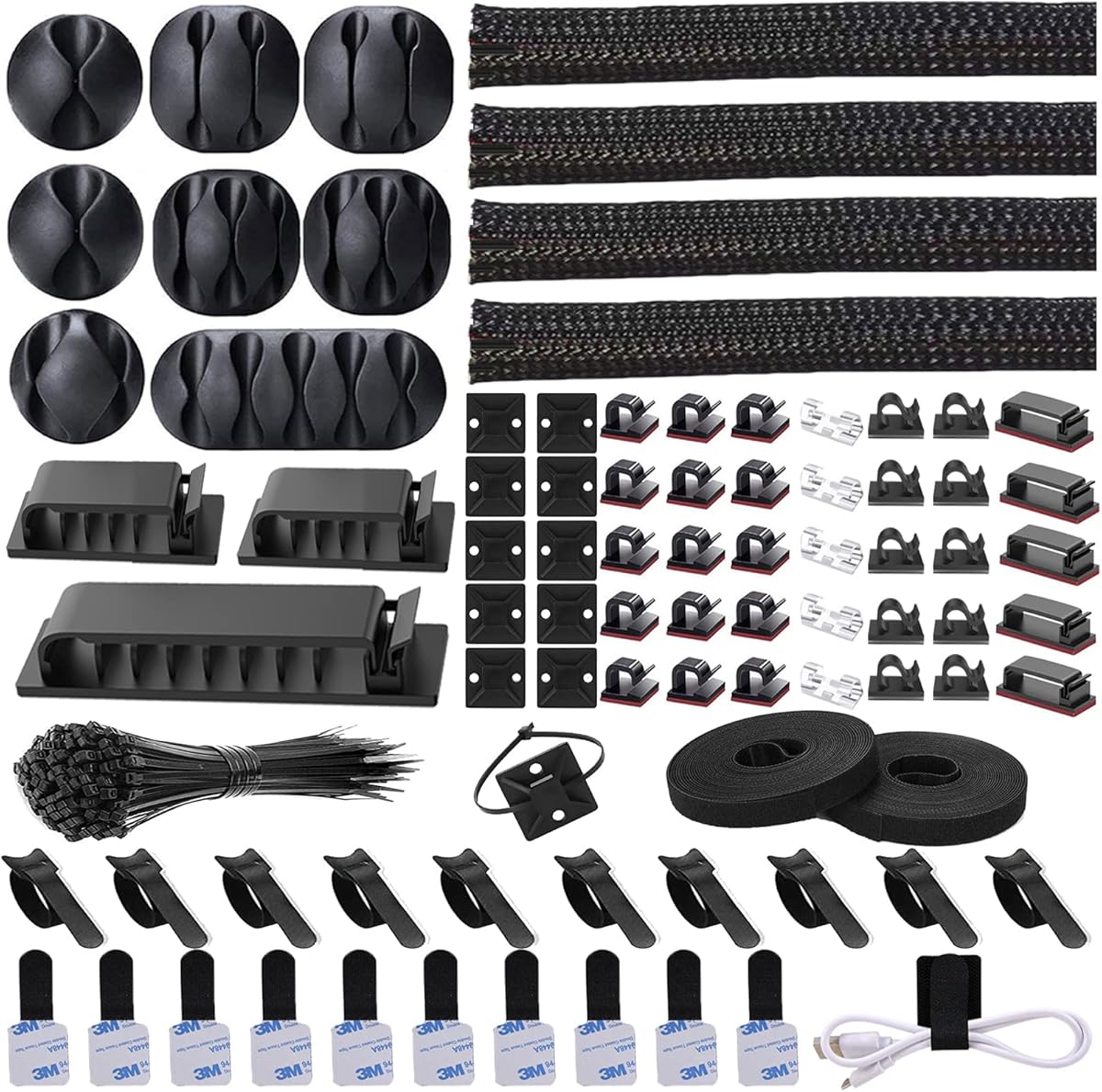
The N NOROCME kit is a broad 192-piece cable organization solution with a 4.6 rating. Rather than concentrating on one attachment method, it includes four braided sleeves, reusable wire ties, cable clips, cord holders, two rolls of self-adhesive ties, cable tie mounts, and 100 fastening ties. It is designed for projects that may require both concealment and active cable guidance.
We may earn a commission when you buy through this link, at no additional cost to you.
The four 20-inch sleeves are especially useful when several wires need to travel together as a protected bundle. Their split construction allows cables to be loaded without threading each one through a closed tube. The kit also provides 35 cable clips, 11 cord holders, 20 mounting squares, and reusable ties, allowing it to handle loose cords along walls, desks, baseboards, cabinets, and other clean surfaces.
Its breadth can be both a strength and a drawback. Buyers with a single cable may not use the included assortment, and adhesive-backed parts require compatible surfaces. The supplied clips are made from PA66 material, while the sleeves offer some protection from contact and can help discourage pet chewing. Construction quality is presented as intended for long-term organization.
This kit is well suited to a home office, media center, television area, or workshop where several cable problems need solving at once. It is less attractive for a single, narrowly defined task because of its assortment. Even so, the range of reusable ties, clips, sleeves, and mounting points makes it one of the most versatile options in this guide.
The mixture of sleeves, clips, mounts, holders, and reusable ties means a single setup can combine concealed bundles with visible routing along furniture. This makes the kit useful when a workspace contains different cable types or requires more than one organizational method.
Reusable wire ties and detachable sleeves can be adjusted as equipment changes, reducing the need to replace an entire organizer after every rearrangement. They are particularly useful for temporary setups and frequently reconfigured office equipment.
We may earn a commission when you buy through this link, at no additional cost to you.
This YECAYE set includes six black J-channel cable organizers, each measuring 15.7 inches long by 0.99 inches wide and 1.55 inches high. Its 4.6 rating and outward-facing opening make it a practical choice for office desks, computer tables, and home setups where cables should be hidden but still accessible when equipment changes.
We may earn a commission when you buy through this link, at no additional cost to you.
The main design advantage is the open side of each channel. Users can place or remove power cords and peripheral wires without dismantling a closed raceway, allowing the layout to be adjusted as needed. Each channel is advertised as capable of holding up to ten cables, though actual capacity depends on cable diameter and the number of items being routed.
Installation uses pre-applied adhesive tape on smooth surfaces. The channels need firm pressure and approximately 24 hours to establish a strong bond. Hairdryer heat can assist removal, though results vary by surface and dwell time. Powder-coated walls and uneven surfaces may prevent proper adhesion, an important limitation for buyers who want to run channels around textured rooms.
The PVC construction is described as flame retardant, and the channels help reduce exposed wiring around a desk. This product is best for a clean, organized cable run along a smooth desktop, wall, or cabinet face. It is less suitable for movable furniture, heavily textured walls, or installations that need frequent changes to the entire channel position.
The outward-facing opening lets users slide cables in or pull them out as devices are moved. That accessibility makes the channel more practical than a fixed enclosed raceway for frequently changing office setups.
Mounted along a desk edge or wall, the channels create a defined route that keeps cords from spreading across work surfaces. The result is visually cleaner than exposed clips and more accessible than a fully enclosed box.
We may earn a commission when you buy through this link, at no additional cost to you.
The D-Line Cable Management Box is a large enclosure designed to contain a power strip, extension cord, or accumulated excess wiring. With a 4.5 rating, it stands out for its finished appearance and practical concealment rather than for small-scale cable routing. The curved edges and understated black housing are intended to blend into home and office surroundings.
We may earn a commission when you buy through this link, at no additional cost to you.
Made in the UK from electrically safe ABS plastic, the box provides a more complete solution than adhesive clips. It can sit behind a television stand, beneath a desk, beside a gaming setup, or near other equipment. Rear entry and exit slots allow connected cables to pass into and out of the enclosure while the main body remains visually uncluttered.
Its dimensions are 16.5 inches long, 6.5 inches wide, and 5.25 inches high. That scale is important because buyers need to confirm that their power strip will fit and that the box does not consume too much floor or furniture space. The enclosure is large enough to create a meaningful visual impact, but it cannot be compressed into a narrow gap.
This is a strong option for a permanent cord-hiding station where appearance and reduced access to wiring are priorities. It can also make a media area or home office feel less cluttered. It is less appropriate for a small desk, mobile workstation, or lightweight temporary setup where a compact sleeve or hook-and-loop tie would be more adaptable.
The curved enclosure and cable slots make it easier to build a deliberately arranged power and media zone. Rather than leaving a strip and tangled extension visible, users can consolidate equipment into one designed object.
Containing excess wiring can make cords less accessible to curious children and pets while also reducing trip and snag hazards. It does not replace electrical supervision, but it can improve the organization of an otherwise exposed area.
We may earn a commission when you buy through this link, at no additional cost to you.
The Nettbe set contains 60 reusable hook-and-loop cable ties measuring six inches each. Its 4.8 rating is the highest among the listed products, reflecting a simple format that works across many basic cable organization tasks. The straps can group loose cords, secure excess cable, or keep temporary bundles neat without tools or fixed hardware.
We may earn a commission when you buy through this link, at no additional cost to you.
Because each strap opens and closes, it can be removed, repositioned, or adjusted as the cable arrangement changes. The listed uses include homes, offices, garages, and outdoor areas. This makes the set especially practical for equipment that moves regularly, such as laptop charging leads, extension cords, speakers, workshop tools, and seasonal decorations.
The limitation is visibility. Hook-and-loop ties gather conductors into a controlled bundle, but they do not provide the finished concealment of a raceway, sleeve, or box. Their effectiveness also depends on selecting an appropriate size and making sure the hook-and-loop surfaces engage fully. Very small or very heavy cable bundles may require several coordinated straps.
For buyers seeking an uncomplicated and flexible starting point, this is a highly practical pick. It offers a large count, straightforward reuse, and compatibility with many locations without a complicated installation. It is less suited to concealing power strips or creating a permanent furniture-mounted routing system, but it remains one of the most economical ways to bring order to loose cords.
The straps can be opened whenever a device is moved or a charging arrangement changes. This makes them more adaptable than fixed clips and easier to reposition than adhesive mounts that are not designed for repeated removal.
From a garage bench to an office wall or outdoor cable run, the same six-inch format can group different cords. Buyers can move the solution between locations as their equipment and organizational priorities change.
We may earn a commission when you buy through this link, at no additional cost to you.
The Alex Tech sleeve is a ten-foot length of half-inch split wire loom designed to bundle and protect several cables. It carries a 4.7 rating and is built for USB leads, power cords, audio cables, video cables, high-fidelity speaker wiring, and automotive wires. Its chief benefit is that it creates a cleaner, protected pathway without concealing the cables completely.
We may earn a commission when you buy through this link, at no additional cost to you.
The split construction makes installation straightforward. Users spread the sleeve, place the cables inside, and allow it to close around the bundle. It also has a broad stated operating range of minus 103 to 257 degrees Fahrenheit, with a melt temperature of 446 degrees. The material is UL Recognized and described as insulating, which supports its use around electrical wiring.
Its fixed diameter is the main constraint. The half-inch opening is best for a modest group of thinner leads and cannot accommodate a large power strip or an unusually thick bundle. In addition, a black sleeve visually cleans up a run but does not provide the discreet appearance of a wall raceway or cable box. It is most effective when the goal is consolidation and protection.
This pick is ideal for owners who want a fast, tool-free way to manage several cords that travel together. It also adds a layer of protection that may discourage pet chewing, although it should not be treated as a guarantee against determined behavior. For medium-sized cable bundles in a home, office, vehicle, or entertainment system, it offers a durable and versatile solution.
Because the loom opens along its length, users do not have to disconnect every cable or feed each connector through a narrow tube. It can be wrapped around an existing bundle and then allowed to settle into place.
The sleeve can reduce abrasion and contact between conductors while giving a loose group a more deliberate profile. Its recognized insulating construction and broad temperature range also make it suitable for many wiring environments.
We may earn a commission when you buy through this link, at no additional cost to you.
The Univivi 32-inch cable tray is a dedicated under-desk storage solution for power strips, power cords, data cables, and chargers. It has a 4.6 rating and stands out as a premium organization option because it combines substantial capacity, a ventilated structure, and two mounting approaches. The result is a more comprehensive system than a collection of individual clips.
We may earn a commission when you buy through this link, at no additional cost to you.
Buyers can install it with C-clips for a mark-free application or use screws for a sturdier hold. Enlarged cable holes make it easier to route different leads through the tray, while the design can accommodate placement on either the front or back. Its broad interior is intended to hold a power strip and associated cords rather than merely a few thin charging wires.
The hollow, ventilated construction promotes heat dissipation around stored equipment and can help reduce overheating concerns. The sturdy structure is also designed to resist shaking or falling once properly installed. That said, the tray still needs sufficient room beneath the desk, and the choice between clips and screws affects appearance, permanence, and the amount of available clearance.
This tray is an excellent fit for home offices, gaming desks, editing stations, and other multi-device workspaces where a large number of cables would otherwise accumulate near the floor. It is less practical beneath a shallow desk or where a compact setup is required. For a dedicated workstation with substantial equipment, it offers the strongest all-around capacity in the guide.
A power strip, several adapters, and multiple charging leads can be consolidated into one defined under-desk area. This reduces floor clutter and keeps frequently connected equipment close to the work surface.
The open structure allows air to circulate around stored cables and adapters. While no organizer replaces sound electrical practices, ventilation is preferable to placing equipment in a fully sealed compartment.
We may earn a commission when you buy through this link, at no additional cost to you.
This under-desk organizer uses 20 pairs of hook-and-loop cable holders, each measuring 120 by 40 millimeters. It has a 4.6 rating and focuses on a practical compromise between bulkier trays and lightweight clips. The segmented, low-profile format is intended to fit into corners and control numerous thin cables beneath a desk.
We may earn a commission when you buy through this link, at no additional cost to you.
Each extended strap is advertised to hold up to 15 cables, with reinforced hook-and-loop fasteners intended to resist slipping. The design can be used independently or paired with adhesive hooks for mounting. Buyers are advised to wait two hours after applying the hooks before loading them, allowing the acrylic adhesive pads time to establish contact with the surface.
The removable pads are designed to adhere to smooth wood, glass, and tile without leaving residue when removed. However, a full-sized power strip is not the intended use, and very thick charging leads may make the stated capacity unrealistic. The organizers also depend on a compatible underside surface, since textured or dusty areas can weaken adhesive performance.
This is a good pick for a compact home office, a dorm-style desk, or a workstation where dozens of thin USB and charging cables need guidance but a large tray would be intrusive. It is also easier to install than a rigid tray and can be adjusted in segments. For bulky adapters or heavy power strips, one of the larger under-desk trays is a better fit.
The segmented holder can gather a substantial number of thin leads without taking up the depth of a metal or fabric tray. It is useful where space under the desk is limited but cable crossings still need control.
The acrylic pads are intended to release cleanly from suitable smooth surfaces, making it easier to relocate the system. The segmented layout also allows individual sections to be positioned according to the cable path.
We may earn a commission when you buy through this link, at no additional cost to you.
The Univivi 36-inch under-desk tray combines a large storage cavity with a flexible fabric construction. It measures 36 inches long by 5.5 inches wide and 5.5 inches high and has a 4.6 rating. Its stated purpose is to hide a broad selection of adapters, sockets, power strips, and cords while preserving a tidy under-desk area.
We may earn a commission when you buy through this link, at no additional cost to you.
Installation can be completed with a heavy-duty no-drill clamp or with screws. It is compatible with wood, glass, and metal tabletops, which makes it useful across different desk styles. The tray can unfold for easier loading, and built-in ties hold items in place once the user has decided on a final arrangement. A reinforced bottom helps it maintain its shape under load.
The product uses flame-retardant 600D Oxford fabric, offering a different appearance and construction from rigid metal trays. Space is the critical limitation. Buyers need at least 5.3 inches of clearance along the table edge, especially when the desk has built-in drawers or a rear support rod. The mounting clips remain visible, so the solution prioritizes function over complete invisibility.
This tray is a strong choice for a large desk with multiple high-wattage adapters, extensive networking equipment, or many power connections. It gives users more freedom to place bulky items than a narrow hook-and-loop holder while remaining removable. Buyers with compact desks or fixed drawer systems should measure carefully before choosing it.
The flexible construction can open for easier access to stored adapters and power strips. This makes initial setup and later changes less awkward than loading items through a rigid, narrow opening.
The screw-free clamp option attaches to the table edge and avoids permanent drilling. It offers a practical installation method for renters and for desks that may eventually be replaced.
We may earn a commission when you buy through this link, at no additional cost to you.
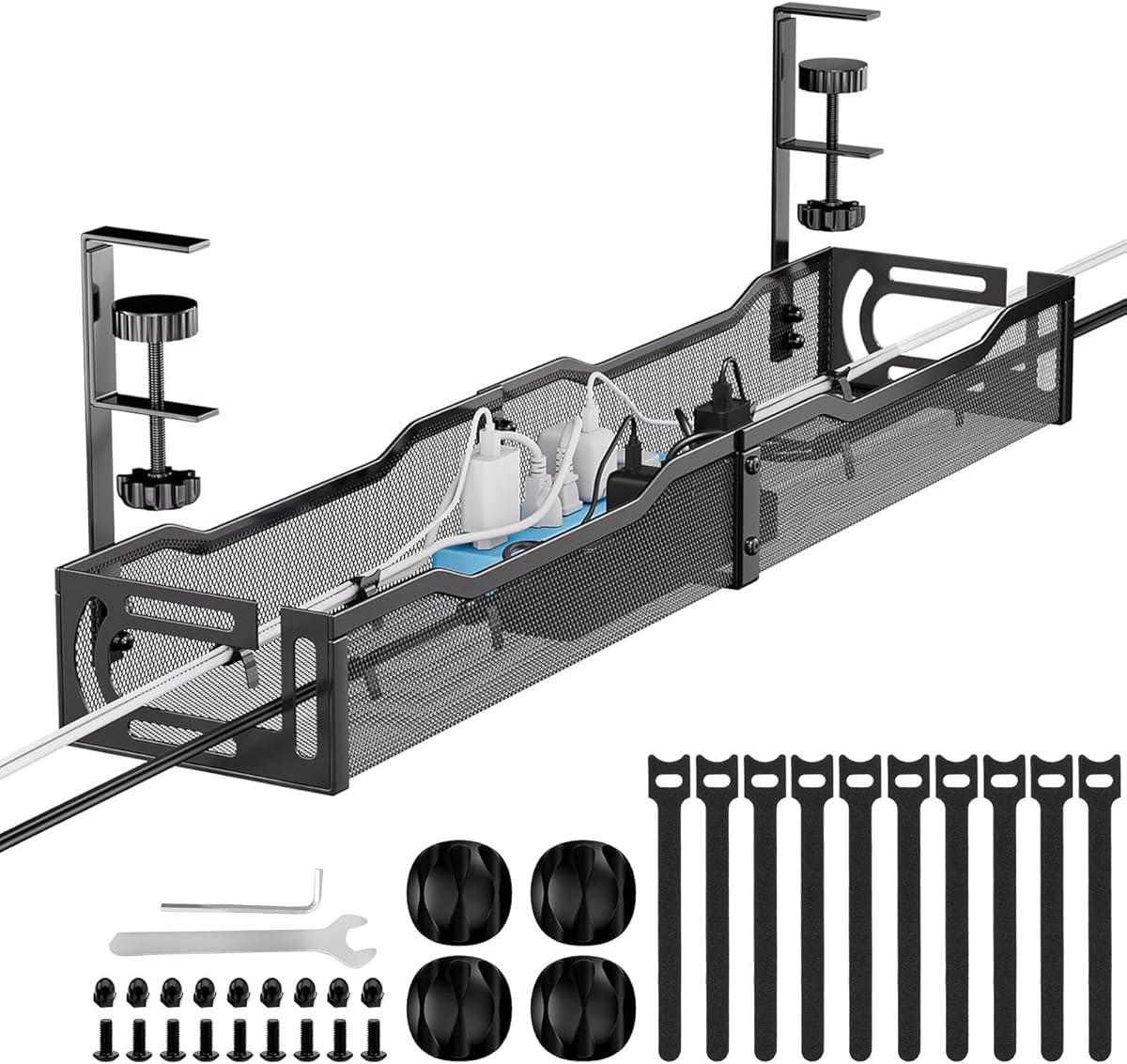
This 25-inch under-desk tray combines rigid metal construction with an open mesh design. It has a 4.8 rating, ties with the Nettbe set for the highest listed rating, and is aimed at users who want a durable platform for power strips, sockets, and charging accessories. The stated load capacity is approximately 15 pounds.
We may earn a commission when you buy through this link, at no additional cost to you.
The tray accommodates desktop thicknesses from 0.4 to 2 inches and supports both inward and outward installation. Its adjustable clamp requires no drilling, while built-in nonslip rubber pads help protect the desk surface from scratches. The open sides allow cables to pass through freely, and the mesh structure promotes ventilation and reduces dust accumulation.
Assembly is the main drawback. The tray is divided into two sections for easier transportation and must be joined with screws before installation. The process reportedly takes only a few minutes, but it is still more involved than installing a one-piece clip-on holder. Buyers should also verify that their desk thickness and edge structure are compatible.
This is a strong pick for standing desks, compact workstations, and buyers who prefer metal over fabric or plastic. It provides a firm, ventilated surface for stored electrical accessories and can help keep cords away from children and walking areas. It is less suitable where a completely tool-free assembly is the main priority, but the straightforward screw assembly is a reasonable trade-off for durability.
The rigid mesh frame supports stored equipment while allowing air to circulate. That combination makes it suitable for power strips and adapters while helping avoid a fully enclosed storage environment.
Nonslip rubber pads help guard against scratches where the clamp contacts the table. The adjustable design also allows the tray to be repositioned as the needs of a standing or conventional desk change.
We may earn a commission when you buy through this link, at no additional cost to you.
The right cable organizer depends on where the cords run, how many need controlling, whether the setup changes, and how much visual concealment is required. Measure before buying, consider the mounting surface, and match the organizer type to the cable bundle rather than choosing solely by appearance.
Cable management products solve different physical problems. Hook-and-loop ties gather loose cords into flexible bundles, split sleeves protect and conceal a moderate group of wires, adhesive clips hold individual cables against surfaces, raceways create a defined route, and under-desk trays store power strips and several accessories at once. A wall with one exposed charging lead needs a clip, while a desk with an overloaded power strip needs a tray.
Dimensions are among the most important selection factors. The D-Line box measures 16.5 by 6.5 by 5.25 inches, the YECAYE channels are 15.7 inches long, and the two premium Univivi trays measure 32 and 36 inches. Under-desk products also require enough vertical and horizontal clearance. Measure the area before ordering and consider cable diameter, connector bulk, and whether the setup must fit inside furniture.
Adhesive mounts offer quick installation on compatible surfaces, but they work best when applied once to clean, smooth material. Clamps are useful when drilling is undesirable, while screws generally provide the most mechanically secure installation. Removable hook-and-loop straps offer maximum flexibility. Choose based on whether the organizer is temporary, movable, renter-friendly, or intended to remain in place for years.
Large organizers can reduce visual clutter dramatically, but they also consume more space. The 36-inch fabric tray and 32-inch ventilated tray suit dedicated workstations, while the 25-inch metal tray provides a smaller rigid option. Low-profile holders suit thin cables, while sleeves suit medium bundles. A product that claims to hold up to 15 cables may not accommodate thick power cords, so consider individual cable size.
Most adhesive-based products perform best on clean, smooth, dust-free surfaces such as wood, glass, tile, cabinets, baseboards, and similar materials. Powder walls, textured paint, dust, oil, and uneven surfaces can reduce adhesion. If the location is porous or frequently exposed to moisture, mechanical mounting may be more dependable. Always clean the surface and follow the stated waiting period before loading an adhesive component.
Good cable management should improve safety without creating new risks. Look for electrically safe or flame-retardant materials, particularly in boxes, raceways, and sleeves. Under-desk trays should have ventilation, as enclosed storage can restrict heat dissipation around power strips and chargers. Organizers can also reduce trip hazards, inaccessible tangles, and exposure of cords to children or pets.
Some setups require a neat appearance more than physical protection. J-channels and cable boxes offer a finished look, mesh trays create a consistent under-desk structure, and sleeves provide a uniform black finish. Reusable ties are more conspicuous but keep cables accessible. Protective sleeving can also discourage pet chewing and reduce abrasion, although it cannot guarantee that a determined animal will leave cords alone.
Technology changes, cables get replaced, and desks are moved. Reusable ties, adjustable clips, and flexible trays are useful when cables are frequently reconfigured. Permanently adhered raceways look tidy but require careful placement because repositioning can damage the surface. Choose an approach that suits how often the cables and connected devices will move, and plan a sensible route before applying adhesive.
Begin by unplugging the relevant equipment and identifying the complete cable path. Group related leads, remove unrelated items from the route, and test the proposed layout before attaching anything permanently. For under-desk trays, position the power strip where it can be reached comfortably and verify that cords reach their devices without crossing walkways or pulling against connectors.
Clean every mounting surface thoroughly and follow the product-specific instructions. Adhesive components generally perform best when pressed firmly against smooth, dust-free material and left undisturbed for the stated period, which may be 24 hours for some raceways. Clamp-style trays should be tightened evenly, while reusable ties should encircle the bundle without being so tight that they strain individual cables.
For ongoing care, inspect adhesive mounts for lifting, exposed cables for damage, and trays for heat buildup or unstable loads. Replace damaged fasteners, refresh clips that have lost their grip, and keep sleeving intact around sensitive connections. Reassess the arrangement whenever equipment changes, and avoid overfilling clips, sleeves, or trays beyond their intended capacity.
An under-desk tray is best for a desk with a power strip, several adapters, and multiple charging leads. It consolidates equipment in a dedicated location while keeping the work surface clear. A smaller desk may work better with hook-and-loop holders or individual clips. The right choice depends on cable volume, available clearance, and whether the arrangement must move frequently.
Reusable ties are better when cables are rearranged often, because they can be opened and repositioned without touching the mounting surface. Adhesive clips are better for a fixed route, particularly when a small number of cords need to be held neatly along furniture. Both approaches have limitations, so a mixed system often provides the most useful result.
Clean the surface with a suitable method and allow it to dry completely before applying the mount. Avoid dust, oil, moisture, powdery paint, and textured surfaces. Press the mount firmly into place and wait for the specified bonding period before adding a cable. If the location is exposed to heat or weather, consider a mechanical mounting method.
A sleeve can add a physical barrier and make a bundle less inviting, but it should not be treated as guaranteed pet protection. Determined animals may still damage the covering or the cable beneath it. Secure cords out of reach, use appropriate bite-resistant covers, and supervise pets around electrical wiring.
Yes, an under-desk tray designed to hold power strips is an effective solution. Choose a model with enough capacity, secure mounting, and ventilation so the equipment is not tightly enclosed. Route cords without creating tight bends or tension at plugs, and keep the power strip accessible for switching devices off.
A raceway channels cables along a surface and often keeps them partially hidden within or behind a cover. A cable tray stores cables and accessories in an open container, usually beneath a desk. Raceways are best for defined visible routes, while trays are better for consolidating bulky equipment and excess cord length.
Adhesive products may not adhere reliably to powder-coated, textured, or uneven walls. Mechanical fasteners can be more dependable when the surface is unsuitable for tape. Test a small area and check the manufacturer's guidance before committing to an adhesive installation, especially if permanent appearance matters.
Reusable hook-and-loop ties, split sleeves, or segmented holders can group cords while keeping them visible and accessible. These approaches are useful for frequently adjusted equipment, temporary installations, and areas where a discreet raceway would be excessive. Bundle only compatible cables and leave enough room to unplug each connector without disturbing the rest.
The Nettbe reusable ties stand out as a flexible, economical option for routine cord control, while the Alex Tech sleeve provides a strong way to bundle and protect several wires. For a more complete workstation setup, the Univivi 32-inch tray offers generous storage, ventilation, and flexible mounting options. Each addresses a different level and style of cable organization.
Prioritize the problem you actually need to solve rather than choosing the largest organizer available. Measure the area, count the cables, check their thickness, and identify the mounting surface before ordering. Reusable solutions suit changing setups, while fixed raceways and trays deliver cleaner long-term results when the final layout is known.
Product ratings, availability, and prices can change over time, so review the current listing and recent customer feedback before making a final decision. Confirm dimensions, included components, mounting requirements, and compatibility with the intended surface. A small amount of planning will produce a safer, neater, and more durable cable management arrangement.