
Nektar SE49
4.5Editor score
Compact 49-key layout
Mac PC and iOS support
Comprehensive MIDI functionality
Our 49 Key MIDI Keyboards guide compares keybed feel, controls, connectivity, software, and creative features for every skill level.
A 49-key MIDI keyboard offers enough range for melodies, chords, and bass lines while remaining compact enough for most home studios and desks. A worthwhile model should combine a responsive keybed with dependable computer connectivity, useful controls, and features that simplify the path from musical idea to finished production.
We compared the ten featured 49-key controllers by examining their key action, velocity sensitivity, pad and knob layouts, DAW integration, included software, platform compatibility, and practical control options. The guide covers models for beginners, FL Studio users, NKS-compatible production, portable practice, and musicians who want a more advanced command surface.
Each review explains who the keyboard suits, which capabilities stand out, and where compromises appear. Ratings reflect the supplied customer feedback, while product availability and pricing change over time, so readers should confirm current details before making a final purchasing decision.
4.5Editor score

4.7Editor score

4.4Editor score
The comparison below highlights the keybed, control surface, connectivity, and creative features that distinguish each 49-key MIDI controller.




The M-Audio Keystation 49 MK3 is a straightforward USB MIDI controller with a 4.5 customer rating. Its 49 full-size, velocity-sensitive keys provide a natural foundation for virtual pianos, samplers, and synthesizers, while the compact enclosure makes it practical for a bedroom studio or dedicated music desk.
We may earn a commission when you buy through this link, at no additional cost to you.
Performance controls are particularly well judged for a straightforward controller. Pitch and modulation wheels support expressive playing, and the volume fader, transport keys, and directional buttons make common software functions easier to reach. The included MPC Beats, Ableton Live Lite, Velvet, XPand2, Mini Grand, and Touch Loops give new users several ways to begin making music.
Connection is refreshingly simple. It works with Mac or PC systems without requiring a separate driver or power supply, and the supplied information also notes compatibility with iOS devices through a separately sold Apple to USB Camera Adapter. The trade-off is that its controls do not offer the tightly integrated pad workflows and screen-based feedback found on newer models.
This is a strong choice for a student, songwriter, or home producer who values familiar piano-sized keys and uncomplicated setup over an elaborate production surface. It also works well as a general-purpose controller across multiple software environments. For those priorities, the Keystation 49 MK3 provides one of the most approachable ways to begin playing and producing with a 49-key instrument.
Full-size, velocity-sensitive keys give performers a familiar playing surface and a useful degree of dynamic response. That makes the controller practical for both realistic piano parts and more exaggerated synthesizer performances.
The bundled applications cover beat making, sequencing, and instrument performance, while online lessons add structured learning options. New users can begin without assembling a large software collection first.
We may earn a commission when you buy through this link, at no additional cost to you.
The Novation Launchkey 49 MK4 combines a premium keybed, 16 responsive FSR pads, and extensive DAW support in one controller. Its 4.7 rating is the highest among the supplied products, reflecting an especially strong overall reception for a model aimed at both performance and production.
We may earn a commission when you buy through this link, at no additional cost to you.
The pads are more than basic trigger buttons. They can support finger drumming, clip launching, step sequencing, chord triggering, and other production tasks, while polyphonic aftertouch expands the expressive range. Scale Mode helps performers stay on the intended notes, and chord and arpeggio tools can generate musical ideas from fewer keystrokes.
Compatibility is one of its major strengths. The controller supports major DAWs including Ableton Live, Logic, Cubase, Reason, Reaper, FL Studio, and Ardour, and it is also Native Kontrol Standard ready. The software bundle adds Ableton Live Lite, Cubase LE, Novation Play, sounds from several developers, and Melodics lessons.
The Launchkey 49 MK4 suits musicians who want a single controller to move between composing, performing, beat programming, and software control. It is especially attractive for cross-DAW users and performers interested in pads as a serious creative tool. Its versatility makes the learning curve worthwhile for users who will explore beyond basic piano playing.
The pressure-sensitive FSR pads can shift between musical roles as a session develops. Their pressure and polyphonic-aftertouch support make them useful for both hands-on rhythm work and more nuanced melodic triggering.
Purpose-built workflows for major DAWs reduce the need to memorize separate control assignments. Native Kontrol Standard support also makes the controller a more natural fit for compatible Native Instruments software.
We may earn a commission when you buy through this link, at no additional cost to you.
The Nektar SE49 is an approachable 49-key MIDI controller built around the essentials of computer-based music production. It carries a 4.5 customer rating and focuses on expressive playing, broad MIDI compatibility, and a compact format rather than a large collection of specialized buttons.
We may earn a commission when you buy through this link, at no additional cost to you.
Its DAW integration supports popular music applications, while comprehensive MIDI functionality allows use with compatible software beyond a single production environment. Compatibility with Mac, PC, and iOS makes it useful for musicians who move between a desktop studio and a mobile device.
The package includes Bigwig Studio, an eight-track DAW with a sound content package, giving new users a functional starting point. Compared with advanced competitors, the SE49 offers fewer performance pads, screens, and assignable controls, so it is less suited to command-surface-style workflows.
Nektar SE49 is a logical recommendation for a beginner, practice-oriented musician, or budget-conscious producer who needs reliable MIDI control without a large footprint. It also works for anyone building a simple setup around existing software and wants broad operating-system compatibility.
The SE49 focuses on sending dependable note, controller, and performance data to compatible software. That makes it suitable for learning MIDI, practicing with virtual instruments, and producing uncomplicated arrangements.
Bigwig Studio provides an eight-track environment and sound content within the package. It offers a convenient entry point for users who want a basic DAW alongside their hardware.
We may earn a commission when you buy through this link, at no additional cost to you.
The M-Audio Oxygen 49 MKV is a feature-rich controller with a 4.6 customer rating. It combines 49 velocity-sensitive, full-size piano-style keys with 16 backlit pads, eight knobs, and nine faders, creating a more complete production interface than a basic keyboard-and-wheels design.
We may earn a commission when you buy through this link, at no additional cost to you.
Native Kontrol Standard integration lets compatible users browse and control Native Instruments presets and libraries from the keyboard. A choice of three complimentary Komplete 15 Select bundles—Beats, Band, or Electronic—adds instrument content, while Smart Chord, Smart Scale, and the arpeggiator assist songwriters who want faster musical decisions.
Its control surface can handle virtual instruments, effect plugins, and DAW parameters, with auto-mapping intended to simplify setup. The trade-off is that a denser layout presents more choices and may feel less immediate than a minimal controller, particularly for someone learning MIDI for the first time.
This model is well suited to producers who want hardware control over a broad range of software while retaining a familiar piano keyboard. It is especially compelling for Native Instruments users, beat makers who value the 16 pads, and musicians who expect to use chord, scale, and arpeggiator tools regularly.
Eight knobs and nine faders place frequently used parameters within reach, while assignable controls can target instruments, effects, and DAW functions. The physical layout is especially useful during mixing and sound design.
Native Kontrol Standard support creates a more direct connection between the controller and compatible Native Instruments software. Users can move through presets and manipulate sounds without relying entirely on mouse-driven browsing.
We may earn a commission when you buy through this link, at no additional cost to you.
Arturia KeyLab Essential mk3 combines a 49-key format with pressure-sensitive pads, a 2.5-inch LCD, and custom DAW scripts. Its 4.5 customer rating indicates a balanced package for musicians who value clear feedback, musical assistance, and a broad collection of included sounds.
We may earn a commission when you buy through this link, at no additional cost to you.
Scale Mode, Chord Mode, and the built-in arpeggiator make composition and beat creation more approachable. The RGB-backlit pads respond to velocity and pressure, while the display provides real-time information and the contextual button helps keep navigation close at hand.
Custom scripts provide deeper control over Ableton Live, Logic Pro X, FL Studio, and other supported software, reducing the manual work involved in building controller assignments. On the other hand, users who do not need those mappings may regard the interface as more complicated than a minimal controller.
This is a good choice for a composer, electronic producer, or beginner who wants guided creative tools and a substantial software package. The included Analog Lab V, two virtual pianos, Loopcloud subscription, and Melodics subscription make it particularly useful for developing both performance and production skills.
The built-in LCD shows relevant information without forcing the user to leave the hardware. Real-time feedback is especially helpful when changing modes, selecting sounds, or navigating deeper controller settings.
Scale and chord modes reduce the need to calculate intervals manually, while the arpeggiator can transform simple notes into repeating patterns. These tools encourage experimentation without hiding the underlying MIDI workflow.
We may earn a commission when you buy through this link, at no additional cost to you.
The ABS Compact 49-Key Controller is a straightforward option for music practice, composition preparation, arranging, and compact recording setups. It has no supplied customer rating, so its value proposition rests primarily on its 49-key format, practical dimensions, and simple construction rather than a documented performance history.
We may earn a commission when you buy through this link, at no additional cost to you.
Measuring approximately 66 by 11.4 by 3.5 centimeters, the controller is designed to fit on a desktop or within a smaller creative workspace. Its clean black finish suits home studios, music rooms, and practice areas without adding visual clutter.
The supplied product information does not describe advanced pads, assignable encoders, displays, or specialized DAW mappings, so buyers should not expect the integrated workflow of premium competitors. It is better understood as a practical hardware platform for basic creative tasks than a complete production command center.
This model may suit users who need a compact 49-key surface for melodic practice, arranging preparation, or a secondary controller. Its limitations make it less attractive for advanced beat programming, but its straightforward footprint can be valuable where desk space and simplicity matter most.
Its shallow, compact measurements make the controller easier to position in home offices, practice rooms, and small studios. It can function as the central musical surface in a workspace where a large keyboard would be impractical.
The 49-note layout provides room for melodies, chords, and basic bass work. For users focused on learning arrangement or preparing parts, the straightforward design avoids unnecessary complexity.
We may earn a commission when you buy through this link, at no additional cost to you.
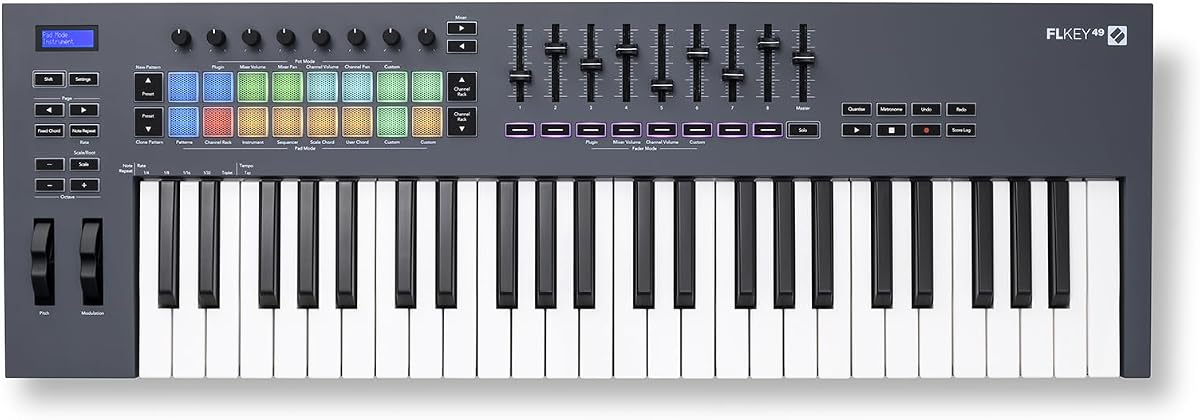
The Novation FLkey 49 is purpose-built for FL Studio and carries a 4.6 customer rating. It brings the software's Mixer, Channel Rack, transport, score log, undo, redo, quantize, and metronome functions into hardware control without requiring users to assign everything manually.
We may earn a commission when you buy through this link, at no additional cost to you.
Eight knobs and nine faders allow real-time changes to volume, panning, and other parameters, while dedicated buttons support a faster editing workflow. Sequencer Mode maps the pads to FL Studio's step sequencer, and Two Pad mode provides an opportunity to build patterns with a more human feel.
Scale Mode helps users stay on the intended notes, while three chord modes let a single finger trigger different harmonies. The pads can also control Trigger FPC and SliceX, extending their value beyond simple percussion. The limitation is that this close integration centers on one DAW, so users working across unrelated applications may want a broader controller.
FLkey 49 is an excellent recommendation for current or prospective FL Studio users who want hardware to feel like an extension of the application. It suits beat makers, producers who dislike mouse-only editing, and performers who want pads and musical modes ready without a complicated template.
The mixer, channel rack, and transport controls are placed directly on the controller for immediate access. This reduces screen navigation and helps keep ideas flowing during arrangement and mixing.
Sequencer Mode turns the pad section into a hardware interface for FL Studio patterns. Two Pad mode and the Trigger FPC and SliceX assignments give beat makers additional ways to shape and perform programmed parts.
We may earn a commission when you buy through this link, at no additional cost to you.
The M-Audio Oxygen Pro 49 is a performance-oriented controller with 49 velocity-sensitive, semi-weighted keys, aftertouch, and assignable zones. Its 4.5 rating reflects a well-rounded feature set aimed at virtual instruments, synthesizers, and producers who want tactile control.
We may earn a commission when you buy through this link, at no additional cost to you.
Sixteen RGB-backlit, assignable, velocity-sensitive pads support beat production, clip launching, and soundboard triggering. Eight knobs and nine faders add a substantial control surface for instruments and effects, while auto-mapping, Smart Chord, Smart Scale, and the arpeggiator reduce setup demands.
Native Kontrol Standard support provides a more direct route into compatible Native Instruments libraries, and a complimentary Komplete 15 Select bundle is included. The 5-pin MIDI output also distinguishes this model from USB-only controllers, potentially making it useful with older or more specialized MIDI equipment.
The main compromise is footprint and complexity. A large keybed, numerous faders, many buttons, and a broad pad grid can occupy substantial desk space and require a learning period. For advanced users who will regularly use those capabilities, however, the Pro 49 offers a particularly expressive and versatile command surface.
Aftertouch and assignable key zones allow a performer to influence expression and divide the keyboard for different functions. These are meaningful advantages for virtual instruments that respond to nuanced input.
USB handles the computer connection, while 5-pin MIDI output provides a path to compatible external gear. That combination gives the controller more flexibility across modern and traditional studio setups.
We may earn a commission when you buy through this link, at no additional cost to you.
The midiplus AK490 is a traditional 49-note master keyboard with velocity-sensitive piano-style keys and a 4.3 customer rating. Its straightforward design centers on core performance functions rather than screen-based feedback, specialized pads, or extensive DAW integration.
We may earn a commission when you buy through this link, at no additional cost to you.
Pitch and modulation wheels handle common expressive gestures, while octave buttons let performers shift the available range without changing software settings. A MIDI output DIN jack supports connection to compatible equipment, and the supplied USB cable allows use with a computer.
A sustain pedal is not included, so users interested in pedal control must add one separately. The package contains an owner's manual and USB cable, while the supplied information does not mention a substantial bundled software suite. Consequently, the AK490 offers less convenience for beginners who want lessons and virtual instruments immediately available.
This model is most appropriate for a musician who wants a straightforward MIDI controller, perhaps to operate a software instrument or serve as a basic master keyboard. It suits users who already have a preferred software setup and value familiar wheels, octave controls, and traditional MIDI output.
Separate pitch and modulation wheels mirror the layout of many stage and studio keyboards. They remain intuitive for players accustomed to controlling expression through physical gestures.
The MIDI DIN output lets the keyboard send control data to compatible hardware, not just a USB-connected computer. This makes the AK490 useful in a more traditional master-keyboard setup.
We may earn a commission when you buy through this link, at no additional cost to you.
The Arturia KeyLab mk3 is a premium 49-key controller centered on expressive playing and detailed software control. It has a 4.4 customer rating, aftertouch-equipped keys, 12 pressure-sensitive performance pads, nine encoders, and USB-C power, giving it a more advanced profile than entry-level alternatives.
We may earn a commission when you buy through this link, at no additional cost to you.
The pads can respond dynamically rather than operating as simple on/off triggers, while the encoders provide precise, repeatable adjustments for mixers, effects, and plug-in parameters. Sustain and auxiliary pedal inputs allow performers to connect compatible footswitches for a more complete stage or studio configuration.
Its advanced feature set also means more setup and a greater financial commitment than simpler controllers. The supplied data does not detail the exact key action beyond aftertouch, so buyers seeking a specific weighted feel should verify those details on the current product listing before buying.
KeyLab mk3 is best for serious performers and producers who intend to use pressure sensitivity and a substantial control surface. It also suits users building a studio around premium virtual instruments, where nuanced aftertouch and granular parameter control can justify the added complexity.
Aftertouch and pressure-sensitive pads allow input to vary with the force of a player's touch. Software and virtual instruments that respond to pressure can gain a more dynamic, expressive character.
Nine encoders make frequently used parameters easier to adjust directly. They are particularly useful when navigating plug-ins, shaping effects, and refining mixes without repeated mouse movement.
We may earn a commission when you buy through this link, at no additional cost to you.
A 49-key MIDI controller should match your software, playing style, and available desk space. The most important considerations are key response, control layout, connectivity, workflow integration, and the software tools included with the hardware.
Begin by considering how the keys respond to pressure and how much physical feedback they provide. Velocity sensitivity lets a controller communicate dynamics to software, while aftertouch adds another dimension by responding to changes in pressure after a note is struck. Semi-weighted or weighted action can feel more substantial than a light, unweighted action, although the supplied specifications do not describe the exact feel of every model. Players should also consider whether their software instruments benefit from realistic resistance or respond better to fast, lightweight playing.
A controller becomes much more useful when it has purpose-built mappings for the DAW you already use. Novation FLkey 49 is specifically oriented toward FL Studio, while the Arturia KeyLab Essential mk3 includes custom scripts for major applications such as Ableton Live, Logic Pro X, and FL Studio. The Novation Launchkey 49 MK4 supports a broad range of major DAWs. If you switch among several environments, cross-platform mappings are valuable; if you work in only one, deep integration can save time and eliminate repetitive assignments.
Extra controls determine whether a keyboard is merely a way to play notes or a complete production surface. The M-Audio Oxygen 49 MKV and Oxygen Pro 49 each offer 16 velocity-sensitive pads, eight knobs, and nine faders, while the FLkey 49 provides eight knobs, nine faders, and sequencer-oriented pads. The Launchkey 49 MK4 uses 16 responsive FSR pads with polyphonic aftertouch. Consider the roles you actually need: beat programming, clip launching, drum triggering, mixer changes, or plug-in parameter adjustment. More controls are useful when mapped well, but they can consume desk space and add complexity.
A display can reduce uncertainty by showing the selected sound, mode, parameter, or software state without requiring the computer screen. The Arturia KeyLab Essential mk3 has a 2.5-inch LCD for real-time feedback, while the premium KeyLab mk3 highlights nine encoders for direct control. Controllers without screens often rely on software windows or illuminated indicators. That can still work well, particularly within a single DAW, but users working across multiple applications may prefer a model that puts important information directly on the hardware.
Check whether your setup depends on USB, traditional 5-pin MIDI, or both. The M-Audio Oxygen Pro 49 and midiplus AK490 include 5-pin MIDI output, allowing more traditional routing to compatible hardware. USB is standard for computer-based production, and the Keystation 49 MK3 and Nektar SE49 also note iOS compatibility, though the former requires a separately sold Apple to USB Camera Adapter. Platform support is an important filter because a controller that suits Mac and PC may not be equally convenient for tablet or mobile-based work.
Native Kontrol Standard support can make compatible Native Instruments software easier to browse and control. The M-Audio Oxygen 49 MKV, Oxygen Pro 49, and Novation Launchkey 49 MK4 all support NKS-related control. That benefit matters most for producers who already own or plan to use compatible Native Instruments products. It is less important for someone focused on other ecosystems, so NKS should be treated as an advantage within a specific software workflow rather than the sole reason to buy a keyboard.
Bundled software can make a new setup usable immediately. The Keystation 49 MK3 includes MPC Beats, Ableton Live Lite, several instrument or effect applications, and lessons from Skoove and Melodics. The Oxygen 49 MKV provides a larger production package, while the KeyLab Essential mk3 includes Analog Lab V, two virtual pianos, and subscriptions to Loopcloud and Melodics. Nektar SE49 includes Bigwig Studio. Bundles are helpful for beginners, but existing software users should check for duplication and be aware that some offerings are subscriptions or require account activation.
A full 49-key controller is more compact than a 61- or 88-key instrument, but models with extensive faders and pads can still occupy significant space. The ABS Compact 49-Key Controller is specifically designed around compact dimensions, whereas advanced production keyboards may fit a larger studio desk better than a small home workstation. Portability also depends on power requirements and platform support. The Keystation 49 MK3 does not require a separate power supply, which simplifies setup, while premium controllers may be better suited to a semi-permanent studio position.
Begin by connecting the controller to the computer with its supplied or compatible USB cable, then open the DAW or virtual instrument you intend to use. Select the keyboard as the MIDI input if the software does not recognize it automatically, and set its output to the desired sound or software instrument. Open the controller's template or setup guide before changing knobs, buttons, or pads, because many manufacturers provide mappings designed for particular applications.
Test the key range at a moderate volume, then check velocity and any special features such as octave buttons, aftertouch, chord modes, or pad pressure. Learn one control grouping at a time: assign transport buttons first, then mixer controls, and finally production pads. Save separate MIDI templates for different software so switching projects does not require rebuilding every assignment from scratch.
For care, place the controller on a stable surface and keep liquids away from the keys, controls, ports, and display. Dust the keybed with a soft, dry cloth, avoid abrasive cleaners, and do not press aggressively on backlit pads or rotary encoders. Store the controller in a padded case when transporting it, coil cables without creating sharp bends, and keep the software and firmware versions current through the manufacturer's official instructions.
A 49-key MIDI keyboard is well suited to melodies, chords, bass lines, sound design, and DAW control within a compact footprint. It usually covers two and a half octaves, making it useful for many virtual instruments without the desk space required by a larger keyboard. Its exact range and layout can vary, so check the specifications when planning music that extends beyond the available keys.
No, because music software can be played with many different input devices. A 49-key controller is convenient when you want a familiar performance surface, physical controls, and a portable way to enter notes. Beginners may begin with a smaller keyboard and upgrade later, while producers focused on clip launching and mouse-based editing may prioritize pads or knobs instead.
Velocity sensitivity is important because it tells compatible software how hard each note was played. That information can influence volume, timbre, brightness, and other parameters. Models with aftertouch can also respond to changes in pressure after the initial strike, although support depends on both the controller and the virtual instrument being used.
They can be useful for learning melodies, harmony, scales, and composition because they provide physical keys and a practical computer-based sound library. However, 49 keys cover less range than a full-size acoustic piano, and lightweight key action may behave differently. A student who needs a faithful acoustic feel should compare key action and weighted-key options carefully.
Pads are valuable for beat making, clip launching, drum triggering, and step sequencing, but they are not necessary for every workflow. If you work mainly with software instruments and melodic playing, a simple keyboard with good action may be sufficient. If you produce electronic music, program rhythms, or want a more tactile workflow, a model with assignable velocity-sensitive pads offers greater versatility.
Most can send standard MIDI information, so they can control many compatible applications, but the convenience varies. A keyboard with native DAW templates may work immediately in one program and require manual mapping in another. Broadly integrated models such as the Launchkey 49 MK4 support several major DAWs, while the FLkey 49 focuses most directly on FL Studio.
Only if you intend to control compatible external MIDI hardware. Computer-based production normally requires USB, and many modern setups need nothing more. Controllers such as the Oxygen Pro 49 and midiplus AK490 include 5-pin MIDI output, giving them extra flexibility for traditional studio or stage routing.
Compare the bundle based on what you actually need, not simply the number of applications. Check whether each item is a full product, a limited edition, a trial, or a subscription, and confirm that it works with your operating system. Experienced users should also consider whether the included tools duplicate software they already own.
The Novation Launchkey 49 MK4 stands out for its broad DAW compatibility, responsive pads, and extensive creative tools, making it the strongest all-around recommendation. The Nektar SE49 provides a simpler and more approachable path for beginners, while the Arturia KeyLab mk3 serves premium users who prioritize aftertouch, pressure-sensitive pads, and detailed encoders.
Your decision should follow your actual workflow. FL Studio users may get the most from the Novation FLkey 49, Native Instruments enthusiasts should examine the Oxygen models, and those who want a direct DAW command surface may prefer the KeyLab Essential mk3. Practice and composition needs may be met more simply by the Keystation, SE49, or compact ABS model.
Finally, confirm the current specifications, software requirements, and price of any 49-key MIDI keyboard before ordering. Ratings and product details can change, and features that are excellent for one producer may be unnecessary for another. The most reliable purchase is the controller that matches your software, your physical setup, and the way you actually make music.