
200W USB C Charger, 6 Ports GaN Fast Charging Station, Black
4.7Editor score
Six-port multi-device design
Up to 100W on one port
Compact corded station
Our 200w Gan Charger guide compares 10 GaN chargers, examining laptop charging, port counts, portability, compatibility, displays, and safety features.
A 200W GaN charger is designed to consolidate substantial charging power into a compact wall adapter or desktop station. The strongest options can charge demanding laptops, tablets, and phones while using fewer outlets than a collection of separate chargers. Port configuration, power allocation, and protocol support matter as much as headline wattage.
This guide compares ten products based on their stated total output, individual port capabilities, supported charging protocols, physical design, device compatibility, and listed safety protections. It covers both direct wall-plug models and corded charging stations, helping readers distinguish between travel adapters, desk organizers, and premium power monitors.
Each review highlights the most useful strengths and practical trade-offs of its featured charger. The UGREEN Nexode leads as an all-around laptop-capable option, while the LENTAD and Anker Prime represent distinct approaches to value and premium control. Product availability and pricing can change, so confirm the current listing and compatibility before purchasing.
4.7Editor score

4.7Editor score

4.6Editor score
The comparison below covers aggregate wattage, USB-C and USB-A port counts, maximum single-port output, and the most relevant design feature of each charger. It also shows how wall-plug adapters differ from corded desktop stations and two-pack bundles.



The UGREEN Nexode 200W GaN USB C Charger is the strongest all-around option in this guide, combining a 4.7 rating with up to 200W of aggregate charging capacity. Its most important feature is the ability to deliver up to 140W through one USB-C connection, a level suited to power-hungry laptops such as the listed MacBook Pro, Dell XPS, and HP models. Four ports allow it to serve as a compact replacement for several separate adapters.
We may earn a commission when you buy through this link, at no additional cost to you.
The charger is especially interesting for users who need to keep two laptops working. UGREEN specifically describes support for charging two MacBook Pro systems at the same time, although exact performance will depend on the connected devices and the power the operating system requests. The port arrangement includes three USB-C connections and one USB-A connection, providing enough flexibility for a laptop, phone, tablet, and a USB-A accessory in a typical desk setup.
The main trade-off is the absence of a display or application-based monitoring system. Users who want to see live per-port wattage must use a separate power meter, whereas the UGREEN Nexode Pro and Anker Prime provide more visible or app-based controls. Only one USB-A port is also less accommodating for older accessories, although three USB-C ports lessen that limitation for modern devices. These are modest compromises given the strong laptop output and portable format.
This is the recommended 200W GaN charger for most professionals who need one dependable adapter for a laptop and several smaller devices. It is particularly attractive for travel, shared workspaces, and desks with limited outlet capacity. Buyers who require an illuminated wattage readout should compare the UGREEN Nexode Pro, while those wanting a larger USB-A selection may prefer the LENTAD or Belkin.
A maximum output of 140W gives the UGREEN Nexode enough stated capability for demanding portable computers. UGREEN reports that a 16-inch MacBook Pro M4 can reach 56% in 30 minutes, making the adapter useful for users who recharge between work sessions or travel with a short charging window.
Three USB-C ports and one USB-A port cover the most common charging mix. The four-port arrangement can reduce the number of adapters needed for a laptop, phone, tablet, and wired accessory while keeping the charger compact enough for a travel bag.
We may earn a commission when you buy through this link, at no additional cost to you.
This two-pack USB C charger block offers a different reason to choose it: one unit can serve a home desk while another travels with a user. Each charger has a stated 200W total capacity, a 4.4 rating, and six ports consisting of three USB-C and three USB-A connections. The included foldable plug and extended power cord make the format more flexible than a permanently cabled desktop brick.
We may earn a commission when you buy through this link, at no additional cost to you.
The central USB-C connection supports up to 65W, while the listing describes two additional 30W USB-C connections and three 15W USB-A ports. That arrangement is well suited to charging a compatible laptop alongside multiple phones, tablets, and accessories. It is not designed around the same maximum single-port output as the UGREEN Nexode, so a high-end laptop may charge at a lower rate than it would with a 140W connection.
The principal advantage is flexibility. Two chargers allow placement in separate rooms, at separate workplaces, or in a shared travel arrangement. Buyers also receive two cables according to the product description, along with a guide and warranty. One drawback is that the feature information contains a repeated and partially garbled product-name line, which may make the exact packaging contents less immediately clear than on a more polished listing.
Choose this option if the goal is to place 200W-class multiport charging in two places rather than maximizing the output of a single laptop connection. It is a sensible choice for households or teams with many USB-A accessories. For one exceptionally powerful laptop, the UGREEN Nexode or UGREEN Nexode Pro offers a higher stated maximum USB-C output.
A two-pack is more useful than it first appears when one charger belongs on a permanent desk and another accompanies a laptop bag. Each unit retains six ports, so both locations can support a mixed collection of USB-C and USB-A devices.
The 65W maximum USB-C output makes the charger suitable for many mainstream USB-C laptops. Performance on specialized gaming or workstation computers may be more limited, so buyers with unusually demanding power requirements should verify their device specifications first.
We may earn a commission when you buy through this link, at no additional cost to you.
The LENTAD 200W USB C Charger is a compact six-port station with a 4.7 rating and a substantial maximum output. Its USB-C 1 connection can provide up to 100W, while the charger supports PD 3.0 and QC 3.0. The advertised 200W aggregate output is distributed across six ports, allowing several devices to charge at once from a single desktop unit.
We may earn a commission when you buy through this link, at no additional cost to you.
This design is oriented toward organization. A five-foot AC power cord gives the station more flexibility than a compact wall block, and the supplied stand can help position it on a desk. The stated dimensions of 9.1 by 6.7 by 3.1 centimeters keep the unit relatively small, although the attached power lead means it is not as self-contained as a foldable-plug travel adapter.
Compatibility covers MacBook Pro and Air models, iPads, iPhones, Samsung Galaxy devices, Google Pixel products, and other USB-C equipment. Protection is listed for short circuits, overcurrent, overvoltage, and excessive temperature. A downside is that the supplied information does not clearly break down the exact number of USB-C and USB-A connections, so buyers who need a specific legacy connector should verify the port layout before ordering.
This is the preferred budget-oriented station for a desk containing numerous phones, tablets, and one demanding USB-C device. It balances a useful 100W maximum with six-port convenience at a notably accessible listing. It is less suitable for travel than a foldable wall charger, and users who require app controls or a live display should examine the Anker Prime or UGREEN Nexode Pro instead.
The five-foot cord and included stand make this a natural center point for a work desk. It can gather several charging leads into one location, reducing the need to keep laptop, phone, tablet, and accessory chargers beside one another.
A dedicated 100W USB-C connection can serve a compatible laptop while the remaining ports handle lower-power devices. LENTAD states that a MacBook Pro can reach 55% in about 35 minutes under the advertised charging conditions.
We may earn a commission when you buy through this link, at no additional cost to you.
The UGREEN Nexode Pro stands out for its 4.7 rating, five-port layout, and unusually informative display. Although its aggregate output is 160W rather than 200W, USB-C ports C1 and C2 can each support up to 140W. This means its headline features matter more than the total number alone for certain high-power laptop configurations.
We may earn a commission when you buy through this link, at no additional cost to you.
The rotatable touch display presents total output, per-port power data, active charging protocols, and internal temperature status. An animated expression adds visual character, while the touch controls make the information accessible without separate equipment. This is particularly helpful for users who want to confirm that a laptop is drawing the expected amount of power or quickly identify how output is being divided among connected devices.
Four USB-C ports and one USB-A port create a balanced charging array. UGREEN states that it can boost a 16-inch MacBook Pro M4 Max to 56% within 30 minutes and describes compatibility with more than 1,000 types of electronic devices. Overheating, overvoltage, overcurrent, and short-circuit protections are included, along with two temperature-control modes. The trade-off is that the screen and touch panel make this model larger than a simple wall block.
Buy the Nexode Pro when live power visibility is the priority and 160W aggregate output is sufficient. It may also appeal to technical users who appreciate protocol and temperature data. Those seeking 200W aggregate capacity should compare the LENTAD, Belkin, or the first-ranked UGREEN Nexode, depending on whether a display or maximum port output matters more.
The smart display reports aggregate wattage, individual port allocation, charging protocol, and temperature status. That visibility can make it easier to understand why a device is charging at a particular speed and whether multiple connected products are sharing the available power.
Four USB-C ports and one USB-A port make the unit suitable for a laptop-heavy setup. Its automatic allocation system is designed to divide available power according to connected equipment, while the foldable plug simplifies packing.
We may earn a commission when you buy through this link, at no additional cost to you.
The Anker Prime Charger is a premium three-port GaN adapter with a 4.6 rating and a stated 160W aggregate output. Its key technical advantage is a consistent 140W single-port output without derating, making it one of the strongest choices here for a single high-performance laptop. Anker states that a 16-inch MacBook Pro can charge from zero to 50% in 25 minutes.
We may earn a commission when you buy through this link, at no additional cost to you.
PowerIQ 5.0 divides the available output across connected devices, with one stated configuration supporting a 16-inch MacBook Pro at 140W, an iPhone 16 Pro Max at 35W, and an 11-inch iPad Pro at 35W. AnkerSense View provides real-time power information on the built-in screen, while Bluetooth app support lets users switch modes and unlock custom modes. That makes the charger unusually interactive for a compact adapter.
Its three-port count is smaller than that of most competing models, so it depends on good power distribution rather than abundant connections. Users with numerous low-power accessories may need a desktop hub. The app dependency can also be unnecessary for anyone who only wants a dependable laptop charger. Even so, the stated power density of 1.35W per cubic centimeter and AirPods Pro 3 case size emphasize portability.
This is the top choice for buyers who want premium laptop performance, live power information, and app-based control in a small package. It is especially appropriate for a mobile professional carrying one laptop, one phone, and one tablet. Buyers needing more than three simultaneous connections should compare the five-port UGREEN Nexode Pro or the six-port LENTAD station.
PowerIQ 5.0 manages the relationship between connected devices and available output. The ability to sustain 140W from one port is especially useful when a laptop needs the full allocation rather than sharing the charger with several other products.
AnkerSense View brings power data onto the charger itself, while the Bluetooth app adds mode selection and custom controls. These features improve transparency and control but are unnecessary for buyers whose only requirement is dependable USB-C charging.
We may earn a commission when you buy through this link, at no additional cost to you.
The Belkin BoostCharge Pro is a four-port 200W charger built around intelligent power sharing and a 4.6 rating. Unlike many compact adapters, it uses a detachable five-foot cord, placing the outlet behind or beside a desk while keeping device ports accessible. This makes it particularly suitable for a permanent workstation.
We may earn a commission when you buy through this link, at no additional cost to you.
Its fast-charging credentials include USB-C Power Delivery, PPS, PD3.1, and PD3.0 support. Belkin states that a 16-inch MacBook Pro 16 with an M2 Pro can charge from zero to 50% in approximately 30 minutes, while an iPhone 14 can reach 50% in 27 minutes. The listed compatibility also includes the iPhone 17 and Galaxy S26, along with other devices that support the relevant fast-charging standards.
The housing contains a minimum of 72% recycled content, and the packaging is described as entirely plastic-free. Coverage includes two years of protection and a stated product liability coverage amount. The main limitation is that only four devices can connect at once, with no display to show how the 200W is being allocated. Users with more accessories may need a larger desktop station.
The Belkin is a strong choice for a desk where a laptop and three other devices need reliable charging. Its detachable cord is more convenient than a fixed lead and offers more freedom than a direct wall plug. It is less suited to minimalist travel, while buyers who value live output information can consider the UGREEN Nexode Pro or Anker Prime.
The detachable five-foot cord allows the charger body to sit where cables connect to devices, rather than directly against the wall. This can improve desk organization and make each port easier to reach.
PD3.1, PD3.0, and PPS support give compatible phones and laptops access to suitable fast-charging behavior. Intelligent sharing then divides the available 200W aggregate output among whatever equipment is connected.
We may earn a commission when you buy through this link, at no additional cost to you.
This GaN III six-port charging station combines 200W aggregate output with a relatively compact 4.6-rated design. It includes four USB-C and two USB-A ports, allowing a laptop, two phones or tablets, and three additional devices to charge at once. The stated maximum output on the first USB-C connection is 65W, which is sufficient for many mainstream portable computers.
We may earn a commission when you buy through this link, at no additional cost to you.
Its protocol support includes PD3.1, PPS, and QC4.0+. The product description states that a 16-inch MacBook Pro can reach 50% in 30 minutes when connected to the first USB-C port. Compatibility is listed for MacBook Pro and Air, iPhone and iPad families, Samsung Galaxy devices, Google Pixel products, Dell XPS systems, Switch, and other USB-C devices.
GaN III is used to improve energy efficiency, heat dissipation, and size. The listed dimensions are 3.7 by 3.7 by 1.3 inches, with a weight of 7.9 ounces, described as 16% smaller than a multiport charger. The five-foot cord extends the station from a wall or power strip, though the fixed connection is less flexible than a detachable cord. No display is included.
Choose this station for travelers or shared offices that require six ports without a bulky desktop hub. The 65W ceiling is the key caveat for users with demanding laptops; a 140W-capable wall charger is a better fit for maximum charging speed. This model is still compelling when port count, portability, and broad compatibility matter more than top-tier single-port output.
Four USB-C and two USB-A ports offer a broad connection mix, while the 7.9-ounce listed weight supports portability. Its cord reaches across a desk or hotel furniture, allowing the unit to remain close to connected devices.
PD3.1, PPS, and QC4.0+ cover several common fast-charging methods across modern phones, tablets, laptops, and handheld gaming devices. Compatibility still depends on the protocol and power limit supported by each connected product.
We may earn a commission when you buy through this link, at no additional cost to you.
The Six-Port 100W Station is a desktop charger with a clear port allocation: one 100W USB-C port, three 20W USB-C ports, and two 15W USB-A connections. Its 4.4 rating reflects a practical mixed-device design, and the third-generation GaN technology is intended to improve efficiency and heat management. The detachable U-shaped base provides an alternative to a bulky freestanding brick.
We may earn a commission when you buy through this link, at no additional cost to you.
The most important consideration is the difference between the listing title and the detailed specifications. Although the title references 200W fast charging, the stated input power is 100V to 240V and the individual outputs add up to no more than 100W when the available outputs are considered. A buyer who interprets the title as a guaranteed 200W aggregate supply could be misled, so the detailed port and power information should guide the decision.
The charger supports PD, PPS, QC, SCP, FCP, and AFC protocols according to its description, making it suitable for many phones, tablets, laptops, cameras, drones, game consoles, and other USB-C devices. Protection is listed for overcurrent, overvoltage, static discharge, short circuits, overcharging, and surges. The removable approximately five-foot power cord and detachable base improve portability and desk placement.
This model is most suitable for users who need one powerful USB-C connection and several smaller charging ports. It is a good fit for a home or office hub where a laptop, tablet, phone, camera, and accessories share a station. Users seeking a true 200W aggregate output should select a clearly specified alternative such as the LENTAD, Belkin, or two-pack model.
The detailed outputs—100W, three 20W USB-C ports, and two 15W USB-A ports—are more informative than the broad title wording. Buyers should base their expectations on those individual port ratings and any protocol behavior shown on the product display.
The detachable U-shaped base and removable cord offer more positioning options than a fixed block. Users can place the charging body more neatly on a desk, nightstand, counter, or other compact surface.
We may earn a commission when you buy through this link, at no additional cost to you.
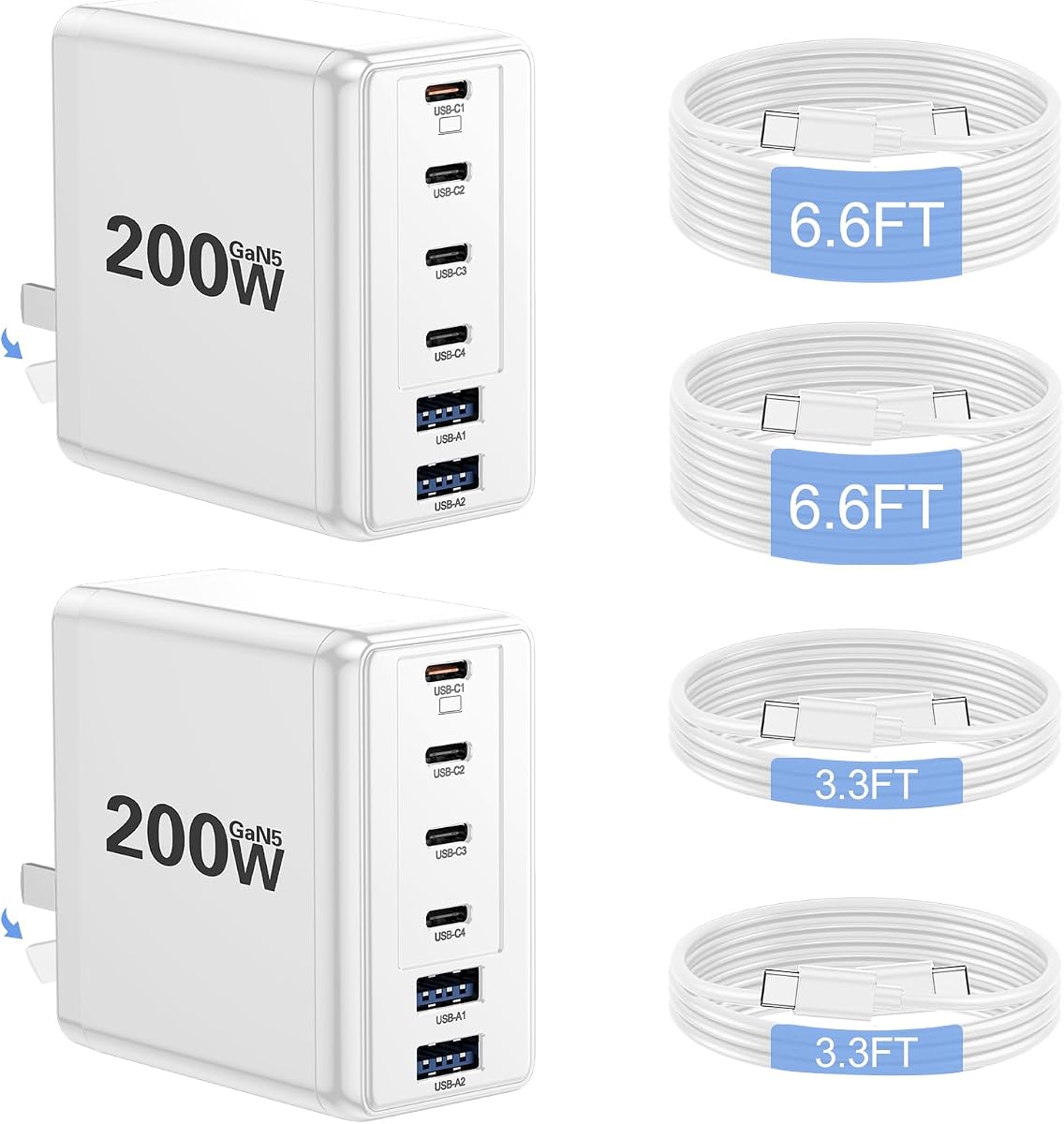
The Lcssio two-pack includes two 200W wall chargers and four USB-C-to-C cables, making it one of the more complete packages in the guide. Each adapter has six ports, including four USB-C and two USB-A connections. Its 4.4 rating and stated use of PD3.1, GaN5 technology, real-time temperature control, and heat dissipation target users who need portable charging in more than one location.
We may earn a commission when you buy through this link, at no additional cost to you.
USB-C laptop charging is listed at up to 65W. Lcssio states that a 16-inch MacBook Pro can charge from zero to 50% in 45 minutes when used with a USB-C charging cable. The unit weighs around 11 ounces and has a foldable plug, which supports travel use, although the stated size reduction claims should be treated as manufacturer comparisons rather than a guarantee for every packing arrangement.
Compatibility includes MacBook Pro, Dell XPS, iPad Pro, iPhone models, Galaxy S23 Ultra, and other USB-C equipment. Temperature control and rapid heat dissipation are intended to reduce overheating, while the 200W total is shared among connected devices. A display is not listed, so users cannot see per-port allocation from the charger itself. That matters when comparing it with display-equipped alternatives.
The package is especially convenient for households, couples, or teams that want identical chargers in separate locations. The four included cables also reduce the need to purchase extras immediately. For the strongest possible laptop charging rate, however, the UGREEN Nexode provides 140W from one port. Lcssio is best for broad device coverage and useful two-location flexibility.
Two chargers and four USB-C cables provide a ready-to-use setup for two work areas or two travel kits. Each charger retains the same six-port configuration, so both locations can support a broad mix of modern devices.
The stated GaN5 implementation supports a compact form and rapid heat dissipation. Real-time temperature control is listed as part of the safety approach, while the foldable plug protects the prongs during transport.
We may earn a commission when you buy through this link, at no additional cost to you.
The UKCSIS Four-Port 200W charger is a compact wall block with two 65W USB-C ports, one 30W USB-C port, and one 20W USB-A port. Its 4.2 rating is the lowest among the featured products, but the explicit port allocation makes it easier to assess than a less detailed aggregate-wattage claim. It is designed to replace several lower-powered adapters with one unit.
We may earn a commission when you buy through this link, at no additional cost to you.
The charger uses a GaN5 chip and supports QC3.1, PD3.0, and PPS. UKCSIS describes a stated charging-speed improvement of 60% compared with standard chargers, while listing 95% power efficiency. Its safety provisions include protection from overcharging, overheating, short circuits, overcurrent, and overvoltage, along with enhanced heat dissipation. The four-port design is suitable for a laptop, phone, tablet, and smartwatch.
Compatibility covers a wide range of current and older iPhone generations, numerous Samsung Galaxy models, MacBook Air, several iPad families, Nintendo Switch, and other devices. The foldable plug and compact body are useful for travel. Its principal limitation is one USB-A port, which may be restrictive for users with several legacy accessories. The lower listed rating also warrants more attention to recent customer feedback.
This charger is a practical option for users who want two capable USB-C connections without moving to a larger desktop station. It is particularly useful for a traveler carrying a laptop and a few smaller devices. Buyers wanting a live display, more USB-A ports, or a higher single-port maximum should look to the UGREEN Nexode Pro, Anker Prime, or LENTAD.
The two 65W ports provide useful capacity for laptops and other demanding USB-C equipment. The remaining 30W USB-C and 20W USB-A ports cover phones, tablets, watches, and smaller accessories.
The foldable plug and GaN5 construction keep the wall block compact for travel or bedside use. Supporting common fast-charging protocols allows one adapter to serve a varied collection of phones, tablets, and laptops.
We may earn a commission when you buy through this link, at no additional cost to you.
A useful 200W GaN charger should be judged by individual port output, simultaneous power allocation, supported protocols, physical design, and the devices in your particular setup. Aggregate wattage provides context, but it does not guarantee that every connected device will receive the power it needs.
The most important number for a demanding laptop is the maximum output available from one USB-C port, not merely the charger's total wattage. Options in this guide range from 65W to 140W per port. A 140W connection gives compatible high-performance notebooks more headroom, while 65W models are generally better suited to mainstream laptops and tablets. Always compare the port limit with the computer manufacturer's power requirements, especially for workstation-class or gaming systems.
A charger with 200W of aggregate output can theoretically deliver that amount across compatible connections, but real allocation depends on the power requested by each device and the charger's internal rules. A phone may draw little while a laptop consumes much more, and some adapters reduce individual output when several high-power devices are connected. Review the listed simultaneous charging configuration and avoid assuming that every port can provide its maximum rating at the same time.
Most modern phones, tablets, and laptops use USB-C, but some accessories, mice, older phones, and legacy devices still require USB-A. Four-port configurations often offer a mix of both, while six-port models can reduce desk clutter further. The ideal balance depends on device age. Frequent USB-A users should favor at least two or three USB-A ports, while USB-C-only users can prioritize higher-output USB-C connections and a more compact body.
USB-C Power Delivery provides the foundation for modern laptop fast charging, while PPS, QC, FCP, AFC, SCP, and related standards can improve supported phone charging. Look for PD3.0 or PD3.1 for broad contemporary compatibility and PPS for compatible Samsung devices. Protocol labels are useful, but the connected device and cable must also support the relevant standard. A high-wattage port running a basic protocol may not achieve the same result as a modern fast-charging connection.
A foldable wall plug is the most convenient option for travel, while a corded station is better for a permanent desk. Wall adapters reduce cable clutter around the outlet and often include no separate power lead. Desktop stations provide more ports, longer reach, and often a removable or detachable cord. If the charger will remain in one place, a station can simplify cable management. If it must accompany a laptop, compactness and plug protection become more important.
A display can show total output, per-port allocation, active protocols, and temperature, while app controls can provide custom modes. These features are particularly useful for people who regularly alternate between demanding and light devices. They are not essential for basic charging, however, and a screen can add size and complexity. Decide whether real-time information will change your daily routine or merely add visual detail that you will rarely consult.
GaN allows substantial power in a relatively small enclosure, but models with screens, foldable mechanisms, and many ports still differ significantly in size. A corded station needs enough surface area and reach for its position, whereas a wall block should fit easily into a power strip. Check the stated dimensions, weight, cord length, and whether the cord is detachable. These details matter more than nominal wattage when packing for travel or working in a constrained space.
Look for listed protection against overheating, overvoltage, overcurrent, short circuits, and overcharging. These safeguards are especially important when several devices share one power supply or when laptops remain connected for long periods. Some models also use recycled housing material or plastic-free packaging. These extra characteristics can help distinguish well-designed products, but they should complement rather than replace compatibility and power checks.
Begin by identifying the power requirements of every device that will be connected. Place the charger on a stable, dry surface or insert it into a suitable wall outlet, unfolding the plug when required. For a corded station, position the body within reach of the devices and avoid tightly bending or sharply twisting the power lead. Connect the most power-hungry device first when the charger prioritizes its highest-output USB-C port.
Use quality cables that support the intended charging protocol and current. A cable limited to a lower wattage or lacking the necessary USB-C Power Delivery capability can prevent a high-output port from reaching its full potential. When connecting several devices, allow the charger to negotiate a safe power distribution. Do not expect every port to deliver its individual maximum while a laptop is drawing heavily from the same charger.
Provide ventilation around the charging body and keep it away from bedding, paper, or other heat-insulating materials. Remove the charger from the outlet if it becomes unusually hot, smells odd, or shows physical damage. For a desktop model, occasionally disconnect and inspect the cord and connectors, and clean the ports gently while the charger is unplugged. Follow the manufacturer’s instructions for the specific model, especially when using displays, companion apps, or removable stands.
A 200W rating describes the charger’s maximum aggregate charging capacity across its ports. It does not mean that every port supplies 200W simultaneously or that every connected device accepts that amount. The charger negotiates an appropriate allocation based on the connected equipment, supported protocols, and individual port limits.
A compatible USB-C charger is designed to negotiate a safe power level with the laptop rather than force a fixed output onto it. The charger should provide the voltage and current required by the computer, and the cable must also support the required current. Confirm that the laptop and charger use compatible USB-C Power Delivery standards before connecting them.
It depends on the model and how quickly you want it to charge. Many mainstream USB-C laptops are designed around 65W, while larger or higher-performance models may accept more. A charger offering 100W or 140W from one port provides more headroom, but the laptop will only draw what its hardware and charging profile permit.
Yes, provided the charger has enough ports and aggregate output for both devices. Power sharing means the laptop may receive a different allocation when a phone is connected, and the results vary by model. A charger with smart allocation or a display can make the distribution easier to understand.
GaN can support higher power density than conventional silicon-based charging components, often allowing more ports and greater output in a smaller body. It is not automatically better for every use case, however. Protocol support, port configuration, thermal design, and device compatibility remain equally important.
A wall charger plugs directly into an outlet and usually has a foldable plug, making it convenient for travel. A charging station usually has a longer power cord, more ports, and a larger body intended to remain on a desk. Stations are often better for reducing cable clutter in a permanent workspace.
Total wattage does not reveal the output of a particular port, the protocols supported, or the way power is divided among connected devices. Cable limitations, device charging profiles, temperature management, and charger design can also influence results. Comparing individual port ratings and supported standards gives a more accurate picture than comparing aggregate wattage alone.
No, a display and app are convenience features rather than basic requirements. They are useful when you want to monitor output, verify protocol activity, or create charging profiles. If you only need dependable laptop and phone charging, prioritize power allocation, compatibility, safety protection, and a suitable port mix instead.
The UGREEN Nexode 200W is the most balanced recommendation because it combines 140W single-port capability, four ports, a foldable design, and stated support for two laptops. The LENTAD six-port station is the best budget-oriented option for a crowded desk, while the Anker Prime 160W provides the most refined combination of sustained laptop output, live monitoring, and app-based control.
Prioritize the device that matters most. Choose at least 65W for many mainstream laptops, look for 100W or 140W when charging a more demanding computer, and ensure the charger supports the protocols required by your phones and tablets. Port mix, cord design, and physical placement are equally important because the highest-wattage specification does not solve every desk or travel problem.
Finally, verify the current product listing, port details, and compatibility before purchasing. Ratings, firmware behavior, product packages, and pricing can change over time, and the most reliable choice is the charger whose power ratings, physical design, and supported devices align with your everyday setup.