
Cyberguys! 2Pack HDMI 90 Degree Adapter
4.9Editor score
48Gbps HDMI 2.1 bandwidth
90 and 270 degree angles
24K gold-plated connectors
Gold-plated 8K-ready contacts
Our 90 Degree HDMI Adapter guide compares ten options for tight spaces, HDMI 2.1 performance, durability, gaming features, and easier cable routing.
A 90 Degree HDMI Adapter is a compact male-to-female connector that redirects an HDMI cable sideways, making it easier to connect devices positioned close to a wall, desk, or media cabinet. The right-angle shape reduces sharp cable bends, relieves strain on ports, and can make a crowded entertainment setup look considerably neater than a conventional inline connection.
We compared the listed adapters by their angle options, supported resolutions, bandwidth, construction, device compatibility, and practical value. The guide covers HDMI 2.0 and HDMI 2.1 models, flat and standard housings, two-piece and four-piece packs, and options aimed at wall-mounted televisions, gaming consoles, computers, projectors, and streaming devices.
Each review explains the most useful attributes and trade-offs of its featured adapter, while the comparison table highlights the differences at a glance. Feature support ultimately depends on the complete HDMI chain, including the source device, display, cable, and adapter. Product availability, ratings, and prices can change, so confirm current details before purchasing.
4.9Editor score

4.7Editor score

4.7Editor score
The following comparison brings all ten adapters together, focusing on angle flexibility, maximum stated resolution, bandwidth, connector construction, and the environments each model is best suited to manage.




The Togconn 8K 90 Degree HDMI 2.1 Adapter is a two-piece set that includes upward and downward right-angle connectors, giving it unusual flexibility for the most common awkward installation positions. It carries a 4.6 rating and stands out for extensive format and feature support, including 8K at 60Hz, 4K at 120Hz, HDR, VRR, ALLM, eARC, Dolby Vision, Dolby Atmos, and HDCP 2.3.
We may earn a commission when you buy through this link, at no additional cost to you.
Its main practical benefit is cable-direction control. Instead of forcing a standard HDMI cable into a tight fold immediately beside a wall-mounted television or desktop computer, the adapter redirects the connection and reduces the strain placed on the device port. The gold-plated connectors and aluminum alloy housing are designed to support reliable conductivity and heat dissipation, while the stated durability figure is 15,000 plug-and-unplug cycles.
The specifications are comprehensive, but they require an appropriately capable cable and source. Reaching 8K at 60Hz depends on HDMI 2.1 support across the entire signal chain, and some advanced gaming modes likewise depend on compatible graphics cards, televisions, consoles, and software. Its two-angle bundle is less comprehensive than the four-direction set, although the up-and-down combination covers many wall-mounted and desktop arrangements.
This is a strong choice for buyers who want more than a simple physical redirect and expect to use high-resolution displays, modern consoles, or feature-rich home theater equipment. It is especially useful where both an upward and downward connection may be needed. For ordinary 4K television setups, however, a simpler HDMI 2.0 model may provide all the necessary performance.
The opposite 90- and 270-degree orientations let the cable leave the device upward or downward instead of projecting straight into the wall. This can simplify connections behind mounted televisions, compact cabinets, desks, and entertainment centers while reducing the force placed on each HDMI socket.
Support for VRR, ALLM, HDR, eARC, Dolby Vision, and Dolby Atmos makes the set relevant to contemporary gaming and home theater systems. These capabilities work only when the connected source, display, and cable support the corresponding formats.
We may earn a commission when you buy through this link, at no additional cost to you.
The PANPEO 8K HDMI Adapter combines a compact right-angle form with support for resolutions up to 8K at 60Hz. It has a 4.6 rating and is presented for gaming consoles, televisions, computers, streaming devices, and other standard HDMI equipment. The product title identifies a four-pack, while the supplied description highlights selectable 90- and 270-degree orientations.
We may earn a commission when you buy through this link, at no additional cost to you.
The adapter's small aluminum alloy body is the central attraction. It is designed for connections where a conventional HDMI plug occupies too much room, including wall-mounted displays and densely packed media furniture. Gold-plated contacts are used to improve conductivity and corrosion resistance, and the product description says the connectors can endure more than 9,999 insertion cycles.
Resolution support includes 8K at 60Hz, 4K at 120Hz, 4K at 144Hz, 2K at 240Hz, 6K at 60Hz, 5K at 60Hz, and 1080p at 60Hz, along with 3D effects. Achieving the higher modes requires a compatible source, display, and HDMI cable. Because the product is compact, buyers should also check whether its physical width permits the cable to bend naturally after the adapter is installed.
The PANPEO is a practical choice for multiple gaming or viewing locations where angle control and a small profile matter more than specialized audio features. It is also a sensible option for owners of current-generation consoles who want roomier cable routing. Buyers should read the actual package contents carefully because the four-pack wording and supplied angle description present some ambiguity.
The ultra-thin housing is intended to reduce the depth needed around a television, console, or media device. It is particularly useful where a standard male-to-female plug would prevent a cabinet door or wall mount from sitting flush.
High refresh-rate modes make the adapter relevant to compatible PS5, Xbox, PC, and high-end display combinations. The source must output the desired resolution and refresh rate, while the cable and adapter must preserve the necessary signal bandwidth.
We may earn a commission when you buy through this link, at no additional cost to you.
The VCELINK 8K HDMI 2.1 Right Angle Adapter earns an Editor's Choice designation because it combines a useful two-angle bundle with one of the most thorough feature lists in the category. Its 4.7 rating reflects generally favorable customer feedback, while its stated HDMI 2.1 support, 48Gbps bandwidth, and extensive format compatibility make it suitable for advanced setups.
We may earn a commission when you buy through this link, at no additional cost to you.
The adapters use a double-layer shell: an outer nickel-plated layer is intended to reduce magnetic interference and signal loss, while gold-plated internal contacts support signal transmission. A protective PVC casing surrounds the female port, and an integrated chip is designed to limit overheating during extended use. The stated bend-stress reduction of at least 70% reinforces the adapter's space-saving purpose.
Feature support covers 8K at 60Hz, 4K at 120Hz, 2K at 240Hz, DSC, VRR, ALLM, QMS, QFT, eARC, Dolby Atmos, Dolby Vision, Dynamic HDR, 3D, HDCP 2.3, and DTS:X. The pair is also compatible with mounted televisions, projectors, consoles, receivers, cameras, computers, laptops, and streaming devices. None of those features can create missing source capability, so the complete chain must meet the relevant standard.
This is the most balanced choice for a modern gaming or home theater installation that needs dependable right-angle routing without sacrificing advanced HDMI functions. The upward and downward pair handles many common placement problems and the construction details suggest attention to both signal integrity and port protection. It is less suitable for installations requiring left and right bends, which are available in a different four-direction set.
The double-layer metal structure and enclosing PVC housing are intended to protect the female connection from physical wear and interference. A right-angle path also removes much of the lateral force that a sharply bent cable can place on a television or console port.
VRR, ALLM, 4K at 120Hz, 2K at 240Hz, eARC, and Dolby audio support make this a strong choice for mixed entertainment setups. Actual mode availability remains determined by the connected television, console, graphics hardware, and cable.
We may earn a commission when you buy through this link, at no additional cost to you.
The VCE HDMI 90 and 270 Degree Adapter is a two-piece set built around HDMI 2.0 rather than HDMI 2.1. It has a 4.7 rating and supports up to 4K at 60Hz, 2K, and 1080p through an 18Gbps connection. That makes it a practical option for the large majority of televisions and conventional home entertainment installations that do not require 8K or 120Hz gaming modes.
We may earn a commission when you buy through this link, at no additional cost to you.
Its defining advantage is the straightforward solution it offers to a common physical problem. A television mounted close to a wall may have a recessed HDMI port that leaves no room for a conventional connector, while a console or media box behind furniture can place the cable at an awkward angle. Redirecting the cable through a 90- or 270-degree adapter reduces the bend and makes the connection easier to reach.
The gold-plated contacts resist corrosion and support stable signal transfer, while the housing is designed for heat dissipation and repeated use. Compatibility extends to streaming sticks, Chromecast devices, PCs, laptops, monitors, projectors, and PS4 systems. Because this is a passive-style connection, no additional software or drivers are required.
The VCE set is best for buyers who primarily need dependable 4K cable routing and do not intend to use HDMI 2.1-only modes. It offers less future-facing bandwidth than several higher-ranked alternatives, but that limitation is easy to understand and often irrelevant to a 4K television setup. Its simple design, complementary angles, and strong customer rating make it a sensible budget-oriented choice.
An 18Gbps HDMI 2.0 connection is sufficient for common 4K at 60Hz viewing and many conventional surround-sound arrangements. It is a sensible choice when the goal is physical cable management rather than maximizing every specification available in the category.
By changing the cable's exit direction, the adapter avoids forcing a hard fold close to the source or display. This can reduce strain on the socket and make cables easier to plug in or remove, especially in recessed installations.
We may earn a commission when you buy through this link, at no additional cost to you.
The UGREEN 10K 8K@60Hz HDMI 2.1 Right Angle Male to Female Adapter is a premium-oriented two-pack with a 4.5 rating. It supports 8K at 60Hz, 4K at 240Hz, 2K, and 1080p, using the HDMI 2.1 standard and a stated 48Gbps transmission rate. Its aluminum alloy housing, modern feature support, and broad device list distinguish it from simpler HDMI 2.0 adapters.
We may earn a commission when you buy through this link, at no additional cost to you.
The set includes both 90- and 270-degree orientations, giving users a practical way to route a cable upward or downward without leaving a sharply folded cable against a wall or desk. Its aluminum construction is intended to dissipate heat and reduce interference, which is useful in installations that remain connected for long periods. Compatibility includes modern game consoles, streaming devices, Blu-ray players, computers, laptops, televisions, monitors, and projectors.
UGREEN lists support for eARC, Dolby Vision, Dolby 5.1 and 7.1 audio, Dolby Atmos, 3D, HDR10+, VRR, ALLM, and HDCP 2.3. It is also backward compatible with HDMI 2.0 and earlier versions. One important qualification is that 4K at 240Hz requires source, display, and cable support for DSC compression; the adapter cannot provide that capability on its own.
This adapter is a good match for buyers building a modern, neatly routed setup with a high-end television, current console, or capable computer. The construction and broad format support justify considering it above basic models, although its rating is not the highest in the list. Its limitations are the same two-direction pack format and the normal dependency on a fully compatible HDMI chain.
The aluminum alloy housing is designed to improve heat dissipation and reduce signal interference during extended use. That makes the adapter a sensible option for connected televisions, consoles, and computers that operate for long periods.
The adapter can work with older HDMI devices while supporting modern 8K and high-refresh modes on compatible equipment. That flexibility makes it useful in mixed homes where one television or input may serve an older media player and a newer gaming console.
We may earn a commission when you buy through this link, at no additional cost to you.
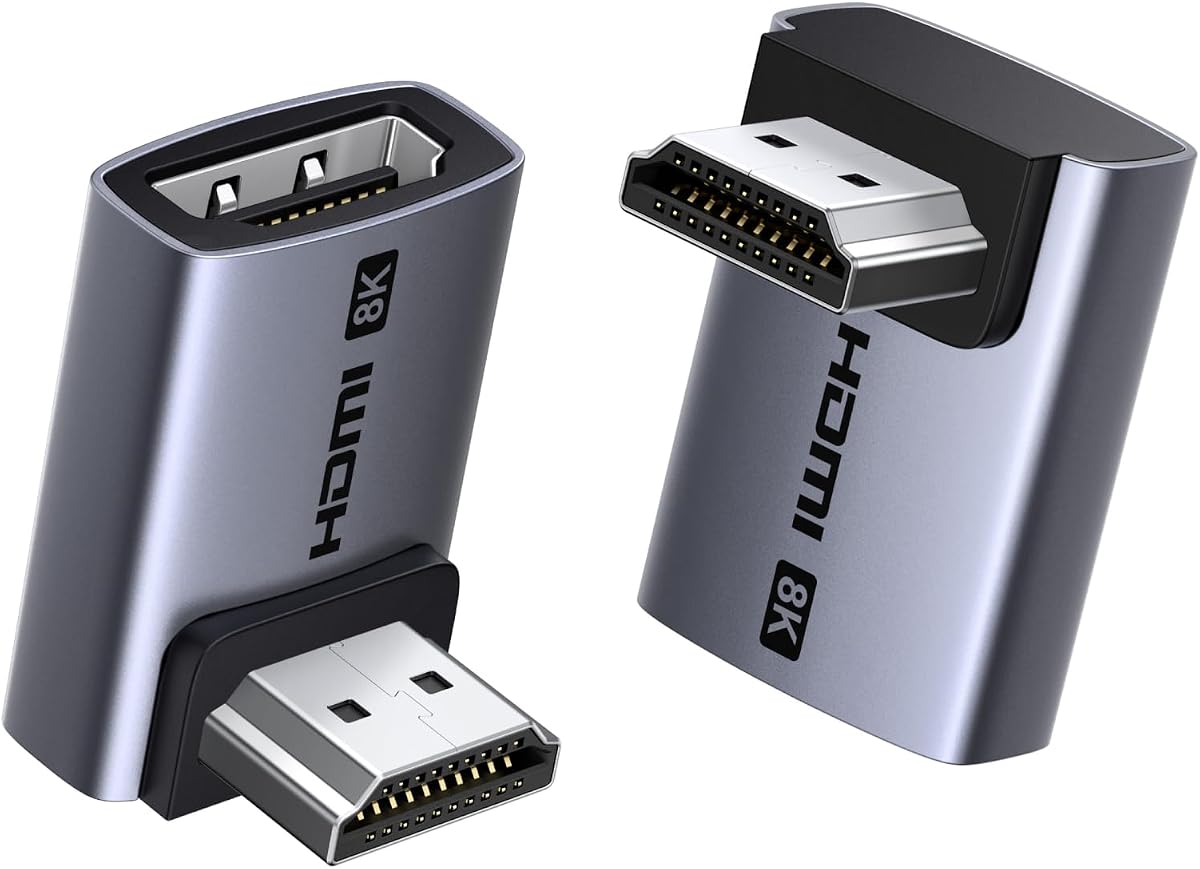
The Cyberguys! 2Pack HDMI 90 Degree Adapter stands out with a 4.9 rating, the highest customer score among the ten listed products. It combines 8K at 60Hz, 4K at 120Hz, 3D, HDMI 2.1 compatibility, and a stated 48Gbps bandwidth with a compact two-angle configuration. That combination makes it a particularly attractive option for modern gaming and home entertainment installations.
We may earn a commission when you buy through this link, at no additional cost to you.
The pack contains one 90-degree and one 270-degree adapter, allowing a cable to point upward or downward. This is especially helpful behind mounted televisions, desks, and media cabinets where a conventional HDMI plug either prevents flush placement or forces an aggressive bend. The small footprint also makes the connectors easier to conceal without adding substantial depth.
The 24K gold-plated connectors are designed to improve conductivity, resist corrosion, and reduce the likelihood of flickering or interruptions. The adapter also functions as a directional extender, reducing the strain placed on ports in televisions, monitors, graphics cards, consoles, and audiovisual equipment. Its universal, plug-and-play approach avoids driver or software requirements.
This is an excellent general choice for buyers who want a compact, well-rated adapter without sacrificing modern gaming formats. It works with 4K and 8K televisions, PS5, Xbox Series X, high-end GPUs, projectors, soundbars, computers, and streaming boxes. As with every high-bandwidth option, the source and display must support 8K for that resolution to be available.
The adapter maintains a small physical footprint while supporting contemporary high-resolution and high-refresh formats. It is a practical middle ground for users who refuse to compromise between a clean installation and modern HDMI capabilities.
Gold-plated connector surfaces are intended to support stable contact and resist corrosion over repeated use. The adapter also reduces cable leverage on the connected device, helping preserve the socket over the life of the installation.
We may earn a commission when you buy through this link, at no additional cost to you.
The four-pack 8K HDMI 2.1 adapter set is the most directionally versatile option in this roundup. It includes upward, downward, left, and right connectors, allowing the cable to leave a device in almost any of the four primary directions. It has a 4.7 rating and supports 8K at 60Hz, 4K at 120Hz, and numerous advanced HDMI features.
We may earn a commission when you buy through this link, at no additional cost to you.
The direction selection is the defining advantage. An upward adapter can route a cable above a console or monitor, a downward adapter can fit beneath a mounted display, and the left and right versions offer additional solutions around desks and equipment racks. This eliminates the need to force a cable into an unsuitable bend and makes the set useful for varied installations rather than one predetermined layout.
Inside, the adapters use a precisely soldered PCB and a rigid aluminum shell, while the interfaces are 24K gold-plated. The listing states a stable 48Gbps signal capability and compatibility with Dynamic HDR, FreeSync, G-SYNC, eARC, Dolby Vision, Dolby Atmos, BT.2020, ALLM, VRR, HFR, QMS, QFT, DSC 1.2a, and HDCP 2.3.
This set is best for installers, gamers, and technically confident users who may encounter more than one cable-routing problem. It also provides a convenient spare for multiple entertainment locations. The obvious trade-off is that most users will not need all four connectors immediately, and the horizontal versions may require more clearance than a slim upward or downward model.
The four-direction bundle removes much of the guesswork involved in cable management. Whether a port sits above, below, or beside a cable route, the appropriate connector can be selected without buying a separate adapter for each orientation.
The 48Gbps specification and support for 8K, 4K at 120Hz, DSC, VRR, and high-refresh formats make the set suitable for advanced displays. All those modes still require compatible source hardware, television or monitor, and HDMI cable.
We may earn a commission when you buy through this link, at no additional cost to you.
The Cable Matters Combo-Pack 8K Right Angle HDMI 2.1 Adapter provides a balanced combination of physical routing and modern signal support. It has a 4.7 rating, includes one 90-degree and one 270-degree male-to-female connector, and supports up to 8K at 60Hz with 48Gbps bandwidth when paired with suitable cables and devices.
We may earn a commission when you buy through this link, at no additional cost to you.
The adapters are designed for locations where reaching a recessed socket or preventing a tight cable fold is important. Behind a wall-mounted television, inside an entertainment cabinet, or beside equipment in a rack, redirecting the connection can reduce pressure on the HDMI port and make the overall setup easier to service. The standard housing also provides a more substantial alternative to an ultra-slim connector.
Feature support includes 4K at 240Hz, ALLM, VRR, 5.1 and 7.1 surround sound, Dolby TrueHD, Dolby Atmos, and HDR. Cable Matters is especially well known for its cable products, making its participation in this category relevant to buyers who already understand HDMI bandwidth and connector compatibility. However, an adapter cannot compensate for a cable limited to an older HDMI specification.
This set is a strong all-around option for a home theater, gaming area, or mixed installation. It offers the key HDMI 2.1 characteristics without going to the four-direction format, and the two common angles cover a wide range of wall and furniture mounting situations. Buyers with exceptionally tight clearance may prefer the flat version in the same range instead.
VRR, ALLM, Dolby TrueHD, Dolby Atmos, and multichannel audio coverage make this pack useful beyond basic video redirection. The connected television, source, and cable must support each selected feature for it to function as intended.
A properly angled connection makes ports easier to reach and reduces the force transmitted by a folded cable. This is particularly helpful when equipment is mounted permanently or positioned inside a furniture cabinet.
We may earn a commission when you buy through this link, at no additional cost to you.
The Cable Matters Combo-Pack 8K Flat Right Angle HDMI 2.1 Adapter is the slimmer counterpart to the standard Cable Matters set. It has a 4.6 rating and includes flat 90- and 270-degree adapters, making it especially suitable for recessed ports, wall-mounted televisions, and shallow cabinets where every bit of clearance matters.
We may earn a commission when you buy through this link, at no additional cost to you.
The reduced profile allows a television to sit closer to a wall or a console to fit more easily behind furniture. It can also make an installation look cleaner because less of the connector and cable transition remains visible. The two complementary orientations still provide enough flexibility for many common upward and downward routing needs.
Despite its small shape, the adapter is described as HDMI 2.1 compatible with 48Gbps bandwidth, supporting 8K at 60Hz, 4K at 240Hz, ALLM, VRR, HDR, 5.1 and 7.1 audio, Dolby TrueHD, and Dolby Atmos. The relevant caveat is that physical clearance and cable bend radius still matter. A very thin adapter can solve the port-space problem while leaving little room for the attached cable to curve comfortably.
This is a strong choice for anyone whose primary challenge is limited depth rather than the need for every connector direction. It is particularly suitable for modern televisions with recessed HDMI inputs. Buyers should inspect both the socket recess and the available space behind the television, then ensure the attached cable can bend without being compressed.
The flat housing is built for the smallest practical installation spaces. It can allow a mounted television to sit nearer the wall and makes deeply recessed sockets easier to access without forcing a bulky plug inward.
The adapter retains support for 8K, 4K at 240Hz, VRR, ALLM, HDR, and advanced audio formats on compatible systems. Its low profile does not automatically guarantee high-speed operation, so the cable and source must still meet the required HDMI standard.
We may earn a commission when you buy through this link, at no additional cost to you.
The RIIEYOCA 8K and 60Hz HDTV 90 Degree Down Angle Male to Female Adapter offers a focused solution for installations where the cable must travel downward. It carries a 4.7 rating, supports HDMI 2.1 at a stated 48Gbps, and is designed to reduce excessive bending in limited spaces behind televisions and device racks.
We may earn a commission when you buy through this link, at no additional cost to you.
Its down-angle configuration is particularly helpful for wall-mounted displays with ports located low on the rear panel or for equipment stored on an upper shelf. Instead of pulling the cable sideways, the adapter redirects it below the connector and reduces the leverage applied to the socket. The product is also supplied in a pack of two for multiple installations or as a spare.
Construction combines a lightweight aluminum alloy shell with 24K gold-plated contacts. A purple finish and LED indicator give the adapter a distinctive appearance, while the stated HDMI 2.1 support covers 8K at 60Hz and 4K at 60Hz. Compatibility is listed for TV boxes, Xbox 360, Xbox One, PS5, PS4, PS3, PS2, Blu-ray players, PCs, laptops, HDTVs, monitors, and projectors, along with older HDMI versions.
This adapter is most suitable for a buyer with a specific downward-routing need rather than a general-purpose installation. It offers modern bandwidth and broad device support, but the single orientation limits placement flexibility. The illuminated purple housing may also be more conspicuous than a conventional black adapter, making it less suitable for setups where visual discretion is the priority.
The 90-degree down angle makes the cable descend immediately from the connection, which is useful beneath a television or behind elevated equipment. This reduces sharp folding and can make recessed ports easier to reach.
A stated 48Gbps rate and support for current game systems, computers, and displays make the adapter relevant to modern setups. Legacy HDMI versions are also supported, though the full 8K mode still requires a compatible source, display, and cable.
We may earn a commission when you buy through this link, at no additional cost to you.
The right adapter depends on your port position, desired resolution, available clearance, and the devices in your setup. Reviewing angle orientation, bandwidth, construction, and compatibility together helps prevent an otherwise simple connector from becoming a performance bottleneck.
A 90-degree adapter redirects the cable by a right angle, while the closely related 270-degree form points in the opposite vertical or horizontal direction. These labels can appear confusingly in listings, so the most reliable approach is to consider where the cable must travel rather than relying only on the number. An upward or downward adapter is generally useful behind a wall-mounted television, while left and right versions can help around a desk, monitor, or equipment cabinet. A two-piece up-and-down set covers many common installations, and a four-direction bundle offers the greatest flexibility for multiple devices.
HDMI 2.0 adapters commonly provide 18Gbps bandwidth and support 4K at 60Hz, which is sufficient for many standard television and home entertainment systems. HDMI 2.1 adapters can provide 48Gbps and support 8K at 60Hz, 4K at 120Hz, and even 4K at 240Hz where DSC compression and suitable equipment are present. The adapter should not bottleneck a setup that already uses high-resolution displays, but a basic 4K system does not need every advanced mode. Always check the specifications of the source, television or monitor, and cable before relying on a headline resolution.
The smallest available gap is often the real reason for using an angled adapter. Measure the distance between the HDMI socket and the wall, cabinet panel, desk surface, or other obstruction. A standard right-angle housing may still be too deep for a deeply recessed port, while a flat profile can provide additional clearance. Leave enough room for the cable to leave the adapter without being compressed or folded too tightly, because excessive pressure can undermine the installation even when the connector itself fits.
Gold-plated contacts are common in this category and are intended to resist corrosion while maintaining good conductivity. Aluminum alloy housings can help dissipate heat, while protected PVC shells and double-layer metal structures may offer additional physical protection for the female port. None of these materials guarantee flawless performance, but a well-constructed adapter is generally preferable in a permanently mounted or frequently handled installation. Look for a design that fully supports the male plug without leaving part of it exposed.
Gaming and home theater users may care about VRR, ALLM, DSC, eARC, HDR, Dolby Vision, Dolby Atmos, and multichannel audio. A modern adapter can preserve these formats, but it cannot add support to a source or display that lacks them. Consult the specifications of every device in the chain and confirm that the selected resolution, refresh rate, and audio format can operate together. This is particularly important for 4K at 120Hz and 240Hz, which place much greater demands on the complete connection.
A right-angle adapter improves cable management by removing the need for a sharp fold near the device, but the cable still needs to curve after it exits the connector. In a very tight installation, an overly thin adapter may provide little room for a thick cable to bend naturally. Consider the cable diameter and the available space beyond the adapter. This is especially important for high-speed HDMI cables with larger housings or stricter signal requirements.
Two-piece sets commonly include one upward and one downward adapter, while some four-piece configurations add horizontal directions. Read the package description carefully because product titles can use terms such as two-pack, four-pack, and combo in different ways. Buying a complementary pair is often more useful than purchasing two identical adapters, particularly when one device is mounted above its source and another is positioned below it. Extra adapters can also serve as spares in a permanent installation.
Before connecting the adapter, turn off or safely disconnect the source and display according to their instructions. Identify the correct adapter orientation for the available space, insert the male end fully into the HDMI port, and avoid forcing the connector at an unusual angle. Connect the HDMI cable to the adapter's female end after checking that the socket and plug are clean and free of debris.
Route the cable gradually in its intended direction. Do not leave the cable sharply compressed between the adapter and a wall, or twist the connector while trying to make it fit. Once the display is powered on, confirm that the intended resolution, refresh rate, audio format, and gaming features are available in the source settings. If an advanced mode is missing, check the cable specification and confirm that every connected device supports the selected format.
To maintain the connection, keep the adapter and cable free of dust and avoid pulling on the cable to disconnect it. Grasp the connector housing and press the retention mechanism before removing it. Periodically inspect the plug, socket, and surrounding mount for looseness, discoloration, or heat. If the connection becomes intermittent, test the setup with another cable and port before assuming the adapter is defective.
A 90 Degree HDMI Adapter changes the direction in which an HDMI cable leaves a device. It is useful behind wall-mounted televisions, inside tight media cabinets, beside desk-mounted monitors, and in other areas where a conventional plug cannot fit or would require a sharp bend. The adapter can also reduce strain on the device's HDMI port by transferring more of the cable's pull away from the socket.
A properly specified adapter should preserve the signal within the capabilities of the connected cable and devices. Performance depends on the adapter's bandwidth, the HDMI cable, the source, and the display. A high-bandwidth HDMI 2.1 adapter with an HDMI 2.1 cable and compatible equipment can support 8K and high-refresh modes, while an older HDMI 2.0 adapter may limit the available resolution or refresh rate.
The two forms point the cable in opposite directions around the connector. In many TV and furniture installations, one sends the cable upward and the other sends it downward, but orientation can vary with the adapter design and how it is positioned. The important consideration is the physical path the cable needs to take in your particular setup.
Not necessarily. A standard 4K television commonly uses 4K at 60Hz, which an 18Gbps HDMI 2.0 adapter can support when the source, television, and cable are also compatible. HDMI 2.1 becomes more important for 4K at 120Hz, 4K at 240Hz with DSC support, 8K, advanced VRR behavior, and other high-bandwidth features.
Yes, provided the console, television or monitor, and cable support the intended format. Right-angle adapters in this roundup list compatibility with modern gaming systems, including PS5 and Xbox Series models. A standard HDMI 2.0 adapter can handle conventional 4K gaming, while HDMI 2.1 hardware is needed for 4K at 120Hz and other advanced display modes.
A properly installed right-angle adapter generally reduces horizontal leverage because the cable no longer extends directly away from the socket. The cable should still have enough room to curve naturally after leaving the adapter. Avoid pushing the connector hard against a wall, sharply bending the cable at the female end, or twisting the plug during installation.
An HDMI male-to-female adapter can accept a cable at the female end while its male end plugs into a source or display, but it does not normally act as an extender by itself. A passive male-to-female coupler can create two joined cable runs, although signal quality and supported resolution then depend on the combined cable quality, total length, and equipment. Active extenders are more appropriate for long-distance links.
Reconnect the setup using the original cable directly and test the same source, display, and resolution. If the issue disappears, try the adapter with another compatible port or cable, inspect it for bent contacts, and check for excessive strain on the connection. Remember that a particular high-resolution mode may require every device and cable in the chain to support it.
The Cyberguys! pair leads the list with its 4.9 rating, compact form, 48Gbps HDMI 2.1 support, and complementary 90- and 270-degree orientations. The VCELINK set is a strong Editor's Choice for users who value layered construction, broad gaming and theater features, and protection for a permanently mounted display. For straightforward 4K systems, the VCE HDMI 2.0 pair provides a more modest and economical solution.
Prioritize physical fit first, then make sure the adapter's bandwidth matches the rest of the chain. A flat design may solve the tightest clearance problem, a four-direction pack may prevent repeated mismatches, and an HDMI 2.1 model is appropriate for 8K, 4K at 120Hz, VRR, and other advanced features. Also consider the cable diameter, available bend room, device compatibility, and whether a visible housing suits your setup.
Ratings, product details, and prices can change, so review the current listing and seller information before making a final purchase. Confirm the included adapter directions, maximum supported mode, warranty terms, and compatibility with your source, display, and cable. Those checks will help ensure that the selected 90 Degree HDMI Adapter solves the space problem without creating a new signal or installation issue.