
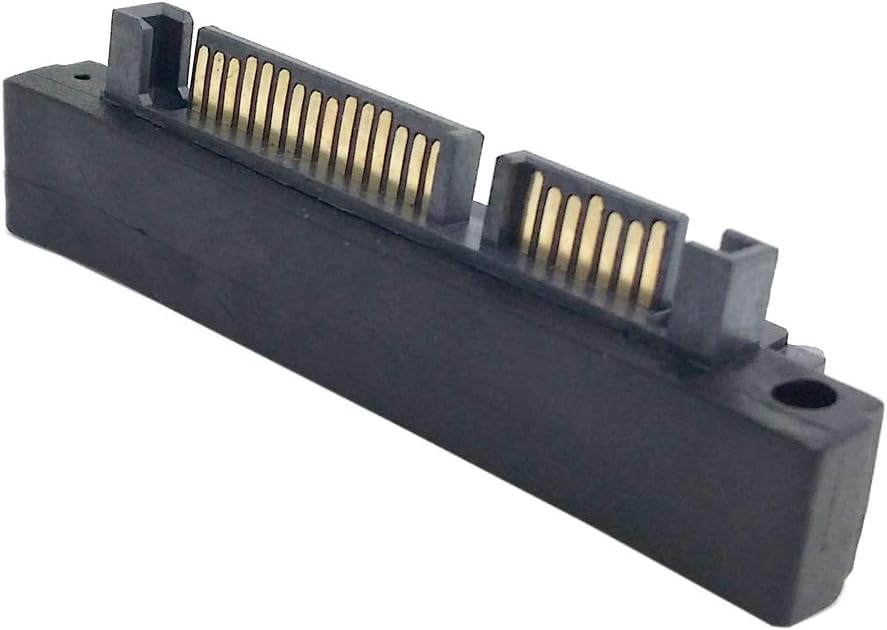
CERRXIAN 90 Degree Duale SATA 7PIN Male to Dual Female Connetcor for Low Profile Motherboard Desktops Computer SSD HDD(2-Pack)
4.5Editor score
Dual seven-pin data connectors
Right-angle space-saving design
Backward-compatible SATA support
A 90 Degree SATA Adapter changes the direction of a storage connection so a data cable can fit inside a crowded desktop chassis without forcing a hard bend. The right adapter can improve cable routing, reduce strain near the drive connector, and make SSD or HDD installation easier when space beside the bay is limited.
The products in this guide were compared by connector configuration, bend direction, stated SATA compatibility, supported devices, pack contents, and practical fit considerations. The list includes separate 7-pin data adapters, combined 22-pin power-and-data adapters, upward and downward angles, and multi-packs for technicians or builders who want spare options available.
Each review explains the adapter's strongest use case, relevant technical details, and possible limitations. The top recommendations are the 7-pin CERRXIAN up-angle adapter, the 7-pin CERRXIAN dual adapter, and the cablecc 22-pin right-angle converter, while prices and availability can change at any time.
4.5Editor score

4.6Editor score
4.6Editor score
As an Amazon Associate we earn from qualifying purchases.
This side-by-side comparison highlights the connector formats, bend directions, device support, and package contents that distinguish each 90 Degree SATA Adapter. It is designed to help builders identify the correct data-only or combined power-and-data model before ordering.


The CERRXIAN B09875GCGV is a 90 Degree SATA Adapter for desktop motherboards, SSDs, and HDDs, with a 4.6 rating making it one of the strongest general-purpose options in this roundup. Its up-angle, seven-pin male-to-female design redirects a SATA data cable from a vertical insertion path to a horizontal one, which is particularly useful when the connector area has little room for the cable's natural bend.
We may earn a commission when you buy through this link, at no additional cost to you.
The adapter is built around the standard seven-pin SATA data interface and is described as fully compliant with SATA III, supporting transfer speeds up to 6 Gbit/s, or 600 MB/s. It is also backward compatible with 1.5 Gbit/s, 3 Gbit/s, SATA I, and SATA II. That makes it relevant to modern SATA SSDs as well as older SATA hard drives, optical drives, and controllers that still rely on legacy transfer rates.
Its main advantage is not increasing speed but changing the physical direction of the connection. The product information specifically notes that the vertical SATA interface faces inward and that a more orderly cable route can improve cable management in some situations. The two-pack also provides a spare, which is useful for a compact workstation, a second drive bay, or a system that may require more than one angled connection.
The important limitation is that this is a data-only adapter. It does not provide power, so a connected 2.5-inch SSD still needs a separate SATA power connection, and a 3.5-inch hard drive requires its usual external power. Buyers should therefore select this model for a cramped motherboard data port rather than expecting a single connector to handle both power and data.
This is the strongest general recommendation for a desktop builder who needs a straightforward, upward-angled seven-pin data adapter. It combines a widely recognized SATA III specification, a practical chassis-management benefit, and a useful pack quantity. Verify the orientation against the drive bay and motherboard layout before installation, since an up-angle adapter can be perfect in one case and face the wrong direction in another.
The up-angle geometry reduces the amount of space required directly beneath the SATA data connector. This can make an SSD or HDD easier to install when a straight plug would force the cable into a sharp bend or prevent the drive from sitting flush.
Stated support for SATA III, SATA II, SATA I, 1.5 Gbit/s, and 3 Gbit/s gives the adapter broad usefulness. The final connection speed still depends on the drive, controller, motherboard, and other parts of the SATA chain.
We may earn a commission when you buy through this link, at no additional cost to you.
The CERRXIAN B09Y1THC3K is a dual right-angle seven-pin SATA data adapter with a 4.5 rating. It is intended for low-profile desktop cases where a conventional SATA cable must be redirected because the space behind the drive connector is limited. Rather than providing only one female end, this model has dual seven-pin female connectors, making it a natural option for systems with closely grouped storage connections.
We may earn a commission when you buy through this link, at no additional cost to you.
The device is designed to change the SATA data cable from a vertical orientation to a horizontal one. According to the supplied product information, the right-angle construction is especially helpful in tight spaces and reduces the likelihood that a cable will be bent too sharply because of insufficient clearance. Its stated SATA III compliance supports data transfer rates up to 6 Gbit/s, or 600 MB/s.
Backward compatibility with SATA 1.0 and 2.0 ports broadens its appeal. It can therefore serve as a practical solution not only for current SATA SSDs but also for older desktops, replacement systems, optical-drive connections, and RAID configurations. The pack includes two adapters, creating a useful combination for a small-form-factor PC with two closely positioned drives.
As with the other seven-pin data adapters in this guide, this product does not carry drive power. Users must retain a separate SATA power lead for each hard drive and connect a conventional power plug to a 2.5-inch SSD. Its dual arrangement should also be compared with the actual available connector spacing; a dual piece is most useful when two ports are close enough to benefit from the shared layout.
This is a compelling value-oriented choice for builders who want two matching angled data connectors or who expect to need a spare. It delivers the essential benefit of improved cable management, supports common and legacy SATA standards, and includes enough hardware for a multi-drive desktop. Confirm that the motherboard or drive arrangement is compatible with the dual physical layout before purchasing.
Two female ends make the adapter useful when a system has adjacent SATA data connections and limited room behind them. The two-pack also allows the same routing solution to be used in more than one bay.
Compatibility with SATA 1.0 and 2.0 makes this more than a modern-computer accessory. It is useful for repairs, older hardware refreshes, and systems where a replacement must support more than one generation of the interface.
We may earn a commission when you buy through this link, at no additional cost to you.
The chenyang B07JCV7QC7 is an up-angle SATA male-to-female adapter for 2.5-inch and 3.5-inch hard disk drives. It carries a 4.4 rating and provides a combined connection, making it distinct from the seven-pin data-only products in the list. This format is often called a 22-pin connector because it combines the seven pins used for data with fifteen used for power.
We may earn a commission when you buy through this link, at no additional cost to you.
Its purpose is strictly physical: the connector changes the direction of the drive connection without changing the transmission speed or interface definition. The product information states that it transfers 5V and 12V power along with data at up to 6 Gbps. That makes it a single-cable solution for a drive that presents the combined SATA power-and-data interface.
The up-angle form is useful when the area directly behind the drive is restricted. Instead of demanding that the attached cable make a wide arc, the adapter turns the connection toward a more manageable horizontal direction. This can support neater wiring, reduce the chance of an excessive bend, and make it easier to slide a drive into a tight bay with the cable already attached.
Its key trade-off is connector compatibility. A combined 22-pin adapter cannot be used with a motherboard that exposes only a standard seven-pin SATA data socket, and it should not be confused with a standalone 15-pin power adapter. The drive's connector and the cable being redirected both need to match the product's SATA male-to-female configuration.
This is a strong option for a desktop with a full 22-pin SATA drive connection that needs an upward turn. It simplifies the attachment by handling power and data in the same connector while supporting both common hard-drive sizes. Buyers should inspect the existing cable and drive end, confirm the 90-degree direction, and ensure that the combined connector can physically reach the available bay space.
The combined connector is especially convenient when a full SATA cable is already attached to the drive. It preserves both 5V or 12V power delivery and the data path while changing the connection angle.
An up-angle connection can keep a drive cable from occupying a wide area behind the bay. That can improve the appearance of the interior and make future storage servicing easier.
We may earn a commission when you buy through this link, at no additional cost to you.
The CY B0C4KTL6W7 is a down-angled 90 Degree SATA Adapter with a 4.4 rating. It uses a 22-pin, 7+15 configuration, with one end described as SATA 22-pin male and the other as SATA 22-pin female. This is the combined SATA connection used by many 2.5-inch SSDs and 3.5-inch hard drives.
We may earn a commission when you buy through this link, at no additional cost to you.
The adapter transfers 12V and 5V power as well as data at up to 6 Gbps. Its primary benefit is a downward cable exit, which is valuable when the space directly behind or above a drive is unsuitable for the cable's normal curve. The result is a more compact installation and potentially better airflow around other components.
The product is specifically described as usable with SATA 2.5-inch and 3.5-inch disks. It does not add storage capacity, increase the underlying SATA standard, or convert one interface into another. It simply changes the physical direction of a matching connection so a drive can be positioned more comfortably inside a case.
The principal limitation is the need for both clearance and a compatible connector. The cable below the adapter must have room to travel without being sharply folded, and the attached SATA hardware must use the matching 22-pin layout. It is not appropriate for a setup where the only available motherboard connection is a separate seven-pin data port.
This model is a practical choice for a compact desktop whose storage bay naturally routes its cables downward. Its combined connector, broad drive-size support, and stated 6 Gbps capability make it a straightforward internal-cable management solution. Checking the drive connector and the direction in which the existing cable approaches the bay is essential before installation.
A downward adapter can keep the attached cable closer to the floor of a chassis. That may prevent it from interfering with side panels, expansion cards, or the top edge of a drive.
The 7+15 layout carries the full SATA drive connection rather than only the data portion. It is a convenient option for internal drives that already use combined power-and-data leads.
We may earn a commission when you buy through this link, at no additional cost to you.
The cablecc B00S5WPSZ2 is a right-angled 90 Degree SATA Adapter that combines seven data pins and fifteen power pins in a 22-pin male-to-female arrangement. Its 4.6 rating places it among the most well-reviewed products in the roundup, and the compact right-angle format addresses a common problem in compact desktop cases.
We may earn a commission when you buy through this link, at no additional cost to you.
The supplied information clearly identifies a SATA 22-pin male end and a SATA 22-pin female end. That distinction matters because the adapter extends and redirects a complete SATA drive connection rather than acting as a seven-pin data-only gender changer. It is therefore suitable for an existing full SATA cable that must turn through 90 degrees at a hard drive or SSD.
A right-angle connection can reduce the footprint of the plug and cable assembly. This is helpful when the drive is mounted close to a case wall, a cage, or another component that would normally be obstructed by a straight connector. It can also support tidier routing by allowing the cable to follow the edge of the drive instead of projecting into the surrounding space.
The product information is less extensive than that of some competing listings. It does not provide a specific transfer-rate statement, material description, or detailed drive-size list, so buyers should validate those points against their own equipment and the complete product information at the time of purchase. The physical connector format is the decisive feature.
For a builder seeking a full 22-pin right-angle adapter without a stated up or down orientation, this is a strong premium-style recommendation. It has a strong rating, a clearly defined connector design, and a practical reason to exist: reducing the space required by a SATA cable connection. Confirm that the cable's connector, the drive connector, and the available direction all match before ordering.
The right-angle form reduces the depth required by a straight plug near the drive. That can make the difference when a drive is positioned in a narrow bay with little room behind it.
Because the adapter is a 22-pin male-to-female converter, it is intended for full SATA power-and-data cables. It is not a substitute for a seven-pin data adapter on a motherboard that uses separate connectors.
We may earn a commission when you buy through this link, at no additional cost to you.
The xiwai B07P5N714P is a seven-pin female-to-male right-angle adapter set with a 4.3 rating. Its package includes one up-angled adapter and one down-angled adapter, giving builders a way to address different cable-routing problems without needing to determine the required direction before ordering.
We may earn a commission when you buy through this link, at no additional cost to you.
The adapter changes the installation direction of a SATA disk cable, taking it from a vertical insertion direction to a horizontal one. This is especially relevant to limited-height chassis, where the straight plug and the bend radius of a SATA cable can interfere with the drive, a case bracket, or another internal component.
Because the package contains both orientations, it offers more flexibility than a single-direction product. One adapter can be installed upward toward the top of a drive, while the other can redirect the cable downward. That makes the set useful for technicians servicing varied cases or builders who may need to change a drive position after installation.
The connector is a standard seven-pin SATA data connection for desktop motherboards, SSDs, and HDDs. It does not provide power, and the supplied information does not state a specific maximum transfer rate. Users should also confirm that the direction can be selected before the drive is fixed into place, since discovering a mismatch after installation can require removing the drive again.
This is a good general-purpose set when the case geometry is uncertain. The mixed-angle package is more versatile than a two-pack containing only identical up-angle pieces, and it remains focused on the widely used seven-pin SATA data format. For combined power-and-data cables, choose a 22-pin adapter instead.
The included up- and down-angle adapters let a builder match the cable route to the case rather than forcing one geometry into every position. This is particularly useful when drive-bay spacing varies between chassis.
The seven-pin design redirects only the SATA data cable. The drive still receives power from a separate connector, making this suitable for systems using the common split SATA power-and-data arrangement.
We may earn a commission when you buy through this link, at no additional cost to you.
The chenyang B07JPZMQCL is a down-angled, male-to-female SATA adapter for 2.5-inch and 3.5-inch hard disk drives. With a 4.3 rating, it offers a simple way to redirect a full SATA connection downward when a straight plug consumes too much space near the drive.
We may earn a commission when you buy through this link, at no additional cost to you.
The product information states that the connector changes the installation direction of the drive without altering the interface definition or transmission speed. It transfers 5V and 12V power together with data at up to 6 Gbps. This makes it suitable for drives using a combined SATA power-and-data plug.
Its angled construction can allow the drive to sit more evenly within a bay. Instead of the cable projecting outward, the connection points down, where it may follow the drive cage or remain closer to the case floor. That can improve internal appearance and may reduce pressure against the cable or connector in a densely packed chassis.
Compatibility is narrower than with a seven-pin data adapter. The attached drive lead must have the matching combined 22-pin arrangement, and there must be enough room beneath the connector for the cable to leave the adapter without another extreme bend. The adapter does not provide a way to connect a combined SATA plug to a separate seven-pin motherboard port.
This is a sensible option for a desktop with a downward cable path and full SATA drive connectors. It supports both common drive sizes, carries both power and data, and leaves the underlying interface unchanged. Users should check the current cable orientation and the clearance below the drive before deciding that a down-angle model is appropriate.
A downward exit can keep the cable closer to the drive cage and out of areas used for airflow or component access. The result is often a neater build with fewer cable obstructions.
Because the adapter only redirects the connection, it does not introduce a protocol conversion. The stated 6 Gbps capability follows the standard SATA performance range, subject to the connected hardware.
We may earn a commission when you buy through this link, at no additional cost to you.
The B0GL9H3ZZL Right Angle SATA 7 Pin Female to Male Adapter has a listed rating of 5.0, making it the highest-rated option in the supplied roundup. It is a seven-pin female-to-male adapter with a 90-degree turn, designed to improve cable routing in tight PC cases while preserving the standard SATA data path.
We may earn a commission when you buy through this link, at no additional cost to you.
The product supports SATA III specifications and data rates up to 6 Gbit/s. It is listed as compatible with standard SATA devices including hard drives, solid-state drives, optical drives, and motherboards equipped with seven-pin SATA data ports. That broad device list makes it a general-purpose choice for a desktop storage repair or clean-build project.
The product information also highlights gold-plated contacts, RoHS compliance, and a space-saving form that reduces cable strain while supporting improved airflow management. These details are useful to consider when selecting an adapter for a compact system, although the actual effect depends on the chassis, cable, and installed components.
As a data-only adapter, it does not solve a combined power-and-data connection. The SSD or hard drive still needs a separate SATA power lead, and the adapter's female side must be able to accept the seven-pin data plug. The practical advantage comes from redirecting that plug rather than from changing the drive's power arrangement.
This is an excellent candidate for anyone who wants a simple seven-pin right-angle adapter backed by the strongest listed rating in the group. Its stated compatibility and contact construction make it particularly appealing for standard desktop storage installations. As always, confirm the physical direction and available plug clearance before ordering, and use a 22-pin model if the existing drive cable combines power and data.
The stated gold-plated contacts are intended to support dependable signal transmission. In practical use, a clean, properly seated connector remains important, and the adapter should not be forced if its orientation is incorrect.
The 90-degree turn can reduce the bending force placed on the connected cable at the drive. It also helps route the cable in a direction that may preserve airflow and make the drive easier to service.
We may earn a commission when you buy through this link, at no additional cost to you.
The B0DYNVZD6H is a four-piece set of seven-pin female-to-male 90 Degree SATA Adapters, with two up-angle and two down-angle versions. It is intended for desktop SSDs, HDDs, and mainboard installations where internal clearance is limited or a particular connection direction is required.
We may earn a commission when you buy through this link, at no additional cost to you.
The set supports standard SATA transfer rates such as 3 Gbit/s and 6 Gbit/s, depending on the capabilities of the connected device and motherboard. This means the adapter is not restricted to one generation of storage equipment. Actual performance remains governed by the slowest component in the connection chain.
Two compact styles are listed: 20 by 13 millimeters and 20.96 by 12.75 millimeters, with slight dimensional differences between the up-angle and down-angle pieces. The product information describes a compact design intended to reduce cable bending and interference while keeping the internal wiring tidy.
Installation is straightforward because the adapter is plug-and-play and does not require complicated tools. The package contains four units, making it a useful option for a multi-drive workstation, a system builder who wants several spares, or a technician who routinely encounters different storage-routing problems. The mixed orientations also make it easier to adapt when one drive position has limited clearance above and another has little room below.
The absence of a listed customer rating means there is less visible feedback to help assess the product, so the physical specifications and connector format are especially important. This set is best for builders who know they need several seven-pin data adapters and want both directions available. It does not carry SATA power and is not the correct choice for a full 22-pin drive lead.
Four adapters make this package suitable for a desktop with several drives or for a technician maintaining multiple systems. Two of each angle provide useful redundancy without requiring separate purchases.
The two styles measure approximately 20 by 13 millimeters and 20.96 by 12.75 millimeters. Their small footprint helps reduce the space taken up where cables meet the motherboard or drive.
We may earn a commission when you buy through this link, at no additional cost to you.
The chenyang CY B0BPSG6ZY1 is a down-angled seven-pin SATA data adapter with a 4.4 rating. It is designed to change the installation direction of a motherboard SATA disk cable from vertical to horizontal, helping with installations in a limited-height chassis where the normal cable bend causes an obstruction.
We may earn a commission when you buy through this link, at no additional cost to you.
The seven-pin female-to-male configuration makes it appropriate for standard SATA data connections on desktop motherboards, SSDs, and HDDs. Its title identifies support for 6 Gbps, aligning it with the SATA III performance range and making it suitable for modern solid-state drives as well as compatible hard drives.
Its two-pack is useful for systems with more than one crowded storage port or for keeping a matching spare available. Because both included pieces are down-angled, this package is less flexible than the xiwai and four-piece mixed-angle sets, but it provides a focused solution where cable space is specifically below the connector.
The adapter does not provide SATA power. A 2.5-inch SSD or 3.5-inch hard drive must still use a separate power connector. Users also need enough room below the port for the outgoing cable to continue without creating a new sharp bend or interfering with another component.
This is a good choice for a desktop builder who has confirmed that a downward seven-pin data route is needed. The stated 6 Gbps capability, focused down-angle geometry, and two-adapter package cover the common requirements of a compact storage installation. For uncertain orientation, a mixed-angle set may be more convenient, while a full 22-pin drive lead calls for a combined connector.
A down-angle adapter can prevent a seven-pin data plug from forcing the cable upward into a shallow drive bay. This keeps the connection compact and may allow the drive to slide into position more easily.
The stated 6 Gbps capability supports the SATA III generation commonly used by modern SSDs and HDDs. The adapter itself does not guarantee that every connected component will operate at that rate.
We may earn a commission when you buy through this link, at no additional cost to you.
Choosing the correct 90 Degree SATA Adapter requires matching the connector format, bend direction, and available clearance to the desktop's actual drive and motherboard arrangement. The most important distinction is whether the cable carries data alone or combines SATA data and power.
A standard seven-pin SATA connector carries data only, while a combined 22-pin connector consists of seven data pins and fifteen power pins. A motherboard usually presents a seven-pin female data socket, and a drive may use a combined plug or separate power and data leads. The adapter must match the end of the cable and the port or drive connector it is expected to enter; an adapter cannot combine power and data when the rest of the hardware uses separate connectors.
A seven-pin adapter is appropriate when only the motherboard's SATA data cable needs to be redirected. A 22-pin adapter is appropriate when the entire drive plug needs to change direction. Inspect the existing connector carefully before buying, especially in systems that combine older optical drives with modern SSDs.
An up-angle adapter sends the cable upward, while a down-angle adapter routes it beneath the connector. The correct choice depends on the drive bay, the case wall, nearby fans, expansion cards, and the direction from which the cable approaches. An adapter that points into a solid case panel is no better than a straight connector, while one aimed into available space can solve the clearance problem.
If the case layout is uncertain, a multipack containing both up- and down-angle pieces offers the safest choice. Measure the space on both sides of the intended port and consider the direction the attached cable naturally follows before deciding.
Many seven-pin adapters are data-only and provide no power to the drive. A 2.5-inch SSD may still need a separate 15-pin SATA power connector, and a 3.5-inch hard drive requires more substantial power. Buying a data adapter does not eliminate the need for a suitable power cable, and buying a combined adapter does not allow a 22-pin drive plug to fit a seven-pin motherboard port.
List the connections already present on the system before ordering. This is especially important in compact builds where adding another cable route may reduce the very clearance the adapter is intended to create.
Modern SATA equipment commonly uses the SATA III interface, with a stated maximum data rate of 6 Gbit/s. Many of the adapters in this guide also state backward compatibility with SATA II, SATA I, 1.5 Gbit/s, or 3 Gbit/s. That matters for older desktops, optical drives, and replacement systems, although the actual transfer rate will always be limited by the connected hardware.
Do not confuse the adapter's stated interface support with a promise of full speed in every setup. A drive, motherboard controller, cable, and adapter must all support the selected SATA generation for the fastest possible transfer rate.
Two- and four-piece packages can be more practical than buying individual adapters when a system has multiple crowded ports or when a technician works on several machines. Mixed-angle packs are particularly useful because the correct direction may differ between drive bays. A two-pack of identical pieces is less flexible but can still be valuable when every relevant connection requires the same orientation.
Count the storage connections that need adjustment before selecting a pack. Extra pieces are useful as spares, but a larger assortment is unnecessary for a simple system with only one drive.
The adapter changes the direction of the connector, but the attached cable still needs enough room to curve naturally. A right-angle plug can reduce the depth required at the port while the cable projects sideways, so the user should consider the entire route rather than measuring only the connector body. Compare the adapter dimensions with the gap between the drive, fan, case panel, and neighboring components.
Avoid forcing a connector into a tight position or folding the cable immediately after the plug. Doing so can place unnecessary strain on the connection and may make future removal more difficult. If clearance remains inadequate, a different bay or a different cable-routing strategy may be needed.
Some listings specifically mention gold-plated contacts, while others describe durable material and good electrical insulation without identifying a contact finish. Contact construction matters for a dependable data connection, but users should still seat the plug fully and avoid forcing it into an incorrect orientation. A compact, well-finished adapter can also be easier to handle than a loose or poorly molded one.
Use the product's stated construction details and warranty information as supporting criteria rather than replacing the more important compatibility checks. A gold-plated adapter still cannot solve an incorrect connector format or the wrong bend direction.
A 90-degree adapter is often installed inside a case, where a tidy cable route matters as much as mechanical clearance. Routing a cable along a drive cage can make the build look cleaner and may reduce interference with airflow. It can also keep a connector away from a side panel, making the drive easier to inspect or remove later.
Choose an angle that leaves a serviceable route rather than merely the tightest immediate fit. Future access is valuable in a workstation that receives frequent storage upgrades or in a case where the drive must be removed without disturbing several other cables.
Begin with the desktop powered off and disconnected. Identify whether the cable is a seven-pin SATA data connection or a combined 22-pin power-and-data connection, and confirm that the adapter matches both the cable and the port or drive. Check the adapter's bend direction against the available space. Do not rely on the listing image alone, because a similar adapter may point upward, downward, or toward a different side of the case.
Attach the adapter to the appropriate end before installing the drive. Hold the connector housing rather than pulling on the cable, align the L-shaped SATA key correctly, and push it in until seated. Then connect the outgoing cable to the motherboard data port or the relevant drive connection. If using a seven-pin adapter, leave the drive's separate SATA power connection in place. Recheck the route to ensure that the cable is not sharply folded and that the plug can be removed without dismantling the entire system.
After installation, power on the system and confirm that the storage device is detected with the expected capacity and model. A missing device may indicate an incomplete connection, an incompatible connector format, or a seating problem rather than an adapter defect. For routine care, keep the connector area free of dust, avoid repeated pulling on the cable, and inspect the plug after any chassis maintenance. If the drive is moved, choose the correct angle again and confirm that the new route remains clear.
A 90 Degree SATA Adapter changes the direction of a SATA connection to make it easier to route inside a compact desktop chassis. It can reduce the space required near a hard drive, motherboard port, or crowded bay. The adapter does not increase storage performance; its purpose is physical positioning and cable management.
No. A 7-pin SATA adapter handles data only, while a 22-pin adapter combines seven data pins with fifteen power pins. They fit different cables and ports, so the adapter must match the existing connection. Check the shape and pin layout before ordering rather than assuming that one can replace the other.
A correctly designed right-angle adapter should not reduce the SATA transfer rate. Several products in this guide support up to 6 Gbit/s, with some also supporting older 1.5 and 3 Gbit/s standards. Actual speed still depends on the drive, controller, motherboard, cable, and the slowest component in the connection chain.
Yes, if the drive requires SATA power. A seven-pin right-angle adapter redirects only the data connection, so a 2.5-inch SSD or 3.5-inch hard drive still needs a separate SATA power lead. A combined 22-pin adapter can redirect both power and data when the existing drive cable uses that format.
Choose the direction that leads the cable into open space and avoids the case panel, fan, expansion card, or neighboring drive. Up-angle models route the cable above the connection, while down-angle models route it below. If the layout is uncertain, a multipack containing both orientations is the most flexible choice.
Yes, provided the connector format matches the drive and the adapter is rated for the relevant SATA connection. The seven-pin models are intended for motherboard data cables, while the 22-pin models support compatible full SATA drive connections. The listed 22-pin products are described for both 2.5-inch SSDs and 3.5-inch hard drives.
No. It changes the connector direction, but the attached cable still needs enough space for a safe bend. If the route remains obstructed, the drive may need to be repositioned, the cable replaced with a different length, or another internal component moved. Measuring the complete cable path is more reliable than focusing only on the port.
The L-shaped SATA key must align with the matching slot, and the connector should be fully inserted without force. With the system powered on, confirm that the drive appears in the operating system or disk utility. If it does not, reseat the adapter and drive connection, verify the cable type, and check that the angle matches the intended route.
The CERRXIAN B09875GCGV is the leading all-around recommendation for an up-angle seven-pin data connection, with a 4.6 rating, SATA III support, and a two-adapter pack. The CERRXIAN B09Y1THC3K stands out for compact systems using a dual seven-pin layout, while the cablecc B00S5WPSZ2 is the strongest choice for a full 22-pin right-angle connection.
Prioritize connector format before considering any other feature. A seven-pin data adapter cannot replace a 22-pin power-and-data adapter, and neither will solve a clearance problem if it points into a panel. Next, verify the bend direction, measure the available space, and confirm that the connected drive and motherboard support the advertised SATA generation.
Prices, ratings, availability, and product details can change over time, so review the current listing before purchasing. For most desktop builders, the best choice is the adapter that matches the existing connector, sends the cable into usable space, and supports the drives being installed without adding unnecessary complexity.