
Multi-Voltage Mini DC UPS
3.8Editor score
Compact multi-voltage design
Multiple DC output options
Battery level indicator
Explore the best battery backup for modem options, comparing runtime, voltage support, outlets, protection, capacity, and suitability for home networks.
A battery backup for a modem can keep essential network equipment operating during outages, brief power fluctuations, and electrical disturbances. The right unit should match your modem’s power requirements, provide suitable voltage and connectors, and offer enough capacity for the router and other essential devices that must remain online.
This guide compares ten battery backup options across both compact DC systems and conventional UPS units. The analysis considers power capacity, supported outputs, backup suitability, surge protection, status monitoring, safety features, outlet configuration, and compatibility with modems, routers, cameras, and other network equipment.
The recommendations range from a dedicated mini UPS for a small home network to larger CyberPower systems capable of supporting a broader collection of electronics. Each pick highlights its strongest use case and limitations, while current retail listings and availability may change before purchase.
3.8Editor score

4.5Editor score

4.6Editor score
This side-by-side comparison distinguishes compact DC backups for a modem and router from full-size UPS systems, making it easier to compare capacity, power quality, connectivity, and monitoring features.


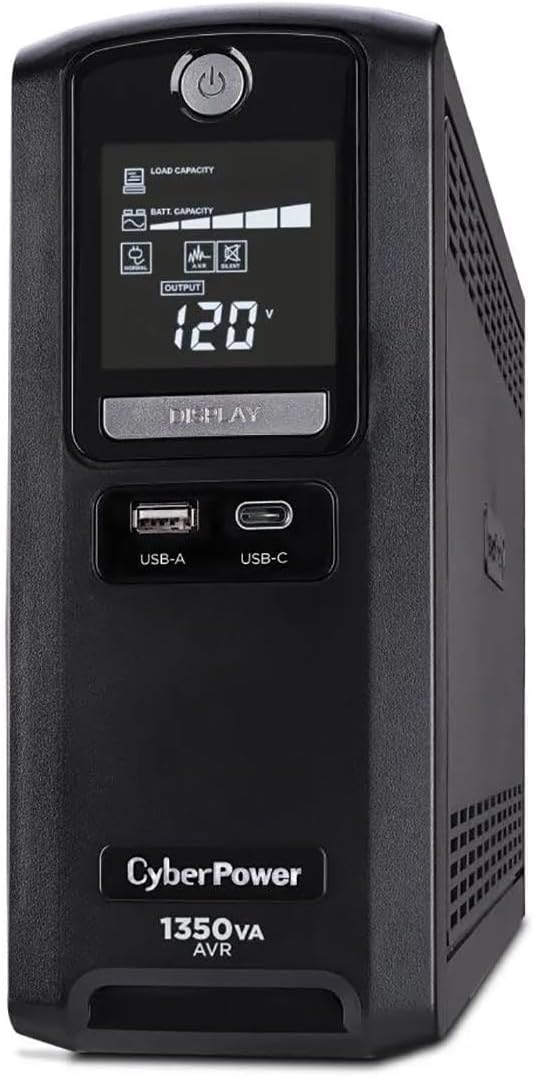


The CyberPower CP1500PFCLCD is the most complete general-purpose option in this guide, combining a 1500VA/1000W UPS with pure sine wave output. Its 4.5 rating reflects a strong balance of power quality, connectivity, and monitoring. It can comfortably support a modem, router, and several related network devices without requiring specialized DC cabling.
We may earn a commission when you buy through this link, at no additional cost to you.
Its standout feature is the PFC sine wave output, which is designed to work well with active power factor correction and conventional power supplies. The unit includes 12 NEMA 5-15R outlets, split between six battery-backed and surge-protected receptacles and six surge-only receptacles. Two USB charging ports add convenience for phones and tablets, while automatic voltage regulation corrects minor fluctuations without needlessly switching to battery power.
The color LCD is another meaningful advantage. It presents detailed information about battery and power conditions and can alert users to developing problems before they interrupt service. The screen tilts for easier viewing, and the included management software adds visibility on compatible systems. Although the enclosure is larger than a dedicated mini UPS, that bulk buys considerably more flexibility and a stronger battery-backed platform.
This is the most suitable recommendation for a home office, media center, or network closet where the modem must remain online alongside a router and other electronics. Buyers who only need to keep one compact modem running may find a mini DC UPS less cumbersome. Even so, the CP1500PFCLCD offers the best combination of output quality, capacity, outlet access, and diagnostics for a comprehensive setup.
Pure sine wave output is the defining advantage here. It provides a smoother form of AC power than a basic simulated sine wave design, making this system more appropriate when connected equipment includes active PFC power supplies or other sensitive electronics.
The color LCD, status alerts, and management software make the unit easier to maintain than an unattended backup. Twelve NEMA outlets also leave room for a modem, router, network switch, and other essential home technology without crowding a single extension outlet.
We may earn a commission when you buy through this link, at no additional cost to you.
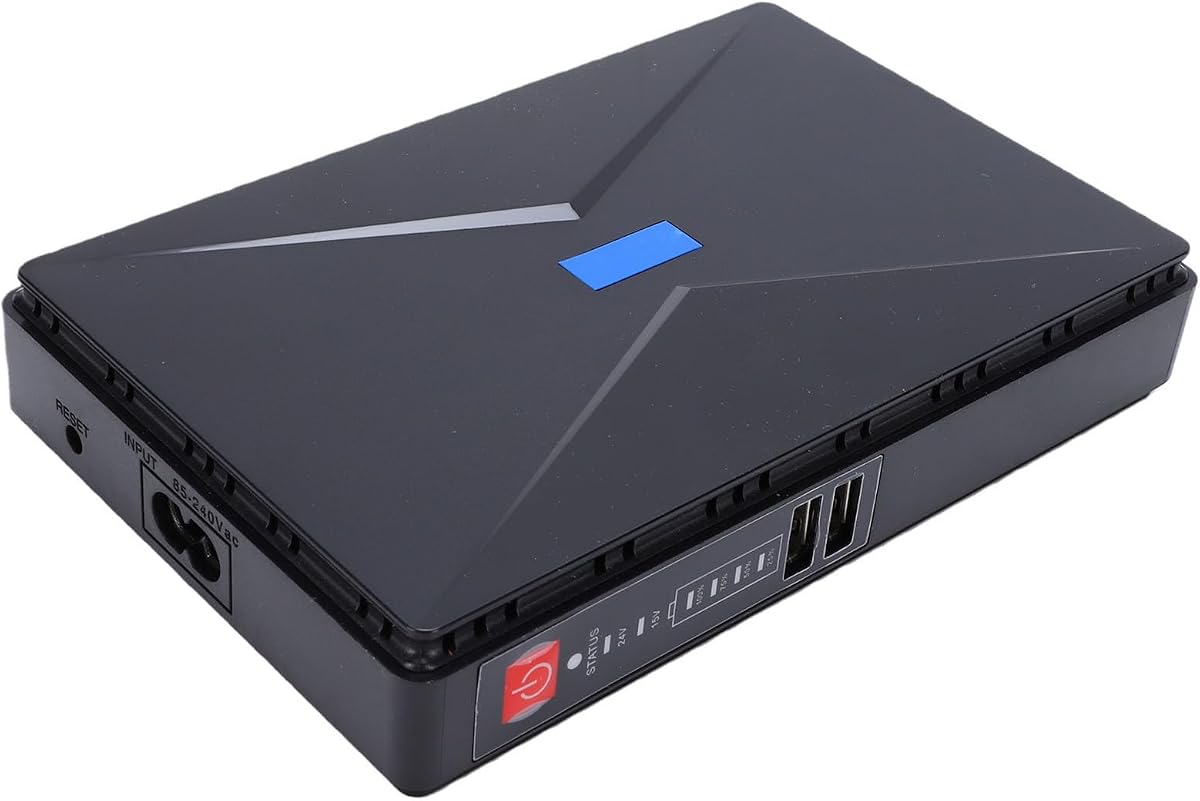
This multi-voltage mini DC UPS is a focused and economical solution for users who need to keep a modem, router, or similar low-power device online. Its 3.8 rating indicates that the core concept appeals to buyers, although it does not offer the feature depth or customer feedback record of the leading CyberPower systems.
We may earn a commission when you buy through this link, at no additional cost to you.
The unit supports 5V, 9V, and 12V DC output, including USB 5V/2A, 5V/2A DC, 9V/2A DC, and 12V/2A DC connections. It also provides POE outputs at 15V/1A and 24V/1A. That range of connections makes it suitable for cable modems, routers, Raspberry Pi systems, IP cameras, security cameras, LED strips, and other compatible equipment.
Its safeguards are unusually comprehensive for a compact device, covering short circuits, unstable voltage, overcharging, deep discharge, thermal conditions, and overcurrent. Indicator lights report remaining battery capacity so users can judge backup status at a glance. The main compromises are the absence of a detailed status display and the lower overall customer rating.
Choose this model if your priority is a small, dedicated backup for a low-power modem rather than a complete home-office UPS. Check the modem’s power requirements and connector type before ordering. For users who need more outlets, stronger AC output, or precise monitoring, one of the full-size CyberPower options is the better long-term choice.
Multiple voltage and connector options reduce the need to search for a separate adapter. The mix of USB, DC, and POE outputs can accommodate a cable modem, router, camera, or other small device when its requirements fall within the listed limits.
The capacity indicator lights provide a simple way to check remaining runtime without opening an app or navigating a complex display. That makes the system practical for users who want fast, glanceable status information.
We may earn a commission when you buy through this link, at no additional cost to you.
The CyberPower EC850LCD combines an 850VA UPS with 12 NEMA outlets and a multifunction LCD, making it a strong option for keeping a modem and nearby network equipment running. Its 4.4 rating places it among the better-reviewed conventional UPS options in the group.
We may earn a commission when you buy through this link, at no additional cost to you.
Six outlets provide battery backup and surge protection, while the remaining six provide surge protection; three of those are ECO controlled. The LCD displays immediate battery and power information, which is more informative than a basic LED-only unit. The system also includes PowerPanel Personal Edition management software for compatible device management.
The primary advantage is outlet flexibility. It can serve a modem, router, network switch, and selected peripherals without requiring a large power strip. ECO mode can reduce energy use by cutting power to peripherals when the connected computer is off or asleep. Its limitations are a smaller overall capacity than the 1350VA and 1500VA alternatives, along with no dedicated USB charging ports.
This is a good fit for a home network that needs several protected connections without the size of a large workstation UPS. Buyers should reserve the battery-backed outlets for the modem and other equipment that must remain operational, while using surge-only or ECO-controlled receptacles for less critical devices.
The ECO-controlled outlets reduce unnecessary standby consumption when a computer is off or in sleep mode. This feature is especially useful when multiple peripherals share the same conventional UPS.
Twelve NEMA outlets give this model a useful advantage over compact mini units. A modem, router, switch, and several low-power accessories can be organized in one location while retaining surge protection.
We may earn a commission when you buy through this link, at no additional cost to you.
The CyberPower CP1500AVRLCD3 is a 1500VA/900W intelligent LCD UPS designed for workstations, networking devices, and home entertainment equipment. Its 4.5 rating and extensive feature set make it an attractive general-purpose backup for a home office or network installation.
We may earn a commission when you buy through this link, at no additional cost to you.
Automatic voltage regulation corrects minor input fluctuations without transferring to battery, preserving connected equipment during common voltage variations. The color LCD reports detailed battery and power conditions and warns users about potential issues. Six outlets offer battery backup and surge protection, six more provide surge protection, and USB Type-A and Type-C ports allow convenient charging of mobile devices.
Compared with the CP1500PFCLCD, this model uses simulated sine wave output rather than pure sine wave. That distinction matters most for sensitive or active-PFC equipment. The larger 1500VA class nevertheless gives it enough headroom for a modem, router, and multiple home electronics, while the three-year warranty includes the battery.
This UPS is most appropriate for users who want abundant outlets and intelligent monitoring but do not require pure sine wave output. It can be a particularly good fit for a home office containing networking equipment, computers, and entertainment devices. A compact DC backup remains simpler for a modem-only arrangement.
Automatic voltage regulation handles minor power fluctuations without switching to battery power. This can reduce unnecessary battery activation during everyday voltage changes, supporting more stable operation for connected equipment.
The tilting color display presents detailed system information and proactive warnings. USB Type-A and Type-C charging ports add practical support for phones and tablets without occupying standard outlets.
We may earn a commission when you buy through this link, at no additional cost to you.
The CyberPower AVRG900LCD stands out with a 4.6 rating, the highest numerical customer rating among the products with established feedback in this guide. Its 900VA/480W capacity is well suited to a modem, router, network switch, and several smaller devices, making it a strong premium pick for a protected home network.
We may earn a commission when you buy through this link, at no additional cost to you.
Six outlets provide battery backup and surge protection, while another six provide surge protection. A multifunction LCD reports battery and power conditions, and automatic voltage regulation corrects minor fluctuations without switching to battery. Data line protection is especially relevant for networking equipment because it helps prevent surges traveling through telephone lines from damaging electronics.
Its 480W maximum output is the main constraint compared with 900W and 1000W systems. It also lacks dedicated USB charging ports, making the AVRG900LCD better suited to essential network infrastructure than a broader collection of mobile and entertainment devices. The three-year warranty includes the battery, and management software is available for compatible setups.
Choose this model when reliability, data-line protection, and clear monitoring are priorities but the connected equipment does not require a high-wattage workstation setup. It is especially attractive for users who want more comprehensive protection than a small DC UPS and prefer a CyberPower conventional UPS with numerous outlets.
Data line protection adds a layer of defense for connected networking hardware. The dedicated protection is designed to stop power surges traveling through telephone lines before they can affect electronic equipment.
The LCD gives users immediate visibility into battery and power status, while automatic voltage regulation handles minor fluctuations without a battery transfer. Together, these features make the unit easier to maintain than a basic backup.
We may earn a commission when you buy through this link, at no additional cost to you.
This mini UPS is designed around a straightforward goal: maintaining a router and modem during a power interruption. Its 8800mAh battery is stated to power a router and modem consuming 18W for up to five hours, giving it one of the most attractive runtime claims among the compact options.
We may earn a commission when you buy through this link, at no additional cost to you.
Outputs include DC 12V/1A, 9V/1A, 5V/2A, USB 5V/2A, and switchable POE output at 15V/0.8A or 24V/0.5A. A DC 5.5-by-2.1mm cable is included for appropriate equipment. The intelligent indicator displays remaining battery capacity, while short circuit, voltage fluctuation, overcharge, overdischarge, and temperature protections address common operating risks.
Because this product does not yet have a numerical customer rating, its long-term customer satisfaction is less clear than for the established CyberPower units. Runtime also depends on actual device consumption, so the stated five-hour figure should be treated as a configuration-specific claim rather than a guarantee for every modem and router combination.
The product is best for a small network where a dedicated, compact DC backup is preferable to a full-size UPS. It can also support selected security cameras, smartphones, fax machines, fingerprint recorders, and DSL equipment when voltage and current requirements match. Buyers should verify connector polarity and electrical requirements before connecting a device.
The stated five-hour runtime for an 18W router-and-modem load is the key attraction. It provides enough time for remote work, online learning, gaming, or routine household activity during many common outages.
DC, USB, and POE outputs make the system more versatile than a single-purpose battery pack. Users can support networking equipment and other compatible low-power devices without relying on a large conventional UPS.
We may earn a commission when you buy through this link, at no additional cost to you.
The CyberPower CST135UC records a 4.9 rating, the highest numerical score in the group, and offers a capable mix of capacity, protection, and management. Its 1350VA/810W conventional UPS is suitable for a modem and router as well as a broader collection of office, networking, and entertainment equipment.
We may earn a commission when you buy through this link, at no additional cost to you.
Ten NEMA 5-15R outlets include five with battery and surge protection, while dual USB Type-A and Type-C ports support charging. Network and coaxial data line protection, 1500 joules of surge suppression, and EMI/RFI filtration provide several layers of electrical protection. A multifunction LCD and HID-compliant USB port make status information and management more accessible.
The stated runtime is two minutes at full load and 10 minutes at half load. This short full-load window is typical of the category and reflects a design intended to preserve data and allow orderly shutdown rather than power an entire office indefinitely. Simulated sine wave output and Energy Star certification are additional considerations when choosing between models.
This is an excellent choice for a home office or network closet where surge protection, data line defense, and management software are important. Its high rating supports confidence in the overall feature package, but users with sensitive active-PFC electronics may prefer a pure sine wave model such as the CP1500PFCLCD.
Surge suppression, EMI and RFI filtration, network protection, and coaxial protection provide a broad defensive layer. These features are useful in a home network where connected equipment may experience different types of line disturbances.
The HID-compliant USB port and PowerPanel Personal software provide a more complete monitoring path than simple indicator lights. The LCD also makes it easy to check load, battery, and power conditions locally.
We may earn a commission when you buy through this link, at no additional cost to you.
The banapoy Mini UPS is a portable 8800mAh backup intended to preserve router and modem service during outages. It shares a useful feature with several compact competitors: the stated ability to power a router and modem for up to five hours, making it appealing where maintaining internet access is the primary goal.
We may earn a commission when you buy through this link, at no additional cost to you.
Multiple output ports allow the unit to serve compatible routers, modems, security cameras, smartphones, and other devices. A power indicator reports remaining battery capacity, and the protection system covers short circuits, unstable voltage, and overcharging. Its portable construction is useful for temporary setups, remote work, or locations where a full-size UPS would be inconvenient.
The product currently lacks a numerical customer rating, so buyers have less historical feedback to evaluate. It also provides less detailed monitoring than an LCD-equipped conventional UPS, and actual runtime will vary with the combined power draw and the number of attached devices. Connector and voltage compatibility remain the most important checks before purchase.
This mini UPS is well suited to a straightforward home network where a modem and router are the primary loads. It can also support a suitable security camera or phone. Users wanting a richer display, standard household outlets, or broader device support should move up to one of the full-size CyberPower models.
The 8800mAh capacity and stated five-hour runtime target a common outage scenario in which a household needs its router and modem to remain active. The small enclosure makes that continuity easier to deploy near the network equipment.
A simple power indicator communicates remaining battery capacity, while short circuit, voltage, and overcharge protection reduce the risk of operating connected equipment without basic safeguards.
We may earn a commission when you buy through this link, at no additional cost to you.
The Sorandy Gigabit POE UPS is aimed at users whose network equipment uses POE or other low-voltage DC connections. Its 3.0 rating reflects mixed customer experiences, so buyers should pay close attention to device requirements and connector compatibility before ordering.
We may earn a commission when you buy through this link, at no additional cost to you.
The listed outputs include USB 5V, DC 9V and 12V, and POE at 24V or 48V, while the product title identifies Gigabit support up to 1000Mbps. It is compatible with a stated 95 percent of mainstream routers and optical modems and may also support security cameras and portable media devices. The replaceable battery design is a positive for owners who want to extend service life.
Protections include guarding against overcharging, overcurrent, overvoltage, overheating, and short circuits. Its compact enclosure is convenient for travel and temporary work arrangements. On the other hand, the 48V POE output may not suit every modern router, and the product’s unusual description of a fantasy-retardant cover does not clearly communicate the enclosure material.
This model is most relevant to a POE-based network where the modem, router, or access equipment uses a supported voltage and connector. Confirm the exact power requirements rather than relying on broad compatibility language. For a conventional home network, a standard CyberPower UPS offers clearer specifications, established customer feedback, and easier monitoring.
Dedicated 24V and 48V POE options can simplify deployments involving compatible routers, cameras, and access equipment. Gigabit support is useful for avoiding bottlenecks in network-linked backup installations.
A replaceable internal battery can improve long-term flexibility compared with sealed battery packs. It is particularly useful for portable setups that may be used repeatedly or stored for extended periods.
We may earn a commission when you buy through this link, at no additional cost to you.
This portable UPS battery backup is designed for routers, optical modems, cameras, and other low-power digital equipment. Its 2.6 rating is the lowest numerical score in the group, so it is best approached as a specialized option that requires careful attention to compatibility and setup.
We may earn a commission when you buy through this link, at no additional cost to you.
Output flexibility includes USB at 5V, 9V, or 12V up to 2A, POE at 15V/0.6A and 24V/0.6A, and a standard 12V DC output. The enclosure measures 6.3 by 4.1 by 1.3 inches, making it easy to carry in a bag or place near compact network equipment.
Most importantly, the required 3.7V polymer battery is not included. Users must install a compatible cell, and the package includes the UPS unit, DC cables, power cord, and screwdriver. Although the replaceable battery design supports longevity, the additional assembly step increases the risk of an incorrect installation or an unsuitable battery choice.
The system includes protections for overcharge, overcurrent, overvoltage, overheating, and short circuits, plus a flame-retardant shell. It may suit users who need a small travel backup and understand how to install the battery correctly. For a permanently installed home network, a ready-to-use mini UPS or conventional UPS is generally less complicated.
The small, lightweight enclosure is easy to carry and can provide continuity in temporary workspaces, travel arrangements, or other locations where a conventional UPS would be excessive.
The 3.7V polymer battery is not included, so buyers must obtain a compatible cell and install it correctly. The included screwdriver and cables simplify setup, but compatibility remains the purchaser’s responsibility.
We may earn a commission when you buy through this link, at no additional cost to you.
Choosing a battery backup for a modem requires matching power output, connectivity, capacity, and protection features to the equipment you expect to keep online. The most important distinction is whether you need a compact dedicated DC unit or a conventional UPS with standard outlets and broader device support.
Begin with the modem’s original power adapter rather than assuming every modem uses the same output. Check the required voltage, current, connector size, and polarity. A backup unit cannot be considered compatible simply because it includes a cable; the output must match the device, and a barrel plug with the same diameter can still have different center-pin polarity. Some modems use USB power, while optical modems may use a round DC plug or a POE connection.
Match the modem’s normal load against the output capacity of the backup. A unit that supports a router and modem simultaneously should be checked for both total wattage and the current available on each port. This is especially important when adding a camera, access point, or network switch to the same system.
A mini DC UPS plugs into wall power and delivers low-voltage DC directly to compatible equipment. It is usually smaller and can be more economical for a modem-router pair, but it may not support standard household electronics. A conventional AC UPS uses standard NEMA outlets and can power a broader collection of devices, although it occupies more space.
Choose DC when the goal is narrowly focused on a small network with clearly compatible equipment. Choose AC when you want to protect a modem, router, computer, monitor, network switch, or other home-office devices in one system. POE support adds another layer of complexity, so verify whether the relevant port supplies the voltage and standard required by the connected device.
Runtime is not determined by battery capacity alone. The device wattage, number of connected products, conversion efficiency, battery condition, and age all influence how long a backup can operate. A small unit may provide several hours for a low-power modem and router while a larger conventional UPS may offer only a short interval at maximum load.
Look for a runtime claim tied to a specific load when one is provided. Compare that stated load with the combined power requirements of your equipment, and remember that a modem may continue operating but an internet service provider can still lose external connectivity. Runtime estimates are most useful for comparing designs rather than predicting every installation.
Conventional UPS capacity is commonly expressed in volt-amperes, with wattage providing a more direct indication of real device load. A higher capacity offers more room for routers, switches, computers, and entertainment equipment, but it also creates a larger unit. A 900VA model may suit a compact network, while a 1350VA or 1500VA model offers more flexibility for office equipment.
Do not select a large UPS solely because a modem is essential. A mini DC unit may be sufficient if the goal is to maintain one connection, while a conventional system becomes more logical when several devices need protected power. Compare both total capacity and the number of battery-backed outlets.
Pure sine wave output provides a smooth, consistent form of AC power and is particularly appropriate for active PFC and other sensitive power supplies. Simulated sine wave systems are common in general-purpose UPS units and can work well with many standard consumer and networking devices, but they are not the best match for every sensitive load.
Automatic voltage regulation is another useful feature. It corrects minor voltage fluctuations without transferring to battery, which can provide smoother operation during ordinary grid variations. If your network includes specialized electronics, check the power requirements of every device before choosing between waveform types.
A modem backup should protect against more than complete power loss. Surge protection is important because voltage spikes can damage networking hardware, while short circuit, overcurrent, overcharge, overdischarge, and thermal safeguards help protect the backup itself. Conventional models may also include network or telephone data-line protection, which can stop surges traveling along connected lines.
For a home network, a model with EMI and RFI filtration and network-line protection offers broader defense. A compact DC unit with short circuit and voltage protection may be sufficient when the equipment is modern and the electrical environment is stable. Consider how many lines enter the modem, such as coaxial, telephone, or fiber-adapter connections, and whether dedicated protection is available.
A detailed LCD can show load, battery condition, and other status information, allowing users to recognize a problem before a service interruption. Basic indicator lights are more convenient for quick checks but reveal less. Management software is another useful feature on systems that support computer monitoring, particularly in offices with several networked devices.
The display should be easy to read from the intended position, and the system should provide clear warnings when battery capacity falls. Warranty length also matters because batteries eventually age. Models with a battery-inclusive warranty can simplify long-term ownership, although regular testing and timely replacement remain important regardless of coverage.
The best backup is one that can be connected correctly and maintained over time. Most mini systems require only a compatible cable and a wall connection, while some include DC leads or USB wiring. Units that require a user-installed battery or have complex output selection need more careful setup and clearer documentation. Keep the unit accessible so battery level and alert status can be checked.
Test the system before relying on it during an outage by confirming that the modem and router remain powered when normal utility power is interrupted. Recheck connections periodically, clean dust from vents, and follow the manufacturer’s battery replacement guidance. A compact unit located discreetly is only useful if its status can be monitored and its cables remain secure.
Start by identifying the correct output for each device and confirming voltage, current, connector size, and polarity. Connect the modem and router to the appropriate battery-backed outputs, then plug the backup itself into a grounded wall outlet. For a POE system, use only the POE connection and voltage specified for the router or modem. Never force a connector or substitute a cable with uncertain output characteristics.
Once connected, test the installation by briefly interrupting the wall supply and confirming that the modem and router remain powered. Check indicator lights or the LCD for correct status, estimated capacity, and any configuration warnings. Allow the unit to charge fully when the manufacturer recommends it, and keep adequate ventilation around the enclosure. Avoid placing it inside a closed cabinet where heat can accumulate.
Maintain the backup by checking its status regularly and testing the outage response before important work periods. Replace a swollen, leaking, or otherwise damaged battery promptly, and use only a compatible replacement. Keep cables organized, connections dry, and vents clear. If a conventional UPS provides management software, install it only when useful and follow the stated guidance for software updates, battery testing, and safe shutdown procedures.
A battery backup can keep a compatible modem and router powered, but it does not control the wider internet infrastructure. The service will remain available only if the provider’s equipment and the necessary outside lines also have backup power. In many neighborhoods, the provider-side equipment is not protected by a household UPS. Even so, keeping the local network running can preserve access to a connection, router administration, or other services that remain available.
The appropriate duration depends on how long the network must remain available and what equipment is connected. A dedicated mini UPS may offer several hours for a low-power modem and router, while a conventional UPS may provide a shorter window at maximum load. Runtime claims are most meaningful when tied to a stated wattage. Compare that figure with the combined load of your devices and add safety margin for battery aging.
A mini DC UPS provides specific low-voltage outputs for compatible routers, modems, cameras, and similar devices. A conventional AC UPS supplies standard household power through NEMA outlets and can support a wider mix of electronics. Mini systems are usually more compact and focused, while conventional UPS models tend to offer more outlets, larger batteries, detailed displays, and broader device support.
A basic network modem may not require pure sine wave output, especially when it uses an external low-voltage adapter. Pure sine wave becomes more relevant when a conventional UPS powers sensitive electronics, including some active PFC computers and other specialized equipment. If the modem uses an AC power brick, check that brick’s requirements and confirm compatibility with the UPS output.
It depends on the unit’s combined power draw, output limits, and connector compatibility. Several products in this guide list routers, modems, and security cameras as supported applications, but each port also has a maximum current. Add the devices’ wattage and verify the available output before connecting them. A conventional UPS with standard outlets may be easier when the camera uses a normal AC adapter.
POE support means the backup can supply power over an Ethernet connection using a supported voltage and standard. It can simplify setup for compatible routers, cameras, and access devices by removing the need for a separate power adapter. However, POE versions are not interchangeable, and an output labeled as POE may not provide the exact voltage required by every router. Check both the electrical standard and connector type.
Test it periodically, especially before working from home, traveling, or relying on it for critical communication. A short controlled outage can confirm that the modem and router remain powered and reveal problems with cables or outlets. Also inspect the battery status and follow the manufacturer’s recommended test schedule. Testing is especially important if the backup has not been used for several months.
Some portable units are sold as an enclosure and power-management platform with a user-replaceable cell rather than a sealed preinstalled battery. This can make packing, servicing, and battery replacement easier, but the purchaser must obtain a compatible 3.7V polymer battery and install it correctly. Verify the required cell type, capacity, polarity, and connector before use.
The CyberPower CP1500PFCLCD is the strongest all-around recommendation because it combines pure sine wave output, 1500VA/1000W capacity, 12 outlets, automatic voltage regulation, USB charging, and a detailed color display. The Multi-Voltage Mini DC UPS is the practical budget-oriented choice for a compatible modem and router, while the CyberPower AVRG900LCD stands out for its strong customer feedback, data line protection, and monitored conventional UPS design.
Prioritize electrical compatibility before any other feature. Confirm output voltage, current, connector, and polarity first, then consider whether the backup will support only a modem or also a router, switch, camera, computer, and other equipment. Dedicated DC units are best for focused network continuity, while conventional UPS systems are more versatile and easier to monitor.
Finally, compare the latest product details, customer feedback, warranty terms, and retail listing before buying, as availability and configurations can change. Read the included instructions, preserve the original cables, and test the backup under a controlled outage so it is ready when real power interruptions occur.