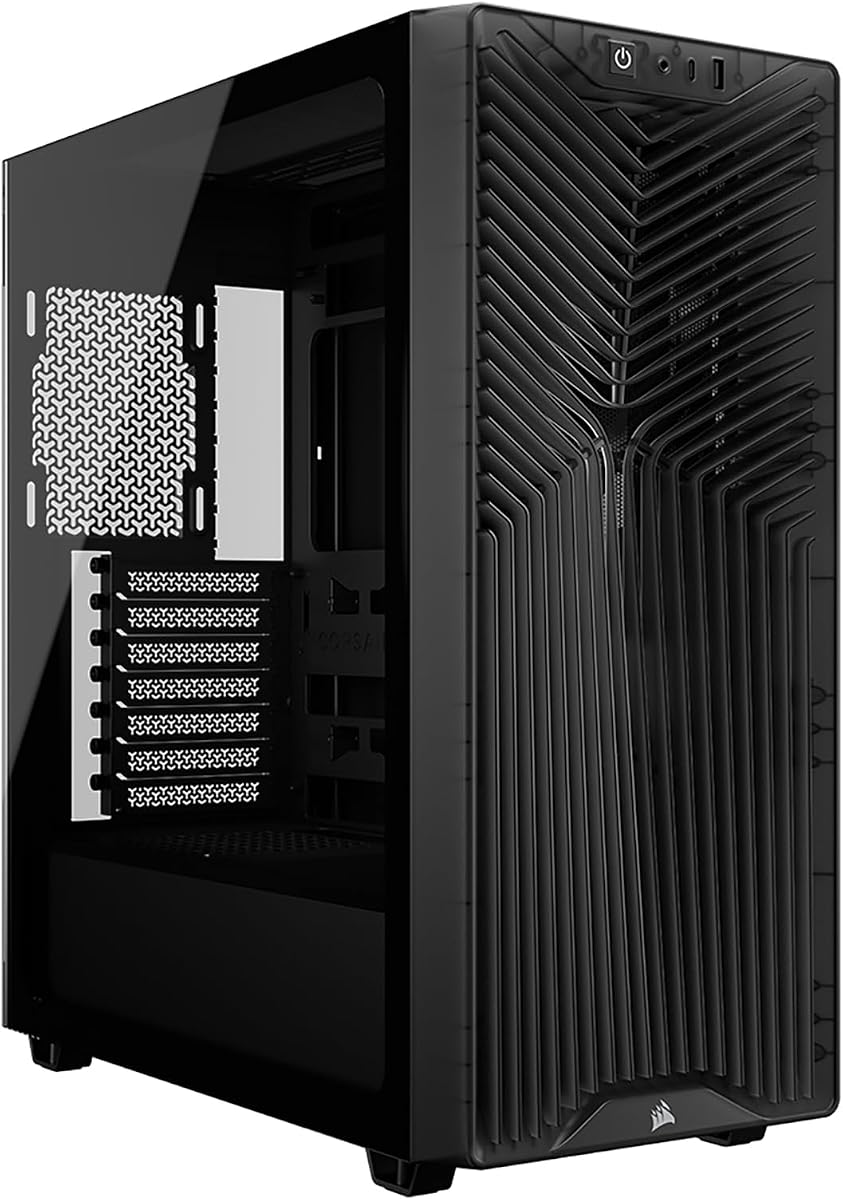
CORSAIR 3200D RS
4.6Editor score
Three included RS120 ARGB fans
Up to nine 120mm fans
Top-mounted 360mm radiator
Discover the best cooling computer case options for powerful builds, comparing airflow, fan support, radiators, layouts, compatibility, and ease of use.
A cooling computer case must do more than look dramatic: it needs to move air through high-power components, support the cooling hardware you prefer, and fit your hardware without creating a frustrating build. The best designs balance front intake, rear exhaust, unobstructed interior space, cable routing, dust filtering, and sensible fan placement.
We compared ten cases using their published specifications, including included fans, radiator capacity, motherboard support, GPU clearance, airflow-focused construction, and build features. The list covers compact mid-towers, larger mid-towers, and a full tower for builders who need room, expansion, or multiple radiators.
Each pick highlights a different reason to choose it, from a balanced everyday design to a premium triple-chamber system. Ratings and specifications reflect the supplied product information, while availability and prices can change, so confirm current details before purchasing.
4.6Editor score

4.7Editor score

4.6Editor score
The comparison below organizes each case by its most important cooling and build characteristics, helping you narrow the field before choosing the chassis that best matches your hardware, layout, and preferred cooling approach.


The CORSAIR 4000D RS ARGB is a well-rounded ATX mid-tower for builders who want substantial airflow without choosing between a restrained exterior and an elaborate lighting system. Its 4.7 rating reflects a strong balance of features, and the standout combination is a perforated steel front panel, three installed RS ARGB PWM fans, and unusually flexible fan positioning.
We may earn a commission when you buy through this link, at no additional cost to you.
The steel Y-pattern front panel gives cool air a relatively open route into the chassis, while the three pre-installed fans provide a useful foundation for immediate airflow. The InfiniRail steel mounting system allows front fans up to 200mm and roof fans up to 140mm, giving builders room to change their configuration as their hardware and cooling needs evolve. A removable internal side panel can act as a cable cover or become an additional fan mount.
The main trade-off is that this is a highly configurable, lighting-focused design rather than the simplest enclosure imaginable. ARGB control depends on a 5V connection and compatible software, and the FRAME modular approach can add more visual and structural complexity than a conventional fixed layout. Even so, those features make the case especially interesting for builders who expect to upgrade components over time.
This is our top overall pick for most performance-oriented mid-tower builds. It makes strong airflow support easy without requiring a large number of additional fans, accommodates a wide range of fan sizes, and offers enough modularity for cable management and future expansion. Choose it when you want a flexible, visually interesting chassis that can grow with the system.
The three-dimensional perforated steel front panel is designed to admit air with minimal obstruction. Combined with the included front fans, it gives cool intake air a direct path toward the CPU, graphics card, and memory while the remaining chassis positions can be configured for exhaust or additional intake.
The FRAME system allows major elements such as the motherboard tray and front I/O area to be reconsidered as the build changes. The removable side section and adjustable InfiniRail mounts make the case especially useful for owners who may switch between air-cooled and liquid-cooled configurations.
We may earn a commission when you buy through this link, at no additional cost to you.
The NZXT H5 Flow is a compact ATX mid-tower aimed at builders who want a conventional full-size motherboard without the footprint of a large chassis. It carries a 4.6 rating and stands out for its clean exterior, ultra-fine mesh panels, two pre-installed 120mm Quiet Airflow fans, and flexible radiator placement.
We may earn a commission when you buy through this link, at no additional cost to you.
Its front and top mesh surfaces allow air to enter the case with fewer visible obstructions, while the perforated PSU shroud provides additional intake from a pair of optional 120mm fans. The most important liquid-cooling opportunity is at the front, where a radiator up to 360mm can be installed. A 240mm radiator is supported at the top, allowing CPU cooling without an oversized liquid-cooling setup.
The primary limitation is that the H5 Flow includes only two fans, so a builder wanting a complete push-pull configuration or several intake fans will need to add hardware. The top radiator ceiling of 240mm is also less generous than the 360mm support found in several larger mid-towers. Those constraints do not make it unsuitable for liquid cooling; they simply define where it is most flexible.
Pick the H5 Flow for a compact gaming or general-purpose build that values clean styling, straightforward installation, and good mesh-based ventilation. It is especially convincing when you already plan to add fans and want a 360mm front radiator in a relatively restrained enclosure.
Ultra-fine mesh spans the top, front, and side panels, giving the case a ventilated appearance without relying on large open gaps. The front mesh also serves as a practical filter, helping limit the dust that reaches internal components.
The case can accept a 360mm radiator at the front or a 240mm unit at the top. That gives builders a way to combine a large CPU radiator with a more compact secondary cooling plan for a GPU or other heat-producing components.
We may earn a commission when you buy through this link, at no additional cost to you.
The Antec Flux Pro is the list's most fan-ready traditional full tower, combining six included PWM fans with support for as many as 12 simultaneously. Its 4.7 rating reflects a strong overall package for builders who want extensive cooling hardware, flexible brackets, and room for large radiators.
We may earn a commission when you buy through this link, at no additional cost to you.
Three Tranquil 140 PWM fans sit at the front, two P12R PWM reverse fans occupy the PSU shroud, and one Tranquil 140 PWM fan handles rear exhaust. This is a remarkably complete airflow foundation for a new system. Multi-directional vents and removable cooling brackets on the top, front, and shroud allow the fan arrangement to be adapted as components or cooling plans change.
The case also supports simultaneous 420mm and 360mm radiators, an uncommon degree of flexibility for a full tower. Its size is the obvious cost of that capacity, and the combination of metal, glass, and wood creates a more textured appearance than the restrained, all-black design of many competitors. The innovative 90-degree PSU mount and dual CPU/GPU temperature display add further practical value.
Choose the Flux Pro when cooling capacity and component clearance matter more than a small footprint. It is especially suitable for elaborate systems with multiple graphics cards, extensive storage, a long power supply, or a plan to use substantial liquid-cooling hardware. The six included fans reduce the number of immediate extra purchases, though the full-tower dimensions require planning.
Six installed PWM fans cover front intake, reverse shroud intake, and rear exhaust. This gives a new build a meaningful airflow foundation immediately, while the twelve-position capacity leaves plenty of room for additional fan sizes and radiator arrangements.
Supporting a 420mm radiator alongside a 360mm radiator makes the Flux Pro useful for builds that need CPU and GPU cooling in different zones. Removable brackets simplify changing that layout as the system matures.
We may earn a commission when you buy through this link, at no additional cost to you.
The Lian Li V100-ATX combines a 4.8 rating with one of the strongest feature lists in this comparison. It provides four pre-installed PWM-controlled ARGB fans, an integrated 26-LED lighting strip, tool-less side panels, motherboard support that includes back-connect layouts, and generous room for high-end components.
We may earn a commission when you buy through this link, at no additional cost to you.
Its cooling foundation is strong for a mid-tower. Four daisy-chainable fans are already installed, while the top can accommodate a radiator up to 360mm. The GPU clearance reaches 420mm and CPU cooler clearance reaches 178mm, allowing substantial tower coolers and long graphics cards without requiring an oversized chassis.
The listed fan figures range from 1800 RPM maximum speed to approximately 60.4 to 61.47 CFM airflow, with a maximum static pressure of roughly 2.17 to 2.54 mm-H2O and noise levels listed between 26.5 and 30.8 dBA. As the figures vary by position, buyers should still check the exact fan placement in the final configuration rather than assuming every installed fan performs identically.
This case is a compelling all-rounder for builders who want attractive lighting, easy maintenance, and high-end compatibility in a conventional mid-tower. Its tool-less panels are especially useful during initial assembly and later upgrades, while the integrated strip and daisy-chain fans reduce some of the wiring complexity associated with illuminated systems.
Daisy-chain connectivity across the four included ARGB fans and a 26-LED integrated strip makes it easier to establish a coordinated lighting layout. The lighting can synchronize with motherboard software when the board and chosen control application support the required connections.
Tool-less mounting on both side panels removes much of the inconvenience associated with repeated access. This is valuable during the first build, when cable routing and component installation occur repeatedly, as well as during later memory, storage, or cooling upgrades.
We may earn a commission when you buy through this link, at no additional cost to you.
The Cooler Master HAF II 500 is an unusual mid-tower built around oversized cooling hardware. It has a 4.8 rating and distinguishes itself with two 220 x 40mm front intake fans, one 180 x 40mm rear exhaust fan, large ventilation openings, and a MasterRail system designed to accommodate multiple fan and radiator sizes.
We may earn a commission when you buy through this link, at no additional cost to you.
Large front and rear fans can move substantial air with relatively modest rotational speeds, which is appealing for builders who want strong cooling without filling every mounting point with smaller fans. The low-resistance Mighty40 cooling system and large openings are designed to improve throughput rather than merely increase the number of installed components.
The trade-off is that 220mm and 180mm fans are less universally available than 120mm and 140mm models, and their size can limit how easily radiators and other hardware share the same zones. The case also uses a substantial amount of space. Its dual-mode GPU holder can secure one card or support two cards up to 72mm thick each, but multi-GPU cooling still requires thoughtful planning.
This is a compelling choice for enthusiasts committed to large-fan cooling and willing to accommodate a larger enclosure. The flexible storage cage, split-level cable management, and broad MasterRail support add practical value, while the oversized airflow hardware gives the design a clear identity.
The 220mm front pair and 180mm rear exhaust create a straightforward intake-to-exhaust arrangement. Large ventilation openings help reduce the chance that the fans move air without enough pressure to carry it through the chassis.
The MasterRail system supports several fan and radiator sizes at the front and top, and the dual-mode GPU holder adapts to one or two graphics cards. These adjustable features make the large format more accommodating for evolving enthusiast builds.
We may earn a commission when you buy through this link, at no additional cost to you.
The MSI MAG Forge 321R Airflow is a gaming-focused mid-tower that combines a vented front panel, tempered glass side panel, ARGB lighting, and room for up to 11 fans. Its 4.6 rating reflects a feature-rich option for users who want their cooling and lighting managed within MSI's software environment.
We may earn a commission when you buy through this link, at no additional cost to you.
Its ventilation is supported by a front panel designed to admit air, while the case offers a top-mounted position for a radiator up to 360mm. A magnetic dust filter on the top is easy to remove, making routine cleaning more convenient. A bundled one-to-six ARGB LED control board provides additional ways to coordinate the system's lighting.
Mystic Light Sync is the central benefit for compatible builds, allowing the case's ARGB elements to be controlled alongside other supported hardware through MSI Mystic Light. That convenience comes with a dependency on compatible software and hardware. The supplied data does not specify exactly how many fans ship with the case, so buyers who want a certain fan count should verify the package contents before ordering.
This case makes the most sense for a gaming build that values coordinated lighting, a visible component showcase, and easy filter maintenance. It is also a strong option for future liquid cooling because a 360mm top radiator is supported. Choose it when the ecosystem and presentation matter nearly as much as raw chassis capacity.
Mystic Light gives users a centralized way to control ARGB lighting across compatible components. The included LED control board and the case's built-in ARGB fan support reduce the likelihood that a lighting setup will look disconnected from the rest of the system.
The removable magnetic top filter can be taken out without using screws, allowing routine cleaning before dust accumulates around the intake path. That is particularly useful in a gaming system that remains powered on frequently or sits in a room where airborne dust is common.
We may earn a commission when you buy through this link, at no additional cost to you.
The CORSAIR 3200D RS delivers the essentials of a modern airflow case at a value-focused level. Its 4.6 rating, three included RS120 ARGB fans, support for up to nine 120mm fans, and top-mounted 360mm radiator capacity make it a strong contender for new builders who want useful cooling hardware without a premium chassis price.
We may earn a commission when you buy through this link, at no additional cost to you.
The fan platform is centered on the standard 120mm format, which simplifies future upgrades because matching fans are widely available. The roof supports 360mm, 280mm, or 240mm radiators, while a built-in shroud conceals cables and numerous tie-down points simplify routing. Reverse-connector motherboard support is a useful modern feature for compatible systems.
The GPU anti-sag stabilization arm deserves attention because it supports heavier graphics cards and can reduce the need for an extra support bracket. The trade-off is that the smoke finish can make the interior less visually open than a clear-sided case, and the total number of visible installed fans can change depending on the exact configuration and radiator choices.
Choose the 3200D RS for a straightforward, modern mid-tower that places practical airflow and installation features ahead of elaborate industrial design. It works particularly well for gamers who want ARGB fans, a roomy top radiator position, and straightforward cable management in one package.
Three RS120 ARGB PWM fans provide a usable starting configuration, and support for up to nine 120mm positions creates room for a more elaborate intake and exhaust arrangement. Using one standard fan size also keeps replacement and expansion simple.
A built-in cable shroud, generous tie-down locations, a single connector for front cables, and reverse-connector motherboard support all reduce installation work. The GPU stabilization arm adds another practical benefit for systems using a large graphics card.
We may earn a commission when you buy through this link, at no additional cost to you.
The CORSAIR AIR 5400 RS ARGB is the most structurally ambitious case in this guide, using three isolated chambers to manage the CPU, graphics card, motherboard, power supply, storage, and cables separately. It has a 4.6 rating and stands out with a panoramic exterior, a dedicated CPU cooling chamber, and an airflow duct designed to accelerate air through the main compartment.
We may earn a commission when you buy through this link, at no additional cost to you.
The front CPU chamber can hold a 360mm radiator and isolates that cooling zone from the rest of the chassis. The central chamber moves vertical air around the motherboard and GPU before exhaust, while the lower PSU and storage chamber has dedicated intake and exhaust locations. This compartmentalized plan reduces the chance that PSU or storage heat interferes with the primary component airflow path.
The drawback is complexity. A multi-chamber design requires more deliberate planning than a straightforward open mid-tower, and the AIR 5400 RS sits in a premium category without reaching the expansive fan count of the Antec Flux Pro. It is also a case that rewards builders who care about internal layout rather than simply filling every available mounting position.
Choose it for a high-end build where CPU, GPU, and power-supply heat are all significant concerns. It is particularly compelling when a 360mm CPU radiator is planned and the owner wants dedicated cooling paths rather than a single shared chamber. The result is one of the most thoughtfully separated airflow designs among the mid-towers reviewed here.
The dedicated CPU chamber allows the front radiator to focus on processor cooling, while the central chamber handles motherboard and GPU circulation. Separating the PSU and storage area prevents those components from sharing the same intake path as the performance-critical hardware.
A bottom duct in the main chamber narrows the airflow path and accelerates air as it moves upward. The design aims to improve cooling effectiveness without requiring every fan to spin faster, which can also help preserve a lower-noise operating profile.
We may earn a commission when you buy through this link, at no additional cost to you.
The CORSAIR AIR 5400 LX RGB shares the sophisticated three-chamber cooling architecture of the AIR 5400 RS while emphasizing an RGB-focused panoramic presentation. It carries a 4.7 rating and is designed for builders who want a visually prominent system with separate cooling zones for the CPU, GPU, motherboard, power supply, storage, and cables.
We may earn a commission when you buy through this link, at no additional cost to you.
The CPU cooling chamber accepts a 360mm radiator at the front, isolating the processor loop from other heat sources. The central motherboard and GPU chamber uses vertical airflow, and the lower PSU and storage chamber has its own dedicated intake and exhaust openings. An innovative bottom duct accelerates airflow through a narrowed route without requiring increased fan speed.
As with the RS model, the complexity of the layout demands deliberate component planning. A multi-chamber chassis offers fewer opportunities for improvised placement, and the LX RGB version is aimed at a premium aesthetic rather than a minimal budget. Its lighting controls will also depend on the selected motherboard, controller, or software ecosystem.
This case is a strong fit for an enthusiast who wants both airflow engineering and RGB presentation. It makes more sense when the system has substantial heat-producing components and the builder appreciates a polished interior view. For those who can plan the layout, its separated chambers offer a clear and compelling approach to chassis cooling.
The panoramic view highlights the separated internal zones, making the cooling layout visible as part of the finished design. RGB lighting and glass panels complement the chamber structure rather than treating appearance and airflow as unrelated goals.
Dedicated CPU, central hardware, and lower PSU zones allow each area to have a more focused airflow route. This is particularly useful in builds where a large CPU radiator, a powerful graphics card, and a substantial power supply all need reliable cooling.
We may earn a commission when you buy through this link, at no additional cost to you.
The MONTECH XR Panoramic combines a 4.7 rating with a visually dramatic enclosure and a useful cooling foundation. It includes three ARGB PWM fans, supports as many as nine fans, accepts a top 360mm radiator, and provides panoramic tempered-glass panels for a clear view of the graphics card and lighting.
We may earn a commission when you buy through this link, at no additional cost to you.
Two included side-mounted reverse-blade fans face their illuminated sides toward the interior, creating a cleaner showcase than conventional fans whose support frames remain visible. A rear fan completes the three-fan layout. The case also supports 420mm graphics cards, CPU coolers up to 175mm, and power supplies up to 230mm, giving it solid room for high-end components.
The main consideration is that the included fan orientation is optimized for presentation. Reverse-blade side fans can limit where certain airflow configurations can be used, so builders planning a specific push-pull setup should confirm compatibility. The wood-grain I/O area also gives the enclosure a more decorative character than a conventional all-black or all-metal industrial design.
Choose the XR Panoramic for a gaming showcase that needs substantial clearance, visible lighting, and easy filter access. Removable magnetic filters at the top, side, and bottom simplify maintenance, while USB-C and two USB 3.0 ports provide convenient front connectivity for everyday peripherals.
The side-mounted reverse-blade fans turn their illuminated faces toward the internal components. This creates a more uniform visual effect through the panoramic glass while keeping the external side of the fan area visually cleaner.
Magnetic filters can be removed from the top, side, and bottom without complex tools. Cleaning all three intake areas helps maintain the airflow needed to cool a gaming system that may operate for long periods.
We may earn a commission when you buy through this link, at no additional cost to you.
The right cooling computer case depends on your hardware, available space, and preferred cooling method. Use the following factors to compare airflow direction, radiator capacity, component clearance, included fans, and everyday maintenance before making a final decision.
A case can have many fan positions and still direct air poorly, so the intake and exhaust layout matters more than a raw mounting count. Look for perforated or mesh front panels, a rear exhaust position, and openings around the PSU shroud. Front intake should meet resistance from filters or tight radiators, while the rear path needs enough space for warm air to leave the chassis. Premium triple-chamber designs go further by separating CPU, GPU, and PSU airflow into distinct routes.
Prioritize a clear, unobstructed path over the highest fan count. A smaller number of properly positioned fans can produce better results than several blocked by cables, radiators, or drive cages.
Decide whether you want air cooling, a 240mm liquid cooler, or a larger 360mm or 420mm radiator. A 360mm radiator is common in modern mid-towers, usually at the top or front, while 420mm support tends to appear in larger cases. Radiator placement also affects GPU clearance: a thick front radiator may shorten usable space for long graphics cards.
Check the case's explicit radiator limits rather than assuming standard sizes fit. Also verify the width of the radiator, fan thickness, and whether the position can accommodate both without preventing a side panel from closing.
Most builders will add fans, but included fans can determine how well the case performs on assembly day. Cases with three or more installed fans provide a stronger starting point than models with only one or two. Standard 120mm and 140mm sizes are versatile, while 180mm and 220mm models can move substantial air but are less convenient to mix with other hardware.
Match the included fan type to your plan. ARGB fans need a compatible 5V control path, and PWM models should connect to a four-pin header or a compatible hub. Count the available headers and connectors before adding more fans.
Long graphics cards and tall tower coolers can interfere even in cases labeled ATX. Look for a stated GPU length, CPU cooler height, power supply length, and clearance beneath the power supply shroud. Support for 360mm or 420mm graphics cards is particularly useful for current high-end cards, especially when a front radiator is also planned.
Treat compatibility specifications as limits, not recommendations. Leave practical clearance for power cables attached to the graphics card and for the tube or heatpipe clearance of a large air cooler.
ATX support covers the standard motherboard format, while Micro-ATX and Mini-ITX boards are generally easier to fit. Some newer cases support back-connect ATX and Micro-ATX motherboards, allowing cable plugs to connect on the rear instead of the surface. Confirm that your chosen motherboard's connector arrangement matches the case before assuming the back side is usable.
Full-tower and E-ATX support provides room for larger motherboards, but it can add considerable size. Conversely, a compact ATX case can still be ideal if its cable routing, GPU clearance, and cooling capacity fit your actual components.
Intake filters are essential because front and bottom air paths collect dust. Magnetic filters are easy to remove, while screw-mounted metal filters may last longer but require more effort to clean. Cases with filters at several openings can be useful when air enters from the top, side, and bottom, although each additional filter must be maintained consistently.
Choose removable filters that you can reach without dismantling the entire system. A filter that is difficult to access often goes uncleaned, eventually reducing the very airflow the case was selected to provide.
A good case should be enjoyable to assemble and service. Look for tool-less side panels, broad motherboard-tray cutouts, adequate space behind the tray, tie-down points, and a cable shroud that does not obstruct fans or drive bays. Reverse-connector motherboard support and a single front-cable connector can also simplify wiring.
Plan cable paths before ordering large components. Thick power leads, 24-pin cables, and front-panel wiring can consume space that manufacturer diagrams may not make immediately obvious.
Cooling performance and acoustics are closely related because faster or larger fans often produce more sound. Fan specifications can provide a useful baseline, but actual noise depends on the CPU, radiator, fan curve, and surrounding components. ARGB and RGB lighting add visual appeal but require compatible controls, and panoramic glass showcases the internal layout as well as any dust.
Balance the aesthetic against practical needs. A dark, filtered exterior may suit a workstation better, while a panoramic RGB design is often more appropriate for a gaming showcase. Verify software support before expecting lighting to synchronize with the rest of the system.
Plan the airflow before installing components. Mount front or bottom fans as intake, position the rear fan as exhaust, and use any additional top fans to move warm air out of the case. If a radiator is involved, follow its pump and fan orientation guidance, connect every PWM fan to an appropriate header or hub, and confirm that the tubing or radiator will not obstruct the graphics card or CPU cooler.
Build the system with cable management in mind. Route the 24-pin and processor power cables behind the motherboard tray where possible, use the supplied tie-down points, and leave enough slack for future maintenance. Connect ARGB and RGB systems to a compatible 5V controller or motherboard header, then update the relevant motherboard or lighting software so the system uses a safe, consistent lighting configuration.
Maintain the case by cleaning removable filters every few months and checking them more often in dusty environments. Use gentle cleaning methods and keep liquid away from the chassis. After building or upgrading, confirm that all panels close, fans spin in the intended direction, radiator fittings are secure, and no cable blocks a fan or radiator. A brief airflow check after installation can reveal configuration problems before they affect temperatures.
Not necessarily. A well-designed case with three or four properly positioned fans can cool a system effectively, while a poorly directed arrangement can undermine even a large fan count. Prioritize an open front intake, unobstructed rear exhaust, compatible fan sizes, and radiator placement over filling every available mounting position.
A 360mm radiator generally offers more total surface area and cooling capacity than a 240mm model, which can be useful for powerful CPUs. It also requires more chassis space and may affect graphics card clearance, so the best choice is the largest radiator that fits without compromising other components or forcing an awkward layout.
No. A balanced setup generally uses front and bottom positions for intake and rear or top positions for exhaust so cool air enters, passes over components, and warm air exits. Some premium cases use specialized ducting, and adding too many opposing fans can increase noise without improving results, so follow the case's recommended airflow path.
Not automatically. A full tower often offers more fan positions, radiator options, and component clearance, but its cooling performance still depends on airflow direction, restrictions, and fan quality. A well-designed mid-tower can be sufficient for many systems and may be easier to fit in a workspace.
Choose a case that explicitly supports your motherboard format. Most mid-towers support ATX and generally accommodate Micro-ATX and Mini-ITX, while E-ATX usually calls for a full tower. Back-connector motherboard support is a separate feature, so confirm both the board format and its connector arrangement before purchasing.
Clean filters every few months, or more frequently if the computer runs in a dusty environment or the intake fans are visibly obstructed. Filters should remain dry and should not be cleaned with excessive force, as bent mesh or a weakened attachment can reduce airflow or allow gaps. Cleaning is easiest before installing expensive components.
No. ARGB and RGB use different lighting standards and voltage arrangements, so compatibility with the motherboard or controller matters. Check the connector type, supported addressable lighting protocol, and required software. Using the correct standard avoids an incompatible connection and makes lighting synchronization more reliable.
A tempered-glass panel does not inherently provide better cooling than a properly vented metal panel. It mainly affects appearance and component visibility, while airflow depends on the intake, exhaust, filter, and fan arrangement. A sealed glass side can even restrict intake if additional side fans are installed, so the complete case design should determine performance.
The CORSAIR 4000D RS ARGB is the most balanced overall choice because it combines a high-airflow front panel, three ARGB fans, flexible mounting rails, and a modular structure that can change with the build. The CORSAIR 3200D RS stands out as a value-focused alternative with three included fans, generous radiator support, and builder-friendly features, while the CORSAIR AIR 5400 RS ARGB leads the premium group with separated CPU, GPU, and PSU cooling chambers.
For a compact build, the NZXT H5 Flow prioritizes a smaller footprint and clean mesh airflow. The Antec Flux Pro and Cooler Master HAF II 500 serve enthusiasts who want more fan capacity, larger fans, or extensive radiator options. The MONTECH XR Panoramic and MSI MAG Forge 321R Airflow emphasize visible gaming aesthetics, while the Lian Li V100-ATX offers an unusually well-rounded mix of lighting, access, and clearance.
Before ordering, verify the exact motherboard, graphics card, CPU cooler, power supply, radiator, and connector requirements against the manufacturer's specifications. Current prices, availability, package contents, and product revisions can change, so checking the latest listing ensures that the case you choose still fits both the hardware and the cooling plan.