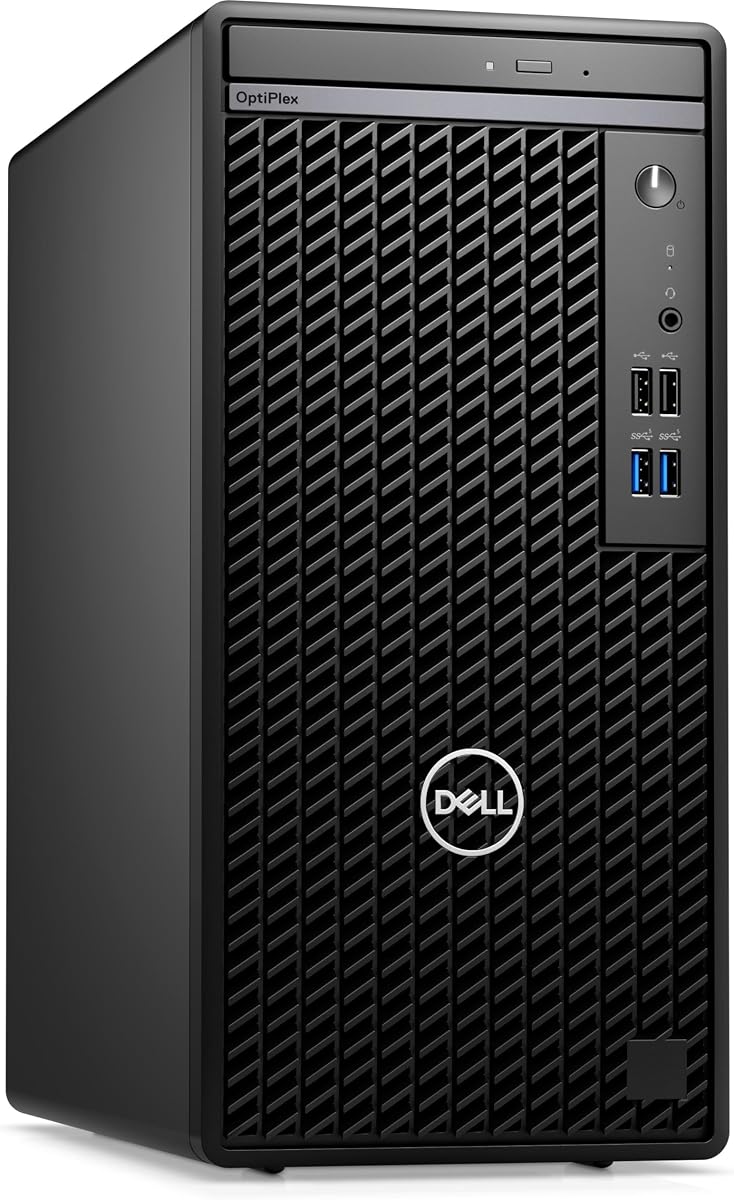
Dell OptiPlex 7010
Ubuntu Linux 22.04 preinstalled
Intel Core i5-13500
256GB PCIe NVMe storage
Business tower expandability
Discover the best desktop PC with Ubuntu pre installed, comparing processors, memory, graphics, connectivity, displays, and Linux readiness.
A desktop PC with Ubuntu pre installed is most useful when it offers the right balance of processing power, memory, graphics, storage, and connectivity without requiring a complicated operating-system setup. Ubuntu is particularly attractive for development, system administration, data work, and users who value open-source software, but the hardware still needs to suit the intended workload.
We compared the available systems by examining their processors, memory, storage, networking, display support, physical form, included accessories, and operating-system configuration. The list includes compact mini PCs, business desktops, dual-OS systems, renewed office machines, and Linux-focused alternatives so buyers can distinguish true Ubuntu-ready options from PCs that only ship with Windows or another Linux distribution.
Each entry below identifies the most relevant benefits and trade-offs for Ubuntu users. The top picks emphasize Ubuntu availability, processor capability, memory, expandability, and everyday usability, while the remaining recommendations show important alternatives and cases where an operating-system change may be necessary. Product availability, configurations, and prices can change, so confirm the current listing before buying.

4.0Editor score
5.0Editor score
The comparison covers both systems that arrive with Ubuntu and alternatives that ship with Windows or Linux Mint. Key differences include processor generation, installed memory, storage capacity, display flexibility, physical size, and how much work is required to create the desired Ubuntu environment.






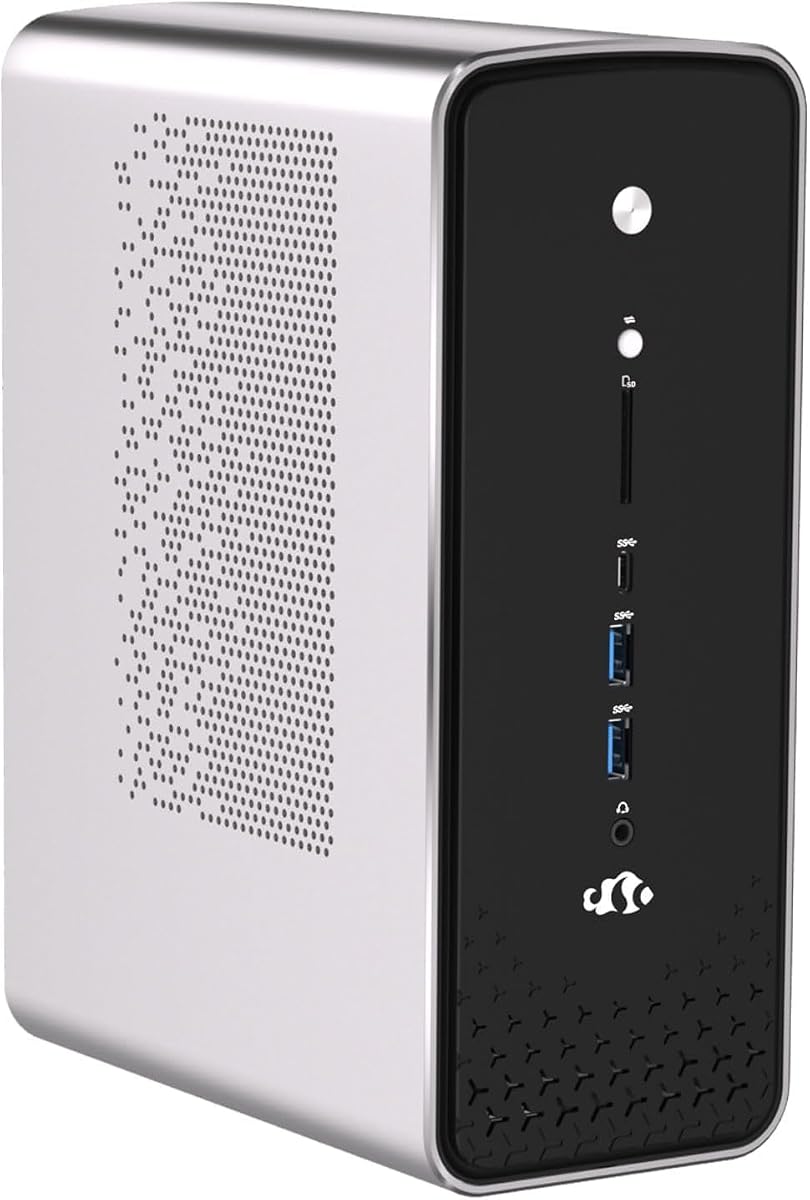
The Beelink SER9 Pro stands out as the most complete match for this guide because it combines a built-in Ubuntu system with capable desktop-class hardware in a compact enclosure. It carries a 4.0 rating, while its Ryzen 7 255 processor provides 8 cores and 16 threads with speeds ranging from 3.8GHz to 4.9GHz. The result is a flexible Ubuntu machine for development, browsing, media, and general productivity.
We may earn a commission when you buy through this link, at no additional cost to you.
Its 24GB of LPDDR5X memory runs at 6400MT/s, giving Ubuntu workloads a generous memory foundation without requiring a separate upgrade. Storage begins with a 1TB PCIe 4.0 SSD, and two additional M.2 PCIe 4.0 x4 positions are listed for expansion. Integrated Radeon 780M graphics with 12 compute cores at 2600MHz add useful capability for gaming, light content creation, and high-resolution displays.
The main compromise is that LPDDR5X memory is generally not user-upgradable, so buyers should treat the installed 24GB as fixed. Its networking and port selection are otherwise impressive: 2.5Gbps Ethernet, Wi-Fi 6, Bluetooth 5.2, two USB 3.2 ports, two USB 2.0 ports, HDMI 2.1, DisplayPort 1.4, and USB4. The built-in microphone and dual speakers are useful for calls and media, although serious audio work may still benefit from external equipment.
This is the recommendation for most people who explicitly want a compact Ubuntu desktop without first installing an operating system. OpenClaw and an extensive set of skills and integrations are included for productivity, development, DevOps, browser automation, marketing, lifestyle, and AI-related scenarios. Buyers seeking a tower to service or a memory configuration they can change should instead examine the Dell OptiPlex alternatives, but the SER9 Pro offers the strongest combination of immediate Ubuntu readiness, modern connectivity, and compact performance.
The preinstalled Ubuntu system and OpenClaw setup reduce the time needed to begin using the mini PC. The included integrations span development assistance, DevOps, browser automation, social media, marketing operations, AI tools, and everyday productivity, making the device more versatile than a barebones Linux machine.
Triple-display support combines HDMI 2.1, DisplayPort 1.4, and full-function USB4. The listed outputs support high-resolution, high-refresh-rate visuals, while 2.5Gbps Ethernet and Wi-Fi 6 provide useful bandwidth for large file transfers, remote work, and local development services.
We may earn a commission when you buy through this link, at no additional cost to you.
The renewed Dell OptiPlex 7070 SFF is a practical option for a buyer who wants capable office hardware and is comfortable installing Ubuntu. Its 4.1 rating reflects a generally favorable customer history, and the system combines an Intel Core i7-9700 with 32GB of DDR4 memory and a 1TB M.2 NVMe SSD. Those specifications are ample for many development, administrative, and productivity tasks.
We may earn a commission when you buy through this link, at no additional cost to you.
This ninth-generation Intel processor has eight cores and reaches up to 4.70GHz. The roomy SFF enclosure is easier to service than a tightly packed mini PC, and the listing also notes room for future expansion. Connectivity includes five USB 3.1 ports, four USB 2.0 ports, two DisplayPort outputs, built-in Wi-Fi 6E through an AX210 adapter, and an included wireless keyboard and mouse.
The significant limitation is that this computer arrives with Windows 11 Pro rather than Ubuntu. Installing Ubuntu would require creating boot media, backing up data, and handling drivers, encryption, firmware settings, and recovery. The renewed condition also means buyers should carefully review the seller's condition description, included accessories, and warranty rather than assuming it matches a new system.
For a technical Ubuntu user, this OptiPlex can be an excellent Linux workstation because its memory and storage are already generous and its chassis offers room to work. It is less suitable for someone whose main requirement is a system that powers on directly into Ubuntu. In that situation, the Beelink SER9 Pro, Dell OptiPlex 7010, or NIMO dual-OS system requires less operating-system setup.
OptiPlex systems are designed for sustained office use and straightforward maintenance. The 7070 SFF's larger enclosure also makes storage, memory, and add-in card upgrades more approachable than they are in many compact mini PCs.
Before replacing Windows, confirm that the AX210 wireless adapter and the selected Ubuntu release are supported. Prepare installation media, record any needed firmware or recovery credentials, and test essential network, audio, and display hardware before migrating important files.
We may earn a commission when you buy through this link, at no additional cost to you.
The NIMO Ryzen AI Max+ 395 is the premium option in this roundup and the most unusual. It arrives with both Windows 11 Pro and Ubuntu, giving users the ability to choose the operating system that suits a project without performing a fresh installation. Its 5.0 rating is also the highest numerical customer rating among the products with a supplied score.
We may earn a commission when you buy through this link, at no additional cost to you.
The Ryzen AI Max+ 395 uses Zen 5 architecture and includes an integrated NPU designed for local AI workloads. The system is positioned for machine learning, AI deployment, image generation, data modeling, code completion, rendering, video editing, virtual machines, and containerized applications. Radeon integrated graphics support demanding visual tasks, while dual M.2 PCIe 4.0 storage slots and high-bandwidth memory suit large project files.
Its connectivity and display capabilities are extensive. Triple 4K output is supported through HDMI, DisplayPort, and USB4. USB4 provides 40Gbps bandwidth and external GPU expansion potential, while dual 2.5Gb RJ45 ports, Wi-Fi 7, and Bluetooth 5.4 create strong networking options. A copper cooling module and high-airflow fan system support continuous workloads, and the included VESA bracket can free desk space.
This is the strongest recommendation for a buyer who wants both Ubuntu and Windows on one highly capable machine. The dual-OS arrangement is particularly convenient for developers, financial professionals, and creators who alternate between specialized Linux tools and Windows applications. The main issue is that its listed cost is substantially above the other systems and the supplied information does not state a precise memory capacity. Buyers should verify the exact configuration, included software, and warranty before ordering.
The dedicated NPU is intended to accelerate locally executed AI tasks such as language models, image generation, data analysis, and code assistance. Local execution can improve responsiveness and reduce dependence on remote services, although application support and actual performance depend on the software being used.
Dual operating systems make this system attractive when a Linux-only computer would be inconvenient or when Windows-specific applications remain important. A VESA mount also allows the mini PC to sit behind compatible monitors, making it a discreet workstation for Linux and Windows users.
We may earn a commission when you buy through this link, at no additional cost to you.
The Dell OptiPlex 7010 business mini tower is the budget-focused Ubuntu recommendation because it combines Ubuntu Linux 22.04 with a modern Intel Core i5-13500. No customer rating was supplied for this listing, so the evaluation relies on the stated hardware and software configuration rather than a numerical review history.
We may earn a commission when you buy through this link, at no additional cost to you.
The processor provides 14 cores and 20 threads, including six performance cores, with a listed base speed of 2.50GHz, boost capability up to 4.8GHz, and 24MB of cache. It handles routine Ubuntu productivity, browser workloads, coding tools, and light virtualization well. Intel UHD 770 integrated graphics support general display needs, while 8GB of DDR4 memory and a 256GB PCIe NVMe SSD provide a functional baseline.
Its biggest limitation is memory. Although the Dell business platform is generally more serviceable and expandable than a mini PC, the configuration as listed has only 8GB of DDR4. Users running many browser tabs, containers, virtual machines, or data-processing workloads would benefit from adding memory. The 256GB SSD can also become constrained quickly when installing development tools, virtual-machine images, and large application libraries.
Ports are practical for an office environment, including four USB 2.0 connections, HDMI, DisplayPort, Ethernet, a headphone and microphone combination jack, and a DVD writer. A keyboard and mouse are included, while the tower leaves the display out of the package. This system is best for a buyer who wants a straightforward Ubuntu desktop in a familiar, expandable business chassis without paying for a compact premium system.
The Core i5-13500 provides a useful balance of multicore performance and everyday efficiency. Its business mini-tower format also makes internal access and future component upgrades more practical than in many sealed mini PCs.
Eight gigabytes of RAM can handle standard office use but may feel limited for intensive development or virtualization. Check the installed memory configuration and available slots, then consider increasing RAM and adding storage if the workflow demands more capacity.
We may earn a commission when you buy through this link, at no additional cost to you.
The renewed Dell OptiPlex 7050 SFF offers a potentially capable Ubuntu platform with 32GB of DDR4 memory and a 1TB SSD, although Windows 11 Pro is the listed operating system. Its 3.9 rating makes it one of the better-rated systems in the guide, and the professionally renewed listing states that the computer is tested and certified with a seller warranty.
We may earn a commission when you buy through this link, at no additional cost to you.
The Core i7-7700 is a familiar fourth-generation Intel platform with four cores running at 3.60GHz. While its processor is considerably older than the Ryzen 7 255, Core i5-13500, and Ryzen AI Max+ 395 options, the large memory allowance can support many multitasking scenarios, including numerous browser sessions, containers, and background services.
The storage and enclosure are the system's most attractive aspects for an Ubuntu conversion. A 1TB SSD provides useful room for the operating system, applications, project files, and virtualized environments, while the SFF case is easier to service than a compact mini PC. Connectivity includes USB 3.0 and USB 2.0 ports, HDMI, DisplayPort, Ethernet, audio connections, and a bundled wireless USB adapter for Wi-Fi and Bluetooth.
This OptiPlex is worth considering for a technical user who prioritizes memory and storage over processor age. Ubuntu installation remains necessary, and buyers should confirm driver support for the included wireless adapter. It is less attractive for demanding compiling, rendering, or modern virtual-machine workloads, but it can serve well as an office Linux computer, lightweight development platform, home server, or inexpensive conversion project.
Thirty-two gigabytes gives Ubuntu considerable working space for browser tabs, office applications, development tools, and background processes. This is especially helpful when compared with mini PCs whose memory cannot be upgraded.
A renewed computer may show normal signs of use, and the actual cosmetic and functional condition can vary. Review the seller's description, confirm the warranty terms, and test ports, cooling, storage health, and display output after delivery.
We may earn a commission when you buy through this link, at no additional cost to you.
The Dell OptiPlex 7060 SFF is a balanced office desktop for users who want to replace Windows with Ubuntu. It has a 4.0 rating, an Intel Core i7-8700 with six cores that can reach up to 4.60GHz, 32GB of DDR4 memory, and a 512GB M.2 NVMe SSD. Those components support productive Linux work without the constraints of a very small system.
We may earn a commission when you buy through this link, at no additional cost to you.
The processor is older than the 13th-generation Core i5 in the OptiPlex 7010, but it offers a useful combination of six cores and generous memory. The NVMe storage improves responsiveness and leaves a reasonable amount of room for Ubuntu, development tools, containers, and documents. A spacious tower case is also easier to open and expand than a sealed compact PC.
The main Ubuntu-related drawback is that Windows 11 Pro is preinstalled. Users must back up their data and install the desired Ubuntu release, while confirming support for the listed built-in Wi-Fi and Bluetooth hardware. The renewed status also calls for normal caution: inspect the machine, test every port, and review the seller's warranty and condition notes.
For dual-monitor office use, the system offers two DisplayPort outputs along with five USB 3.0 and two USB 2.0 ports. A wireless keyboard and mouse are included. This is a good fit for programmers, students, and home-office users who value 32GB of memory, serviceable hardware, and a straightforward Ubuntu installation more than newest-generation performance or a tiny footprint.
The installed 32GB makes the 7060 SFF more appropriate for memory-heavy Linux workflows than many entry-level mini PCs. It can comfortably support a browser, code editor, terminal, container runtime, and multiple background services at the same time.
The pair of DisplayPort outputs supports a productive two-monitor arrangement for coding, research, system administration, or general office work. Additional USB devices can be connected through the plentiful USB 3.0 and USB 2.0 ports.
We may earn a commission when you buy through this link, at no additional cost to you.
The Dell OptiPlex 5050 SFF carries the highest customer rating among the products with a numerical score, at 4.2, and could become a serviceable Ubuntu computer for general productivity. It arrives with Windows 11 Pro, so it is better suited to buyers willing to install Ubuntu than to those requiring a ready-to-use Linux system.
We may earn a commission when you buy through this link, at no additional cost to you.
Its Core i7-7700 is a four-core processor running at 3.60GHz and boosting to 4.20GHz. Paired with 16GB of DDR4 memory, it remains adequate for web browsing, office applications, programming, education, and light server duties. Intel HD Graphics 630 handles everyday visual output, while a 512GB NVMe SSD provides fast startup and enough space for a focused collection of applications and files.
The SFF enclosure preserves several advantages of traditional desktop computers. It is larger than a mini PC, which can make servicing and upgrades more manageable, and it avoids the need to purchase a separate monitor, keyboard, or mouse because those accessories are included. On the other hand, its older processor and moderate memory limit heavy compiling, intensive rendering, and large virtual-machine environments.
For a buyer converting an office machine to Ubuntu, the OptiPlex 5050 provides a simple path to a capable everyday Linux desktop. Back up the existing installation, prepare Ubuntu media, and verify device compatibility before changing the operating system. Those comfortable with Linux setup should find the result useful, while first-time Ubuntu users should favor a system that arrives with Ubuntu already installed.
The 4.2 rating indicates favorable customer feedback, although ratings should still be considered alongside component age and the specific task. This machine's strongest qualities are its practical office configuration, fast storage, and included peripherals.
The traditional case provides room for maintenance and potential upgrades, making it useful for learning Linux, office productivity, and lightweight development. Verify Ubuntu hardware compatibility and back up the Windows installation before beginning the conversion.
We may earn a commission when you buy through this link, at no additional cost to you.
The Dell Pro Micro QCM1250 is a compact business desktop with Ubuntu Linux 18.04 preinstalled and a modern processor. No numerical customer rating was supplied, so its appeal comes from the stated configuration. The system pairs an Intel Core Ultra 5-235T with 8GB of DDR5 memory and a 512GB PCIe NVMe SSD in a compact enclosure.
We may earn a commission when you buy through this link, at no additional cost to you.
The 15th-generation processor has 14 cores and 14 threads, including six performance cores, a listed 2.20GHz base speed, boost capability up to 5GHz, and 24MB of cache. Those specifications make it more current than the Intel Core i7 systems in several other business desktops. Integrated graphics, a 90-watt power supply, and the small form factor are intended to balance performance with efficient office deployment.
The preinstalled Ubuntu version is the biggest concern. Ubuntu 18.04 is an older release, and users may need to perform a distribution upgrade before benefiting from current kernels, applications, and security improvements. With only 8GB of memory, the system is best suited to standard productivity and browsing unless memory can be expanded.
Connectivity is solid for a small business desktop. The listing includes Wi-Fi 6E via an AX211 adapter, Bluetooth 5.4, RJ-45 Ethernet, two USB 2.0 ports, HDMI 2.1, DisplayPort, USB 3.2 Type-C, and a headphone and microphone combination jack. A keyboard and mouse are included. This is a compelling compact choice if the buyer values Dell's business design and a recent processor, but an Ubuntu upgrade should be planned.
The Core Ultra 5-235T brings a more recent platform to compact business use. Its processing capacity and efficient 90-watt power supply make it suitable for offices where desk space, power draw, and manageability matter.
An Ubuntu 18.04 installation is a starting point rather than a reason to ignore security updates. Check the current Ubuntu support lifecycle, update the installation in stages, and back up important data before upgrading to a newer supported release.
We may earn a commission when you buy through this link, at no additional cost to you.
The ASUS NUC 14 Pro is a high-specification compact PC for Ubuntu users who are comfortable working with Linux Mint or installing Ubuntu themselves. It has a 1.0 rating, the lowest supplied score in the guide, so prospective buyers should investigate customer feedback carefully rather than relying on the specification list alone.
We may earn a commission when you buy through this link, at no additional cost to you.
Its Intel Core Ultra 7 155H processor provides 16 cores and 22 threads with a hybrid design intended for demanding productivity, development, and AI-related tasks. Intel Arc graphics add hardware acceleration, while 16GB of DDR5 memory and a 512GB PCIe SSD form a capable general-purpose configuration. The product information also describes configuration ranges extending to 64GB memory and 2TB storage, but the listed unit specifically includes 16GB and 512GB.
Linux Mint is preinstalled, not Ubuntu. That distinction matters because Mint provides a familiar desktop experience and strong hardware support, yet its release, package management, and update behavior differ from Ubuntu. Installing Ubuntu is feasible for a knowledgeable user, but it adds setup work and may involve driver adjustments. The listing describes advanced cooling, an aluminum fin design, dual copper heat pipes, and optimized airflow for extended Linux workloads.
The NUC's connectivity is excellent. It includes USB 3.2 Type-C and Type-A ports, HDMI 2.1, Thunderbolt 4, 2.5Gb Ethernet, Wi-Fi 6E, and Bluetooth 5.3. Support for up to four 4K HDR displays makes it particularly attractive for a multi-monitor developer desk, while VESA mounting helps save space. It is a compelling Linux-ready option for experienced users, but the low rating and lack of preinstalled Ubuntu make it a riskier recommendation for this particular search.
Linux Mint gives the NUC a usable Linux environment immediately and is well suited to programming, virtualization, cloud-native work, and local AI experimentation. The preinstalled distribution is the principal distinction from a true Ubuntu-ready listing.
Thunderbolt 4 enables high-speed storage and potential external graphics expansion. Multiple modern display outputs, 2.5Gb Ethernet, Wi-Fi 6E, and VESA mounting create a flexible desktop arrangement for technical users.
We may earn a commission when you buy through this link, at no additional cost to you.
The ASUS PB64 is a compact business mini PC that can serve as a capable Ubuntu platform, but it ships with Windows 11 Pro. No numerical rating was supplied. Its Intel Core Ultra 7 265 processor, 16GB of DDR5 memory, and 512GB NVMe SSD provide a modern base for general office productivity, software development, and Ubuntu-based server services.
We may earn a commission when you buy through this link, at no additional cost to you.
The 1.35-liter chassis is designed for professional environments and includes improved tool-less access, which makes internal components easier to reach than in many sealed systems. USB-C connectivity, Wi-Fi 6E, Bluetooth 5.4, a hardware TPM, and ASUS Control Center support a managed business deployment. Display capabilities include up to four 4K screens through two DisplayPort outputs, a configuration port, and USB4.
The primary limitation is that Ubuntu is not part of the stated operating system. A buyer must install it or use a related Linux environment. Users should also verify that the exact USB-C and display-port configuration supports their intended monitor arrangement. Sixteen gigabytes of memory is adequate for normal work, but heavy virtual machines, large compilation jobs, and data-intensive projects may need more.
This mini PC is a worthwhile option for a business or technical user who values a compact footprint, modern security features, easy servicing, and flexible multi-monitor support. It is less relevant to the core search than products with Ubuntu already installed. Its strongest use case is as an upgradable Linux platform where the buyer is comfortable handling installation and hardware configuration.
The improved chassis design makes memory, storage, and other internal upgrades more approachable. This can be valuable for organizations that replace or expand components without sending each system to a specialist service center.
The hardware TPM supports stronger platform security controls, while Wi-Fi 6E, Bluetooth 5.4, and extensive display connectivity suit modern offices. Ubuntu compatibility should be validated against the specific ports and peripheral devices in the intended deployment.
We may earn a commission when you buy through this link, at no additional cost to you.
Choosing a Ubuntu-ready desktop requires matching the operating system, processor, memory, storage, graphics, and connectivity to the intended workload. The most important distinction is whether Ubuntu is actually preinstalled or must be installed separately.
Choose a system that explicitly includes Ubuntu when setup convenience is important. Choose a Windows or Linux Mint system only if you are comfortable installing the desired distribution or value a dual-OS arrangement.
Match core count, threads, graphics, and cooling to the actual workload rather than choosing by model name alone. For most office tasks, prioritize adequate memory and storage over premium processor specifications.
Choose at least 16GB for active development and 32GB for heavier multitasking. Confirm whether memory is soldered or replaceable before purchase.
Look for at least 512GB when installing multiple development tools or virtual-machine images. Check for additional M.2 slots so storage can be expanded without replacing the primary drive.
Count the required monitors and check their resolution and refresh-rate needs. Choose native display outputs instead of adapters wherever possible for the most reliable Linux experience.
Choose a tower for easy maintenance and expansion. Choose a mini PC for a compact, tidy desk and verify that its fixed specifications meet your long-term needs.
Verify networking, audio, video, input devices, and security hardware before migrating important data. Keep the original operating system available until the Linux configuration is fully verified.
List the monitors, network connection, peripherals, and external storage that must work. Confirm those accessories are included or budget for purchasing them separately.
Begin by completing Ubuntu's setup prompts, connecting to the intended network, and verifying that Ubuntu is fully updated. Open Settings to check the operating-system release, installed updates, storage status, display resolution, sound output, keyboard layout, and network connection. For a system converted from Windows or Linux Mint, create a recovery method and test the hardware before removing or replacing the previous operating system.
Install applications through Ubuntu Software or the command-line package manager, depending on the software and the method supported by the vendor. Add current security updates, configure backups, and use a password manager or hardware-backed security features where appropriate. When connecting external drives or USB devices, verify the filesystem format and mount location before writing important data.
Maintain airflow around the computer, keep vents free from dust, and avoid placing the system where heat can accumulate. For mini PCs mounted behind a monitor, check that the bracket does not block ventilation. Periodically review storage capacity, memory use, temperatures, and update status, and back up important projects to separate storage. When upgrading memory or storage, shut down the system, disconnect power, use appropriate anti-static precautions, and follow the manufacturer's instructions.
The Beelink SER9 Pro is the clearest overall match because its listing explicitly identifies a preinstalled Ubuntu system alongside OpenClaw. The Dell OptiPlex 7010 and Dell Pro Micro QCM1250 also include Ubuntu, while the NIMO system provides both Ubuntu and Windows 11 Pro. Availability and exact bundled software should always be confirmed on the current listing.
Yes, most modern x86-compatible Windows desktops can run Ubuntu, but the process requires care. Back up the files you need, create official Ubuntu installation media, check hardware and wireless-driver compatibility, and decide whether to keep the existing operating system in a separate partition. Installation is not appropriate for every user, so a dual-OS model may be more convenient.
Linux Mint is a strong alternative for many users because it provides a polished desktop, a large software community, and a familiar interface. It is based on Ubuntu and uses related package and command-line tools, but it is still a distinct distribution with its own release policy. The ASUS NUC 14 Pro in this guide is therefore a Linux-ready option rather than a true Ubuntu-preinstalled option.
Not for every task. Eight gigabytes can handle basic browsing, documentation, and lightweight coding, while 16GB is more comfortable for multiple applications and browser tabs. Thirty-two gigabytes is beneficial for large builds, containers, virtual machines, and data processing. The best amount depends on whether the memory can also be upgraded later.
They can be, provided the hardware is healthy and compatible with the chosen Ubuntu release. OptiPlex systems often have approachable serviceable designs and useful port selections. Because renewed units vary in cosmetic and functional condition, check the seller's testing, warranty, included accessories, and return terms before installing a new operating system.
Choose a mini PC for a compact desk, efficient footprint, integrated features, and often strong integrated graphics. Choose a business tower when serviceability, expansion, cooling headroom, or replaceable memory matters more. A dual-OS mini PC can offer both operating systems in a small enclosure, while a tower may require a separate Ubuntu installation.
Check Wi-Fi, Bluetooth, audio, webcam, network, graphics, and any enterprise security hardware against the target Ubuntu release. Some systems also require proprietary drivers or firmware updates. Back up data, preserve recovery credentials, and keep the original system intact until networking, displays, peripherals, and essential applications have been tested successfully.
The listings vary. Several Dell OptiPlex systems include a keyboard and mouse, while the NIMO includes a power adapter and VESA bracket. No monitor is listed with the NIMO, and monitor inclusion varies among the Dell systems. Review the package contents carefully and add any missing display, keyboard, mouse, network adapter, or other needed accessories.
The Beelink SER9 Pro is the strongest all-around recommendation because it combines an explicitly preinstalled Ubuntu system, a capable Ryzen 7 255 processor, 24GB of fast memory, 1TB PCIe 4.0 storage, modern networking, and strong multi-display support. For a more traditional business desktop with Ubuntu already installed, the Dell OptiPlex 7010 offers a 14-core processor and a serviceable tower design, though its 8GB memory and 256GB storage should be considered.
The NIMO Ryzen AI Max+ 395 is the premium choice for buyers who want Ubuntu and Windows on the same compact machine. Its advanced processor, integrated NPU, USB4, dual 2.5Gb Ethernet, and triple-display support make it particularly compelling for AI, development, and multi-platform work. For conventional Ubuntu use, prioritize an upgradable memory option, at least 512GB of fast storage, compatible networking, and the display outputs required by your workspace.
Several alternatives in this guide arrive with Windows or Linux Mint rather than Ubuntu. They can still be excellent Linux platforms, but they require an installation and should not be described as Ubuntu-preinstalled. Before making a final purchase, verify the current operating-system statement, exact component configuration, warranty, included accessories, and current price, since listings and product details can change.
