
10Gtek 82599EN SFP+ Card
4.4Editor score
Single 10GbE SFP+ port
Intel 82599EN controller
Server-oriented feature set
This Fiber Optic Network Interface Card guide compares 10 options for speed, port count, PCIe fit, OS support, virtualization, and practical server use.
A fiber optic network interface card adds high-speed, low-latency connectivity to a desktop, workstation, NAS, or server that lacks a suitable built-in Ethernet port. The right card depends on your fiber type, switch, PCIe slot, operating system, virtualization needs, and whether one or two links will better serve your workload.
We compared all ten products by controller, supported speed, physical interface, port count, PCIe requirements, bracket support, operating-system compatibility, and management features. The list covers single-port and dual-port SFP+ cards, a dual-port gigabit option, a newer 25GbE RDMA adapter, and one copper-based 10GBase-T alternative for comparison.
Each review explains where the card fits best, along with practical limitations that can affect installation or operation. The top selections range from a feature-rich Intel I350 option to a newer single-port Realtek card and a high-speed dual 25GbE model. Product prices and availability can change, so verify current details before purchasing.
4.4Editor score

5.0Editor score

4.9Editor score
The table below compares the ten cards by their most important purchasing variables: line rate, port configuration, controller, host interface, and practical platform support. It also highlights the one copper-based alternative so readers can distinguish true SFP fiber options from 10GBase-T adapters.


The StarTech 2-Port GbE SFP Network Card combines two open SFP slots with an Intel I350-AM2 controller, making it a flexible choice for servers, workstations, NAS systems, and management environments. Its 5.0 rating is the highest among the listed products, and its strongest appeal is the combination of two ports, broad platform compatibility, and mature enterprise-oriented features.
We may earn a commission when you buy through this link, at no additional cost to you.
Each port can operate at 1 Gbps in full duplex and works with MSA-compliant single-mode or multimode SFP modules, branded transceivers, and direct-attach copper modules. That makes it useful for longer fiber runs, EMI-sensitive installations, and short point-to-point links when the correct module is available. The card also supports IPv4, IPv6, TCP and UDP offloading, link aggregation, VLAN tagging, 9K jumbo frames, PXE boot, and Intel virtualization technologies including VT-c, VMDq, and SR-IOV.
The main limitation is obvious: this is a one-gigabit-per-port card, not a 10GbE or 25GbE accelerator. It cannot connect to a modern 10GbE SFP+ uplink using an ordinary 10GbE SFP+ transceiver. It also depends on the correct compatible SFP hardware for the desired media and distance. Even so, the PCIe 2.1 x1-compatible design fits x1 or larger slots, and the included low-profile bracket makes it adaptable to compact systems.
This is the strongest general recommendation for a buyer who needs two flexible fiber ports but does not require multigigabit throughput. It is particularly suitable for virtualization management, server clustering, storage access at modest speeds, or networks that combine fiber and direct-attach copper modules. Choose it for feature coverage and flexibility; choose a 10GbE model instead when throughput, latency, or larger transfers are the priority.
The dual-port layout allows two independent links, link aggregation, or a flexible mix of optical and direct-attach copper connections. This makes the card useful both as a primary network interface and as part of a more resilient server topology.
PXE boot, VLAN tagging, jumbo frames, link aggregation, and hardware offloading cover common administration and deployment needs. The built-in heatsink and status LEDs also help with thermal management and basic troubleshooting.
We may earn a commission when you buy through this link, at no additional cost to you.
The LinksTek X520-DA1 is a single-port 10GbE SFP+ adapter built around the Intel 82599 controller. Its 4.3 rating reflects a card aimed at users who want a serious fiber or high-speed direct-attach connection for a NAS, workstation, gaming system, server, or virtualization host. The PCIe 2.0 x4 interface and support for 10GbE and 1GbE media make it a conventional 10-gigabit expansion solution.
We may earn a commission when you buy through this link, at no additional cost to you.
Its SFP+ cage supports 10GbE SFP+ transceivers used with LC fiber cables, as well as 10GbE DAC and AOC cables. The stated feature set includes iSCSI, FCoE, NFS, Receive Side Coalescing, Intel Ethernet Flow Director, Flexible Port Partitioning, VMDq, and PCI-SIG SR-IOV. On-chip QoS and traffic management can be valuable in virtualized environments where multiple workloads share a physical adapter.
The main installation issue is driver setup. Plug-and-play operation is listed for Windows Server editions from 2012 through 2022, while Windows 11, 10, 8.x, and 7 require driver installation, including both 32-bit and 64-bit versions. Linux support includes IXGBE drivers and a broad list of enterprise and desktop distributions. The card arrives with a full-height bracket and includes a low-profile bracket, but it needs a PCIe x4, x8, or x16 slot.
Buyers seeking one dependable 10GbE link should find this card practical, especially when the host has a spare PCIe slot but no native SFP+ connector. It is less suitable if they need two simultaneous uplinks, extremely dense server construction, or effortless setup on every consumer Windows release. Confirm the appropriate SFP+ module, driver plan, and operating system before installation.
A 10GbE link can materially improve large NAS transfers, virtual machine movement, and storage traffic compared with gigabit Ethernet. The SFP+ interface also allows the operator to choose fiber or direct-attach media according to distance and installation needs.
Flow Director, Flexible Port Partitioning, QoS, VMDq, and SR-IOV give administrators ways to manage traffic and virtual devices. These features are more relevant in servers than in a simple single-workstation setup.
We may earn a commission when you buy through this link, at no additional cost to you.
The Asus XG-C100F is a 10GbE PCIe SFP+ network card designed for systems that need a fast optical or direct-attach copper uplink. It carries a 4.3 rating and is especially notable for its simple physical design, aluminum heatsink, and built-in QoS. The card is aimed at users who prioritize a clean 10-gigabit connection over the broader management suite seen on more specialized server adapters.
We may earn a commission when you buy through this link, at no additional cost to you.
Its SFP+ cage supports both fiber-optic connections and direct-attach copper. That lets the owner use short copper DAC links in a nearby rack or deploy optical modules over longer distances. The card uses a PCIe 2.0 or 3.0 x4 interface and is positioned for 10Gbps networking, making it suitable for high-volume local traffic, media workflows, NAS access, and other bandwidth-sensitive applications.
Compared with cards that publish extensive operating-system and virtualization compatibility, the supplied specifications for this model are relatively brief. It also has one port, so it cannot provide two independent physical connections or a native multiport link-aggregation design. The QoS feature is described as automatically prioritizing important streams or games, although the exact behavior and configuration depth may depend on the host software and driver.
This card is a good fit for a desktop or workstation owner who wants 10GbE over a modular SFP+ interface and values a straightforward, well-cooled design. It is less compelling for a heavily virtualized server where detailed driver matrices, SR-IOV support, or dual-port operation are priorities. Confirm current driver and system support before committing to it for a production deployment.
Supporting both optical connections and direct-attach copper makes the card adaptable to short rack links and longer fiber runs. The correct module and cable must match the distance, connector, and link-speed requirements of the network.
The built-in aluminum heatsink is designed to dissipate heat during sustained networking tasks. It is a useful physical feature in compact workstations where long, uninterrupted transfers are common.
We may earn a commission when you buy through this link, at no additional cost to you.
The 10Gtek X520-DA1 provides one 10GbE SFP+ port with an Intel 82599EN controller and a 4.4 rating. It is positioned as a cost-conscious server and workstation adapter for Windows Server, Linux, ESX, and ESXi environments. Its appeal comes from the familiar controller family, support for storage protocols and I/O virtualization, and inclusion of both standard and low-profile mounting hardware.
We may earn a commission when you buy through this link, at no additional cost to you.
The card supports 10GbE SFP+ modules, DAC cables, and AOC cables. Storage-over-Ethernet options include iSCSI, FCoE, and NFS, making the adapter relevant to NAS and data-center tasks. Its physical interface is PCIe x8 and it can be installed in x8 or x16 slots. The product description also notes that it supports 10G but not 1G, 2.5G, or 5G operation, an important limitation when planning mixed-speed networks.
A notable caveat is that the card does not support hot swapping. The supplied information also recommends that QNAP and Synology owners contact the seller before purchase because of platform-specific behavior. Windows 11 can require careful driver configuration, and the listed compatibility includes Windows 7, 8, 10, Windows Server 2003 through 2012, Linux, ESX, and ESXi. The included low-profile bracket improves its suitability for compact servers and small-form-factor cases.
This model makes sense for a buyer who specifically needs a 10GbE server link, values a proven Intel controller family, and does not require multigigabit fallback. It is especially relevant for iSCSI, FCoE, or NFS-oriented infrastructure. Confirm the switch, transceiver, host slot, and appliance compatibility before ordering, and treat its single-speed requirement as part of the network design rather than an afterthought.
The Intel 82599EN controller supports I/O virtualization and a range of storage-over-Ethernet functions. These characteristics align well with consolidated servers, NAS appliances, and hosts handling virtualized storage traffic.
Because the card supports 10G rather than 1G, 2.5G, or 5G, it cannot automatically adapt to those lower switch rates. Networks with mixed link speeds require either a compatible 10GbE switch port or a different adapter.
We may earn a commission when you buy through this link, at no additional cost to you.
The Realtek RTL8127 SFP+ card offers 10GbE connectivity through a PCIe Gen4 x1 interface, and its 4.5 rating makes it a compelling budget-oriented pick. It is particularly attractive for a desktop or server that needs a high-speed fiber or direct-attach link but cannot spare a wide PCIe slot for a multi-lane server adapter.
We may earn a commission when you buy through this link, at no additional cost to you.
The single SFP+ port works with a 10GbE SFP+ module, DAC, or AOC cable. The card is usable in PCIe x1, x4, x8, and x16 slots, and both full-height and low-profile brackets are included. RealWoW technology is associated with wake-up and diagnostic functions intended to improve transmission stability. A QR code is provided for downloading the driver, simplifying the initial setup process.
The operating-system list includes Windows 10, Windows 11, Windows Server 2019, 2022, and 2025, plus Linux kernels through version 6.15. It does not support FreeBSD, ESX, or ESXi according to the supplied details, which narrows its appeal for certain hypervisor and appliance environments. Protocol support includes PXE, Wake-on-LAN, jumbo frames, IEEE 802.1Q VLAN tagging, IEEE 802.3x flow control, and IEEE 802.1ad double VLAN.
Choose this card when the priority is a straightforward 10GbE SFP+ upgrade without requiring a multiport server controller. It works especially well for compatible Windows and Linux workstations, file-transfer systems, and developer environments. Buyers running VMware, Proxmox, TrueNAS, or other hypervisor platforms should verify driver support elsewhere. The single port and limited virtualization focus also mean it is not the strongest choice for a redundant multi-link server design.
A PCIe Gen4 x1 card can operate in x1, x4, x8, and x16 slots, making it easier to install alongside other expansion devices. This can preserve valuable lanes and motherboard space in a workstation.
VLAN tagging, double VLAN, flow control, PXE, Wake-on-LAN, and jumbo frames make the adapter relevant to managed networks. The driver procedure is streamlined through the included QR code.
We may earn a commission when you buy through this link, at no additional cost to you.
The FebSmart X520-DA1 combines an Intel 82599EN controller with a single 10GbE SFP+ interface and earns a 4.5 rating. Its most compelling features are broad media compatibility, support for major NAS and hypervisor platforms, and a compact four-lane physical design that can fit x4, x8, or x16 slots.
We may earn a commission when you buy through this link, at no additional cost to you.
The SFP+ cage is not restricted to Intel-branded modules. It supports third-party DAC twinax cables, AOC cables, 10GBASE-SR multimode optics, and 10GBASE-LR single-mode optics. The link can also step down to 2.5G, 1G, and 100M when paired with a compatible slower switch port. That adaptability makes it easier to integrate into a mixed network than a card limited to one module family or one exact line rate.
The supplied information lists plug-and-play detection in Proxmox, TrueNAS, UnRAID, and ESXi, along with QNAP, Synology, Ubuntu, Debian, and CentOS. Windows users need the Intel Ethernet Adapter Complete Driver Pack. The card supports jumbo frames up to 9KB and checksum offload in hardware. One practical concern is thermal behavior: the passive heatsink is designed to run warm, so the case needs adequate airflow, especially in a silent build.
This is a good selection for a homelab or storage server where flexibility across SFP modules matters. It is also useful for administrators who want one card to work in several NAS or hypervisor environments. Ensure that the chassis has sufficient airflow and confirm appliance-specific guidance before installation. It remains a single-port solution, so redundant links require a different architecture or another card.
Compatibility with third-party DAC, AOC, SR, and LR media gives administrators more sourcing options. It also makes the card easier to adapt as distance and link conditions change.
The card can be placed in x4, x8, or x16 expansion slots while leaving the rest of the board unobstructed. It can suit ATX towers, 1U and 2U servers, and mini-ITX systems with appropriate mounting hardware.
We may earn a commission when you buy through this link, at no additional cost to you.
The LinksTek CX4121A is the premium selection in this guide, offering two 25GbE SFP28 ports based on the Mellanox ConnectX-4 Lx EN MT27711A0 controller. Its 4.9 rating reflects a feature-rich adapter designed for virtualization, storage servers, cloud platforms, databases, analytics, and other high-throughput environments where a 10GbE link may become the limiting factor.
We may earn a commission when you buy through this link, at no additional cost to you.
The PCIe 3.0 x8 interface provides 64 Gbps of total bandwidth and can auto-negotiate to x8 or x4 lanes and PCIe Gen3 or Gen2. Both SFP28 ports can operate at 25GbE, while the listed IEEE standards also include 10GbE support. SFP28 transceivers, SFP28 DAC cables, and SFP28 AOC cables with PAM4 Ethernet links are supported. The two-port arrangement allows separate traffic paths, aggregation, or a direct server-to-server topology.
RDMA over RoCE is the standout capability. It is intended to reduce the processing burden associated with moving data between hosts, making the card relevant to distributed storage, clustered virtualization, and high-performance computing. The adapter also supports PXE, iSCSI, SR-IOV, I/O virtualization, NVGRE, VXLAN, GENEVE, 9.6KB jumbo frames, and 802.1Q-related traffic management. Plug-and-play support is listed for Windows and Windows Server, while RHEL, CentOS, FreeBSD, VMware, and other Linux-based systems are also supported.
This card is best for a properly engineered data-center or advanced lab network with 25GbE switches, compatible optics or cables, and workloads that can benefit from RDMA. It would be excessive for ordinary web browsing, a small home network, or a system connected only to 1GbE or 10GbE equipment. The SFP28 hardware may also require closer platform validation than a conventional SFP+ adapter, so administrators should confirm the full network path before purchasing.
RDMA over RoCE allows capable systems to move data with lower CPU involvement and latency. The benefit is especially meaningful for clustered storage, large virtual-machine transfers, and tightly coordinated compute workloads.
Two SFP28 ports can carry separate 25GbE links or be combined for additional bandwidth. This makes the adapter better suited to multi-path storage, server clustering, and dedicated management networks.
We may earn a commission when you buy through this link, at no additional cost to you.
The 82599EN Single SFP+ Card combines a 10GbE optical port, an Intel 82599EN chip, and an included multimode optical module. It has no customer rating in the supplied data, so its evaluation must focus on the specification set rather than a numerical review history. The bundled module is a major practical advantage for buyers who do not already own compatible SFP+ hardware.
We may earn a commission when you buy through this link, at no additional cost to you.
The physical PCIe x1 interface fits x1, x4, x8, and x16 slots, making the card easy to add to systems where wide expansion slots are unavailable. Gold-plated edge fingers are intended to improve corrosion resistance and contact reliability. The port supports single-mode or multimode SFP+ modules, active optical cables, and direct-attach copper cables, while automatic speed adaptation and half- or full-duplex modes add operational flexibility.
Hardware offload for TCP, UDP, and IP checksums, along with TCP segmentation offload, can free CPU resources and improve throughput. The listed operating systems include Windows, Windows Server, Linux, VMware, CentOS, Ubuntu, and FreeBSD. Both low-profile and full-height brackets are included, with the low-profile bracket intended for 2U chassis and the full-height bracket for common 3U chassis.
The main reason to consider this card is the included multimode optical module, which may simplify a first fiber installation. However, multimode optics generally suit shorter distances and require the correct fiber type and patch cables. The product has no published customer rating here, and the supplied specifications emphasize general connectivity rather than advanced virtualization functions. It is best for compatible workstations, industrial PCs, and servers needing a straightforward single 10GbE optical link.
The included multimode SFP+ module can be useful for a new installation that does not already have compatible optics. Buyers still need appropriate fiber patch cables and must confirm the module's distance and fiber requirements.
TCP and UDP checksum offload plus segmentation offload reduce the processing work required during packet handling. That can leave more processor capacity available for storage, virtualization, and application tasks.
We may earn a commission when you buy through this link, at no additional cost to you.
The TP-Link TX401 is included as a useful copper-based alternative to the fiber-focused cards in this guide. It provides one 10GBase-T port over a PCIe adapter and carries a 4.2 rating. While it cannot accept SFP or SFP+ optical modules, it is a compelling choice for a home lab, office, or gaming system that can use high-quality copper Ethernet.
We may earn a commission when you buy through this link, at no additional cost to you.
The card automatically negotiates among 10 Gbps, 5 Gbps, 2.5 Gbps, 1 Gbps, and 100 Mbps. That range makes it particularly adaptable to existing switches and routers, many of which may offer only 1GbE or 2.5GbE but can still accept the adapter at the negotiated lower rate. A 1.5-meter CAT6A cable is included and is rated to support the full 10Gbps rate, reducing the chance of an installation being limited by an unsuitable cable.
Quality of Service is included to prioritize gaming traffic and reduce congestion during play. Both low-profile and full-height brackets are provided, allowing installation in mini-tower or compact cases. The stated system support covers Windows 10, 8.1, 8, 7, Windows Server 2019, 2016, and 2012 R2, and Linux. TP-Link also lists a two-year warranty and round-the-clock technical support for the product.
This adapter is the right choice only when copper is acceptable. It cannot connect directly to fiber with an SFP transceiver, and its usefulness depends on the distance and quality of the Ethernet cable run. For a home or office where 2.5GbE switches are already installed, it can be a simpler option than sourcing optical modules. For long-distance, EMI-isolated, or switch-rack fiber infrastructure, choose an SFP+ model instead.
Automatic support for five rates lets the card work with both 10GbE and slower network hardware. It can therefore be introduced without requiring a simultaneous upgrade of every switch in the network.
The included cable is rated for 10Gbps, which is important for achieving the card's top rate over copper. Cable quality, length, and installation standards still need to align with the network design.
We may earn a commission when you buy through this link, at no additional cost to you.
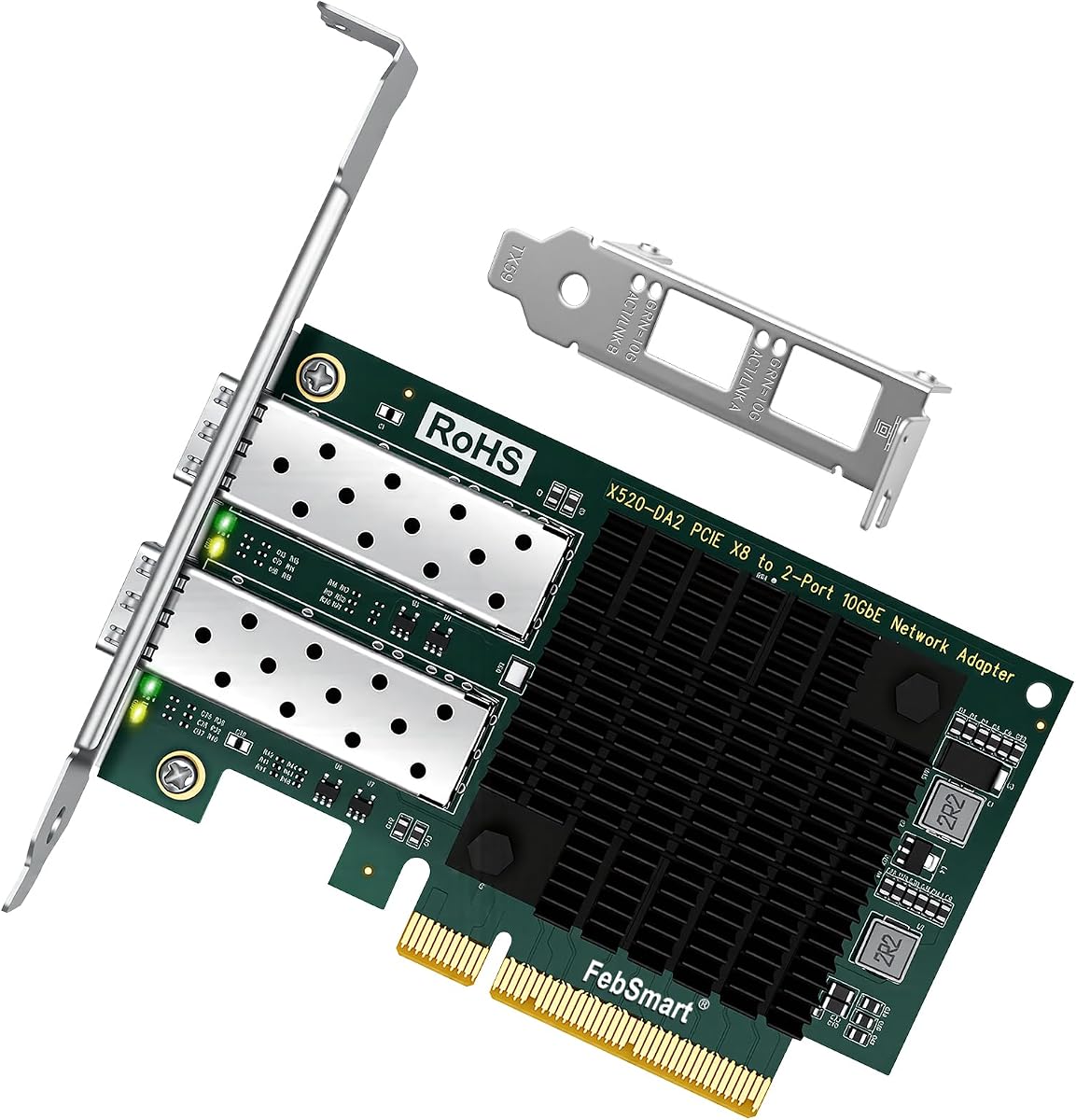
The FebSmart X520-DA2 delivers two 10GbE SFP+ ports through an Intel 82599ES controller and holds a 4.8 rating. It is one of the strongest choices for buyers who want more than a single high-speed link without moving to 25GbE. Dual connectivity can support aggregation, separate storage and management networks, or straightforward separation of traffic classes.
We may earn a commission when you buy through this link, at no additional cost to you.
The PCIe 2.0 x8 interface provides a stated total bandwidth of 40 Gbps and works in x8 or x16 slots. Each port supports 10GbE and 1GbE media, including 10GbE SFP+ transceivers paired with LC fiber cables, SFP+ AOC cables, and DAC cables. The card supports LAN and SAN uses, along with IEEE 802.3ae, IEEE 802.1z, IEEE 1588, PXE, FCoE, and storage-over-Ethernet functions.
For virtualized systems, support for Intel Data Direct I/O Technology, VMDq, SR-IOV, on-chip QoS, traffic management, and Flexible Port Partitioning is important. The card also supports Open Fabrics Enterprise Distribution and Open Fabrics Windows Distribution. Plug-and-play operation is listed for several Windows Server releases, while consumer Windows systems require installation of the appropriate IXGBE driver. Linux support includes major enterprise and desktop distributions.
This model is a compelling option for a NAS, server, virtualization host, or advanced desktop that needs two SFP+ links. It provides enough bandwidth for simultaneous 10GbE paths while remaining less specialized and generally less demanding than a 25GbE SFP28 adapter. The two-port layout, server-oriented offload features, and high rating distinguish it from single-port alternatives. Confirm driver needs, switch configuration, and available slot width before installation.
A pair of 10GbE ports can divide storage, management, and user traffic or work together in an aggregated configuration. This flexibility is valuable in server and virtualization environments where one shared link may become a bottleneck.
VMDq, SR-IOV, Flexible Port Partitioning, QoS, and traffic management support a more structured virtual networking approach. The two-port design also gives administrators room to separate traffic by purpose.
We may earn a commission when you buy through this link, at no additional cost to you.
Choosing a fiber optic network interface card starts with the network design, not the advertised headline speed. Match the card's port count, line rate, media, controller, PCIe footprint, and software support to the switch, optics, host, and workloads that will actually use it.
A single SFP+ port is enough for a basic server, workstation, or NAS connection, while two ports can support aggregation, separate storage and application networks, redundant paths, or direct links to another host. The StarTech card provides two 1GbE SFP ports, the FebSmart X520-DA2 provides two 10GbE SFP+ ports, and the CX4121A provides two 25GbE SFP28 ports. Consider not only today's traffic but also whether failover, management separation, or future expansion is likely.
The advertised link rate must be supported by the adapter, switch, optics, storage, and remote endpoint. A 10GbE card is appropriate for large file transfers, virtual machine traffic, and high-resolution media, while 25GbE is aimed at larger clustered workloads. The 1GbE StarTech model is more appropriate for management, ordinary file access, and links where cost and compatibility matter more than throughput. The Realtek and 10Gtek cards in particular are designed around 10GbE operation, so slower switch ports may not be usable.
Fiber adapters need the correct module type, optical or copper medium, connector, wavelength, and distance range. SFP+ systems may use single-mode or multimode optics, DAC, or AOC media, but not every card accepts every module. The FebSmart X520-DA1 explicitly supports several third-party media families, while the CX4121A requires SFP28-compatible equipment for its full 25GbE rate. The single-port 82599EN card includes a multimode module, which is convenient but must still match the fiber path.
The card's host interface determines which motherboard slots it can use. The Realtek RTL8127 and the included-module 82599EN card use a narrow x1 design that can fit wider slots, while the LinksTek X520-DA1 and FebSmart X520-DA2 need x4 or x8-class arrangements depending on the model. The CX4121A uses PCIe 3.0 x8 and can negotiate down to x4 lanes. Also check the chassis height, available clearance, and whether a low-profile bracket is included or must be substituted.
The controller influences driver availability, management tools, offloading, and virtualization behavior. Intel I350 and Intel 82599 families are common choices for server and enterprise use, with features such as checksum offload, flow control, jumbo frames, and virtual-device support. Realtek can provide a simpler general-purpose 10GbE path, while the Mellanox ConnectX-4 Lx controller in the CX4121A adds RDMA over RoCE and advanced data-center functions. Choose the controller whose driver model best fits the host operating system.
Compatibility is more than a list of logos. Consumer Windows versions may require explicit driver installation, even when Windows Server recognizes the card immediately. Linux systems may need IXGBE, i40e, or another driver depending on the controller. The CX4121A supports a broad server and virtualization set, whereas the Realtek RTL8127 explicitly does not support ESX or ESXi and is limited to Linux kernels through version 6.15. Confirm the exact operating-system release, kernel, and hypervisor version before purchasing.
Features such as SR-IOV, VMDq, Flexible Port Partitioning, QoS, traffic management, iSCSI, FCoE, NFS, and RDMA over RoCE can materially change how a card behaves in a server environment. The Intel-based dual-port and premium options provide the broadest enterprise feature sets, while the Realtek card focuses on general connectivity and basic VLAN and flow-control functions. Select advanced features when a hypervisor or storage platform will actually use them, not simply because they appear on the specification list.
A 10GbE or 25GbE controller can generate meaningful heat, particularly during sustained transfers, so the card's cooling design and the host airflow deserve attention. The Asus XG-C100F uses a built-in aluminum heatsink, while the StarTech card also includes a heatsink. The FebSmart X520-DA1 is described as using a passive heatsink that runs warm and may benefit from additional airflow in a silent case. Consider thermals alongside the card's dimensions, connector clearance, and serviceability.
Before installation, shut down the computer, disconnect its power, and use appropriate electrostatic-discharge precautions. Open the case, identify a compatible PCIe slot, and check whether the card needs a full-height or low-profile bracket. Connect the card to the motherboard slot without forcing it, secure the bracket, and reinstall the case. Keep the SFP cage area clear so the card is not pressed sideways by a poorly aligned enclosure.
Install the appropriate driver for the card's controller and operating system. Windows Server may recognize some adapters automatically, while consumer Windows versions, Linux distributions, and hypervisors may require the vendor or Intel driver package. After the system starts, confirm that the network interface appears, install the correct SFP, DAC, or AOC media, and connect the fiber or copper path. Check link speed, duplex mode, MTU settings, VLAN configuration, and the negotiated rate rather than assuming the card is operating at its maximum specification.
For routine care, keep the SFP port and module dust-free, inspect cables for bends or damaged latches, and avoid exposing the card to moisture or severe temperature changes. Do not hot-swap modules or cards unless the specific product and platform explicitly support it; the 10Gtek X520-DA1, for example, does not support hot swapping. When changing an optical module, power down or follow the safe removal procedure recommended for the host and switch, then reseat the module and verify that the link returns.
A fiber optic network interface card is a PCI Express adapter that adds a network connection to a desktop, workstation, NAS, or server. It commonly uses an SFP, SFP+, or SFP28 cage so the administrator can choose a compatible optical transceiver, DAC cable, or AOC cable. It is especially useful for long cable runs, high-speed storage, and server environments.
Only when the switch has a compatible SFP+ port and a matching link rate. A normal RJ45 switch cannot accept an SFP+ card directly, and many SFP+ switches still support only 1GbE or 10GbE rather than 25GbE. Verify the switch model, port type, and negotiated speed before purchasing the card or transceiver.
The card provides the interface, while the SFP or SFP28 module converts the card's electrical signal to the selected optical or copper medium. Some products, such as the 82599EN Single SFP+ card, include a multimode module. Other cards generally require separate compatible modules, and the module must match the fiber type, distance, connector, and line rate.
A 10GbE card is sufficient for many workstations, NAS systems, and conventional servers, while a 25GbE card can handle denser storage, clustered virtualization, and high-performance computing traffic. The faster card also requires compatible SFP28 infrastructure and may offer advanced functions such as RDMA over RoCE. The correct choice depends on the end-to-end network, not merely the adapter.
Yes, provided the desktop has an available PCI Express slot, adequate clearance, and a compatible driver. The card must also match the slot width and physical bracket required by the case. Consumer Windows systems may need manual driver installation, and the included bracket should be checked before purchase if the enclosure is compact.
RDMA over RoCE allows compatible systems to transfer data with low latency and reduced processor involvement. It can benefit clustered storage, virtualization, and high-performance compute environments, but the operating system, driver, switch, and fabric must all support the intended configuration. The CX4121A is the card in this guide that explicitly highlights RDMA over RoCE.
You need a low-profile bracket if the card will be installed in a small-form-factor desktop, 1U or 2U server, or another enclosure that cannot accept the full-height bracket. Several products include both, while the card itself may arrive with one bracket preinstalled. Confirm the chassis dimensions and included hardware before ordering.
It depends on the exact appliance and hypervisor. The FebSmart X520-DA1 lists detection in Proxmox, TrueNAS, UnRAID, ESXi, and several NAS environments, while other cards have narrower or different support statements. Confirm the appliance model, hypervisor release, controller driver, and any vendor-specific guidance before purchasing.
The StarTech 2-Port GbE SFP card is the leading all-around choice for buyers who value two flexible ports, open module support, broad OS compatibility, and enterprise management features. The 10Gtek X520-DA1 stands out as a budget-focused server card with an Intel controller, while the CX4121A is the premium recommendation for dual 25GbE links, RDMA, and advanced virtualization or storage workloads.
Most buyers should first match the adapter to the existing switch and media, then confirm the PCIe footprint, bracket, operating system, and driver requirements. A single 10GbE SFP+ port may be sufficient for a workstation or NAS, a dual-port design offers more topology flexibility, and 25GbE is justified only when the surrounding infrastructure and workload can benefit from it. A copper-based TX401 can be sensible when the network is already designed around 10GBase-T and multigigabit switches.
Finally, confirm the current product details, module requirements, and system compatibility at the time of purchase. Prices, driver packages, firmware, and product listings can change, and the included components or supported operating systems may also vary by seller. A careful compatibility check before ordering is the surest way to avoid a fast card that cannot connect to the rest of the network.