
Dell SE2426H
4.7Editor score
144Hz fluid motion
One-millisecond MPRT response
IPS wide viewing angles
Dual HDMI connectivity
A gaming monitor without a PC can turn a compatible console, handheld, laptop, smartphone, or streaming device into a more immersive entertainment setup. The right model should balance smooth motion, accurate color, useful ports, and a screen shape that suits your available space without creating a complicated installation.
We compared all ten products by examining their stated resolution, refresh rate, response time, adaptive synchronization, color coverage, brightness, connectivity, mounting options, and portability. The guide covers portable gaming monitors as well as larger desktop displays that can be paired with compatible consoles and other devices without a traditional gaming PC.
Each recommendation highlights the product's strongest use case, from compact travel setups to high-refresh-rate console gaming. Product ratings and specifications can change over time, and current prices vary by retailer, seller, promotion, and availability, so readers should verify the latest listing details before purchasing.
4.7Editor score

4.4Editor score

4.4Editor score
As an Amazon Associate we earn from qualifying purchases.
The comparison below organizes every display by its core gaming specifications, portability, connectivity, and practical suitability for use without a traditional gaming PC. It is designed to make the tradeoffs between screen size, motion speed, color quality, and setup convenience easier to understand.




The InnoView 23.8-inch 180Hz portable monitor is a strong all-around recommendation for gamers who want more screen space without setting up a conventional desktop PC. It pairs a 2560×1440 QHD panel with a 180Hz refresh rate, giving fast action smooth motion while retaining enough resolution for detailed games, console menus, and streaming interfaces. Its 4.4 rating reflects a well-rounded feature set with broad device compatibility.
We may earn a commission when you buy through this link, at no additional cost to you.
The standout qualities are the balance between portability and usable screen size, the fast IPS panel, and a stand that adjusts from zero to 180 degrees. FreeSync, HDR support, and a stated 100% sRGB color gamut are useful for games that use saturated colors. Two full-featured USB Type-C ports, an HDMI port, a 3.5mm audio connection, and built-in speakers reduce the need for separate accessories when the source device supports the relevant functions.
The main compromise is size. A 23.8-inch screen is more substantial than the most travel-friendly portable monitors, so it may not fit a small gaming bag or a compact desk. Reaching the advertised 180Hz also depends on the connected source and cable, and a portable display cannot independently run console games or provide PC-level performance. Those limitations are reasonable for a flexible gaming monitor that bridges desktop and mobile use.
Choose this model if you regularly travel with a laptop, handheld, phone, or supported console and want a generous QHD canvas with unusually high refresh capability. It is especially attractive for players who value a larger portable screen more than minimum weight. For a stationary setup with a similar feature focus, the Samsung Odyssey G55C offers a more conventionally roomy and curved desktop alternative.
A 180Hz refresh rate makes this a compelling choice for fast games when the source can also output at that rate. The short rendering interval, FreeSync support, and low-input-lag positioning are designed to keep motion clean and responsive during competitive play.
USB-C and HDMI connectivity make the monitor adaptable to compatible laptops, phones, game consoles, and handheld systems. Built-in speakers are convenient for casual gaming, although external headphones or a sound system may still be preferable for competitive or cinematic play.
We may earn a commission when you buy through this link, at no additional cost to you.
The EVICIV 18.5-inch portable monitor is an appealing practical choice for console, handheld, laptop, and phone users who want a larger gaming canvas without carrying a full desktop display. It offers a 120Hz refresh rate, a stated 1ms response time, FreeSync, and 125% sRGB coverage. Its 4.4 rating suggests strong customer satisfaction across performance, portability, and everyday versatility.
We may earn a commission when you buy through this link, at no additional cost to you.
The product data emphasizes an 18.5-inch panel with ultra-thin bezels, creating a spacious display without the footprint of a conventional gaming monitor. A universal 75x75mm VESA pattern and a 360-degree adjustable bracket allow it to sit on a desk, attach to a monitor arm, or be mounted vertically. The included lightweight sleeve has multilayer shock-absorbing foam and a soft microfiber interior for protection during travel.
Its most important limitation is resolution. The listed product information does not identify the EVICIV as a QHD or 4K model, so buyers should examine the final resolution specification and interface details on the listing. A source also needs to support 120Hz to realize the monitor's full refresh-rate advantage. Despite that consideration, the compact size and included travel protection make it a sensible value-oriented option.
This is a strong recommendation for players who frequently game away from a desk and need a screen that is easier to carry than the 23.8-inch InnoView. It also works for users who want one portable display for gaming and productivity. Buyers prioritizing QHD detail or very high refresh rates should instead examine the InnoView 280Hz or UPERFECT QLED models.
The included sleeve is a meaningful convenience for a portable monitor. Its layered foam and microfiber lining help protect the screen during transport, making it easier to move the display between home, travel, and event locations.
The 75x75mm VESA mount and 360-degree bracket expand the available viewing positions. Desktop placement, wall mounting, monitor-arm attachment, portrait orientation, and low-angle gaming can all be considered without relying on a separate fixed stand.
We may earn a commission when you buy through this link, at no additional cost to you.
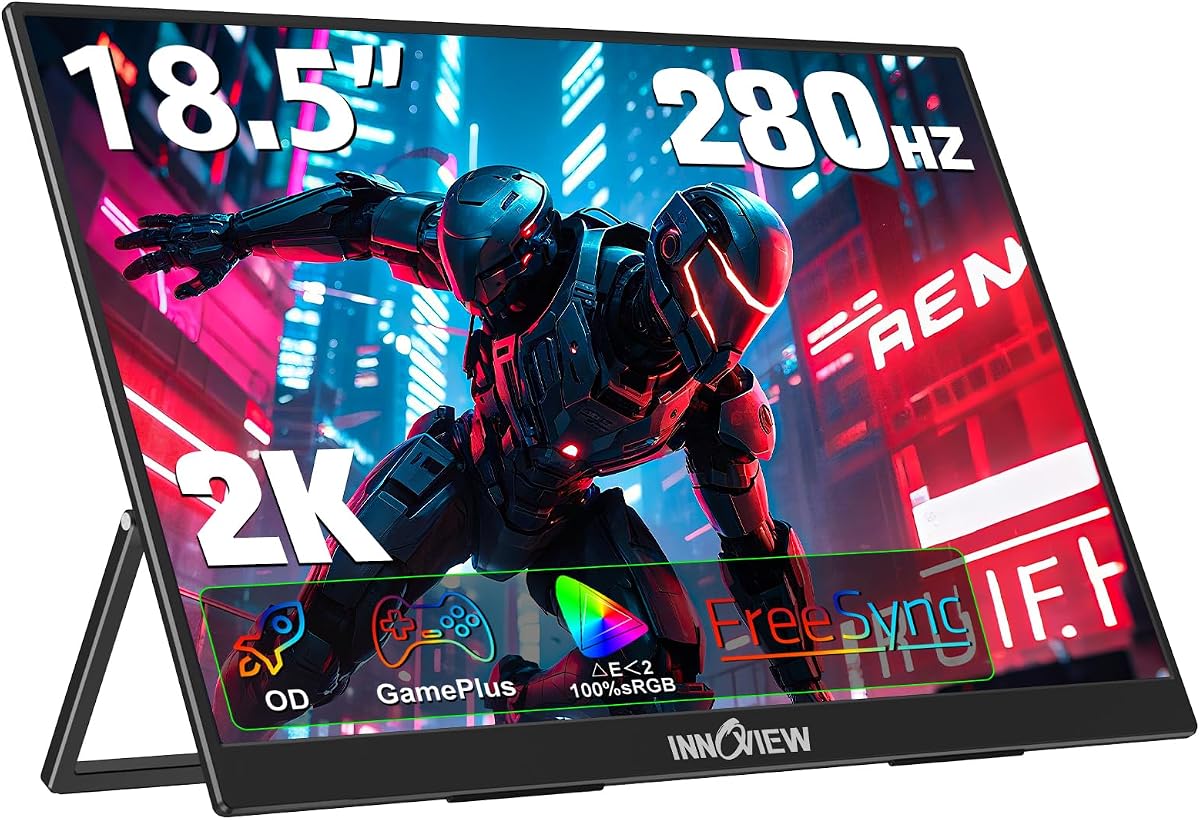
The InnoView 18.5-inch 280Hz portable gaming monitor is built for players who want the highest stated refresh rate in a compact secondary display. It combines a 2560×1440-class QHD presentation with 280Hz motion, FreeSync, overdrive acceleration, HDR, and GamePlus features. Its 4.2 rating remains positive, reflecting a specialized performance proposition rather than a conventional value-focused design.
We may earn a commission when you buy through this link, at no additional cost to you.
The monitor provides 16.7 million colors and 100% sRGB coverage, making it suitable not only for competitive gaming but also for work, creative tasks, and entertainment. Customizable crosshairs and an FPS mode add practical tools for shooters. Two full-function Type-C connections, a standard HDMI port, and DisplayPort give users options when connecting a console, laptop, PC, tablet, or phone.
The critical caveat is that 280Hz is a source-dependent ceiling. The product information explicitly notes that the connected device must be capable of delivering the same refresh rate, and many portable game sources cannot do so. It also warns that a power supply may be required to prevent flickering caused by insufficient device output. These requirements make the monitor less universal than simpler 120Hz or 144Hz alternatives.
Buy this model if you already own a capable gaming source that can drive QHD at 280Hz and want a portable display without giving up extremely fast motion. It is less compelling as a general console-only screen unless the console's supported output mode aligns with the display's capabilities. Users wanting similarly fast motion in a more conventional format should compare the SANSUI 240Hz and Dell 144Hz options.
GamePlus crosshairs and an FPS mode are useful additions for compatible console, handheld, or laptop gaming. They provide quick visual references without requiring the complexity of a full desktop configuration.
The combination of QHD resolution and a 280Hz ceiling suits sources capable of driving that mode. The monitor's value depends less on theoretical peak speed and more on whether the attached device can realistically produce matching frames.
We may earn a commission when you buy through this link, at no additional cost to you.
The ViewSonic VX1654 is a compact gaming monitor designed for travelers who want a dedicated display without a desktop PC. It combines a 16-inch 1920×1080 IPS panel with a 144Hz refresh rate and AMD FreeSync. At only 1.5 pounds and approximately 0.7 inches thick, it is among the more travel-conscious options in this guide, earning a 4.2 rating.
We may earn a commission when you buy through this link, at no additional cost to you.
Single-cable USB-C connectivity is a major practical benefit. The display supports 60W two-way power delivery, allowing a compatible laptop to be charged while the image is transmitted. Mini-HDMI and dual USB-C inputs also give users alternatives for consoles and other devices. The integrated kickstand supports portrait and landscape orientations, while the included cover helps protect the portable screen.
The 1080p resolution is modest beside the QHD models here, and fine interface text or distant game details may appear less crisp. Mini-HDMI also differs from full-size HDMI, so users should confirm that their source cable and adapter match. As with every high-refresh display, the source must support the desired mode, and FreeSync only provides its intended benefit with compatible hardware.
This monitor is best for a lightweight travel gaming kit, particularly for someone alternating between a laptop, supported console, or other compatible device. It may be less suitable for a permanent gaming station where higher resolution, larger size, or stronger color performance is the priority. Its portability, charging capability, and straightforward stand make it a well-rounded mobile companion.
The 60W two-way USB-C function is particularly useful when the display serves as a laptop extender. A compatible cable can carry video and charge the computer simultaneously, reducing desk clutter during work or gaming sessions.
A weight of 1.5 pounds and a thickness of about 0.7 inches keep this monitor manageable in a bag. The included durable cover provides an additional layer of protection between trips.
We may earn a commission when you buy through this link, at no additional cost to you.
The ARZOPA Z1FC is a straightforward portable gaming monitor for users who want a 144Hz display without carrying a full-size screen. Its 16.1-inch 1920×1080 IPS panel, 106% sRGB color coverage, and adjustable kickstand cover the essential needs of console, handheld, laptop, phone, and desktop gaming. The product carries a 4.4 rating and a straightforward plug-and-play design.
We may earn a commission when you buy through this link, at no additional cost to you.
Two fully functional USB Type-C connections and a Mini HDMI port allow flexible source selection, and the listing specifically cites compatibility with laptops, Mac systems, Xbox, PS5, and Steam Deck. Users can switch between horizontal and vertical views, which is useful for wide console games, vertical content, messaging, and compact productivity layouts. No setup software or driver downloads are required.
The display does not include adaptive synchronization or FreeSync, which may matter for users accustomed to tear-free synchronization in a desktop environment. It also offers only Full HD resolution. Console users should consult the manual for the appropriate connection sequence, especially when a source may not negotiate the intended refresh rate automatically.
The Z1FC is a good fit for a compact secondary gaming setup, especially where a lightweight 144Hz panel matters more than QHD detail or adaptive synchronization. It also serves well as a travel display for compatible handhelds and laptops. Buyers who need broader color coverage or synchronized high-refresh performance should consider the UPERFECT QLED or InnoView models instead.
USB-C and Mini HDMI give the Z1FC useful flexibility for modern consoles, handhelds, and computers. The plug-and-play approach keeps setup uncomplicated, although the included guidance should be followed for each source.
The tilt-adjustable kickstand and ability to rotate between landscape and portrait modes let users adapt the screen to different games and workflows. This is especially handy where desk space is limited.
We may earn a commission when you buy through this link, at no additional cost to you.
The SANSUI 32-inch 240Hz monitor is a large, high-refresh display aimed at gamers who want an expansive picture and very fast motion. It uses a 1500R curved 1920×1080 panel with a 240Hz refresh rate, 1ms MPRT response time, built-in FreeSync, and anti-flicker and low-blue-light features. Its 4.4 rating indicates a favorable response among users.
We may earn a commission when you buy through this link, at no additional cost to you.
HDMI and DisplayPort 1.4 connections are specified for operation up to 240Hz, and a DisplayPort cable is included. Color performance is supported by 125% sRGB coverage, 16.7 million display colors, 300 nits of brightness, HDR technology, and a 3500:1 contrast ratio. A 178-degree wide viewing angle and tilt adjustment make it practical for a permanent gaming station.
The main weakness is the Full HD resolution across a 32-inch panel. While motion can be extremely quick, image density trails the QHD Samsung and InnoView options. The monitor has no built-in speakers, and the recommended viewing distance is about 1.2 meters, so desk depth and room layout matter. Reaching 240Hz also depends on the source device and game mode.
Choose this display when a large screen and high refresh rate are your priorities and you want a large curved screen for compatible console or source-device gaming. It is a strong fit for fast competitive titles and a stationary setup. If sharper desktop rendering, higher color brightness, or a more advanced curved QHD panel matters, the Odyssey G55C or UPERFECT QLED may be a better fit.
The 1500R curve wraps the picture around the viewer more closely than a flat panel, while the 240Hz ceiling is suited to very fast motion. This makes the monitor appealing for action-heavy console gaming and high-refresh compatible sources.
HDMI and DisplayPort 1.4 are specified to support refresh rates up to 240Hz. A DisplayPort cable is included, reducing friction for a new desktop or game-room installation.
We may earn a commission when you buy through this link, at no additional cost to you.
The SANSUI 24-inch 160Hz monitor combines a moderately curved panel with high-refresh gaming in a size that suits many desks. It offers Full HD resolution, a fast VA panel, a 160Hz refresh rate, 1ms MPRT, and FreeSync compatibility. The 4.4 rating supports its position as a capable, approachable option for console and high-refresh source setups.
We may earn a commission when you buy through this link, at no additional cost to you.
Gaming utilities include a crosshair, game timer, black-level adjustment, and separate FPS, RTS, movie, and standard modes. Display specifications list 110% sRGB coverage, 300 nits of brightness, a 3000:1 contrast ratio, 16.7 million colors, and HDR. The monitor includes one HDMI 2.0 port and one DisplayPort 1.4 port, each specified for up to 160Hz.
Its Full HD resolution is the clearest trade-off, particularly if the screen will also serve as a desktop display. Curved panels can also make small text handling less natural for some users, while the absence of speakers limits casual media use unless external audio is added. Source compatibility and the selected game mode still determine the actual refresh rate.
This monitor suits a gamer who wants a smaller curved screen, fast motion, and useful on-screen tools without moving to a large 32-inch model. It is a sensible choice for a console-focused room or a desk where a 24-inch footprint is easier to manage. Buyers seeking sharper QHD imagery should examine the Odyssey G55C, while frequent travelers should consider a genuinely portable display.
Dedicated FPS, RTS, movie, and standard modes make it easy to tailor the display to different content. The crosshair and timer add value during competitive sessions without requiring additional equipment.
At 24 inches, the curved design is easier to accommodate on an ordinary desk than a larger 32-inch model. The included tilt adjustment and 75x75mm VESA compatibility provide additional setup flexibility.
We may earn a commission when you buy through this link, at no additional cost to you.
The UPERFECT 18-inch QLED is the premium portable choice in this guide, combining a 2560×1600 resolution, 144Hz refresh rate, QLED color performance, and a 400-nit brightness rating. It is designed for gamers, streamers, and creative users who want a sophisticated display without a traditional gaming PC. Its 4.4 rating reflects a favorable reception of the feature-rich portable design.
We may earn a commission when you buy through this link, at no additional cost to you.
Coverage of 100% DCI-P3 is particularly notable for wide-gamut media and color-sensitive creative work. HDR support, FreeSync, a black stabilizer, backlight optimization, and eye-care features including flicker-free operation, low blue light, and anti-glare treatment round out the display. At 2.3 pounds, 0.4 inches thick, and with a 0.15-inch bezel, it remains highly portable.
The product information recommends a 30W or higher USB-C power adapter for optimal 2K at 144Hz. That requirement adds a small burden to a truly minimal travel kit, and a source must also support the intended resolution and refresh rate. Although the product is portable, it is not as lightweight or compact as the ViewSonic or ARZOPA models.
This is the recommendation for buyers who prioritize image quality, wide color, brightness, and premium portability over the lowest possible weight. It works particularly well for compatible handheld and laptop gaming, media consumption, and creative tasks. If the budget is more constrained or a high-refresh source is unavailable, the Dell SE2426H or ViewSonic VX1654 offer simpler paths.
Full DCI-P3 coverage gives the QLED panel a clear advantage for vivid games and media. The 400-nit brightness also supports HDR presentation in suitable environments, making this a stronger fit for content creators than most basic portable monitors.
The slim chassis, narrow bezel, and low weight preserve portability despite the higher-resolution panel. Dual USB-C and Mini HDMI connections support modern laptops, phones, and consoles, while the 75x75mm VESA mount allows desktop or wall placement.
We may earn a commission when you buy through this link, at no additional cost to you.
The Samsung Odyssey G55C is a compelling stationary gaming monitor for users who do not need a traditional PC but still want a premium console-like display at a larger scale. It combines a 32-inch 1000R curved QHD panel with a 165Hz refresh rate, 1ms MPRT response time, AMD Radeon FreeSync, and HDR10. Its 4.4 rating indicates a broadly positive response.
We may earn a commission when you buy through this link, at no additional cost to you.
QHD resolution provides 1.7 times the pixel density of Full HD, giving menus, subtitles, and game environments more visible detail than the lower-resolution models in this guide. The tighter 1000R curvature is designed to fill peripheral vision and pull the viewer into the action. HDR10, deep blacks, luminous whites, Eye Saver Mode, and reduced screen flicker support longer viewing sessions.
FreeSync can reduce tearing when the connected device and game support synchronization. A console, laptop, or other source must also be able to drive the desired resolution and refresh rate, so buyers should check interface and mode support. The 32-inch size also requires a suitable desk and sufficient viewing distance, making it less practical for travel or compact spaces.
Buy the G55C if your priority is a large, sharp, immersive gaming experience and you have room for a desktop display. It is especially well suited to console gaming, streaming, and high-refresh compatible devices. For a smaller setup, the Dell SE2426H provides a straightforward alternative, while travelers should look to one of the portable monitors.
QHD pixel density produces a noticeably more defined picture than Full HD at a comparable viewing size. This benefit is especially useful for console interfaces, detailed environments, and games with small on-screen information.
Eye Saver Mode reduces blue light, while flicker reduction is intended to limit visual fatigue during long gaming sessions. These features complement the curved panel and high-refresh motion for a more comfortable stationary setup.
We may earn a commission when you buy through this link, at no additional cost to you.
The Dell SE2426H is a value-focused desktop-style gaming monitor that can serve compatible consoles, handhelds, and other sources without a traditional PC. It offers a 23.8-inch 1920×1080 IPS panel, a 144Hz refresh rate, 1ms MPRT response, and AMD FreeSync. Its 4.7 rating is the highest among the ten products, making it an encouraging choice for straightforward gaming setups.
We may earn a commission when you buy through this link, at no additional cost to you.
The IPS panel provides wide 178-degree horizontal and vertical viewing angles and consistent color presentation from many positions. TÜV Rheinland 3-star certification indicates that blue-light and eye-comfort considerations were evaluated. The display also uses thin bezels, supports tilt adjustment, and includes two HDMI connections according to the title and product information.
The main limitation is Full HD resolution, which is less detailed than the QHD alternatives. The listed feature set is focused and does not mention many gaming utilities, built-in speakers, or broad mounting support beyond tilt. Users requiring a curved panel, wider port selection, or a more elaborate physical design may find one of the dedicated gaming monitors more suitable.
Choose the SE2426H if you want a simple, well-rated gaming monitor for a compatible device and do not need portability or QHD detail. Its 144Hz rate, fast response, FreeSync support, and eye-comfort certification create a strong foundation for console and general gaming. It is also a practical choice when a traditional 24-inch desktop footprint is easier to manage than a larger curved display.
The 144Hz refresh rate and 1ms MPRT target crisp motion in fast games. FreeSync support can further improve consistency when the source device supports synchronization.
IPS technology and 178-degree viewing angles help maintain consistent visuals when the user is not seated directly in front of the screen. This is useful in smaller rooms and gaming positions that are less rigid.
We may earn a commission when you buy through this link, at no additional cost to you.
Choosing a gaming display for use without a conventional PC means considering the source device as carefully as the monitor. Resolution, refresh rate, latency, ports, power requirements, portability, and mounting options should be matched to the games and devices you actually plan to use.
A monitor cannot manufacture a stronger signal than the connected console, handheld, laptop, phone, or streaming device provides. Check whether the source supports the monitor's desired resolution and refresh rate, and whether it can negotiate those modes over the available cable. A 240Hz screen will not deliver 240Hz frames from a source limited to 60Hz, and some portable displays require a separate power supply. Compatibility should therefore be checked before any other feature.
Full HD is adequate for many console games and portable setups, while QHD provides sharper menus, text, and environments. A larger panel can make action more immersive, but it also requires more desk space and a comfortable viewing distance. Portable users must balance screen area against size, while stationary gamers may favor a 24-, 32-, or even larger curved display. Resolution alone does not determine image quality, but it strongly affects visible detail.
Higher refresh rates can make motion appear smoother and reduce the time between an input and its visible result. The 120Hz to 160Hz range is versatile, while 180Hz to 280Hz offers additional headroom for compatible competitive sources. Response-time claims also differ: MPRT and GtG measurements are not directly interchangeable, so treat them as relative indicators. The practical result depends on the game, source, display mode, and the source's ability to produce enough frames.
FreeSync can coordinate a compatible display and source to reduce tearing and stuttering. It is valuable for high-refresh laptop or desktop gaming, but its benefit depends on source support and the mode in use. The ARZOPA Z1FC explicitly lacks adaptive synchronization, while several other products include it. Gamers who experience visible tearing or inconsistent pacing should give synchronized operation more weight, whereas a source that does not support it will not benefit from the feature.
USB-C is convenient for modern laptops and phones because one cable may carry both video and power, while HDMI remains important for many consoles. DisplayPort is useful for high-refresh desktop sources. Check whether USB-C ports support video, data, and charging, and note the difference between full-size HDMI and Mini HDMI. For portable 2K or high-refresh modes, a sufficiently powerful USB-C adapter may be necessary to avoid flickering or unstable operation.
Portable monitors are measured by more than diagonal size. Weight, thickness, bezel width, stand stability, and protective accessories all influence daily portability. A built-in kickstand is convenient for quick positioning, while a VESA mount or flexible bracket allows wall mounting, monitor-arm attachment, portrait use, and low-angle viewing. The 16-inch ViewSonic is especially compact, the 23.8-inch InnoView offers more screen area, and the UPERFECT balances premium features with a slim but still substantial body.
Color coverage matters for vivid games, HDR media, and creative work. Standard sRGB is sufficient for many console experiences, while wider DCI-P3 coverage offers more flexibility for editing and entertainment. Brightness should be considered alongside room lighting rather than in isolation. Flicker reduction, low-blue-light modes, and anti-glare treatments may improve comfort during extended sessions. Eye-care certifications are helpful, but personal sensitivity and viewing environment still influence the result.
A curved screen can feel more immersive, but curvature does not improve clarity by itself. Flat IPS panels often provide consistent viewing angles, while 1000R and 1500R curves wrap more closely around the viewer. Check VESA compatibility, included hardware, tilt ranges, and whether a separate arm is needed. Audio also varies: some portable monitors include speakers, while desktop models may require headphones or external speakers. A setup that feels cluttered can undermine an otherwise capable display.
Begin by identifying the source device and its maximum supported resolution, refresh rate, and connector type. Connect the monitor with the appropriate cable, attach the power supply if the manual or product listing requires one, and select the matching display mode on the console, handheld, laptop, or phone. If motion looks inconsistent, verify that the source is actually outputting the advertised refresh rate rather than silently falling back to a lower mode.
Use the stand, kickstand, bracket, or VESA mount to establish a stable position. Keep the screen within a comfortable viewing distance, avoid blocking ventilation openings, and use headphones or external speakers when the monitor's own audio is insufficient. For portable displays, install the protective cover or place the unit in its sleeve before moving it. Do not leave a large curved panel unsupported near the edge of a desk, and follow the manufacturer's guidance when changing orientation.
Clean the panel with a soft, lint-free microfiber cloth and avoid pressing hard on the surface. Do not use ammonia-based cleaners, solvents, or spraying liquid directly onto the display. Keep food and drinks away from the screen, periodically inspect cables and connectors, and allow the device to cool before packing it away. Updating the connected console or laptop, checking compatibility after a system change, and cleaning the ports can prevent avoidable setup problems.
Yes, if the monitor is compatible with a console, handheld, laptop, phone, or other source that can send a compatible video signal. It cannot independently run games, but it can enlarge the picture and provide features such as a higher refresh rate, QHD resolution, HDR, or wider color. Check the source's output modes and the monitor's supported inputs before buying.
The correct cable depends on the source and monitor. USB-C is common for laptops, phones, and some handhelds, while HDMI is widely used with consoles and computers. Mini HDMI requires a Mini HDMI cable, and some high-resolution or high-refresh modes need a full-featured USB-C cable and a sufficiently powerful adapter. Confirm that the USB-C port supports video as well as data or charging.
Flickering can result from insufficient power, an undersized USB-C adapter, an inadequate cable, or a source that cannot support the selected resolution and refresh rate. Start by using the recommended power supply and cable, then lower the resolution or refresh rate to test stability. The InnoView 280Hz listing specifically notes that external power may be required to prevent output-related flickering.
A higher refresh rate can make motion smoother, but it only helps when the connected source supports that rate in the selected game mode. Many console games and modes have lower maximum refresh rates, so a 144Hz or 160Hz monitor may not display anything above 60Hz. High-refresh models are most useful with compatible laptops, handhelds, and PCs.
Full HD is a practical choice for compact portable displays and many console setups. QHD offers finer detail, especially on larger screens, but requires a compatible source and suitable output configuration. If your primary device is a console, confirm its supported resolution; if you also use the display for work or browsing, QHD may provide a more comfortable viewing experience.
Yes, most of the portable models support common extended-screen workflows, including horizontal and vertical orientations. Compatibility with your computer's operating system and the monitor's USB-C video support should be confirmed. For a clean setup, look for full-function USB-C ports and, ideally, two-way charging so one cable can transmit the image and power the laptop.
A 16-inch model is easiest to carry, an 18.5-inch model offers a stronger balance of portability and screen area, and a 23.8-inch portable display is more suitable when desk space and a large image matter. Larger 24- to 32-inch desktop monitors are better for permanent console rooms. The best size depends on portability, viewing distance, and the dimensions of your available surface.
The InnoView 23.8-inch 180Hz stands out as the most balanced portable recommendation because it combines a generous QHD screen, high refresh rate, broad connectivity, and flexible positioning. The EVICIV 18.5-inch is a more travel-oriented alternative, while the InnoView 18.5-inch 280Hz targets owners of a source capable of driving that unusually high refresh rate. Each serves a different idea of portable gaming performance.
For a permanent setup, the Samsung Odyssey G55C offers the strongest combination of QHD detail, a 32-inch curved canvas, and 165Hz motion. The UPERFECT 18-inch QLED is the premium portable option for wide color, brightness, and refined media performance, while the Dell SE2426H provides a simpler 24-inch path with 144Hz motion, FreeSync, and eye-comfort certification. Prioritize source compatibility first, then choose the balance of resolution, refresh rate, and portability that matches your actual gaming routine.
Before ordering, verify the current product listing, supported source modes, included cables, power requirements, and availability. Ratings, software support, port configurations, and specifications can change, and retailer promotions can alter the value equation. Taking a few minutes to confirm compatibility will prevent most disappointments and help ensure that the chosen monitor delivers the intended experience without a traditional gaming PC.