
Apple Magic Keyboard Case
4.3Editor score
Haptic glass trackpad
Backlit scissor keys
USB-C charging passthrough
A keyboard case can transform an iPad Pro 13 M4 into a more practical laptop-style device for typing, browsing, video calls, note-taking, and creative work. The best options combine a comfortable keyboard, responsive trackpad, flexible viewing stand, secure magnetic connection, and reliable protection in a portable design.
We compared ten keyboard cases using the supplied specifications, focusing on M4 and M5 compatibility, typing features, trackpad size and gestures, viewing angles, backlighting, connectivity, protection, portability, and overall value. The list covers Apple, Logitech, ESR, Typecase, Nillkin, Harvopu, and other alternatives.
Each review explains who the case is best for, where it stands out, and which compromises may matter to you. Ratings and availability can change over time, and current prices fluctuate, so readers should compare the latest listing details before making a final purchase.
4.3Editor score

4.4Editor score

4.4Editor score
As an Amazon Associate we earn from qualifying purchases.
The comparison below evaluates all ten cases across their core design, input hardware, viewing support, protection, and M4 compatibility, helping readers identify the option that best matches their preferred workflow.



The Apple Magic Keyboard Case combines an unusually polished physical design with tight integration for the iPad Pro 13-inch M4 and M5. Its 4.3 rating reflects a generally favorable user reception, particularly for the glass trackpad, scissor-key mechanism, and smooth two-cantilever hinge. It also adds a dedicated ten-key function row that many competing cases do not provide.
We may earn a commission when you buy through this link, at no additional cost to you.
Its standout feature is the built-in glass trackpad with haptic feedback and support for familiar Multi-Touch gestures. The keyboard itself feels purpose-built for extended iPad use, with backlit scissor keys and enough spacing to encourage touch typing. USB-C pass-through charging is a subtle but meaningful convenience, allowing the tablet to charge while the keyboard remains attached and in use.
The trade-offs are mostly about value and adjustability rather than quality. This is the premium option in the group, and some users may find alternatives that provide a broader selection of angles or more elaborate backlighting for less. The product also focuses on a minimalist design, so buyers looking for a thick rugged shell, a large pencil holder, or many viewing positions may prefer another case.
It is best suited to iPad owners who value Apple’s native design language, effortless magnetic attachment, precise gesture navigation, and a dependable function row. Anyone already invested in an Apple-oriented workspace will find the integration especially coherent. For those priorities, it remains one of the most polished keyboard cases for the iPad Pro 13 M4.
The glass surface delivers a smooth, familiar pointer experience, while haptic feedback provides a subtle response to clicks and presses. Gesture support means users can pinch, swipe, and navigate without repeatedly reaching toward the display.
Backlighting, a dedicated function row, and charging passthrough make the case practical for emails, documents, remote work, and longer typing sessions. It also folds around the tablet to protect both the front and back during travel.
We may earn a commission when you buy through this link, at no additional cost to you.
The ESR Multi-Mode Magnetic Stand is a flexible middle-ground option for iPad Pro 13-inch M4 and M5 owners. Its 4.2 rating suggests a generally positive experience, and the supplied features emphasize a strong magnetic floating stand, multiple viewing configurations, and a trackpad that supports tapping, pinching, and swiping.
We may earn a commission when you buy through this link, at no additional cost to you.
The case can shift between typing, raised-screen browsing, portrait use, and detached tablet operation. That flexibility makes it useful for email, video calls, entertainment, and lighter keyboard work. The extended multi-touch trackpad offers a larger navigation surface than a simple click pad and should appeal to users who regularly work with spreadsheets, documents, or web pages.
The main limitation is that the supplied specifications do not describe the keyboard backlight in the same detail as several competing products. If customizable illumination is important, you would need to verify the current listing. The design may also be less compelling for buyers who need the most rugged drop protection or an integrated Apple Pencil storage solution.
This ESR model is a solid fit for students, travelers, and hybrid workers who want more than a basic folio but do not require a premium ecosystem-specific accessory. Its detachable full-body cover, magnetic construction, and range of viewing modes make it a versatile choice for everyday use.
The cantilever stand supports a raised screen position that can improve viewing posture, while portrait mode suits calls and reading. Removing the back cover restores a simpler tablet setup without abandoning keyboard access.
A broad multi-touch trackpad lets users tap, pinch, and swipe in ways that are difficult to replicate efficiently on a touchscreen. It reduces reliance on repeated reach-and-tap motions during editing and browsing.
We may earn a commission when you buy through this link, at no additional cost to you.
The ESR Multi-Angle Keyboard Case is one of the most balanced options in this guide. Its 4.4 rating, detachable keyboard, generous trackpad, and broad range of viewing positions make it a strong all-around choice for the iPad Pro 13-inch M4 and M5. It works particularly well for users who move between typing, writing, drawing, reading, and gaming.
We may earn a commission when you buy through this link, at no additional cost to you.
The 112 by 70mm trackpad is 65% larger according to the supplied information and supports full iOS gestures. The keyboard attaches magnetically, so it can be removed for a cleaner tablet experience or attached for laptop-style work. The adjustable landscape stand spans 20 to 75 degrees, and an additional low-angle magnetic position supports writing and drawing. A built-in Pencil holder adds another practical touch.
The protective cover uses a form-fit design, reinforced Air Guard corners, and magnets intended to guard against scratches, drops, and dust. As a trade-off, the supplied product information does not detail keyboard backlighting, so buyers who require illumination in dark environments should verify that feature before ordering. The Pencil holder is also a storage location rather than an included stylus.
This is the recommendation for most buyers because it balances a large trackpad, flexible magnetic construction, useful angles, and solid protection without relying on an ecosystem-specific connector. It is particularly attractive for students, creative professionals, and mobile workers who want one case to support several ways of using the iPad.
The expanded trackpad gives gestures more physical space, making text selection, scrolling, zooming, and app switching more comfortable. Its dimensions also make it easier to perform precise cursor movements for creative applications.
Detaching the keyboard transforms the setup into a conventional tablet, while magnetic reattachment restores a full typing arrangement. The range of angles supports desks, couches, presentations, sketching, and low-light use without requiring a separate stand.
We may earn a commission when you buy through this link, at no additional cost to you.
The Typecase Edge adopts a magic-style magnetic format while adding extensive customization and productivity features. It carries a 4.2 rating and is designed specifically for the 13-inch iPad Pro M4 and M5 models. Its strongest visual feature is a keyboard with 11 backlight colors and three brightness levels.
We may earn a commission when you buy through this link, at no additional cost to you.
A floating cantilever stand allows the iPad to be adjusted to a preferred viewing angle, while the keyboard and rear cover attach magnetically for a laptop-like setup. The full-area trackpad supports navigation across the display, and dedicated keyboard shortcuts provide faster access to common iPadOS functions. Smart wake and sleep behavior means the keyboard can activate as the case opens and conserve power when it closes.
As with many visually elaborate cases, customization comes at the cost of additional complexity. More lighting settings and shortcut behavior may not be useful to every owner, and the supplied information does not establish the same level of rugged impact protection offered by purpose-built protective models. Buyers who prefer a minimal case may also find the design visually busy.
The Typecase Edge suits users who want a highly adjustable, feature-rich setup with strong keyboard illumination and shortcut access. It is especially useful for students, travelers, and productivity-focused users who switch frequently between typing, entertainment, and reading.
Eleven backlight colors and three brightness levels make the keyboard easier to read in dim rooms or late at night. The range also lets users choose an appearance that matches their workspace or personal preference.
Dedicated iPadOS shortcuts bring frequently used controls closer to the user's hands. This can be particularly useful during writing, editing, browsing, and app-based work where repeated touchscreen navigation would otherwise interrupt the task.
We may earn a commission when you buy through this link, at no additional cost to you.
The Logitech Combo Touch brings a familiar established case-and-keyboard format to the iPad Pro 13-inch M4 and M5. Its 3.7 rating is the lowest among the ten products, but the core feature set remains appealing: a detachable wireless keyboard, a large multi-touch trackpad, an ultra-flexible kickstand, and form-fit protection.
We may earn a commission when you buy through this link, at no additional cost to you.
The Smart Connector provides instant, secure connectivity, and the keyboard is powered by the iPad without requiring a separate charging cable for the keyboard itself. Adjustable wireless backlighting supports typing in dim conditions, while familiar gesture controls allow swiping, pinching, and double-tapping. Users can leave the tablet in the case while switching between typing, sketching, reading, video, and calls.
The important caveat is the compatibility restriction for iPad Pro configurations with nano-texture glass. It is also not compatible with an iPad, and the product listing notes that the tablet is not included. While the detachable architecture is practical, the rating suggests that some users may have encountered issues or simply preferred alternatives with broader listed functionality.
The Combo Touch is best for users who value a recognizable keyboard design, straightforward attachment, and the convenience of iPad-powered connectivity. It is a sensible option for keyboard-focused productivity, although buyers should verify the exact finish of their iPad before purchasing.
The wireless keyboard offers adjustable backlighting and a layout designed to support regular typing. Detaching it from the kickstand allows the iPad to be used more freely for sketching, reading, and watching.
The Smart Connector supplies a secure connection and draws power from the iPad. This removes the need for a separate keyboard charging routine, although the overall design still benefits from routine case and connector care.
We may earn a commission when you buy through this link, at no additional cost to you.
The Harvopu Magnetic Keyboard Case combines a detachable design, colorful backlighting, and a rechargeable keyboard in a cost-conscious package. Its 4.4 rating is among the highest in this comparison, making it a notable option for iPad Pro 13-inch M4 and M5 users who want several convenience features in one accessory.
We may earn a commission when you buy through this link, at no additional cost to you.
Its magnetic keyboard can be attached for typing or removed for a less cumbersome tablet setup. A seven-color backlight with three brightness levels provides strong visibility options, while the high-sensitivity multi-function trackpad supports scrolling, swiping, and zooming. The keyboard uses Bluetooth and includes a simple Fn + C pairing sequence, with Fn + Q used to switch to the iOS system.
The rechargeable 500mAh battery can be charged through USB-C in approximately two hours and automatically sleeps after 15 minutes of inactivity. The case uses stain-resistant PU and flexible TPU materials, with a honeycomb inner mesh intended to assist heat dissipation. Three non-slip grooves provide viewing angles of 110, 120, and 130 degrees, which is useful but less flexible than the adjustment range of some rivals.
This case is best for budget-conscious buyers who want backlighting, a large functional trackpad, a rechargeable keyboard, and magnetic convenience. It also works well for general productivity, drawing, calls, and media consumption. Buyers should simply accept that Bluetooth pairing and a fixed set of angles make it less integrated than premium options.
The built-in 500mAh battery avoids disposable battery replacements and can be replenished with a USB-C cable. Automatic sleep helps preserve power during periods when the keyboard is not being used.
The combination of PU and TPU materials offers shell protection while resisting stains that can be wiped away. Three stable viewing positions keep the tablet upright for typing, writing, calls, and viewing.
We may earn a commission when you buy through this link, at no additional cost to you.
The Typecase Edge+ emphasizes portability while preserving the detachable, floating-stand format associated with modern premium iPad keyboard cases. Its 4.2 rating indicates a favorable reception, and the supplied specifications highlight a notably thin back shell, strong N54H magnets, a 33% larger touchpad, and support for both portrait and tablet modes.
We may earn a commission when you buy through this link, at no additional cost to you.
The detachable Wingshell back case weighs 110 grams and is only 1.4mm thick according to the product information. That makes it easier to carry than a bulky all-in-one keyboard. The magnetic arrangement secures the keyboard and back case, while the floating stand adjusts up to 135 degrees. Eleven adjustable backlight colors and dedicated shortcuts for brightness, volume, search, and other functions support extended use.
The principal tradeoff is that this is a model-specific design, explicitly limited to the listed M4 and M5 configurations. The back shell provides useful grip and everyday protection but is not presented as a heavy-duty drop-protection system. Users who need a hard rugged frame should consider the Nillkin instead, while those who prioritize Apple’s native ecosystem may favor Magic Keyboard.
The Edge+ is a compelling choice for mobile professionals and students who want protection, typing, and a large trackpad without carrying a heavy case. Its detachable structure makes it particularly convenient for switching between focused keyboard sessions and lighter tablet use.
At 1.4mm and 110 grams, the detachable back cover adds grip and scratch protection without creating a large amount of extra bulk. The keyboard can remain at home while the slim cover travels with the iPad.
N54H magnets support a secure connection between the keyboard and rear shell. The wider floating stand can move through a broad range of angles while maintaining a stable surface for typing, viewing, or presenting.
We may earn a commission when you buy through this link, at no additional cost to you.
This Wireless Keyboard Case has the highest listed rating in the guide at 4.6, giving it a strong user-reception signal. It is designed exclusively for the 13-inch iPad Pro M5 and M4 models and centers on a rotating stand, a wireless keyboard with trackpad, adjustable lighting, and a transparent protective shell.
We may earn a commission when you buy through this link, at no additional cost to you.
Its 360-degree omnidirectional rotating stand allows the tablet to be repositioned for typing, drawing, presenting, portrait use, or conventional tablet handling. The keyboard includes seven lighting colors and three brightness levels, while the smooth trackpad supports laptop-style navigation, editing, and application switching. The hardshell case adds protection against drops, scratches, and dust, with precision cutouts for access to ports.
The transparent design distinguishes the case visually and allows the iPad’s finish to remain visible. However, the supplied specifications do not mention battery capacity, recharge time, keyboard pairing method, Pencil storage, or exact protection materials. Those omissions make it especially important to review the current listing before buying if those features matter to you.
This is an attractive recommendation for buyers who prioritize the stand’s flexibility and value the high user rating. It works well for presentations, drawing, general productivity, and entertainment. Among the alternatives, it stands out for combining an unobtrusive transparent appearance with a wide range of physical positions.
The rotating base allows the display to move smoothly between landscape and portrait positions. Users can lock an angle for stability, which helps maintain a comfortable viewing posture during longer sessions.
Seven-color illumination and three brightness levels make the keyboard usable in different lighting conditions. At the same time, the rigid transparent shell guards the tablet while preserving its original visual design.
We may earn a commission when you buy through this link, at no additional cost to you.
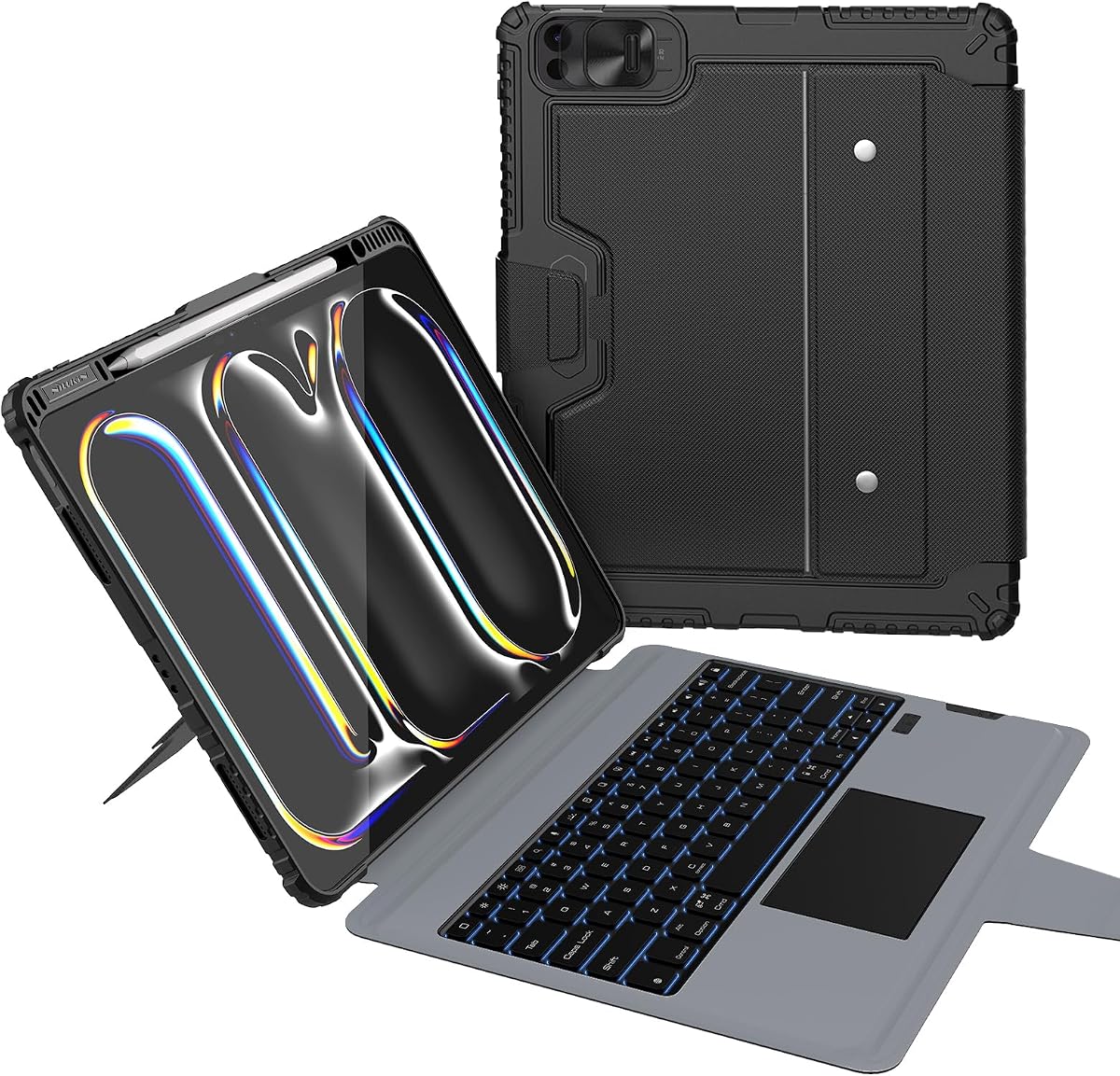
The Nillkin Rugged Detachable Keyboard Case is built for owners who place their iPad in demanding environments. Its 4.3 rating and extensive protection specifications distinguish it from the slimmer cases in the guide. The supplied information cites 1.2-meter drop testing, corner air-cushion bumpers, a heavy-duty TPU frame, and a reinforced polycarbonate back.
We may earn a commission when you buy through this link, at no additional cost to you.
Its carbon-steel hinge supports a broad 0 to 180-degree range, allowing use in laptop, low-angle drawing, portrait, and detached tablet modes. The 1.4mm scissor-switch keys provide travel and feedback, while seven backlight colors and three brightness levels support different environments. A multi-touch trackpad handles common iPadOS gestures and includes palm rejection for more controlled typing.
The rechargeable 500mAh battery is stated to provide up to 100 hours of active typing and 180 days of standby. It sleeps after 10 minutes of inactivity and wakes with a key press. These are manufacturer-supplied figures that can vary with use and settings. The case is also heavier in concept than a minimalist design because it prioritizes reinforced construction, and the Apple Pencil is not included.
The Nillkin is best for travelers, field workers, students, and anyone who regularly carries an iPad in a bag or uses it away from a desk. If drop protection and broad stand adjustment matter more than a slim profile, this is one of the strongest choices in the roundup.
Corner air cushions, a heavy-duty TPU frame, and a reinforced polycarbonate back are designed to absorb impacts and resist scratches. A sliding camera cover also protects the lens and offers privacy when the cover is closed.
The kickstand supports typing, drawing, upright viewing, and portrait use, while the keyboard detaches for ordinary tablet handling. This range makes it practical for travel, field work, presentations, and entertainment.
We may earn a commission when you buy through this link, at no additional cost to you.
The TSQQST Clear Wireless Keyboard Case combines a futuristic transparent design with a rotating support system. It has a 4.3 rating and is intended for the iPad Pro 13-inch M4 and M5 models. Its visual identity is immediately distinct from the conventional fabric or black shells seen elsewhere in the guide.
We may earn a commission when you buy through this link, at no additional cost to you.
A 360-degree rotating base allows fluid repositioning for typing, sketching, streaming, and other activities, with five adjustable angles supplied in the specifications. The keyboard and trackpad provide laptop-style control for editing, productivity, and creative applications. Its seven-color glow adds visibility and visual flair in low-light environments.
The clear hard shell uses reinforced corners and shock-absorbent edges for protection against drops, scratches, and impacts. As a trade-off, the supplied information is less detailed than for several competitors and does not state keyboard battery capacity, charging time, or connection details. Those points should be confirmed from the current product listing before ordering.
The TSQQST case is best for buyers who value appearance, rotational flexibility, and a clear shell that showcases the iPad’s design. It can serve well for media viewing, light productivity, drawing, and everyday mobility, provided the current listing confirms the features most important to you.
The transparent panel highlights the tablet while reinforced corners and shock-absorbing edges add practical protection. Precision in fit and case weight should be considered carefully if portability is the highest priority.
A rotating base with five positions makes it easy to shift among typing, drawing, streaming, and viewing arrangements. The smooth movement offers a different experience from cases limited to a fixed kickstand.
We may earn a commission when you buy through this link, at no additional cost to you.
The best keyboard case balances accurate model compatibility, comfortable input, useful viewing positions, dependable connectivity, and enough protection for your normal routine. These factors matter more than decorative features because a case becomes part of the way you work with the iPad.
An iPad Pro 13-inch case must fit the physical camera and body layout of the M4 or M5 generation, not merely the marketed screen size. The products in this guide list relevant model numbers such as A2925, A2926, A3007, A3360, A3361, and A3362. Check the model number in Settings, General, About before buying, and also note the exact finish. Some cases exclude particular glass configurations, as the Logitech Combo Touch does for nano-texture glass, while other products explicitly warn that they do not fit iPad Air models.
In short, verify the model number and finish before choosing any case.
A useful keyboard should feel comfortable enough for ordinary messages, documents, and email rather than serving only as a decorative prop. Apple emphasizes a scissor mechanism and dedicated function row, Logitech offers a detachable wireless keyboard, and the Nillkin uses 1.4mm scissor-switch keys. Consider key spacing, travel, backlighting, shortcut keys, and whether the keyboard can be detached when you want to use the iPad as a normal tablet. A full-size layout is generally easier for sustained typing, but a compact layout can produce a smaller and more portable package.
In short, prioritize key comfort, layout clarity, lighting, and useful shortcuts.
The trackpad is as important as the keyboard for cursor-based work. Look for a genuinely multitouch surface rather than a simple click pad, and confirm support for pinching, swiping, double-tap, scrolling, and other gestures used by iPadOS. The ESR Multi-Angle case offers a specified 112 by 70mm surface, while the Typecase Edge+ lists a 33% larger touchpad. Apple’s glass trackpad includes haptic feedback, and the Nillkin emphasizes palm rejection. These features can materially improve precision, but the best trackpad is still the one that feels smooth and accurate for your hands.
In short, choose a responsive multitouch surface with useful gesture support.
The stand should support the way you use the tablet, not merely remain upright. A floating cantilever design is useful for conventional typing, while a low angle can make handwriting and sketching more natural. The ESR Multi-Angle case provides an adjustable landscape range and a separate low-angle position, the Nillkin supports an especially broad 0-to-180-degree range, and the TSQQST lists five rotating positions. Portrait support is important for video calls and document reading. Check both angle range and physical stability, because a wide range is not useful if the case rocks under light typing pressure.
In short, match angle range and stability to your most common tasks.
Apple’s Magic Keyboard uses magnetic attachment and requires no pairing or separate charging, while the Logitech Combo Touch uses a Smart Connector and is powered by the iPad. Other cases, including the Harvopu and Nillkin, use rechargeable 500mAh batteries, and some generic designs connect through Bluetooth. Each approach has maintenance implications: connector-based models avoid a separate battery, while Bluetooth allows more physical separation but requires pairing and occasional charging. Review the stated battery duration, recharge method, sleep behavior, and required shortcuts before assuming the keyboard will remain ready for spontaneous use.
In short, choose the power method that best matches your charging and pairing habits.
Protection ranges from slim magnetic covers to rugged reinforced shells. The Nillkin advertises 1.2-meter drop testing, air-cushion corners, a TPU frame, and a polycarbonate back, while the Typecase Edge+ prioritizes a thin 1.4mm shell weighing 110 grams. Apple folds its case around both sides of the tablet, and several ESR models use reinforced corners with full-body coverage. Consider whether the case will regularly encounter desks, travel, construction sites, children, or crowded environments. More protective materials often mean extra weight, so the strongest design is not automatically the most comfortable one.
In short, match shell strength to your risk of drops and your tolerance for extra weight.
Backlighting is valuable for travel, evening work, and dim lecture environments, but the options vary considerably. Apple offers backlit keys without a stated color selection, the Typecase Edge lists 11 colors, Typecase Edge+ also lists 11, and the Harvopu and TSQQST use seven-color illumination. Three brightness levels appear across several listings. Dedicated shortcuts for brightness, volume, search, and media controls can also reduce screen taps. These features are helpful, but they should complement rather than outweigh keyboard feel, trackpad performance, and case protection.
In short, use lighting and shortcuts as useful additions, not substitutes for core quality.
Apple Pencil storage, charging passthrough, port access, and case thickness can influence daily convenience. The ESR Multi-Angle and Nillkin include Pencil holders, while the Apple Magic Keyboard provides USB-C charging passthrough. The Typecase Edge+ separates a slim rear cover from the keyboard, making it easier to carry the iPad without the keyboard, whereas the Nillkin and other rugged designs prioritize a complete protective shell. Check whether the included accessories meet your needs, remember that the Pencil is generally sold separately, and consider the size and weight of the complete arrangement when carrying it with a charger or notebook.
In short, include stylus storage, charging access, and carried weight in your decision.
Begin by confirming that the model number and device finish match the case, then attach the iPad securely to the magnetic or fitted back cover. For Bluetooth models, power on the keyboard and follow the manufacturer’s pairing shortcut, such as holding Fn + C for three seconds on the Harvopu, then use Fn + Q to select the iOS system. Magnetic or connector-based cases should attach evenly without forcing the tablet into position.
Choose a stable viewing angle before beginning detailed typing, drawing, or editing. Low angles suit handwriting and stylus work, conventional laptop angles suit documents and email, and portrait positions are useful for calls or reading. Keep the case on a firm surface when possible, and avoid pressing hard on the keyboard edge or hinge because side pressure can destabilize a floating or rotating stand.
For care, keep the keyboard and trackpad free of dust, crumbs, oil, and sticky residue, and clean them with a soft, lightly dampened microfiber cloth. Avoid abrasive cleaners or moisture around openings, ports, hinges, and magnetic contacts. Rechargeable keyboard models should be kept within their charging instructions, while magnetic and connector models benefit from periodic inspection for lint or debris. Always follow the specific manufacturer guidance supplied with the case.
All ten cases in this guide are listed for the iPad Pro 13-inch M4, and most also support the M5 generation. Compatibility can still vary by exact model number and finish, so check the model number in Settings, General, About before ordering. The Logitech Combo Touch specifically excludes certain nano-texture glass configurations, and these cases should not be assumed to fit iPad Air or older iPad Pro models.
A detachable keyboard can be removed to use the iPad as a conventional tablet while the protective cover remains attached. This is useful for reading, drawing, browsing, and gaming because it eliminates the weight and bulk of the keyboard. A fixed keyboard offers a simpler laptop-like arrangement but usually remains physically attached to the tablet at all times.
A trackpad can make cursor-based tasks, editing, browsing, and app switching much more efficient than repeated touchscreen taps. It is particularly useful for spreadsheets, documents, and desktop-style workflows. For mainly reading, video, and note-taking, a keyboard without a trackpad may still be sufficient, while users working at a desk will generally benefit from a larger multitouch surface.
The Typecase Edge+ explicitly emphasizes portability with a detachable back shell listed at 1.4mm and 110 grams. Other magnetic folio designs can also be slim, while rugged models such as the Nillkin generally add more material for impact protection. The most portable choice depends on whether you prioritize low weight or a strong shell for travel and demanding environments.
Yes, backlighting is especially helpful during evening work, travel, and dim classroom use. The listed cases offer varying combinations of seven or 11 colors and three brightness levels, while the Apple Magic Keyboard provides backlit keys without a stated customizable color list. Backlighting is useful, but keyboard travel, layout, and trackpad responsiveness should remain the primary considerations.
Most of the cases are designed to allow stylus use, and the ESR Multi-Angle and Nillkin include dedicated Pencil holders. Other cases may permit use of the Pencil without a holder, depending on the magnetic layout. The Pencil itself is generally not included, and its magnetic attachment or charging behavior should not be assumed to work while the iPad is inside a particular protective shell.
Open Settings, choose General, select About, and look for the Model Number field. Relevant M4 identifiers listed for these products include A2925, A2926, and A3007, while M5 identifiers include A3360, A3361, and A3362. Also note the finish and any special glass configuration, since some accessories exclude particular versions even when the size matches.
It depends on the connection method. Apple’s Magic Keyboard and the Logitech Combo Touch draw their keyboard power from the iPad through the magnetic or Smart Connector arrangement. Bluetooth keyboard cases use their own rechargeable batteries, so they add a separate charging item but do not normally consume the tablet’s power while typing. Always follow the connection and battery guidance supplied by the manufacturer.
The ESR Multi-Angle Keyboard Case stands out as the most balanced overall recommendation because it combines a detachable magnetic keyboard, a large 112 by 70mm multitouch trackpad, a 20-to-75-degree stand, a low-angle writing position, reinforced protection, and a Pencil holder. It covers productivity, drawing, reading, and entertainment without forcing one fixed workflow on the owner.
Apple’s Magic Keyboard Case is the strongest premium choice for buyers who prioritize native integration, a haptic glass trackpad, a dedicated function row, and charging passthrough. The Harvopu is the practical budget-focused option, providing seven-color lighting, a rechargeable keyboard, a useful trackpad, and three stable angles. For maximum physical protection, the Nillkin Rugged Keyboard Case is better suited to demanding use.
Before buying, confirm the exact model number, finish, keyboard feel, trackpad size, connection method, battery arrangement, and viewing requirements. Prices, ratings, availability, and product details can change, so compare the current listing and manufacturer instructions at the time of purchase. The right case is the one that fits your iPad correctly and supports the tasks you expect to perform most often.