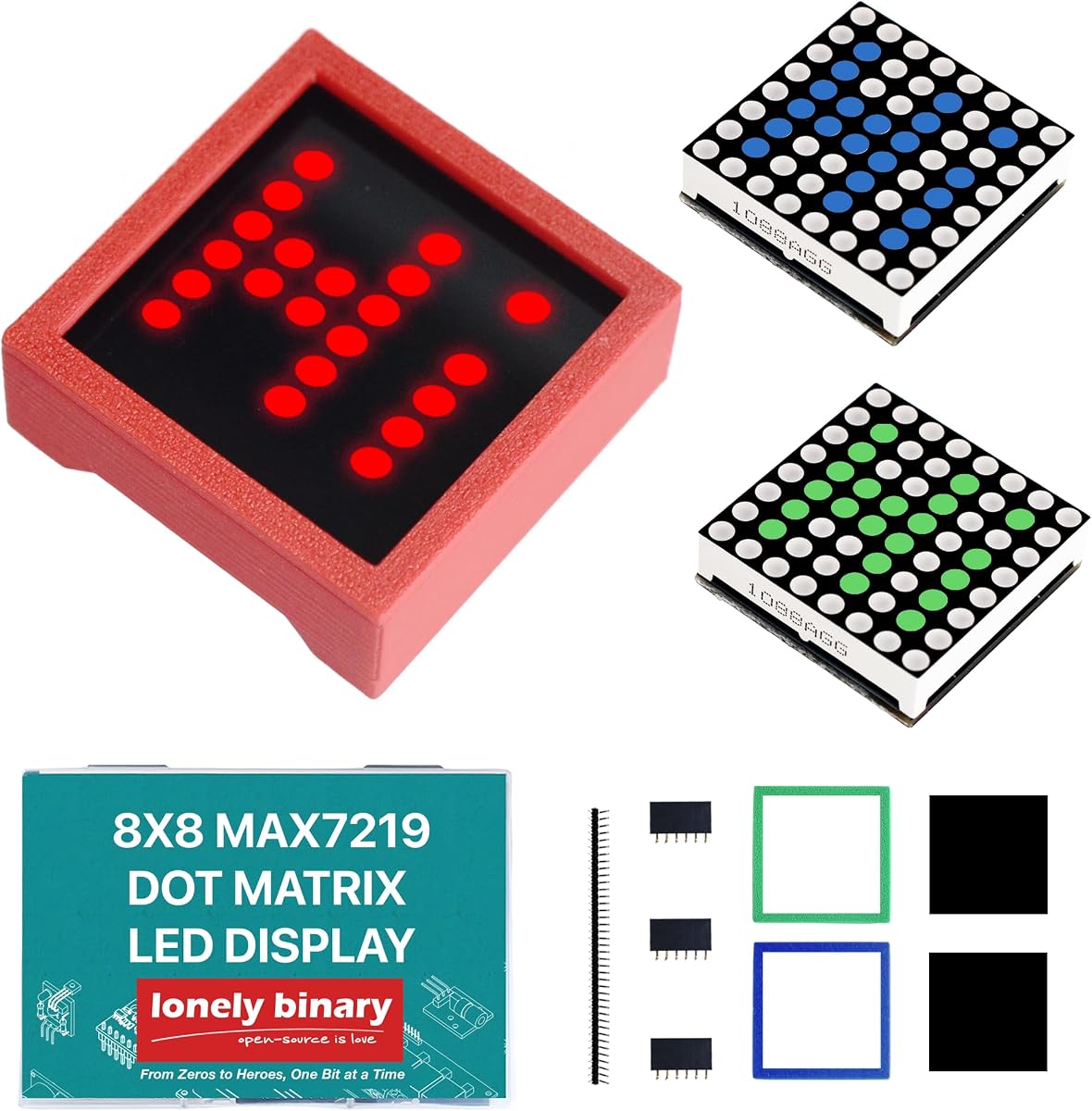
Lonely Binary 8×8 3-Pack
4.7Editor score
Three 8×8 LED modules
Onboard MAX7219 driver
Five-pin SPI interface
Enclosures and headers included
Discover the best LCD dot matrix modules for Arduino and microcontrollers, comparing screen size, resolution, backlighting, interfaces, ratings, and project
LCD dot matrix modules make it possible to add readable text, detailed graphics, status indicators, and animated displays to Arduino and microcontroller projects. The best choice depends on whether you need a conventional character LCD, a full graphic screen, or a programmable LED matrix.
The products in this guide were compared by display format, resolution, interface, voltage, dimensions, backlighting, controller features, supported platforms, and available customer ratings. The list includes 1602, 20×4, and 128×64 character or graphic LCDs, plus MAX7219 LED matrix kits designed for scrolling text and pixel graphics.
Each review explains the module's strongest features, practical trade-offs, and ideal project fit. The first three picks highlight convenient general-purpose options, while the remaining products show how module size, resolution, and bundled components change the possibilities. Prices and availability can change, so confirm current details before buying.
4.7Editor score

4.1Editor score

4.1Editor score
This side-by-side overview compares every module's display type, usable resolution, electrical interface, physical layout, and standout project features, helping narrow the field before a detailed review.




The Ximimark 12864 LCD Display Module combines a 128-by-64 graphic screen with a blue backlight, making it one of the most approachable options for projects that need more freedom than a standard character LCD can provide. Its 4.1 customer rating indicates generally favorable experiences, although it does not stand out as one of the highest-rated products in the guide.
We may earn a commission when you buy through this link, at no additional cost to you.
The integrated potentiometer gives the display a practical advantage because contrast can be adjusted directly on the module without relying entirely on software. The backlight is dimmable, allowing output to be tuned for bright rooms, dim workspaces, or enclosed projects. Library and example availability also reduces the learning curve for Arduino users who want to begin drawing icons, showing sensor data, or creating basic menus.
This is a single-module package, so buyers who want several synchronized screens will need additional units. The listing also does not emphasize unusually fast refresh performance, unusually wide viewing angles, or a particularly large character area. Those limitations are reasonable for a general-purpose graphic LCD, particularly when the priorities are a useful resolution, simple contrast adjustment, and straightforward integration.
The module is best suited to Arduino experiments, sensor dashboards, small graphing projects, and custom text or icon interfaces. It is also a strong option for anyone who wants one dependable graphic display without assembling an LED matrix. For those needs, it is the most balanced recommendation in the guide, combining useful screen space with convenient onboard controls and readily available software resources.
A 128-by-64 canvas can show custom characters, small diagrams, icons, and changing measurements. That makes the module useful when fixed character rows would not adequately represent the interface.
Contrast adjustment and a dimmable backlight are handled directly on the module. These controls help the screen remain readable in different lighting conditions without relying exclusively on code.
We may earn a commission when you buy through this link, at no additional cost to you.
This 128×64 graphic LCD module offers a bright, high-contrast screen with a wide viewing angle, making it useful when the display must remain legible from different positions. It targets five-volt systems and is stated to be compatible with Arduino Mega 2560 and Nano Due platforms, though buyers should still verify connector and library compatibility with their specific board.
We may earn a commission when you buy through this link, at no additional cost to you.
The module uses a full graphic resolution of 128 by 64 pixels, so it can render text, icons, simple charts, and custom graphics rather than being limited to a fixed arrangement of characters. A blue backlight improves visibility, while the wide viewing angle is particularly useful for instrument panels, environmental monitors, and desktop information displays where users may not always look straight on.
Two one-by-20-pin headers are included, which helps with initial assembly and breadboard or prototype work. However, the product information does not highlight an onboard contrast control, dimmable backlight, bundled examples, or a specific library. Those omissions may matter for buyers who value the Ximimark module's more clearly documented setup features.
This display is a sensible choice for makers who prioritize resolution, viewing flexibility, and compatibility with common five-volt Arduino boards over extensive listing support. It works especially well for custom dashboards and graphical status panels. Confirm the interface, required library, and connector arrangement before committing to a larger build, particularly if your project depends on a specific Arduino library.
The stated wide viewing angle makes the module more flexible for enclosures and angled installations. It can reduce the need to position every visible display perfectly square to the viewer.
Included pin headers make initial wiring and breadboard experiments more convenient. The user must still confirm that the header layout matches the intended controller and library.
We may earn a commission when you buy through this link, at no additional cost to you.
The two-pack of 1602 LCD modules offers a simple route into character-based displays, with each blue screen capable of showing 16 characters across two lines. It is a natural fit for beginners who need readable text from sensors, status messages, counters, and simple menus rather than full graphic rendering.
We may earn a commission when you buy through this link, at no additional cost to you.
Each module measures 80 by 36 millimeters and operates at five volts with a parallel interface. Compatibility is listed with controllers and one-by-16 interfaces, while the stated operating range of minus 20 to 70 degrees Celsius suits many indoor and general-purpose electronics projects. The two-module format is especially useful for split interfaces, dual readouts, or keeping one display reserved for status.
The parallel interface requires more connections than a serial display, and the fixed 16-by-2 character arrangement cannot provide the same design flexibility as a 128×64 graphic LCD. There is also no available customer rating in the supplied information, so prospective buyers should pay close attention to board compatibility and pin documentation.
This package is best for education, simple appliance interfaces, Arduino temperature displays, and beginner projects where character output and two included screens matter more than animation or elaborate graphics. Buyers should confirm that their controller board has enough available pins and that their preferred library supports this particular interface and controller arrangement.
The dual package supports designs that place information on separate panels, such as a measurement and status display. It also provides a spare for testing without buying another module.
A standard 16-by-2 format is easy to learn and works with many established Arduino examples. It is well suited to fixed labels, changing numeric values, and short status messages.
We may earn a commission when you buy through this link, at no additional cost to you.
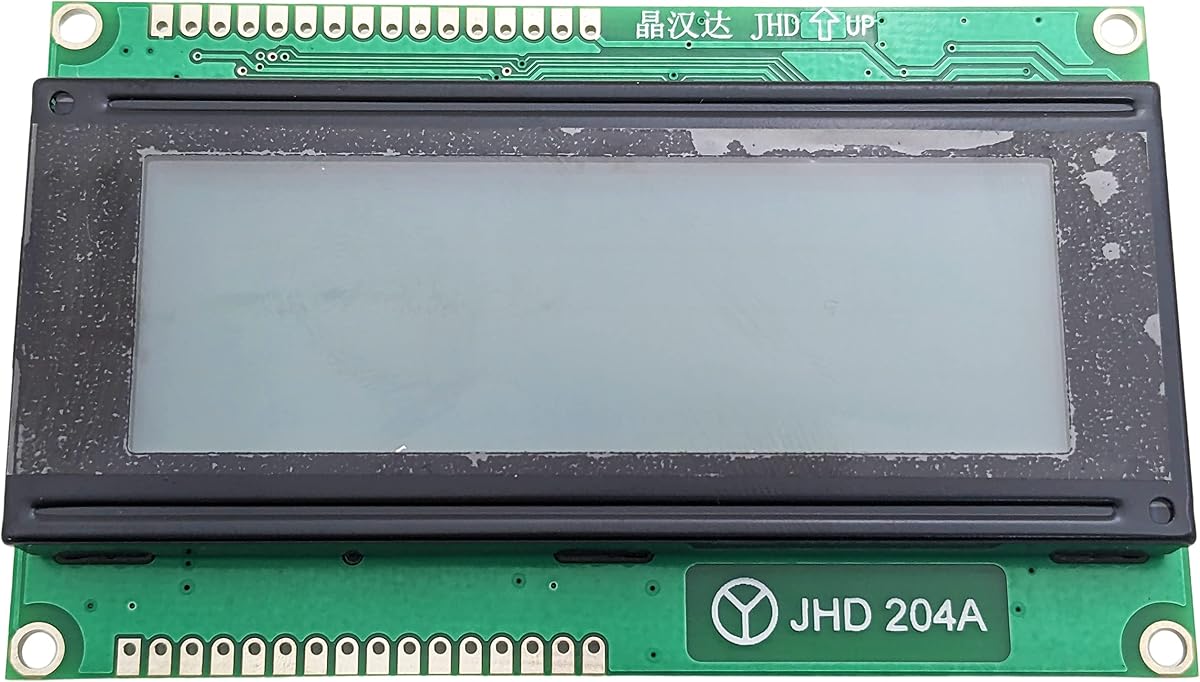
The Electronix Express JHD629-204A provides a conventional 20-character by four-line character layout, giving it substantially more text space than the smaller 1602 format. It is a logical choice for instruments that need labels, readings, operating states, and instructions visible at the same time.
We may earn a commission when you buy through this link, at no additional cost to you.
The module uses reflective, positive, gray display characteristics with a 5-by-7-dot character design. Its listed character size is 2.95 by 4.75 millimeters, and the complete module measures 98 by 60 by 9.5 millimeters. Having the driver and controller integrated makes the display easier to treat as a complete module rather than a collection of separate electronic components.
The listing does not provide a customer rating, brightness controls, detailed library information, or a clearly stated operating voltage. Those details should be checked in the product documentation and against the intended controller. It is also a single module, so a project requiring multiple displays must plan for additional units and adequate wiring space.
This is an excellent match for laboratory-style readouts, kitchen or workshop controllers, multi-line status panels, and educational demonstrations where four rows of characters are more useful than pixel art. Buyers who want a conventional LCD with generous text capacity should place it near the top of the shortlist, while those wanting animated graphics should choose an LED matrix instead.
The 20×4 layout can separate a title, measured value, operating mode, and instruction or alert. This improves clarity without requiring the complex drawing code needed for a graphic canvas.
An integrated driver and controller simplify the module's role in a project. The microcontroller handles commands and character data rather than directly driving every display segment.
We may earn a commission when you buy through this link, at no additional cost to you.
The Lonely Binary 8×8 3-Pack offers three independently controllable MAX7219 LED matrix modules, each containing 64 LEDs. Its 4.7 rating is the highest published rating among the products in this guide, indicating strong customer reception while still leaving room to consider practical constraints.
We may earn a commission when you buy through this link, at no additional cost to you.
One module is red, one is green, and one is blue. These are fixed-color panels rather than full-color RGB matrices, but the color assortment supports status indicators, layered pixel art, scrolling messages, and retro game displays. Every panel has an onboard MAX7219 driver with 16-level brightness adjustment, constant-current LED drive, and low-power shutdown.
Control uses five connections for power, ground, data input, chip select, and clock. The modules can be chained through labeled input and output ports, and basic soldering is needed to fit the headers. The included three-dimensionally printed PLA cases add protection and a finished appearance, but they can also make the assembly thicker than bare panels.
The stated platform support includes ESP32, ESP32-S3, ESP8266, Raspberry Pi Pico, STM32, C++, MicroPython, and CircuitPython. This broad compatibility, combined with sample code, makes the set appealing for learners, classrooms, desktop gadgets, and compact scrolling displays. It is the strongest compact starter kit in the guide when visual animation matters more than a conventional text screen.
The three fixed colors can represent different channels, create a wider chained panel, or provide a consistent visual theme. Each module remains independently controllable through its MAX7219 driver.
The custom-fit cases protect the boards from dust and scratches while improving the appearance of a finished build. They are useful for desktop, wall, or embedded installations.
We may earn a commission when you buy through this link, at no additional cost to you.
The HiLetgo MAX7219 Dot Matrix Module is a conventional Arduino-oriented 8-by-8 LED display with a 4.4 customer rating. It offers a direct path to creating icons, animations, simple games, counters, and pixel characters through a standard microcontroller ecosystem.
We may earn a commission when you buy through this link, at no additional cost to you.
The module operates at five volts, and a single board drives an 8×8 common-cathode matrix. Its dimensions are listed as 128 by 128 by 13 millimeters, and the board includes 64 fixing holes with a three-millimeter diameter. Those holes make it easy to mount the display in a case, panel, or custom frame without inventing a separate support structure.
The screen has only 64 pixels, so it is better for compact symbols than detailed images. Because the listing focuses on a single module rather than a multi-panel kit, buyers creating a scrolling sign will need additional compatible panels and appropriate wiring. It also does not list the protective cases or extensive platform-specific code that accompany the Lonely Binary bundles.
This display is a strong option for beginners who want a recognizable MAX7219 module, Arduino compatibility, and convenient mechanical mounting. It is especially suitable for pong, snake, score counters, status symbols, and small animated indicators. Projects that need a larger canvas should look toward the 32×8 modules or consider chaining several 8×8 boards.
The dense grid of three-millimeter fixing holes supports secure panel installation. This is useful for projects where a loose breadboard display would be inconvenient.
Using the MAX7219 means the controller handles multiplexing and current regulation for the matrix. Existing display examples can help reduce development time for common Arduino projects.
We may earn a commission when you buy through this link, at no additional cost to you.
This MAX7219 module is designed around an eight-digit driver board with a two-by-four display layout. Its 4.5 rating reflects a favorable customer response, and its support for both seven-segment and individual LED control gives it broader uses than a fixed numerical readout.
We may earn a commission when you buy through this link, at no additional cost to you.
The onboard MAX7219 can drive eight-digit seven-segment displays, bar graphs, or as many as 64 individual LEDs. A four-wire serial interface provides a straightforward connection to a microcontroller, while scan-limit settings, brightness control, and a test mode offer practical setup and diagnostic features.
Buyers need to inspect the included display arrangement and confirm that the board's control mode matches the intended use. BCD decoding can simplify conventional numeric entry, but direct segment control allows more precise custom patterns. Software configuration is therefore a central part of the product rather than a negligible detail.
The module suits clock faces, counters, temperature displays, segmented gauges, small bar indicators, and compact educational demonstrations. It is especially attractive when a project needs numeric flexibility in a small package. Users should verify the available library and register settings for their chosen development environment before beginning the final wiring.
BCD decoding is convenient for normal numbers, while direct segment control supports specialized symbols and custom layouts. This flexibility makes the board useful beyond ordinary counters.
The full illumination test helps identify display problems, and low-power shutdown can reduce consumption when the board is inactive. Brightness adjustment helps balance visibility with power use.
We may earn a commission when you buy through this link, at no additional cost to you.
The SunFounder LCD2004 uses a 20-by-4 character layout to provide a large, readable Arduino display. White characters against a blue background create a clear visual style, while its 4.5 rating places it among the better-reviewed products in this guide.
We may earn a commission when you buy through this link, at no additional cost to you.
The module operates at five volts and includes a 50-kilohm potentiometer for contrast adjustment directly on the board. Its dimensions are 97 by 59 by 12 millimeters, and the stated viewing area is 71 by 21 millimeters. Compatibility with Arduino and other microcontrollers makes it broadly useful for sensor interfaces, counters, and instructional projects.
This is a character display, not a pixel-addressable graphic screen. Custom icons are more limited than on a 128×64 graphic LCD, and there is no indication of advanced animation capabilities. The bright backlight may also be more prominent than necessary in a very dark enclosure, although the supplied information does not specify a manual backlight adjustment.
The LCD2004 is best for projects that need four lines of conventional text in a recognizable format, including classroom exercises, home automation panels, and microcontroller tutorials. It is a particularly strong choice for users who value simple setup, an onboard contrast control, and a clear four-line interface over animated LED graphics.
The 20×4 format can show a heading, a live sensor value, a status message, and a prompt simultaneously. That organization reduces the need to scroll through a small two-line display.
The onboard 50K potentiometer allows the characters to remain legible under different viewing conditions. It is especially helpful during early prototype testing.
We may earn a commission when you buy through this link, at no additional cost to you.
The Lonely Binary 32×8 3-Pack is the most visually capable kit in the guide, offering three long LED panels with 256 pixels each. It is designed for scrolling messages, clocks, scoreboards, visualizers, game graphics, and other projects that need a substantially wider canvas than an 8×8 display.
We may earn a commission when you buy through this link, at no additional cost to you.
Each module uses an onboard MAX7219 with 16-level software brightness control, constant-current LED drive, and low-power shutdown. The five-pin connection covers power, ground, data input, chip select, and clock. Listed support includes ESP32, ESP32-S3, ESP8266, Raspberry Pi Pico, STM32, Micro:bit, C++, MicroPython, and CircuitPython, making the package unusually versatile.
The set contains red, green, and blue fixed-color modules rather than full RGB panels. It also includes three three-dimensionally printed PLA cases, one long male header strip, and three female sockets. Soldering may still be necessary, and daisy-chaining multiple panels requires careful attention to input, output, power, and shared control signals.
This kit is the premium choice for makers building a visible scrolling ticker, layered pixel-art frame, retro game display, or desktop notification panel. The included hardware reduces the need to source cases and connectors separately, while sample code and the large module count accelerate the first build. It is less appropriate for tiny embedded projects where space and power are strict priorities.
A 32-by-8 panel can present readable text, progress indicators, and simple animations. Chaining panels creates wider displays for banners, clocks, scoreboards, and status boards.
Matching enclosures and connection hardware make the kit more installation-ready than a bare matrix. The additional components are particularly valuable for repeatable builds and educational kits.
We may earn a commission when you buy through this link, at no additional cost to you.
This two-pack of MAX7219 4-in-1 modules offers a practical middle ground between a single compact display and a large multi-panel kit. Its 4.6 customer rating is among the strongest published ratings here, while the two included boards provide enough material for paired indicators or the beginning of a chained display.
We may earn a commission when you buy through this link, at no additional cost to you.
Each module drives a full 8×8 common-cathode matrix of 64 individually addressable pixels. The stated operating voltage is five volts, and the slim board measures 128 by 128 by 13 millimeters. A five-pin SPI interface supports daisy-chaining, allowing multiple modules to be combined into a larger display when wiring and power requirements are handled correctly.
The 8×8 format remains limited for long text, so these modules are better suited to icons, small words, animations, counters, and game elements. Although the boards have 64 pre-drilled three-millimeter holes for mounting, the package does not include protective enclosures like the Lonely Binary kits. Actual LED panels may also differ from the MAX7219 driver board alone, so the package contents should be confirmed.
This product is a good fit for Arduino and five-volt microcontroller builders who want two expandable 8×8 displays. It can serve in dashboard indicators, simple games, status panels, or classroom exercises. For a long scrolling message or large visualizer, the 32×8 option offers more space, while this pair remains more compact and flexible for two independent displays.
The two boards can show separate readouts, act as left and right game views, or be chained into a wider panel. This flexibility is useful for prototypes that may change layout.
A grid of pre-drilled three-millimeter holes provides convenient attachment points. The mounting pattern supports more permanent installations than a temporary breadboard arrangement.
We may earn a commission when you buy through this link, at no additional cost to you.
Start by separating character LCDs, graphic LCDs, and LED matrix panels, then compare resolution, interface, electrical requirements, physical size, bundled hardware, and the software support your controller provides.
A graphic LCD provides individual pixel control across a defined canvas. The 128×64 modules in this guide can show icons, diagrams, small charts, and custom characters, making them more flexible than a character-only screen. An LED matrix is different again: it uses illuminated LEDs rather than a passive LCD and is the better choice for bright scrolling text, animations, games, and status graphics.
Choose the smallest canvas that comfortably fits the intended content. Larger displays consume more power, occupy more enclosure space, and require more careful layout planning. A high-resolution screen is not automatically better for a simple counter, while an undersized panel can force scrolling, abbreviation, or split-screen designs.
ESP32, ESP8266, and Raspberry Pi Pico boards commonly use 3.3-volt logic, so level shifting or a carefully verified interface may be needed. Arduino Uno and Nano-style boards are generally a more direct match for five-volt modules. Confirm the controller's supply limits, connector pinout, and library expectations before wiring a permanent project.
Count the available pins before choosing a module, especially when using a small microcontroller board. Favor a library with examples for your exact platform and module layout. A simple five-pin interface is usually convenient, but correct pin selection, chip-select handling, and initialization remain necessary for reliable output.
Backlighting improves visibility in dim environments but may create glare, increase power use, or make characters harder to read if brightness is poorly matched. A dimmable backlight gives the user more control. LED matrices always emit light, so their perceived brightness depends on resistor and driver settings, ambient light, and the software brightness level.
Pre-drilled mounting holes are useful for a stable final installation. Protective cases can improve appearance and protect exposed components, but they add to the total thickness. Always leave room for headers, wiring, and ventilation rather than measuring only the visible glass area.
Bundled accessories are not automatically better than bare modules. Some buyers already own suitable headers and cases, while others want the simplest possible starting point. Compare the complete contents rather than judging only by the number of LEDs or characters in the title.
Library quality also affects troubleshooting. Good examples show pin assignments and initialization order, while community activity can help when unusual wiring or display artifacts occur. Avoid designing around a product until its sample code has been reviewed and the required library can be installed in the development environment being used.
Begin by identifying the controller board, the module's voltage, pin arrangement, and required library. Wire power and ground first, then connect the data and control lines according to the module documentation. For a potentiometer-equipped LCD, adjust contrast after the backlight activates. For an LED matrix, start with a low brightness setting so current draw and glare remain manageable during the first test.
Upload the simplest available example before creating a custom interface. A successful test pattern confirms the wiring, initialization, and display orientation without introducing complex application code. Add brightness, contrast, scroll, or animation functions one at a time, then verify how the display behaves over several minutes. This staged approach makes it easier to distinguish hardware problems from application errors.
Handle the display board by its edges and avoid pressure on the glass, flex connectors, or LED panels. Keep the module away from moisture, conductive debris, and excessive heat. For daisy-chained matrices, confirm the order of data-in and data-out connections and avoid unnecessary extension leads. When a project is complete, disconnect power before changing wiring, and periodically inspect connectors for looseness.
Many are designed for Arduino-compatible use, but compatibility depends on voltage, logic levels, connector layout, and the available library. Five-volt Arduino systems are generally the simplest match for the modules listed here. Boards with 3.3-volt logic may require level shifting or a carefully verified signal arrangement.
A character LCD displays predefined positions for letters, numbers, and symbols, usually in a fixed row layout. A graphic LCD lets the program control individual pixels, enabling icons, diagrams, charts, and custom characters. Choose a character LCD for straightforward text and a graphic LCD when the interface design benefits from flexible layouts.
No. The 8×8 and 32×8 Lonely Binary packs include one red, one green, and one blue fixed-color module each. They are not individual panels that can mix red, green, and blue light on every pixel. Color mixing can be created across a larger arrangement, but each individual module produces only its assigned color.
Yes, the supported modules use labeled input and output connections for daisy-chaining. Connecting data out from one panel to data in on the next allows a controller to address a wider display. The chain must follow the correct order, and power capacity and signal integrity should be checked as the number of panels increases.
A 32×8 LED matrix offers the most practical canvas in this guide for readable scrolling messages. The 8×8 modules are better for icons, small words, and compact animations. A character LCD can show static or changing text without scrolling graphics, but it lacks the animated visual character of an LED matrix.
It depends on the package and project. Some modules include headers, while others may require headers to be attached. The Lonely Binary LED kits state that basic soldering is required for pin headers, although their package includes connection pieces. A 1602 module intended for a breadboard may be usable without soldering if suitable header connections are already present.
Start by adjusting the contrast with the onboard potentiometer, if one is provided. Then match the backlight or LED brightness to the ambient light, taking care to avoid glare. Correct orientation, adequate power, and a library configured for the module's actual interface also help produce clean, stable output.
Graphic LCD modules can show custom icons and small bitmap images because their pixels are individually addressable. MAX7219 LED matrices are better suited to animated pixel art, game graphics, and scrolling content. Conventional 1602 and 20×4 character modules are mainly limited to predefined characters, numbers, and symbols.
The Ximimark 12864 LCD is the strongest all-around choice for buyers who need graphics, an adjustable contrast control, a dimmable backlight, and Arduino-oriented software support. The Lonely Binary 8×8 3-Pack stands out for compact projects and offers the highest published customer rating, while the 32×8 3-pack provides the largest animated canvas and a more complete installation kit.
Prioritize the display type that matches the information you need to present, then verify voltage, interface, library support, and physical dimensions. Use a conventional character LCD for fixed text menus, a graphic LCD for custom icons and compact dashboards, and an LED matrix for scrolling content, games, and bright animated displays. Do not overlook the number of controller pins or the enclosure space required by the selected module.
Current prices, ratings, availability, and package contents can change over time, so review the live product listing before making a final decision. The links in this guide lead to the relevant modules, while the specifications and feature summaries are intended to make comparison easier. Checking the latest listing details will help ensure the chosen module still matches the planned project and platform.