
Akai Professional LPD8
4.4Editor score
Eight RGB-backlit MPC pads
Eight assignable Q-Link knobs
Four programmable preset slots
USB-powered Mac and PC operation
Explore the best MIDI pads for guitarists, comparing controls, sounds, connectivity, portability, and features for live and studio use.
MIDI pads give guitarists a tactile way to trigger samples, control effects, launch clips, and shape performances without relying entirely on a mouse or keyboard. A useful pad controller combines responsive pads, practical controls, dependable connectivity, and software support that suits your preferred DAW and working style.
We compared these ten controllers across pad count, velocity sensitivity, knob and fader options, DAW integration, audio or MIDI connectivity, portability, and suitability for stage use. The list covers compact beat-making pads, Ableton Live controllers, dedicated percussion units, and an advanced guitar-oriented effects sampler.
Each selection highlights the feature that makes it most useful to a guitarist, along with practical limitations to consider. Product ratings reflect the supplied customer feedback, while ratings and configurations can change. Check current prices and current software requirements before making your final purchase.
4.4Editor score

4.8Editor score

4.6Editor score
The table below compares every controller by its most important pad, control, connectivity, and performance features, making it easier to identify the right fit for guitar-based studio work, beat production, and live performance.


The Akai Professional MPD218 is a portable USB MIDI pad controller built around sixteen MPC-style pads, three dedicated pad banks, and eighteen assignable rotary potentiometers. Its 4.4 rating reflects a generally favorable balance of portability, tactile control, and production features, making it a natural choice for guitarists who want to trigger samples and manage virtual effects away from a full studio desk.
We may earn a commission when you buy through this link, at no additional cost to you.
The standout feature is the combination of pad capacity and physical controls. Sixteen thick pads can trigger drums, melodic samples, or effects, while three banks expand the working surface to 48 assignable positions. Eighteen knobs across three banks give guitarists direct access to DAW channels, virtual instruments, and plug-in parameters without navigating menus. Note repeat and full-level controls add expressive tools for looping and performance.
Its portable, USB-powered design is balanced against a few limitations. It is a controller rather than a self-contained instrument, so it depends on a computer and compatible software for sound generation. iPad or iPhone control is possible with Apple's separately sold Camera Connection Kit, and the included Ableton Live Lite and Drum Synth 500 expand the initial toolkit without turning the device into an all-in-one production system.
This is an excellent choice for a guitarist who wants a dedicated pad surface for a DAW, especially in a home studio, rehearsal room, or mobile setup. Choose the MPD218 when portability, numerous assignable knobs, and traditional MPC-style triggering matter more than having a built-in display or instrument keyboard.
Eighteen assignable knobs make it easy to place frequently used amplifier, delay, reverb, or virtual-instrument parameters under your fingers. The three knob banks help organize those assignments without filling the surface with duplicate controls.
The three dedicated pad banks provide 48 assignable positions, enough room for different song sections, sampled guitar textures, and effect variations. Dedicated bank controls reduce the need to scroll through software screens during a performance.
We may earn a commission when you buy through this link, at no additional cost to you.
The Akai Professional APC Mini MK2 combines 64 RGB pads, nine faders, and a compact footprint in a controller explicitly designed for Ableton Live. Its 4.6 rating reflects strong user reception, and the 8×8 matrix gives guitarists a practical way to launch clips, trigger loops, play samples, and build arrangements while keeping one hand near the strings.
We may earn a commission when you buy through this link, at no additional cost to you.
The visual pad feedback is particularly useful for live use. RGB colors communicate clip states and make it easier to identify sounds, sections, and effects from across a rehearsal space. Nine faders can handle mixer levels, pans, or device parameters, while Device mode gives access to Ableton macros. Drum Mode integrates with Drum Rack, and Note Mode provides a Smart Scale View for melodic playing.
Its strongest qualification is that Ableton Live is the center of the design. Although the controller works over standard USB and can trigger sounds in a broader setup, its pre-mapped clip-launching and device-control features are optimized for Ableton. The included Ableton Live Lite is useful for getting started, while virtual instruments such as Hybrid 3, Mini Grand, and Velvet add playable content.
The APC Mini MK2 is best for guitarists who build songs in Ableton Live or perform with clip-based arrangements. Select it when a compact grid, immediate visual feedback, and integrated mixer control are your priorities. It is less compelling for users whose primary DAW has no meaningful use for an 8×8 clip matrix.
The 8×8 RGB matrix is more than a set of sample triggers: it can launch loops, vocal clips, backing sections, and production ideas in Ableton Live. Color feedback reduces visual searching and makes the controller well suited to improvisation.
Eight assignable faders plus a master fader provide direct access to mixer channels, pans, or device controls. Note Mode also makes the pads useful for melodies, giving guitarists a second way to develop ideas without adding a separate keyboard.
We may earn a commission when you buy through this link, at no additional cost to you.
The Akai Professional LPD8 is the most budget-conscious recommendation in this guide, combining eight RGB-backlit MPC pads with eight assignable Q-Link knobs. Its 4.4 rating indicates a favorable balance for musicians who want a dedicated beat-making and sample-triggering surface without carrying a larger controller.
We may earn a commission when you buy through this link, at no additional cost to you.
For guitarists, the LPD8 can serve as a compact front end to a DAW or virtual instrument. The pads trigger samples, loops, drum sounds, and other software content, while the knobs provide tactile control over common parameters. Four programmable preset slots let you recall mappings for different DAWs, effects, or virtual instruments, reducing the time spent reassigning controls when your project changes.
The main compromise is limited pad space. Eight pads are enough for focused beat production, but they cannot provide the clip-launching density of the APC Mini MK2 or the extensive controls of the APC40 MKII. There is also no built-in display, so deeper configuration must happen in the host software rather than on the device.
The LPD8 is a strong pick for a guitarist building a first home-studio setup, experimenting with samples, or seeking a portable pad controller that works with popular applications such as GarageBand, Logic, Studio One, Cubase, Ableton Live, Pro Tools, and FL Studio. Its straightforward USB operation makes it approachable without sacrificing useful controls.
The LPD8 connects through a full-size USB-powered jack and operates without a driver installation or external power adapter. That makes setup simple on both Mac and PC, even when moving between different production environments.
Four programmable slots can hold mappings for a recording session, live set, or alternate software instrument. This makes the controller more versatile than its compact pad count initially suggests.
We may earn a commission when you buy through this link, at no additional cost to you.
The Korg KAOSS Pad V is the premium, guitar-focused selection in this guide. It combines a dual-touch XY pad, built-in sampling and looping, a dedicated Hi-Z input, and a USB audio interface. Its 4.6 rating reflects a strong user response, while the feature set distinguishes it from conventional pad-only MIDI controllers.
We may earn a commission when you buy through this link, at no additional cost to you.
The XY surface is the defining advantage. Two parameters can be manipulated simultaneously with separate fingers, allowing complex movement through effects, presets, and sample playback without stepping through a menu. The Voice FX engine adds harmonies, pitch shifting, and vocal-oriented tones, while the Hi-Z input accepts guitar or bass directly for finger-controlled processing.
This direct signal path also reduces dependence on the computer for some performance tasks. It can sample up to eight bars depending on tempo, overdub layers in real time, and use slicing and playback modes for creative arrangements. An integrated USB audio interface simplifies recording, streaming, and processing, and MIC, LINE, USB, and MIDI connections support a flexible signal chain.
The KAOSS Pad V is best for a guitarist who wants an instrument-like effects processor for improvisation, looping, sound design, and live performance. It is less appropriate for someone whose only goal is a conventional grid of clip-launch buttons. Its specialized design justifies the premium position for players who value expressive, continuous control.
The dual-touch XY pad lets a performer sweep two effect parameters at once. That continuous movement can create evolving textures and performance transitions that conventional knobs or individual trigger pads cannot reproduce as naturally.
The dedicated Hi-Z input is designed for direct guitar or bass connection, reducing the need for an external interface for basic processing. USB, LINE, MIC, and MIDI connectivity broaden the device's role across recording, streaming, and stage setups.
We may earn a commission when you buy through this link, at no additional cost to you.
The Akai Professional MPK Mini IV combines 25 velocity-sensitive mini keys, eight velocity- and pressure-sensitive MPC pads, eight assignable knobs, and a full-color screen. Its 4.6 rating makes it one of the stronger general-purpose picks, especially for guitarists who want both melodic control and sample triggering in a portable package.
We may earn a commission when you buy through this link, at no additional cost to you.
The screen and push-turn encoder stand out from simple pad controllers. They provide immediate access to settings, presets, and DAW functions without requiring constant mouse operation. Eight RGB-feedback pads support finger-drumming and sample triggering, while the mini keys handle piano-style parts, synth leads, and bass ideas. Expanded DAW-mapped transport controls support a smoother production workflow.
The included software is substantial, with Ableton Live Lite 12, Logic Pro, FL Studio, a large collection of virtual instruments, a Melodics trial, and Splice access. The keys are mini-sized, so pianists accustomed to full-size keys may find the playing surface constrained, and eight pads are less than ideal for elaborate clip launching. Full-size MIDI Out and USB-C connectivity are useful additions.
The MPK Mini IV is a compelling choice for a guitarist who composes with software instruments but also wants tactile melodic triggering. Pick it for travel, compact home-studio use, or a streamlined workflow that benefits from a screen. It is less suitable when a large pad grid or full-size piano keyboard is the main requirement.
The full-color display and encoder let you inspect and adjust settings without obscuring the DAW with a menu. For guitarists working alone, that visibility can make navigation faster and reduce interruptions to creative flow.
The 25 mini keys are velocity-sensitive and useful for sketching chords, bass lines, and synth phrases. Arpeggiator functions, chord and scale modes, note repeat, and an eight-pad performance section extend the controller beyond simple sample triggering.
We may earn a commission when you buy through this link, at no additional cost to you.
The LEKATO PD705 is a dedicated nine-pad percussion instrument with dual-zone, velocity-sensitive surfaces, a large preset sound library, and support for external triggers. Its 4.3 rating indicates a favorable reception among users who want an electronic percussion hub rather than a general-purpose production controller.
We may earn a commission when you buy through this link, at no additional cost to you.
Nine pads provide access to snare, toms, bass drum, hi-hat, and cymbal sounds, with up to 592 preset percussion sounds and 30 drum kits. Individual pad LEDs and a dot-matrix display show performance and audio-level activity. The setup can expand with two dual-zone trigger pads or acoustic drum triggers, while a velocity-sensitive footswitch can control the kick and hi-hat.
Customization extends beyond factory kits. Up to 20 user kits can be saved to a 32GB SD card or USB memory drive, and WaveManager supports sample importing on Windows and macOS. USB-B provides computer connectivity, while five-pin MIDI I/O supports external sound modules and broader studio routing. The learning curve is steeper than that of a basic pad controller, and the nine main pads are limited for multi-part triggering.
The PD705 is best for guitarists who use percussion as part of their live or recording setup, especially those connecting acoustic drums or willing to add trigger pads. Choose it when deep sound customization, external hardware expansion, and standalone kit storage matter more than a large clip-launch matrix.
The two available trigger inputs let performers add pads or acoustic drum triggers, expanding the instrument beyond its nine built-in surfaces. Footswitch control for kick and hi-hat further supports a hands-free live arrangement.
User kits can be stored on an SD card or USB drive, making custom sounds portable between rehearsals and sessions. WaveManager provides a dedicated route for importing and organizing personal samples.
We may earn a commission when you buy through this link, at no additional cost to you.
The Korg nanoPAD2 is a slim USB MIDI controller with 16 solid, responsive, velocity-sensitive pads and an X-Y touchpad. Its 4.0 rating reflects a solid but more traditional feature set, and its uncomplicated design remains attractive to guitarists seeking a portable trigger surface.
We may earn a commission when you buy through this link, at no additional cost to you.
The sixteen pads are suitable for finger-drumming, drum-machine programming, sample triggering, and entering percussion data into software. Velocity sensitivity adds dynamic realism compared with a simple on-off grid. The X-Y touchpad provides a compact way to manipulate two MIDI parameters at once, offering expressive control without taking up substantial desk space.
What distinguishes this controller is also its limitation: it lacks the illuminated grids, screens, extensive knobs, and dedicated faders found on newer alternatives. It works best as a focused input device paired with a capable computer and production application. There is no dedicated visual display, so its usability depends on software feedback.
The nanoPAD2 suits mobile guitarists, producers who want an uncomplicated drum controller, and users building a compact live rig. Choose it for portability, simple operation, and a large number of responsive pads in a slim enclosure. Look elsewhere if RGB feedback, clip launching, or extensive onboard control is important.
The low-profile body is easy to place beside a laptop, pedalboard, or compact studio interface. Its limited footprint makes it easier to carry than a full controller while retaining 16 velocity-sensitive trigger surfaces.
The X-Y touchpad can control two related MIDI parameters simultaneously. That makes it useful for sweeping filters, changing effect positions, or navigating expressive software-instrument controls.
We may earn a commission when you buy through this link, at no additional cost to you.
The Alesis Sample Pad 4 is a compact four-pad percussion unit built around the straightforward idea of triggering a small set of sounds reliably. Its 4.1 rating reflects a practical product for players who want sample loading, basic sound shaping, and MIDI control without a complicated interface.
We may earn a commission when you buy through this link, at no additional cost to you.
The four velocity-sensitive pads are backed by 25 percussion and electronic drum sounds mapped across eight ready-to-play kits. Standard SD-card support allows users to add their own samples, an important advantage for guitarists who want custom loops, textures, or effects within a simple performance layout. Onboard tuning and reverb can shape the assigned sounds before they are routed onward.
Its strongest limitation is scale. Four pads can be effective for basic kick-and-snare patterns or a handful of carefully chosen samples, but they do not support dense melodic playing or elaborate clip-launching. The dual trigger input adds an extra input for expansion, and MIDI output allows the unit to trigger external sound modules and software.
The Sample Pad 4 is best for a guitarist who wants a straightforward sample source to add percussion and one-shot sounds to a live or recording setup. It is also useful as a compact MIDI controller. Choose it for simplicity and SD-card flexibility; consider a larger pad controller if detailed arrangement control is central to your workflow.
A standard SD card keeps custom sounds separate from the compact hardware and easy to move between setups. This makes the unit practical for users who already know exactly which samples they want at each pad.
Tuning and reverb can be applied to sounds and assigned to the pads or kick input. That quick adjustment layer is useful for shaping samples before sending them into a larger guitar rig.
We may earn a commission when you buy through this link, at no additional cost to you.
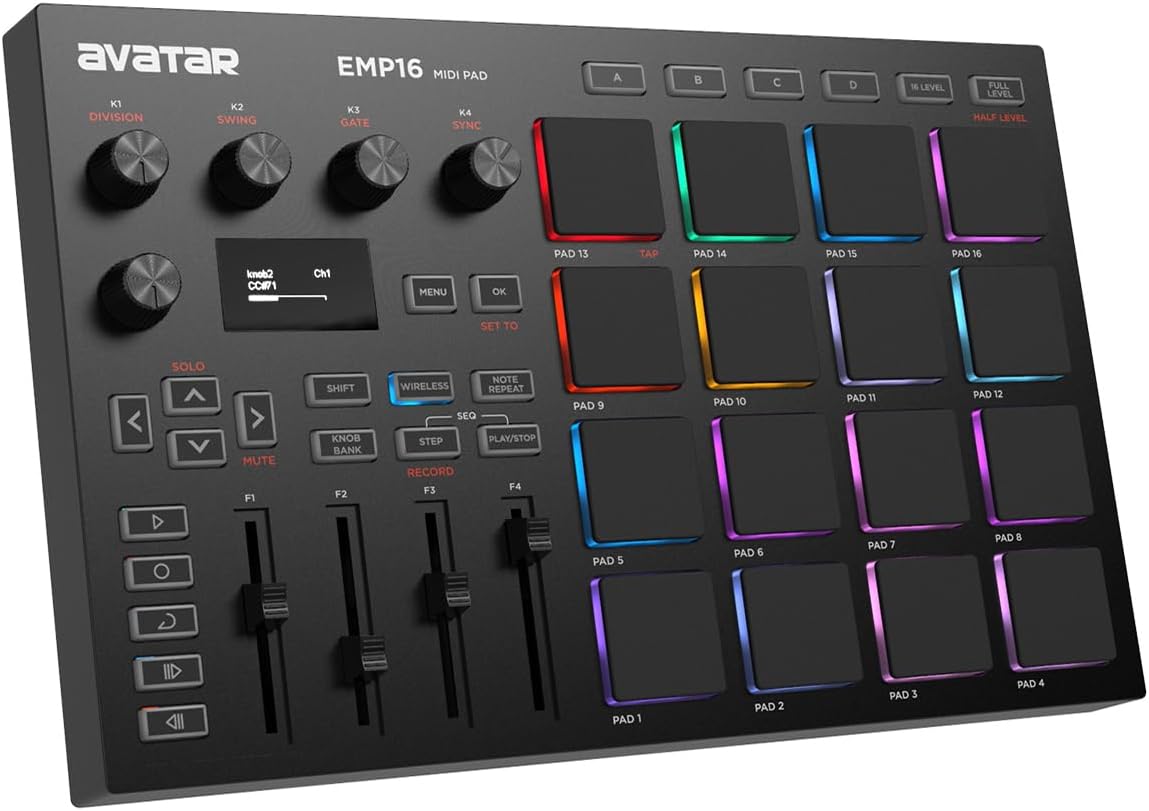
The EMP16 is a portable 16-pad MIDI controller distinguished by Bluetooth 5.0 support, four pad banks, and a broad set of performance and sequencing controls. Its 4.2 rating reflects a useful feature set for mobile producers and guitarists who want to move between a laptop, rehearsal room, and stage without relying on a cable.
We may earn a commission when you buy through this link, at no additional cost to you.
The sixteen RGB-lit pads provide customizable colors and four banks for 64 assignable positions. Three velocity curves, threshold adjustment, level settings, and aftertouch support allow the response to be tailored to a player's touch. Twelve assignable controls—four faders, five buttons, and four endless knobs—extend well beyond basic sample triggering.
Performance tools include note repeat, time division, swing, gate, a sequencer, clock synchronization, transport, and tap tempo. An OLED display gives immediate feedback without requiring a computer-based editor. USB MIDI and standard MIDI inputs and outputs allow connection to laptops or external gear, while Bluetooth avoids cable clutter around mobile devices. Cubase LE 15 and Cubasis LE 3 can be redeemed through Steinberg for an introductory software path.
The EMP16 is a strong option for guitarists producing on an iPad, iPhone, iPod touch, or Mac, particularly when wireless control is a priority. Verify that the intended software supports the necessary MIDI functions and that the Bluetooth connection is stable in your environment. It is less ideal for users who insist on a hardwired-only workflow.
Bluetooth 5.0 can connect to compatible mobile devices and Macs without a cable or OTG adapter. That convenience makes the controller appealing for rehearsal spaces where a laptop is the only workstation.
Beyond 64 assignable pad positions across four banks, the controller includes sequencer functions, swing, gate, clock synchronization, transport, and tap tempo. These features support both live triggering and more structured beat-making.
We may earn a commission when you buy through this link, at no additional cost to you.
The Akai Professional APC40 MKII is the strongest all-around choice for a guitarist working in Ableton Live. It combines a 5×8 RGB clip-launch matrix, nine channel faders, eight control knobs, eight device controls, and an assignable crossfader. Its 4.8 rating is the highest among the products reviewed, matching its extensive control surface and established Ableton integration.
We may earn a commission when you buy through this link, at no additional cost to you.
The controller gives guitarists a tangible way to manage an entire Live set. Pads can launch clips, loops, and samples, with RGB colors communicating clip status. Faders and knobs handle mixer parameters, virtual instruments, and effects, while the crossfader supports assignable DJ-style mixing. Its comprehensive layout can reduce mouse movement and make live improvisation more coherent.
The trade-offs are size and specialization. A full-size controller takes more room than the compact APC Mini MK2, LPD8, or nanoPAD2 and is less convenient for travel. The tight integration centers on Ableton Live, with compatibility beginning at version 9.1.3. Ableton Live Lite and a collection of AIR Music Tech instruments, Puremagnetik racks, sample packs, and artist packs are included for getting started.
The APC40 MKII is the recommendation for a guitarist who uses Ableton Live as the main creative hub and wants comprehensive hands-on control. It is especially compelling for live performers, producers handling complex mixer sections, and musicians who want to manipulate clips and effects from a single purpose-built surface. Choose the APC Mini MK2 instead when portability matters more than fader count and device control.
Nine channel faders, eight control knobs, eight device controls, and the assignable crossfader cover a broad range of Ableton functions. This depth allows clips, mixer channels, virtual instruments, and effects to be handled without constantly returning to the mouse.
The 5×8 RGB matrix displays clip status and color coding, helping performers identify the next section of a song at a glance. The same visual system can color samples and other assigned triggers for consistent live navigation.
Because the faders and buttons are assignable, the controller can also shape lighting cues and performance effects. That flexibility extends its value beyond conventional music production into visually driven shows.
We may earn a commission when you buy through this link, at no additional cost to you.
The right MIDI pad controller depends on how you record, compose, and perform. Consider pad response, control depth, software integration, signal routing, and portability together rather than judging a device by its pad count alone.
Velocity sensitivity lets a pad respond differently according to how firmly it is struck, giving finger-drumming and percussion performances more natural dynamics. Backlighting helps you see assignments in dim rooms, while RGB can display clip states, note information, or user-selected colors. Pad layout also matters: compact grids support chord-like melodic ideas, wide grids suit finger drumming, and matrix layouts excel at launching clips.
Prioritize the number and type of pads only after considering your software. A guitar-focused workflow may need only eight carefully assigned triggers, while an Ableton performance set can benefit from dozens of clip buttons. Confirm whether the pads are velocity-sensitive and whether the controller provides a note mode or musical scale guidance.
A MIDI pad controller must communicate reliably with the DAW and virtual instruments you already use. Some products are pre-mapped for Ableton Live, including clip launching, mixer views, and device control. More general controllers send standard MIDI and depend on the host software or your own mapping for assignments. Check current operating-system support, required drivers, and whether bundled software is a full version or a limited edition.
Pre-mapped controllers can be productive immediately, but they may be less attractive outside their specialty. Confirm that your preferred DAW appears in the compatibility list when that matters. Also check the included software's longevity and whether downloadable instruments or lessons are activated through an account or redemption process.
Knobs are useful for amplifier, delay, reverb, synthesizer, and plug-in parameters, while faders suit continuous mixer control such as volume and pan. Assignable controls should have enough banks to preserve important mappings without becoming confusing. Consider whether controls can be recalled through presets, edited on the device, or require a computer-based editor.
More controls are not automatically better. A focused guitar setup may benefit from eight knobs and one crossfader, while a live set may need several channel faders. Choose a layout that puts frequently adjusted parameters within reach and leaves rarely used functions in software.
Guitarists should distinguish MIDI-only controllers from products with audio inputs. A MIDI pad sends commands to software or hardware but does not process an instrument's audio signal itself. The Korg KAOSS Pad V includes a dedicated Hi-Z guitar input and USB audio interface, while the LEKATO PD705 includes trigger inputs and conventional MIDI I/O. Check impedance, input type, and whether audio can be recorded through the device.
If the pad is intended to process a guitar directly on stage, verify that it offers the necessary input and output connections. If it is only controlling software in a DAW, USB MIDI may be enough. Choose simple, reliable routing over unnecessary features that do not improve your workflow.
A controller for rehearsals and gigs should be compact, durable, and simple to power. The MPD218 and LPD8 use USB power and include no external adapter requirement, while the nanoPAD2 offers an especially slim option. The APC40 MKII provides more controls but requires considerably more space. Evaluate the dimensions against your pedalboard, laptop bag, studio desk, and transport case.
Also consider cable direction. A wired controller avoids batteries and connection latency concerns, while Bluetooth can reduce cable clutter around mobile devices. Whichever option you choose, verify the included cables and the availability of any mobile or OTG adapter needed for your setup.
A controller with onboard sounds can function more independently than a MIDI-only device, but the depth and quality of that library determine its usefulness. The LEKATO PD705 includes a large percussion library and custom-kit storage, while the Alesis Sample Pad 4 supports SD-card loading. Controllers such as the LPD8 rely on the sounds and samples available in the host computer.
Guitarists who use specific textures, loops, or virtual instruments may prioritize import options over factory content. Look for editable presets, sample storage, waveform import, and support for popular file formats. For MIDI-only units, verify that your DAW can load the samples you want and that pad assignments can reference them easily.
Bluetooth can be especially useful when controlling an iPad or iPhone from across a room. The EMP16 supports Bluetooth 5.0 and can also operate over USB MIDI and standard MIDI connections. Wireless control depends on the operating system, application, and MIDI implementation, so compatibility should be checked before purchase.
A wired controller may be preferable in a fixed studio because it can be simpler to configure and less dependent on wireless stability. For mobile performance, test the complete signal path rather than assuming every Bluetooth MIDI connection behaves identically.
Features such as note repeat, aftertouch, scale display, arpeggiator modes, XY control, sequencing, and clip feedback can make a controller much more musical. A guitarist may value a continuous XY surface for effects or a drum-focused display for precise timing. These tools should support the playing style rather than add complexity that is never used.
Try to understand how each feature is activated and whether it changes MIDI behavior in your main software. Some controllers offer onboard parameter editing, while others depend on a host editor. The best setup is one that remains easy to operate under stage pressure.
Begin by connecting the controller to the computer with its supplied USB or MIDI cable, then power it on and open the DAW or virtual instrument you intend to use. Confirm that the application recognizes the controller as a MIDI input and output. If mapping is required, begin with one function per pad, such as a sample, effect toggle, or clip launch, before building a larger control scheme.
For a guitar-focused setup, create a basic signal chain with the guitar, amplifier simulation, delay, reverb, and any essential virtual pedal. Assign frequently changed effect parameters to knobs or faders, then use pads for switching presets, launching loops, or triggering samples. Keep common sounds in the first pad bank and reserve other banks for song sections, alternate effects, and production variations.
Before a rehearsal or performance, save the controller presets, verify MIDI routing, and test every pad, knob, fader, and audio connection at the intended volume. Clean the surface with a soft dry or lightly damp cloth, avoid liquid cleaners near controls and ports, and keep the device in a padded case during transport. Update software only when needed and back up custom mappings before making major changes.
Yes, but the controller and guitar usually occupy different parts of the signal chain. The guitar feeds an amplifier simulation, pedal, audio interface, or another processor, while the MIDI pads control software, hardware parameters, loops, or effects. A controller with a built-in Hi-Z input can process a direct guitar signal more conveniently.
A MIDI pad controller can add value by providing fast access to samples, clips, effects, and parameter changes without interrupting a guitar performance. It is especially useful for looping, live arrangement, beat creation, and software-instrument control. Players who already have sufficient control through a DAW or dedicated MIDI footswitches may not need one.
Most standard MIDI pads can send notes and control changes to major DAWs, including Ableton Live, Logic Pro, FL Studio, Cubase, and GarageBand. However, specialized features such as clip launching, RGB state displays, and device control may depend on a specific application or an included mapping. Check the compatibility list and current software requirements before buying.
A general MIDI pad controller is designed primarily to send commands and trigger software sounds. An electronic drum pad often includes a larger internal sound library, dedicated drum controls, trigger inputs, and sample storage. Either can control software, but a percussion-focused unit is better suited to realistic drum performance and kit customization.
Bluetooth is convenient for mobile devices and reduces cable clutter, but it is not essential for every setup. A wired USB controller is often simpler in a fixed studio and avoids wireless configuration questions. Choose Bluetooth when mobility or wireless iPad and iPhone control is central to your workflow.
The useful number depends on your arrangement. Eight or sixteen pads can cover a focused set of samples, effects, and song sections, while a 40- or 64-button matrix is better for visual clip launching. Count every sound and transition you expect to trigger, and leave additional pads for expansion and alternate variations.
They can control software-based effects, but they do not necessarily reproduce the durability, immediate tactile operation, or independent signal routing of physical guitar pedals. Controllers with direct guitar inputs can process audio themselves, while conventional MIDI pads remain control surfaces. Many guitarists use both, assigning essential sounds to hardware and broader variations to software.
Most of the controllers in this guide are USB-powered and do not require batteries for normal computer use. Some portable or wireless models can also operate from AA batteries, although those batteries are generally not included. Check the power requirements for the exact model and whether battery mode changes its available features.
The Akai APC40 MKII is the most complete choice for guitarists who build and perform in Ableton Live, while the Korg KAOSS Pad V stands out for direct guitar processing, expressive XY control, sampling, and looping. For a smaller and more affordable setup, the Akai LPD8 provides eight pads, eight assignable knobs, and broad DAW compatibility.
Prioritize the workflow that matters most rather than simply choosing the largest pad count. Guitarists focused on live clip arrangements should look for RGB feedback and a matrix, players building effects around an instrument signal should examine audio inputs, and mobile musicians should weigh wireless support and physical size. Reliable software integration and comfortable controls are more valuable than features that will never be used.
Ratings, software versions, bundled editions, and product configurations can change over time, and current prices also fluctuate. Review the latest specifications, compatibility notes, and accessory requirements before purchasing, then compare the controller's routing and mapping options with the way you actually plan to play guitar.