
TP-Link TL-SG105S-M2
4.7Editor score
Five 2.5G RJ45 ports
25 Gbps switching capacity
Fanless metal construction
Discover the best Network Switch for Google Fiber options, comparing port counts, link speeds, features, fiber connectivity, noise, and installation needs.
A network switch can turn the high-capacity connection provided by Google Fiber into a more flexible and dependable home or office network. The right model should offer enough Ethernet ports, match the speeds of your computers and Wi-Fi access points, and provide a clean way to organize connected equipment.
We compared all ten switches by examining their port layouts, supported link speeds, switching capacity, management capabilities, fiber uplinks, physical design, and intended installation environments. The list covers basic Gigabit options, Multi-Gig switches for modern devices, managed systems, PoE equipment, and dedicated 10G SFP+ infrastructure.
Each review highlights who should consider the switch, what it does particularly well, and where its compromises may matter. Ratings reflect the supplied customer feedback, while practical fit depends on your wiring, router, access points, and connected devices. Product prices and availability can change, so verify current listings before buying.
4.7Editor score

4.8Editor score

4.6Editor score
The table below compares all ten switches by port count, speed, management level, and physical design, making it easier to identify the right model for a Google Fiber installation.


This managed 10G SFP+ switch carries a 4.6 rating and is the strongest option here for advanced users who want more than basic Ethernet expansion. Its eight fiber-capable ports and 160 Gbps switching capacity make it suited to high-speed storage, demanding workstations, aggregation points, and environments built around 10G links.
We may earn a commission when you buy through this link, at no additional cost to you.
The switch supports static routing, RIP v1 and v2, and OSPF v2, allowing inter-VLAN routing to be handled internally instead of relying entirely on the primary router. A web interface and console port provide management paths, while DAI and ACL features add control over internal traffic. Its two global rate modes also offer flexibility when connected equipment uses 1G, 2.5G, or 10G modules.
The principal tradeoff is that this is an SFP+ platform rather than a conventional RJ45 desktop switch. Compatible transceivers, direct attach cables, or suitable copper modules are required, and the global mode change affects all eight ports. Buyers seeking a simple plug-and-play box for ordinary computers may find an unmanaged 2.5G model easier to deploy.
This is a compelling choice for technically confident users, home labs, creative studios, and small organizations that genuinely need 10G switching and Layer 3 control. It earns the premium recommendation because its combination of routing, security, loop recovery, silent operation, and fiber flexibility goes well beyond the basic switch category.
Eight 10Gbps SFP+ ports and 160 Gbps of switching capacity provide headroom for high-throughput storage, rapid file transfers, and demanding creative workflows. The architecture is especially appropriate when connected modules can operate consistently at the selected global rate.
Static routing, RIP, OSPF, ACLs, and DAI give administrators more control than an unmanaged switch offers. These functions can organize inter-VLAN traffic, limit unwanted communication, and improve resilience when the network is more complex than a basic home setup.
We may earn a commission when you buy through this link, at no additional cost to you.
The TRENDnet TEG-S562 has a 4.4 rating and offers one of the most balanced port layouts in this guide. Four 2.5GbE RJ45 ports accommodate modern wired equipment, while two 10G SFP+ ports provide a high-speed uplink or aggregation path for compatible infrastructure.
We may earn a commission when you buy through this link, at no additional cost to you.
The 2.5G copper ports can operate across 100Mbps, 1Gbps, and 2.5Gbps, making the switch suitable for modern Wi-Fi 6 access points, NAS devices, and speed-capable PCs. Its 60 Gbps switching capacity is ample for a small home or office network, and the fanless enclosure remains unobtrusive in a media cabinet or office.
The SFP+ ports require separate compatible modules, and the switch is unmanaged, which means it does not offer VLAN controls, routing, or a web interface. That simplicity is a benefit for plug-and-play installations but a limitation for users who want to segment traffic or monitor individual ports.
The TEG-S562 is best for a user who wants a small number of fast copper connections plus a fiber-ready uplink without managing a complex interface. It offers more flexibility than a basic Gigabit switch while remaining easier to deploy than the Layer 3 model at the top of the list.
The combination of four 2.5G RJ45 ports and two 10G SFP+ ports lets builders connect ordinary modern devices while reserving high-bandwidth links for switches, servers, or aggregation equipment. This mixed layout is particularly useful when the property already supports fiber cabling.
No configuration is required, so the switch can be installed by connecting devices and powering it up. Its wall-mountable, fanless body is practical for closets, home offices, and small business environments where noise, size, and maintenance simplicity matter.
We may earn a commission when you buy through this link, at no additional cost to you.
The TP-Link TL-SG108 carries a 4.7 rating and remains a straightforward way to expand a wired network. Eight Gigabit RJ45 ports support computers, printers, game consoles, and other Ethernet devices, while the plug-and-play design removes the configuration burden.
We may earn a commission when you buy through this link, at no additional cost to you.
Its sturdy metal housing, shielded ports, and fanless construction suit long-term use in offices, bedrooms, and entertainment areas. IEEE 802.3x flow control helps maintain smooth data transfer, and automatic energy adjustments respond to link status and cable length to avoid unnecessary power use.
The important limitation is speed. Every port operates at up to 1Gbps, so the switch cannot take full advantage of 2.5G or 10G network adapters, high-speed NAS equipment, or advanced access-point uplinks. It is also unmanaged, which keeps installation simple but prevents configuration of VLANs, priorities, and routing policies.
Choose the TL-SG108 when a dependable pool of Gigabit ports is all your network needs. It is especially suitable for ordinary Google Fiber connections, game systems, printers, and home-office computers that negotiate 1Gbps links, and it avoids unnecessary complexity for users who simply want more wired outlets.
The TL-SG108 is ready as soon as it is connected, with no software installation or detailed configuration required. It is a practical choice for expanding wired access throughout a home or small office without changing the existing Google Fiber connection method.
The fanless design eliminates operating noise, while the metal case and shielded ports support heat dissipation and protection from electromagnetic interference. Energy-efficient behavior adds another practical advantage for a switch expected to remain connected continuously.
We may earn a commission when you buy through this link, at no additional cost to you.
The TL-SG108S-M2 has the highest listed rating at 4.8 and delivers eight 2.5G RJ45 ports, making it an excellent general-purpose choice for modern Google Fiber networks. It combines a useful port count with multi-gigabit performance and requires no configuration.
We may earn a commission when you buy through this link, at no additional cost to you.
Auto-negotiation supports 100Mbps, 1Gbps, and 2.5Gbps connections, so ordinary devices can operate at their supported speed while newer equipment can use the full 2.5G capability. With 40 Gbps of switching capacity, the model is well suited to home labs, home offices, entertainment areas, and transfers involving speed-capable NAS or server hardware.
As an unmanaged switch, it does not offer granular traffic policies, virtual networks, or routed control. It also cannot make a 1Gbps device transmit faster than its own adapter and network path allow. However, those limitations are reasonable for a simple Layer 2 installation focused on connecting wired endpoints.
This is our editor's choice because it balances eight convenient ports, 2.5G capability, backward compatibility, and silent operation without making setup complicated. It is an especially strong recommendation for users who want to modernize a wired Google Fiber setup but do not need managed routing or dedicated fiber modules.
Eight 2.5G ports make this switch useful for current hardware while auto-negotiation keeps older 100Mbps and 1Gbps devices connected. That combination makes it easier to upgrade incrementally instead of replacing every endpoint at once.
The 40 Gbps switching capacity supports a varied collection of high-speed local endpoints, including NAS systems, servers, workstations, and 2.5G Wi-Fi access points. It is particularly useful for transferring large files over the local network rather than relying on internet-facing bandwidth.
We may earn a commission when you buy through this link, at no additional cost to you.
The TP-Link TL-SG105 earns a 4.7 rating and provides a compact five-port Gigabit solution for homes, offices, and small entertainment setups. Its five auto-negotiating RJ45 ports support common wired devices without requiring configuration.
We may earn a commission when you buy through this link, at no additional cost to you.
Although it remains unmanaged, it includes useful traffic-handling features such as port-based 802.1p and DSCP quality of service and IGMP snooping. These functions can make voice, video, and other prioritized traffic behave more consistently on a modest network. Energy-efficient operation and a fanless metal case support quiet, long-running use.
With only five ports, the TL-SG105 may be too small for a busy office or a home with many wired rooms. Its Gigabit ceiling also leaves 2.5G and 10G equipment on the slower side of the switch. Buyers should also note that the port-based features are not equivalent to the granular control found in a fully managed switch.
This model is best for a small, straightforward network that needs a few dependable Gigabit connections. It can complement a Google Fiber setup around a desk, media area, or home office, and it is especially attractive to users who value simple setup and a metal, fanless design over high-speed expansion.
Port-based 802.1p and DSCP QoS give this otherwise simple switch a degree of traffic awareness. It remains easier to deploy than a managed platform while helping selected types of real-time or media traffic receive appropriate treatment.
Five ports keep the TL-SG105 manageable for a desk, home office, or media cabinet. The fanless metal design supports quiet operation, and the included installation flexibility allows it to sit on a desktop or be mounted to a wall.
We may earn a commission when you buy through this link, at no additional cost to you.
The TL-SG105S-M2 combines a 4.7 rating with a focused set of five 2.5G ports. It is a compelling budget pick for users who want a clear speed upgrade over an ordinary Gigabit switch without paying for a larger port count or management interface.
We may earn a commission when you buy through this link, at no additional cost to you.
The switch supports 100Mbps, 1Gbps, and 2.5Gbps auto-negotiation and provides 25 Gbps switching capacity. It can serve 2.5G Wi-Fi 6 access points, NAS devices, servers, gaming PCs, and modern workstations, and it can operate over existing Cat5e cabling without requiring a full wiring replacement.
Its primary limitation is the five-port ceiling. A home with numerous wired devices may need to connect through another switch or choose the eight-port TL-SG108S-M2. It is also unmanaged, so VLAN segmentation, detailed monitoring, and routing controls are outside its feature set.
The TL-SG105S-M2 is our best budget recommendation because it delivers useful Multi-Gig performance in a compact, durable, no-fuss package. It is ideal for a smaller Google Fiber network, a focused home lab, or a few high-speed endpoints where preserving quiet operation and simple installation matters.
Five 2.5G ports provide a meaningful performance path for compatible devices without turning the installation into a complex managed project. Link negotiation allows mixed-speed equipment to coexist, which is valuable during gradual home or office upgrades.
The fanless enclosure avoids operating noise, and the metal case is designed for desktop or wall-mount placement. It is small enough for a cabinet or office while remaining robust enough for continuous networking use.
We may earn a commission when you buy through this link, at no additional cost to you.
The MokerLink 8-Port 10G SFP+ switch has a 4.1 rating and focuses on high-speed fiber aggregation. It offers eight SFP+ slots, 160 Gbps switching capacity, and support for 1G or 10G optical modules, making it relevant to infrastructure builders rather than ordinary basic Ethernet users.
We may earn a commission when you buy through this link, at no additional cost to you.
Because it is unmanaged and supports standard SFP interfaces, deployment is a matter of connecting power, inserting compatible modules, and linking the fiber cables. Jumbo frames up to 10K bytes and non-blocking 10G forwarding are useful for specialized local networks, access layers, and long-distance fiber arrangements.
No SFP modules are included, so the total deployment requires compatible transceivers and suitable fiber cabling. Unlike many fanless choices in this guide, it uses an industrial-grade fan for heat dissipation, which may add sound. Its lack of a management interface also means it is better suited to simple, transparent Layer 2 designs.
Choose this model for a home lab, enterprise-style access or aggregation project, or advanced residential installation where every endpoint is designed around fiber. It is less attractive for a normal family network, but its raw 10G capacity and dedicated SFP+ layout serve a clear specialized purpose.
All eight ports are SFP+ slots, allowing the switch to be tailored with suitable 1G or 10G optical modules. This makes it a useful building block for fiber-heavy access, core, or aggregation topologies rather than a conventional endpoint switch.
Power and port LEDs report operating state and link rate, which helps simplify installation and troubleshooting. A metal case and desktop or wall-mount design support deployment in more structured network environments.
We may earn a commission when you buy through this link, at no additional cost to you.
The YuanLey 2.5G switch has a 4.4 rating and brings together four 2.5G copper ports, two 10G SFP ports, and basic VLAN isolation. It is a flexible option for users who want modest traffic segmentation in a compact home or office network.
We may earn a commission when you buy through this link, at no additional cost to you.
The four RJ45 ports negotiate 10, 100, 1000, and 2500Mbps, while the SFP ports accept compatible 1G or 2.5G modules. A 60 Gbps switching capacity supports the combined design, and the one-key VLAN function isolates communication between the RJ45 ports to reduce unnecessary traffic and improve organization.
The switch is marketed as unmanaged, so its VLAN feature is a focused exception rather than a broad management platform. SFP modules are not included, and the physical design has only four copper connections, so larger wired installations will need additional capacity. Users should verify module compatibility before buying.
This model makes sense for a compact setup involving a 2.5G NAS, PC, server, or Wi-Fi 6 access point that benefits from port isolation. Its fanless metal case, lightning protection, and wall-mount support are especially useful for a carefully planned residential or small-office network.
The one-key VLAN control separates communication among the four copper ports without requiring a full managed interface. This can be useful for keeping selected devices isolated while retaining a straightforward overall setup.
A durable metal case, 6KV lightning protection, cooling holes, and an operating range of -10 to 50 degrees Celsius support practical placement. Desktop and wall-mount options make it adaptable to closets, offices, and home network cabinets.
We may earn a commission when you buy through this link, at no additional cost to you.
The NETGEAR GS724TP carries a 4.6 rating and is built for networks that need many powered Ethernet endpoints. Its 24 Gigabit PoE+ ports and 190W total power budget make it a natural fit for access points, surveillance devices, VoIP phones, and other connected hardware.
We may earn a commission when you buy through this link, at no additional cost to you.
Two 1G SFP ports provide fiber connectivity and expansion potential, while the smart management interface offers controlled setup, access features, SNMP, and remote management through NETGEAR Insight during the included year. The compact metal chassis can be placed on a desktop or mounted in a rack.
The main limitation is that endpoint ports top out at 1Gbps, so the switch does not suit users seeking 2.5G or 10G connections for modern NAS systems, servers, or workstations. Its PoE capability also introduces a power-planning consideration, and deployments should be designed around the shared 190W budget.
The GS724TP is best for a larger home, small office, hospitality environment, or campus-style installation with numerous PoE devices. For an ordinary household with only a few wired endpoints, its capacity and management features would be more than required.
Twenty-four PoE+ ports eliminate the need for a local power adapter at every supported endpoint. The 190W budget is generous for a thoughtfully planned deployment, although it must be allocated across connected devices.
Smart management, SNMP support, access controls, and remote oversight make this switch more appropriate for a network with several users or device types. It provides administrative flexibility that a basic unmanaged switch cannot match.
We may earn a commission when you buy through this link, at no additional cost to you.
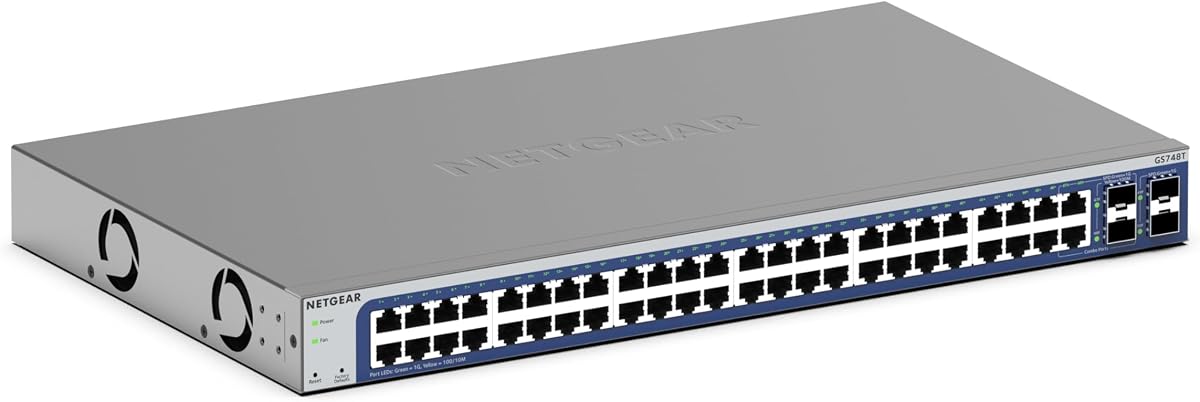
The NETGEAR GS748T has a 4.4 rating and is designed for locations that need many wired connections. Forty-eight Gigabit Ethernet ports make it a practical central distribution point for a large house, office, school, or shared workspace.
We may earn a commission when you buy through this link, at no additional cost to you.
Four 1G SFP ports, two of which are shared, allow fiber connections and network expansion. Smart management features provide controlled access, setup tools, SNMP, and remote NETGEAR Insight oversight for one year, making the switch more appropriate for environments where monitoring and policy control are important.
Its fanless construction keeps it silent, and IEEE 802.3az Energy Efficient Ethernet reduces power use without reducing link performance. The tradeoff is physical scale: this model is excessive for a small home, and every endpoint is limited to 1Gbps, which may constrain newer high-speed equipment.
Choose the GS748T when port count, remote oversight, and quiet operation matter more than Multi-Gig performance. It is a strong centralized switch for a large property or organization, but a smaller 2.5G model will usually be more appropriate for a modern home using Google Fiber with only a few high-speed devices.
Forty-eight ports allow numerous computers, printers, phones, access points, and other devices to connect through one managed unit. This simplifies physical distribution in larger installations where individual wall outlets need to converge at a central cabinet.
The fanless chassis supports silent operation, while Energy Efficient Ethernet reduces consumption according to network demand. Smart software and SNMP give administrators the tools to maintain visibility across a much larger collection of connected ports.
We may earn a commission when you buy through this link, at no additional cost to you.
The most suitable switch depends on the number of wired devices, their supported speeds, the role of the Google Fiber connection, and the amount of network control you need. These factors help prevent overspending on unnecessary ports or choosing a model that cannot support your equipment.
Count every device that needs a wired connection, including computers, televisions, printers, game systems, network storage, and access-point uplinks. Leave a few open ports for expansion if the network is likely to grow. Five-port models suit compact installations, eight-port models cover many homes, and 24- or 48-port systems suit larger offices or shared buildings.
A Gigabit switch is sufficient for many internet and file-transfer uses, but it caps local traffic at 1Gbps. A 2.5G switch offers a practical middle ground for NAS devices, modern servers, high-speed workstations, and newer Wi-Fi 6 access points. Dedicated 10G SFP+ equipment is more specialized and generally requires compatible modules and cabling.
Unmanaged switches prioritize quick installation and straightforward operation. Smart-managed and fully managed systems add features such as VLAN policies, access controls, monitoring, routing, and remote administration. These controls can improve security and troubleshooting, but they also require more setup and ongoing configuration knowledge.
SFP or SFP+ ports can carry traffic over optical modules and fiber cables, making them useful for longer runs, building-to-building links, and high-speed aggregation. Confirm the supported module type and speed before purchasing, and note that compatible transceivers are generally sold separately. An RJ45 switch is easier when all endpoints are already within copper-cable reach.
Power over Ethernet can supply power to compatible access points, cameras, phones, and other devices through their network cables. The NETGEAR GS724TP provides 24 PoE+ ports with a 190W total budget. Account for each device's power draw and the switch's capacity, and use a powered PoE injector or appropriate power supply if the full budget is not required.
The Multi-Gig models in this guide can use Cat5e or better wiring for 2.5G connections, which can make an upgrade easier than replacing cabling throughout a building. Faster standards and longer fiber runs have different requirements, so check the capabilities of your installed cable before assuming every port will achieve its advertised speed.
Most compact switches in this guide use fanless metal enclosures, which are quiet and appropriate for bedrooms, offices, and living areas. The MokerLink fiber switch uses a fan for heat dissipation. Consider cabinet ventilation, wall-mount availability, desktop footprint, and access to status lights when deciding where the switch will live.
A Google Fiber connection may enter the home through a router or gateway that has a limited number of LAN ports. A switch can expand those ports, but it does not automatically become the main router, assign internet addresses, or configure Wi-Fi. Check how the switch is intended to sit between the gateway, access points, and wired endpoints.
Begin by identifying the role of the switch. For a basic expansion, connect the Google Fiber gateway or router to one switch port and connect each wired device to another port. For a managed design, connect the switch to the appropriate gateway interface, temporarily isolate any existing DHCP or routing service that could conflict, and complete the initial configuration before reconnecting clients.
Use the supplied product information to confirm supported speeds, module requirements, and operating modes. For a 2.5G switch, connect compatible devices with suitable Ethernet cables and allow auto-negotiation to establish their link rate. For an SFP+ switch, insert only compatible modules, observe the global rate setting on managed models, and verify that every attached module matches the selected mode.
Place the switch in a dry, ventilated area with access to its power connection and status lights. Keep fiber and network cables routed so they are not pinched, sharply bent, or exposed to unnecessary strain. Review traffic or PoE conditions periodically, and use the management interface when available to update status checks, access policies, and connected-device information.
Usually, a network switch does not replace the router or gateway. It expands the number of Ethernet connections and may provide faster local links, but internet access, DHCP, Wi-Fi, and routing commonly still come from the Google Fiber equipment. Some advanced switch models include routing functions, but their configuration and intended role can differ from a full home gateway.
It can be worthwhile when connected devices support 2.5G, such as a modern NAS, server, workstation, or compatible Wi-Fi access point. The benefit is mainly faster local traffic; it does not automatically increase the speed of every internet download. A Gigabit switch remains sufficient when most endpoints negotiate at 1Gbps or only handle ordinary browsing and streaming.
Yes, compatible optical or copper modules are generally required for the SFP+ ports, and the products in this guide do not include the required modules. You must match the module type, supported link speed, cable, and transceiver to the switch. Verify compatibility carefully because incorrect modules may not establish a reliable link.
In many cases, yes. The 2.5G models in this guide support 2.5G connections over Cat5e or better, making them useful for gradual upgrades without replacing all Ethernet cables. Run a speed test to confirm the actual link rate, as cable quality, length, device support, and installation can affect the result.
A managed switch is most useful when you need VLAN isolation, access controls, monitoring, or remote configuration. A simple home with a few wired devices can usually use an unmanaged model because it is faster to install and easier to maintain. Managed options provide flexibility, but the added features also create more opportunities for configuration mistakes.
Count the router uplink, computers, game systems, televisions, printers, and access points that require wired connections. Most compact homes need five or eight additional ports, while a larger office may require 24 or 48. Keeping one or two spare ports is useful when adding equipment later.
Ordinary Ethernet carries network data, while PoE also delivers electrical power through the cable. That can simplify installations for compatible access points, cameras, and phones because each device may not need a nearby outlet. The total connected device power must remain within the switch's PoE budget for reliable operation.
No. Internet downloads are constrained by the service, the Google Fiber gateway, the device, and the path to the server. A faster switch can improve local transfers and communication between network devices, especially when an intermediate device previously limited the link to 1Gbps. It cannot increase the internet bandwidth supplied to the property.
The TP-Link TL-SG108S-M2 is the most versatile general choice because it combines eight 2.5G ports, broad auto-negotiation, 40 Gbps switching capacity, and plug-and-play operation. The TL-SG105S-M2 delivers similar Multi-Gig performance in a more compact five-port format, while the managed 10G SFP+ model leads the list for advanced routing, security, and dedicated fiber links.
Prioritize the switch that matches your actual endpoints and the role you need it to play. Choose Gigabit for ordinary wired access, 2.5G for modern local performance, PoE for numerous powered devices, and SFP+ only when compatible fiber modules and high-speed aggregation are genuine requirements. For a small network, simple unmanaged equipment is often easier to maintain.
Before making a purchase, verify the current listing, port count, supported link speeds, module requirements, and physical fit. Product prices, configurations, and availability can change over time, so the current product page and the latest manufacturer details should guide the final decision.