
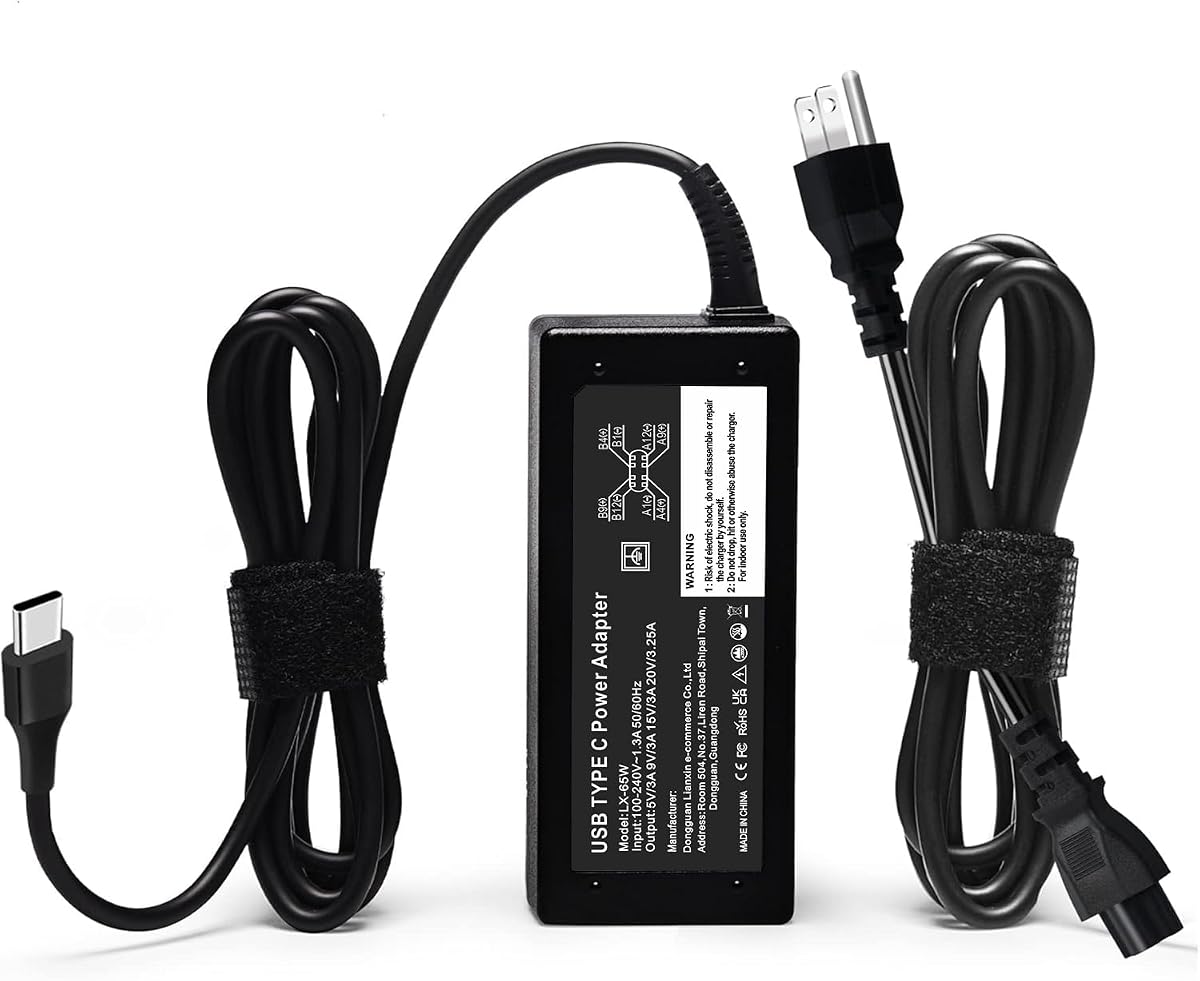
STJJNNWI 65W USB-C Charger
4.4Editor score
Ten-foot braided power cord
Wide 60W and 65W support
Extensive newer Dell coverage
Replacement Dell Laptop Charger guide comparing USB-C, round-tip, wattage, connector, compatibility, safety, and portability for popular Dell models today.
A replacement Dell laptop charger must fit both the power connector and the charging requirements of the computer. The right choice depends on connector type, supported wattage, voltage, current, model compatibility, cord length, and built-in protection. A charger that looks similar can still be unsuitable for a particular Dell notebook.
This guide compares ten relevant listings, separating round-tip 45W and 65W adapters from USB-C options while examining connector profiles, electrical outputs, supported model families, included accessories, and stated safety features. Products with missing specifications are included for completeness but cannot be evaluated as confidently as listings with complete technical information.
Each review explains who the charger is best suited for, what stands out, and where compatibility limitations may apply. The recommendations also distinguish general-purpose replacements from options aimed at newer Dell Latitude, XPS, Inspiron, Pro, and Chromebook systems. Product availability and pricing can change, so readers should confirm both the connector and model requirements before ordering.
4.4Editor score

4.8Editor score

4.5Editor score
The comparison below places the two round-tip options beside eight USB-C-focused listings, including two entries with insufficient supplied details. Connector type, rated output, supported model families, and included components are the most important distinctions.



The Ostrich 65W Round-Tip charger is a practical replacement for older Dell laptops that use the familiar 4.5 by 3.0mm barrel connector. It carries a 4.5 rating and stands out for offering one of the broadest round-tip compatibility descriptions in this group. The listing says it supports Dell Inspiron, XPS, and Vostro systems equipped with the specified connector.
We may earn a commission when you buy through this link, at no additional cost to you.
Its maximum output is 19.5V at 3.34A, allowing it to serve as a 65W adapter while also being advertised for 45W laptops. The included 4.5mm by 3.0mm to 7.4mm by 5.0mm converter cable expands the range of older Dell models that can use the charger. A detachable AC power cord is also included, which is convenient for travel or replacement.
The listing emphasizes protection against short circuits, overvoltage, overcurrent, and internal overheating. Its 100–240V input is suitable for use across many regions, although users should always follow local electrical guidance. Because a barrel charger cannot serve a USB-C notebook merely because both are rated at 65W, connector shape remains the decisive compatibility factor.
This is a sensible option for a common older Dell design, especially when the original adapter has failed and the notebook has a 4.5mm round socket. It is less appropriate for newer USB-C-only Latitude, XPS, or Pro systems. Buyers should still compare the charger label with the original adapter and confirm that the computer expects 19.5V and no more than 3.34A.
The included adapter cable converts the charger's 4.5mm round connector to a 7.4 by 5.0mm plug. That makes the package more versatile for Dell notebooks that used the larger barrel connection, provided the voltage and current requirements remain within the charger's stated limits.
The listed short-circuit, overvoltage, overcurrent, and thermal protections make the electrical safeguards clearer than those of many generic listings. The seller also describes a return and exchange policy for defective products, adding another useful layer of buyer confidence.
We may earn a commission when you buy through this link, at no additional cost to you.
The QXA 65W USB-C charger is the strongest all-around USB-C replacement in this roundup, combining a 4.8 rating with a detailed compatibility list. It targets a wide range of Dell Latitude, XPS, Inspiron, and Chromebook systems, as well as selected Dell Pro models and two-in-one computers.
We may earn a commission when you buy through this link, at no additional cost to you.
The adapter accepts 100–240V input and can deliver up to 20V at 3.25A. Its compatibility section lists both 65W, 60W, and 45W Dell USB-C laptops, while the replacement part numbers include families such as LA65NM170, HA65NM190, DA65NM190, HKA65NM200, and LA45NM210. The included AC cord makes the package ready for normal use.
Its standout strength is the breadth of the model coverage. Supported machines include Dell Latitude 5420 through 5550 families, numerous 7000 and 9000 series models, many XPS 13 systems, several Inspiron models, and a range of Chromebooks. Built-in protection is stated for overvoltage, overcurrent, overheating, overload, and short circuits.
This is a strong recommendation for a compatible USB-C Dell notebook, especially one in the Latitude, XPS, or current Inspiron line. The main limitation is obvious: the physical connector and USB-C power profile must both be supported. A 65W rating alone does not guarantee that every USB-C charger works with every Dell notebook.
The listing is especially useful because it translates common Dell adapter part numbers into a broad selection of compatible systems. That gives buyers more than a generic USB-C description and makes it easier to cross-check a replacement against a known charger label.
With worldwide input and a compact adapter body, this charger fits a home office, classroom, carry-on, or hotel setup. The detachable cord also means the power adapter itself can be packed without tangling the full cable around it.
We may earn a commission when you buy through this link, at no additional cost to you.
This listing offers a 65W USB-C AC power adapter with a 3.9 rating, placing it behind the higher-rated USB-C options but still making it relevant for a specific Dell setup. It claims to be a new genuine original Dell adapter supplied with non-retail packaging and a three-foot power cord.
We may earn a commission when you buy through this link, at no additional cost to you.
Its output information includes 65W at 20V and 3.25A, as well as 45W, 27W, and 15W USB-C profiles. The listed part-number references include 0WMDHR, 0VT148, 0CJG9W, 0T3JDJ, and 723JG. Factory-model references include LA65NM190, HA65NM190, and HKA65NM200.
The compatibility description references recent Dell Latitude 3000, 5000, 7000, and 9000 series models along with XPS and 2-in-1 systems. However, the model text is less comprehensive and less clearly organized than the QXA listing. That makes careful comparison with the computer's original charger label especially important.
This option may suit a buyer seeking a short USB-C cord and a recognizable Dell-style part number, but it is not the most confidently documented recommendation in the group. Check the connector, required wattage, and exact model number before purchase. Its lower rating also suggests buyers should examine recent customer feedback more closely.
The stated 65W, 45W, 27W, and 15W profiles can be useful when the Dell notebook negotiates lower power over USB-C. This is more informative than a listing that lists only the headline wattage.
The referenced Latitude generations and recognized Dell part numbers make this a plausible option for newer business notebooks. Exact model verification remains important because a connector matching the port does not automatically confirm electrical compatibility.
We may earn a commission when you buy through this link, at no additional cost to you.
The GVKRLXZ 65W USB-C adapter is a broadly compatible replacement with a 4.2 rating. Its defining feature is flexibility across Dell Latitude, Dell Pro, and XPS notebooks, accompanied by a 50-unit case configuration for institutional, repair-shop, or office purchasing.
We may earn a commission when you buy through this link, at no additional cost to you.
Electrical specifications include 100–240V input at 50–60Hz and 1.8A, with outputs of 5V at 3A, 9V at 3A, 12V at 3A, 15V at 3A, 18V at 2.5A, and 20V at 3.25A. This range of profiles is appropriate for many modern USB-C laptops that negotiate different power levels.
The listed laptop coverage includes Dell Pro 13, 14, and 16 models, including Plus, Premium, and Rugged variants, plus a broad set of Latitude 5000 and 7000 series systems. The listing also describes protections for overvoltage, overcurrent, short circuits, and real-time temperature detection.
For an individual, this is a viable all-purpose USB-C option when the computer appears in the compatibility list. For offices, repair shops, or schools, its case-pack arrangement may be the main attraction. The unusual bulk configuration means a buyer interested in one adapter should confirm that a single unit is available through the selected listing option.
A consolidated case of 50 units can simplify procurement for a workplace replacing several aging chargers. The listing specifically targets institutional purchasing, making it more relevant to administrators than the average home user.
Listing each supported output level gives buyers a clearer picture of the charger's USB-C negotiation capabilities. It also helps distinguish this adapter from a basic wall plug that offers only one fixed voltage.
We may earn a commission when you buy through this link, at no additional cost to you.
The DECSZDY replacement is a 65W USB-C charger with a 4.1 rating and a notably long list of supported Dell part numbers. It is positioned as a general replacement for USB-C Dell laptops across Latitude, XPS, Inspiron, and Chromebook families.
We may earn a commission when you buy through this link, at no additional cost to you.
Its stated input range is 100–240V at 50–60Hz and 1.8A. Outputs include 5V at 3A, 9V at 3A, 12V at 3A, 15V at 3A, 18V at 2.5A, and 20V at 3.25A. A power cord is included, allowing the adapter to be used in a standard wall outlet setup.
The strongest part of the listing is its reference to original Dell charger families such as LA65NM170, HA65NM190, DA65NM190, HKA65NM200, DA45NM210, and HA45NM210. It also includes numerous alphanumeric part numbers, which can help buyers identify a suitable replacement using the label on an original adapter.
This charger is most appropriate when the existing Dell adapter uses USB-C and its part number appears in the listing. The product description is somewhat repetitive, and some model names are entered more than once, so it should be used as a compatibility reference rather than a perfectly organized catalog. Confirm the computer model and connector before ordering.
Many buyers replace a charger by comparing the part number printed on the old unit. The extensive part-number list in this listing makes that method more accessible, provided the number is cross-checked carefully.
The listing identifies short-circuit, overcurrent, overvoltage, overheating, and overload protection. These safeguards are important because a charger is connected to both mains power and an expensive portable computer.
We may earn a commission when you buy through this link, at no additional cost to you.
The STJJNNWI USB-C charger earns the premium distinction with a 4.4 rating, broad compatibility, and an unusually long ten-foot cord. It is designed for 65W, 60W, and 45W Dell USB-C systems rather than being limited to one notebook generation.
We may earn a commission when you buy through this link, at no additional cost to you.
The charger accepts 100–240V input and offers output at 15V and 3A, 20V and 2.25A, 20V and 3A, or 20V and 3.25A. That range is especially relevant for current Dell Plus and Pro systems, whose supported charging profiles can differ from earlier Latitude and XPS notebooks.
The compatibility description reaches beyond the usual business laptops. It includes Dell 14 Plus and 16 Plus 2-in-1 families, Dell Pro 13 Plus, Pro 13 Premium, Pro 14 Plus, Pro 16 Plus, multiple Pro 3, 5, and 7 systems, and a broad selection of Latitude, XPS, Inspiron, and Chromebook models.
This is the top choice when a long cord and broad new-model coverage matter, such as at a large desk, in a conference room, or in a shared workspace where the outlet is far from the computer. The ten-foot cable can be too long for travel, but the detachable power cord and broad electrical specifications make it a flexible desktop option.
A ten-foot cord provides more placement flexibility than the shorter cable included with several competing adapters. It can reduce the need for an extension lead, although users should still route the cable safely and avoid tight bends.
The extensive list of Plus and Pro model families gives this adapter an advantage for newer Dell equipment. Because the listing limits some compatibility to 60W and 65W machines, users of lower-power systems should verify their requirements.
We may earn a commission when you buy through this link, at no additional cost to you.
The Dell 45W AC Adapter is a focused replacement for compatible lower-power Dell notebooks. Its 4.6 rating is among the strongest in the roundup, and its specifications are notably concise: 19.5V at 2.31A, a maximum of 45W, and worldwide 100–240V input.
We may earn a commission when you buy through this link, at no additional cost to you.
The listing identifies original Dell part numbers 0KXTTW and LA45NM140. That information is valuable because it provides a direct way to match the replacement with the label on an existing adapter. A power cord is included, making the package suitable for a home, office, or travel setup.
The main advantage is simplicity. Unlike listings that claim compatibility with dozens of systems without explaining the connector, this one focuses on a specific 45W output class and recognizable Dell part numbers. Buyers need to remember that a 45W adapter is intended for systems designed for that power level; it should not be chosen solely because it plugs into the same port.
This is a strong recommendation for a compatible 45W Dell notebook, particularly one identified by 0KXTTW or LA45NM140. Check the round connector profile, required voltage, current, and wattage printed on the original charger before buying. It is not a general replacement for a 65W or USB-C-only machine.
The two original Dell part numbers provide a concise cross-reference for buyers who still have the failed charger or can locate the model label. This is more dependable than choosing from a long and sometimes overlapping model list.
The adapter is designed around a 19.5V, 2.31A output. When those figures match the original charger, it offers a more focused replacement than a higher-wattage unit that may behave differently during charging.
We may earn a commission when you buy through this link, at no additional cost to you.
The SK90195334 65W AC Charger is built around the round connectors used by many Dell Inspiron laptops. It has a 4.4 rating and supports both 4.5 by 3.0mm and 7.4 by 5.0mm sockets, making it a versatile legacy option without requiring a separate converter.
We may earn a commission when you buy through this link, at no additional cost to you.
The stated electrical rating is 19.5V at up to 3.34A for 65W, with a listed cord length of 8.8 feet. Its model coverage is extensive, including Inspiron 3000, 5000, and 7000 families, selected 2-in-1 systems, and specific model numbers such as 3558, 5535, 5555, 7000, 7359, and 7352.
The listing also gives a long collection of replacement part numbers, including KXTTW, 04H6VH, ADP-45XD BA, D0KFY, 332-1827, 3RGOT, JHJX0, CDF57, DA45NM131, and LA45NM140. This is useful for older systems whose original charger may have been lost or whose service documentation identifies a part number rather than a current series name.
This is a good match for an older or mid-range Inspiron with the appropriate round socket. It can also cover systems associated with some of the listed 45W part numbers because the headline output is 65W, but the computer's charging circuit still governs whether that output is appropriate. USB-C-only Inspiron models require a different charger.
Supporting both common Dell round-tip dimensions is a major convenience. It allows the same charger to serve systems from different Inspiron generations, provided their voltage and current requirements are compatible.
The long list of model and part numbers is particularly valuable for older Inspiron owners. Buyers can match the original charger label or exact system model rather than relying on a vague series reference.
We may earn a commission when you buy through this link, at no additional cost to you.
The B0F371QBYX listing is included to keep the comparison complete, but the supplied product data contains no usable title, rating, specifications, or image. Without those details, it is impossible to determine whether this is a USB-C charger, a round-tip adapter, or a charger for a particular Dell series.
We may earn a commission when you buy through this link, at no additional cost to you.
A buyer should inspect the product page for the connector shape, input voltage, output voltage, current, wattage, supported model numbers, included cord, and protection features. Comparing those details with the original charger is essential. A similar plug shape or a 65W claim alone is not enough to establish compatibility.
The absence of ratings also removes one useful signal for judging customer experience. Review comments can help reveal problems such as insufficient power, connector looseness, cable damage, noisy operation, or incompatibility, but no such information can be summarized responsibly from the data provided here.
This listing is not recommended over the documented alternatives in this guide. It may still be a valid option if the full listing confirms the required connector, wattage, and Dell model support, but readers should proceed only after checking the current product details and making sure the package includes a usable power cord.
The first check should be whether the adapter terminates in a 4.5mm round tip, a larger 7.4mm round tip, or USB-C. Connector shape is a physical requirement and cannot be worked around without a suitable adapter or cable.
Buyers should match the voltage, current, and wattage shown on the old adapter. A replacement that physically connects but supplies a different unsupported output profile may fail to charge correctly.
We may earn a commission when you buy through this link, at no additional cost to you.
The B0921QPWQX entry also lacks a usable product title, rating, image, and technical description in the supplied data. It therefore cannot be responsibly compared with the fully documented round-tip and USB-C adapters included in this roundup.
We may earn a commission when you buy through this link, at no additional cost to you.
Before considering this listing, a shopper should locate the output label on the current Dell charger and note the connector, input range, output voltage, current, wattage, and any Dell part number. Those details should then be compared directly with the full B0921QPWQX product page and the manufacturer's compatibility information.
Because no customer rating is supplied, there is no documented performance signal to weigh. This makes the technical specification even more important. A replacement charger should provide clear supported output profiles, appropriate safeguards, and a complete cord rather than relying on a broad compatibility claim.
This option is best treated as an unconfirmed candidate rather than a recommended pick. It may be appropriate for a specific legacy Dell system if the listing provides an exact match, but the documented choices in this guide offer substantially clearer information for making an informed decision.
The original adapter remains the best reference for a replacement. Photographing its label can help the buyer compare connector type, output specifications, and manufacturer part numbers across available listings.
A listing that says only that it fits Dell laptops does not provide enough confidence. It should identify at least the connector, electrical ratings, and compatible model or part-number families.
We may earn a commission when you buy through this link, at no additional cost to you.
The safest purchase starts with the label on the charger you already have. Compare the connector, voltage, amperage, wattage, and Dell part number, then confirm that the replacement supports the exact charging profile required by your notebook.
Dell laptops have used several charging connectors, and the most common alternatives in this guide are the 4.5 by 3.0mm round tip, the 7.4 by 5.0mm round tip, and USB-C. The connector must fit the socket physically, but it must also support the laptop's charging protocol. A USB-C-shaped plug that fits the port is not automatically compatible if the computer expects specific power negotiation, and a round-tip adapter cannot charge a USB-C-only model.
Check the old charger and the laptop's port before browsing. Measure a round plug only if the original adapter is unavailable, because Dell's smaller and larger barrel connectors look similar. For USB-C, confirm that the notebook is designed for USB-C power input rather than merely for data or display use.
Voltage and current determine the electrical output. The Ostrich and SK90195334 options list 19.5V at up to 3.34A, which corresponds to a 65W maximum output, while the dedicated 45W adapter lists 19.5V at 2.31A. USB-C replacements generally use several negotiated output levels, ending at 20V and 3.25A for 65W systems.
Match the replacement as closely as possible to the original label. Do not assume that a higher wattage charger is always better, because the computer must also support the offered voltage and current combination. Conversely, a lower-wattage adapter may charge more slowly or fail to support performance modes that require the full rated output.
Compatibility claims are most useful when they include exact model families or original part numbers. The QXA, DECSZDY, and STJJNNWI listings provide extensive Dell part-number references, while the 45W Dell adapter identifies 0KXTTW and LA45NM140. These details help distinguish systems that look similar but use different power connections.
Search the original charger label for codes beginning with common Dell families such as LA, HA, DA, or HKA, and compare them with the replacement listing. Also verify the complete notebook model number. If a listing uses broad phrases such as select models, confirm that the specific designation is included before ordering.
USB-C power negotiation allows a charger and computer to negotiate a suitable voltage and current. Good listings publish the available profiles rather than only a headline wattage. The GVKRLXZ and DECSZDY chargers list 5V, 9V, 12V, 15V, 18V, and 20V outputs, while the Dell 65W USB-C Adapter also mentions 45W, 27W, and 15W modes.
A charger with several profiles is not automatically compatible with every USB-C laptop. The computer may request a profile that the adapter does not provide. Use the Dell model guidance and original charger information to confirm that the advertised 20V output and wattage meet the system's requirements.
An input rating of 100–240V means the adapter can generally be used with a wide range of AC outlets when paired with a cord suitable for the local outlet. Most products in this guide claim that range, which is useful for international travel. The 45W Dell adapter, Ostrich adapter, and all documented USB-C replacements provide particularly clear worldwide input information.
Travel planning should also consider the plug and cord. A US power cord may require an appropriate plug adapter for another country, while a cord permanently attached to a different regional plug may be less convenient. Do not use a travel adapter if the charger's input range is not rated for the local supply.
Electrical protection matters because a charger sits between the wall outlet and an expensive computer. The documented listings mention combinations of short-circuit, overvoltage, overcurrent, overload, and overheating protection. The GVKRLXZ listing additionally refers to copper wiring, plated conductors, temperature detection, and heat dissipation.
Look for clearly stated safeguards rather than vague claims of quality. Inspect the adapter and cord for cracks, discoloration, a loose plug, or a damaged strain relief. A reputable certification mark can add confidence, but certification and compatibility are separate issues: a safe charger still needs the right connector and output profile.
Cord length affects how easily a charger can be used in different spaces. The STJJNNWI listing includes a ten-foot cord, the SK90195334 charger lists an 8.8-foot cord, and the Dell 65W USB-C Adapter includes a three-foot cord. A shorter lead is easier to pack, while a longer lead offers more freedom when the outlet is distant.
Consider the primary use location. A long cord is helpful at an office desk but can be cumbersome during travel. For portability, a compact adapter with a detachable cord is generally easier to organize, although USB-C cables can still be lost or damaged and should be carried in a protective pocket.
A complete package should include both the power adapter and a usable AC cord unless the computer is designed to use a detachable cable. The Ostrich option also includes a 4.5mm to 7.4mm converter, while the documented USB-C products generally include a power cord. This reduces the need to source a second cable separately.
Review the seller's return and support terms as well. The Ostrich listing describes a return and exchange policy for defective products, and the DECSZDY listing mentions email support. Warranty terms, shipping arrangements, and support responsiveness can be as important as the headline specifications when selecting among several otherwise similar chargers.
Before connecting the charger, inspect the adapter, plug, and cable for visible damage. Confirm that the connector matches the laptop and that the voltage, current, and wattage agree with the original charger or the computer's requirements. Do not force a connector into the port, and do not use a damaged cable even if the plug appears to fit.
Connect the charger to a suitable grounded wall outlet, then attach it to the Dell laptop. For USB-C models, allow the laptop and charger to negotiate their supported power level. A smaller charging icon does not always mean the adapter is defective; some systems reduce power when the battery is full, when the computer is in a low-power state, or when thermal conditions require it.
Unplug the charger when it is not needed, especially during travel or extended storage. Keep the power cable from being pinched, wrapped tightly, or placed where a chair wheel can roll over it. Use a surge-protected outlet where appropriate, and disconnect the charger if it becomes unusually hot, smells burnt, produces a buzzing sound, or behaves inconsistently.
It depends on the connector, voltage, current, and charging profiles supported by the laptop. A physically compatible 65W adapter can often charge a system designed for 45W, but the Dell model and original charger label should confirm this. Never use an adapter whose output differs from the required charging specification.
No, not directly. Round-tip Dell chargers use a barrel-style connector, while the newer replacements in this guide use USB-C. An adapter cable can bridge some suitable round-tip systems, but it cannot make a USB-C charger safe or electrically compatible with a notebook that lacks USB-C power input.
Read the label on the original charger and note the connector, input voltage, output voltage, current, wattage, and Dell part number. Then compare those details with the replacement listing and the exact computer model. The most reliable match will agree on connector, output rating, and supported charging profile.
Most documented chargers in this guide accept 100–240V AC input, which covers a wide range of international outlets. The attached power cord or plug may still need to be adapted for the destination country. Verify the input range and use only an appropriate, properly rated travel plug.
Not necessarily. Charging speed is limited by the laptop, its battery, the charger's available power profile, thermal conditions, and the negotiated USB-C voltage and current. A higher-rated adapter is useful when the computer expects 65W, but it cannot force a lower-power system to charge at a rate the computer does not support.
For a compatible USB-C Latitude, the QXA charger is a strong general choice because it lists broad Latitude coverage and numerous Dell part numbers. The STJJNNWI model offers extensive newer Plus and Pro coverage with a longer cord. Confirm the exact Latitude model and original charger part number before choosing.
The Ostrich and SK90195334 chargers are the main round-tip options. The SK90195334 listing provides extensive Inspiron model and part-number references, while the Ostrich adapter includes a converter for a larger 7.4mm connector. Match the original voltage and current rating in either case.
Recheck the connector, model compatibility, output specifications, and AC outlet, then try another known-good outlet. Inspect the port and cable for dirt, bent contacts, or damage. If the charger becomes excessively hot or shows visible damage, stop using it and seek qualified service rather than continuing to troubleshoot.
The QXA 65W USB-C charger is the most well-rounded option for a compatible modern Dell system, combining the highest listed rating, broad model coverage, worldwide input, and clearly stated protections. The STJJNNWI charger is the premium alternative for buyers who value a long cord and extensive support for current Dell Plus and Pro families. For legacy round-tip notebooks, the Ostrich adapter stands out with its converter cable and support for 45W and 65W systems.
The most important decision is not wattage alone but a complete match among connector type, output specifications, and computer model. USB-C users should check the supported part numbers and charging profiles, while Inspiron and older Latitude owners should confirm barrel dimensions and compare the original 19.5V label. The dedicated 45W Dell adapter is appropriate only when the notebook was designed for that lower output.
Before ordering, photograph the old charger label and use it as the final checklist. Confirm that the package includes the required cord, inspect the seller's warranty and return terms, and read recent customer feedback for connector or power issues. Product availability and pricing can change, so verify the current listing and compatibility information at the time of purchase.


