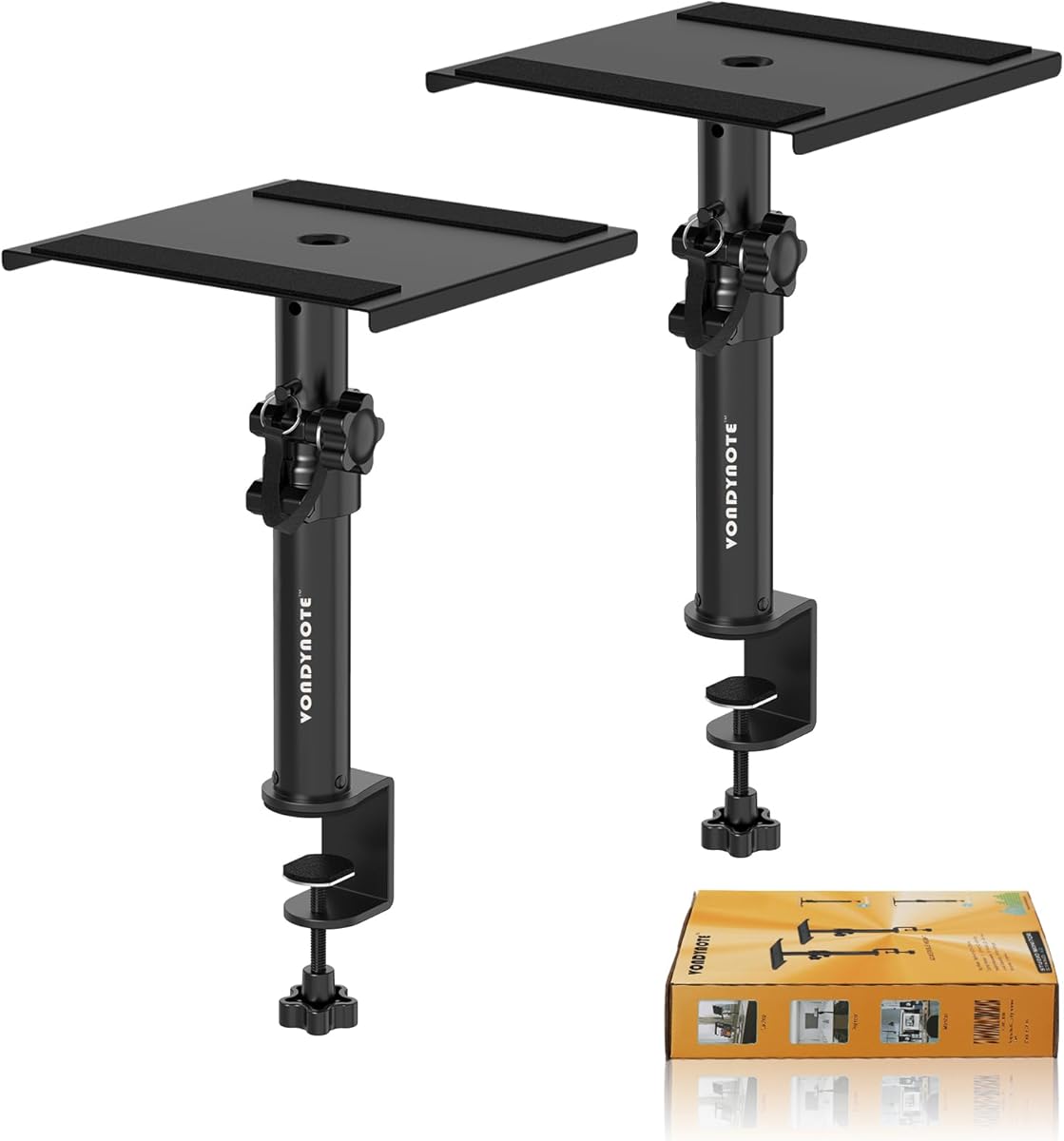
Vondynote Set of 2 Desktop Clamp Speaker Stands
4.6Editor score
Adjustable clamp height
Protective desktop padding
Supports speakers up to 50 pounds
Desktop speaker stands can improve a listening setup by raising speakers, reducing desk vibration, and helping direct sound toward the listener. The right stand depends on speaker size, desk construction, available clearance, preferred mounting method, and whether you need height or angle adjustments.
We compared all ten products by examining their stated height ranges, tilt controls, load limits, top-plate dimensions, isolation materials, clamp or base designs, cable-management features, and compatibility. The list includes freestanding, clamp-on, and one floor-stand alternative for shoppers with different setups.
Each review identifies the stand most likely to suit a particular need, from space-saving desk clamps to adjustable studio-monitor supports. Product listings and availability can change, so confirm dimensions, desk thickness, speaker weight, and included hardware before making a final purchase.
4.6Editor score

4.8Editor score

4.7Editor score
As an Amazon Associate we earn from qualifying purchases.
The comparison below highlights the major differences among all ten stands, including installation style, adjustment range, speaker support, isolation features, and cable management.




These Vondynote clamp stands offer one of the most practical ways to elevate speakers without taking up valuable desktop surface area. They hold speakers between 9 and 14 inches above the desk, use a compact clamp footprint, and carry a stated load limit of 50 pounds. Their 4.6 rating reflects a generally well-received balance of useful adjustment, protection, and straightforward installation.
We may earn a commission when you buy through this link, at no additional cost to you.
The strongest feature is the clamp itself. A 3mm EVA pad helps protect the desktop, while 5mm-thickened clamps and grade 8.8 reinforced steel screws are designed to resist deformation and loosening. The clamp accommodates desktops from 0 to 2.6 inches thick, and the top plate measures 9 by 9 inches with a 2mm anti-skid pad that helps limit speaker movement and vibration.
The main limitation is the relatively narrow height range. The four fixed positions cover only 9, 10.6, 12.3, and 14 inches, so listeners who need to position larger studio monitors near ear level may find the support less versatile. Installation also depends on finding an edge with enough clearance for the clamp and mounting hardware.
This is a strong choice for a compact workstation, home office, or gaming desk where clamping the stands to the side is more useful than placing broad bases on the surface. It is especially suitable for studio monitors, laptops, projectors, and other supported devices weighing no more than the stated limit. For shoppers seeking straightforward desktop elevation and minimal surface use, it is an especially compelling option.
The padded clamp is particularly useful on finished wooden or laminate desks because it reduces the chance of scratches during installation and long-term use. Reinforced screws and the security-focused clamp design help keep the stands from shifting, although users should still check the fit after adjusting the height.
Because the supports attach beneath the desktop edge, they leave most of the work surface open. That makes them useful for smaller desks where two wide freestanding bases would consume a meaningful portion of the available area.
We may earn a commission when you buy through this link, at no additional cost to you.
The Kanto SP6HD pair is a refined, purpose-built solution for medium and large bookshelf speakers as well as 4- to 7-inch studio monitors. Each stand raises the listening surface to six inches, and the 4.7 rating indicates strong customer satisfaction with the combination of stability, presentation, and acoustic positioning features.
We may earn a commission when you buy through this link, at no additional cost to you.
Its heavy-steel construction and closed-cell foam padding are designed to reduce resonance transferred between the speaker and desk. Two top plate sizes are included, each with a mounting hole and a quarter-inch 20 screw for securing compatible speakers. The plates can also rotate up to 15 degrees in either direction, making it easier to aim a stereo pair toward the listening position.
Unlike many adjustable studio-monitor stands, this model does not change height. Its fixed six-inch elevation works well for compact bookshelf speakers and common nearfield monitors, but users who need a higher or lower platform may need a different design. The hollow support columns also create a neat place to route cables, though larger connectors may not pass through every opening comfortably.
The Kanto pair is best for listeners who value clean styling and accurate horizontal placement over a broad range of height positions. It is a particularly good match for compatible medium and large bookshelf speakers that benefit from tweeters being brought closer to ear level. Buyers should verify the bottom-mounting pattern and connector clearance before ordering.
The 15-degree rotation on each top plate helps create a more focused stereo image than fixed, forward-facing platforms. Adjusting both stands in opposite directions allows a pair to be directed toward a central listening position without moving the stands themselves.
The hollow columns provide a practical route for speaker wires, helping keep desktop cabling less visible. This makes the stands especially appealing where the setup should look organized as well as acoustically improved.
We may earn a commission when you buy through this link, at no additional cost to you.
These Vondynote stands combine height adjustment, vertical tilt, and a space-saving clamp design. They offer four fixed height positions from 10.4 to 15.4 inches and allow the top plate to tilt from zero to 12 degrees. With a stated capacity of 60 pounds, they are well suited to many medium and large studio monitors.
We may earn a commission when you buy through this link, at no additional cost to you.
A locking knob and security pin work together to keep the selected height stable. The top plate measures 9 by 12 inches and includes a 3mm EVA anti-skid pad intended to reduce speaker vibration. The desktop clamp also has protective padding and fits edges measuring from zero to 2.6 inches thick.
Compared with fixed-angle stands, the ability to alter vertical tilt is a meaningful advantage for listeners whose monitors have a tall front baffle or whose preferred seating position differs from the desk height. The maximum 12-degree tilt is not as generous as the 20-degree range offered by the Liquid Stands, however, and clamp installation still requires a suitable desk edge.
This pair works well for home studios, editing desks, and compact audio workstations that need both elevation and angle control. It is a particularly good fit for studio monitors up to the stated load limit that benefit from being directed slightly upward or downward. Those willing to clamp rather than freestand the supports gain useful desk space in return.
Height and vertical angle can be adapted to the speaker and listener rather than treated as fixed features. This flexibility is useful for nearfield monitoring, where a small change in direction can affect the apparent center of the stereo image.
The 60-pound stated capacity gives the stands more support than many compact desktop models. Security hardware and a reinforced desktop clamp help maintain a stable connection, while the padded contact points protect both the desk and the speaker.
We may earn a commission when you buy through this link, at no additional cost to you.
Liquid Stands offer the most adaptable desktop support in this group, combining a 9.5-to-13.5-inch height range with tilt adjustment from zero to 20 degrees. They carry a stated capacity of 65 pounds, the highest listed maximum, and their 4.8 rating is the highest among the ten products. The result is a versatile stand for serious desktop audio setups.
We may earn a commission when you buy through this link, at no additional cost to you.
The platform measures 9 by 12.5 inches and can be used horizontally or vertically. Four included lips can be added or removed to accommodate different speaker orientations, while the plate can be tilted to match the listening position. Heavy-duty stainless steel, a four-inch-wide base, and 6mm anti-slip isolation padding support stability and reduce unwanted movement.
The clamp is designed for desks between 0.5 and 2 inches thick and needs less than two inches of space from the wall. That makes it a good space-saving option, but it also narrows the range of desks on which it can be used. Buyers should also consider the multiple orientation and angle options carefully, since the range of adjustment can be more involved than a simple fixed stand.
This pair is well suited to music studios, post-production desks, and serious home audio workspaces using heavier studio monitors. Its broad tilt range is useful when a speaker needs to point upward toward a seated listener or when the speakers sit substantially above ear level. The ten-year warranty further strengthens its appeal for buyers seeking a long-term support solution.
The removable lips make it possible to adapt the platform to speakers that work better in a horizontal orientation. This versatility is valuable for unusual monitor shapes and lets a single stand design serve more than one placement preference.
A four-inch-wide base, stainless steel construction, and a 65-pound capacity make these stands suitable for substantial studio monitors. The thick isolation padding also helps control movement and resonance at the speaker-to-platform contact point.
We may earn a commission when you buy through this link, at no additional cost to you.
This Vondynote pair combines a relatively broad 11-to-16-inch height range with a maximum 12-degree tilt. The top plate can also rotate freely, allowing both vertical and horizontal speaker placement. A 4.6 rating indicates a solid balance of adjustment and everyday utility for studio monitors and other supported devices.
We may earn a commission when you buy through this link, at no additional cost to you.
Height is secured with a knob and locking pin, providing two forms of retention. The 9-by-9-inch top plate has a full-coverage 2mm EVA pad, while non-slip feet help keep the stands stable on the desk. Steel construction and a 9.5-by-9.5-inch base support loads up to 60 pounds.
The free rotation and option to operate the stand horizontally make this model unusually flexible, though the broad base occupies more desk area than a clamp-on design. The listed information also does not describe a clamp, so buyers should treat it as a freestanding stand and verify the dimensions against their available surface. The four fixed height positions should be considered before purchasing.
This pair is a good option for studio monitors that need both a meaningful elevation and directional control. It can also accommodate speakers better suited to a horizontal orientation or users who want the stand itself to remain visually unobtrusive while rotating the platform. For a spacious desk and flexible placement needs, it offers a convincing balance.
Height, vertical tilt, and free rotation give the user several ways to align a monitor with the listening position. This is especially helpful for asymmetric desks, where moving the entire stand may be inconvenient but rotating the plate is simple.
The adjustment knob works together with a locking pin, reducing the chance of accidental height changes. Non-slip feet add another layer of stability at the desk contact point.
We may earn a commission when you buy through this link, at no additional cost to you.
These Vondynote stands offer a generous 11.6-to-18-inch adjustment range, making them one of the tallest desktop options in the roundup. Four drill-hole positions provide firm height settings, and a safety-pin locking device helps keep the selected position secure. Their 4.6 rating reflects a well-regarded combination of height range, portability, and robust construction.
We may earn a commission when you buy through this link, at no additional cost to you.
Each stand uses steel construction and has a matte black finish suited to studios, offices, and home listening rooms. A nine-inch square top plate with a 2mm EVA anti-skid pad helps control speaker vibration, while the stated maximum load is 50 pounds. The stands can also hold a laptop or projector, according to the product information.
Unlike the Vondynote clamp and adjustable-tilt models in this guide, these stands do not offer a stated tilt mechanism. Their emphasis is vertical elevation and portability, so listeners who need to precisely aim upward or downward should consider another option. The relatively wide base may also occupy more surface area than a clamp-mounted design.
This pair is a sensible choice for a large studio desk, editing suite, or home office with tall speakers that need to sit above surrounding equipment. The disassemblable construction makes it easier to move between workspaces, while the extended height range helps bring tweeters closer to a seated listener. It is a straightforward choice when elevation matters more than fine angle control.
The maximum 18-inch position is useful for taller bookshelf speakers or desks where other equipment would otherwise block the speaker’s acoustic path. Four discrete positions make it straightforward to reproduce a chosen setup in another location.
The stands can be disassembled for carrying, which is helpful for mobile production rooms or shared creative workspaces. Steel construction and the safety pin provide a reassuring balance of portability and retention.
We may earn a commission when you buy through this link, at no additional cost to you.
The Suptek SDM003MB pair offers straightforward elevation for bookshelf speakers, desktop speakers, studio monitors, gaming equipment, and home-audio systems. Each stand raises the speaker to 6.1 inches and carries up to 44 pounds. The 4.5 rating suggests a dependable, uncomplicated option that prioritizes stable support and quick setup.
We may earn a commission when you buy through this link, at no additional cost to you.
The top plate measures 200 by 165 millimeters, or 7.9 by 6.5 inches, providing enough room for many common desktop speakers. Anti-slip mats help limit movement at the contact surface, while the stated load capacity comfortably covers most consumer and many nearfield studio monitors. Illustrated instructions are designed to make assembly straightforward.
The design does not include height or tilt adjustment, so it will not satisfy listeners who want fine control over speaker positioning. Its appeal lies in simplicity: a fixed 6.1-inch platform, a broad top, and balanced paired elevation. Buyers should verify that their speakers fit the plate and that their bottom surfaces are appropriate for direct contact with the anti-slip material.
These stands are best for gaming desks, home offices, and listening rooms where a pair of medium-sized speakers needs a clean, moderate lift. The simple setup and substantial plate make them accessible to first-time buyers, while the 44-pound capacity extends their use beyond lightweight computer speakers. They are an effective choice when fixed positioning is acceptable.
The broad 7.9-by-6.5-inch top gives common bookshelf and desktop speakers a stable place to sit. That makes the pair suitable for mixed listening, gaming, and office-audio environments.
Clearly illustrated instructions keep setup approachable. Once assembled, the fixed platform removes the need to continually readjust knobs or pins, making the stands convenient for a fixed workstation.
We may earn a commission when you buy through this link, at no additional cost to you.
This pair combines a 16-degree upward tilt with a simple choice between freestanding use and screw-mounted installation. It supports speakers up to 22 pounds and carries a 4.9 rating, the highest numerical rating in this roundup. The design is aimed at bookshelf speakers in gaming, creative, and casual desktop-listening spaces.
We may earn a commission when you buy through this link, at no additional cost to you.
The metal base measures 7.1 by 4.8 inches and includes a protective pad for the desktop. An anti-vibration pad on the support surface is intended to reduce resonance between the speaker and stand. Users can place compatible speakers on the platform without assembly or secure them with screws when they want a more permanent connection.
The fixed 16-degree angle is a trade-off. It can provide direct sound when speakers are placed below a seated listener, but it cannot be reset for a different seat position, speaker orientation, or desk arrangement. The 22-pound load capacity is also lower than that of most studio-oriented stands in the list, making weight verification particularly important.
This is a strong option for consumers who already know that an upward-tilted platform suits their setup and want minimal installation work. It works particularly well for compact bookshelf speakers on a gaming desk or in a creative workspace. Those with heavier studio monitors or a need to change angles should choose a higher-capacity adjustable model.
The ability to begin using the stands immediately is convenient for quick setup changes. Screw mounting provides an additional option for a fixed workstation where preventing movement is a priority.
Separate pads protect the desktop and help isolate the speaker from the supporting surface. These details are useful in a compact audio setup where a stable, clean connection is more important than extensive adjustment.
We may earn a commission when you buy through this link, at no additional cost to you.
The PERLESMITH PSSS2 pair is included as a specialized alternative for listeners who need to elevate small surround, satellite, studio, or bookshelf speakers to a much greater height. It extends from 33.3 to 45.1 inches and supports up to 11 pounds. Its 4.3 rating is the lowest in the group, but that figure should be interpreted alongside its floor-standing purpose.
We may earn a commission when you buy through this link, at no additional cost to you.
The stand width adjusts from 4.5 to 9 inches, allowing it to accommodate a range of rectangular speaker shapes. A twist-lock mechanism enables tool-free height adjustment, while solid steel construction, a wide base, deeper threaded connections, and non-slip foot pads create a stable floor platform.
Two cable-management choices are provided. A cable hole in the hollow pole can carry wires internally, while hook-and-loop straps can secure cables externally when the hole is too narrow for the connectors. The stand is not designed for round or irregularly shaped speakers, and its 11-pound limit excludes many larger studio monitors.
This pair makes most sense as a rear-surround solution positioned around a seating area rather than as a conventional desktop stand. It is also useful for a floor-based listening room where small speakers need to be raised near ear level. Desktop users should favor one of the clamp-on or compact freestanding models instead.
The twist-lock system allows the stand to be raised or lowered without additional tools. This is convenient when the speakers need to be repositioned around a room or aligned with a particular listening area.
Internal routing keeps compatible cables inside the hollow poles for a cleaner appearance. External straps provide a backup for cables with larger connectors or for runs that do not fit through the openings.
We may earn a commission when you buy through this link, at no additional cost to you.
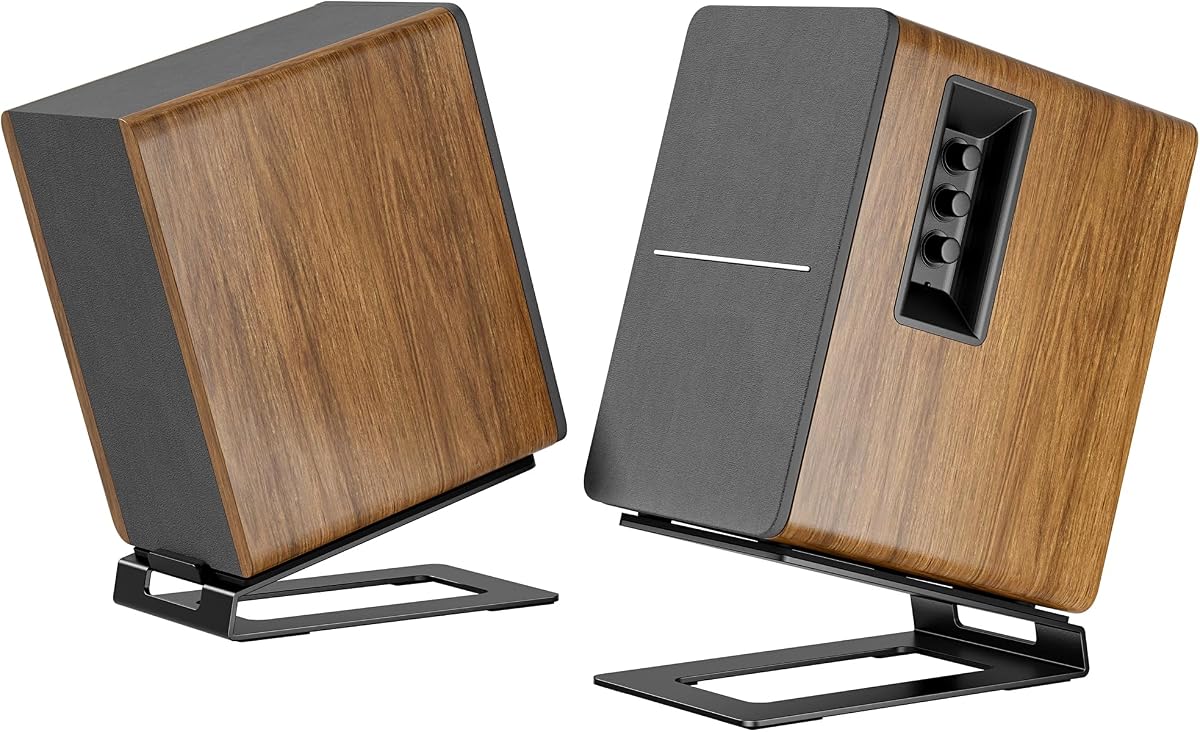
This cantilevered pair is designed to elevate small and medium bookshelf speakers while preserving useful space beneath them. The C-shaped structure leaves 5.9 inches of clearance under the speaker, allowing items such as a keyboard, notebook, or other slim accessory to remain accessible. Its 4.5 rating reflects a practical design with several thoughtful adjustments.
We may earn a commission when you buy through this link, at no additional cost to you.
The support tilts six degrees to align the speaker more closely with the listener. An extendable ledge stopper adjusts the depth from 5.5 to 7.5 inches, helping accommodate speakers with different footprints. A preset slot is included for models with bottom mounting holes, while soft EVA pads improve stability and protect the speaker surfaces.
The maximum capacity is 12 pounds, the second-lowest listed limit, so heavy studio monitors are outside its intended range. The six-degree tilt is also fixed. These restrictions are reasonable for compact bookshelf speakers, but less suitable for users who need to support large monitors or adapt the angle frequently.
This pair is a good match for a busy desk where the space directly beneath a small speaker would otherwise be wasted. It is especially useful for listeners using light bookshelf speakers, computer speakers, or compact studio monitors. Verify speaker dimensions, weight, and bottom-mounting requirements before selecting it.
The cantilevered geometry turns otherwise unused space into an accessible storage area. This is one of the most distinctive benefits in the roundup and can be especially helpful on a compact workstation.
The extendable ledge changes the platform depth to fit a wider range of compact speakers. Paired with the mounting slot, it provides more flexibility than a simple fixed pad.
We may earn a commission when you buy through this link, at no additional cost to you.
The most suitable desktop speaker stand depends on your desk, speakers, and listening position. Evaluate installation method, height, tilt, capacity, isolation, and cable handling before choosing.
A clamp-on stand attaches beneath the desk edge and usually preserves more of the working surface. It is particularly attractive on compact desks, but the desk must have a compatible edge thickness and enough room beneath the top for the clamp and hardware. A freestanding model is easier to move and can work with more desk shapes, although its base occupies surface area.
Choose a clamp for maximum desk space, or a freestanding stand for portability and simple repositioning.
The ideal height brings the tweeter closer to ear level without forcing the speakers too far from the front edge of the desk. Compare minimum and maximum heights with the dimensions of your speakers and the height of your seated listening position. Fixed-height stands can be simpler and visually tidy, while multi-position supports are better when the setup changes.
Match the stand’s full height range to your seating position, not merely to the speaker size.
Tilt changes the vertical direction of the speaker, while rotation adjusts the horizontal angle. Upward tilt can help direct sound toward a listener seated above a low stand; rotation can narrow a stereo image toward the central listening position. Fixed-angle designs are adequate for a stable setup, but adjustable controls make repositioning easier and accommodate more speaker shapes.
Prioritize adjustable tilt and rotation when your listening position or speaker orientation changes.
Every stand has a stated maximum load, and the speaker’s actual weight should remain comfortably below that figure. Also consider the base width, steel construction, feet, and locking hardware because nominal capacity alone does not guarantee stability. Larger studio monitors benefit from wide bases and high stated limits, while compact desktop speakers need less structural support.
Check both speaker weight and base dimensions before assuming a stand is adequately strong.
A compact speaker may sit securely on a smaller plate, while a wider bookshelf model or projector needs more surface area. Check both the platform dimensions and the speaker footprint. Some stands include mounting holes and screws, which is useful for compatible studio monitors, while others rely on friction and anti-skid padding.
Measure the speaker base and compare it with the platform before ordering.
EVA or foam padding can reduce vibration and protect the contact surfaces. Desktop clamps may also include padding where they press against the desk. These details help control unwanted resonance and prevent scratches, but users should still assemble the hardware carefully and check the clamp after adjustment.
Choose padded contact points for both cleaner acoustics and safer surfaces.
Hollow columns, internal cable holes, and external straps can keep speaker wires organized. A clean stand also matters in an office or home environment where the audio setup forms part of the room. Look for cable routing that matches your connector size and preferred cable path, since a decorative opening may not accommodate bulky plugs.
Match the cable route to your connectors and choose the least visible workable option.
Some stands are ready to use immediately, while others require bolts, an Allen key, or platform pieces to be installed. Consider how often the setup will move and whether the hardware can be repeatedly tightened without losing its position. A stand that disassembles cleanly can be useful for shared studios, mobile production, or temporary listening events.
Favor simple assembly for a fixed desk and portable construction for a changing setup.
Begin by confirming that the stand’s base or clamp fits the intended location, then compare its maximum load with the weight of each speaker. Assemble the height and tilt controls before lifting the speakers into place. For a clamp-on model, position the padded jaw against the desk edge, tighten the hardware gradually, and check that the contact area is clean and free of grit.
Place each speaker centrally on the top platform and use a secure mounting hole when the model and speaker support one. Position the pair symmetrically, then adjust the height, vertical tilt, or horizontal rotation to aim the speakers toward the listening position. Route cables through any internal openings or secure them along the column so they do not pull against the connectors or hang near moving parts.
For routine care, wipe the steel and platform with a soft, dry cloth and check the pads for compression or damage. Inspect clamp screws, mounting bolts, locking pins, and tilt locks periodically, especially after moving the setup. Avoid standing on a desk chair near the stands, and replace a stand if its hardware becomes damaged or its support surface no longer holds the speaker securely.
They can by reducing vibration transfer, elevating the tweeters, and helping direct sound toward the listener. The degree of improvement depends on the speakers, desk, room, stand construction, and placement. Isolation padding and a stable platform are useful, but a stand cannot replace correct speaker positioning or room treatment.
Clamp-on stands are better when desk space is the priority and the desk edge is compatible. Freestanding stands are easier to move and work with a wider range of desks. The better choice depends on the desk thickness, available clearance beneath the edge, and how much surface area you are willing to devote to the supports.
The tweeter should ideally sit near ear level when you are seated at your normal listening position. Exact height depends on the speaker and desk, so compare the stand’s full adjustment range rather than focusing on one number. A fixed stand can still work well if it places the acoustic center of the speaker at the appropriate height.
Tilt is useful when the speakers sit well below your ears or their front baffles need to be directed toward you. It is less essential when the platform is already close to ear level and the speakers naturally face the listening position. Adjustable tilt adds flexibility, while a fixed angle can be sufficient for a permanent setup.
Only if their stated load capacity exceeds the weight of the monitors and the platform is large enough for the speaker footprint. Models in this roundup support varying limits, so check both specifications. Also consider the stand’s base size, desk strength, and whether the speaker can be secured through a bottom mounting hole.
Pads can reduce surface vibration and protect the speaker or desk from scratches. They are particularly helpful with hard desktops and metal platforms. The exact material matters less than ensuring the pads are firmly attached, clean, and not so worn that the speaker can move.
Using a matching pair is the easiest way to maintain equal height and angle. If different models are used, make sure their platforms sit at the same height, offer similar adjustment, and keep the speakers parallel or deliberately aimed in the same manner. Matching stands also simplify future repositioning and cable management.
Install the supplied protective pad and keep the contact area clean and free of grit. Tighten the clamp gradually, checking the fit from underneath, and avoid overtightening the hardware. The jaw should hold the desk securely without visibly denting the surface or compressing the pad excessively.
The Vondynote Desktop Clamp Stands stand out for buyers who want to save surface area, while the Liquid Stands pair offers the broadest combination of height, angle, orientation, and load capacity. The Kanto SP6HD stands provide a polished premium option for compatible bookshelf speakers and studio monitors with an emphasis on placement and cable management.
Prioritize the features your setup actually needs: desk space, height range, tilt, speaker weight, platform dimensions, and installation method. A fixed stand can be the more sensible choice for a stable workstation, while an adjustable model is more useful if the speakers, seating position, or desk arrangement changes.
Before purchasing, verify the current listing details, included hardware, maximum load, desk requirements, and speaker dimensions. Product configurations and availability can change, so confirm that the stand remains compatible with the exact speakers and desktop arrangement you plan to use.