
MSI MPG Ai1300TS PCIE5
5.0Editor score
Dual native 12V-2×6 cables
GPU Safeguard+ current monitoring
Server-grade SiC MOSFET design
Our 80 Plus Titanium Power Supply guide compares efficiency, wattage, modularity, noise, protection, and connectors to help you choose the right model.
An 80 Plus Titanium power supply converts wall power into usable computer power with exceptional efficiency, reducing waste heat while helping capable systems run cooler and quieter. Titanium models are especially relevant to high-end gaming PCs, workstations, and compact builds equipped with demanding processors and graphics cards.
We compared the supplied models using their efficiency certifications, power capacity, ATX and PCIe standards, connector layouts, modularity, cooling behavior, fan characteristics, protection features, and warranty coverage. The list includes 850W through 1600W options so readers can match a supply to different hardware configurations.
Each review identifies the strongest use case, practical benefits, and potential compromises without assuming that one capacity fits every system. Ratings reflect the supplied customer feedback, while specifications and certifications come directly from the product information. Availability and pricing can change, so confirm current details before buying.
5.0Editor score

4.6Editor score

4.7Editor score
The following comparison brings all ten models together by capacity, efficiency, platform readiness, connector support, cooling approach, and key design features. It makes it easier to identify a compact 850W option, a flexible 1000W choice, or a high-output 1300W to 1600W unit for an advanced workstation.




The FSP Hydro Ti Pro 1000W is a strong all-around choice for builders who want serious efficiency without moving into an oversized 1600W unit. It carries a 4.6 rating and combines 80 Plus and Cybenetics Titanium certification, indicating that efficiency is central to the design rather than merely a marketing label.
We may earn a commission when you buy through this link, at no additional cost to you.
Its standout feature is power density. At 150 x 150 x 86mm, the Hydro Ti Pro is shorter than many general-purpose 1000W power supplies, which can make it easier to fit into compact cases without giving up meaningful capacity. The fully modular design removes unused cables and improves airflow, while the native 12V-2×6 connection and five PCIe 6+2-pin connectors support current and next-generation graphics hardware.
Cooling is handled by a 135mm fluid dynamic bearing fan and a Zero-RPM mode that keeps the fan inactive until cooling is necessary. ATX 3.1 and PCIe 5.1 readiness address modern power-delivery requirements, while the conformal coating adds protection against dust, moisture, and staining. The main compromise is that only one 12V-2×6 cable is listed, so builders with unusually demanding multi-GPU configurations must confirm their cable requirements.
This is an especially attractive option for a high-end single-GPU gaming PC, powerful workstation, or space-conscious enthusiast build. It balances high capacity, compact dimensions, strong certification, and practical noise control. For most people seeking a modern 80 Plus Titanium power supply without an excessive wattage target, the FSP Hydro Ti Pro is the most balanced recommendation in this guide.
The dual Titanium certifications and stated efficiency above 94% at typical loads can reduce waste heat, while the 150mm depth helps preserve case space. That combination makes the unit particularly useful when a build needs substantial power but cannot comfortably accommodate a longer premium enclosure.
A native 12V-2×6 lead, five PCIe 6+2-pin connectors, and ATX 3.1 compliance cover the needs of modern graphics cards. The semi-fanless mode keeps normal operation quiet, allowing the 135mm fluid dynamic bearing fan to activate only when the load and temperature require it.
We may earn a commission when you buy through this link, at no additional cost to you.
The Seasonic Prime TX-1600 Noctua Edition is built for workstations, enthusiast systems, and professional creators who require both exceptional power headroom and near-silent cooling. Its 4.7 rating supports its reputation for consistent electrical performance, while the specialized Noctua edition makes noise reduction a central selling point.
We may earn a commission when you buy through this link, at no additional cost to you.
At the heart of the design is a 135mm Renowned Noctua NF-A12x25 fan paired with a custom fan grille. The product information says this configuration is approximately 8 to 10dB(A) quieter than the regular Prime TX-1600 and holds Cybenetics Lambda A++ certification. Semi-passive operation keeps the fan stopped until the supply reaches 50% load at an ambient temperature of up to 25°C, then ramps it gradually as demand rises.
The power platform remains fully modern, with ATX 3.1 and PCIe 5.1 compliance, a 12V-2×6 connector, and backward compatibility for ATX 3.0 and PCIe 5.0 equipment. Fully modular Noctua-themed cabling keeps the installation orderly, and both 80 Plus Titanium and Cybenetics ETA Titanium certifications confirm strong conversion efficiency at typical operating loads.
The tradeoff is straightforward: most consumer PCs do not need 1600W, and the enormous capacity is unnecessary for a modest gaming machine. For a heavily loaded workstation or a high-end multi-component system where near-silence matters, however, the specialized cooling package is compelling. It is best viewed as a premium specialist rather than a general-purpose recommendation.
The NF-A12x25 fan, optimized grille, and gradual semi-passive ramp distinguish this model from standard Seasonic power supplies. Those details are particularly valuable in recording, rendering, and engineering environments where constant fan noise can be distracting.
A 1600W rating gives demanding multi-GPU, high-end CPU, and expanded workstation configurations considerable room. Titanium efficiency helps limit the amount of energy converted into heat, supporting the quiet thermal design under sustained load.
We may earn a commission when you buy through this link, at no additional cost to you.
The MSI MPG Ai1300TS PCIE5 stands out with a perfect 5.0 rating and a feature set aimed directly at modern high-end graphics cards. Its 1300W capacity occupies a useful middle ground: substantially more headroom than 850W or 1000W models without reaching the extreme size and demand of a 1600W supply.
We may earn a commission when you buy through this link, at no additional cost to you.
MSI's GPU Safeguard+ is the most distinctive feature. It provides real-time protection and an early alert if the 12V-2×6 current enters an abnormal state, potentially allowing a user to address a developing issue before system functionality is affected. Two native 12V-2×6 cables can each support up to 600W, while five PCIe 6+2-pin connectors preserve flexibility for existing graphics hardware.
Internally, the server-grade silicon carbide MOSFETs in the interleaved PFC stage are intended to improve efficiency and maintain lower temperatures. A 135mm fluid dynamic bearing fan supports durability, and the cable set includes motherboard, CPU, native GPU, PCIe, SATA, and peripheral connections. The fully modular layout and 12-year warranty complete the premium proposition.
This model is well suited to a high-end gaming PC using a power-hungry graphics card, an enthusiast system planning future upgrades, or a compact workstation needing more power than a 1000W unit. Its main limitation is that 1300W remains excessive for most mainstream builds. A prospective buyer should balance future expansion plans against the additional bulk and expense of this capacity.
GPU Safeguard+ checks the status of current delivered through the 12V-2×6 connection and provides an early warning when behavior becomes abnormal. That focus is relevant to modern graphics cards that can demand substantially more power during brief intensive workloads.
The server-grade SiC MOSFET construction is designed to improve efficiency and limit operating temperatures. Combined with 80 Plus Titanium certification, it supports a platform that seeks clean power delivery alongside high output and modern ATX 3.1 compliance.
We may earn a commission when you buy through this link, at no additional cost to you.
The ASUS ROG Thor 1600W Titanium III is a feature-rich choice for extreme enthusiast builds, exotic workstations, and showcase systems where monitoring and power-management details matter. It carries a 4.3 rating and wraps a 1600W output in a design loaded with premium ROG-specific technology.
We may earn a commission when you buy through this link, at no additional cost to you.
The magnetic OLED display is the most visible distinction. It can show real-time power consumption and can be positioned on either side of the unit, allowing users to see the information whether the power supply is installed conventionally or with its fan facing outward. That flexibility makes the display more useful than a fixed panel would be in different case layouts.
ROG's patented GPU-First smart voltage stabilizer detects the graphics card and is claimed to improve voltage delivery by up to 45%. A GaN MOSFET arrangement is also said to offer up to 30% greater energy efficiency than standard MOSFET designs while enabling a more organized, cooler internal layout. Turbo mode supports extended power excursions, and the ATX 3.1 platform is designed for the latest high-current hardware.
The model is finished with ROG heatsinks, aluminum housing, a double-ball-bearing fan, and foldable premium modular cables. Its 4.3 rating is lower than the scores attached to most alternatives, and the OLED plus advanced voltage features may feel excessive for a standard PC. For a builder who values sophisticated graphics-card support and real-time system information, it is nevertheless one of the most distinctive options here.
The magnetic OLED panel adds useful information without requiring software or a display inside the operating system. Its two-sided mounting option allows builders to preserve access to the readout across popular PSU installation orientations.
GPU-First voltage detection and the intelligent stabilizer focus on the graphics card, one of the most power-hungry and voltage-sensitive parts of a modern system. Turbo mode and ATX 3.1 compliance extend that focus toward components capable of demanding brief power excursions.
We may earn a commission when you buy through this link, at no additional cost to you.
The be quiet! Dark Power 13 850W is aimed at builders who want a capable yet relatively modest power supply for a strong single-GPU system. Its 4.1 rating is the lowest among the listed products, but the underlying specification is focused: 850W of continuous power, up to 95.4% efficiency, and an ATX 3.0 platform.
We may earn a commission when you buy through this link, at no additional cost to you.
Efficiency is one of its strongest attributes. The 80 Plus Titanium rating and stated maximum efficiency of 95.4% can reduce heat and support quieter system operation. The unit also provides native integration for the 12VHPWR connector intended for PCIe 5.0 graphics cards, as well as PCIe 6+2-pin connectors for current-generation cards.
Power delivery uses four independent 12V rails. The product information also states that the supply can handle short-duration power excursions up to twice its rated power, which gives demanding graphics hardware room during sudden load increases. This makes the Dark Power 13 more versatile than its conventional 850W label might initially suggest.
The principal drawback is that ATX 3.0 is now one step behind the newest platforms in this list. A buyer who expects to install a PCIe 5.1 card requiring a 12V-2×6 cable may prefer a newer design. For an 850W system using supported hardware, however, the efficiency, excursion handling, and quiet-brand pedigree remain meaningful advantages.
The up-to-95.4% efficiency claim is particularly useful in a compact build where reduced heat output can support quieter cooling. This makes the unit appealing for a well-balanced gaming system that does not need the hundreds of extra watts offered by larger models.
Native 12VHPWR support and legacy PCIe connectors allow the supply to serve both current and newer supported graphics cards. Its stated ability to manage brief excursions to twice rated power adds flexibility for components with abrupt power demands.
We may earn a commission when you buy through this link, at no additional cost to you.
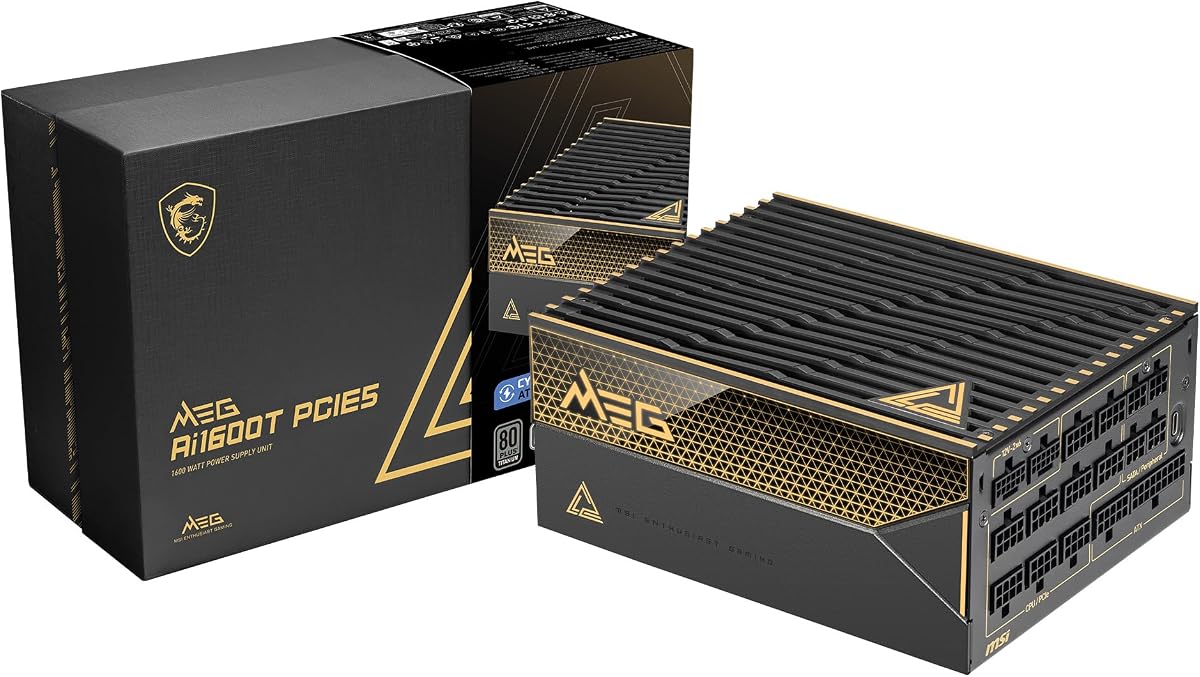
The MSI MEG Ai1600T PCIE5 is designed for high-end systems that need more power than conventional gaming PCs can offer. It provides 1600W, dual native 12V-2×6 connectors, and ATX 3.1 and PCIe 5.1 readiness, making it relevant to multi-GPU configurations, elaborate workstations, and high-end enthusiast platforms.
We may earn a commission when you buy through this link, at no additional cost to you.
Its certification program is particularly comprehensive. The product information describes 80 Plus, Cybenetics, and PPLP Titanium certification, providing three ways to assess the platform's efficiency credentials. That focus is useful where a powerful system operates for long periods and excess conversion heat would otherwise need to be removed.
A pair of native 12V-2×6 connectors avoids relying on an adapter for modern high-power graphics cards. The cable set is braided for a finished appearance and clean routing, while the fully modular design prevents unnecessary leads from reducing airflow. A 12-year warranty provides one of the longer coverage periods in this category.
The unit also uses Japanese 105°C capacitors and an industrial-level protection suite covering OCP, OTP, OPP, SCP, OVP, UVP, SIP, and NLO. Its 4.5 rating reflects solid customer feedback, though 1600W output and a substantial enclosure make it difficult to justify outside a genuinely power-intensive system. It is best reserved for builds where present and future hardware demand substantial headroom.
A 1600W rating and two native 12V-2×6 cables make this unit suitable for power-hungry graphics configurations. It also gives creators room to add storage, cooling, and other high-draw components without repeatedly operating near the supply's limits.
Japanese 105°C capacitors form part of the internal design, while the protection list covers overcurrent, overtemperature, overpower, short circuit, overvoltage, undervoltage, and other fault conditions. These features support stable operation in a system where downtime would be costly.
We may earn a commission when you buy through this link, at no additional cost to you.
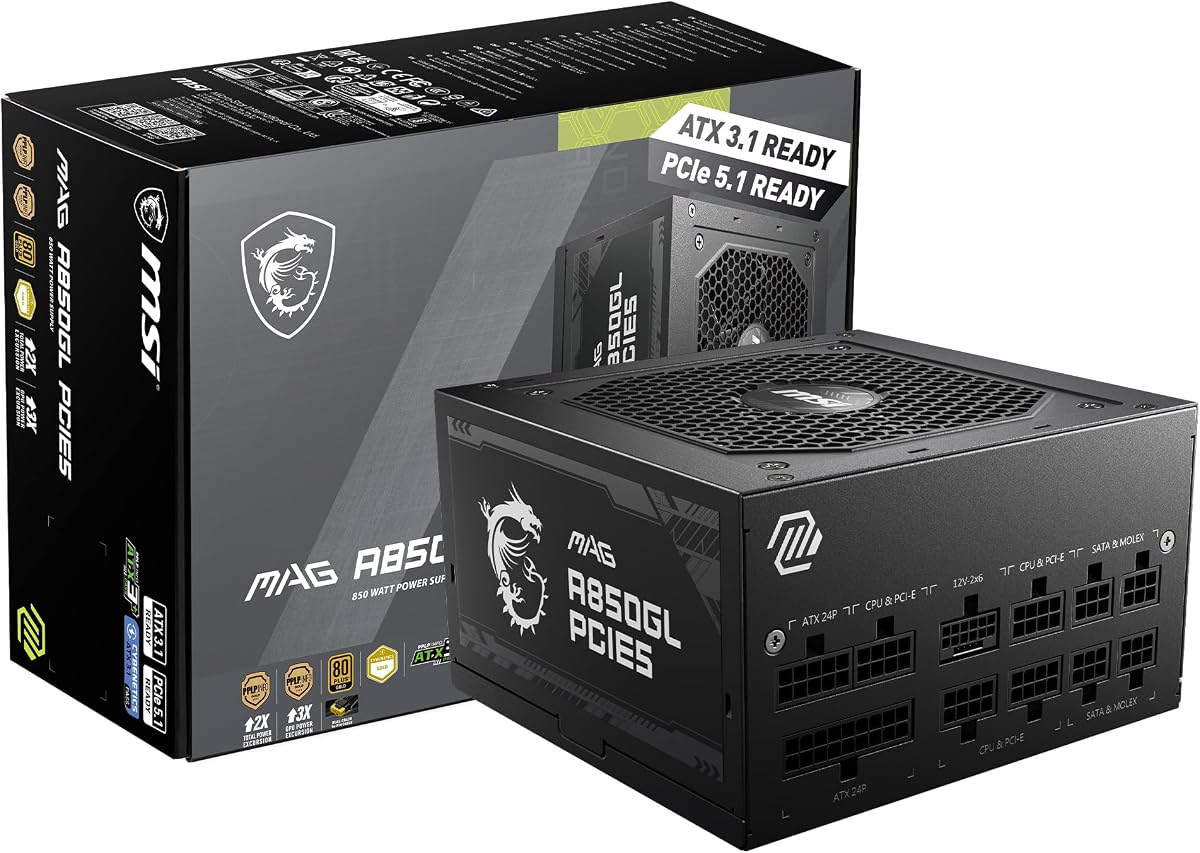
The MSI MAG A850GL PCIE5 is included as a useful modern-platform alternative, although its 80 Plus Gold certification places it below the Titanium models in this comparison. Its 4.5 rating, ATX 3.1 support, and native dual-color 12V-2×6 cable may still make it a practical choice for builders prioritizing modern compatibility and a compact design.
We may earn a commission when you buy through this link, at no additional cost to you.
At 850W, the MAG A850GL can support a strong gaming configuration without reaching the bulk and unnecessary capacity of a 1300W or 1600W model. Fully modular cabling allows builders to route only the leads they need, which can improve airflow and reduce visual clutter in smaller cases. The native 12V-2×6 connection is designed for contemporary graphics cards and avoids an adapter-based installation.
ATX 3.1 and PCIe 5.1 readiness indicate that the platform was designed with current high-power hardware in mind. The product information also highlights a 10-year limited warranty, providing long-term coverage comparable to many of the premium options in the guide.
The obvious limitation is efficiency. An 80 Plus Gold model does not offer the same efficiency classification as the Titanium products, so it may create somewhat more heat under equivalent load. Buyers who specifically need the lowest waste and have a system that truly warrants 850W should compare it with a certified Titanium alternative. Those who prioritize compactness, modern connectors, and straightforward gaming capacity may still find it compelling.
ATX 3.1 and PCIe 5.1 readiness, combined with a native dual-color 12V-2×6 cable, make this supply well suited to modern graphics hardware. That forward-looking connector support is its clearest advantage over older power supply designs.
The combination of 850W output, full modularity, and a compact format can simplify a clean gaming build. It offers enough capacity for many performance systems without requiring the considerably larger frame associated with high-output enthusiast models.
We may earn a commission when you buy through this link, at no additional cost to you.
The Corsair AX850 is a compelling value-oriented choice for a powerful gaming PC that can benefit from Titanium efficiency. It holds a 4.7 rating and offers a combination of 850W output, full modularity, and quiet operation that remains highly relevant even as newer connector standards emerge.
We may earn a commission when you buy through this link, at no additional cost to you.
Its Zero-RPM fan mode stops the cooling fan during low and medium load conditions, helping keep the system nearly silent during browsing, media playback, or ordinary productivity tasks. When higher output is required, the 135mm fan uses a true fluid dynamic bearing to maintain low noise. This is an effective arrangement for a system that spends much of its time below maximum load.
The electrical claims emphasize stable voltages and ultra-low ripple noise, both important for clean and consistent power delivery. Full modularity makes installation easier and reduces the number of unused cables inside the case. Three-color customizable magnetic side labels provide a minor visual benefit, allowing the exterior to fit different build themes without requiring permanent modification.
The principal limitation is that the AX850 predates the newest ATX 3.1 and 12V-2×6 standards represented by several newer products. Its exact cable compatibility should be checked against the intended graphics card, and a native modern connection may be preferable for a new build. For a compatible 850W system, however, the AX850's rating, efficiency, quiet mode, and modular layout make it an excellent budget-focused Titanium recommendation.
An 850W supply is sufficient for many strong single-GPU systems, and Titanium certification reduces the amount of power converted into heat. It offers a more efficient option than a similarly capable Gold-rated unit without moving into premium 1200W or 1300W territory.
The Zero-RPM mode prevents fan noise during lighter operating periods. A fluid dynamic bearing fan then handles cooling as demand rises, making the AX850 a sensible choice for a system used for gaming, productivity, and media throughout the day.
We may earn a commission when you buy through this link, at no additional cost to you.
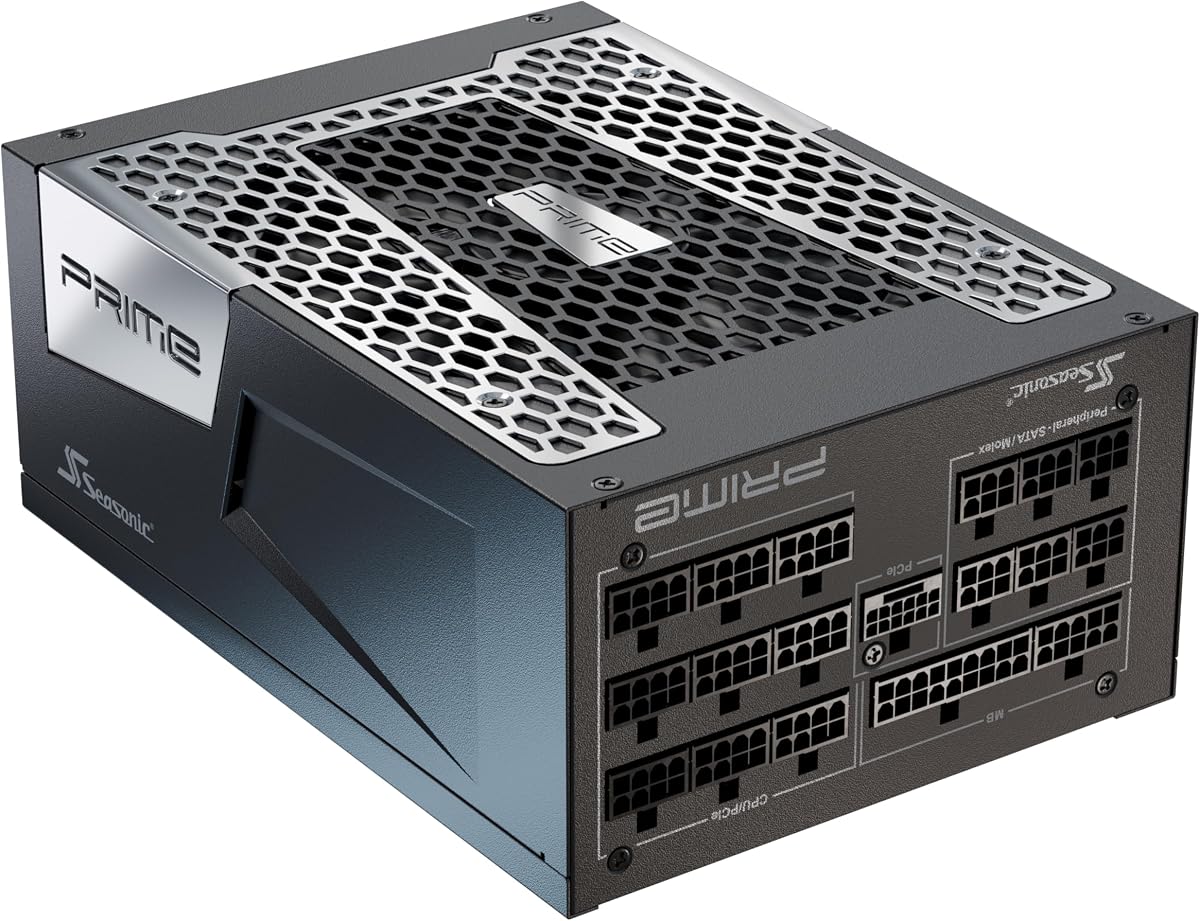
The Seasonic Prime TX-1300 provides a balanced combination of high capacity, Titanium efficiency, and mature electrical performance. Its 4.5 rating makes it one of the stronger all-around entries in the guide, while the 1300W rating serves demanding single-GPU systems and configurations that want extra upgrade headroom.
We may earn a commission when you buy through this link, at no additional cost to you.
One of the most notable specifications is Micro Tolerance Load Regulation, listed at 0.5%. That tight target indicates an emphasis on maintaining consistent voltage as load conditions change, which can benefit sensitive high-end processors and graphics cards. A 135mm fluid dynamic bearing fan provides cooling, and the fully modular layout keeps cable management clean by allowing unused leads to remain out of the chassis.
The platform is ATX 3.0 and PCIe 5.0 ready, positioning it for current-generation power delivery while remaining slightly behind ATX 3.1 products in the list. The product title specifically notes compatibility with Nvidia RTX 30 and 40 Super cards and AMD GPUs, while the use of premium Japanese capacitors reinforces the emphasis on component quality.
This Seasonic is a strong alternative to more elaborate 1300W units that add displays, app-based monitoring, or specialized GPU protections. It lacks those extras, and buyers should verify the exact cable compatibility for a new graphics card. Its restrained feature set, strong efficiency certification, tight load regulation, and full modularity should appeal to experienced builders who prefer a conventional, dependable design.
The stated 0.5% Micro Tolerance Load Regulation reflects a priority on stable output as system demand varies. This is particularly relevant to high-end CPUs and graphics cards, where clean and consistent voltage delivery can contribute to stable operation.
The fully modular cabling and 135mm fluid dynamic bearing fan provide a straightforward installation and cooling experience. Rather than relying on decorative displays or companion software, the TX-1300 emphasizes electrical performance and a tidy internal layout.
We may earn a commission when you buy through this link, at no additional cost to you.
The be quiet! Dark Power 14 1200W is one of the strongest all-round performers in the guide, carrying a 4.9 rating. It combines dual efficiency certifications, modern ATX 3.1 support, generous capacity, and user-selectable cooling and rail modes in a design aimed at advanced gaming and overclocking systems.
We may earn a commission when you buy through this link, at no additional cost to you.
Cooling can be handled in two ways. A rear button activates balanced active cooling with the Silent Wings fan running continuously, or selects semi-passive operation in which the fan stops and starts only as additional cooling becomes necessary. A re-ventilation function keeps the fan running for two to five minutes after the load falls, preventing frequent starting and stopping. A large heatsink targets the parts of the supply that need the most cooling.
Its 1200W capacity is well suited to a high-end single-graphics-card system or a multi-GPU configuration without reaching 1600W. Two native 12V-2×6 connectors and four PCIe 6+2-pin connectors cover current and legacy graphics hardware. A separate control selects the conventional four-12V-rail arrangement or a single-rail mode, giving overclockers direct control over power distribution.
The active rectifier, full-bridge LC technology, high-quality Japanese capacitors, and modular sheathed cables reinforce the premium design. The main caution is that the user-selectable rail mode must be configured correctly for the installed equipment. Most buyers will also find 1200W more capacity than they need. For an advanced system where efficiency, flexibility, and modern power standards all matter, it is an excellent fit.
The rear cooling button lets users choose between continuous active cooling and semi-passive operation. The added re-ventilation period avoids abrupt fan cycling and allows the internal components to cool smoothly after a demanding workload ends.
A dedicated mode switch allows selection between four independent 12V rails and a single-rail configuration. That flexibility is valuable for advanced users who understand the power demands of their components and want direct control over distribution.
We may earn a commission when you buy through this link, at no additional cost to you.
Choosing an efficient power supply involves balancing available wattage, physical fit, connector compatibility, acoustic behavior, protection, and future upgrade plans. The best option is not always the largest or most advanced model; it is the unit whose electrical and mechanical features fit the rest of the system.
In practical terms, an 850W model can suit many performance-oriented single-GPU systems, while 1000W offers additional flexibility. Systems with exceptionally powerful graphics cards, multiple accelerators, or elaborate workstation configurations may justify 1200W, 1300W, or 1600W. The most important rule is to size for the actual hardware and likely upgrades rather than choosing by efficiency badge alone.
Prioritize a genuine Titanium or dual-certification model when reducing waste heat and supporting quiet operation matters. It is particularly attractive for high-load systems that operate for long periods, although a well-designed Gold unit may still meet a lower budget and thermal needs if its size and noise are more important.
For a new enthusiast build, favor ATX 3.1 and PCIe 5.1 readiness with native 12V-2×6 connections. For an existing system, verify the required connector, pin configuration, and power rating before ordering. Never substitute an unverified cable or assume that every high-power plug is physically and electrically interchangeable.
Create a short checklist of every connector the build requires, including cable length. The best platform is not useful if it lacks the right lead, while extra unneeded connectors can complicate a compact installation. Fully modular systems also make it easier to carry only the necessary cables into the chassis.
Choose a model with a zero-RPM or well-designed semi-passive mode for general-purpose systems. Workstations and studios that demand near-silence may favor a purpose-built acoustic edition, while frequent heavy-load users may prefer continuous active cooling to avoid rapid fan transitions.
Measure the case's power-supply compartment and route before choosing a model. Favor a compact, fully modular unit for tight cases, but ensure the long modular cables remain easy to arrange. In a large case, cable length and support for neat routing may matter more than minimizing the enclosure.
Prioritize models that clearly document meaningful protections and use reputable components. Longer warranty coverage adds reassurance, but it should complement rather than replace careful sizing, compatible cables, proper ventilation, and correct installation.
Treat warranty length as useful supporting evidence rather than the primary buying criterion. Confirm terms directly, retain documentation, and maintain a sensible upgrade plan. Electrical compatibility, protection, and fit should remain more important than the number of years printed on the box.
Install the power supply in a clean, well-ventilated area and connect it only after confirming that the mains supply is switched off and unplugged. Match the unit to the case mounting pattern and use the supplied screws. Route modular cables carefully behind the motherboard tray, avoid sharp bends, and keep connectors away from hot components such as a CPU cooler or exhaust fan. Never open the power-supply enclosure; its internal capacitors can retain dangerous voltage after disconnection.
Connect the motherboard, processor, graphics card, storage, and accessory leads according to the hardware manuals. Confirm that any graphics cable required by the card is native and properly rated, especially when using 12VHPWR or 12V-2×6. Do not force a connector or leave a partially seated plug. If the power supply offers selectable rail or cooling modes, read the manual before changing them and use the setting appropriate for the installed equipment.
After startup, listen for unusual fan behavior and monitor the system for shutdowns, unexpected restarts, or signs of unstable voltage. Keep the intake and exhaust paths clear of dust, maintain unrestricted airflow around the enclosure, and use normal computer-cleaning methods to remove accumulated debris. If a connector becomes hot, discolored, loose, or damaged, stop using the supply and have it inspected. For unusual noise, voltage instability, or a fault condition, contact the manufacturer or a qualified technician rather than opening the unit.
It can be worthwhile in a gaming PC that draws substantial power or runs for long sessions because the higher efficiency can reduce waste heat and support quieter cooling. The benefit is most noticeable when the system operates near the supply's efficient range and has room for airflow. For a light-use PC, the total energy and noise savings may be less noticeable, so case fit, connectors, protection, and warranty should also influence the decision.
Not always; the correct capacity depends on the exact CPU, graphics card, number of drives, and planned upgrades. An 850W unit can serve many strong single-GPU systems, while 1000W, 1200W, 1300W, and 1600W models provide additional headroom for power-hungry combinations. Check the component manufacturers' guidance and allow room for transient loads and future upgrades rather than relying on wattage alone.
ATX 3.1 is the newer platform guidance and is designed around the demands of contemporary high-power components, including updated connector and transient-handling requirements. ATX 3.0 is an earlier generation that remains usable in many systems. A modern build with a recently released graphics card should still verify the exact power connector and power-supply requirements, because the standard label alone does not guarantee complete cable compatibility.
A native cable is strongly preferable when the graphics card explicitly requires the 12V-2×6 connection. It provides a direct route for high-current delivery and avoids relying on an adapter that adds another connection point. If the card supports standard PCIe connectors within its power limit, compatible 6+2-pin cables may be suitable. Always follow the graphics-card manufacturer's instructions and the power supply's cable guide.
They can be, because unused modular cables do not have to be stored inside the case and routed around other components. Fewer cables can reduce clutter and leave more room for air to move through the chassis. The actual improvement depends on the case design and cable-management technique, so a compact PSU with good routing can perform as well as a larger modular model.
No. A power supply is only one source of noise, and its fan may still spin under heavy load. Semi-passive and Zero-RPM modes can make it quiet during lighter operation, while premium models may use specially optimized fans. CPU and GPU coolers, case fans, coil whine, and vibration also affect the overall sound level, and a quality case design remains important.
Only if its wattage, connectors, and electrical standards satisfy the new hardware's requirements. A previously adequate unit may lack the appropriate high-power connector or enough sustained and transient capacity for a modern graphics card. Check the card's recommended power supply, required connectors, and the PSU's cable compatibility before installing it. When uncertain, a new purpose-built platform is safer than relying on an improvised connection.
A longer warranty can add confidence because power supplies are often retained for many years and may see several component upgrades. It should not replace checking efficiency, fit, protection, fan behavior, and connector support. Read the warranty terms, confirm regional coverage, and keep proof of purchase. Proper installation and ventilation remain the buyer's responsibility throughout the coverage period.
The FSP Hydro Ti Pro 1000W is the most balanced recommendation because it combines dual efficiency certification, modern ATX 3.1 and PCIe 5.1 support, a native 12V-2×6 connection, and a compact 150mm enclosure. The MSI MPG Ai1300TS stands out for premium GPU protection, two native high-current cables, SiC MOSFETs, and a perfect supplied rating, while the Corsair AX850 offers a compelling budget route into an 850W fully modular Titanium design.
Prioritize wattage that matches the hardware, native connectors that fit the graphics card, and a case-compatible size before focusing on secondary features. For particularly quiet professional systems, the Seasonic Prime TX-1600 Noctua and the cooling controls of the be quiet! Dark Power 14 deserve special attention. ROG enthusiasts may prefer the ASUS Thor's OLED display and GPU-focused voltage controls, while high-output builders can examine the MSI MEG Ai1600T and other 1300W or 1600W alternatives.
Finally, check the exact model specifications, included cable inventory, warranty terms, and current marketplace details before purchasing. Efficiency ratings, component revisions, and availability can change over time, and the right 80 Plus Titanium power supply is ultimately the one that delivers the required power safely, fits the case, connects cleanly, and suits the system's acoustic and upgrade goals.