
MELOGAGA RGB Computer Speakers
4.2Editor score
Dual 3W high-fidelity drivers
Seven-color RGB lighting
USB and 3.5mm connections
Inline rotary volume control
Explore the best cheap PC speakers for 2026, with a detailed comparison of sound quality, connectivity, controls, compact designs, setup, and overall value.
Cheap PC speakers can make a meaningful difference to music, videos, calls, and games without requiring a large or complicated audio system. The best models balance useful output, clear sound, practical controls, straightforward USB or 3.5mm connections, and a footprint that works well on a crowded desk.
We compared the ten featured speakers using the information available for each model, including driver configuration, power method, audio input, mounting or desk design, frequency response, controls, compatibility, dimensions, and user ratings. The list covers conventional stereo pairs, compact soundbars, USB-only systems, monitor-mounted models, and RGB options.
Each review explains where a particular speaker stands out and where its design makes more sense. The Creative Pebble 2.0 leads for refined sound, the Amazon Basics stereo pair offers a versatile balance, and the MELOGAGA RGB model represents an especially approachable option. Product prices and availability can change, so check current listings before buying.
4.2Editor score

4.6Editor score

4.4Editor score
The comparison below places all ten models side by side, emphasizing the differences that matter most at a computer desk: sound hardware, power and audio connections, physical format, controls, mounting options, and practical compatibility.




The Amazon Basics Stereo 2.0 is the strongest all-around choice in this guide, earning a 4.4 rating from its listed user feedback. It combines a conventional two-speaker desktop layout with USB power, a 3.5mm auxiliary input, and an easy-to-reach inline volume control. That combination makes it familiar, uncomplicated, and suitable for many PC and laptop arrangements.
We may earn a commission when you buy through this link, at no additional cost to you.
Its practical appeal comes from the way the features support daily use. USB power removes the need for a wall adapter, while the auxiliary input keeps the audio connection widely compatible with computers, laptops, and other audio sources. The black metal finish, blue LED lights, and scratch-free padded bases add a polished look, while the bottom radiator is designed to contribute fuller bass response.
The main trade-off is that USB handles power rather than the entire signal, so the system still needs its 3.5mm audio cable. It also lacks a documented headphone jack, which may matter to listeners who want to switch quickly between speakers and personal headphones. Neither limitation is unusual for a compact stereo system, however, and the straightforward connection arrangement is easy to manage.
This is a strong recommendation for someone who wants a conventional pair of computer speakers without giving up useful controls or a polished appearance. It works particularly well for general music, video playback, and everyday desktop listening. Choose it when straightforward operation, a real stereo pair, and flexible input options matter more than wireless convenience or a single-cable setup.
Two separate speakers give the system a natural left-right layout, making this option more suitable than a single soundbar for users who appreciate stereo imaging. The pair can also be positioned around a monitor or laptop for a more involving desktop setup.
USB power removes the need for a separate power brick, and the inline control lets you adjust the level without reaching behind the speakers. This keeps the main functions close at hand and avoids unnecessary desktop clutter.
We may earn a commission when you buy through this link, at no additional cost to you.
This compact USB desktop speaker set carries a 4.1 rating and focuses on the fundamentals that matter in a small workspace. It uses a pair of narrow, column-shaped enclosures, USB power, and a 3.5mm audio cable. The result is a straightforward stereo system for users who would rather preserve desk space than add large audio equipment.
We may earn a commission when you buy through this link, at no additional cost to you.
The manufacturer describes the speakers as producing loud, crisp, distortion-free sound for movies, music, and gaming. More importantly for setup, the included USB and auxiliary cables support a plug-and-play arrangement without drivers. Inline volume control adds convenience, while the cable length between the two speakers offers enough flexibility to place them on opposite sides of a compact workstation.
The product's high-quality plastic construction, matte metal panels, and anti-slip pads make it look more deliberate than a bare-bones computer speaker. The trade-off is that no detailed driver size, power rating, or frequency response is provided in the supplied information. That makes it difficult to compare raw output precisely with models such as the FUNLOGY 14W set or the Creative Pebble 2.0.
This pair is a sensible choice for dorm rooms, office desks, laptop workstations, and other setups where every centimeter matters. It is best suited to listeners seeking an inexpensive, conventional stereo upgrade with easy controls. Prospective buyers should ensure their computer has an available 3.5mm audio output and accept that the listing offers fewer measurable specifications than some alternatives.
The slim column form leaves more usable space than a traditional rectangular speaker pair. That makes the system appealing beside a monitor, on a small desk, or near a laptop where open workspace matters.
The speaker set separates power and audio connections but does not require operating-system drivers. Once the cables are connected, it is positioned for immediate use with compatible computers and laptops.
We may earn a commission when you buy through this link, at no additional cost to you.
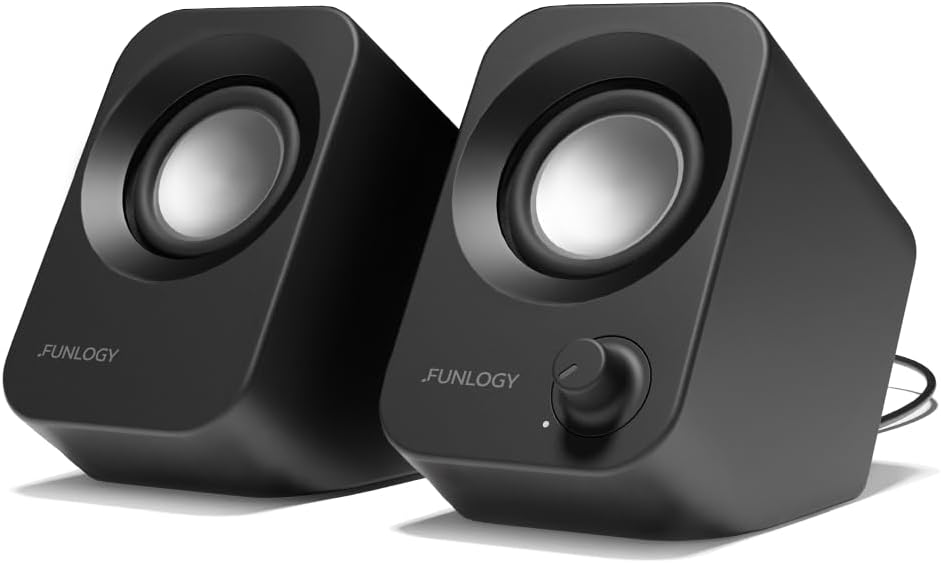
The FUNLOGY 14W Stereo PC Speaker receives a 4.2 rating and brings unusually clear specifications to the budget category. It offers 14 watts of total output through dual 48mm full-range drivers and passive radiators, giving buyers a better idea of its hardware than listings that rely only on broad claims about loudness or fidelity.
We may earn a commission when you buy through this link, at no additional cost to you.
Its defining physical feature is the 30-degree upward-facing layout. The tilt directs sound toward a seated listener, which can improve perceived clarity for desktop use. A dedicated volume dial provides direct adjustment, and the gold-plated AUX input is intended to preserve a clean signal. USB power, a 3.5mm cable, and driver-free setup keep operation simple.
Compatibility extends beyond desktop PCs and laptops to monitors, smartphones, and gaming consoles, provided they offer the required connections. The trade-off is that this remains a wired system rather than a Bluetooth model, and its separate power and audio cables can be less tidy than a one-cable design. The supplied information also does not list a frequency response or dimensions.
This is an attractive choice for gamers and listeners who want more explicitly documented output than the smallest sets provide but still prefer a compact footprint. Its tilted enclosure, stereo configuration, and volume dial make it especially useful on a desk. Choose it when you want a visibly purposeful computer audio upgrade without moving into a large powered speaker system.
The elevated 30-degree design is more than a styling choice: it aims the drivers upward toward the seated user. This can make music, dialogue, and game effects feel more present than they might from a level-facing compact speaker.
A stated 14-watt total output, 48mm drivers, and passive radiators provide a clearer technical basis for comparison. These details help distinguish the FUNLOGY from smaller models that do not publish equivalent specifications.
We may earn a commission when you buy through this link, at no additional cost to you.
The Adaptive Monitor Speaker is a 4.2-rated system designed for a specific kind of workspace: one where a pair of traditional desktop speakers would be inconvenient. It clips onto a monitor and also works as a desktop unit, giving users flexibility without committing to a fixed arrangement.
We may earn a commission when you buy through this link, at no additional cost to you.
Its most interesting feature is adaptive channel switching with a sensor. Depending on where the unit is mounted, the system can keep the left and right channels correctly oriented. Dual ultra-magnetic drivers and dual passive radiators support stereo playback and deeper bass, while three front touch controls provide muting and volume adjustment.
The mounting system is the central trade-off. It can save desk area, but not every monitor has a compatible edge or sufficient clearance, and the listing specifically states that televisions, projectors, and monitors are not compatible as audio sources. The system must be connected to a computer USB interface, including through the included USB-C adapter for compatible devices.
Choose this model for a compact home office, gaming desk, or workstation where monitor-mounted audio is important. It is especially useful when a pair of separate speaker boxes would block keyboard space or when a single soundbar needs to sit immediately in front of a display. Users should verify their monitor dimensions and computer connection before purchasing.
Mounting the speaker above, below, or beside the display keeps the speaker enclosure off the work surface. The included clamp also permits desk placement, so the system can adapt if your monitor arrangement changes.
The sensor-based channel switching is designed to keep the stereo image correctly assigned when the unit is mounted in different orientations. This avoids one common problem with compact soundbars, where placement can inadvertently swap the perceived left and right sides.
We may earn a commission when you buy through this link, at no additional cost to you.
The Amazon Basics USB-Powered Computer Speakers have a 4.2 rating and offer one feature that many compact alternatives omit: a 3.5mm headphone jack. They are designed for desktop or laptop use, draw power through USB, and fit within a compact footprint of 2.76 by 3.55 by 5.3 inches.
We may earn a commission when you buy through this link, at no additional cost to you.
A front control handles power, standby, and volume, so routine adjustments are easy without reaching behind the speakers. The plug-and-play design requires no drivers, and the published 2.2-watt total RMS output, split evenly between the two speakers, gives buyers a clear expectation of this system's scale.
The main limitation is acoustic reach. A frequency range beginning at 103Hz and ending at 20KHz, paired with relatively modest output, suggests a lightweight listening experience suited to near-field desktop audio rather than room-filling entertainment. The headphone output adds flexibility, but USB power still leaves the speaker system dependent on a separate audio input for computer playback.
This model is a good fit for a small office, dorm, or laptop desk where users need a compact pair, front controls, and an easy way to connect headphones. It is less compelling for users seeking deep bass or high volume. Still, for uncomplicated near-field listening, the feature set is notably well rounded.
The 3.5mm headphone jack gives the setup a convenient private-listening option. It is a meaningful convenience in a shared office or at a desk where you may alternate between system audio and personal headphones.
Power, standby, and volume are handled by a control on the front of the speaker. This reduces the need to reach behind the enclosure and makes the system easier to manage during work or entertainment.
We may earn a commission when you buy through this link, at no additional cost to you.
The Upgraded USB Soundbar has a 4.2 rating and centers on a clean one-cable connection. Both audio and electrical power travel through USB, eliminating the need for a separate 3.5mm cable and reducing desk clutter. It is designed for desktop PCs, laptops, and mini PCs running Windows, macOS, ChromeOS, or Linux.
We may earn a commission when you buy through this link, at no additional cost to you.
Sound comes from two 3W high-excursion drivers and a passive radiator. The product description emphasizes greater dynamic range, improved bass, and lower distortion compared with a basic single-bar speaker. Its single-enclosure format also takes up less room than a pair of separate speakers and sits neatly beneath a monitor.
Setup is easy but not entirely automatic in every case. The instructions describe selecting a USB 2.0 device as the playback source after connecting the speaker, and the listing recommends keeping the computer audio driver current. That small configuration step is a reasonable trade-off for eliminating a second cable. The supplied details do not mention a headphone jack or a separate volume control location.
This soundbar is a good recommendation for laptop users, mini-PC owners, and anyone who wants clean cable management. It also works well beneath a monitor where two speaker boxes would be inconvenient. Choose it for simple USB operation and enhanced bass from a compact bar, particularly if you are comfortable selecting the correct playback device.
The combined USB connection is the system's standout convenience. It removes the loose auxiliary lead found on many inexpensive stereo pairs and makes moving the computer or rearranging the desk more straightforward.
Placing a single soundbar beneath a monitor creates a more open work area than positioning two separate speaker enclosures. The passive radiator and dual drivers are intended to provide more bass and dynamics than a minimal one-speaker bar.
We may earn a commission when you buy through this link, at no additional cost to you.
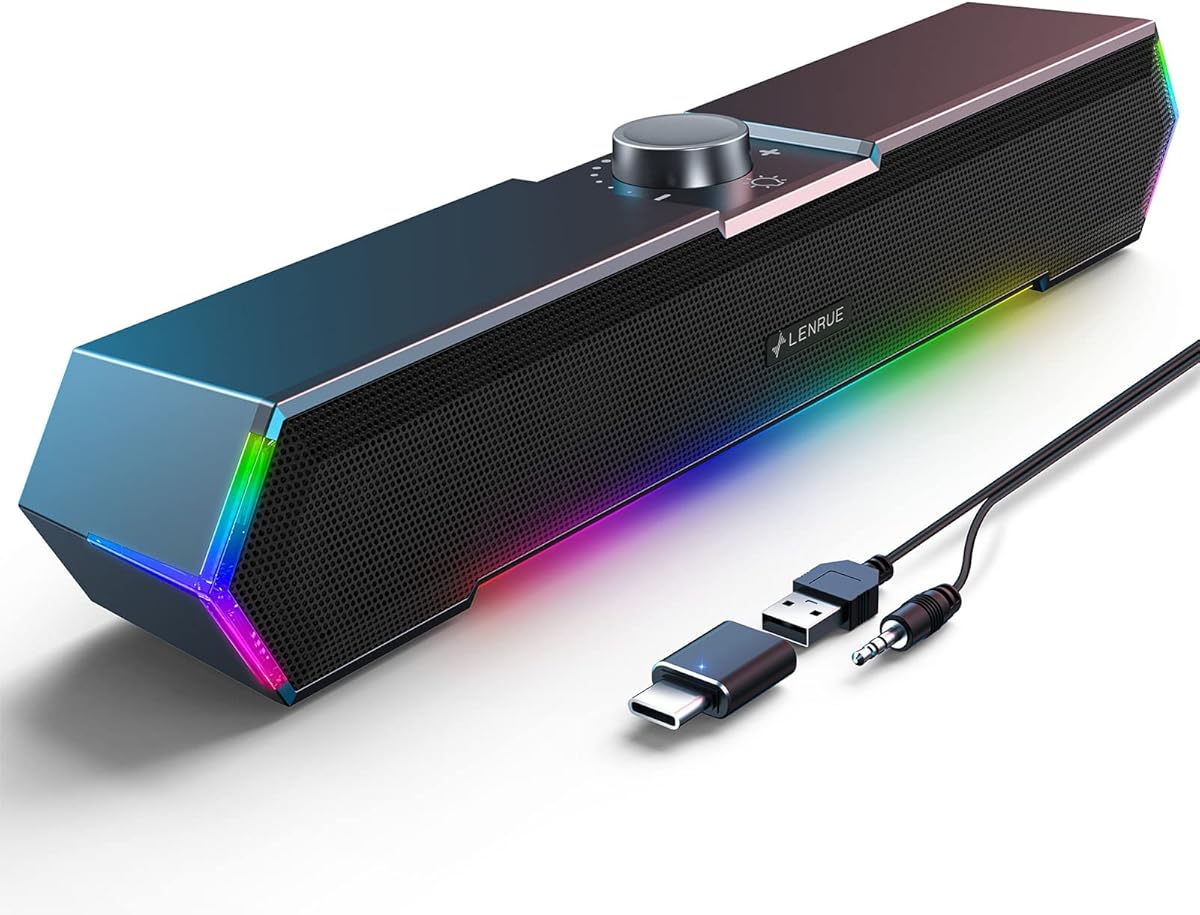
The LENRUE G11 is a 4.2-rated speaker system built for users who want their computer audio to match a gaming-oriented setup. Its defining features are four amplifier IC horn units, dynamic angular lighting, and a compact enclosure intended to fit under a monitor without taking over the desk.
We may earn a commission when you buy through this link, at no additional cost to you.
The speaker is designed for distortion-free, low-noise stereo playback across movies, videos, games, and music. Lighting is controlled through a touch function rather than a traditional button, while a top-mounted knob makes volume adjustment easy to see and reach. USB handles power, a 3.5mm cable handles audio, and an included Type-C adapter broadens connection options.
The listing explicitly states that there is no Bluetooth, headphone port, or microphone connection. It is also not intended for televisions or headphones. These limitations make the G11 a specialized choice: buyers need the included wired arrangement and should not expect modern wireless convenience or private-audio switching.
Choose the G11 when a gaming aesthetic, visible lighting, and simple desktop controls are priorities. It can add atmosphere and a full-width stereo presentation without requiring two separate speaker boxes. For a standard office, the decorative lighting may be unnecessary, but for a game room or colorful workstation it gives this model a distinct identity.
The angular light treatment makes the system visually prominent without requiring a large enclosure. Touch activation keeps the front free of a conventional illuminated power button and contributes to the gaming-focused appearance.
The compact all-in-one body can sit under a monitor, using vertical desk space more efficiently than a conventional speaker pair. Bundled cables are joined together to reduce visible clutter, and the top knob places volume control in an accessible position.
We may earn a commission when you buy through this link, at no additional cost to you.
The MELOGAGA RGB Computer Speakers combine a 4.2 rating with a feature-rich budget presentation. Two 3W high-fidelity drivers provide the audio foundation, while seven-color RGB backlighting gives the setup a more animated appearance than most small office speakers.
We may earn a commission when you buy through this link, at no additional cost to you.
The system is designed for crisp, balanced sound with deep bass and is positioned for gaming, music, and movies. Its slim enclosures conserve desk space, and an inline rotary knob provides direct volume adjustment. USB power and 3.5mm audio input make setup straightforward without software, while the stated compatibility includes PCs, laptops, tablets, and monitors.
One honest caveat is that maximizing perceived loudness requires the computer and media-player volume to be at their normal maximum levels. The manufacturer specifically notes that pushing the system beyond 100 percent can introduce distortion. The RGB lighting is another subjective feature: it works well for gaming and colorful workspaces but may feel unnecessary in a professional office.
This pair is a compelling choice for budget-conscious gamers or students who want a stereo system, visible lighting, and straightforward controls in a small footprint. It is less ideal for listeners seeking a single-cable setup or a completely understated appearance. Overall, it delivers the most attention-grabbing visual treatment among the budget options in this list.
Seven-color RGB illumination adds personality without requiring a large soundbar or elaborate lighting controller. The backlighting cycles through colors and can make a basic computer setup feel more deliberately equipped for gaming.
Dual 3W drivers are a meaningful improvement over many tiny single-speaker options for music and video. The compact stereo pair also preserves some separation between channels, which can make dialogue and effects easier to distinguish.
We may earn a commission when you buy through this link, at no additional cost to you.
The Uakinat Computer Desktop Speaker is a compact 4.2-rated pair designed around the basics of inexpensive computer audio. It draws power through USB, receives sound through a 3.5mm cable, and provides an inline volume control without requiring software or driver installation.
We may earn a commission when you buy through this link, at no additional cost to you.
Its upgraded two-by-three-watt configuration and anti-slip foot pads support a practical desktop design. The slim enclosures can sit beside a monitor or underneath one, and joined cables help prevent the two units from becoming visually tangled. The product is marketed for indoor movies, videos, music, and video games.
The main limitation is a lack of published detail about frequency response, dimensions, and driver construction. That makes direct technical comparisons difficult. It also offers no distinctive premium features such as a headphone jack, monitor clamp, USB-C input, or decorative lighting; its value proposition is simplicity and low-impact desktop use instead.
Choose this model for a small work area, home office, or temporary laptop station where a basic stereo upgrade is needed. It is a sensible alternative to the MELOGAGA RGB set for buyers who want a similar compact format without lighting. As always, check that the computer has a 3.5mm audio output and that the speakers will be placed close enough for near-field listening.
Two slim speaker units provide separate left and right channels while taking up relatively little room. Their small size makes them easy to position close to a laptop or fit into a workstation that lacks space for larger boxes.
The cables are bonded together, which keeps the run between the two speakers more orderly. Combined with inline volume control, this creates a tidy setup without requiring a separate control pod or desktop hub.
We may earn a commission when you buy through this link, at no additional cost to you.
The Creative Pebble 2.0 holds the highest listed rating in this roundup at 4.6, making it the strongest choice for buyers who place sound quality and refined desktop design above the lowest possible cost. Its compact stereo format fits naturally beside a monitor, and a single USB cable handles both power and audio.
We may earn a commission when you buy through this link, at no additional cost to you.
Custom-tuned far-field drivers are paired with rear-facing passive radiators to improve bass reproduction. The drivers are elevated at 45 degrees, directing output toward the listener rather than simply forward across the desk. Front-facing volume controls make everyday adjustments convenient, while the modern black enclosure is designed for home offices and contemporary workspaces.
The frequency response is listed from 100Hz to 17KHz. That range does not extend as high as the Amazon Basics model, which reaches 20KHz, and no headphone output is documented. The single-cable design may also mean less flexibility if you want to connect the speakers to a separate amplifier or analog source without a USB computer.
This is the pick for a user who wants a polished upgrade from built-in laptop speakers without accepting an unrefined mini system. The elevated drivers, passive radiators, and convenient USB operation make it particularly good for music, videos, and focused desktop listening. Choose it when the combination of presentation, compactness, and strong listed customer feedback is your priority.
The 45-degree elevation places the driver faces more directly in line with a seated user's ears. This focused orientation can improve clarity and make the pair feel more effective at near-field listening than a level desktop speaker.
One USB cable carries both audio and power, reducing clutter at the computer. That makes the Pebble 2.0 particularly convenient for laptops, compact workstations, and desks where an adapter and auxiliary lead would be unwelcome.
We may earn a commission when you buy through this link, at no additional cost to you.
The right inexpensive PC speaker depends on your desk, computer ports, listening habits, and tolerance for cables. Use the following factors to separate genuinely useful features from decorative additions and to identify the model that fits your setup most naturally.
Check whether your computer relies on a 3.5mm audio jack, a USB port, or both. A USB-only speaker can often carry audio and power through one cable, which is ideal for a laptop or a tidy desk. A speaker powered by USB but fed by a 3.5mm auxiliary cable offers broader source compatibility but requires two connections. Systems that use an auxiliary input can connect to a desktop, laptop, monitor, phone, or gaming console when the device provides a compatible output.
A pair of separate speakers generally creates a wider stereo image than a single compact soundbar because each channel has its own enclosure. A soundbar may be preferable when desk space is limited, a monitor has no room for side speakers, or you want a visually unified setup. Consider the trade-off between channel separation and physical footprint rather than assuming one format is always superior. Listening near the computer is important because small speakers are designed primarily for near-field desktop use.
Published output and driver details make comparisons more meaningful, although no wattage figure perfectly predicts perceived quality. The FUNLOGY states 14 watts of total output and uses dual 48mm drivers with passive radiators. The MELOGAGA and Uakinat models specify dual 3W drivers, while the Amazon Basics model provides 2.2 watts of total RMS power. Passive radiators can add useful low-end response in a small enclosure, but driver tuning, placement, and room acoustics also affect the result.
Traditional speaker pairs require room on both sides of a display or laptop. A single soundbar can sit below a monitor, while a clip-on model can attach to the top or bottom of a compatible display. The adaptive monitor system in this guide also supports desktop placement. Before choosing a mounted design, check the monitor's thickness, edge clearance, base, and available space around the screen. For very small desks, a compact pair or soundbar may be more practical than a clamp-on product.
Inline knobs are convenient when a speaker sits beside the display, while front controls are easier to reach on a soundbar or compact pair. A dedicated power or standby control avoids repeatedly changing the computer's master volume. Touch buttons can look clean but may provide less tactile feedback than knobs or physical buttons. Also consider mute access: a front-mounted mute control is useful for meetings and voice chats because it can be reached without navigating operating-system menus.
Lighting is not a substitute for sound quality, but it can make a setup feel more cohesive or entertaining. The MELOGAGA uses seven-color RGB backlighting, while the LENRUE G11 features angular touch lights. Blue LEDs add a subtle indicator effect to the Amazon Basics stereo pair. In a formal office, a dark minimalist system may be more appropriate; in a gaming room, illuminated speakers may be a welcome part of the visual theme.
Compact speakers are best used close to the computer, where their small drivers and modest output are more capable of delivering clear near-field audio. A larger room or a desk several feet from the screen calls for greater output and more bass authority than most budget models provide. If you frequently move between rooms or alternate between a laptop and desktop, prioritize USB power, low weight, and a simple connection rather than permanent features such as a monitor clamp.
Broad operating-system support can make setup smoother, especially when moving between Windows, macOS, ChromeOS, and Linux devices. Some models also include a USB-C adapter, while others document compatibility with smartphones and gaming consoles. Confirm the exact ports on your equipment: a USB speaker does not automatically support audio from a television or projector, and a 3.5mm system needs a compatible analog output. Also check whether the package includes the adapter or cables described in the listing.
Start by placing the speakers at roughly ear level and on opposite sides of the monitor when using a stereo pair. The FUNLOGY's tilted design and the Creative Pebble's elevated drivers are intended to project upward toward the listener, while a soundbar works well directly below a display. Keep each speaker at a similar distance from your chair, and avoid placing either one inside a closed cabinet or hard against a wall if bass and stereo balance are important.
Next, connect the system according to its design. For a single-cable USB model, connect the USB plug to the computer and select the USB audio device if it does not become the default automatically. For USB-powered speakers with a 3.5mm input, connect the audio cable to the correct headphone or line-out port and the USB plug to a power port. Use the included USB-C adapter only with compatible devices, and avoid forcing an adapter into an incompatible socket.
For daily care, dust the enclosures gently with a soft dry cloth and keep liquids away from the drivers and control surfaces. Do not push the volume beyond the recommended range, particularly on the MELOGAGA, because excessive amplification can create distortion. Route cables so they are not pulled sharply, and avoid using the power cable as a handle. If sound is weak, confirm the computer and media-player levels are raised, verify the correct playback device is selected, and check that every cable is fully seated.
USB speakers are usually easier to connect because one cable can provide both power and audio, although some inexpensive models use USB only for power and still require a 3.5mm audio cable. A 3.5mm connection is broadly compatible with computers, laptops, monitors, phones, and other sources that have an analog output. The best choice depends on your available ports and whether cable simplicity or source flexibility matters more.
Most models in this guide use USB power, so they do not need a wall adapter or a nearby outlet. A desktop computer or laptop USB port supplies the needed power. Systems advertised as USB-only may also carry the audio signal through USB, while models with a separate AUX input still require both their USB power lead and audio cable to be connected.
It depends on how the monitor provides audio. A monitor with a 3.5mm audio output can usually feed a speaker system with an auxiliary input. A monitor with a USB audio connection may work with a USB-only speaker if the operating system recognizes it as a playback device. The adaptive monitor-mounted model in this guide is compatible with USB devices but the listing specifically states that monitors, televisions, and projectors are not compatible as direct audio sources.
Separate speakers generally provide more obvious left-right channel separation and can create a wider stereo image. A soundbar is usually easier to place beneath a monitor, uses less desk space, and offers a tidier single-unit appearance. For music and games where stereo placement matters, two speakers can be preferable; for a compact workstation, a soundbar may be the more practical choice.
For near-field listening at a desk, modest output is usually sufficient. The models here range from the Amazon Basics compact pair at 2.2 watts total RMS to the FUNLOGY at 14 watts total, with several dual 3W options between them. You generally need more output for a large room, a party, or listening from across the room than you do immediately in front of a computer.
Begin by raising both the computer's master output and the media application's volume, then adjust the speaker's own control. Confirm that the correct playback device is selected in the operating system's sound settings and that the audio cable or USB connection is fully seated. Pushing the system beyond 100 percent can introduce distortion, so avoid using excessive software gain as a substitute for adequate output.
Wired models are dependable for a fixed computer desk because they avoid battery management, pairing, latency concerns, and wireless dropouts. Bluetooth can be convenient when you want to move the speakers around or reduce visible cables, but it adds pairing steps and depends on the computer's wireless audio implementation. Every product featured in this guide is described as a wired USB or auxiliary system.
Place a stereo pair on opposite sides of the monitor, with the drivers aimed toward your chair. Models with elevated drivers work best when their angled faces point toward the listening position. A soundbar should sit below or just above the display without blocking it. Leave enough distance between the speakers for stereo separation, and keep them away from enclosed spaces that can make the bass overly boomy.
The Creative Pebble 2.0 is the strongest premium-style choice in this group, combining the highest listed rating, a single USB connection, elevated drivers, passive radiators, and front-facing controls. The Amazon Basics Stereo 2.0 is the most versatile conventional pair, while the MELOGAGA RGB model is the strongest budget pick for buyers who value a compact stereo setup and colorful gaming-oriented styling.
Prioritize the connection method that suits your computer, the amount of desk space available, and whether stereo separation matters to you. A single-cable USB design creates the cleanest installation, a 3.5mm input supports more source types, and a monitor clamp can reclaim considerable desk area. Sound output, driver details, bass radiators, and accessible volume controls should matter more than decorative lighting unless appearance is a leading priority.
Prices, ratings, connector details, and product availability can change, so confirm the current listing before purchasing. Review the included accessories, compatibility notes, and computer's available ports, then compare the current offer with the strengths identified in this guide. That final check helps ensure the inexpensive speaker you choose remains a good fit for your particular workstation.