
MOTOPOWER MP69033
4.6Editor score
Nine-protocol vehicle support
Built-in DTC lookup library
Clear backlit LCD display
This Cheap OBD2 Scanner Tool guide compares ten affordable code readers for vehicle compatibility, diagnostic features, live data, ease of use, and emissions
A budget-friendly OBD2 scanner can turn an illuminated check engine light from a mystery into a manageable first step. The best affordable tools read diagnostic trouble codes, explain their likely meaning, display freeze-frame information, and help owners decide whether a repair shop is necessary.
We compared ten scanners based on their stated diagnostic functions, vehicle coverage, code libraries, displays, live-data capabilities, and ease of use. The list includes basic code readers as well as more advanced tools with battery testing, graphing, emissions checks, and component-level diagnostic modes.
Each pick below shows what it does best and where its coverage stops. Ratings reflect the supplied customer feedback, while features and compatibility may change with a vehicle's year, model, engine, and installed equipment. Product availability and pricing can also change over time.
4.6Editor score

4.6Editor score

4.5Editor score
The comparison below highlights each scanner's strongest capabilities, including code interpretation, live-data viewing, emissions readiness, specialized tests, and vehicle coverage, while noting the principal limitation relevant to prospective buyers.




The ANCEL AD310 Classic combines a 4.6 customer rating with a focused set of engine and emissions diagnostics in a compact package. It reads and clears codes, provides live and hard-memory data, displays freeze-frame information, checks I/M readiness, and retrieves vehicle information. Its practical appeal comes from combining useful information with a simple physical design.
We may earn a commission when you buy through this link, at no additional cost to you.
Protocol support is one of the model's strongest attributes. It covers KWP2000, J1850 VPW, ISO9141, J1850 PWM, and CAN, making it suitable for many 1996-and-newer US vehicles, 2000-and-newer European vehicles, and compatible Asian cars, SUVs, and light trucks. The long, flexible cable also provides more freedom than a tightly integrated handheld unit.
There are important boundaries. The AD310 diagnoses emission-related engine problems and does not read non-emission engine faults, ABS, SRS, or transmission systems. It also requires a genuine OBDII interface rather than an OBDI connection. Buyers seeking broader system-level coverage will need to look beyond this category of scanner.
This is our top overall choice because it delivers a balanced mix of portability, readability, protocol support, and core diagnostics without introducing an app or subscription requirement. It is particularly suitable for owners who want to investigate a check engine light, confirm monitor readiness, and avoid paying for a preliminary code-reading visit.
At 12 ounces and measuring 8.9 by 6.9 by 1.4 inches, the AD310 is easy to carry in a tool bag or glove box. Its two-and-a-half-foot cable has thick, flexible insulation, while clearly labeled buttons and a large screen help reduce the learning curve for first-time users.
Beyond reading and clearing codes, the scanner supports live data, hard memory, freeze-frame data, I/M readiness, and vehicle information. Those functions make it more useful than a single-purpose code reader when an intermittent problem needs additional context.
We may earn a commission when you buy through this link, at no additional cost to you.
The MOTOPOWER MP69033 earns a 4.6 rating and stands out as a budget-minded scanner with an unusually broad feature set. It reads and erases codes, displays freeze-frame data, checks I/M readiness, retrieves vehicle information, and presents live sensor information in a real-time curve.
We may earn a commission when you buy through this link, at no additional cost to you.
Compatibility is the central selling point. The scanner supports nine protocols and is stated to work with most 1996-and-newer US vehicles, 2000-and-newer European vehicles, and newer Asian vehicles using OBDII or CAN. It also offers English, German, Dutch, Spanish, French, and Italian, making it a practical choice for multilingual households or international travelers.
The 2.8-inch LCD includes a white backlight and contrast adjustment, which helps when scanning in a dim garage. Six physical buttons cover scrolling, entering and exiting menus, and quick access to VIN and fault-code queries. A transparent screen-protecting film is included and can be removed if it becomes scratched.
This scanner reads and clears check engine information within the OBDII system, but it does not diagnose ABS, airbag, oil-service, or other non-OBDII systems. For basic engine troubleshooting and emissions preparation, however, the MP69033 offers an effective combination of protocol coverage, useful menus, and simple operation.
Supporting nine protocols gives the MP69033 strong flexibility across U.S., European, and Asian vehicles. Buyers should still verify the scanner against their vehicle's year, make, model, and port before making a purchase.
The real-time curve can display engine RPM, coolant temperature, vehicle speed, calculated engine load, and other available parameters. Backlighting and adjustable contrast make this information easier to interpret in varying working conditions.
We may earn a commission when you buy through this link, at no additional cost to you.
The FOXWELL NT301 carries a 4.5 rating and delivers the most advanced feature set in this guide without requiring a phone app or subscription. Its 2.8-inch color screen, live-data graphing, dedicated I/M readiness controls, EVAP test, and oxygen-sensor test make it especially useful for owners who want more than a code list.
We may earn a commission when you buy through this link, at no additional cost to you.
Its practical diagnostic tools set it apart from simpler readers. Users can view and log live sensor data, including oxygen-sensor values, fuel trims, coolant temperature, and RPM. That information can help reveal abnormal patterns or support analysis of intermittent faults. Dedicated readiness hotkeys and a red-yellow-green indicator simplify emissions-test preparation.
Vehicle support covers KWP2000, J1850 VPW, ISO9141, J1850 PWM, and CAN, with stated compatibility for most 1996-and-newer US gasoline vehicles, light trucks, SUVs, many 2000-and-newer European and Asian models, and 12V diesel vehicles equipped with OBD2. Actual functions vary by vehicle, so VIN and compatibility should be checked first.
The NT301 is our premium recommendation for DIY users who will use live-data graphs, readiness status, and emissions tests. It remains focused on engine and emissions diagnostics rather than ABS, SRS, or transmission work, but within that scope it provides a capable and approachable professional-style workflow.
Graphing sensor values over time can expose fluctuations that a static code alone does not explain. The NT301 is suited to owners who want to compare RPM, fuel trim, oxygen-sensor, and temperature readings while investigating a symptom.
One-touch I/M readiness functions and a three-color status indicator help determine whether required monitors are ready. This reduces uncertainty before an annual emissions inspection and supports verification after recent repairs.
We may earn a commission when you buy through this link, at no additional cost to you.
The ANCEL AD410 provides a 4.5 rating and expands on the basic code-reader format with a 2.4-inch color display, more than 42,000 built-in DTC lookups, and several dedicated diagnostic modes. It reads and clears codes, displays live data and freeze-frame information, checks I/M readiness, and performs O2 sensor and EVAP tests.
We may earn a commission when you buy through this link, at no additional cost to you.
The built-in library is especially useful for owners who want an immediate explanation without separately searching for every code. Live readings can include RPM, coolant temperature, fuel trim, and oxygen-sensor values. These functions provide useful context when deciding whether a warning light represents a simple maintenance issue or a more involved fault.
ANCEL provides free software updates and support for compatibility, setup, and product-use questions. The scanner draws power from the vehicle's OBD2 port and requires no battery, charger, Bluetooth, or phone application, preserving a simple workflow.
Its limitation is scope. The AD410 handles engine and emission-related codes only and does not provide ABS, SRS, transmission, bidirectional-control, or service-reset functions. For a homeowner focused on check engine diagnostics, live data, and emissions readiness, it offers a clear and useful upgrade over a basic code reader.
The built-in lookup library is one of the AD410's defining features. Displaying definitions on the scanner helps owners understand a reported code before researching a repair, while free updates help keep the information current.
Live data, freeze-frame information, and component tests allow a more methodical diagnosis. The O2 and EVAP functions also make the scanner useful for owners investigating fuel-system, air-fuel, or emissions-related concerns.
We may earn a commission when you buy through this link, at no additional cost to you.
The VDIAGTOOL VD10 has a 4.6 rating and targets straightforward owners who want to read, understand, and clear engine codes without navigating a complicated interface. Its clear two-line LCD presents definitions from a built-in library covering more than 3,000 codes.
We may earn a commission when you buy through this link, at no additional cost to you.
The scanner handles generic and manufacturer-specific code families, pending codes, live data, freeze-frame information, I/M readiness, and vehicle information. Generic P0, P2, P3, and U0 codes are supported alongside the listed manufacturer-specific P1, P3, and U1 ranges. A five-year warranty adds reassurance for long-term ownership.
Compatibility covers CAN, ISO9141, KWP2000, J1850 PWM, and J1850 VPW. The stated range includes compatible 12V vehicles sold in the US after 1996, the EU after 2006, and Asia after 2009. VIN, calibration ID, and calibration verification number information can also be retrieved.
The VD10 is a good fit for a quick check before a repair appointment or during routine maintenance. Its interface is less advanced than the FOXWELL NT301 or Safescan, and the code database is smaller than some competing devices, but it covers the essential engine-code workflow in a straightforward format.
The VD10 displays stored and pending code definitions without requiring an internet connection. That makes it convenient for roadside checks, quick garage sessions, and users who do not want to depend on a phone app.
Freeze-frame data records conditions around the detected fault, which can help with intermittent problems. Live sensor information such as RPM, intake-air temperature, fuel data, and misfire information adds further diagnostic context.
We may earn a commission when you buy through this link, at no additional cost to you.
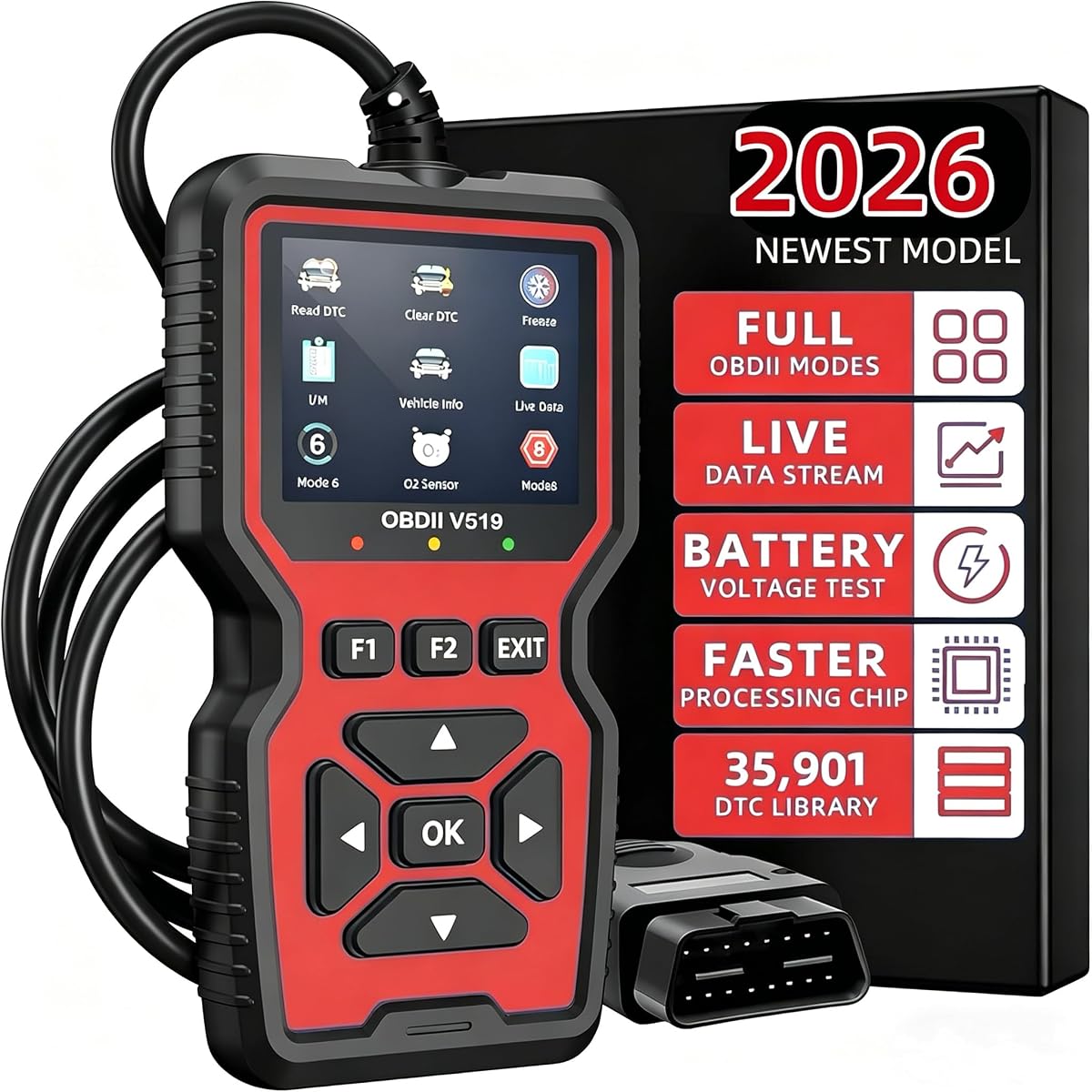
The V519 combines a 4.1 rating with a broad set of standard OBD2 functions and a library of 35,901 built-in diagnostic code lookups. It can read and clear engine codes, display the malfunction indicator light status, retrieve freeze-frame data, check I/M readiness, and obtain VIN information.
We may earn a commission when you buy through this link, at no additional cost to you.
Live data monitoring and battery voltage testing distinguish it from the most basic readers. Onboard monitoring and component-test functions also provide more avenues for basic troubleshooting. The scanner supports ten languages and draws power directly from the vehicle, eliminating battery charging and phone-pairing steps.
Compatibility is stated for most OBD2-compliant vehicles, including US cars manufactured after 1996, EU cars after 2000, and Asian vehicles with a standard 16-pin OBD2 port. As with every generic code reader, exact functions depend on the vehicle's electronics, so the port and year should be verified before purchase.
The V519 is a practical option for owners who want an extensive lookup library plus a few extra diagnostic checks in a portable format. Its customer rating trails the leaders in this guide, but its listed functions cover the essential needs of a general-purpose engine code reader.
The 35,901-entry library is the model's main attraction. It provides on-screen definitions for troubleshooting codes without requiring a separate lookup service, which is useful when connectivity is limited.
Battery voltage testing can help owners check the vehicle's electrical condition during a diagnostic session. This adds a maintenance-oriented function beyond simple code reading and clearing.
We may earn a commission when you buy through this link, at no additional cost to you.
The Safescan Enhanced Universal has a 4.6 rating and offers the largest stated built-in DTC library in the guide, with more than 65,000 lookups. It reads and clears engine codes, displays freeze-frame data, checks readiness, retrieves VIN and calibration information, and performs O2 and EVAP-related diagnostics.
We may earn a commission when you buy through this link, at no additional cost to you.
Its standout capabilities include real-time battery voltage monitoring, full I/M readiness tests, and both cloud printing and local-printer compatibility. These features can create and share diagnostic reports, save maintenance records, or provide remote technicians with evidence about a fault. The included F1 and F2 shortcut keys place frequently used commands close at hand.
The 2.8-inch HD color screen includes adjustable brightness and red, green, and yellow status indicators. Thirteen languages and support for nine standard protocols broaden its appeal, while vehicle coverage is stated for 1996-and-newer US vehicles and 2000-and-newer European and Asian cars.
Safescan supports only engine fault-code diagnostics and does not cover ABS, SRS, or transmission systems. Its reporting and printing functions also make it more complex than a basic reader. For owners who want thorough emissions diagnostics, professional-looking records, and a large code library, it is one of the most capable options here.
Cloud printing and local printer support allow users to generate, store, and share reports. This is valuable for documenting a recurring issue, tracking completed repairs, or giving a technician a concise record of the vehicle's condition.
Readiness indicators, live voltage monitoring, O2 tests, and EVAP diagnostics make this scanner particularly relevant around inspections. The red-yellow-green display provides quick visual guidance on vehicle and monitor status.
We may earn a commission when you buy through this link, at no additional cost to you.
The OBD2 Scanner and Battery Tester has a 4.4 rating and combines engine diagnostics with a dedicated one-click battery check. Its 2.8-inch color screen provides a readable interface, while the scanner translates more than 4,000 diagnostic trouble codes into easier-to-understand descriptions.
We may earn a commission when you buy through this link, at no additional cost to you.
Beyond reading and clearing codes, it offers live sensor data, freeze-frame information, I/M readiness, vehicle information, and specialized O2 sensor and EVAP leak tests. The battery feature monitors voltage and visualizes potential risks, making it more useful than a reader that only decodes warning codes.
The scanner supports CAN, ISO9141, KWP2000, J1850 PWM, and J1850 VPW. Its stated compatibility includes post-1996 US vehicles, post-2006 EU vehicles, post-2009 Asian vehicles, and compatible 12V cars, SUVs, and light trucks. Eight languages are offered, including English, Spanish, French, Italian, and Russian.
The device does not support ABS, SRS, or transmission systems. Its defining advantage is the battery diagnostic mode, so it is best suited to owners who want electrical-health information alongside routine check engine diagnostics in one vehicle-powered tool.
The one-click battery test can reveal abnormal voltage behavior during diagnostics. Integrating this function with code reading helps owners consider both engine and electrical conditions when evaluating warning lights or starting issues.
O2 and EVAP tests expand the scanner beyond stored-code retrieval. Live data and freeze-frame functions also help users compare current readings with the conditions recorded when a fault occurred.
We may earn a commission when you buy through this link, at no additional cost to you.
The Professional OBD2 Diagnostic Tool has a 4.4 rating and a feature set aimed at owners who want more than basic code retrieval. It reads and clears codes, checks I/M readiness, displays freeze-frame data, retrieves VIN information, tests battery voltage, monitors live data, and includes onboard monitoring and component tests.
We may earn a commission when you buy through this link, at no additional cost to you.
Live-data graphing and logging are particularly valuable for comparing sensor trends. Users can focus on suspicious readings and capture diagnostic information for later reference or sharing with a mechanic. A printing function and DTC replay add options for organizing findings before making a repair decision.
Twelve languages are supported, including English, French, Spanish, German, Chinese, Russian, Italian, Japanese, Portuguese, and Dutch. The tool is stated to work with most worldwide cars, SUVs, light trucks, and 12V diesel vehicles equipped with OBD2, including vehicles dating from 1996.
It does not read ABS, SRS, TPMS, transmission, or other non-engine system data. Despite the professional-style description, this remains an engine-focused OBD2 tool. It is most attractive to users who prioritize graphing, multilingual access, and stored diagnostic records.
Graphing live vehicle sensors can make irregular behavior easier to recognize than a list of values. The tool also supports logging, which is useful when a fault appears intermittently or only under particular operating conditions.
Capturing and storing diagnostic data creates a useful record before a service appointment. DTC replay and printing functions can help organize that information and support more focused conversations with a repair professional.
We may earn a commission when you buy through this link, at no additional cost to you.
The Car OBD2 Voltage Tester has a 4.0 rating and offers a broad core set of engine diagnostics in a straightforward package. It reads and clears codes, resets the check engine light, analyzes freeze-frame data, tests battery voltage, monitors live data, and provides component-test functions.
We may earn a commission when you buy through this link, at no additional cost to you.
The scanner tracks more than 20 live-data streams, including fuel pressure and coolant temperature. That makes it useful for watching operating values rather than relying only on stored trouble codes. I/M readiness checks cover eight systems, giving owners a more detailed view of emissions-monitor status before an inspection.
Compatibility is stated for gasoline cars produced after 1996 in the US, 2002 in the EU, and 2008 in Asia. It uses the standard 16-pin connection and is intended for cars and trucks with compliant OBD2 systems. Hybrids, electric vehicles, and non-OBD2 models are excluded.
This is the most approachable option in the guide for owners who mainly need engine codes, freeze-frame information, and voltage readings. Its lower rating and more limited language selection mean it lacks some of the polish found in higher-ranked models, but its core functions cover the basics well.
Tracking more than 20 live streams offers a broad view of engine behavior. Users can follow parameters such as fuel pressure and coolant temperature to spot unusual readings while investigating a warning light.
Readiness checks across eight systems support pre-inspection planning, while freeze-frame data captures operating conditions when a fault occurred. Together, these features provide useful context for diagnosing intermittent problems.
We may earn a commission when you buy through this link, at no additional cost to you.
The best inexpensive OBD2 scanner is not necessarily the one with the longest feature list. Compatibility, diagnostic depth, code interpretation, display quality, and the specific faults you hope to investigate should guide the decision.
An OBD2 scanner can only communicate with vehicles that use a compatible diagnostic port and communication protocol. Most products in this guide support OBDII-equipped gasoline vehicles and many 12V diesel vehicles, but model-year cutoffs differ among US, European, and Asian markets. Confirm that your vehicle has a 16-pin OBD2 connector and verify its year, make, model, engine, and protocol before buying.
Choose a scanner with broad protocol coverage, including CAN, KWP2000, ISO9141, J1850 PWM, and J1850 VPW. Even within those standards, individual modules and functions can vary by manufacturer.
A basic code reader may be sufficient for reading a check engine light and retrieving stored codes. Owners who want more context should look for live data, freeze-frame information, I/M readiness, graphing, or dedicated tests. Specialized functions such as EVAP and O2 sensor tests can be useful for emissions complaints, fuel-use questions, or air-fuel-related diagnosis.
List the problems you expect to investigate before choosing. A feature-rich interface offers no benefit if its functions are difficult to understand or irrelevant to your vehicle.
Most inexpensive scanners in this guide focus on engine and emissions codes. They generally do not diagnose ABS, SRS, TPMS, transmission, oil-service, or other vehicle systems. A tool that reads a check engine light is not automatically a whole-vehicle diagnostic platform. Check the exclusions carefully if your warning light is related to a non-engine system.
Look for explicit wording about supported systems. If you need broader coverage, you may need to move beyond a basic OBD2 code reader to a professional diagnostic platform.
A large built-in DTC library can make a scanner more useful because it explains common generic codes, pending codes, and manufacturer-specific ranges without requiring an internet connection. Database size alone does not guarantee accuracy, however, so review the listed coverage and whether software updates are provided. A device with fewer codes but clear definitions may still serve a simple owner better than a complex unit.
Prioritize readable definitions, accessible menus, and update support over a headline library number alone.
A larger, backlit, or color display can make menus easier to navigate, particularly in a dark garage. Live-data viewing shows sensor values while the engine is running, while graphing reveals changes over time. These features are most useful when a stored code does not fully explain the symptom. For quick code checks, a simple two-line display may be sufficient.
Choose the least complicated display that supports your intended level of diagnosis. Fancy graphs have limited value if you do not know what the readings mean.
I/M readiness functions show whether the monitors required for an emissions inspection have completed their cycles. Some scanners add color indicators, audio prompts, or dedicated hotkeys that make readiness status easier to check. This matters when a recent battery disconnect, code clearing, or repair has reset monitor progress.
For frequent inspection use, prioritize a clear readiness display and reliable freeze-frame data. For vehicles that fail readiness, give yourself enough driving time between attempts.
All of the featured scanners draw power from the vehicle through the OBD2 connector, so batteries, chargers, and charging cables are not required. This keeps setup simple and ensures the tool is ready for roadside or garage use. Cable length and flexibility matter if the port is difficult to reach or if you want to operate the scanner while viewing the engine.
Look for a clear connector, substantial cable insulation, and an interface that works without an app, account, or internet connection.
Battery voltage testing, VIN retrieval, freeze-frame capture, graphing, and printable reports can improve a scanner's usefulness. They may also add menu complexity. Some tools include special modes for vehicle information, onboard monitoring, or component tests, while others provide only the core engine functions. Consider whether these extras will genuinely improve your repair process.
Select additional features for a clear purpose. Otherwise, a dependable basic reader can deliver a more useful and less intimidating experience.
Begin by locating the vehicle's 16-pin OBD2 port, which is commonly near the driver's side beneath the dashboard, though its exact position varies by model. With the ignition off, plug the scanner in firmly. Turn the ignition on or start the engine as directed by the manual, then select the main diagnostic function and begin the vehicle scan.
Read the displayed trouble codes and definitions before clearing anything. Review freeze-frame data, live sensor readings, vehicle information, and I/M readiness status while they are available. Use the information to research the likely cause, inspect the relevant system, and complete the repair or maintenance before clearing the code and verifying that the warning light does not return.
Treat the scanner as a diagnostic aid rather than a substitute for a repair manual or professional diagnosis. Handle the cable and connector gently, avoid sharply bending the plug, and keep the screen free of oily fingerprints and scratches. Disconnect it before working near moving engine components, and store it in a dry place after each use.
Most affordable OBD2 scanners diagnose engine and emissions-related trouble codes stored by the powertrain control module. Many also provide live sensor data, freeze-frame information, I/M readiness status, vehicle identification, battery voltage, and emissions-related tests. They generally do not read ABS, SRS, TPMS, transmission, or service-reset functions.
It should work if the vehicle has a compatible 16-pin OBD2 port and a protocol supported by the scanner. US gasoline vehicles from 1996 onward are commonly covered, while European and Asian model-year requirements vary. Check the scanner's protocol list and confirm compatibility with your vehicle's year, make, model, engine, and port before purchasing.
It is generally better to read and document the code and related freeze-frame information before clearing it. Clearing removes the stored evidence and may reset readiness monitors that must run again before an emissions test. Repair the underlying fault first, then clear the code and verify that it stays off after a proper drive cycle.
A scanner can erase or reset a stored code, but it cannot repair a mechanical, electrical, or emissions-system problem. If the underlying fault remains, the control module will generally report it again. Use the code definition and supporting data to determine the affected system, then diagnose and repair that system before clearing the code again.
The scanners in this guide are powered directly through the vehicle's OBD2 connector, so they do not require separate batteries or chargers. They also operate without Bluetooth pairing or a phone application. This makes setup more consistent and allows the scanner to be used without a smartphone, internet connection, or account.
An OBD2 scanner usually identifies the system or circuit related to a fault through a trouble code; it does not always identify the exact failed part. Definitions can guide the next diagnostic step, while live data, freeze-frame information, component tests, and targeted inspection can narrow the cause. Some faults require advanced manufacturer-specific procedures or professional equipment.
The required drive cycle varies by vehicle and fault. Driving long enough to restart the affected monitor and confirm that the warning light stays off is important. Before an emissions inspection, check I/M readiness and allow the vehicle to complete its required monitors rather than clearing codes immediately before the test.
Most conventional OBD2 scanners in this guide are intended for OBD2-equipped combustion vehicles. Their usefulness on hybrids and electric vehicles depends on the vehicle's diagnostic architecture and the scanner's stated support. One listed model explicitly excludes hybrids and electric vehicles, so buyers should verify this limitation before ordering for a newer powertrain.
The MOTOPOWER MP69033 is the strongest budget-oriented choice because it combines nine-protocol support, a built-in code library, live-data curves, a readable backlit display, and multilingual support. The ANCEL AD310 Classic stands out for its compact construction and balanced set of engine, emissions, freeze-frame, and readiness functions.
The FOXWELL NT301 is the premium option in this group, adding color-screen graphing, EVAP and oxygen-sensor tests, and dedicated readiness indicators. Buyers should prioritize confirmed vehicle compatibility first, then choose between a straightforward code reader and a deeper diagnostic tool based on whether they need only warning-code interpretation or ongoing live-data analysis.
Product features, customer ratings, availability, and pricing can change, so check the current listing before buying. Also verify the scanner's limitations, especially its protocol list, supported vehicle years, and excluded systems. A lower-cost tool is most valuable when its functions match the vehicle and the owner's actual diagnostic needs.