
Vaydeer Wrist Rest with Keyboard Stand
4.5Editor score
Integrated keyboard stand
Two selectable elevation angles
Moisture-wicking Lycra surface
Our guide compares the best arm and wrist rest for computer desk setups, covering support, materials, sizing, stability, cleaning, and user comfort.
An arm and wrist rest for a computer desk can make long typing, gaming, and mouse sessions more comfortable by cushioning contact points and encouraging steadier hand positioning. The best options combine supportive foam, stable bases, suitable dimensions, and soft surfaces, but they are not all designed for the same desk layout or task.
We compared ten products using the supplied specifications, customer ratings, dimensions, materials, base designs, and intended uses. The list covers traditional keyboard and mouse sets, extended L-shaped elbow pads, integrated keyboard stands, and matching mouse accessories, allowing readers to compare format as well as cushioning.
Each review explains the product's strongest benefits, practical limitations, and best-suited user. Ratings reflect the supplied customer feedback, while product details focus on verified features; prices and availability change frequently, so readers should confirm current listing information before purchasing.
4.5Editor score

4.7Editor score

4.5Editor score
This side-by-side comparison highlights each product's format, cushioning material, stability features, and best use case, from compact keyboard-and-mouse sets to long L-shaped elbow supports.


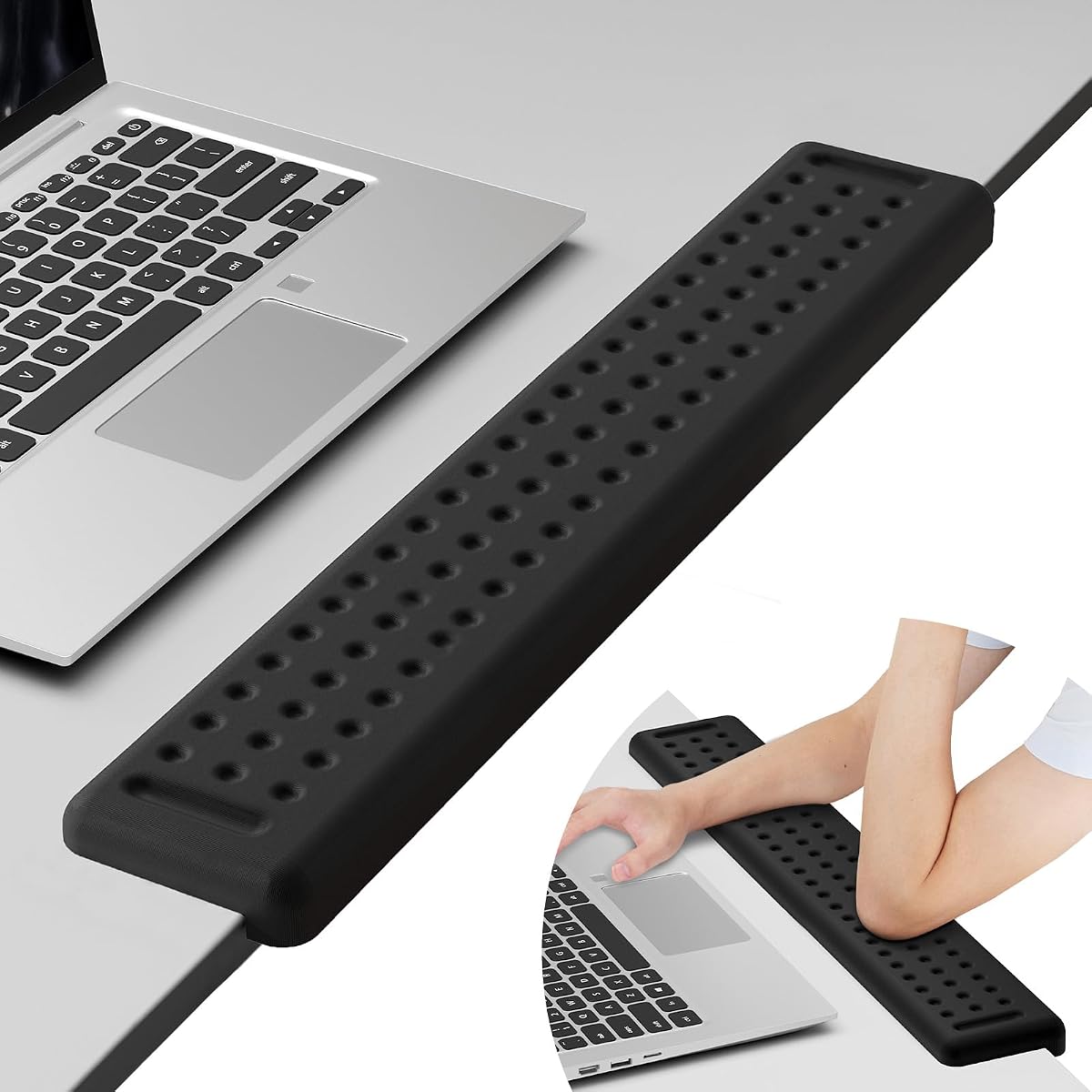

The MEKASS L-Shaped Desk Elbow Pad is a two-piece edge support rated 4.4 by customers. Its standout feature is the elongated L-shaped format, which cushions where the forearms and elbows meet the desk while allowing the sections to be spaced according to the user's position. Each pad measures approximately 11.8 by 3.9 inches, with a height of about 1.2 inches.
We may earn a commission when you buy through this link, at no additional cost to you.
Support comes from slow-rebound memory foam beneath a textured Lycra covering. The fabric is described as breathable and stain resistant, while the rubberized base is intended to remain in place during rapid typing or gaming. Unlike narrow keyboard rests, this product addresses a broader pressure area and can be positioned along the front edge of a straight or L-shaped workstation.
The main trade-off is desk space. Two long sections occupy more surface area than a conventional keyboard cushion, and the design does not provide a dedicated mouse platform. The stated height may also feel more substantial than users seeking a very low profile, so checking the edge clearance and personal forearm sensitivity is advisable before committing.
This is a strong choice for people who spend long hours typing, editing, studying, or gaming and feel pressure at the elbows or inner forearms. It is especially suitable for users who want the positioning flexibility of two separate supports without moving to a full-size platform-style armrest. For narrower keyboard-focused setups, one of the matching keyboard and mouse sets may be more efficient.
The long edge cushions contact along more of the forearm than a narrow keyboard rest. That broader contact can be useful when the desk edge becomes uncomfortable during prolonged typing or gaming sessions.
The two independent sections can be separated or shifted to suit different body positions. This flexibility is a major advantage on straight and L-shaped desks where the elbows do not naturally align in the same place.
We may earn a commission when you buy through this link, at no additional cost to you.
The Vaydeer Wrist Rest for Keyboard and Mouse is a traditional two-piece set with a 4.6 customer rating. It pairs a 17.32 by 3.15 by 0.83-inch keyboard rest with a 5.94 by 3.15 by 0.83-inch mouse support. The matching pieces offer a coordinated way to cushion both hands without introducing a larger platform or raised keyboard stand.
We may earn a commission when you buy through this link, at no additional cost to you.
Both sections use a concave shape intended to follow the natural curve of the wrist. Memory foam provides the cushioning, while a smooth Lycra cover creates a soft, breathable-looking surface. The anti-skid silicone base is designed to prevent the pads from moving during extended computer sessions, helping preserve the position selected during setup.
Its compact mouse support is the principal limitation. It cushions the wrist but does not create a broad mouse-tracking area, so users with low mouse sensitivity or large arm movements may prefer a dedicated mousepad with an integrated support zone. The pads also have a fixed height, which may not suit users accustomed to very low-profile input devices.
The set is well suited to general office work, laptop use, writing, typing, and gaming. It offers a strong balance of comfort, familiar dimensions, and straightforward installation for people who want support for both hands without the desk footprint of an elbow pad or the elevation of a keyboard riser.
The concave profile is intended to cradle rather than simply flatten the wrists. Pairing similarly shaped keyboard and mouse pieces also creates a visually consistent setup for daily computer use.
The silicone underside helps limit sliding while keeping the overall profile relatively narrow. This makes the set practical for desks where a full mouse platform would obstruct movement or reduce usable space.
We may earn a commission when you buy through this link, at no additional cost to you.
The Gimars Upgrade Enlarge Wrist Rest Set is rated 4.5 by customers and emphasizes substantial cushioning. Its keyboard pad measures 17 by 3.5 by 1.2 inches, while the mouse rest measures 6.3 by 3.3 by 1.2 inches. The one-point-two-inch memory foam is among the thicker profiles included in this guide.
We may earn a commission when you buy through this link, at no additional cost to you.
A three-layer construction combines a natural rubber base, thick memory foam, and soft breathable spandex fabric. Grooves in the cushion are designed to support the wrists in a more aligned position, while the fabric is described as water resistant and stain resistant for easier maintenance. Additional non-slip stickers are included to reinforce stability.
The generous height is the key consideration. A thick cushion can reduce direct desk contact, but it also raises the wrists relative to the keyboard. Users who type with a pronounced upward angle or prefer minimal wrist extension may need to adjust their keyboard position. Applying the optional stickers before placing the set can help prevent movement.
This set is a practical option for office workers, students, and gamers who prefer a visibly padded support surface and do not mind a taller keyboard profile. It is less suitable for users who want an almost flush wrist position, but for those seeking generous memory-foam support, the dimensions and three-layer construction are compelling.
The one-point-two-inch foam is substantially higher than many standard bars. That height can reduce contact with the desk, though users should verify that their typing posture remains relaxed and neutral.
The rubber, foam, and spandex layers serve separate functions: grip, cushioning, and a soft surface against the skin. This construction is also easy to maintain with a damp cloth.
We may earn a commission when you buy through this link, at no additional cost to you.
The MOSISO Wrist Rest Support Set combines a keyboard rest, a large curved mousepad, and a small coaster in an antique green design. It carries a 4.5 customer rating. The keyboard cushion measures 17.32 by 3.15 inches, while the mousepad measures 9.65 by 8.66 inches and the coaster has a 3.9-inch diameter.
We may earn a commission when you buy through this link, at no additional cost to you.
Breathable neoprene cloth covers the mousepad, while a silicone lining is intended to support smooth tracking and grip the desk. The keyboard section adds memory foam for wrist cushioning. Together, the components create a coordinated workstation that can simplify mouse movement while keeping the keyboard and mouse at related visual levels.
The larger mouse area is both a strength and a commitment. It offers room for broad movement and a more integrated desktop appearance, but it occupies more space than a narrow mouse wrist bar. The distinct antique green finish may also be less suitable for users seeking a neutral color that blends into every setup.
This set is a good match for programmers, gamers, and office users who want a complete surface rather than separate accessories. Its compatibility with laptops, notebooks, Chromebooks, ultrabooks, desktop PCs, and iMac systems also makes it straightforward to add to a mixed-device workspace.
Unlike a small mouse wrist bar, the curved mousepad provides a usable tracking area while the filled section supports the wrist. This can be useful for users who prefer freer mouse movement.
The matching keyboard rest, mousepad, and coaster create a deliberate desktop arrangement. The antique green color gives the set a distinctive look for users who want their accessories to contribute to the room's style.
We may earn a commission when you buy through this link, at no additional cost to you.
The GORILLA GRIP Memory Foam Wrist Rest is a two-piece black set rated 4.4 by customers. Its inner foam is nearly 1.2 inches thick, placing it among the more substantial supports in this comparison. The keyboard cushion measures 17 by 3.5 inches, and the mouse support measures 6 by 3.3 inches.
We may earn a commission when you buy through this link, at no additional cost to you.
The three-layer design combines a durable rubber bottom, thick memory foam, and a soft spandex top. The bottom is designed to remain in place on most desk surfaces, while the elevated profile and slow-rebound foam are intended to reduce direct contact and distribute wrist pressure. The top layer is water and stain resistant.
As with other high-profile pads, the added height is the main trade-off. Some users may need to raise the keyboard or change their seating position to keep the wrists comfortable. The mouse piece offers cushioning but no broad tracking surface, making this more of a support set than a complete mouse platform.
The set is well suited to frequent computer users who want a substantial cushion for typing and mouse use. It is also appealing for shared workspaces because the black finish is understated and the surfaces can be wiped clean with a damp cloth before being left to air dry.
The nearly one-point-two-inch foam offers a visibly generous interior. Users who spend extended periods at the keyboard can benefit from the reduced contact between the wrist and hard desk.
Each layer has a defined purpose: the rubber base handles grip, the foam provides support, and the spandex adds a soft contact surface. This combination balances everyday function with straightforward care.
We may earn a commission when you buy through this link, at no additional cost to you.
The MEKASS Ergonomic Wrist Rest for Keyboard and Mouse holds a 4.7 customer rating, tying for the highest listed rating among these ten products. It uses a textured massage pattern intended to help hands relax during long periods of computer use. The set includes matching keyboard and mouse supports for a coordinated approach to wrist comfort.
We may earn a commission when you buy through this link, at no additional cost to you.
The interior is made from slow-bounce memory foam and covered with smooth Lycra. The keyboard pad measures 17.32 by 3.15 by 0.79 inches, while the mouse rest measures 6.23 by 3.54 by 0.79 inches. A high-grip silicone base is designed to remain stable on metal, wood, glass, and plastic desktop surfaces.
The textured surface is the feature most likely to divide opinion. Some users may appreciate the patterned pressure points, while others may prefer a completely smooth cushion. The mouse support is also a compact bar rather than a platform, so those who need extensive mouse-tracking room should verify their movement style before buying.
This is our top overall choice for users who want a complete keyboard-and-mouse set, strong stability, a moderate height, and a distinctive surface. It is appropriate for office work, study, and gaming, and the broad stated surface compatibility makes it easy to incorporate into many desktop arrangements.
The raised massage pattern introduces varying contact across the wrists and palms. It offers a more tactile experience than a flat foam bar without requiring a raised keyboard platform.
At roughly three-quarters of an inch tall, the set adds support without reaching the substantial height of the thickest foam options. The low profile can work well with conventional desktop and laptop keyboards.
We may earn a commission when you buy through this link, at no additional cost to you.
The Leolee L-Shaped Desk Long Wrist Rest Elbow is designed for users who want more extensive arm and elbow support than a narrow keyboard cushion provides. With a stated length of 60 centimeters, it can cover a substantial section of a desk edge and is intended to fit upright or L-shaped desks.
We may earn a commission when you buy through this link, at no additional cost to you.
The support is made from memory foam that is described as resistant to deformation. A breathable, textured Lycra surface helps limit heat buildup, while the non-slip rubber base is intended to stay secure during quick typing or intensive gaming. The smooth, stain-resistant covering can be wiped with a damp cloth.
The primary drawback is space. Its extended length makes it less convenient for compact work areas, and its edge-oriented design does not replace a keyboard-and-mouse support set. Users who only experience wrist discomfort may feel that more targeted support is needed at the hands rather than the elbows.
The Leolee is a strong option for people whose forearms, elbows, or inner arms press against a hard desk edge during long work periods. It works particularly well for users with a broad typing area or a larger L-shaped desk who value continuous support over a minimal footprint.
The extended design cushions a larger portion of the forearm and elbow than a conventional keyboard bar. That makes it useful when prolonged desk-edge contact is the source of discomfort.
The L-shaped geometry follows the perimeter of many corner desks. Its long span reduces the need to reposition a short support throughout the day, provided the desk has sufficient room.
We may earn a commission when you buy through this link, at no additional cost to you.
The KTRIO Keyboard Wrist Rest and Mouse Pad provides a complete support arrangement at a restrained 4.5 customer rating. The keyboard cushion measures 17.2 by 3.12 by 0.9 inches, while the mousepad and wrist support measure 9.8 by 8.6 by 0.9 inches. That combination suits users who want support for both hands without a separate keyboard riser.
We may earn a commission when you buy through this link, at no additional cost to you.
High-density memory foam is paired with breathable fabric in the wrist-support areas. A dense rubber base is used beneath the pieces to resist sliding during office work, typing, or gaming. The mousepad's larger surface also provides more usable tracking space than a simple mouse wrist bar, making mouse movement easier to manage.
The included materials may produce a slight rubber odor when first unpacked, although the product information indicates that it fades naturally. The fixed height may also be noticeable to users accustomed to a low-profile desk, and those who strongly prefer a raised keyboard may find this set less satisfying than an integrated riser.
This is our best budget-oriented complete set for students, home workers, and general users. It offers the most practical all-in-one format here for users who want both a keyboard cushion and a functional mouse surface in a restrained black design that coordinates easily with existing equipment.
The 9.8 by 8.6-inch mousepad provides a broad area for movement while retaining a raised wrist section. This makes it a practical middle ground between a narrow mouse bar and a large desk mat.
Both pieces use coordinated cushioning, fabric, and rubber-base construction. The result is visually tidy and functionally consistent without taking over much more space than two separate accessories.
We may earn a commission when you buy through this link, at no additional cost to you.
The Vaydeer Wrist Rest with Keyboard Stand is a one-piece keyboard riser and wrist support rated 4.5 by customers. Its defining feature is the integrated construction, which removes the gap that can appear between a separate wrist rest and keyboard. The keyboard is elevated while the hands remain supported by a continuous cushioned surface.
We may earn a commission when you buy through this link, at no additional cost to you.
Two angle options are offered: 12.5 degrees for more substantial elevation and three degrees for a subtler lift. Memory foam supplies the cushioning, and a breathable, moisture-wicking Lycra cover is intended to keep wrists comfortable. A high-density silicone base provides stability and is designed to resist shifting during typing or gaming.
Compatibility is the most important limitation. Because this is a full keyboard stand and wrist rest, its dimensions and profile may not suit every compact keyboard, laptop, or unusual desktop arrangement. The raised position can also change how a user approaches the keyboard, so an adjustment period is likely, especially at the steeper angle.
This is the premium pick for users who want keyboard elevation and wrist support to work as a single coordinated system. It is particularly useful for typists who spend long periods at the keyboard, value gap-free positioning, and want the option to alternate between a pronounced and subtle angle.
The integrated design removes the space between the keyboard and wrist cushion. That continuity can feel more consistent than placing a separate narrow rest immediately in front of a keyboard.
A shallow three-degree setting supports a relatively natural desktop position, while twelve and a half degrees provide more elevation. The choice allows users to match the setup to their keyboard, chair height, and preferred typing posture.
We may earn a commission when you buy through this link, at no additional cost to you.
The TECKNET Cloud Keyboard Wrist Rest Set has a 4.7 customer rating, tying for the highest listed rating in this guide. Its three-in-one format includes a keyboard wrist rest, mouse wrist rest, and coaster. The cloud-shaped keyboard cushion is designed to follow the wrist curve while providing soft support for typing and mouse work.
We may earn a commission when you buy through this link, at no additional cost to you.
High-density memory foam is covered with four-sided elastic PU leather that is waterproof and dirt resistant. The concave and convex surface is intended to promote airflow between the wrist and cushion, while the silicone bottom helps prevent shifting. The set is offered in white and described as compatible with 60-, 65-, 75-, 80-, and 96-key keyboards.
Some users may not prefer the feel of PU leather against bare skin, even though it is easier to wipe clean than many exposed-fabric surfaces. The cloud contour also takes up slightly more visual and physical space than a conventional straight bar, and the three accessories may feel excessive for a minimalist setup.
This set is a strong choice for users who value coordinated accessories, simple cleaning, and a distinctive desktop look. It suits office, gaming, and home setups where the mouse and keyboard areas are kept visually unified, and the included coaster adds practical organization to the same desktop system.
The waterproof PU leather can be wiped clean without the same concern associated with absorbent fabric. This is useful in offices and homes where drinks, crumbs, and daily dust are likely around the keyboard.
Combining the keyboard rest, mouse support, and coaster creates a consistent visual system. It also gives users dedicated matching surfaces for both hands without requiring separate color or design decisions.
We may earn a commission when you buy through this link, at no additional cost to you.
The right support depends on where discomfort occurs, how you move your hands, and how much desk space you can devote to accessories. Use the following factors to narrow the options before making a selection.
A keyboard and mouse set is appropriate when the hands and wrists need direct cushioning while typing and operating a mouse. An L-shaped desk-edge pad is more useful when the inner forearms and elbows press against a hard surface. An integrated keyboard stand addresses wrist height and elevation, while a large mousepad with a raised zone supports users who want both movement space and a cushioned wrist position. Choosing based on the location of discomfort produces a more useful result than selecting only by appearance or general size.
Cushion height changes the angle between the wrist, keyboard, and desk. A low or moderate bar can preserve a familiar typing position, while thick foam may reduce hard-surface contact but require keyboard or chair adjustment. Thick supports are not automatically more comfortable; a profile that forces the wrists upward can create tension elsewhere. Check the listed dimensions, compare them with your current setup, and look for a height that allows relaxed shoulders, elbows, and hands.
A support that shifts can undermine comfort and interrupt typing or mouse work. Silicone and rubber bases are common because they grip smooth desks, but performance also depends on the desktop surface and how firmly the pad is placed. Larger sets with broad bases may stay put more reliably than narrow bars. For glass, polished wood, plastic, or metal, verify that the underside is explicitly designed to grip the material and avoid placing the support where cables or desk edges could disturb it.
Keyboard rests are commonly around 17 inches long, but length alone does not confirm compatibility. Compare the full dimensions with the keyboard width, desk depth, mouse movement area, and any existing pad. Integrated stands are especially important to check because their slope and size may only suit standard keyboards. The TECKNET model is stated to fit several common keyboard sizes, while other products provide standard keyboard-and-mouse dimensions. Taking a quick desk measurement avoids discovering a fit issue after delivery.
Lycra, spandex, neoprene cloth, and PU leather all have different tactile and maintenance characteristics. Lycra and spandex feel soft and can allow airflow, while neoprene provides a familiar mousepad surface. PU leather is especially easy to wipe clean but may feel less breathable or more synthetic to some users. Consider sensitivity to fabric, heat buildup, cleaning preferences, and how the material feels after a long session rather than focusing only on the foam underneath.
A narrow mouse wrist bar cushions the wrist but provides little room to move the mouse. A larger mousepad with an integrated raised area is better for broad movements, low-sensitivity setups, or gaming. If you already use a large mousepad, a slim standalone mouse cushion may prevent interference, while a complete padded mouse surface may duplicate your existing coverage. Think about the movements you actually make and the amount of free desk space available.
Adding a wrist rest can subtly change typing mechanics even when the product feels excellent at first. The cushion may raise the hands, reduce wrist extension, or create a small gap from the keyboard. Integrated stands make that change more pronounced because the keyboard itself is raised. Allow several days of ordinary work to assess comfort, make small adjustments, and alternate with your previous setup. If tension moves into the fingers, shoulders, or forearms, the support may be too high or positioned incorrectly.
Desktop accessories collect dust, oil, and spills, so cleanability matters for long-term use. Smooth Lycra, spandex, and PU leather can generally be wiped with a damp cloth, although the product instructions should be followed. Avoid soaking memory foam or using harsh chemicals. Removable covers, if available, can simplify care, and a stain-resistant surface is useful in busy work areas. A stable, easy-to-clean design is often more practical than one that feels plush initially but is difficult to maintain.
Begin by cleaning the desk where the support will sit and remove any debris from the underside. Place the base flat against the surface, then position the keyboard and mouse before settling into your normal posture. For a traditional set, align the keyboard cushion with the front edge of the keyboard and place the mouse support so it supports the wrist without forcing the hand to rotate. For an integrated stand, set the correct angle gradually and check that the keyboard remains stable.
Keep the wrists neutral rather than sharply bent or extended. Rest the palms or heel of the hand lightly on the cushion rather than pressing down continuously, and keep the shoulders relaxed. Adjust chair height, screen position, and keyboard distance as needed so the support improves your existing setup rather than forcing a new posture. Allow several days of regular use before deciding whether the height and contour feel right.
For cleaning, follow the manufacturer's instructions and use a lightly damp cloth on Lycra, spandex, neoprene cloth, or PU leather covers. Wipe away residue, avoid saturating the foam, and let the product air-dry fully before use. Do not use harsh solvents unless the manufacturer specifically permits them. Periodically check the base for dust or trapped debris, since a clean, fully contacting underside is essential for the non-slip grip to work as intended.
A keyboard wrist rest can add comfort by reducing direct contact between the wrists and a hard surface during extended typing or mouse use. It does not guarantee that every wrist condition will be prevented or resolved, so it should complement proper posture, regular movement, and a comfortable workstation setup. If pain, numbness, or weakness persists, seeking advice from a qualified medical professional is appropriate.
Choose a wrist rest when the hands and wrists feel uncomfortable while typing or using a mouse. Choose an L-shaped elbow pad when the inner forearms and elbows press against the desk edge. Some users benefit from both, but each requires sufficient desk space, and combining too many accessories can make the workspace feel crowded.
Not necessarily. Thicker foam can provide a softer cushion and reduce hard-surface pressure, but it also changes the height of the hands relative to the keyboard. A moderate profile is often easier to adapt to, while a thicker pad may suit users who want more pronounced elevation. The best height is the one that supports a relaxed, neutral wrist position.
Most products in this guide use rubber or silicone bases designed to grip common desktop surfaces. Remove dust and debris from both the desk and the base, then press the product down firmly so the full underside makes contact. Sliding is more likely on glass, highly polished wood, or other smooth surfaces, so care and occasional cleaning are especially important.
Most slim keyboard rests can sit in front of a laptop, although laptop users may prefer a compact mouse support because the touchpad does not require the same large tracking area. An integrated keyboard stand generally suits standard keyboards better than a laptop. For laptop work, users should also consider raising the screen separately to avoid bending the neck while the keyboard remains low.
Most smooth covers can be wiped gently with a lightly damp cloth, followed by complete air drying. Users should avoid soaking the foam, scrubbing it aggressively, or applying harsh chemicals unless the product instructions specifically allow it. A fabric cover with a light stain can often be spot-cleaned, while PU leather is generally among the easiest surfaces to wipe down.
A separate support can help when the wrist contacts the desk while reaching for the mouse, particularly during long work or gaming sessions. However, a mousepad with an integrated raised area may provide the same benefit while preserving more mouse movement space. Users with a compact desk can select a narrow mouse bar, while others may prefer a broad curved mousepad.
A wrist rest may reduce pressure and support a more comfortable hand position, but it should not be treated as a guaranteed treatment for carpal tunnel syndrome. Persistent numbness, tingling, weakness, or pain deserves evaluation by a qualified healthcare professional. The rest is best treated as one part of a broader workstation strategy that also includes neutral positioning, movement breaks, and proper equipment setup.
The MEKASS Ergonomic Wrist Rest Set is the most versatile all-around choice, with a 4.7 rating, matching keyboard and mouse supports, a moderate profile, and a textured surface. The Vaydeer Wrist Rest with Keyboard Stand stands out when adjustable keyboard elevation is more important than a compact footprint, while the KTRIO set offers a complete and restrained setup for users who prefer both a keyboard cushion and a useful mouse surface.
Prioritize the location of discomfort, the height of the support, and the way you use your mouse before considering decorative details. A thicker pad may feel luxurious but disrupt your typing angle, whereas a narrow low-profile cushion may integrate more easily into an existing workstation. For elbows and inner forearms, compare the MEKASS and Leolee L-shaped options; for wrists and hands, focus on the keyboard and mouse sets.
Ratings can change as more customers review a product, and current prices and availability are equally variable. Use the listed dimensions and materials to confirm fit, compare the current product pages, and read recent customer feedback before making a final purchase. The right arm and wrist rest should feel supportive without pushing the hands into an unnatural position.