
Tapo 2K Wireless Smart Video Doorbell
4.4Editor score
One-minute Bluetooth setup
Color night vision spotlight
Local microSD storage support
Discover the best easy to setup video doorbell options by comparing installation, video quality, power options, alerts, storage, and standout features.
An easy to setup video doorbell should make monitoring your entrance more convenient, not turn a simple upgrade into a complicated project. The most useful models combine quick mounting, clear app-based setup, dependable visitor alerts, two-way audio, and enough battery or wiring flexibility to suit different homes.
We compared all ten products using the supplied specifications, focusing on installation methods, viewing angle, night visibility, detection features, local or cloud storage, power choices, and ongoing subscription requirements. The list covers battery, hardwired, and dual-power models for renters, homeowners, and anyone improving an existing entryway.
Each review explains who the doorbell is best suited for, along with the trade-offs worth considering before purchase. Ratings and feature details reflect the provided product information, while prices and availability can change, so readers should confirm current listings and requirements before ordering.
4.4Editor score
4.3Editor score

3.9Editor score
The comparison below highlights the installation approach, imaging system, power configuration, and most important monitoring feature of each model, making it easier to identify the doorbell that best matches your doorway and priorities.


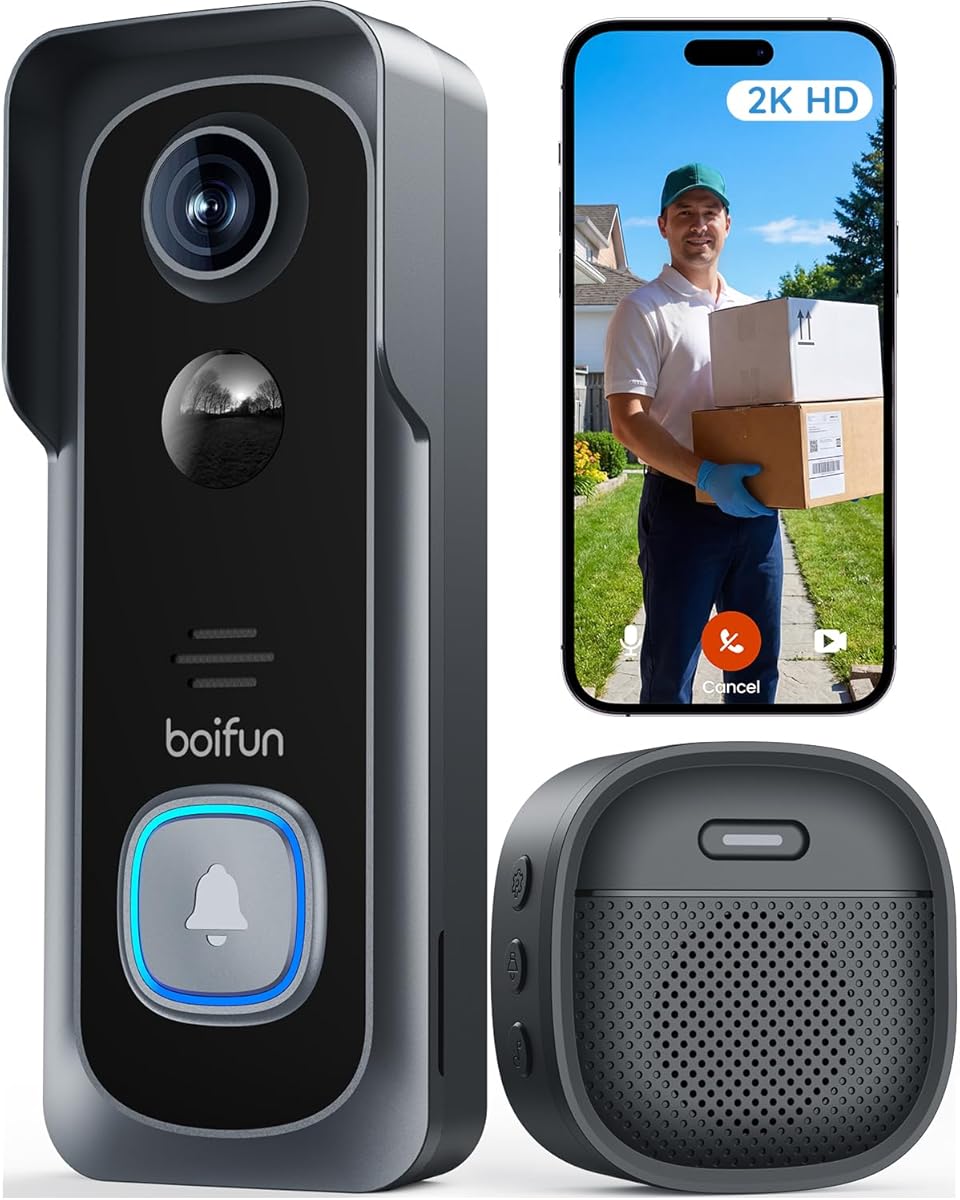
The BOIFUN Video Doorbell Camera Wireless combines a 2K sensor, a wide 166-degree field of view, and a genuinely approachable installation process. It earns a 4.3 rating in the supplied data and stands out for offering real-time alerts, two-way audio, human detection, and video playback without requiring a subscription.
We may earn a commission when you buy through this link, at no additional cost to you.
The quick no-drill setup is the central attraction. Once the doorbell is mounted and the BoifunCam app is configured, users can view the entrance live, speak with visitors, and receive motion notifications. A built-in AI chip supports responsive detection, while local microSD storage up to 128GB offers an alternative to cloud recording, although the card itself is not included.
Its night performance is also thoughtfully specified. HDR technology and a 940nm infrared illuminator are designed to provide clear imagery up to 10 meters without the red glow associated with some visible infrared LEDs. The built-in tamper alert adds another layer of security by notifying the owner if the camera is forcibly removed.
This is a strong recommendation for renters and homeowners who want broad porch coverage, 2K detail, and useful everyday features without ongoing subscription costs. The main compromises are the lack of 5GHz support and the laboratory battery estimate of up to 60 days, which can shorten with frequent motion or heavy use.
The advertised no-drill arrangement is especially useful for renters or anyone who does not want to modify the door frame. Installation still requires stable placement, a reliable 2.4GHz signal, and enough battery capacity to match the expected number of daily visitors.
Core alerts, live viewing, two-way audio, human detection, and playback remain available without a plan. Optional subscriptions add services such as cloud storage and enhanced event classification, but the core experience is not dependent on that upgrade.
We may earn a commission when you buy through this link, at no additional cost to you.
The Wyze Battery Video Doorbell Wireless Camera is designed around a one-minute setup, flexible power, and a square 1536-by-1536 image designed to show visitors and packages from head to toe. Its supplied rating is 4.2, and the feature set is particularly broad for a wireless model.
We may earn a commission when you buy through this link, at no additional cost to you.
Its 150-by-150-degree field of view differs from conventional rectangular sensors, giving the camera a 1:1 perspective that can capture more of the door and the ground beside it. A starlight sensor supports color night vision, while person, vehicle, and package monitoring helps make alerts more useful. Two-way audio and tap-to-send auto-responses improve visitor communication.
The doorbell can operate on its built-in USB-C rechargeable battery for up to six months under suitable conditions or be hardwired for continuous power. Local microSD recording becomes available in the hardwired configuration, with support for cards up to 256GB in FAT32 or exFAT format. Wyze Chime Controller, Universal Wi-Fi Chime, or a Wyze Cam can provide indoor chime sounds, but those accessories are sold separately.
This model best suits buyers who want flexible power, sophisticated detection categories, and local storage without a mandatory monthly fee. The one-minute claim applies to the Bluetooth-assisted setup rather than every physical mounting consideration, and continuous local recording also depends on hardwiring.
The 1:1 format is designed to cover tall visitors and packages positioned close to the door. It can reduce the need to tilt or manually reposition the camera as circumstances change.
Users can begin with the rechargeable battery, add a compatible microSD card for local storage, or hardwire the unit for continuous power. This makes the doorbell adaptable to both temporary and permanent installation needs.
We may earn a commission when you buy through this link, at no additional cost to you.
The Blink Video Doorbell system is a convenient all-in-one option because it includes the second-generation doorbell, three AA Energizer lithium batteries, and a Blink Sync Module Core. It carries a 4.1 rating and promises straightforward installation in either wire-free mode or through existing doorbell wiring.
We may earn a commission when you buy through this link, at no additional cost to you.
The head-to-toe HD view is intended to show arriving guests and delivered packages both during the day and at night through infrared illumination. Two-way talk works through the Blink app, and the Sync Module manages communication between the doorbell and the local network. With a wired installation, the unit can also sound through the home's existing chime.
The included Sync Module distinguishes this package from the Blink add-on version. That makes it a more self-contained choice for someone starting a Blink system. A wire-free setup, however, requires a Blink Mini 2 indoor plug-in chime for audible notification, and that camera is sold separately.
Blink's optional subscription plan provides person-detection alerts, Blink Moments, and cloud clip storage, with a free trial described in the product information. This system is most attractive to buyers who want a recognized ecosystem, a long battery interval, and the option to install without running new wires.
The bundled Sync Module Core and included batteries remove several separate purchases from the setup process. It is a practical selection for a first Blink installation or an existing user adding a new doorbell.
Existing doorbell wiring can provide a familiar chime and a more permanent installation. Renters can choose the battery path, then add a compatible indoor chime if audible alerts inside the home are important.
We may earn a commission when you buy through this link, at no additional cost to you.
The Arlo Video Doorbell 2K is built for buyers who want a detailed image and a broad selection of intelligent alerts. It has a supplied rating of 4.0 and supports both wireless and hardwired installation, giving new users room to choose the power arrangement that best fits the property.
We may earn a commission when you buy through this link, at no additional cost to you.
Its 2K resolution and head-to-toe view are intended to make facial identification and package checks easier. Person and vehicle recognition, package detection, and pet detection are among the standout alert types. Custom activity zones focus monitoring on the door and path, while privacy zones help suppress areas where activity is not relevant.
The camera also supports live streaming, night vision, two-way audio, quick replies, phone video calls, and remote siren control. It works with Alexa, Apple Home, Google Home, Samsung SmartThings, and IFTTT, making it a practical option for a broader smart-home environment.
Live viewing and basic alerts work without a subscription. However, a paid Arlo Secure plan is required after the trial for 60-day video history, AI detection, and emergency response. Arlo is best for users who prioritize smart-home integration and flexible alerts, provided they understand which advanced features are plan-based.
Activity and privacy zones let owners define what deserves attention. This is particularly useful for entrances facing sidewalks, landscaping, parked vehicles, or other areas that may otherwise generate repetitive motion alerts.
Compatibility with several major voice-control ecosystems gives the camera more ways to fit into an existing routine. Users can view the entrance, answer visitors, and connect detected activity to other connected devices.
We may earn a commission when you buy through this link, at no additional cost to you.
The Ring Battery Doorbell 2K combines a wide-angle image, Retinal 2K resolution, and up to 6x Enhanced Zoom in a compact built-in-battery design. It has a 4.2 rating and focuses on clear remote viewing, direct visitor communication, and straightforward everyday recharging.
We may earn a commission when you buy through this link, at no additional cost to you.
The zoom function is the defining specification. It allows users to inspect faces or other details at a distance without physically approaching the door. Live View and Two-Way Talk provide real-time interaction, while motion detection produces phone notifications so a visitor can be checked when someone is away.
Charging uses the built-in battery and an included removal tool. The camera detaches from the wall and reconnects through USB-C, although the cable is not included. A compatible Ring Protect subscription adds historical footage, AI-powered alerts, and additional event information when a plan is chosen.
This doorbell is a good match for people already invested in Ring or Alexa-compatible devices. It also suits users who want the ability to magnify important details. Buyers should account for the missing charging cable and the subscription required to access the richest history and AI features.
Enhanced zoom is useful for checking a face, a package label, or movement farther from the entrance. It complements the wide field of view without requiring a separate camera covering the same space.
The removal tool makes routine charging more convenient than dealing with fixed wiring. Users can take the unit down, charge it through USB-C, and return it to its mounting position.
We may earn a commission when you buy through this link, at no additional cost to you.
The Blink Video Doorbell Add-On is a straightforward choice for households that already use Blink and need another entrance camera. It has a 4.3 rating and shares the second-generation doorbell's head-to-toe HD view, infrared night vision, two-way talk, and battery or wired installation options.
We may earn a commission when you buy through this link, at no additional cost to you.
The important distinction is that the required Sync Module is not included. Buyers should confirm that their home already has a compatible module before considering this add-on. Otherwise, the complete Blink system is the more convenient package because it includes the module, batteries, power adapter, USB-C cable, and mounting accessories.
Three AA Energizer lithium batteries are included with the doorbell, and the product information lists battery life of up to two years. Existing doorbell wiring can be used when a hardwired installation is preferred. In a wire-free setup, a Blink Mini 2 indoor plug-in chime is required for an audible indoor sound.
This model is best for Blink users who want to expand an established system without buying a second Sync Module. The long battery specification, flexible installation, and familiar app are compelling, but the missing required hub makes it less suitable as a standalone first purchase.
An existing Sync Module and familiar Blink app streamline adding another entry point. This is particularly useful for homes with a front door, side gate, or other monitored entrance.
The add-on listing does not include the Sync Module. Confirm compatibility and ownership of that device before ordering to avoid an incomplete installation.
We may earn a commission when you buy through this link, at no additional cost to you.
The Orbitell 1080p Wireless Wi-Fi Video Doorbell Camera is the most budget-oriented selection in this guide, with a supplied rating of 3.9. Despite its accessible positioning, it provides a useful collection of everyday features including two-way audio, night vision, motion alerts, and AI-based person filtering.
We may earn a commission when you buy through this link, at no additional cost to you.
The detection system is designed to distinguish people from vehicles and animals, helping reduce irrelevant notifications. A wide-angle lens covers more of the doorstep, while four infrared LEDs and an image sensor support detailed recording in darkness. Its IP65-rated enclosure is intended to withstand rain, snow, and varied outdoor temperatures.
Recordings are protected with AES-128 encrypted cloud storage. Cloud subscribers also receive pre-capture recording, allowing the camera to begin saving footage as motion starts. That advantage is tied to the service rather than included automatically, so buyers should consider their desired retention and backup approach before setup.
The doorbell connects only to 2.4GHz Wi-Fi and sends real-time notifications when motion is detected or the bell is pressed. It is best for a straightforward, budget-conscious installation in a home with compatible Wi-Fi coverage, especially for users who prioritize person alerts and basic communication.
AI person detection is intended to filter out vehicles, animals, and other moving objects. That can make a basic doorbell more useful in busy surroundings where every movement would otherwise create an alert.
AES-128 encryption adds a layer of protection to stored recordings. The subscription-based pre-capture feature is worth reviewing if capturing the first seconds of an approaching visitor is important.
We may earn a commission when you buy through this link, at no additional cost to you.
The youkey Doorbell Camera Wireless stands apart with a dual-camera design intended to capture visitors and packages at the same time. It has the highest supplied rating in the group at 4.6 and offers 2K full high-definition recording, a 160-degree field of view, and local event storage without monthly fees.
We may earn a commission when you buy through this link, at no additional cost to you.
Its built-in 8GB eMMC gives the camera a practical storage option without requiring a microSD card. The dual arrangement is especially relevant for online shoppers because it reduces the chance that a package hidden low beside the door will be overlooked. Clearer detail also helps with labels, faces, and general doorstep activity.
A 6400mAh rechargeable battery is rated for up to 180 days in laboratory conditions using 20 events per day, with each event lasting around 15 seconds. Real-world results will depend on activity, signal strength, and the environment. The doorbell can also be hardwired, and its radar plus PIR sensing system is designed to reduce false alerts.
This model is an excellent choice for households focused on package monitoring and local recording without recurring fees. Buyers should recognize that the battery figure is laboratory-based and that the more complex dual-camera arrangement may offer less relevance in an entrance with a very limited view.
The dual-camera approach is designed to reduce blind spots around people and low-positioned packages. That makes it particularly useful where delivery drivers regularly leave parcels beside the entrance.
The included 8GB eMMC stores event recordings locally while keeping core functions available without subscription costs. This is a meaningful advantage for users who want dependable access without a recurring cloud plan.
We may earn a commission when you buy through this link, at no additional cost to you.
The Tapo 2K Wireless Smart Video Doorbell D210 delivers one of the clearest setup-focused specifications in the group: a one-minute setup time. It has a 4.4 rating, 2K resolution, and a 160-degree diagonal field of view designed to provide a head-to-toe view of the entrance.
We may earn a commission when you buy through this link, at no additional cost to you.
The app experience includes Ring Call, which sends a phone call to answer the door without first opening the Tapo app. Because calls are generated through the app, they do not use cellular minutes. Users can also communicate through two-way audio or select from a list of preset quick responses for common situations.
Storage can be handled through a microSD card of up to 512GB without a subscription, while Tapo Care provides 30 days of cloud history. The camera also has a full-color night vision spotlight whose brightness can be adjusted, and an included 15-degree horizontal wedge helps improve the angle at perpendicular entrances.
Tapo is best for buyers who prioritize quick configuration, flexible visitor responses, and a choice between local and cloud storage. The main limitations are the 2.4GHz-only connection and the need to purchase a compatible card separately if local recording is desired.
Ring Call offers a fast way to answer visitors, while quick-response presets cover routine situations such as directing a delivery or asking someone to wait. These options reduce the need to open the full camera interface.
The motion-activated spotlight can improve visibility and add deterrence. Adjusting its brightness allows owners to balance useful illumination with their preferences for the appearance and energy use of the entrance.
We may earn a commission when you buy through this link, at no additional cost to you.
The BOIFUN Video Doorbell Camera Wireless with a 180-degree view is built for entrances where seeing the widest possible area matters most. It has a supplied rating of 4.3 and combines 2K recording, human detection, two-way audio, night vision, and core functions that remain available without a subscription.
We may earn a commission when you buy through this link, at no additional cost to you.
Its 180-degree field of view covers visitors, packages, and movement across a broad section of the porch. AI detection is designed to recognize people while filtering out moving leaves, cars, and animals, helping the camera deliver more relevant alerts. Two-way communication allows a resident to greet or guide a visitor without opening the door.
For nighttime monitoring, 2K recording is paired with infrared night vision for visibility in darkness. The battery is rated for up to 120 days in laboratory tests using approximately ten activations per day, each lasting ten seconds. Frequent checks or motion activation can increase power consumption and reduce actual runtime.
This is a compelling choice for a wide porch, broad path, or entryway where a conventional narrow lens might miss activity. Its 2.4GHz-only connection remains an important consideration for modern dual-band networks, but its broad coverage and no-subscription core features make it a flexible option.
The 180-degree lens is the model's primary advantage. It can reduce the number of separate cameras needed to monitor a wide entry area, although edge distortion and actual usable coverage should be considered for each doorway.
Real-time notifications, two-way audio, human detection, and video playback work without a subscription. Optional plans add services such as cloud storage and enhanced AI event classification for buyers who want them.
We may earn a commission when you buy through this link, at no additional cost to you.
The easiest doorbell to install is not always the one with the largest specification list. Consider physical placement, app configuration, power, wireless compatibility, recording options, and alert quality together before choosing a model.
Choose the mount that matches your door and desired view. Battery-only models are usually the least disruptive, while hardwired options require suitable transformer voltage and safe routing of the existing low-voltage wiring.
Prioritize a stable 2.4GHz connection unless the product explicitly supports 5GHz. Weak signal can delay alerts, reduce live-view quality, and complicate initial app setup.
Choose hardwiring when uninterrupted recording matters. Choose a battery model for simpler installation, then select it carefully if the doorway experiences heavy traffic or frequent package deliveries.
Compare lens coverage, 2K or square image formats, and zoom together. The best result comes from a wide enough view to cover the entrance with enough detail to recognize important activity.
Look for the event categories you actually need. More detection types are not automatically better if they create noisy or unnecessary notifications.
Local storage can reduce subscription dependence, but capacity, card compatibility, and continuous-recording requirements vary. Review the full feature list before assuming a doorbell is completely subscription-free.
Check how you prefer to answer visitors. A dedicated phone call, spoken response, or in-app conversation can be more convenient than manually opening the app every time the bell rings.
Choose a model that can remain mounted in your local conditions. Compare night imaging, operating temperature expectations, and the physical protection offered by the enclosure.
Begin by charging the battery fully for a wireless model or confirming that the transformer and existing wiring are compatible with a hardwired doorbell. Install the app, create the required account, and connect the doorbell to the 2.4GHz network if that is the only supported band. Keep the phone near the door during setup, and use the included mounting accessories to position the camera at a height that captures faces, packages, and the full approach.
After mounting, walk through the live view and adjust the camera angle, motion sensitivity, activity zones, and privacy zones. Test the bell, two-way audio, night recording, and phone notifications from outside the home. If the model supports local recording, format the microSD card in a supported file system before inserting it, and confirm that the doorbell recognizes the card. If using a cloud plan, review retention, pre-capture, and event-detection features during activation.
For ongoing care, clean the lens gently and check that the mounting position remains stable, particularly after severe weather or physical impact. Monitor battery life and recharge before the camera becomes unreliable. Review which alerts and cloud features require payment, keep the app updated, and periodically confirm that recordings remain accessible. If the camera shows unfamiliar prompts or connectivity issues, use the manufacturer's support channel rather than removing the unit repeatedly.
Easy installation usually means the doorball can be mounted without extensive electrical work, paired through a straightforward phone-app process, and configured over a compatible Wi-Fi network. Battery models are generally the simplest because they avoid connecting to existing doorbell wiring. Buyers should still account for physical placement, a stable 2.4GHz signal, and any separate chime or hub requirements.
No. Most of the reviewed models can operate from a built-in rechargeable battery, while models such as Tapo, Wyze, Arlo, Blink, and youkey also support hardwiring for a more permanent installation. Hardwiring can provide continuous power and may unlock local recording features, but it requires compatible wiring, a suitable transformer, and comfort with basic low-voltage electrical work.
Many doorbells use the 2.4GHz band because it generally provides better range and wall penetration than 5GHz. Connect the phone and doorbell to the 2.4GHz network, even if the router broadcasts both bands under the same name. Separate 2.4GHz and 5GHz networks may require temporarily disabling or renaming the faster band during setup.
It depends on the model and the features you want. BOIFUN, Tapo, Wyze, and youkey provide pathways for local recording or core features without ongoing fees, although some require a separate memory card. Blink, Ring, Arlo, and Orbitell provide basic access while placing historical storage, advanced detection, or pre-capture behind a subscription. Compare features rather than focusing only on the word free.
A wider field of view can capture more of the porch and reduce blind spots, but it may also include more irrelevant background movement. The 166- and 180-degree BOIFUN models suit broad entrances, while square or head-to-toe formats can be more practical for a standard door. The best angle depends on camera height, distance from the walkway, and the placement of nearby roads or paths.
All of the listed products provide a form of night monitoring. Tapo and Wyze emphasize color night vision, while Tapo adds an adjustable spotlight. Other models use infrared illumination, with BOIFUN's 940nm system designed to provide visibility without a red glow. Actual results depend on the camera's distance from the subject, ambient light, and infrared reflective surfaces.
Battery models offer the least disruptive installation and are often the better option for renters. Hardwired models are generally better for busy entrances, continuous recording, or users who do not want to recharge regularly. A dual-power model provides flexibility, but the advertised battery runtime may not apply in its hardest mode, and existing wiring must meet the manufacturer's requirements.
Begin by lowering motion sensitivity and creating activity zones around the door or package area. Use privacy zones to exclude windows, roads, or neighboring properties where possible. Models with person, package, vehicle, or pet detection can also reduce irrelevant alerts, but the best balance often comes from combining object detection with carefully chosen zones.
The BOIFUN 2K HD is the strongest all-around choice for quick no-drill installation, wide coverage, local storage, and core features without a required subscription. Tapo D210 is especially appealing for its one-minute setup, color night vision, Ring Call feature, and flexible storage, while the Orbitell model offers a more affordable route to person alerts and two-way communication.
Before choosing, prioritize the factors that affect daily use: reliable 2.4GHz coverage, a viewing angle that fits the entrance, power configuration, and whether local or cloud storage suits your routine. A doorbell with a longer specification list is not automatically easier to install, and models that require a separate hub, chime, storage card, or plan should be evaluated as complete systems.
Ratings, features, availability, and prices can change over time, so confirm the current product listing before purchasing. Checking the included mounting hardware, network requirements, battery expectations, and subscription details will help prevent surprises and make the installation process substantially easier.