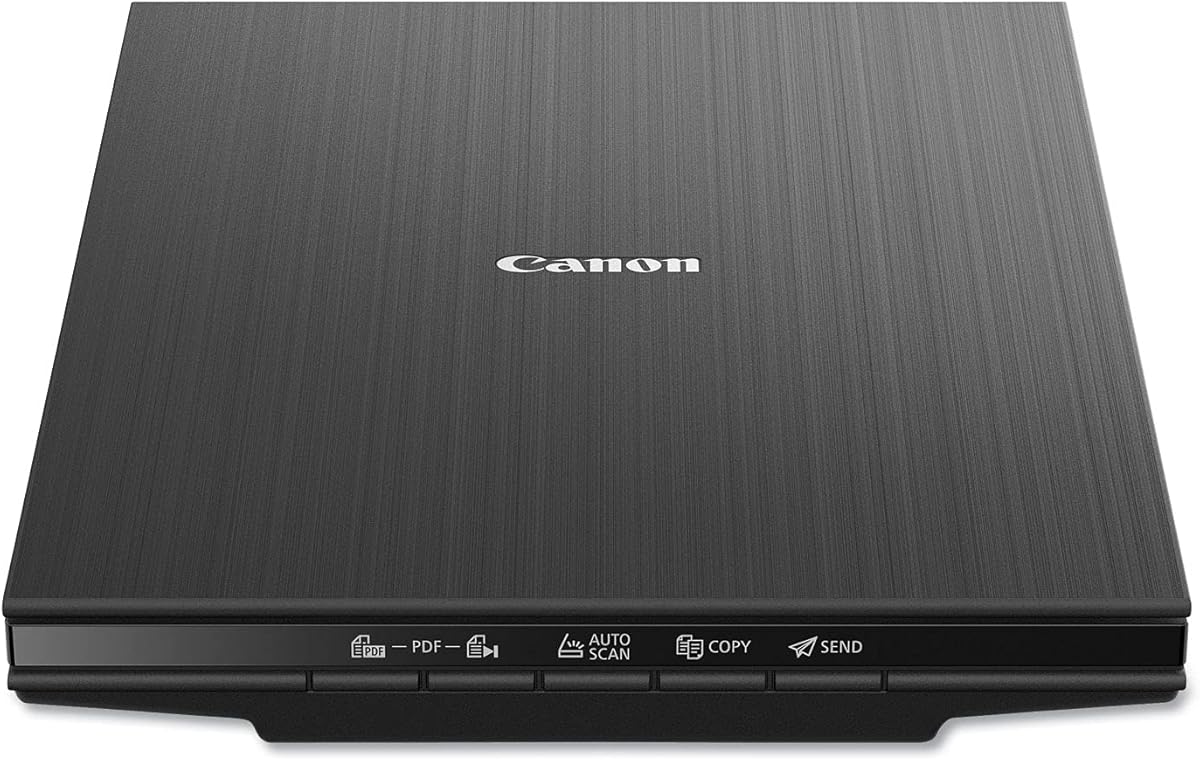
Canon CanoScan LiDE 400
4.1Editor score
4800 × 4800 dpi resolution
Automatic document detection
Editable searchable PDF creation
Single-cable USB Type-C
A scanner can turn stacks of receipts, records, reports, and printed photographs into organized digital files, but the right model depends heavily on how you work. MacBook Neo users should consider macOS compatibility, document handling, OCR quality, photo resolution, storage options, portability, and the balance between speed and convenience.
This guide compares ten document and photo scanners using the supplied specifications, including supported formats, feed methods, connectivity, software, maximum scanning dimensions, and document-processing features. The list includes flatbed models, sheet-fed scanners, mobile units, and photo-focused scanners for a wide range of Mac workflows.
Each product review explains the scanner's strongest attributes, practical limitations, and ideal user profile. The top selections illustrate the best balance of portability, capability, and value, while the buying guide focuses on the details that matter most when choosing equipment for a MacBook Neo.
4.1Editor score

4.3Editor score

4.5Editor score
As an Amazon Associate we earn from qualifying purchases.
The table below compares all ten scanners by their core design, Mac-related connectivity, document or photo capabilities, and standout features. It is designed to make differences in format, resolution, automation, and portability easy to identify before choosing a model.


The Epson Workforce ES-50 earns a 4.3 rating and stands out as the most balanced option for a MacBook Neo user who needs portable document digitization. It is designed around a compact single-sheet format, yet adds a substantial software package that can create searchable PDFs and editable Word and Excel files. Its portability makes it especially useful for people who scan away from a fixed desk.
We may earn a commission when you buy through this link, at no additional cost to you.
Scanning can be completed in as little as 5.5 seconds, and the automatic feeding mode combines multiple inserted sheets into one file. The scanner supports documents up to 8.5 by 72 inches, giving it unusual flexibility for long paper items, receipts, and identification cards. USB 2.0 provides both power and data, so no battery or separate external supply is needed. Mac and Windows compatibility broadens its appeal, while Epson ScanSmart and the included TWAIN driver support common workflows.
The main limitation is its single-sheet design. There is no automatic multi-page feeder and no duplex function, so double-sided pages must be scanned individually and combined through software. It also focuses on documents rather than offering the photo-oriented enhancements found in dedicated photo scanners. These constraints are understandable for a highly mobile model, but they make the ES-50 less suitable for someone regularly processing large archives or many double-sided forms.
It remains a strong recommendation for students, travelers, field workers, and home users who want a small scanner that can work directly with a MacBook Neo. Its quick operation, cloud support, OCR capabilities, and low-friction USB setup outweigh the inconvenience of feeding one sheet at a time. It is the strongest all-around choice in this guide for portable paperwork rather than photographic archiving.
The ES-50 is designed to move with a MacBook Neo and operate wherever a USB port is available. Because it draws power through USB, there is no separate battery to charge or external supply to carry.
Nuance OCR can turn captured pages into searchable PDFs and editable office documents, while Epson ScanSmart supports review, organization, and direct saving to online storage accounts. These features reduce manual data entry and make the scanner useful beyond simple archiving.
We may earn a commission when you buy through this link, at no additional cost to you.
The Canon CanoScan LiDE 400 has a 4.1 rating and delivers a practical combination of slim design, high resolution, and straightforward document handling. Its flatbed format gives it broad usefulness for loose papers, photos, and images, while the 4800 by 4800 dpi specification makes it suitable for detailed photo reproduction and image-oriented projects on a MacBook Neo.
We may earn a commission when you buy through this link, at no additional cost to you.
One of its strongest features is automatic document detection. The scanner identifies what is being scanned, simplifying changes between photographs, receipts, and standard pages. Its EZ buttons make the process more approachable, and built-in PDF controls can create editable, searchable multi-page files. The included USB Type-C cable handles both data and power, which is convenient for modern laptops and reduces cable clutter.
The trade-off is the absence of an automatic document feeder. Every item must be placed on the glass and scanned individually, so this is not the ideal choice for rapidly digitizing a thick stack of reports. It also relies on image-enhancement features such as color restoration and dust removal to improve photographs, which are useful but do not make it a dedicated high-volume photo-archiving system.
The LiDE 400 is best for a MacBook Neo owner who wants one device for both documents and occasional photographs without investing in a larger feeder. It offers an approachable way to create searchable PDFs while preserving enough resolution for images and detailed pages. For basic home filing, creative projects, and occasional photo capture, it provides a compelling mix of capability and simplicity.
Unlike mobile sheet-fed models, the LiDE 400 can capture a wide variety of placed originals, including photographs and detailed printed images. Its 4800 by 4800 dpi resolution also gives Mac users more flexibility for creative work and larger reproductions.
Automatic detection identifies the type or size of material on the glass, reducing the need for repeated manual configuration. Built-in PDF controls then make it easy to produce editable, searchable documents for everyday record keeping.
We may earn a commission when you buy through this link, at no additional cost to you.
The Brother DS-640 carries a 4.3 rating and is built for users who consider every bit of bag space important. At less than one foot long and approximately 1.5 pounds, it is one of the most compact scanners here. It is a natural fit for a MacBook Neo user who needs to digitize receipts, forms, and documents while traveling or working away from an office.
We may earn a commission when you buy through this link, at no additional cost to you.
Its stated maximum speed is 16 pages per minute, with color scanning performing at the same rate as black-and-white scanning. The included micro USB 3.0 cable supplies power and data, allowing use without an available wall outlet. Brother's iPrint&Scan desktop app provides destinations such as a PC, network, cloud services, email, and OCR. Windows, Mac, and Linux support are listed, with TWAIN and WIA drivers for PC environments and ICA drivers for Mac.
Automatic color detection and adjustment, text enhancement, background removal, and bleed-through prevention help produce usable digital files without extensive manual editing. Image rotation is limited to PC use according to the supplied information. Like the ES-50, this is a single-sided mobile unit, and its compact proportions mean it is better suited to incremental scanning than large document batches.
Choose the DS-640 when portability matters more than duplex operation, large feeder capacity, or dedicated photo scanning. It is especially compelling for students, business travelers, and field workers who want broad software support and automatic corrections in a highly compact package. For a MacBook Neo-based mobile filing system, it is a flexible and dependable choice.
At less than one foot long and around 1.5 pounds, the DS-640 is easy to place in a small work bag. Its USB-powered operation further reduces the number of accessories that must accompany a MacBook Neo.
Automatic color detection, background removal, text enhancement, and bleed-through prevention reduce the need for repeated edits. The Brother iPrint&Scan app also expands output options to cloud locations, email, OCR, and network destinations.
We may earn a commission when you buy through this link, at no additional cost to you.
The Canon imageFORMULA R10 holds a 4.0 rating and is a practical choice for MacBook Neo users who want automatic duplex scanning in a portable body. Its 20-sheet feeder reduces the need to insert pages manually, and it can scan both sides in color or black and white at up to 12 pages per minute.
We may earn a commission when you buy through this link, at no additional cost to you.
The scanner supports receipts, business cards, plastic or embossed cards, reports, legal documents, and other everyday media. Its built-in software is designed to work without installation and is said to update automatically. Users can preview scans, straighten and trim files, create custom settings, and define buttons for scanning destinations. Windows and Mac compatibility makes it straightforward to use with a MacBook Neo.
It is important to distinguish this model from a photo scanner. Canon explicitly states that it is not intended for photographs printed on photo paper or other photographic media. Its suggested daily volume of 500 scans and 20-sheet feeder also make it more appropriate for routine paperwork than for museum-grade photographic preservation. On the positive side, USB power and its small size support mobile offices, classrooms, and remote workspaces.
The R10 is best for people who regularly handle double-sided forms, multi-page reports, business cards, and mixed office documents. Its automatic feeder, duplex capability, preview tools, and included software offer a balanced workflow without the complexity of a large desktop machine. It is a particularly strong fit for a MacBook Neo user who wants dependable office digitization with portable dimensions.
Automatic duplex capture is the defining advantage here. A 20-sheet feeder scans both sides at up to 12 pages per minute, making it more suitable than single-sheet models for contracts, reports, and office paperwork.
The integrated scanning software is designed for immediate use and automatic updates. Preview, straighten, trim, and custom destination controls help users organize mixed batches without relying on a complicated separate workflow.
We may earn a commission when you buy through this link, at no additional cost to you.
The Plustek Photo Scanner ePhoto Z300 earns a 4.5 rating and is an efficient option when the main goal is converting printed photographs into digital files. It scans a 4-by-6-inch photo in approximately two seconds and a larger 8-by-10-inch photo in about five seconds at 300 dpi. That makes it well suited to building a digital image library without the slower positioning process of a flatbed.
We may earn a commission when you buy through this link, at no additional cost to you.
The supported photograph sizes include 3-by-5, 4-by-6, 5-by-7, and 8-by-10 inches, while letter and A4 paper can also be processed. Its CCD sensor supports automatic cropping and deskewing, helping each image align properly without repeated manual adjustments. Image enhancement tools can restore faded photographs with a click, an important benefit for older prints and albums.
The trade-off is that its maximum optical resolution is 600 dpi, with the supplied information listing 300 and 600 dpi settings. That is useful for sharing, archiving, and many forms of output, but it is lower than the 4800 dpi capability of the flatbed models in this guide. It is also a specialized feeder rather than a general-purpose scanner with advanced office OCR and custom workflow tools.
MacBook Neo users who want a fast way to digitize albums and family photographs will appreciate its direct feed system and broad print-size support. It is less compelling for extensive document archives, but it remains one of the most efficient dedicated photo choices here. The ePhoto Z300 is especially attractive for users prioritizing convenience and speed over maximum optical resolution.
Feeding photographs directly is more efficient than lifting a lid, positioning each print, and closing the flatbed for every image. At roughly two seconds for a 4-by-6-inch photo, the Z300 supports a fast large-project workflow.
Automatic cropping and deskewing reduce alignment work, while one-click enhancement can improve faded images. The result is a streamlined process for creating a usable digital collection from older prints.
We may earn a commission when you buy through this link, at no additional cost to you.
The Epson Perfection V19 II has a 3.9 rating and brings a high-resolution flatbed option to the list. Its 4800 dpi optical resolution is well suited to photo enlargements, artwork, illustrations, and detailed printed material. The removable high-rise lid also allows books and photo albums to be scanned, expanding its usefulness beyond single sheets.
We may earn a commission when you buy through this link, at no additional cost to you.
Epson ScanSmart 2 supports photos, documents, artwork, and books, while one-touch controls reduce the number of steps in the capture process. Easy Photo Fix can restore color to faded photographs, and OCR can generate searchable PDFs plus editable Word, Excel, and PowerPoint files. A letter-sized document can be scanned in as little as 10 seconds, providing adequate speed for a non-feed model.
The body weighs 3.1 pounds, operates over USB, and includes a built-in kickstand for vertical placement and storage. These features make it reasonably portable for a MacBook Neo, although it lacks a document feeder and requires each page or image to be placed manually. The lower 3.9 rating should also be considered alongside those workflow limitations.
This scanner is best for creative users, students, and home archivists who value detail and flexibility more than batch throughput. Its combination of high resolution, photo restoration, searchable document output, and book-scanning support makes it a versatile choice for mixed creative projects. It is a strong alternative when the goal is a single scanner for both image quality and ordinary paperwork.
The 4800 dpi optical resolution provides considerable detail for photographs, illustrations, and enlargements. It is especially valuable when the MacBook Neo will be used to edit, print, or preserve visually rich source material.
The removable high-rise lid lets users scan books and photo albums, while Easy Photo Fix can restore faded color. OCR and editable document output extend the same device into routine office tasks.
We may earn a commission when you buy through this link, at no additional cost to you.
The ScanSnap iX1300 has a 4.2 rating and is a versatile scanner for MacBook Neo users who want fast, flexible document capture. Its space-saving design is intended to reduce desk clutter, while automatic duplex scanning reaches up to 30 pages per minute. It can handle documents, photos, cards, and thicker items without being limited to standard office paper.
We may earn a commission when you buy through this link, at no additional cost to you.
A single touch starts scanning, and automatic de-skewing, color optimization, and blank-page removal help clean up results without driver setup. The QUICK MENU supports a scan-drag-drop workflow into favorite computer applications. Wireless and USB connections give Mac users alternatives for placement, and output can be directed to a Mac, PC, mobile device, cloud service, or Chromebook through the mobile app.
A major distinction is that the iX1300 can scan without being attached to a computer. That makes it more flexible for a shared office or a location where a MacBook Neo is not immediately available. ScanSnap Home centralizes management and editing of documents, receipts, business cards, and photos. The broad output options require users to learn the software, and the scanner is not optimized for the extremely high optical resolution offered by photo-focused flatbeds.
This is an excellent choice for someone who wants wireless convenience, computer-free capture, and fast duplex scanning in one unit. It works especially well for receipts, business cards, forms, and mixed office collections. MacBook Neo users who alternate between local and cloud workflows will appreciate the flexible destinations and automatic image cleanup.
The iX1300 supports both USB and Wi-Fi, allowing placement away from a cable run. It can also operate without a computer, sending scans to supported destinations for later review on a MacBook Neo.
De-skewing, color optimization, and blank-page removal are applied automatically. The QUICK MENU then makes captured files easy to move into preferred applications, while ScanSnap Home organizes the wider document library.
We may earn a commission when you buy through this link, at no additional cost to you.
The Epson FastFoto FF-680W combines a 4.5 rating with exceptional photo throughput. It can scan as many as 36 photographs in a batch and process them at roughly one photo per second at 300 dpi. That performance makes it the premier option in this guide for digitizing a large album, collection of Polaroids, postcards, panoramas, or mixed-size prints.
We may earn a commission when you buy through this link, at no additional cost to you.
The scanner supports several output resolutions: 300 dpi for everyday sharing, 600 dpi TIFF for archiving, and 1200 dpi for enlargement-oriented work. Its photo imaging system includes automatic enhancement, color restoration, red-eye reduction, de-skewing, cropping, and rotation. Single-step duplex technology captures the image and handwritten notes on the back at the same time, a major benefit when preserving memories or annotations.
It is also a capable document scanner. Epson ScanSmart and OCR can create readable text, and documents up to 240 inches can be scanned at speeds reaching 45 pages per minute and 90 images per minute. USB and wireless connectivity allow flexible placement, while Dropbox and Google Drive support assists with sharing and backup. The tradeoff is size and weight: this is not a travel-oriented scanner, and its extensive feature set requires a little more setup than a simple mobile unit.
Safetouch technology, a carrier sheet, and a microfiber cloth support careful handling of delicate photographs. For a MacBook Neo owner who wants one premium machine for extensive photo preservation and regular document work, the FF-680W offers the most complete combination of speed, formats, restoration, and connectivity.
The ability to feed up to 36 photographs at once changes the economics of album digitizing. At approximately one photo per second at 300 dpi, a large collection can be processed much faster than with manual flatbed workflows.
Single-step duplex capture records an image and any writing on its reverse in one pass. Output choices from 300 to 1200 dpi support sharing, detailed archival files, and enlargement-oriented workflows.
We may earn a commission when you buy through this link, at no additional cost to you.
The Canon imageFORMULA RS40 has a 4.0 rating and serves users who need one feeder for both photographs and paperwork. Its automatic document feeder processes up to 40 items per minute and can scan both sides of photos and documents at the same time. This combination makes it a practical middle ground between a conventional office scanner and a dedicated photo-archiving device.
We may earn a commission when you buy through this link, at no additional cost to you.
It accepts Polaroids, receipts, cards, driver licenses, tax documents, and photographs of varying sizes. The bundled software supports photo enhancement, red-eye correction, and digital face smoothing while also handling ordinary document tasks. Output formats include JPG, TIF, BMP, PNG, PDF, and PPTX, giving a MacBook Neo user several ways to organize and reuse captured content.
Windows and Mac support are confirmed, and a TWAIN driver is included. The one-year limited warranty and US-based technical support provide additional reassurance. The main limitations are its wired USB interface and the absence of the 4800 dpi resolution offered by specialized flatbeds. As a result, it is better suited to practical digitization and sharing than the most demanding photographic enlargement workflow.
Choose the RS40 when you want the convenience of an automatic feeder for a mixed collection of old photographs and current paperwork. It is well suited to families, students, and small offices that need flexible media handling without maintaining separate devices. Its speed and bundled enhancement tools make photo digitizing less cumbersome while preserving core document capabilities.
The RS40 accepts photographs, Polaroids, receipts, identification cards, licenses, and tax papers. This flexibility helps users digitize mixed collections without repeatedly changing between flatbed and sheet-fed processes.
Bundled tools can improve photos with red-eye correction, face smoothing, and general enhancement. Multiple output formats make captured images suitable for storage, editing, presentations, and document workflows.
We may earn a commission when you buy through this link, at no additional cost to you.
The ScanSnap iX2400 carries a 4.3 rating and is built around fast, simple, one-touch operation. It scans up to 45 pages per minute through a 100-sheet automatic feeder, giving it the largest listed feeder capacity in this group. A MacBook Neo user processing routine paperwork, receipts, business cards, and envelopes can rely on minimal interaction once the scanning workflow is configured.
We may earn a commission when you buy through this link, at no additional cost to you.
The scanner automatically detects document size and color depth, removes streaks and blank pages, de-skews, and rotates scans. These corrections reduce manual preparation and make batches more consistent. ScanSnap Home manages documents, receipts, business cards, photos, and other captured data, while the QUICK MENU supports quick transfer into favorite computer applications.
Its defining limitation is connectivity. The supplied information specifies a stable wired USB connection rather than wireless operation, so the iX2400 is best where a cable can be kept in place. It is also not positioned as a maximum-resolution photo scanner, although it can handle photos within a broader document workflow. For delicate archives with specialized restoration needs, the FastFoto or photo-focused flatbed models are stronger choices.
The iX2400 is a strong recommendation for high-volume Mac users who value speed, a large feeder, and automatic cleanup over wireless flexibility. It is particularly effective for daily administrative work, client records, office batches, and mixed paper collections. Its one-touch design and automatic corrections make it a productive addition to a MacBook Neo-centered digital office.
The 100-sheet feeder reduces interruptions during large document runs, while the stated speed of up to 45 pages per minute supports a productive office workflow. It is particularly effective for routine records and administrative paperwork.
Automatic size and color-depth detection, blank-page removal, de-skewing, and rotation create more consistent files. The QUICK MENU then provides a direct route from captured data to commonly used computer applications.
We may earn a commission when you buy through this link, at no additional cost to you.
The best scanner for a MacBook Neo depends on the material being scanned, the required level of detail, and how often documents must be processed. Compatibility, workflow features, and physical design should be evaluated together rather than treating resolution as the only deciding specification.
Begin by confirming that the scanner explicitly supports Mac systems and that its included software, drivers, or mobile apps are available for the version of macOS used with the MacBook Neo. The Epson Workforce ES-50, Canon LiDE 400, Brother DS-640, Canon R10, Canon RS40, ScanSnap iX1300, and ScanSnap iX2400 all list Mac support. The Epson FastFoto FF-680W and Plustek ePhoto Z300 also support Mac environments, although the supplied operating-system details for the Plustek model are more limited.
A sheet-fed scanner suits loose receipts, forms, and multipage reports, while a flatbed is more flexible for books, albums, and delicate or irregular originals. Automatic duplex scanning captures both sides in one pass and is especially valuable for contracts, office documents, and records. The Canon R10, ScanSnap iX1300, Canon RS40, and Epson FastFoto FF-680W offer duplex capabilities, whereas the ES-50, Brother DS-640, and LiDE 400 do not.
Photo quality depends on optical resolution, sensor type, automatic alignment, and enhancement features. The LiDE 400 and Epson Perfection V19 II offer 4800 dpi, making them appropriate for detailed images and enlargements. The Plustek ePhoto Z300 uses a CCD sensor and focuses on fast photo capture with automatic crop and deskew. The FastFoto FF-680W is built for large photo batches and offers 300, 600, and 1200 dpi options along with restoration tools.
MacBook Neo users who scan away from a desk should consider size, weight, power, and connection method. The ES-50 and Brother DS-640 are compact mobile scanners that draw power through USB. The Canon R10 is also portable and USB powered but includes a larger automatic feeder. Wireless models such as the ScanSnap iX1300 and FastFoto FF-680W provide placement flexibility, while the wired iX2400 favors stable operation in a fixed office.
OCR can convert scanned pages into searchable PDFs and editable office files, making records easier to find and reducing manual retyping. The ES-50, LiDE 400, Brother DS-640, Epson Perfection V19 II, and FastFoto FF-680W explicitly include OCR-related capabilities. Consider not only whether OCR is present, but also whether the preferred output format fits your MacBook Neo workflow, especially when preserving records, creating reports, or moving information into a cloud service.
A useful scanner should place captured files where you can find them without unnecessary manual transfers. The ES-50 can scan directly to online storage accounts, the Brother DS-640 supports destinations including cloud services and email, and the ScanSnap iX1300 can send files to a Mac, PC, mobile device, cloud service, or Chromebook. The FastFoto supports Dropbox and Google Drive workflows. Cloud support is useful, but local and application-based destinations may matter more in environments with limited connectivity.
Speed is most valuable when processing recurring batches. Listed rates range from single-page scans in as little as 5.5 seconds to automatic document rates of 45 pages per minute. The ScanSnap iX2400 combines the highest stated page speed with a 100-sheet feeder, making it ideal for office volume. The ScanSnap iX1300 reaches 30 pages per minute, the Brother DS-640 16 pages per minute, and the Canon R10 12 pages per minute. Flatbed models prioritize flexibility over unattended throughput.
Automatic corrections can save substantial time when scans contain mixed colors, uneven backgrounds, skewed pages, or unnecessary blanks. The Brother DS-640 includes color detection, text enhancement, background removal, and bleed-through prevention. The ScanSnap iX1300 offers de-skewing, color optimization, and blank-page removal, while the iX2400 adds automatic size and color-depth detection, streak removal, rotation, and de-skewing. These features are particularly valuable for batch processing and mixed source material.
Begin by installing the manufacturer's software or confirming that the required driver and application support your MacBook Neo. Connect the scanner using its specified cable or establish the appropriate wireless connection, then perform a test scan before processing important originals. Choose the correct document type, resolution, and output format, and verify the destination in ScanSmart, ScanSnap Home, iPrint&Scan, or the applicable Canon or Plustek software.
For a sheet-fed scanner, clean the rollers with the approved method, straighten the stack, and insert pages one at a time or within the stated feeder limit. For a flatbed, clean the glass, place the original face down, align it with the edges, and close the lid. When scanning photographs, use the carrier sheet or protective handling recommended by the manufacturer, avoid touching the image surface, and review cropping and enhancement settings before saving.
Store the scanner in a dry, dust-free area and keep the power or USB cable untangled. Periodically inspect the glass, rollers, feed path, and photo guide for dust or debris. Use the device's automatic cleanup features to correct skew, blank pages, streaks, and orientation, but retain important originals until the digital file has been checked for completeness, legibility, and accurate color.
The Canon CanoScan LiDE 400 is straightforward for occasional documents and photos because it uses a flatbed, automatic document detection, and a single USB Type-C cable. The Epson Workforce ES-50 is similarly approachable for portable document work, with automatic feeding and direct cloud options. The best choice depends on whether you prioritize compact travel use, photo detail, or automatic batch handling.
OCR is valuable whenever you want searchable PDFs or editable versions of printed text. It is especially useful for receipts, reports, forms, and records that may need to be searched or reused. If your main goal is preserving photos or images, a high-resolution scanner with photo enhancement may be more important than OCR.
A flatbed places an item on a glass surface and captures it with a moving sensor. A sheet-fed scanner pulls paper through a mechanism, making it faster for batches but less convenient for books, albums, and irregular items. Flatbeds are usually better for photographs and bound material, while sheet feeders are better for routine stacks of paper.
Wireless scanning can be valuable when the scanner must sit away from the computer or when files should go directly to mobile devices, cloud services, or a Chromebook. Wired models often provide a stable connection and a simpler setup. Choose wireless if placement flexibility and direct transfer are priorities; choose wired if consistent operation in a fixed workspace matters more.
The Epson FastFoto FF-680W is designed for large photo collections, supporting batches of up to 36 photographs and a stated speed of roughly one photo per second at 300 dpi. It also provides restoration, duplex capture, and several resolution options. The Plustek ePhoto Z300 is a faster option for smaller standard-size prints, while the LiDE 400 and Perfection V19 II offer very high flatbed resolution.
Yes, but only certain models include automatic duplex scanning. The Canon R10, Canon RS40, ScanSnap iX1300, and Epson FastFoto FF-680W can capture both sides automatically. The ES-50, Brother DS-640, Canon LiDE 400, and Epson Perfection V19 II require each side to be scanned separately, and the resulting pages can then be combined in the software.
The appropriate resolution depends on the source and intended use. High optical resolution benefits photo enlargement and detailed artwork, while 300 or 600 dpi is often sufficient for ordinary documents and photo sharing. A higher number does not automatically produce a better result if the source, lighting, handling, or output size does not require it.
Choose based on your most frequent task. The ES-50, Brother DS-640, Canon R10, and ScanSnap iX2400 focus on efficient document handling, with varying degrees of photo support. The LiDE 400, Perfection V19 II, ePhoto Z300, FastFoto FF-680W, and Canon RS40 offer stronger photo-oriented resolution, alignment, or enhancement features for mixed archives.
The Canon CanoScan LiDE 400 is the best value choice for users who need a simple flatbed, high resolution, and basic searchable PDF creation. The Epson Workforce ES-50 takes the lead as the best overall option because it combines an exceptionally portable design, quick scans, OCR, cloud support, and direct Mac and Windows compatibility. For extensive photo archives, the Epson FastFoto FF-680W provides unmatched batch throughput, restoration tools, and flexible resolution options.
Prioritize the workflow you will use most often. A mobile sheet feeder suits receipts and forms on the move, a flatbed handles books and photographs with greater flexibility, and a duplex model is preferable for double-sided paperwork. Verify software support for your macOS version, review the intended output destinations, and consider the balance between feeder capacity, photo quality, OCR, and physical portability.
Before making a final choice, compare the current specifications, included software, and connector requirements for your specific MacBook Neo setup. Product features and availability can change, so checking the latest manufacturer information and current listing details will help ensure that the selected scanner continues to fit your intended document and photo workflow.