
240W Laptop Charger Compatible with Dell G16 G15 G7 G5 G3
4.4Editor score
240W charging output
Global 100–240V input
Ten-foot total cable
Multiple safety protections
Replacement Alienware Laptop Charger guide comparing 240W, 330W, and 360W adapters for compatibility, connector size, safety features, and portability.
A replacement Alienware laptop charger must match the laptop's power requirements, connector, and supported model list. Alienware systems range from 240W gaming-laptop adapters to higher-output 330W and 360W units, so a visually similar plug can still be unsuitable if its electrical specifications do not align with the device.
The products in this guide were compared using their stated output ratings, input ranges, connector dimensions, model compatibility, safety features, included accessories, and design details. The list covers replacement options for common Alienware m, x, 13, 15, and 17 series systems as well as selected Dell G-series and Precision models.
Each review explains the adapter's most useful qualities and any important limitations, while the comparison table highlights the core differences among all ten selections. Product ratings and availability can change, and prices fluctuate over time, so readers should confirm the current listing and laptop requirements before ordering.
4.4Editor score

4.5Editor score

4.7Editor score
The table below places all ten replacement chargers side by side, emphasizing output wattage, voltage and current, connector size, and the broadest compatible model families. It makes it easier to identify whether you need a standard 240W adapter, a higher-power 330W unit, or the genuine 360W Dell GAN charger.




This 240W AC adapter earns a 4.0 rating and stands out for the breadth of its stated compatibility. It supports 19.5V and 12.3A output, works with compatible 180W systems, and is identified as a replacement or backup for GA240PE1-00, LA240PM180, and DA240PM180 adapters.
We may earn a commission when you buy through this link, at no additional cost to you.
Its model list covers numerous Alienware 13, 15, and 17 systems, including several R-series generations. It also extends across Dell G3, G5, G7, G15, and G16 models, plus a substantial list of Dell Precision mobile workstations ranging from older M-series systems to newer 7000-series machines.
The package includes one power adapter and one power cord, so the basic setup is complete. The important limitation is the explicit warning against using the adapter with a laptop that requires more than 12.3A. It also cannot serve as a substitute for a 330W or 360W charger.
This is a practical choice for a user with a compatible 240W Alienware laptop who wants a backup adapter or a widely compatible replacement. Confirm the laptop model, original wattage, and barrel-tip dimensions before buying, especially if the system is a newer high-performance configuration.
The adapter is not limited to one Alienware family. Its listed coverage includes Dell G-series gaming laptops and numerous Dell Precision workstations, making it useful for owners who support more than one compatible system.
The stated maximum current is a decisive compatibility detail. Choosing a lower-output adapter for a laptop designed around a higher current can create charging or power-delivery problems, so the warning should be taken literally.
We may earn a commission when you buy through this link, at no additional cost to you.
This DECSZDY charger carries a 4.2 rating and delivers 19.5V at 12.3A for a maximum of 240W. Its specifications also state compatibility with 180W, 150W, 130W, and 90W Dell systems that use the appropriate connector and power requirements.
We may earn a commission when you buy through this link, at no additional cost to you.
The adapter includes AC 100–240V, 50/60Hz input, a three-prong outlet connection, and a 5.0mm by 7.4mm connector tip. Its listed model coverage includes Alienware m15, m17, m17x, m18x, Area-51m R2, and Dell G5 and G7 systems, together with several Precision workstation models.
Protection is a major selling point. The description cites professional technical inspections, a built-in heat-dissipation system, and integrated circuit protection for overload, short circuits, and overheating. A 60-day refund and 12-month warranty provide additional buyer support.
This is a strong option for owners of compatible 240W or lower-powered Alienware systems who value clear safeguards and direct support. The three-prong outlet arrangement and 240W ceiling are the main points to verify before ordering.
The stated heat-dissipation system and overload, short-circuit, and overheat protections make this option appealing for owners who want more than basic output specifications. These are manufacturer-described safeguards rather than independently verified test results.
The adapter is stated to work with several lower-wattage Dell systems as well as 240W models. That flexibility is useful, provided the laptop's original requirements and connector size are confirmed before use.
We may earn a commission when you buy through this link, at no additional cost to you.
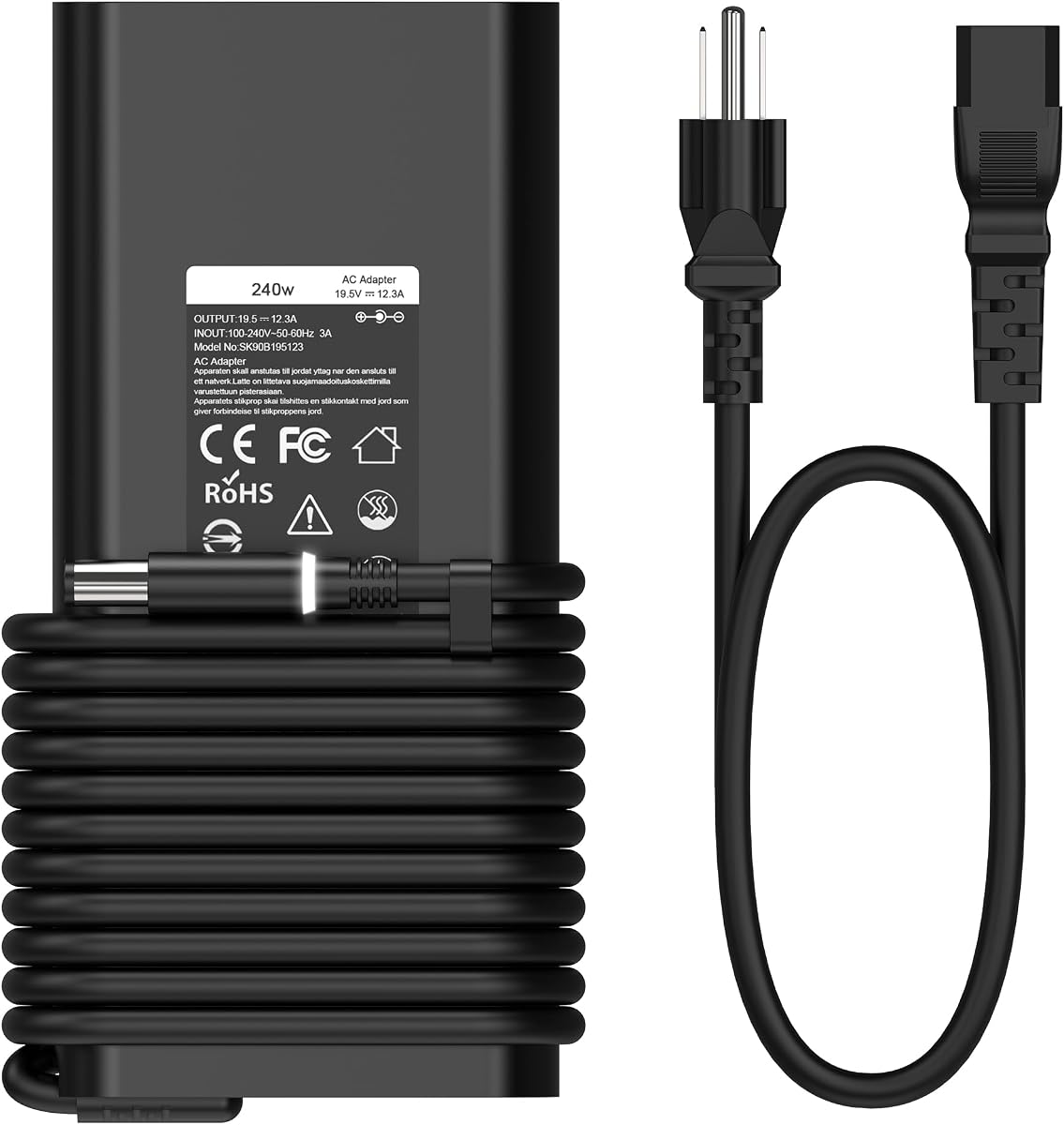
This 240W adapter has a 4.4 rating and combines useful travel input support with an unusually long total cable setup. It outputs 19.5V at 12.3A, accepts 100–240V at 50–60Hz, and provides a seven-point-four by five-point-zero millimeter connector tip.
We may earn a commission when you buy through this link, at no additional cost to you.
Its compatibility description covers Dell Alienware, Precision, and G3, G5, and G7 gaming laptops. The adapter is also identified as a replacement for factory models LA240PM200, HA240PM200, and DA240PM200, which gives buyers useful part numbers to compare with the original unit.
The long cable is the standout practical feature. A six-foot charger cord plus a four-foot power cord provides ten feet of total reach, which can make charging from a wall outlet, desk, or hotel room more flexible. Short-circuit, over-current, over-voltage, and overheating protections are also listed.
This is a strong budget-oriented choice for a compatible Dell G-series or 240W Alienware owner who values cable reach and broad model coverage. The listing does not explicitly claim support for 180W, 150W, or 130W systems, so the full model and wattage requirements should be checked first.
The stated ten-foot combined length gives the adapter considerable placement flexibility. It can reduce the need to sit directly beside an outlet, particularly in workspaces where the nearest outlet may be inconvenient.
A 100–240V, 50–60Hz input is suitable for use across many regions without a separate voltage converter. Users should still follow local electrical and travel requirements, including checking the plug configuration.
We may earn a commission when you buy through this link, at no additional cost to you.
This HSXIRQA adapter has the highest rating among the 240W options in the list at 4.5. It outputs 19.5V at 12.3A and is stated to work with 240W, 180W, 150W, and 130W devices, provided they use the listed round 7.4mm by 5.0mm connector.
We may earn a commission when you buy through this link, at no additional cost to you.
Its extensive compatibility list spans Alienware m15, m17, x15, x16, x17, M18x, M17x, M15x, M14x, M11x, older 13, 14, 15, and 17 systems, X51, Area-51m, and Alpha models. The listing also provides numerous factory model numbers, helping buyers compare more than just the marketing family name.
The described built-in chip automatically adjusts power according to device temperature and battery status. Over-current, short-circuit, and overheating safeguards are listed, and the housing uses heat-resistant, flame-retardant, and fire-resistant materials. A power adapter and power cord are included.
This is the most flexible general-purpose 240W replacement in the group, especially for buyers who need support across several Alienware generations. The enormous compatibility list should be treated as a reference rather than a substitute for checking the exact laptop model and its original charger requirements.
The compatibility list extends from older 13, 15, and 17 systems through m, x, X51, Area-51m, and Alpha families. It also covers multiple R-series revisions, which is particularly useful for owners of older or secondary gaming laptops.
The manufacturer describes an internal chip that adjusts power according to temperature and battery status. Combined with the listed thermal and circuit protections, it presents a feature set aimed at stable everyday charging.
We may earn a commission when you buy through this link, at no additional cost to you.
This slim 240W charger has a 3.8 rating and is designed for both Alienware gaming laptops and selected Dell G-series and Precision systems. It outputs 19.5V at 12.3A, accepts 100–240V at 50–60Hz, and is stated to support compatible 180W devices.
We may earn a commission when you buy through this link, at no additional cost to you.
Its strongest buying aid is the long list of compatible part numbers, including FWCRC, C3MFM, U896K, 6RTJT, Y044M, Y047M, J211H, J938H, GA240PE1-00, PA-9E, 7XCR6, DA240PM180, and several other Dell-related identifiers. This gives buyers more ways to match the original adapter.
The stated model coverage includes Alienware 13, 15, and 17 R-series systems, m11 through m18x families, X51, G3, G5, and G7 models, and multiple Dell Precision systems. The slim form is intended to take less space than a larger original-style brick.
This is a reasonable choice when matching a known part number is the priority. Its 3.8 rating is the lowest among the ten products, and the listing specifically promises 180W support rather than the broader 150W and 130W compatibility claimed by some 240W alternatives.
The extensive part-number list is the most useful feature for careful buyers. Finding the same identifier on the old adapter can provide a more reliable starting point than comparing a broad series name alone.
The adapter is marketed as a slim alternative for users who want to reduce the bulk of a replacement power brick. Actual dimensions are not provided, so buyers should assess the listing photos and their existing cable arrangement.
We may earn a commission when you buy through this link, at no additional cost to you.
This 240W slim GaN adapter has a 4.0 rating and is built around portability. It weighs 690 grams, accepts 100–240V input, and uses a detachable power cord. The total cable length is stated as 3 meters, or 9.84 feet.
We may earn a commission when you buy through this link, at no additional cost to you.
Compatibility includes Dell G16, G15, G7, and G5 systems; Alienware m15, m17, X51, x15, x16, x17, m18x, m17x, and 13 through 17 systems; selected Precision models; and Performance TB16 and TB15 docks. It also supports laptops equipped with 180W, 150W, or 130W supplies.
The listing describes a smart chip, Load Break System technology, and protection against overcharging, overheating, and short circuits. It also claims fast charging from zero to full in approximately 0.6 to 1.2 hours depending on power capacity, a manufacturer estimate rather than a universal result.
This adapter is well suited to buyers who want a compact travel charger with a detachable cord. Confirm the 7.4mm by 5.0mm connector and 19.5V at 12.3A requirement, particularly for systems listed as compatible through lower-wattage Dell power supplies.
The stated 690-gram weight and slim GaN construction reduce the burden of carrying a full-size gaming-laptop power brick. The detachable cord also simplifies storage and allows the main cable to be replaced independently.
Support for Performance TB16 and TB15 docks expands the adapter's usefulness beyond a single Alienware laptop. Buyers using one of these docks should still verify the power path and the connector used by the exact device.
We may earn a commission when you buy through this link, at no additional cost to you.
This 330W replacement carries a 4.7 rating and offers the higher output required by many newer Alienware systems. It produces 19.5V at 16.92A, accepts 100–240V at 50–60Hz, and uses a 7.4mm by 5.0mm connector tip.
We may earn a commission when you buy through this link, at no additional cost to you.
Its stated Alienware compatibility includes M18x R1, R2, and R3, specific M18x system numbers, X17 R1 and R2, M17 R3 and R4, X51, and Area-51m R1 and R2. Dell G15 and G16 models are also listed alongside several factory model identifiers.
The replacement is particularly useful for owners seeking a match for Dell 330W adapters. Its compatible part numbers include 0XM3C3, XM3C3, 0Y90RR, Y90RR, F0K0N, 331-2429, 450-17280, ADP-330AB B, 5X3NX, 332-1432, ADP-330AB D, and several DA and LA series references.
This is a compelling option for compatible 330W Alienware and selected Dell systems. It should not be selected for a 360W-only laptop, and users should verify whether the exact system expects the full 16.92A output before making the purchase.
The 16.92A output distinguishes this adapter from the 12.3A chargers in the guide. It is aimed at newer or higher-power configurations that require more current than a conventional 240W replacement can provide.
A long list of Dell part numbers makes it possible to compare the replacement against the identifier printed on the original adapter. This is more precise than relying only on a model family or chassis appearance.
We may earn a commission when you buy through this link, at no additional cost to you.
This slim 330W charger has a 4.3 rating and is intended primarily for Dell Alienware m16, m18, and x16 R1 systems. It outputs 19.5V at 16.92A and is also stated to be compatible with Dell Alienware 240W and 180W chargers.
We may earn a commission when you buy through this link, at no additional cost to you.
The listing includes specific identifiers such as P124F001, P51E001, and P120F001, as well as compatibility with systems associated with RTX 4090 and RTX 4080 configurations. It accepts AC 100–240V at 50–60Hz, allowing use across a wide range of power environments.
Its slim design targets users who want more output than a standard 240W brick without moving to a larger 360W form factor. The package includes one 330W AC adapter and one three-prong power cord, while the connector is listed as 7.4mm.
This is a good focused option for owners of the named high-performance Alienware systems. Its compatibility list is narrower than several 240W alternatives, and it specifically mentions 240W and 180W lower-power compatibility rather than the full 150W and 130W range.
The model references focus on m16, m18, and x16 systems, including several factory identifiers. This makes the listing useful for buyers who know the exact system code and need a 330W replacement.
The slim form combines a 330W output with a three-prong power cord. It offers an alternative for users whose laptop needs 16.92A but who do not want to select a 360W adapter.
We may earn a commission when you buy through this link, at no additional cost to you.
This HSXIRQA 240W adapter has a 4.3 rating and offers one of the broadest stated compatibility lists in the guide. It covers Dell G-series laptops, Alienware m, x, X51, Area-51m, Alpha, and traditional 13, 15, and 17 systems, along with many Dell Precision models.
We may earn a commission when you buy through this link, at no additional cost to you.
Its output is 19.5V at 12.3A, and the listing states compatibility with 180W, 150W, and 130W devices. The round connector is 7.4mm by 5.0mm. Input supports 100–240V at 50–60Hz, while the listed safeguards cover overcurrent, short circuits, and overheating.
The product also has a particularly long list of compatible Dell part numbers. These include DA240PM180, LA240PM180, DA180PM111, FA180PM111, ADP-180MB B, LA150PM121, ADP-150RB B, PA-1151-56D, DA130PE1-00, and numerous additional identifiers.
This adapter is a strong general replacement for compatible 240W systems and useful for owners of lower-wattage Dell laptops. Buyers should not treat the broad list as universal: the exact model, wattage, connector, and original part number should all be matched.
The combination of Alienware, Dell G-series, and Precision support is valuable for a household, workshop, or repair setup that includes several compatible Dell laptops. A single adapter can reduce the number of different power bricks kept on hand.
The listed built-in chip adjusts power according to temperature and battery status. Heat-resistant, flame-retardant, and fire-resistant materials are also described, adding further details to the adapter's safety positioning.
We may earn a commission when you buy through this link, at no additional cost to you.
This genuine Dell Alienware GAN charger has a 4.7 rating and stands apart as the premium, highest-output option in the guide. It provides 360W, using 19.5V at 18.46A, and has a barrel connector with a 7.4mm tip.
We may earn a commission when you buy through this link, at no additional cost to you.
The product is described as a new genuine original Dell AC adapter supplied in non-retail packaging and includes a six-foot power cord. That non-retail packaging detail may matter to buyers who expect the presentation associated with an individually boxed original accessory.
Its compatible Dell part numbers are 0Y7YW7, 07TMR6, and 0NN34T, while the factory adapter models include LA360PM230, DA360PM230, and HA360PM230. The stated computer compatibility covers Alienware M18, X16, M16, and X17 R2 systems.
This charger is the natural choice for a compatible high-power Alienware system that specifically requires 360W, especially when owning a genuine Dell adapter is a priority. Confirm the laptop model and required current before ordering, and verify that the original identifier matches one of the listed numbers.
The listing identifies this as a genuine original Dell AC adapter. For buyers prioritizing OEM provenance and exact part matching, that distinction makes it a more specialized option than the broadly compatible third-party replacements.
At 360W and 18.46A, this adapter occupies a different output class from the 240W and 330W alternatives. It should be reserved for systems whose power requirements specifically call for the 360W configuration.
We may earn a commission when you buy through this link, at no additional cost to you.
The right replacement depends on more than appearance. Model support, wattage, current, connector geometry, and the original part number should be checked together before choosing an adapter, while power-cord arrangement and travel needs help determine which well-matched option is most convenient.
Begin with the output printed on the original adapter rather than the maximum wattage associated with a product family. A replacement should provide the voltage and current expected by the laptop, and a higher class of charger should not be used as a substitute for a lower-power laptop without confirming compatibility. The 240W options in this guide generally output 19.5V at 12.3A, while the 330W units output 19.5V at 16.92A and the genuine Dell option provides 360W at 18.46A.
The charging circuitry and the charger rating are not interchangeable details. Match the system's specified power class and follow any manufacturer warning included with the replacement. A higher-output charger does not necessarily improve battery health or charging speed if the laptop itself does not support that level.
Alienware names can refer to several generations with similar styling but different power systems. Check the complete model designation, usually found on the underside of the laptop or in the device information, and then compare it with the adapter listing. Model family names such as m15, m17, x16, x17, Area-51m, and X51 should be checked together with the applicable R-series number.
A model list is useful, but it is not a substitute for a precise match. Pay particular attention to exclusions, such as laptops requiring more than the charger's stated current. When the exact model is absent from the list, contact the seller or choose a charger whose compatibility claim directly names the system.
Most options in this roundup use a round 7.4mm by 5.0mm barrel connector, although the product descriptions phrase the dimensions differently. Measure the center pin and outer barrel of the original charger or inspect the laptop's power port rather than relying on a loose visual comparison. A connector that appears close in diameter can still differ in the center-pin diameter or shape.
For the highest-power models, the 7.4mm tip is especially important because the 360W Dell charger also uses that size but delivers a different current. Connector size confirms physical fit, while voltage, current, and model support determine whether the charger is electrically appropriate.
Part numbers printed on the old adapter can provide the most reliable starting point for a search. Several products in this guide list identifiers including GA240PE1-00, LA240PM180, DA240PM180, DA240PM200, HA240PM200, 7XCR6, J211H, and 0Y7YW7. Compare the complete number, including prefixes and zeroes, because visually similar codes can represent different assemblies.
Part-number matching also helps distinguish 240W, 330W, and 360W adapters that may use a similar physical plug. If the original label is faded, use the laptop's complete model number, wattage requirement, and connector measurements together.
Most adapters accept 100–240V at 50–60Hz, allowing use in many countries without a separate voltage converter. That does not mean every plug, outlet, or travel arrangement is interchangeable, so travelers should check the cord and plug configuration for their destination. The genuine Dell adapter's listed input range is not specified, making the laptop's original requirements especially important for international buyers.
A detachable power cord can simplify packing because the main adapter body and wall-side cord can be separated. The 240W slim GaN option combines that feature with a stated 690-gram adapter weight, while the longer 240W unit with a ten-foot total cable offers flexibility at a desk or outlet.
Look for stated protection against overcurrent, over-voltage, short circuits, overheating, and overcharging where applicable. The DECSZDY, 240W Dell G-series, HSXIRQA, and slim GaN options all describe multiple safeguards, although the exact terminology and technical implementations differ. These claims should be considered alongside the adapter's compatibility, construction, and manufacturer support.
Protection features cannot compensate for an incorrect charger. A well-protected unit connected to a laptop that requires a different voltage, current, connector, or wattage can still be unsuitable. Use every specification as part of the same safety decision rather than selecting solely on the presence of protection language.
The practical replacement experience depends on where the outlet is located and how the laptop is positioned. The Dell G-series 240W adapter has a stated total length of ten feet, the slim GaN option provides 3 meters across its adapter and detachable cord, and the genuine Dell charger includes a six-foot power cord. These layouts serve different workspaces and travel routines.
A longer cable offers reach but can occupy more desk or bag space. A detachable cord is convenient for storage and replacement, while a permanent combined cable is simpler because there are fewer separate pieces to manage. Consider where the charger will be used most often before choosing.
The genuine Dell GAN charger provides exact OEM positioning, a 360W output, and compatibility with several original part numbers. Third-party replacements in the guide offer broader lists of supported models and lower-wattage flexibility, along with extensive safety descriptions. There is no single choice that is best for every situation; the appropriate path depends on the laptop's requirements and whether OEM provenance matters more than flexibility.
Whichever route you take, insist on an exact or near-exact match. Keep the original adapter until the replacement has been confirmed, retain the product listing and compatibility information, and follow the laptop manufacturer's guidance if the charger produces unusual noise, heat, or charging behavior.
Before connecting the adapter, confirm the charger's input and output specifications against the laptop's requirements. Check the complete laptop model, the voltage and current printed on the original charger, and the barrel connector's measurements. The replacement should match all three categories before it is connected to the power outlet.
Connect the charger to the laptop first if that is consistent with the adapter and laptop instructions, then plug the power cord into a properly grounded wall outlet. Avoid extension cords, overloaded power strips, or damaged cables. Keep the connector seated fully, route the cable so it is not pinched, and do not leave the adapter in a confined space where heat cannot dissipate.
During use, monitor the charger and charging behavior. Unplug it if the connector, cord, or housing becomes damaged, if unusual odor or discoloration appears, or if the adapter behaves differently from the original. Unplug the charger when it is not needed, store the cord without creating sharp bends, and keep the replacement in a dry, ventilated location away from combustible materials.
It generally should not be assumed to be suitable. A 240W replacement outputs less power than a 330W adapter and may not meet the current required by a high-power Alienware configuration. Check the voltage, current, wattage, connector, and exact model before substituting one output class for another.
Most of the chargers in this guide specify a round 7.4mm by 5.0mm barrel connector, including the 360W genuine Dell option. The wording differs across listings, so measure the outer barrel and center pin on the original charger rather than relying on the diameter written on the product page.
Look for the complete model designation under the laptop or in its system information, then inspect the output label and part number on the old adapter. Match the voltage, current, wattage, connector, and model compatibility together. A similar chassis shape or a broad family name is not enough on its own.
Some products explicitly support compatible 180W, 150W, or 130W devices, but not every charger in the list makes the same claim. The laptop must be designed to accept that power level, and the connector must still match. Follow the manufacturer's compatibility list rather than assuming a lower wattage is universally interchangeable.
Some 330W and 360W products are stated to support lower-wattage Dell or Alienware systems, while others list compatibility only with specific models. Check the exact adapter's model list and the laptop's power requirements. The correct current and connector are more important than simply choosing the higher-wattage option.
Most list 100–240V, 50–60Hz input, which supports use across many countries without a separate voltage converter. The outlet and cord configuration still need to suit the destination, and the genuine 360W Dell listing does not state an input range. Confirm both the charger label and local plug requirements before traveling.
A genuine adapter is the more specialized choice when exact OEM provenance, a specific part number, or the highest listed output matters. Third-party replacements can offer broader model lists and compatibility with several lower-wattage Dell systems. The best choice still depends on matching the laptop rather than on genuine or third-party status alone.
Disconnect it and verify the model, voltage, current, wattage, connector size, and original part number before trying again. Inspect the outlet, power cord, connector, and laptop port for visible damage. If the specifications match but charging remains abnormal, stop using the adapter and contact the seller or the laptop manufacturer.
The 240W Dell G-series charger is a strong budget-oriented pick for its long combined cable, global input range, and broad safety features. The HSXIRQA 240W adapter earns the Editor's Choice position for its extensive Alienware model coverage and support for several lower-wattage systems, while the genuine 360W Dell GAN charger stands as the premium option for compatible high-power models.
The most important buying priority is an exact match among the laptop model, required output, connector dimensions, and original part number. A 240W adapter with a 12.3A output is not a substitute for a 16.92A or 18.46A system, and a correct connector alone does not establish electrical compatibility. Cable length, detachable-cord design, warranty, and travel input are useful secondary considerations.
Ratings, seller offers, and prices can change over time, so review the current product listing before ordering. Compare the replacement's label with the charger currently in use, review the stated exclusions, and retain the old charger until the new one has been confirmed to work as intended with the laptop.