
Torjim 12 Inch Video Light Kit
4.5Editor score
Two 30W LED panels
Adjustable 3000K-6500K
Tripods and phone holders
Live streaming LED lighting can transform a dim bedroom, crowded office, or plain home studio into a focused and visually polished broadcast space. Good lighting improves facial detail, product visibility, color accuracy, and viewer comfort while reducing distracting shadows. The right setup should also be easy to position, adjust, power, and store.
We compared ten lighting products across important streaming considerations: brightness, color-temperature range, dimming controls, color rendering, beam modifiers, power options, mounting hardware, and portability. The list includes desk lights, two-panel kits, RGB panel lights, and a high-output COB spotlight for creators working at different production levels.
Each review highlights the most useful strengths, practical limitations, and ideal creator for the selected product. The top picks represent a capable budget kit, a flexible panel system, and a premium professional light. Product listings, included accessories, and availability can change, so confirm the current package details before purchasing.
4.5Editor score

4.7Editor score

4.7Editor score
As an Amazon Associate we earn from qualifying purchases.
This side-by-side comparison covers ten options for desktop streamers, mobile creators, video-call users, and small production teams, showing how each kit differs in output, control, accessories, and portability.





The Torjim 12 Inch Video Light Kit is a two-panel creator package designed for streamers, online sellers, remote workers, and home content producers. Its 4.5 rating reflects a generally favorable balance of useful output, straightforward controls, and a generous accessory set. Each 30W panel offers considerably stronger illumination than a typical decorative desk lamp, making the kit relevant to bedrooms, offices, and other dim indoor spaces.
We may earn a commission when you buy through this link, at no additional cost to you.
The package includes two LED studio lights, two tripod stands, two phone holders, a remote, and a carrying bag. That combination allows creators to establish a key-and-fill arrangement without purchasing each component separately. Color temperature is adjustable from 3000K to 6500K, while nine brightness levels cover warm evening streams, neutral tutorial footage, and cooler product demonstrations. An in-line controller changes power, mode, and brightness without requiring the creator to move the light.
The main limitation is that the system focuses on conventional white light rather than saturated RGB output. It also does not offer the wireless app programming, professional DMX integration, or extensive beam modifiers found on higher-tier fixtures. For creators who want dependable face illumination, adjustable white balance, and a complete starter package, those omissions are reasonable because the core streaming functions remain well covered.
This kit is especially suitable for new streamers who want a two-light arrangement without assembling a complex studio. It also works well for mobile demonstrations, vertical videos, video calls, product listings, and makeup content. Choose it when comprehensive accessories, portable storage, and useful brightness controls matter more than cinematic color effects or advanced production integration.
Two lights, two adjustable tripods, phone holders, a remote, and a bag give new creators a usable setup almost immediately. The dual arrangement can illuminate a face and add fill light, reducing the flat look that often occurs with a single overhead room fixture.
The broad 3000K-6500K range makes it possible to move between warm and cool looks. Nine brightness steps provide enough control for changing room conditions, live demonstrations, and different camera positions.
We may earn a commission when you buy through this link, at no additional cost to you.
The NiceVeedi 2-Pack Studio Light is a compact option for streamers who want good color rendering without carrying large fixtures. It has a 4.4 rating and uses two 15W panels containing 356 LED beads each. The stated CRI of 97+ makes the kit especially interesting for makeup, fashion, product demonstrations, and other streams where accurate color representation matters.
We may earn a commission when you buy through this link, at no additional cost to you.
Three color temperatures—2800K, 4800K, and 6500K—cover warm, neutral, and cool lighting conditions. Brightness can be adjusted from 10% to 100% using the included remote. The compact panels measure 10 by 7.8 inches, and the thickened shell functions as a diffuser to produce softer illumination. USB power options include a 5V, 2A wall connection or a suitable power bank, with USB-C adapters included for phone or laptop use.
The stands are made from lightweight aluminum and can be raised to 60 inches. Their three adjustment knobs make height changes straightforward, while the 1/4-inch thread connection and 180-degree side rotation provide practical directional control. A storage bag helps keep the two-panel package organized. One limitation is that the 15W output per panel is lower than the output of several other two-light kits, so the system is better suited to close camera positions than expansive studio coverage.
This setup is a good match for desktop streamers, remote presenters, and learners who want soft, color-accurate light with minimal desk clutter. It is also useful for creators who already understand USB power limitations and want a lighter kit. Choose it for portability, high CRI, and flexible color temperature rather than maximum brightness or large-panel coverage.
The stated CRI 97+ rating supports natural-looking skin and product colors. This makes the panels useful when your audience is judging makeup shades, fabric textures, artwork, or small product details under camera.
USB power gives creators flexibility around laptops, phones, and power banks. The two included USB-C adapters reduce setup friction, although a suitable wall charger is not included.
We may earn a commission when you buy through this link, at no additional cost to you.
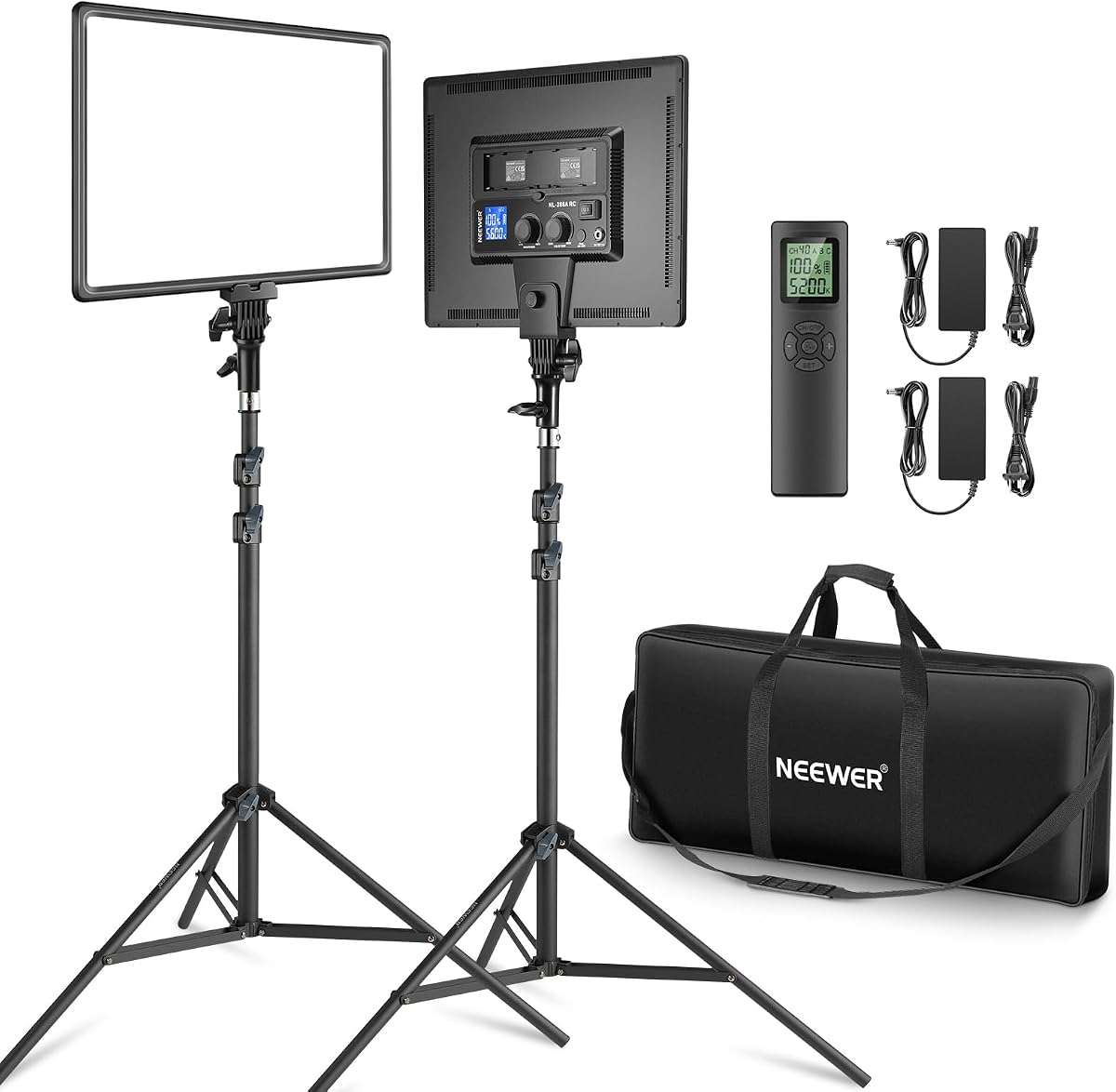
The Neewer 18 Inch Panel Kit is a two-light studio solution with a 4.6 rating. Its pair of 45W bi-color panels are substantially more powerful than the compact panels from the Torjim and NiceVeedi kits, making this package better suited to creators who want a noticeable key-and-fill setup across a desk, bedroom studio, or small production room.
We may earn a commission when you buy through this link, at no additional cost to you.
Each panel uses 288 LEDs and provides soft, continuous, flicker-free light. The stated CRI 97+ supports accurate skin tones and product colors. Brightness is dimmable from 1% to 100%, and color temperature adjusts from 3200K to 5600K. These controls make it practical to use one panel as a key and the other as fill, reducing facial shadows without forcing every light to the same intensity.
The 2.4GHz remote handles power, settings, 40 channels, and four groups, including A, B, C, and combined ABC configurations. That group control is valuable when both lights need identical changes. Indoor users can connect the included AC adapters, while mobile shooters can use compatible Sony NP-F batteries, although those batteries are not included. The tradeoff is a larger and more involved kit than a basic desktop light.
This kit fits gaming streamers, YouTube creators, makeup broadcasters, and photographers who want substantial continuous output and coordinated remote control. It is a strong middle ground between simple creator panels and specialized RGB fixtures. Choose it when two powerful, matched lights and wireless group adjustment are more important than saturated color effects.
Forty channels and four group options let the operator manage both panels efficiently. Matching the two lights also reduces visible differences in color and brightness across a face or product.
Included AC adapters serve stationary studios, while compatible NP-F batteries support location work. Because batteries are not included, mobile creators must account for that additional component and its charging needs.
We may earn a commission when you buy through this link, at no additional cost to you.
The NEEWER 660 PRO II RGB combines a 50W output, full-color control, and smartphone app management in one streaming fixture. Its 4.7 rating makes it one of the strongest options in this guide for creators who want cinematic color and remote setup adjustments. The aluminum alloy panel, updated cooling system, and stated flicker-free, color-stable performance also suit extended live production.
We may earn a commission when you buy through this link, at no additional cost to you.
Brightness spans 1% to 100%, color temperature covers 3200K to 5600K, and the RGB spectrum provides a full 360-degree color range. CRI 97+ and an output of 7000 lux at 0.5 meters support clear, accurate imagery. Nine preset scenes—covering effects such as emergency lighting, fireworks, party, candlelight, lightning, paparazzi, and television—help creators add atmosphere without manually combining settings.
Bluetooth app control extends up to 49 feet and can operate one light or several together across eight channels or all channels. Two favorite presets can be saved for recurring streams. The physical U-shaped bracket tilts 180 degrees, four-way barn doors shape the beam, and a removable diffuser creates a softer result. The kit includes two adjustable stands and a carrying bag, but it includes only one light. NP-F550 or NP-F970 batteries and an AC adapter are the stated power options, with batteries not included.
This is an excellent choice for streamers and short-form creators who want saturated backgrounds, expressive accents, or precise white balance without rebuilding their settings during a show. It may be excessive for a straightforward talking-head channel, but its beam control and app presets make that overhead unnecessary. For flexible, app-driven color work, it is a particularly compelling recommendation.
The app can group compatible lights, select channels, and restore two saved configurations. This reduces setup time and makes repeated streaming scenes easier to reproduce.
Four-way barn doors narrow or redirect the beam, while the removable diffuser softens facial illumination. The tilting bracket makes it easier to place the fixture above, beside, or opposite the camera.
We may earn a commission when you buy through this link, at no additional cost to you.
The UBeesize 2-Pack LED Video Light Kit is designed for streamers and content creators who want a high level of visible output without moving to a professional COB system. Its 4.4 rating reflects a straightforward feature set, and the two 26W panels deliver up to 3000 lumens each with a stated CRI above 97.
We may earn a commission when you buy through this link, at no additional cost to you.
The 12-inch panels contain 420 LED beads and produce soft, flicker-free illumination. Color temperature adjusts from 3000K to 6500K, and nine brightness levels cover common indoor lighting requirements. An in-line controller handles power, mode, and brightness, so changes can be made without moving the fixture. The aluminum tripods extend to 72 inches, fold to 15.5 inches, and support panels that tilt through 180 degrees.
Two phone holders make the package directly relevant to vertical-video creators, live sellers, and mobile streamers. A carrying bag supports movement between a desk, bedroom, office, or product table. The tradeoff is that operation is corded, and the lights do not offer sophisticated wireless grouping, app programming, or RGB scene controls. Each light connects directly to a wall outlet through its attached power cord.
This kit is well suited to creators who want generous brightness, accurate color, a tall stand, and phone support in a complete two-light package. It is particularly useful in low-light rooms where a small webcam light may feel insufficient. Choose it for straightforward, continuous studio lighting rather than advanced cinematic effects or portable battery operation.
Up to 3000 lumens per panel provides a noticeable improvement over basic desk lamps. This output is useful when the camera is several feet away or the room has limited ambient light.
Seventy-two-inch tripods create more placement options than compact desktop stands. The included phone holders support hands-free vertical recording, tutorials, product demonstrations, and gaming streams.
We may earn a commission when you buy through this link, at no additional cost to you.
The Logitech Litra Glow is a purpose-built desktop streaming light for creators who want attractive facial illumination without assembling a large light stand. Its 4.5 rating and monitor-mounted design make it one of the cleanest options for gaming, podcasting, video conferencing, and professional webcam use. The frameless diffuser radiates a broad, soft source that reduces harsh shadows across the subject.
We may earn a commission when you buy through this link, at no additional cost to you.
Logitech TrueSoft technology is designed to deliver balanced, full-spectrum illumination with cinematic color accuracy. Brightness and color temperature can be adjusted, allowing creators to move from warm candlelight to a cool appearance. The patent-pending three-way monitor mount supports changes in height, tilt, and rotation, which helps the user find a flattering angle above, beside, or near a monitor.
G HUB provides desktop control for power, brightness, color temperature, and saved presets. USB power and a lightweight design keep installation simple. The product has also cleared the stated UL testing guidelines for all-day streaming, which is reassuring for creators running long sessions. Its main limitation is that it is a single monitor-mounted fixture, not a dual-light key-and-fill kit, and the mounting system is optimized for desk displays rather than freestanding studio placement.
The Litra Glow is best for desktop streamers and remote professionals who prioritize a tidy setup, soft light, and fast preset access. It is less suitable for creators who need stands, phone mounting, battery operation, or saturated RGB lighting. Choose it when the main goal is polished webcam illumination above a computer display.
Mounting the light to the display reduces the need for separate stands and keeps the light close to the camera axis. This is particularly useful in compact home-office environments.
The wide frameless diffuser produces soft illumination and reduces harsh facial shadows. Adjustable warmth and brightness help the on-camera result match the room and stream format.
We may earn a commission when you buy through this link, at no additional cost to you.
The NEEWER FS600C is the most production-oriented product in this guide. Its 4.7 rating, 600W COB engine, and maximum stated output of 52,500 lux at one meter make it appropriate for dedicated streaming rooms, video studios, interviews, and polished product productions. It is substantially more specialized than the compact panel and desktop-light options included here.
We may earn a commission when you buy through this link, at no additional cost to you.
RGBWW blending provides access to CCT, HSI, FX, GEL, RGBCW, XY, and Light Source modes. The kit also includes 18 built-in scene effects and 17 light-source presets. Its color temperature extends from 2500K to 7500K, and the stated CRI 95+ and TLCI 97+ support accurate rendering. PWM dimming runs from zero to 100% in 0.1% increments, with four dimming curves for more precise changes during exposure-sensitive footage.
Control methods include an onboard panel with an LCD, the NEEWER app, a built-in 2.4GHz system with 00-99 channels, and DMX operation for more complex installations. A Bowens mount supports softboxes, reflectors, snoots, and diffusion domes, and an umbrella holder adds another modification option. A cooling system offers Smart, High, Medium, and Silent modes. The standard power cable uses a locking XLR connection, while the size and professional accessory requirements reduce the convenience of spontaneous setups.
This light is best for streamers and small production teams that have a permanent set and want to integrate lighting into a larger production workflow. It may be excessive for a small webcam channel, but the control precision, output, modifiers, and DMX compatibility justify that role. Choose it when the stream is serious enough to benefit from professional continuous lighting and expansion.
Fine dimming steps, multiple curves, and high color-rendering figures give operators close control over exposure. This helps maintain consistent illumination as camera settings or stream scenes change.
The Bowens mount makes the FS600C compatible with common modifiers rather than limiting it to the bare fixture. DMX, 2.4GHz, app, and onboard controls also support everything from a single stream to a multi-light installation.
We may earn a commission when you buy through this link, at no additional cost to you.
The Zoom Lighting Desk Ring is designed around desktop video calls, remote work, education, and close-range content creation. Its 4.4 rating reflects a useful combination of soft illumination, compact construction, and flexible placement. A seven-inch full-screen head uses edge-lit technology to distribute light evenly while reducing harsh glare and visual clutter.
We may earn a commission when you buy through this link, at no additional cost to you.
The stated high CRI of 97.8 supports vibrant, true-to-life color reproduction. Three color temperatures and ten brightness levels cover 3000K-6500K, allowing the user to move between warm, neutral, and cool looks. The metal base includes a non-slip pad for stability and surface protection. Its height adjusts from 22 to 32.5 inches, making it usable with laptops, monitors, and compact workspaces.
The head rotates through 360 degrees, so it can point forward, sideways, or toward a subject from a slightly elevated position. A universal rotating phone holder supports video chats and mobile recording. Power comes from a 10W USB supply rated at 5V and 2A. The main trade-off is output: 10W is modest compared with the 26W, 30W, 45W, 50W, and 600W options in this roundup, and the product is not designed to light an entire room.
This light is ideal for remote professionals, students, podcasters, and streamers working at a desk with limited space. It works especially well when the subject is close to the camera and the goal is flattering, even facial light. Choose it for compact convenience and natural appearance rather than maximum reach or studio coverage.
The edge-lit, full-screen design spreads illumination across a broad area. That makes it useful for reducing sharp facial shadows without requiring a separate key and fill fixture.
The adjustable height and 360-degree head rotation allow the light to sit beside or above a display. The rotating phone holder also expands the system beyond computer-based calls.
We may earn a commission when you buy through this link, at no additional cost to you.
The Torjim Softbox Photography Lighting Kit is a two-softbox option for creators who want broad, diffused illumination. Its 4.4 rating and package of two 16-inch softboxes, two 85W LED bulbs, two stands, two diffusers, and a remote make it a complete choice for interviews, live broadcasts, product photography, and conventional video recording.
We may earn a commission when you buy through this link, at no additional cost to you.
PET fabric and a foldable nylon cover create a reflective enclosure, while an internal silver-particle baffle helps distribute light evenly. Each 85W energy-saving CFL LED bulb offers a 3000K-7500K daylight color range. The paired softboxes can create a key-and-fill arrangement or serve as matching fill lights around a subject. Softboxes are particularly useful for reducing the hard reflections and pronounced facial shadows associated with bare point-source fixtures.
Each head rotates through 210 degrees, allowing the operator to redirect illumination without moving the entire stand. The aluminum tripods use independent locking knobs for stability and height adjustment, and the included diffusers can further soften the light. The limitation is that the color-temperature range belongs to the replaceable bulbs rather than an electronic control panel, so changes are less convenient than those on modern LED panels.
This kit is a good choice for streamers who want a traditional studio-softbox appearance and broad, flattering light. It is also attractive to photographers, online sellers, and interview producers who can use both units in the same session. Choose it when soft diffusion and a complete paired setup matter more than compact construction, app control, or instant electronic brightness adjustment.
The enclosed softbox spreads light across a larger apparent source. That helps reduce hard shadows and creates a smoother presentation for interviews, demonstrations, and face-based streams.
Two softboxes, bulbs, diffusers, and tall tripods provide a matched key-and-fill foundation. The foldable covers also make the system more practical to store than rigid studio modifiers.
We may earn a commission when you buy through this link, at no additional cost to you.
The Torjim Single Softbox Kit is a straightforward solution for streamers who primarily need one broad, flattering light. It carries a 4.4 rating and includes a 16-by-16-inch softbox, an 85W LED bulb, a 60-inch tripod, a diffuser, and a remote. The result is a focused package that can also support photography, product work, and video recording.
We may earn a commission when you buy through this link, at no additional cost to you.
The reflective PET fabric and foldable nylon shell work with an internal silver-particle baffle to spread light evenly and reduce shadows. The 3000K-7500K LED bulb provides a broad daylight range, although the adjustment method depends on the bulb rather than an integrated control system. Adding the diffuser gives the creator another way to soften the source when a less defined look is needed for a close-up stream.
The head rotates through 210 degrees, providing a broad range of directional positions. Independent locking knobs on the aluminum tripod help maintain a stable setup, and the foldable softbox cover supports easier storage. Compared with the dual-softbox Torjim package, this option includes only one fixture, so creators cannot build a matched key-and-fill setup without adding another light.
This kit is best for creators working with a single camera position who want diffused, soft illumination from a familiar stand-mounted design. It can also serve as a fill light beside a broader panel setup. Choose it for simplicity and a large soft source, while choosing the dual version for balanced two-light coverage.
The 16-inch enclosure gives a close subject a larger and more forgiving light source than a bare panel or exposed bulb. It can reduce hard shadows while keeping the setup relatively compact.
A single stand, head, bulb, diffuser, and remote keep the package easy to understand. The foldable softbox cover also allows the system to be packed away between recording sessions.
We may earn a commission when you buy through this link, at no additional cost to you.
A useful streaming light should brighten the camera-facing subject, reproduce colors accurately, and remain easy to control during production. The right choice depends on your room, camera position, power access, desired color effects, and whether you need one panel or a matched multi-light system.
Choose output that matches your shooting distance and set size. Avoid judging brightness only by the largest headline number.
Prioritize a broad color-temperature range and high CRI for natural-looking footage. Choose RGB only when expressive color is a real part of your format.
Look for smooth dimming and controls you can operate without leaving the camera. Saved presets offer the greatest convenience for repeat broadcasts.
Match the mount to your workspace and ensure the head can point toward the subject. Softening and beam control can matter as much as raw brightness.
Check the complete power system, not just wattage. Include adapters, batteries, cables, and storage needs in your setup decision.
Choose app, wireless, or DMX control when you need coordinated changes across multiple lights. Simple single-camera streams rarely require every feature.
Test the complete room rather than judging the light in isolation. Balance the subject, background, and any reflective surfaces.
Begin by positioning the camera first, then place the light near the camera and slightly above or beside the subject. A key light placed near the camera axis usually creates flattering facial illumination, while a second light on the opposite side can fill shadows. Turn on the fixture at a low brightness before increasing output, and compare the monitor image under the intended camera settings. Keep the light high enough to create natural depth without casting harsh upward shadows.
Match the color temperature to the room and content. Warm light can make a cool room feel inviting, while neutral or daylight settings often produce a balanced appearance for tutorials, demonstrations, and product footage. If the light supports RGB, build scenes before the broadcast and save them as presets. After each stream, lower the brightness, switch off the fixture, disconnect the power, and let the panel cool before packing it into its case.
For stands, tighten every locking knob and check the feet on a level surface. Clean the diffuser and panel with a soft, dry cloth, and avoid liquids that could enter the housing. Keep cables from creating trip hazards, inspect connectors for visible damage, and store softboxes only after they are fully cool and dry. Battery-compatible systems should use compatible batteries and follow the battery manufacturer's charging and storage instructions.
One well-positioned light can produce a clear and professional image, especially for a close webcam setup. Two lights are useful for stronger separation, controlled fill, product work, and a polished studio appearance. A key-and-fill arrangement is generally easier to manage than placing one bright light directly on the camera axis, which can create a flat facial look.
Neutral light around 4000K to 5000K is often a practical starting point because it works well for faces, tutorials, and product demonstrations. Warm light can enhance cozy evening content, while cooler light suits crisp technology or gaming visuals. The most important factor is consistency, because mixed temperatures can make skin and backgrounds look unnatural.
Yes, monitor-mounted and desk LED lights are especially suitable for video calls. The Logitech Litra Glow and Zoom Lighting Desk Ring are designed around compact computer or desk use. Position the light near the camera and adjust brightness until the face is clearly visible without washing out the image.
High CRI is beneficial when viewers need to judge accurate colors, especially in beauty, fashion, art, food, or e-commerce streams. It can also make skin tones look more natural under camera. For basic talking-head content, CRI matters less than stable output, suitable brightness, and good placement.
LED panels are convenient, compact, and easy to dim electronically, making them common choices for video calls and live broadcasts. Softboxes create a broader, softer source that can reduce hard shadows and produce a more traditional studio look. The best choice depends on your available space, desired contrast, and the need for rapid electronic control.
Wireless control can make live adjustments much easier because the operator does not need to walk to each fixture. Remote controls handle simple brightness and color changes, while app and 2.4GHz systems can coordinate multiple lights. DMX offers deeper control for complex productions but requires compatible equipment and a clearer understanding of the setup.
There is no universal distance because panel size, output, diffusion, and camera exposure all affect the result. For a compact webcam light, place it near the monitor and close enough to illuminate the face clearly. For larger panels, begin at a similar distance to a conventional key light and adjust brightness, angle, and camera settings based on the monitor image.
Most products in this guide are suitable for both live video and still photography when used within their stated capabilities. Softboxes and high-output panels can support studio photography, while monitor lights and smaller panels are more convenient for quick portraits, product images, and desk-based content. Check the fixture's power, mounting, and control features to ensure they match the production.
The Torjim 12 Inch Video Light Kit offers the strongest value for new streamers because it includes two useful 30W panels, adjustable tripods, phone holders, a remote, and a storage bag. The NEEWER 660 PRO II RGB is the most versatile all-around choice for creators who value saturated color, app presets, and physical beam shaping. The NEEWER FS600C stands apart as the premium option for permanent studios and professional production workflows.
Prioritize the features that affect your actual broadcast. Desktop streamers may need a monitor mount and USB power, mobile creators may prioritize phone holders and battery support, and studio operators should focus on output, app or DMX control, and modifier compatibility. Whichever system you choose, proper placement and consistent settings will influence the final image more than a small difference in specifications.
Before buying, confirm the current package contents, power requirements, dimensions, and compatibility with your camera and workspace. Product bundles and availability can change, so review the current listing carefully. With the correct fixture and a deliberate lighting plan, your live stream can look clearer, more consistent, and more engaging from the first frame.